-
仿网易云移动端项目Vue3.2+Pinia+Vant+axios
仿网易云移动端项目Vue3.2+Pinia+Vant+axios
目录
仿网易云移动端项目Vue3.2+Pinia+Vant+axios
前期准备(Pinia,rem,初始化样式,图标引入,vant组件,axios)
1.在官网添加项目后复制symbol代码在index.html引入
3.对播放量处理(定义一个函数对渲染的数据进行处理返回出去)
6.用v-for渲染数组时,数组内还有数组的元素可以再v-for进行渲染
2.回车搜索需要进行去重和数组追加(unshift和Set语法)
vue3.2 + vue-router + pinia + vant+axios
基于vue-cli创建,rem移动适配方案

前期准备(Pinia,rem,初始化样式,图标引入,vant组件,axios)
安装pinia
npm install pinia -S
1.在main.js引入注册
- import { createApp } from 'vue'
- import App from './App.vue'
- import router from './router'
- import { createPinia } from 'pinia'
- const app = createApp(App)
- app.use(router).use(createPinia()).mount('#app')
2.创建store
- import { defineStore } from 'pinia'
- export const useStore = defineStore('main', {
- state: () => ({
- }),
- getters: {
- },
- actions: {
- }
- })
rem移动适配
1.创建rem.js实现移动适配布局
在public存放静态资源新建js文件夹,在js文件夹创建rem.js实现移动适配布局:
- function remSize () {
- /* 获取设备宽度 */
- let deviceWith = document.documentElement.clientWidth || window.innerWidth
- /* 设计稿宽度 */
- if (deviceWith >= 750) {
- deviceWith = 750
- }
- if (deviceWith <= 320) {
- deviceWith = 320
- }
- /* 设置rem,
- 750px--> 1rem=100px
- 375px--> 1rem=50px
- */
- document.documentElement.style.fontSize = (deviceWith / 7.5) + 'px'
- /* 设置字体大小 */
- document.querySelector('body').style.fontSize = 0.3 + 'rem'
- }
- remSize()
- /* 当窗口发生变化 */
- window.onresize = function () {
- remSize()
- }
2.在index.html引入
- <div id="app"></div>
- <!-- 引入rem.js,<%= BASE_URL %>这个为基础路径 -->
- <script src="<%= BASE_URL %>js/rem.js"></script>
3.可以用px to rem 插件进行px和rem转换
需要对插件进行配置,基准font-size这里设置为50
那就是1rem=50px
阿里图标引入(Symbol方法)
1.在官网添加项目后复制symbol代码在index.html引入
- <link rel="icon" href="<%= BASE_URL %>favicon.ico">
- <!-- 引入阿里图标 -->
- <script src="//at.alicdn.com/t/font_3415587_mpuudaajazg.js"></script>
2.使用svg
在官网:https://www.iconfont.cn/manage/index?manage_type=myprojects&projectId=3415587
查看使用帮助,这里用到的是symbol
组件内使用:
- <svg class="icon" aria-hidden="true">
- <use xlink:href="#icon-liebiao2"></use>
- </svg>
注意:类名要加#号
3.初始化样式,设置图标大小(在App.vue)
symbol是设置width和height,而font class是设置fontsize
- * {
- margin: 0;
- padding: 0;
- box-sizing: border-box;
- }
- .icon {
- width: .4rem;
- height: .4rem;
- }
- a{
- color: black;
- }
使用vant组件库
官网:https://vant-contrib.gitee.io/vant/#/zh-CN
1.安装vant3组件
npm i vant
2.引入vant(按需引入,安装插件)
参照官网步骤
npm i babel-plugin-import -D
在.babelrc 或 babel.config.js 中添加配置
3.测试按钮(在main.js进行注册)
- import { Button } from 'vant';
- app.use(Button);
4.对引入vant组件库进行集中管理(封装)
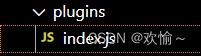
在src目录创建plugins文件夹,在plugins文件夹创建index.js:
- import { Swipe, SwipeItem, NavBar, Button, Search, Popup } from 'vant'
- /* 放入数组中 */
- const plugins = [
- Swipe, NavBar, SwipeItem, Button, Popup, Search
- ]
- /* 循环将每一个插件注册到app上,main.js直接调用这个方法即可 */
- export default function getVant (app) {
- plugins.forEach((item) => {
- return app.use(item)
- })
- }
在main.js引入调用方法即可
- import { createApp } from 'vue'
- import App from './App.vue'
- import router from './router'
- import { createPinia } from 'pinia'
- /* 引入插件 */
- import getVant from './plugins'
- const app = createApp(App)
- getVant(app)
- app.use(router).use(createPinia()).mount('#app')
安装axios
npm i axios -S
1.对axios进行封装

创建utils文件夹,在其文件夹下创建request.js用于封装请求根路径:
- import axios from 'axios'
- const service = axios.create({
- baseURL: 'http://localhost:3000',
- timeout: 3000
- })
- export default service
创建api文件夹,在其文件夹下创建homeApi.js模块对关于首页api接口进行封装:
- import service from '@/utils/request.js'
- /* 获取首页轮播图数据 */
- /* 第一种写法
- export function getBanner () {
- return service({
- method: 'GET',
- url: '/banner?type=2'
- })
- } */
- // 第二种写法
- export function getBanner (type) {
- return service.get('/banner', {
- /* 请求参数 */
- params: {
- type
- }
- })
- }
2.在组件中调用方法请求数据
- <script setup >
- import { toRefs, reactive, onMounted } from 'vue'
- import { getBanner } from '@/api/homeApi.js'
- const state = reactive({
- images: [
- 'https://c99=1533&h=575&f=webp&q=90',
- 'https://cdn.cnbj1.fds.api.mi-img.c=90'
- ]
- })
- onMounted(async () => {
- /* axios.get('http://localhost:3000/banner?type=2').then((res) => {
- console.log(res)
- state.images = res.data.banners
- console.log(state.images)
- }) */
- const res = await getBanner(2)
- state.images = res.data.banners
- })
- const { images } = toRefs(state)
- </script>
组件开发(知识点)
路由
1.独享路由守卫
判断进入个人中心页面是否有登录或者是否有token,如果没有就跳转到登录页面
- {
- path: '/infoUser',
- name: 'InfoUser',
- // 独享路由守卫
- beforeEnter: (to, from, next) => {
- // pinia要在这里定义
- const store = FooterMusicStore()
- if (store.isLogin || store.token || localStorage.getItem('token')) {
- next()
- } else {
- next('/login')
- }
- },
- component: () => import('../views/InfoUser.vue')
- }
2.全局前置守卫
如果跳转到登录页面就将隐藏底部播放栏组件
- const router = createRouter({
- history: createWebHashHistory(),
- routes
- })
- // 全局前置守卫
- router.beforeEach((to, from) => {
- const store = FooterMusicStore()
- if (to.path === '/login') {
- store.isFooterMusic = false
- } else {
- store.isFooterMusic = true
- }
- })
- export default router
首页

路由组件:HomeView
组件:
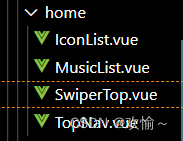
1.在组件全局编程式路由跳转(无需引入)
点击我的就跳转到个人中心页面
$router.push('路径')
- <div class="topContent">
- <span @click="$router.push('/infoUser')">我的</span>
- <span class="active">发现</span>
- <span>云村</span>
- <span>视频</span>
- </div>
2.flex布局
- display: flex;
- //设置盒子距离
- justify-content: space-between;
- //垂直居中
- align-items: center;
- /* 修改主轴对齐方向 */
- flex-direction: column;
3.懒加载的轮播图组件(v-for循环请求回来的图片)
- <script setup >
- import { toRefs, reactive, onMounted } from 'vue'
- import { getBanner } from '@/api/homeApi.js'
- const state = reactive({
- images: [
- ]
- })
- onMounted(async () => {
- const res = await getBanner(2)
- state.images = res.data.banners
- })
- const { images } = toRefs(state)
- </script>
- <template>
- <div id="swiperTop">
- <!-- 懒加载 -->
- <van-swipe :autoplay="3000" lazy-render>
- <van-swipe-item v-for="image in images" :key="image">
- <img :src="image.pic" />
- </van-swipe-item>
- </van-swipe>
- </div>
- </template>
4.用vue2和vue3的写法获取数据
vue2
- export default {
- data () {
- return {
- musicList: []
- }
- },
- methods: {
- // 获取发现歌单
- async getGnedan () {
- const res = await getMusicList()
- console.log(res)
- this.musicList = res.data.result
- },
- // 对播放量进行处理
- changeCount: function (num) {
- if (num >= 100000000) {
- // toFixed(1)显示一位小数
- return (num / 100000000).toFixed(1) + '亿'
- } else if (num >= 10000) {
- return (num / 10000).toFixed(1) + '万'
- }
- }
- },
- mounted () {
- this.getGnedan()
- }
- }
vue3
- import { getMusicList } from '@/api/homeApi'
- import { reactive, onMounted, toRefs } from 'vue'
- export default {
- setup () {
- const state = reactive({
- musicList: []
- })
- onMounted(async () => {
- const res = await getMusicList()
- // console.log(res)
- state.musicList = res.data.result
- })
- // 对播放量进行处理
- const changeCount = function (num) {
- if (num >= 100000000) {
- // toFixed(1)显示一位小数
- return (num / 100000000).toFixed(1) + '亿'
- } else if (num >= 10000) {
- return (num / 10000).toFixed(1) + '万'
- }
- }
- return {
- ...toRefs(state),
- changeCount
- }
- }
- }
5.组件的模板内使用router-link(路由传参)
from组件:
- <van-swipe-item v-for="item in musicList" :key="item.id">
- <router-link :to="{ path: '/itemMusic', query: { id: item.id } }">
- <img :src="item.picUrl">
- </router-link>
- </van-swipe-item>
to跳转的路由组件进行接收:
可以通过useRoute()获取到路由信息
- import { useRoute } from 'vue-router'
- import { onMounted } from 'vue'
- // useRoute可以拿到路由的参数
- onMounted( () => {
- /* 可以调用useRoute方法的query拿到id */
- const id = useRoute().query.id
- console.log(id)
- })
歌单详情页面

路由组件:ItemMusic.vue
组件:
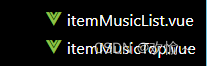
1.通过父传子值props(Vue3.2语法糖和Vue3写法)
父组件:
- <script setup>
- import { useRoute } from 'vue-router'
- import { onMounted, reactive } from 'vue'
- import { getMusicItem, getMusicItemList } from '@/api/itemApi.js'
- /* 引入子组件 */
- import ItemMusicTop from '@/components/item/itemMusicTop.vue'
- import ItemMusicList from '@/components/item/itemMusicList.vue'
- const state = reactive({
- playlist: {}, // 歌单详情页数据
- itemList: []// 歌单的歌曲
- })
- // useRoute可以拿到路由的参数
- onMounted(async () => {
- /* 可以调用useRoute方法的query拿到id */
- const id = useRoute().query.id
- // console.log(id)
- /* 获取歌单详情 */
- const res = await getMusicItem(id)
- // console.log(res)
- state.playlist = res.data.playlist
- /* 获取歌单歌曲 */
- const result = await getMusicItemList(id)
- // console.log(result)
- state.itemList = result.data.songs
- /* 为防止页面刷新,数据丢失,将数据保存到sessionStorage */
- sessionStorage.setItem('itemDetail', JSON.stringify(state))
- })
- </script>
- <template>
- <ItemMusicTop :playlist="state.playlist"></ItemMusicTop>
- <ItemMusicList :itemList="state.itemList" :subscribedCount="state.playlist.subscribedCount"></ItemMusicList>
- </template>
- <style lang='less' scoped>
- </style>
子组件:
vue3.0写法:
- <script>
- import { reactive } from 'vue'
- export default {
- props: ['playlist'],
- setup (props) {
- // 通过props进行传值,判断如果数据拿不到,则从本地读取数据
- let creator = reactive({})
- if ((props.playlist.creator === '')) {
- creator = JSON.parse(sessionStorage.getItem('itemDetail')).playlist.creator
- }
- // 对播放量进行处理
- const changeCount = (num) => {
- if (num >= 100000000) {
- // toFixed(1)显示一位小数
- return (num / 100000000).toFixed(1) + '亿'
- } else if (num >= 10000) {
- return (num / 10000).toFixed(1) + '万'
- }
- }
- return {
- props,
- creator,
- changeCount
- }
- }
- }
- </script>
vue3.2写法:
- <script setup>
- import { defineProps } from 'vue'
- const props = defineProps(['itemList', 'subscribedCount'])
- console.log(props)
- </script>
2.在刷新时读取不到store的数据,则先存储到本地
保存:
- /* 为防止页面刷新,数据丢失,将数据保存到sessionStorage */
- sessionStorage.setItem('itemDetail', JSON.stringify(state))
使用:
creator = JSON.parse(sessionStorage.getItem('itemDetail')).playlist.creator删除:
sessionStorage.removeItem('itemDetail')3.对播放量处理(定义一个函数对渲染的数据进行处理返回出去)
- // 对播放量进行处理
- const changeCount = (num) => {
- if (num >= 100000000) {
- // toFixed(1)显示一位小数
- return (num / 100000000).toFixed(1) + '亿'
- } else if (num >= 10000) {
- return (num / 10000).toFixed(1) + '万'
- }
- }
在模板使用:
{{ changeCount(playlist.playCount) }}4.Css对图片进行虚化,并将其层级放底层(要定位)
- .bgimg {
- width: 100%;
- height: 11rem;
- position: absolute;
- z-index: -1;
- //虚化
- filter: blur(0.6rem);
- }
5.Css文本超出几行就进行省略号表示
- span {
- width: 80%;
- height: .6rem;
- text-overflow: ellipsis;
- overflow: hidden;
- display: -webkit-box; //使用自适应布局
- -webkit-line-clamp: 2; //设置超出行数,要设置超出几行显示省略号就把这里改成几
- -webkit-box-orient: vertical;
- }
6.用v-for渲染数组时,数组内还有数组的元素可以再v-for进行渲染
如渲染歌曲列表每一首歌曲,而每一首歌曲又有多少歌手
- <div class="item" v-for="(item, index) in itemList" :key="item">
- <span class="id">{{ index + 1 }}</span>
- <div class="songmsg" @click="playMusic(index)">
- <p class="song">{{ item.name }}</p>
- <span class="singer" v-for="(item1, i) in item.ar" :key="i">{{ item1.name }}</span>
- </div>
- </div>
底部组件FooterMusic.vue

在App.vue进行引入使用
需要用到Pinia进行全局数据共享,如底部组件是否显示
- <template>
- <router-view />
- <FooterMusic v-show="store.isFooterMusic"></FooterMusic>
- </template>
1.vue2中的this.$ref在Vue3的使用
在模板中:
- <audio ref="audio" :src="`https://music.163.com/song/media/outer/url?id=${store.playlist[store.
- playListIndex].id}.mp3`"></audio>
- import { FooterMusicStore } from '@/store/FooterMusic.js'
- import { ref, onMounted, watch } from 'vue'
- /* vue3中this.$ref的使用变化 */
- const audio = ref(null)
- onMounted(() => {
- console.log(audio)
- })
注意改变audio需要audio.value,因为ref
2.定时器的使用和清除
- // 定时器
- let interVal = ref(0)
- /* vue3中this.$ref的使用变化 */
- const audio = ref(null)
- onUpdated(() => {
- // 渲染的时候也需要同步歌词时间
- updateTime()
- })
- const play = () => {
- /* 判断是否已暂停 */
- if (audio.value.paused) {
- // 触发定时器
- updateTime()
- } else {
- // 清除定时器
- clearInterval(interVal)
- }
- }
- // 设置定时器方法来触发更新歌词时间
- const updateTime = () => {
- interVal = setInterval(() => {
- store.udpateCurrentTime(audio.value.currentTime)
- }, 1000)
- }
3.模板字符串的使用
- // 获取歌曲歌词/lyric?id=33894312
- export function getMusicLyric (data) {
- return service({
- method: 'GET',
- /* 这里用到模板字符串,将data参数传进来 */
- url: `/lyric?id=${data}`
- })
- }
歌词和磁盘播放页面


1.旋转图片动画(活跃和不活跃)
在样式定义好样式和动画
- .ar {
- width: 3.2rem;
- height: 3.2rem;
- border-radius: 50%;
- position: absolute;
- bottom: 3.14rem;
- /* 使用动画匀速,无限循环 */
- animation: rotate_ar 10s linear infinite;
- }
- .ar_active {
- animation-play-state: running;
- }
- .ar_paused {
- animation-play-state: paused;
- }
- /* 定义图片旋转动画 */
- @keyframes rotate_ar {
- 0% {
- transform: rotateZ(0deg);
- }
- 100% {
- transform: rotateZ(360deg);
- }
- }
通过改变类名进行动画的开始暂停:
<img :src="musicList.al.picUrl" class="ar" :class="{ ar_active: !isbtnShow, ar_paused: isbtnShow }">2.歌词
- /* 歌词 */
- .musiclyricList{
- width: 100%;
- height: 8rem;
- display: flex;
- flex-direction: column;
- align-items: center;
- margin-top: .2rem;
- //溢出滚动
- overflow: scroll;
- p{
- color:rgb(195, 239, 244);
- margin-bottom: .4rem;
- }
- //高亮显示的歌词
- .active{
- color: white;
- font-size: .4rem;
- }
- }
改变类名实现高亮:
<p v-for="item in lyric" :key="item" :class="{active:(store.currentTime*1000)>=item.time&&store.currentTime*1000<item.pre}">{{item.lrc}}</p>3.计算属性歌词处理(计算属性在vue3.2的使用)
- 先用数组split方法对歌词的换行进行分割
- 用map方法,遍历数组并对其进行操作返回一个新数组
- 以对象形式返回为新数组
- import { computed, defineProps, onMounted, ref, watch } from 'vue'
- import { Vue3Marquee } from 'vue3-marquee'
- import { FooterMusicStore } from '@/store/FooterMusic.js'
- import 'vue3-marquee/dist/style.css'
- const store = FooterMusicStore()
- const props = defineProps(['musicList', 'isbtnShow', 'play', 'addDuration'])
- const isLyricShow = ref(false)
- // 计算属性歌词处理
- const lyric = computed(() => {
- let arr
- if (store.lyricList.lyric) {
- /* 将歌词进行换行符分割 */
- /* 1.先用数组split方法对歌词的换行进行分割
- 2.用map方法,遍历数组并对其进行操作返回一个新数组
- 3.以对象形式返回为新数组
- */
- arr = store.lyricList.lyric.split(/[(\r\n)\r\n]+/).map((item, i) => {
- // 分钟,切割第一到第三
- const min = item.slice(1, 3)
- // 秒钟切割
- const sec = item.slice(4, 6)
- // 毫秒切割
- let mill = item.slice(7, 10)
- // 歌词切割
- let lrc = item.slice(11, item.length)
- // 每句歌词显示的时间
- let time = parseInt(min) * 60 * 1000 + parseInt(sec) * 1000 + parseInt(mill)
- // 因为两句歌词后面的毫秒为两位数,则要进行处理
- if (isNaN(Number(mill))) {
- mill = item.slice(7, 9)
- lrc = item.slice(10, item.length)
- time = parseInt(min) * 60 * 1000 + parseInt(sec) * 1000 + parseInt(mill)
- }
- // console.log(min, sec, Number(mill), lrc)
- // 返回对象组成数组
- return { min, sec, mill, lrc, time }
- })
- // 遍历拿到pre,即后一句歌词的时间
- arr.forEach((item, i) => {
- if (i === arr.length - 1 || isNaN(arr[i + 1].time)) {
- item.pre = 100000
- } else {
- item.pre = arr[i + 1].time
- }
- })
- }
- return arr
- }
- )
4.使用vue3marquee实现歌名走马灯效果
下载地址:https://www.npmjs.com/package/vue3-marquee
npm install vue3-marquee@latest --save
先引入:
import { Vue3Marquee } from 'vue3-marquee'
import 'vue3-marquee/dist/style.css'- <!-- 走马灯 -->
- <Vue3Marquee>
- {{ musicList.name }}
- </Vue3Marquee>
5.watch在vue3.2的使用
- // 监听歌词时间
- watch(() => store.currentTime, (newValue) => {
- const p = document.querySelector('p.active')
- // console.log([p])
- if (p) {
- if (p.offsetTop > 300) {
- musicLyric.value.scrollTop = p.offsetTop - 300
- }
- }
- // console.log([musicLyric.value])
- if (newValue === store.duration) {
- if (store.playListIndex === store.playlist.length - 1) {
- store.updateplayListIndex(0)
- props.play()
- } else {
- store.updateplayListIndex(store.playListIndex + 1)
- }
- }
- })
搜索页面

1.页面渲染时读取本地历史记录
- onMounted(() => {
- // 页面渲染时读取本地历史记录
- keyWorldList.value = JSON.parse(localStorage.getItem('keyWorldList')) ? JSON.parse(localStorage.getItem('keyWorldList')) : []
- })
2.回车搜索需要进行去重和数组追加(unshift和Set语法)
- // 输入框回车操作进行搜索
- const enterKey = async () => {
- if ((searchKey.value !== '')) {
- // 数组向前追加元素
- keyWorldList.value.unshift(searchKey.value)
- // 去重,这里用到Set语法
- keyWorldList.value = [...new Set(keyWorldList.value)]
- console.log([...new Set(keyWorldList.value)])
- // 固定长度
- if (keyWorldList.value.length > 10) {
- keyWorldList.value.splice(keyWorldList.value.length - 1)
- }
- // 将历史记录保存到本地
- localStorage.setItem('keyWorldList', JSON.stringify(keyWorldList.value))
- const res = await getSearchMusic(searchKey.value)
- console.log(res)
- // 将请求回来的数据进行接收
- searchList.value = res.data.result.songs
- searchKey.value = ''
- }
- }
登录组件

1.登录的接口
- // 登录/login/cellphone?phone=xxx&password=yyy
- export function getPhoneLogin (data) {
- return service({
- method: 'GET',
- url: `/login/cellphone?phone=${data.phone}&password=${data.password}`
- })
- }
2.登录需要的数据共享
- import { getPhoneLogin } from '@/api/homeApi.js'
- import { defineStore } from 'pinia'
- export const FooterMusicStore = defineStore('musicstore', {
- state: () => {
- return {
- isLogin: false, // 登录状态
- isFooterMusic: true, // 判断底部组件是否显示
- token: '', // 接收后台返回的token字段
- user: {}// 用户信息
- }
- },
- getters: {
- },
- actions: {
- // 登录请求
- async getLogin (value) {
- const res = await getPhoneLogin(value)
- console.log('登录返回的数据:', res)
- return res
- },
- // 更新登录状态
- udpateIsLogin (value) {
- this.isLogin = value
- },
- // 更新token字段
- updateToken (value) {
- this.token = value
- localStorage.setItem('token', this.token)
- },
- // 更新用户信息
- updateUser (value) {
- this.user = value
- localStorage.setItem('mydata', JSON.stringify(this.user))
- }
- }
- })
3.登录路由组件
- <!-- 登录路由组件 -->
- <script setup>
- /* 在setup中使用访问路由 */
- import { useRouter } from 'vue-router'
- import { ref } from 'vue'
- import { FooterMusicStore } from '@/store/FooterMusic.js'
- import { getLoginUser } from '@/api/homeApi.js'
- const store = FooterMusicStore()
- const router = useRouter()
- const phone = ref('')
- const password = ref('')
- const Login = async () => {
- const res = await store.getLogin({ phone: phone.value, password: password.value })
- console.log(res)
- if (res.data.code === 200) {
- // 将用户登录状态传过去
- store.udpateIsLogin(true)
- // 将用户id传到发起获取用户详情的接口
- const result = await getLoginUser(res.data.account.id)
- console.log('获取用户详情返回的数据:', result)
- // 将后端返回来的token传去pinia和本地存储
- store.updateToken(res.data.token)
- // 将用户详情数据存储到pinia和本地存储
- store.updateUser(result)
- // 如果返回的code为200,说明登录成功,跳转个人中心页面
- router.push('/infoUser')
- } else {
- alert('手机号码或密码错误!')
- }
- }
- </script>
- <template>
- <div class="loginBox">
- <div class="title">
- 欢迎登录
- </div>
- <div class="form" @keydown.enter="Login">
- <input type="text" placeholder="请输入手机号" v-model="phone">
- <input type="password" placeholder="请输入密码" v-model="password">
- <van-button color="linear-gradient(to right, #ff6034, #ee0a24)" @click="Login">
- 登录
- </van-button>
- </div>
- <van-button color="linear-gradient(to right, #ff6034, #ee0a24)" @click="$router.go(-1)">
- 返回首页
- </van-button>
- </div>
- </template>
源码
 https://gitee.com/zi1726517395/emo_music.git
 -
相关阅读:
数据结构初步(五)- 线性表之单链表的分析与C语言实现
微信小程序——后台交互
安装或卸载Anaconda后Windows自带的cmd命令行窗口会闪退
Git:撤销 commit 提交或撤销对远程仓库的push操作
MySQL基础—从零开始学习MySQL
【python学习】基础篇-常用模块-re模块:正则表达式高效操作字符串
vivo面试-Java
Spring框架在Bean中的管理(第十课)
Node.js内置模块
Elasticsearch搜索引擎该怎么使用,这篇文章彻底讲透(荣耀典藏版)
- 原文地址:https://blog.csdn.net/m0_61612505/article/details/124944861