-
Tailwindcss 提取组件
背景
随着项目的发展,您不可避免地会发现自己需要重复使用常用样式,以便在许多不同的地方重新创建相同的组件。这在小组件(如按钮、表单元素、徽章等)中最为明显。在我的项目中是图表标题样式如下:
<div class="h-8 p-1 flex items-center justify-end bg-white">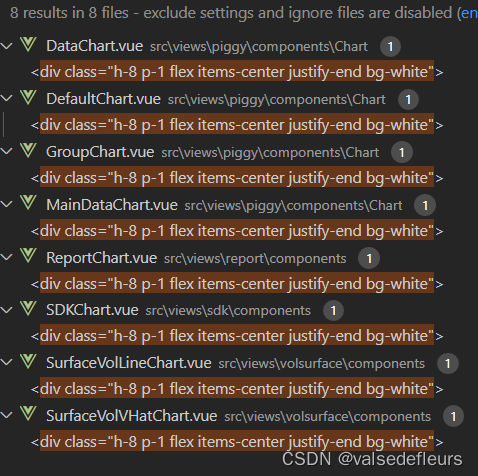
在许多组件实例中保持一长串样式类class,同步很快就会成为真正的维护负担,因此当您开始遇到像这样的痛苦重复时,提取一个组件是一个好主意。可选方案
查阅 Tailwindcss 官方文档
1. 提取模板组件
不推荐做法:不要依赖 CSS 类来提取复杂的组件
因为这样依然无法避免复制同样的HTML结构,如下:
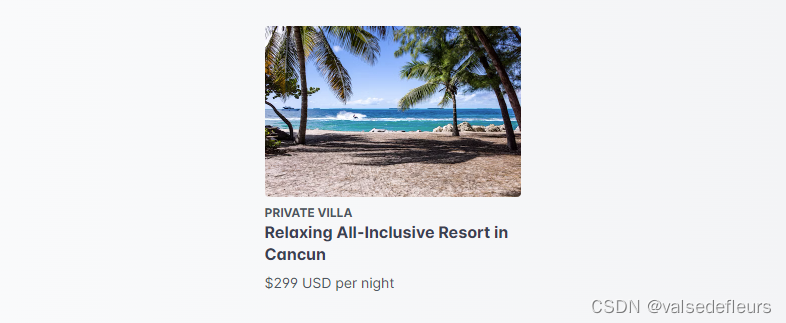
<style>
  .vacation-card { /* ... */ }
  .vacation-card-info { /* ... */ }
  .vacation-card-eyebrow { /* ... */ }
  .vacation-card-title { /* ... */ }
  .vacation-card-price { /* ... */ }
style>


<div class="vacation-card">
  <img class="vacation-card-image" src="..." alt="Beach in Cancun">
  <div class="vacation-card-info">
    <div>
      <div class="vacation-card-eyebrow">Private Villadiv>
      <div class="vacation-card-title">
        <a href="/vacations/cancun">Relaxing All-Inclusive Resort in Cancuna>
      div>
      <div class="vacation-card-price">$299 USD per nightdiv>
    div>
  div>
div>
因此,将可重复使用的 UI 部分提取到模板部分或JavaScript 组件中通常比编写自定义 CSS 类更好。
通过为模板创建单一真实来源,您可以继续使用实用程序类,而无需承担因在多个地方重复相同的类而产生的维护负担。
推荐做法:创建模板部分或 JavaScript 组件
<VacationCard img="/img/cancun.jpg" imgAlt="Beach in Cancun" eyebrow="Private Villa" title="Relaxing All-Inclusive Resort in Cancun" pricing="$299 USD per night" url="/vacations/cancun" /> <template> <div> <img class="rounded" :src="img" :alt="imgAlt"> <div class="mt-2"> <div> <div class="text-xs text-gray-600 uppercase font-bold">{{ eyebrow }}div> <div class="font-bold text-gray-700 leading-snug"> <a :href="url" class="hover:underline">{{ title }}a> div> <div class="mt-2 text-sm text-gray-600">{{ pricing }}div> div> div> div> template> <script> export default { props: ['img', 'imgAlt', 'eyebrow', 'title', 'pricing', 'url'] } script>上面的例子使用了Vue,但同样的方法也可以用于React 组件、ERB partials、Blade 组件、Twig 包含等等。
2. 使用@apply提取组件类
对于按钮和表单元素等小组件,与简单的 CSS 类相比,创建模板部分或 JavaScript 组件通常会感觉太重。
在这些情况下,您可以使用 Tailwind 的
@apply指令轻松地将常见的实用程序模式提取到 CSS 组件类中。下面是
btn-indigo使用@apply现有实用程序组成的类的示例:

<button class="btn-indigo">
  Click me
button>

<style>
  .btn-indigo {
    @apply py-2 px-4 bg-indigo-500 text-white font-semibold rounded-lg shadow-md hover:bg-indigo-700 focus:outline-none focus:ring-2 focus:ring-indigo-400 focus:ring-opacity-75;
  }
style>
为了避免意外的特殊性问题,我们建议使用指令包装自定义组件样式,
@layer components { ... }以告诉 Tailwind这些样式属于哪个层:@tailwind base; @tailwind components; @tailwind utilities; @layer components { .btn-blue { @apply py-2 px-4 bg-blue-500 text-white font-semibold rounded-lg shadow-md hover:bg-blue-700 focus:outline-none focus:ring-2 focus:ring-blue-400 focus:ring-opacity-75; } }Tailwind 会自动将这些样式移动到与 相同的位置
@tailwind components,因此您不必担心在源文件中获取正确的顺序。使用该
@layer指令还将指示 Tailwind 在清除层时考虑清除这些样式components3. 编写组件插件
除了直接在 CSS 文件中编写组件类之外,你还可以通过编写自己的插件将组件类添加到 Tailwind:
// tailwind.config.js
const plugin = require('tailwindcss/plugin')

module.exports = {
  plugins: [
    plugin(function({ addComponents, theme }) {
      const buttons = {
        '.btn': {
          padding: `${theme('spacing.2')} ${theme('spacing.4')}`,
          borderRadius: theme('borderRadius.md'),
          fontWeight: theme('fontWeight.600'),
        },
        '.btn-indigo': {
          backgroundColor: theme('colors.indigo.500'),
          color: theme('colors.white'),
          '&:hover': {
            backgroundColor: theme('colors.indigo.600')
          },
        },
      }

      addComponents(buttons)
    })
  ]
}
如果您想将 Tailwind 组件发布为库或更轻松地在多个项目之间共享组件,这可能是一个不错的选择。
在组件插件文档中了解更多信息最终方案
因为我的使用场景,是针对图表的标题,虽然出现次数多,但将该组件提取出来会显得代码繁重,我最终决定在tailwindcss.css用@apply定义一个类,并在组件中重复使用这个类名
1. Tailwindcss.css文件做以下class配置
@tailwind base;
@tailwind components;
@tailwind utilities;

@layer components {
  .chart-title {
    @apply h-8 p-1 flex items-center justify-end bg-white;
  }
}
2. 组件使用class
<div class="chart-title">div> -
相关阅读:
前端到底有多卷?可以转行吗?
Lumiprobe 双功能交联剂丨Sulfo-Cyanine5 双-NHS 酯
云计算实验4 面向行业背景的大数据分析与处理综合实验
腾讯核心人员纯手写出这份JAVA面试全集总结,简直不要太香了!
香港免费主机空间哪里有
Windows平台 使用jarsigner对Apk签名
PMP通过率暴跌,是否跟新大纲有关?
Mysql系列三:Innodb MVCC版本控制
javascript从0到0.9手写一个windows计算器
x210项目重新回顾之十七升级到linux4.19.114 +buildroot2018再讨论
- 原文地址:https://blog.csdn.net/valsedefleurs/article/details/139824353