-
FFmpeg源码:AV_RB32宏定义分析
一、AV_RB32宏定义的作用
AV_RB32是FFmpeg源码中经常出现的一个宏,其定义如下:
- #ifndef AV_RB32
- # define AV_RB32(p) AV_RB(32, p)
- #endif
该宏定义有多层。把它简化为函数,其函数声明可以等价于:
uint32_t AV_RB32(uint8_t *data);该函数作用是:按照大端模式 读取形参data指向的缓冲区的前四个字节,并返回。
形参data:输入型参数。指向某个缓冲区。
返回值:按照大端模式 读取到的 “形参data指向的缓冲区的前四个字节”。
二、AV_RB32宏定义的内部实现
FFmpeg源码目录下的libavutil/intreadwrite.h 中存在如下宏定义:
- #ifndef AV_RB32
- # define AV_RB32(p) AV_RB(32, p)
- #endif
- #ifndef AV_RN32
- # define AV_RN32(p) AV_RN(32, p)
- #endif
- # define AV_RB(s, p) av_bswap##s(AV_RN##s(p))
- # define AV_RN(s, p) (((const union unaligned_##s *) (p))->l)
- union unaligned_32 { uint32_t l; } __attribute__((packed)) av_alias;
libavutil/attributes.h 中存在如下宏定义:
- #ifdef __GNUC__
- # define AV_GCC_VERSION_AT_LEAST(x,y) (__GNUC__ > (x) || __GNUC__ == (x) && __GNUC_MINOR__ >= (y))
- # define AV_GCC_VERSION_AT_MOST(x,y) (__GNUC__ < (x) || __GNUC__ == (x) && __GNUC_MINOR__ <= (y))
- #else
- # define AV_GCC_VERSION_AT_LEAST(x,y) 0
- # define AV_GCC_VERSION_AT_MOST(x,y) 0
- #endif
- #define av_alias __attribute__((may_alias))
- #ifndef av_always_inline
- #if AV_GCC_VERSION_AT_LEAST(3,1)
- # define av_always_inline __attribute__((always_inline)) inline
- #elif defined(_MSC_VER)
- # define av_always_inline __forceinline
- #else
- # define av_always_inline inline
- #endif
- #endif
- #if AV_GCC_VERSION_AT_LEAST(2,6) || defined(__clang__)
- # define av_const __attribute__((const))
- #else
- # define av_const
- #endif
所以 # define AV_RB32(p) AV_RB(32, p) 等价于 =>
# define AV_RB32(p) av_bswap32(AV_RN(32, p)) 等价于 =>
# define AV_RB32(p) av_bswap32((((const union unaligned_32 *) (p))->l))
libavutil/bswap.h 中存在如下宏定义:
- #define AV_BSWAP16C(x) (((x) << 8 & 0xff00) | ((x) >> 8 & 0x00ff))
- #define AV_BSWAP32C(x) (AV_BSWAP16C(x) << 16 | AV_BSWAP16C((x) >> 16))
- #ifndef av_bswap32
- static av_always_inline av_const uint32_t av_bswap32(uint32_t x)
- {
- return AV_BSWAP32C(x);
- }
- #endif
所以AV_BSWAP32C(x) 等价于 =>
(AV_BSWAP16C(x) << 16 | AV_BSWAP16C((x) >> 16)) 等价于 =>( (((x) << 8 & 0xff00) | ((x) >> 8 & 0x00ff)) << 16 | ((((x) >> 16) << 8 & 0xff00) | (((x) >> 16) >> 8 & 0x00ff)) )
所以
- static av_always_inline av_const uint32_t av_bswap32(uint32_t x)
- {
- return AV_BSWAP32C(x);
- }
等价于 =>
- static __attribute__((always_inline)) inline __attribute__((const)) uint32_t av_bswap32(uint32_t x)
- {
- return ( (((x) << 8 & 0xff00) | ((x) >> 8 & 0x00ff)) << 16 | ((((x) >> 16) << 8 & 0xff00) | (((x) >> 16) >> 8 & 0x00ff)) );
- }
所以 AV_RB32(p); 等价于 =>
av_bswap32((((const union unaligned_32 *) (p))->l)); 等价于 =>
( ((((((const union unaligned_32 *) (p))->l)) << 8 & 0xff00) | (((((const union unaligned_32 *) (p))->l)) >> 8 & 0x00ff)) << 16 | (((((((const union unaligned_32 *) (p))->l)) >> 16) << 8 & 0xff00) | ((((((const union unaligned_32 *) (p))->l)) >> 16) >> 8 & 0x00ff)) );三、编写测试例子,测试AV_RB32
main.c :
- #include
- #include
- #include
- #ifdef __GNUC__
- # define AV_GCC_VERSION_AT_LEAST(x,y) (__GNUC__ > (x) || __GNUC__ == (x) && __GNUC_MINOR__ >= (y))
- # define AV_GCC_VERSION_AT_MOST(x,y) (__GNUC__ < (x) || __GNUC__ == (x) && __GNUC_MINOR__ <= (y))
- #else
- # define AV_GCC_VERSION_AT_LEAST(x,y) 0
- # define AV_GCC_VERSION_AT_MOST(x,y) 0
- #endif
- #define av_alias __attribute__((may_alias))
- #ifndef av_always_inline
- #if AV_GCC_VERSION_AT_LEAST(3,1)
- # define av_always_inline __attribute__((always_inline)) inline
- #elif defined(_MSC_VER)
- # define av_always_inline __forceinline
- #else
- # define av_always_inline inline
- #endif
- #endif
- #if AV_GCC_VERSION_AT_LEAST(2,6) || defined(__clang__)
- # define av_const __attribute__((const))
- #else
- # define av_const
- #endif
- #define AV_BSWAP16C(x) (((x) << 8 & 0xff00) | ((x) >> 8 & 0x00ff))
- #define AV_BSWAP32C(x) (AV_BSWAP16C(x) << 16 | AV_BSWAP16C((x) >> 16))
- #ifndef av_bswap32
- static av_always_inline av_const uint32_t av_bswap32(uint32_t x)
- {
- return AV_BSWAP32C(x);
- }
- #endif
- union unaligned_32 { uint32_t l; } __attribute__((packed)) av_alias;
- # define AV_RN(s, p) (((const union unaligned_##s *) (p))->l)
- # define AV_RB(s, p) av_bswap##s(AV_RN##s(p))
- #ifndef AV_RB32
- # define AV_RB32(p) AV_RB(32, p)
- #endif
- #ifndef AV_RN32
- # define AV_RN32(p) AV_RN(32, p)
- #endif
- int main()
- {
- uint8_t *data = (uint8_t *)malloc(sizeof(uint8_t) * 8);
- if(data)
- {
- data[0] = 0x12;
- data[1] = 0x34;
- data[2] = 0x56;
- data[3] = 0x78;
- data[4] = 0x9A;
- data[5] = 0xBC;
- data[6] = 0xDE;
- data[7] = 0xF0;
- printf("%lu\n", AV_RB32(data));
- printf("%lu\n", AV_RB32(data + 4));
- free(data);
- data = NULL;
- }
- return 0;
- }
Linux平台下使用gcc编译(我用的是CentOS 7.5,通过10.2.1版本的gcc编译)。输出为:
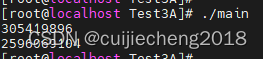
由于AV_RB32是按照大端模式读取。而data[0] = 0x12,data[1] = 0x34,data[2] = 0x56,data[3] = 0x78; 所以AV_RB32(data) 的值为0x12345678,换算成10进制就是305419896。
data[4] = 0x9A;data[5] = 0xBC;data[6] = 0xDE;data[7] = 0xF0;所以AV_RB32(data + 4) 的值为0x9ABCDEF0,换算成10进制就是2596069104。
AV_RB32(data) 将宏展开,实际就是:
( ((((((const union unaligned_32 *) (data))->l)) << 8 & 0xff00) | (((((const union unaligned_32 *) (data))->l)) >> 8 & 0x00ff)) << 16 | (((((((const union unaligned_32 *) (data))->l)) >> 16) << 8 & 0xff00) | ((((((const union unaligned_32 *) (data))->l)) >> 16) >> 8 & 0x00ff)) )四、参考文章
《大小端模式》
-
相关阅读:
SwiftUI之iOS16中的三种SF字体的样式和使用
朋友问我,你都30岁了学编程来得及吗
COMSOL----微阻梁模型的搭建---最终的温度分布和变形情况----几何模型的建立
09【享元设计模式】
与时同行 “云寄 • 时光邮局”|我想开始一个有意思的项目!
Vue 多环境的配置
Windows下安装与配置Docker
10年软件测试工程师经验,很茫然....
Acwing刷题
如何使用远程控制软件并将用途最大化?4款国内外优质应用测评解析
- 原文地址:https://blog.csdn.net/u014552102/article/details/139865143