-
基于WPF技术的换热站智能监控系统16--动态数据绑定
1、实现思路
1)实时读取到的数据绑定到前台UI控件上,这个通过MVVM模式实现,同时注意实时读取必须通过任务task异步方式,这就需要读取PLC数据。
2)UI控件的动作,如开或关水泵,必定能够将值写入PLC,这就需要写入PLC数据,此时当上面1的任务执行时,又获取到了新的实时数据,从而改变UI控件
注意:
默认启动程序后,就主动读取PLC数据,启动成功后,可以关闭某个水泵
2、开搞
1、完善数据块中的变量
每个水泵有3个数据,即状态,温度,压力,所以有9个变量

2、完善监控变量
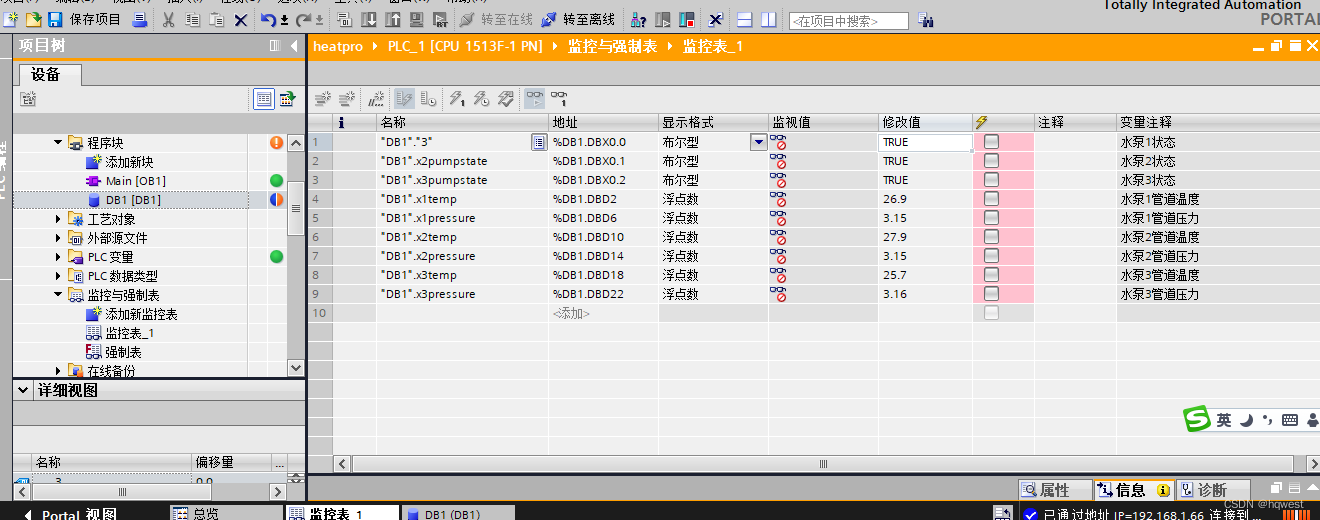
3、完善逻辑代码

- private void ReadmyPLC()
- {
- tasks.Add(Task.Run(async () =>
- {
- plc.Open();
- while (!cts.IsCancellationRequested)
- {
- await Task.Delay(5000);
- //读取float,从左到右参数依次是:数据块类型,数据块号,启始地址,变量类型,读取数量
- var result = plc.Read(S7.Net.DataType.DataBlock, 1, 2, S7.Net.VarType.Real, 6);
- float[] values = (float[])result;
- //水泵1数据
- MainData.MomentDataList1[0].Value = values[0];
- MainData.MomentDataList1[1].Value = values[1];
- //水泵2数据
- MainData.MomentDataList2[0].Value = values[2];
- MainData.MomentDataList2[1].Value = values[3];
- //水泵3数据
- MainData.MomentDataList3[0].Value = values[4];
- MainData.MomentDataList3[1].Value = values[5];
- //读取bool,DB1.DBX0.0是变量的具体地址
- var result2 = plc.Read(pumpaddr1); //水泵1状态
- Pump1State = bool.Parse(result2.ToString());
- if (!Pump1State)
- {
- WaterDirection1 = "NONE";//停止流动
- }
- else
- {
- WaterDirection1 = "EW";//开始流动
- }
- result2 = plc.Read(pumpaddr2);//水泵2状态
- Pump2State = bool.Parse(result2.ToString());
- if (!Pump3State)
- {
- WaterDirection2 = "NONE";
- }
- else
- {
- WaterDirection2 = "EW";
- }
- result2 = plc.Read(pumpaddr3); //水泵3状态
- Pump3State = bool.Parse(result2.ToString());
- if (!Pump3State)
- {
- WaterDirection3 = "NONE";
- WaterDirection32 = "NONE";
- }
- else
- {
- WaterDirection3 = "EW";
- WaterDirection32 = "WE";
- }
- }
- }, cts.Token)
- );
- }
4、完善控件数据绑定
"West.HeatExchange.Views.MainWindow" - xmlns="http://schemas.microsoft.com/winfx/2006/xaml/presentation"
- xmlns:x="http://schemas.microsoft.com/winfx/2006/xaml"
- xmlns:d="http://schemas.microsoft.com/expression/blend/2008"
- xmlns:mc="http://schemas.openxmlformats.org/markup-compatibility/2006"
- xmlns:local="clr-namespace:West.HeatExchange.Views"
- mc:Ignorable="d"
- xmlns:c="clr-namespace:West.HeatExchange.Controls"
- xmlns:lvc="clr-namespace:LiveCharts.Wpf;assembly=LiveCharts.Wpf"
- WindowStyle="None" AllowsTransparency="True" WindowStartupLocation="CenterScreen" ResizeMode="CanResizeWithGrip"
- Background="#F7F9FA" FontFamily="Microsoft YaHei" Foreground="#333"
- Title="MainWindow" Height="650" Width="1200" >
"Top" > "48"/> "Auto"/> "Auto"/> "50"/> "45" Grid.Column="0" Background="#3BBAFF" BorderBrush="#EEE" BorderThickness="1" HorizontalAlignment="Left"> "../Assets/Images/Logo_white.png" Margin="8"/> "4" Grid.Column="1" Background="#5E7593" MouseLeftButtonDown="Border_MouseLeftButtonDown"/> "换热站远程监控系统" VerticalAlignment="Center" Foreground="White" FontSize="19" Margin="10,0" Grid.Column="1"/> "{Binding NowTime, StringFormat={}{0:yyyy年MM月dd日HH时mm分ss秒}}" VerticalAlignment="Center" Foreground="White" FontSize="19" Margin="20,0" Grid.Column="3"/> "../Assets/Images/closewin.png"/> "Left" Width="280" Background="White" CornerRadius="3" Margin="30,10,10,10" > "10" ShadowDepth="0" Color="LightGray" Opacity="0.3"/> "20,10"> "50"/> "1.2*"/> "1.2*"/> "0" Background="#3BBAFF" CornerRadius="3" Margin="0,8"> "Horizontal" VerticalAlignment="Center" HorizontalAlignment="Center"> "换热站综合信息详情" Foreground="White" FontSize="12" VerticalAlignment="Center"/> "1" Background="#FFF0F4F8" Margin="0,5"> "16" VerticalAlignment="Bottom" Background="#FF0E3A52" CornerRadius="8"/> "#3BBAFF" VerticalAlignment="Top" HorizontalAlignment="Left"> "历史曲线" Foreground="White" FontSize="10" Margin="5,1"/> "2" Background="#FFF0F4F8" Margin="0,5"> "1"> "Horizontal" VerticalAlignment="Top"> "#FF3BBAFF"> "能耗排名" Foreground="White" FontSize="10" Margin="5,1"/> "10" VerticalAlignment="Center" Margin="5,0"> "耗水" Foreground="#666"/> "" FontFamily="../Assets/Fonts/#iconfont"/> "10" VerticalAlignment="Center"> "耗电" Foreground="#666"/> "" FontFamily="../Assets/Fonts/#iconfont"/> "10" VerticalAlignment="Center" Margin="5,0"> "耗热" Foreground="#666"/> "" FontFamily="../Assets/Fonts/#iconfont"/> "0,0,10,0"> "20"/> "" FontFamily="../Assets/Fonts/#iconfont" VerticalAlignment="Center" HorizontalAlignment="Center" Foreground="#FF3BBAFF"/> "1" Minimum="0" Maximum="200" Value="182" Background="LightGray" Foreground="Orange" Height="4"/> "0,0,10,0"> "20"/> "" FontFamily="../Assets/Fonts/#iconfont" VerticalAlignment="Center" HorizontalAlignment="Center" Foreground="#FF3BBAFF"/> "1" Minimum="0" Maximum="200" Value="156" Background="LightGray" Foreground="Orange" Height="4"/> "0,0,10,0"> "20"/> "" FontFamily="../Assets/Fonts/#iconfont" VerticalAlignment="Center" HorizontalAlignment="Center" Foreground="#FF3BBAFF"/> "1" Minimum="0" Maximum="200" Value="116" Background="LightGray" Foreground="Orange" Height="4"/> "5" Margin="10,0"> "0,0" EndPoint="1,0"> "#FF3BBAFF" Offset="0"/> "#113BBAFF" Offset="1"/> "3" Background="#FFF0F4F8" Margin="0,5"> "16" VerticalAlignment="Bottom" Background="#FF0E3A52" CornerRadius="8"/> "#FF3BBAFF" VerticalAlignment="Top" HorizontalAlignment="Left" Margin="2"> "故障统计" Foreground="White" FontSize="10" Margin="5,1"/> "4" Background="#FFF0F4F8" Margin="0,5"> "#FF3BBAFF" VerticalAlignment="Top" HorizontalAlignment="Left" Margin="2"> "数据报表" Foreground="White" FontSize="10" Margin="5,1"/> "80" DockPanel.Dock="Top" Background="White" Margin="0,10,20,0" CornerRadius="3"> "10" ShadowDepth="0" Color="LightGray" Opacity="0.3"/> "1"> "Center" HorizontalAlignment="Center"> "手动模式" IsChecked="True" Style="{StaticResource ModeButtonStyle}"/> "自动模式" Style="{StaticResource ModeButtonStyle}"/> "#88F0F4F8" VerticalAlignment="Center" HorizontalAlignment="Center"> "No.1 补水泵" Margin="20,3" HorizontalAlignment="Center"/> "1" Margin="10,0"> "15"/> "0" IsChecked="True" Command="{Binding StartCommand}" CommandParameter="1" Grid.ColumnSpan="2" Style="{StaticResource LeftSwitchButtonStyle}" Name="rb"/> "1" Grid.ColumnSpan="2" Command="{Binding StopCommand}" CommandParameter="1" Style="{StaticResource RightSwitchButtonStyle}"/> "#88F0F4F8" VerticalAlignment="Center" HorizontalAlignment="Center"> "No.2 补水泵" Margin="20,3" HorizontalAlignment="Center"/> "1" Margin="10,0"> "15"/> "True" Grid.ColumnSpan="2" Command="{Binding StartCommand}" CommandParameter="2" Style="{StaticResource LeftSwitchButtonStyle}"/> "1" Grid.ColumnSpan="2" Command="{Binding StopCommand}" CommandParameter="2" Style="{StaticResource RightSwitchButtonStyle}"/> "#88F0F4F8" VerticalAlignment="Center" HorizontalAlignment="Center"> "No.3 补水泵" Margin="20,3" HorizontalAlignment="Center"/> "1" Margin="10,0"> "15"/> "True" Grid.ColumnSpan="2" Command="{Binding StartCommand}" CommandParameter="3" Style="{StaticResource LeftSwitchButtonStyle}"/> "1" Grid.ColumnSpan="2" Command="{Binding StopCommand}" CommandParameter="3" Style="{StaticResource RightSwitchButtonStyle}"/> "#88F0F4F8" VerticalAlignment="Center" HorizontalAlignment="Center"> "循环变频故障" Grid.Row="0" Style="{StaticResource WarningButtonStyle}" IsChecked="True"/> "补水变频故障" Grid.Row="1" Style="{StaticResource WarningButtonStyle}"/> "White" Margin="0,10,20,10" CornerRadius="3" > "10" ShadowDepth="0" Color="LightGray" Opacity="0.3"/> "90" > "90" > "{Binding RelativeSource={RelativeSource Mode=FindAncestor, AncestorType=Canvas}, Path=ActualHeight}" Y="0"> "90" CenterX="{Binding RelativeSource={RelativeSource Mode=FindAncestor, AncestorType=Canvas}, Path=ActualHeight}" CenterY="0"> "../Assets/Images/d1.jpg" Canvas.Left="35" Canvas.Top="29" Height="39" Width="61" HorizontalAlignment="Center" VerticalAlignment="Top"/> "../Assets/Images/d1.jpg" Canvas.Left="755" Canvas.Top="29" Height="39" Width="61" HorizontalAlignment="Center" VerticalAlignment="Top"/> "../Assets/Images/d1.jpg" Canvas.Left="755" Canvas.Top="279" Height="39" Width="61" HorizontalAlignment="Center" VerticalAlignment="Top"/> "../Assets/Images/d1.jpg" Panel.ZIndex="3" Canvas.Left="95" Canvas.Top="429" Height="39" Width="61" HorizontalAlignment="Center" VerticalAlignment="Top"/> "../Assets/Images/heat_exchange.jpg" Panel.ZIndex="2" Canvas.Left="264" Canvas.Top="20" Height="156" Width="80" HorizontalAlignment="Center" VerticalAlignment="Top"/> "../Assets/Images/heat_exchange.jpg" Panel.ZIndex="2" Canvas.Left="264" Canvas.Top="200" Height="156" Width="80" HorizontalAlignment="Center" VerticalAlignment="Top"/> "../Assets/Images/i2.jpg" Canvas.Left="164" Canvas.Top="13" Height="31" Width="25" HorizontalAlignment="Left" VerticalAlignment="Top"/> "../Assets/Images/i2.jpg" Canvas.Left="424" Canvas.Top="13" Height="31" Width="25" HorizontalAlignment="Left" VerticalAlignment="Top"/> "../Assets/Images/i2.jpg" Canvas.Left="524" Canvas.Top="85" Height="31" Width="25" HorizontalAlignment="Left" VerticalAlignment="Top"/> "../Assets/Images/i2.jpg" Canvas.Left="684" Canvas.Top="193" Height="31" Width="25" HorizontalAlignment="Left" VerticalAlignment="Top"/> "../Assets/Images/i2.jpg" Canvas.Left="584" Canvas.Top="265" Height="31" Width="25" HorizontalAlignment="Left" VerticalAlignment="Top"/> "../Assets/Images/f2.jpg" Panel.ZIndex="2" Canvas.Left="64" Canvas.Top="115" Height="33" Width="34" HorizontalAlignment="Left" VerticalAlignment="Top"/> "../Assets/Images/f2.jpg" Panel.ZIndex="2" Canvas.Left="224" Canvas.Top="425" Height="33" Width="34" HorizontalAlignment="Left" VerticalAlignment="Top"/> - -3个水泵-->

5、运行效果
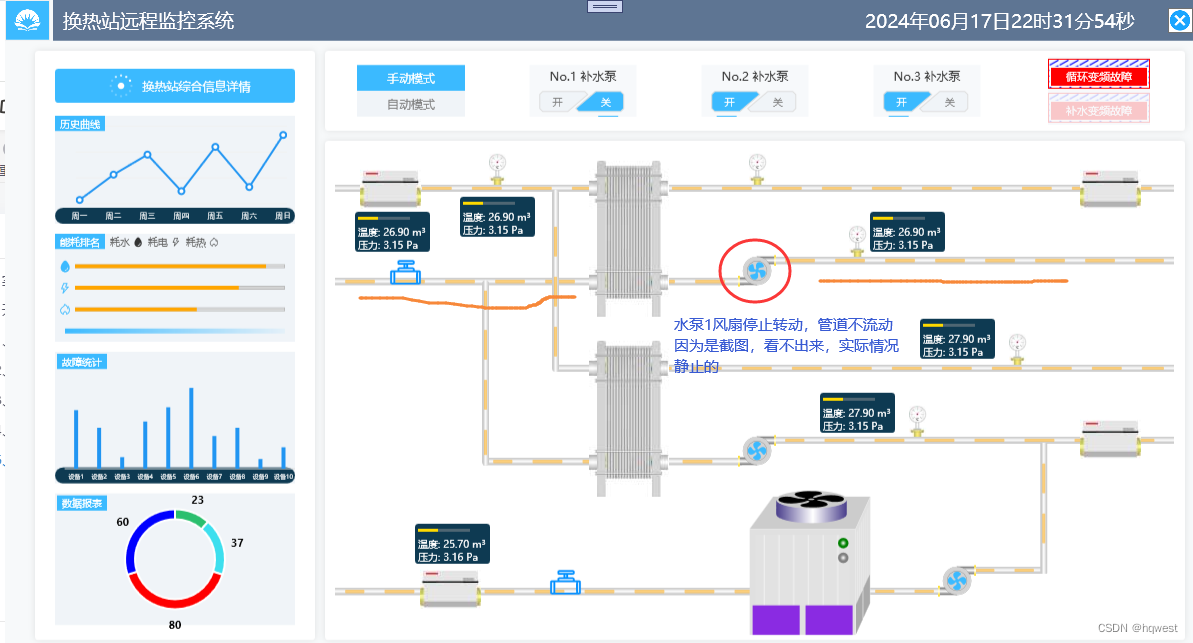
程序启动后,暂时没有数据

5秒后,数据实时显示,温度压力状态数据与监控表中的数据一致的

关闭水泵1,观察管道和风扇情况及监控表数值

开启水泵1,管道流动了,风扇转动了 ,PLC数据改变了
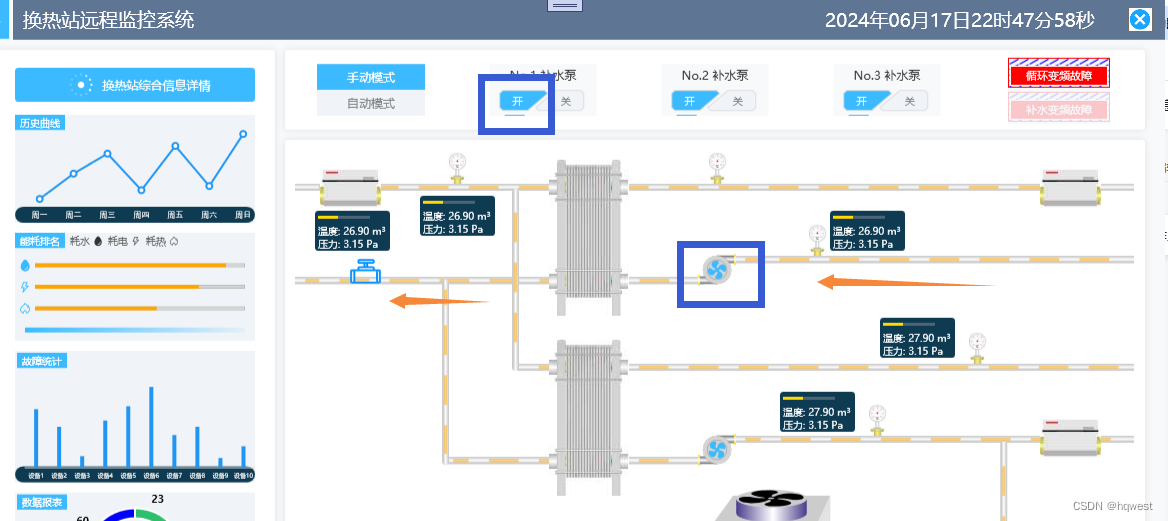
 至此,PLC与系统完美对接,实现了全场监控管理。
走过路过不要错过,点赞关注收藏又圈粉,共同致富,为财务自由作出贡献

-
相关阅读:
通过逻辑回归和随机梯度下降法对乳腺癌数据集breastCancer和鸢尾花数据集iris进行线性分类
无协同资源创新打法,这几个品牌在双11「品牌嘉年华」实现品效双收
后缀自动机(SAM)——黑盒使用方案
7天酒店亮相“2022锦江行”17年国民历史酒店再启新程
02、MongoDB -- MongoDB 的安全配置(创建用户、设置用户权限、启动安全控制、操作数据库命令演示、mongodb 的帮助系统介绍)
UI设计开发原则
Linux系统编程_进程间通信第1天:IPC、无名管道pipe和命名管道mkfifo(半双工)、消息队列msgget(全双工)
算法 - 计数排序(Counting_Sort)
美国上周初请人数23.2万人是两个月最低水平 美联储加息75基点稳了
Nacos注册中心和服务消费方式
- 原文地址:https://blog.csdn.net/hqwest/article/details/139755928