-
Nacos注册中心和服务消费方式
目录
1 在shop-common模块的pom.xml中添加nacos的依赖
2 在主类上添加@EnableDiscoveryClient注解
3 在application.yml中添加nacos服务的地址
4 启动服务, 观察nacos的控制面板中是否有注册上来的商品微服务
1 通过idea再启动一个shop-product 微服务,设置其端口为8081
第3步:启动两个服务提供者和一个服务消费者,多访问几次消费者测试效果
第1步:在RestTemplate 的生成方法上添加@LoadBalanced注解
3 创建一个service, 并使用Fegin实现微服务调用
3 在消费方的Controller层中的FeignClientController 调用服务方
前言:本期文章操作性不多,多在于详细的理论说明 还各位看官耐心看完
一,服务治理介绍
1.1 先来思考一个问题 通过上一期的操作,我们已经可以实现微服务之间的调用。但是我们把服务提供者的网络地址 (ip,端口)等硬编码到了代码中,这种做法存在许多问题:
-
一旦服务提供者地址变化,就需要手工修改代码
-
一旦是多个服务提供者,无法实现负载均衡功能
-
一旦服务变得越来越多,人工维护调用关系困难
那么应该怎么解决呢? 这时候就需要通过注册中心动态的实现服务治理。
什么是服务治理? 服务治理是微服务架构中最核心最基本的模块。用于实现各个微服务的自动化注册与发现。
在上一期中我们是微服务之间直接的相互调用,但是这样实际是不合理的
举例:租房子 就好像你租房子你不会直接的去一些墙上贴的租房帖找房东,因为房东贴上去就不管了可能这已经被租了但是帖子没有撕,这也是说明了一个不准确性,所以我们可以选择更好的方式,中介,通过中介找房子,运用到我们的主题当中也就是不直接的进行调用微服务,而是我们会将所有的微服务进行一个一个注册到一个注册中心去,当我们需要这个微服务的时候我们就去注册中心找,然后再由注册中心帮我们找到我们对应的需要服务,这样就比前者稳妥的多
业务应如下图所示

-
服务注册:在服务治理框架中,都会构建一个注册中心,每个服务单元向注册中心登记自己提供服 务的详细信息。并在注册中心形成一张服务的清单,服务注册中心需要以心跳的方式去监测清单中 的服务是否可用,如果不可用,需要在服务清单中剔除不可用的服务。
-
服务发现:服务调用方向服务注册中心咨询服务,并获取所有服务的实例清单,实现对具体服务实 例的访问。
-
通过上面的调用图会发现,除了微服务,还有一个组件是服务注册中心,它是微服务架构非常重要 的一个组件,在微服务架构里主要起到了协调者的一个作用。注册中心一般包含如下几个功能:
-
服务发现:
-
服务注册:保存服务提供者和服务调用者的信息
-
服务订阅(发现):服务调用者订阅服务提供者的信息,注册中心向订阅者推送提供者的信息
-
-
服务配置:
-
配置订阅:服务提供者和服务调用者订阅微服务相关的配置
-
配置下发:主动将配置推送给服务提供者和服务调用者
-
-
服务健康检测
- 检测服务提供者的健康情况,如果发现异常,执行服务剔除
- 常见的注册中心
- Zookeeper
- zookeeper是一个分布式服务框架,是Apache Hadoop 的一个子项目,它主要是用来解决分布式 应用中经常遇到的一些数据管理问题,如:统一命名服务、状态同步服务、集群管理、分布式应用 配置项的管理等。
-
Eureka
-
Eureka是Springcloud Netflix中的重要组件,主要作用就是做服务注册和发现。但是现在已经闭 源
-
Consul
-
Consul是基于GO语言开发的开源工具,主要面向分布式,服务化的系统提供服务注册、服务发现 和配置管理的功能。Consul的功能都很实用,其中包括:服务注册/发现、健康检查、Key/Value 存储、多数据中心和分布式一致性保证等特性。Consul本身只是一个二进制的可执行文件,所以 安装和部署都非常简单,只需要从官网下载后,在执行对应的启动脚本即可。
-
Nacos
-
Nacos是一个更易于构建云原生应用的动态服务发现、配置管理和服务管理平台。它是 Spring Cloud Alibaba 组件之一,负责服务注册发现和服务配置,可以这样认为nacos=eureka+config。
二,nacos简介
Nacos 致力于帮助您发现、配置和管理微服务。Nacos 提供了一组简单易用的特性集,帮助您快速 实现动态服务发现、服务配置、服务元数据及流量管理。 从上面的介绍就可以看出,nacos的作用就是一个注册中心,用来管理注册上来的各个微服务。
nacos实战入门
接下来,我们就在现有的环境中加入nacos,并将我们的微服务注册上去。
搭建nacos环境
第1步: 安装nacos
下载地址: https://github.com/alibaba/nacos/releases
下载zip格式的安装包,然后进行解压缩操作
第2步: 启动nacos
先修改startup.cmd文件:
set MODE="standalone"改之前:set MODE="cluster"
#切换目录
cd nacos/bin#命令启动
startup.cmd -m standalone
第3步: 访问nacos
打开浏览器输入
http://localhost:8848/nacos
 http://localhost:8848/nacos即可访问服务, 默认密码是nacos/nacos
将商品微服务注册到nacos
接下来开始修改shop-product 模块的代码, 将其注册到nacos服务上
1 在shop-common模块的pom.xml中添加nacos的依赖
com.alibaba.cloud
spring-cloud-starter-alibaba-nacos-discovery
注意在父模块中是否导入了alibaba
org.springframework.cloud
spring-cloud-dependencies
${spring-cloud.version}
pom
import
com.alibaba.cloud
spring-cloud-alibaba-dependencies
${spring-cloud-alibaba.version}
pom
import
2 在主类上添加@EnableDiscoveryClient注解
@SpringBootApplication
@EnableDiscoveryClient
public class ProductApplication3 在application.yml中添加nacos服务的地址
spring:
cloud:
nacos:
discovery:
server-addr: localhost:88484 启动服务, 观察nacos的控制面板中是否有注册上来的商品微服务


二,实现服务调用的负载均衡
什么是负载均衡?
通俗的讲, 负载均衡就是将负载(工作任务,访问请求)进行分摊到多个操作单元(服务器,组件)上 进行执行。 根据负载均衡发生位置的不同,一般分为服务端负载均衡和客户端负载均衡。 服务端负载均衡指的是发生在服务提供者一方,比如常见的nginx负载均衡 而客户端负载均衡指的是发生在服务请求的一方,也就是在发送请求之前已经选好了由哪个实例处理请 求。
服务端负载均衡指的是发生在服务提供者一方,比如常见的nginx负载均衡 而客户端负载均衡指的是发生在服务请求的一方,也就是在发送请求之前已经选好了由哪个实例处理请求。
我们在微服务调用关系中一般会选择客户端负载均衡,也就是在服务调用的一方来决定服务由哪个提供 者执行。
DiscoveryClient实现负载均衡
1 通过idea再启动一个shop-product 微服务,设置其端口为8081


2 通过nacos查看微服务的启动情况

3 修改shop-order 的代码,实现负载均衡

- package com.ljj.shoporder;
- import com.ljj.entity.Order;
- import com.ljj.entity.Product;
- import com.ljj.entity.User;
- import org.springframework.beans.factory.annotation.Autowired;
- import org.springframework.cloud.client.ServiceInstance;
- import org.springframework.cloud.client.discovery.DiscoveryClient;
- import org.springframework.web.bind.annotation.PathVariable;
- import org.springframework.web.bind.annotation.RequestMapping;
- import org.springframework.web.bind.annotation.RestController;
- import org.springframework.web.client.RestTemplate;
- import java.util.List;
- import java.util.Random;
- @RequestMapping("/order")
- @RestController
- public class OrderController {
- @Autowired
- private RestTemplate restTemplate;
- @Autowired
- private DiscoveryClient discoveryClient;
- @RequestMapping("/get/{uid}/{pid}")
- public Order get(@PathVariable("uid") Integer uid,
- @PathVariable("pid") Integer pid){
- // 我们可以通过服务名拿到这个节点的信息
- List
instances = discoveryClient.getInstances("shop-product"); - // 随机产生0或者1的整数
- int index = new Random().nextInt(instances.size());
- // 通过产生的数字拿到实例
- ServiceInstance serviceInstance = instances.get(index);
- // 通过拿到de实例拿到ip和端口
- String url = serviceInstance.getHost() + ":" + serviceInstance.getPort();
- User user = restTemplate.getForObject("http://localhost:8070/user/get/" + uid, User.class);
- Product product = restTemplate.getForObject("http://"+url+"/product/get/" + pid, Product.class);
- Order order = new Order();
- order.setNumber(product.getStock());
- order.setOid(System.currentTimeMillis());
- order.setPid(pid);
- order.setPname(product.getPname());
- order.setPprice(product.getPprice() * order.getNumber());
- order.setUid(user.getUid());
- order.setUsername(user.getUsername());
- return order;
- }
- }
第3步:启动两个服务提供者和一个服务消费者,多访问几次消费者测试效果
先添加一个打印 打印出被调用的端口 然后再启动

开始调用

调用成功,第一次为8081

调用成功,第二次为8080

偶然性较高,多调用几次就会看到效果了
Ribbon实现负载均衡
Ribbon是Spring Cloud的一个组件, 它可以让我们使用一个注解就能轻松的搞定负载均衡
第1步:在RestTemplate 的生成方法上添加@LoadBalanced注解

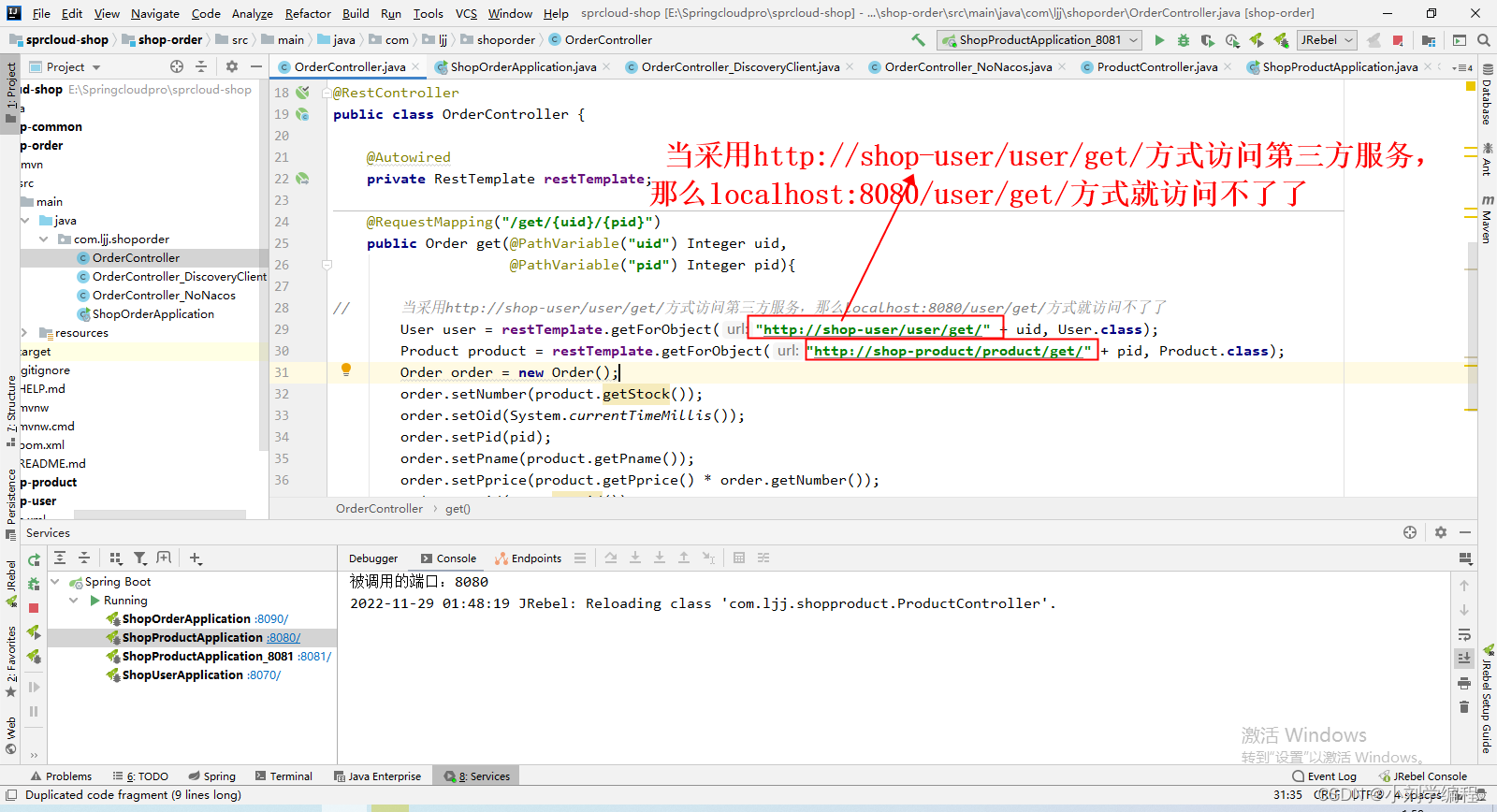
第2步:修改服务调用的方法
- package com.ljj.shoporder;
- import com.ljj.entity.Order;
- import com.ljj.entity.Product;
- import com.ljj.entity.User;
- import org.springframework.beans.factory.annotation.Autowired;
- import org.springframework.cloud.client.ServiceInstance;
- import org.springframework.cloud.client.discovery.DiscoveryClient;
- import org.springframework.web.bind.annotation.PathVariable;
- import org.springframework.web.bind.annotation.RequestMapping;
- import org.springframework.web.bind.annotation.RestController;
- import org.springframework.web.client.RestTemplate;
- import java.util.List;
- import java.util.Random;
- @RequestMapping("/order")
- @RestController
- public class OrderController {
- @Autowired
- private RestTemplate restTemplate;
- @RequestMapping("/get/{uid}/{pid}")
- public Order get(@PathVariable("uid") Integer uid,
- @PathVariable("pid") Integer pid){
- // 当采用http://shop-user/user/get/方式访问第三方服务,那么localhost:8080/user/get/方式就访问不了了
- User user = restTemplate.getForObject("http://shop-user/user/get/" + uid, User.class);
- Product product = restTemplate.getForObject("http://shop-product/product/get/" + pid, Product.class);
- Order order = new Order();
- order.setNumber(product.getStock());
- order.setOid(System.currentTimeMillis());
- order.setPid(pid);
- order.setPname(product.getPname());
- order.setPprice(product.getPprice() * order.getNumber());
- order.setUid(user.getUid());
- order.setUsername(user.getUsername());
- return order;
- }
- }
Ribbon支持的负载均衡策略 Ribbon内置了多种负载均衡策略,内部负载均衡的顶级接口为
com.netflix.loadbalancer.IRule, 具体的负载策略如下图所示: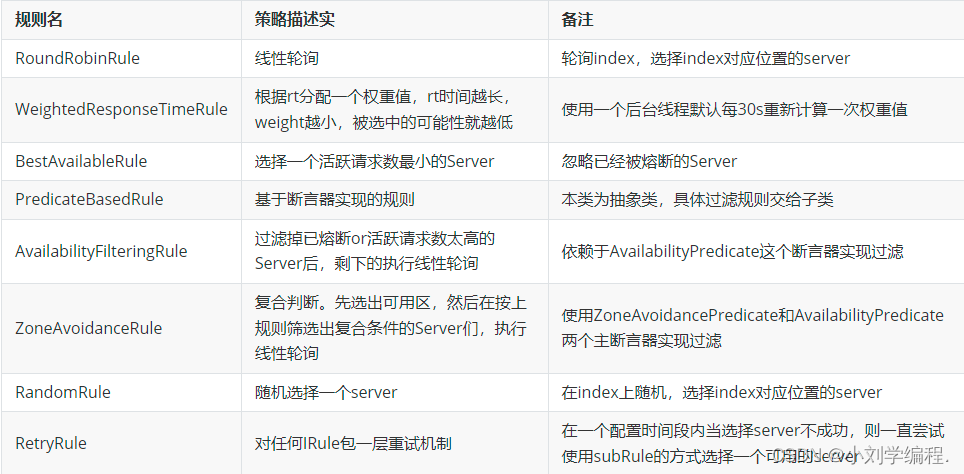
我们可以通过修改配置来调整Ribbon的负载均衡策略,具体代码如下
service-product: # 调用的提供者的名称
ribbon:
NFLoadBalancerRuleClassName: com.netflix.loadbalancer.RandomRule基于Feign实现服务调用
Feign是Spring Cloud提供的一个声明式的伪Http客户端, 它使得调用远程服务就像调用本地服务 一样简单, 只需要创建一个接口并添加一个注解即可。 Nacos很好的兼容了Feign, Feign默认集成了 Ribbon, 所以在Nacos下使用Fegin默认就实现了负 载均衡的效果。
1 加入Fegin的依赖
org.springframework.cloud
spring-cloud-starter-openfeign
2 在主类上添加Fegin的注解
@SpringBootApplication
@EnableDiscoveryClient
@EnableFeignClients//开启Fegin
public class OrderApplication {}3 创建一个service, 并使用Fegin实现微服务调用
- package com.ljj.shoporder.service;
- import com.ljj.entity.Product;
- import org.springframework.cloud.openfeign.FeignClient;
- import org.springframework.web.bind.annotation.GetMapping;
- import org.springframework.web.bind.annotation.PathVariable;
- @FeignClient("shop-product")//声明调用的提供者的name
- public interface ProductService {
- //指定调用提供者的哪个方法
- //@FeignClient+@GetMapping 就是一个完整的请求路径
- //http://serviceproduct/product/{pid}
- @GetMapping(value = "/product/get/{pid}")
- Product get(@PathVariable("pid") Integer pid);
- }
4 修改controller代码,并启动验证
- package com.ljj.shoporder.controller;
- import com.ljj.shoporder.service.ProductService;
- import com.ljj.entity.Order;
- import com.ljj.entity.Product;
- import com.ljj.entity.User;
- import org.springframework.beans.factory.annotation.Autowired;
- import org.springframework.web.bind.annotation.PathVariable;
- import org.springframework.web.bind.annotation.RequestMapping;
- import org.springframework.web.bind.annotation.RestController;
- import org.springframework.web.client.RestTemplate;
- @RequestMapping("/order")
- @RestController
- public class OrderController {
- @Autowired
- private RestTemplate restTemplate;
- @Autowired
- public ProductService productService;
- @RequestMapping("/get/{uid}/{pid}")
- public Order get(@PathVariable("uid") Integer uid,
- @PathVariable("pid") Integer pid){
- String url = "shop-product";
- String url2 ="shop-user";
- User user = restTemplate.getForObject("http://"+url2+"/user/get/" + uid, User.class);
- //通过ProductService调用商品微服务
- Product product = productService.get(pid);
- Order order = new Order();
- order.setNumber(product.getStock());
- order.setOid(System.currentTimeMillis());
- order.setPid(pid);
- order.setPname(product.getPname());
- order.setPprice(product.getPprice() * order.getNumber());
- order.setUid(user.getUid());
- order.setUsername(user.getUsername());
- return order;
- }
- }
5 重启order微服务,查看效果

实现了负载均衡


-
FeignClient接口,不能使用@GettingMapping之类的组合注解
-
FeignClient接口中,如果使用到@PathVariable必须指定其value
-
只要参数是复杂对象,即使指定了是GET方法,feign依然会以POST方法进行发送请求,同时生产者必须支持POST请求并给参数添加@RequestBody注解 建议使用公共vo+@RequestBody方式
-
4.springcloud中feign访问其他服务并传参数出现错误的问题:status 405 reading LogisticsOrderService#getLogistics(Integer,String,Integer,Integer) 当使用feign传参数的时候,需要加上@RequestParam注解,否则对方服务无法识别参数; @GetMapping("/order/getLogistics") public ResponseObj getLogistics( @RequestParam(value = "logisticsType") Integer logisticsType, @RequestParam(value="token") String token, @RequestParam(value = "currentPage", defaultValue = "1") Integer currentPage, @RequestParam(value = "pageSize", defaultValue = "10") Integer pageSize);
Feign参数传递
1 在服务方添加FeignServerController
- package com.ljj.shopproduct.controller;
- import com.ljj.entity.Product;
- import lombok.extern.slf4j.Slf4j;
- import org.springframework.web.bind.annotation.*;
- @Slf4j
- @RestController
- @RequestMapping("/feignServer")
- public class FeignServerController {
- @RequestMapping("/findByParameter")
- public String findByParameter(String name,Double price){
- log.info("服务提供者日志:{}",name);
- return "hello:"+name;
- }
- @RequestMapping("/findByParameter2")
- public String findByParameter2(
- @RequestParam("name") String name,
- @RequestParam("price") Double price){
- log.info("服务提供者日志:{},{}",name,price);
- return "hello:"+name+price;
- }
- @RequestMapping("/findByPathVariable/{name}")
- public String findByPathVariable(@PathVariable String name){
- log.info("服务提供者日志:{}",name);
- return "hello:"+name;
- }
- @RequestMapping("/findByRequestBody")
- public Product findByRequestBody(@RequestBody Product product){
- log.info("服务提供者日志:{}",product.getPname());
- return product;
- }
- }
2 在消费方添加或修改 ProductService 类
整体代码
- package com.ljj.shoporder.service;
- import com.ljj.entity.Product;
- import org.springframework.cloud.openfeign.FeignClient;
- import org.springframework.web.bind.annotation.*;
- @FeignClient("shop-product")//声明调用的提供者的name
- public interface ProductService {
- //指定调用提供者的哪个方法
- //@FeignClient+@GetMapping 就是一个完整的请求路径
- //http://serviceproduct/product/{pid}
- @GetMapping(value = "/product/get/{pid}")
- Product get(@PathVariable("pid") Integer pid);
- @RequestMapping("/feignServer/findByParameter")
- public String findByParameter( @RequestParam("name") String name,
- @RequestParam("price") Double price);
- @RequestMapping("/feignServer/findByParameter2")
- public String findByParameter2(
- @RequestParam("name") String name,
- @RequestParam("price") Double price);
- @RequestMapping("/feignServer/findByPathVariable/{name}")
- public String findByPathVariable(@PathVariable("name") String name);
- @RequestMapping("/feignServer/findByRequestBody")
- public Product findByRequestBody(@RequestBody Product product);
- }
3 在消费方的Controller层中的FeignClientController 调用服务方
- package com.ljj.shoporder.controller;
- import com.ljj.entity.Product;
- import com.ljj.shoporder.service.ProductService;
- import lombok.extern.slf4j.Slf4j;
- import org.springframework.beans.factory.annotation.Autowired;
- import org.springframework.web.bind.annotation.*;
- @Slf4j
- @RestController
- @RequestMapping("/feignClient")
- public class FeignClientController {
- @Autowired
- private ProductService productService;
- @RequestMapping("/findByParameter")
- public String findByParameter( @RequestParam("name") String name, @RequestParam("price") Double price){
- log.info("服务消费者日志:{}",name);
- return productService.findByParameter(name,price);
- }
- @RequestMapping("/findByParameter2")
- public String findByParameter2(
- @RequestParam("name") String name,
- @RequestParam("price") Double price){
- log.info("服务消费者日志:{},{}",name,price);
- return productService.findByParameter2(name,price);
- }
- @RequestMapping("/findByPathVariable/{name}")
- public String findByPathVariable(@PathVariable("name") String name){
- log.info("服务消费者日志:{}",name);
- return productService.findByPathVariable(name);
- }
- @RequestMapping("/findByRequestBody")
- public Product findByRequestBody(@RequestBody Product product){
- log.info("服务消费者日志:{}",product.getPname());
- return productService.findByRequestBody(product);
- }
- }
4 启动服务 查看结果
手动传参 调用方法

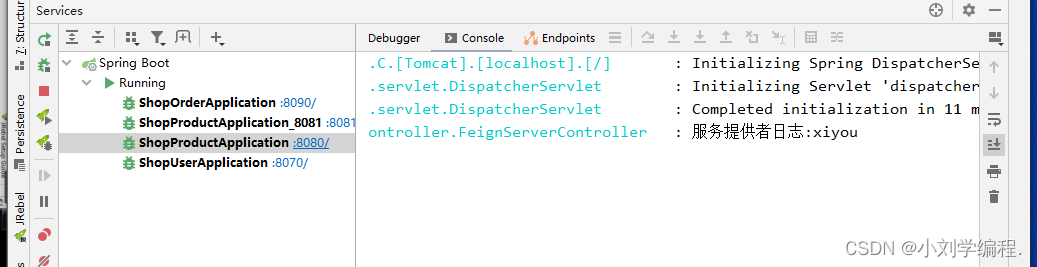
查看控制台

访问的是8080端口
注: 如果调用最后一个方法传递对象的话 需要传递json数据,因为方法中使用了@RequestBady注解

需要用到工具Eolink进行传参 json型的数据 需要的小伙伴可以查看前面的博客
否则用bebug就可以发现浏览器访问并传参它不会进入到该方法

-
-
相关阅读:
数据结构和算法的区分和学习
量子计算:未来技术的变革与应用
小问题--电脑开机一连上网就总是会安装各种软件的问题及解决
【zabbix】docker安装zabbix、yum安装zabbix-agent
【音视频基础】封装格式与编码数据
ubuntu系统vscode中配置C++环境(tasks.json、launch.json)
Go源码--sync库(3):sync.Pool(1)
Excel 技巧大全之 01 如何将公式应用于 Excel 中的整列(5 种简单方法)
第三章 栈和队列
linux性能分析(二)如何从日志分析 PV、UV
- 原文地址:https://blog.csdn.net/weixin_64313980/article/details/128086907