-
PodMan容器技术
容器
容器技术
软件应用通常依赖于运行时环境提供的系统库、配置文件或服务。传统上,软件应用的运行时环境安装 在物理主机或虚拟机上运行的操作系统中。
然后,管理员在操作系统上安装应用依赖项。 在RHEL中,诸如 RPM 等打包系统可协助管理员管理相关依赖项。安装 httpd 软件包时,RPM 系统会确 保同时安装该软件包的正确库和其他依赖项。
以传统方式部署的软件应用的主要弊端时这些依赖项会受到运行时环境的束缚。应用需要的支持软件的 版本可能比操作系统提供的软件更旧或更新。
同样,同一系统上的两个应用可能需要同一软件互不兼容 的不同版本。 解决这些冲突的方式之一是将应用打包并作为容器进行部署。容器是由一个或多个与系统其余部分隔离 的进程组成的集合。软件容器是打包应用以简化其部署和管理的一种方式。
以实体集装箱为例,集装箱是打包和装运货物的标准方式。它作为一个箱子进行标记、装载、卸载,以 及从一个位置运输到另一个位置。集装箱中的内容与其他集装箱的内容隔离,因此互不影响。这些基本 原则也适用于软件容器。 RHEL 通过运用以下核心技术来支持容器:
- 用于资源管理的控制组(cgroup)
- 用于进程隔离的命名空间(namespace)
- 加强安全边界的SELinux 和 Secomp(安全计算模式)
Rootless 和 Rootful 容器
在容器主机上,你可以 root 用户或普通非特权用户身份运行容器。由特权用户运行的容器称为 Rootful 容器。由非特权用户运行的容器称为 Rootless 容器。 Rootless 容器不允许使用通常为特权用户保留的系统资源,例如访问受限目录,或在受限端口(1024以 下的端口)上发布网络服务。此功能可防止潜在攻击者获取容器主机上的 root 权限。
容器管理工具
RHEL 提供了一组容器工具,可用于在单一服务器上运行多个容器。
- podman 管理容器和容器镜像
- skopeo 检查、复制、删除和签署镜像
- buildah 创建容器镜像
这些工具与开放容器项目(OCI)兼容。借助这些工具,你可以管理由兼容 OCI 的容器引擎(如 Podman 或 Docker)创建的任何 Linux 容器。这些工具专门设计用于在单节点容器主机上的 RHEL 下运 行容器。
部署容器
Podman 实用程序 Podman 是来自 container-tools 元数据包的全功能容器引擎,用于管理开放容器计划容器和镜像。 podman 实用程序的运作不使用守护进程,因此开发人员无需系统上的特权用户账户来启动和停止容 器。Podman 提供多个子命令来与容器和镜像交互。以下列表显示了一些使用的子命令。
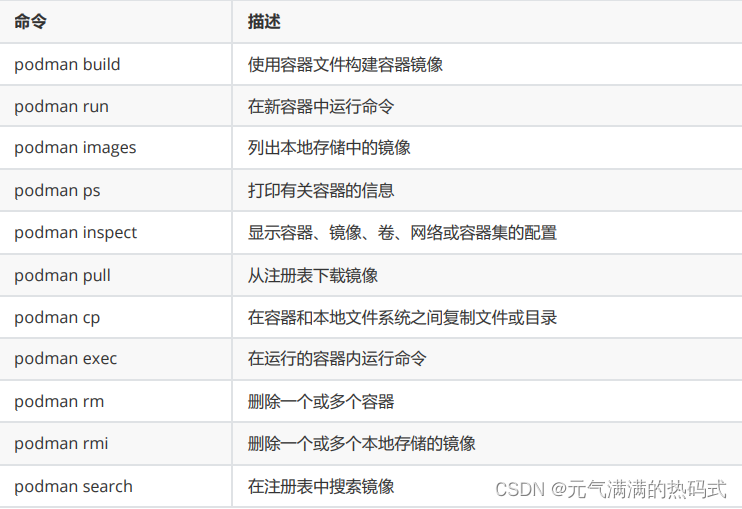
安装容器使用工具
- # dnf install container-tools -y
- # dnf info container-tools
从注册表下载容器镜像文件
- [root@service ~]# podman info
- host:
- arch: amd64
- buildahVersion: 1.33.5
- cgroupControllers:
- - cpuset
- - cpu
- - io
- - memory
- - hugetlb
- - pids
- - rdma
- - misc
- cgroupManager: systemd
- cgroupVersion: v2
- conmon:
- package: conmon-2.1.10-1.el9.x86_64
- path: /usr/bin/conmon
- version: 'conmon version 2.1.10, commit: 5c6ed42ed821d0a028d0006e6f9c8a69ae0806ab'
- cpuUtilization:
- idlePercent: 75.99
- systemPercent: 6.7
- userPercent: 17.3
- cpus: 2
- databaseBackend: sqlite
- distribution:
- distribution: rhel
- version: "9.1"
- eventLogger: journald
- freeLocks: 2048
- hostname: service
- idMappings:
- gidmap: null
- uidmap: null
- kernel: 5.14.0-162.6.1.el9_1.x86_64
- linkmode: dynamic
- logDriver: journald
- memFree: 232144896
- memTotal: 1828413440
- networkBackend: netavark
- networkBackendInfo:
- backend: netavark
- dns:
- package: aardvark-dns-1.9.0-1.el9.x86_64
- path: /usr/libexec/podman/aardvark-dns
- version: aardvark-dns 1.9.0
- package: netavark-1.10.3-1.el9.x86_64
- path: /usr/libexec/podman/netavark
- version: netavark 1.10.3
- ociRuntime:
- name: crun
- package: crun-1.14.3-1.el9.x86_64
- path: /usr/bin/crun
- version: |-
- crun version 1.14.3
- commit: 1961d211ba98f532ea52d2e80f4c20359f241a98
- rundir: /run/user/0/crun
- spec: 1.0.0
- +SYSTEMD +SELINUX +APPARMOR +CAP +SECCOMP +EBPF +CRIU +YAJL
- os: linux
- pasta:
- executable: ""
- package: ""
- version: ""
- remoteSocket:
- exists: false
- path: /run/podman/podman.sock
- security:
- apparmorEnabled: false
- capabilities: CAP_CHOWN,CAP_DAC_OVERRIDE,CAP_FOWNER,CAP_FSETID,CAP_KILL,CAP_NET_BIND_SERVICE,CAP_SETFCAP,CAP_SETGID,CAP_SETPCAP,CAP_SETUID,CAP_SYS_CHROOT
- rootless: false
- seccompEnabled: true
- seccompProfilePath: /usr/share/containers/seccomp.json
- selinuxEnabled: true
- serviceIsRemote: false
- slirp4netns:
- executable: /usr/bin/slirp4netns
- package: slirp4netns-1.2.3-1.el9.x86_64
- version: |-
- slirp4netns version 1.2.3
- commit: c22fde291bb35b354e6ca44d13be181c76a0a432
- libslirp: 4.4.0
- SLIRP_CONFIG_VERSION_MAX: 3
- libseccomp: 2.5.2
- swapFree: 3140481024
- swapTotal: 4001361920
- uptime: 0h 24m 14.00s
- variant: ""
- plugins:
- authorization: null
- log:
- - k8s-file
- - none
- - passthrough
- - journald
- network:
- - bridge
- - macvlan
- - ipvlan
- volume:
- - local
- registries:
- search:
- - registry.access.redhat.com
- - registry.redhat.io
- - docker.io
- store:
- configFile: /etc/containers/storage.conf
- containerStore:
- number: 0
- paused: 0
- running: 0
- stopped: 0
- graphDriverName: overlay
- graphOptions:
- overlay.mountopt: nodev,metacopy=on
- graphRoot: /var/lib/containers/storage
- graphRootAllocated: 17060331520
- graphRootUsed: 8712081408
- graphStatus:
- Backing Filesystem: xfs
- Native Overlay Diff: "false"
- Supports d_type: "true"
- Supports shifting: "false"
- Supports volatile: "true"
- Using metacopy: "true"
- imageCopyTmpDir: /var/tmp
- imageStore:
- number: 0
- runRoot: /run/containers/storage
- transientStore: false
- volumePath: /var/lib/containers/storage/volumes
- version:
- APIVersion: 4.9.3-dev
- Built: 1707216158
- BuiltTime: Tue Feb 6 18:42:38 2024
- GitCommit: ""
- GoVersion: go1.21.3
- Os: linux
- OsArch: linux/amd64
- Version: 4.9.3-dev
搜索镜像
- [root@service ~]# podman search python
- NAME DESCRIPTION
- registry.access.redhat.com/ubi8/python-27 Platform for building and running Python 2.7...
- registry.access.redhat.com/ubi8/python-36 Platform for building and running Python 3.6...
- registry.access.redhat.com/ubi8/python-38 Platform for building and running Python 3.8...
- registry.access.redhat.com/ubi8/python-39 Platform for building and running Python 3.9...
- registry.access.redhat.com/ubi9/python-39 rhcc_registry.access.redhat.com_ubi9/python-...
- registry.access.redhat.com/ubi9/python-311 rhcc_registry.access.redhat.com_ubi9/python-...
- registry.access.redhat.com/openshift3/python-33-rhel7 Python 3.3 platform for building and running...
- registry.access.redhat.com/ubi8/python-311 rhcc_registry.access.redhat.com_ubi8/python-...
- registry.access.redhat.com/rhscl/python-35-rhel7 Python 3.5 platform for building and running...
- registry.access.redhat.com/rhscl/python-27-rhel7 Python 2.7 platform for building and running...
- registry.access.redhat.com/rhscl/python-34-rhel7 Python 3.4 platform for building and running...
- registry.access.redhat.com/rhscl/python-36-rhel7 Python 3.6 available as container is a base...
- registry.access.redhat.com/ubi7/python-27 Python 2.7 platform for building and running...
- registry.access.redhat.com/ubi7/python-36 Platform for building and running Python 3.6...
- registry.access.redhat.com/ubi7/python-38 Python 3.8 platform for building and running...
- registry.access.redhat.com/codeready-workspaces/stacks-python "Red Hat CodeReady Workspaces- Python Stack...
- registry.access.redhat.com/codeready-workspaces-beta/stacks-python Red Hat CodeReady Workspaces- Python Stack c...
- registry.access.redhat.com/rhel7-atomic Red Hat Enterprise Linux Atomic Image is a m...
- registry.access.redhat.com/rhel7/rhel-atomic Red Hat Enterprise Linux Atomic Image is a m...
- registry.access.redhat.com/rhel-atomic Red Hat Enterprise Linux Atomic Image is a m...
- registry.access.redhat.com/rhel7-minimal Red Hat Enterprise Linux Minimal Image is a...
- registry.access.redhat.com/rhel-minimal Red Hat Enterprise Linux Minimal Image is a...
- registry.access.redhat.com/rhel7-rhel-minimal Red Hat Enterprise Linux Minimal Image is a...
- registry.access.redhat.com/rhscl/s2i-base-rhel7 Base image delivers all the essential librar...
- registry.access.redhat.com/ubi8/s2i-base Base image with essential libraries and tool...
- registry.redhat.io/rhel8/python-27 Python 2.7 available as container is a base...
- registry.redhat.io/rhel8/python-36 Python 3.6 available as container is a base...
- registry.redhat.io/ubi8/python-27 Platform for building and running Python 2.7...
- registry.redhat.io/ubi8/python-36 Platform for building and running Python 3.6...
- registry.redhat.io/ubi8/python-38 Platform for building and running Python 3.8...
- registry.redhat.io/rhel8/python-38 Platform for building and running Python 3.8...
- registry.redhat.io/rhel8/python-39 Platform for building and running Python 3.9...
- registry.redhat.io/ubi8/python-39 Platform for building and running Python 3.9...
- registry.redhat.io/rhel9/python-39 rhcc_registry.access.redhat.com_rhel9/python...
- registry.redhat.io/ubi9/python-39 rhcc_registry.access.redhat.com_ubi9/python-...
- registry.redhat.io/rhel8/python-311 rhcc_registry.access.redhat.com_rhel8/python...
- registry.redhat.io/rhel9/python-311 rhcc_registry.access.redhat.com_rhel9/python...
- registry.redhat.io/ubi9/python-311 rhcc_registry.access.redhat.com_ubi9/python-...
- registry.redhat.io/openshift3/python-33-rhel7 Python 3.3 platform for building and running...
- registry.redhat.io/ubi8/python-311 rhcc_registry.access.redhat.com_ubi8/python-...
- registry.redhat.io/ansible-automation-platform-21/ansible-python-base-rhel8 Base python container for ansible-builder
- registry.redhat.io/ansible-automation-platform-23/ansible-python-base-rhel8 rhcc_registry.access.redhat.com_ansible-auto...
- registry.redhat.io/ansible-automation-platform-23/ansible-python-toolkit-rhel8 rhcc_registry.access.redhat.com_ansible-auto...
- registry.redhat.io/ansible-automation-platform-24/ansible-python-base-rhel9 rhcc_registry.access.redhat.com_ansible-auto...
- registry.redhat.io/ansible-automation-platform-24/ansible-python-toolkit-rhel9 rhcc_registry.access.redhat.com_ansible-auto...
- registry.redhat.io/ansible-automation-platform-20-early-access/ansible-python-base-rhel8 Base python container for ansible-builder
- registry.redhat.io/ansible-automation-platform-20-early-access/ansible-python-toolkit-rhel8 Python builder container for ansible-builder
- registry.redhat.io/ansible-automation-platform-21/ansible-python-toolkit-rhel8 Python builder container for ansible-builder
- registry.redhat.io/ansible-automation-platform-22/ansible-python-base-rhel8 rhcc_registry.access.redhat.com_ansible-auto...
- registry.redhat.io/ansible-automation-platform-22/ansible-python-toolkit-rhel8 rhcc_registry.access.redhat.com_ansible-auto...
- docker.io/library/python Python is an interpreted, interactive, objec...
- docker.io/library/hylang Hy is a Lisp dialect that translates express...
- docker.io/library/pypy PyPy is a fast, compliant alternative implem...
- docker.io/bitnami/python Bitnami Python Docker Image
- docker.io/cimg/python
- docker.io/okteto/python
- docker.io/appdynamics/python-agent-init AppDynamics Repository for Python agent inst...
- docker.io/rapidfort/python-chromedriver
- docker.io/intel/python
- docker.io/pachyderm/python-build
- docker.io/pachyderm/python-sdk-ci-testing
- docker.io/airbyte/python-connector-base
- docker.io/clearlinux/python Python programming interpreted language with...
- docker.io/faucet/python3 Python3 docker image for amd64
- docker.io/openwhisk/python3action Apache OpenWhisk runtime for Python 3 Action...
- docker.io/openwhisk/python2action Apache OpenWhisk runtime for Python v2 Actio...
- docker.io/mirantis/python-operations-api https://mirantis.jira.com/browse/IT-40189
- docker.io/opensuse/python openSUSE base image with python
- docker.io/submitty/python Official Repository for Submitty Python Imag...
- docker.io/okteto/python-fastapi
- docker.io/fnndsc/python-poetry Python Poetry
- docker.io/ubuntu/python A chiselled Ubuntu rock with the Python runt...
- docker.io/pipelinecomponents/python-safety Safety by pyup.io for Python in a container...
- docker.io/openwhisk/python3aiaction Apache OpenWhisk runtime for Python 3 Action...
- docker.io/okteto/python-job-launcher
下载镜像
- [root@service ~]# podman pull docker.io/library/python
- Trying to pull docker.io/library/python:latest...
- Getting image source signatures
- Copying blob e1aa7eb23da8 done |
- Copying blob 7bb465c29149 done |
- Copying blob 49b40be4436e done |
- Copying blob 2b9b41aaa3c5 done |
- Copying blob c558fac597f8 done |
- Copying blob 11402150a57e done |
- Copying blob 297428e82567 done |
- Copying blob 28e810024ad5 done |
- Copying config a3aef63c6c done |
- Writing manifest to image destination
- a3aef63c6c1029222ff635a72a0fcaddba1fd7a26abdf2491ace8eb3c654471e
查看镜像
- [root@service ~]# podman images
- REPOSITORY TAG IMAGE ID CREATED SIZE
- docker.io/library/python latest a3aef63c6c10 4 weeks ago 1.04 GB
从容器文件创建容器镜像
- [root@service ~]# vim Containerfile
- FROM registry.access.redhat.com/ubi9/ubi:latest
- RUN dnf install -y python39
- CMD ["/bin/bash","-c","sleep infinity"]
- [root@service ~]# podman build -t python39:1.0 .
- STEP 1/3: FROM registry.access.redhat.com/ubi9/ubi:latest
- Trying to pull registry.access.redhat.com/ubi9/ubi:latest...
- Getting image source signatures
- Checking if image destination supports signatures
- Copying blob 1153e061da4e done |
- Copying config 8d2a8803cf done |
- Writing manifest to image destination
- Storing signatures
- STEP 2/3: RUN dnf install -y python39
- Updating Subscription Management repositories.
- Unable to read consumer identity
- This system is not registered with an entitlement server. You can use subscription-manager to register.
- Red Hat Universal Base Image 9 (RPMs) - BaseOS 118 kB/s | 515 kB 00:04
- Red Hat Universal Base Image 9 (RPMs) - AppStre 683 kB/s | 1.8 MB 00:02
- Red Hat Universal Base Image 9 (RPMs) - CodeRea 67 kB/s | 192 kB 00:02
- Package python3-3.9.18-1.el9_3.1.x86_64 is already installed.
- Dependencies resolved.
- Nothing to do.
- Complete!
- --> bf856a94a83f
- STEP 3/3: CMD ["/bin/bash","-c","sleep infinity"]
- COMMIT python39:1.0
- --> 0274d417a217
- Successfully tagged localhost/python39:1.0
- 0274d417a21704d9e66aec64b1a0f9934ae822e776704044523e12eb1db5063c
查看镜像
- [root@service ~]# podman images
- REPOSITORY TAG IMAGE ID CREATED SIZE
- localhost/python39 1.0 0274d417a217 9 seconds ago 225 MB
- registry.access.redhat.com/ubi9/ubi latest 8d2a8803cfca 8 days ago 219 MB
- docker.io/library/python latest a3aef63c6c10 4 weeks ago 1.04 GB
运行容器
- [root@service ~]# podman create --name python39 localhost/python39:1.0
- 2cf96e0ccbcbcceb66664cb5e93414e8f1f0163b44352c2f3b652ff2e95b9855
- [root@service ~]# podman ps
- CONTAINER ID IMAGE COMMAND CREATED STATUS PORTS NAMES
- [root@service ~]# podman ps -a
- CONTAINER ID IMAGE COMMAND CREATED STATUS PORTS NAMES
- 2cf96e0ccbcb localhost/python39:1.0 /bin/bash -c slee... 9 seconds ago Created python39
- [root@service ~]# podman start python39
- python39
- [root@service ~]# podman ps
- CONTAINER ID IMAGE COMMAND CREATED STATUS PORTS NAMES
- 2cf96e0ccbcb localhost/python39:1.0 /bin/bash -c slee... 46 seconds ago Up 17 seconds python39
删除容器
- [root@service ~]# podman stop python39
- WARN[0010] StopSignal SIGTERM failed to stop container python39 in 10 seconds, resorting to SIGKILL
- python39
- [root@service ~]# podman ps
- CONTAINER ID IMAGE COMMAND CREATED STATUS PORTS NAMES
- [root@service ~]# podman ps -a
- CONTAINER ID IMAGE COMMAND CREATED STATUS PORTS NAMES
- 2cf96e0ccbcb localhost/python39:1.0 /bin/bash -c slee... 2 minutes ago Exited (137) 32 seconds ago python39
- [root@service ~]# podman rm python39
- python39
- [root@service ~]# podman rmi localhost/python39:1.0
- Untagged: localhost/python39:1.0
- Deleted: 0274d417a21704d9e66aec64b1a0f9934ae822e776704044523e12eb1db5063c
- Deleted: bf856a94a83f1f433aa54190152d11556e24bb105876eb8342947358a420b203
-
相关阅读:
SpringCloud-06-Config
牛客java训练题 day1
国庆北京游玩攻略
Go 程序打成 rpm 包
Pisa-Proxy 之 SQL 解析实践
高德地图通过画面中的一个覆盖物设置图中心点和zoom
ai绘画软件哪个好用?这5个工具值得尝试
HarmonyOS 实现底部导航栏
FFmpeg 硬件加速介绍
C++学习随笔(3)——auto和for
- 原文地址:https://blog.csdn.net/m0_66011019/article/details/136589672
