-
Java Stream流指南:优雅处理集合数据
一、为什么要使用stream流呢?
想必我们在日常编程中,会经常进行数据的处理,我们先来看看没有stram流时,我们的操作方式,我们想要收集姓赵的学生姓名。
public class StreamDemo { public static void main(String[] args) { ArrayList<String> list = new ArrayList<>(); Collections.addAll(list,"赵子龙","猪大肠","赵坤","张良","赵雯"); ArrayList<String> list1 = new ArrayList<>(); list.forEach(s -> { if(s.startsWith("赵")) { list1.add(s); } }); list1.forEach(s -> System.out.println(s)); } }- 1
- 2
- 3
- 4
- 5
- 6
- 7
- 8
- 9
- 10
- 11
- 12
- 13
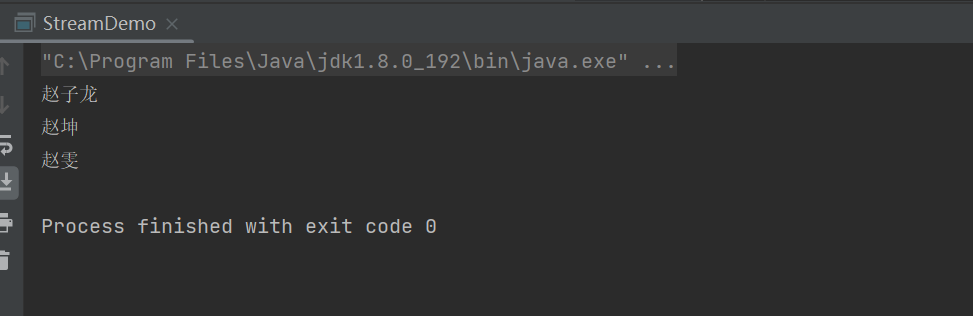
这是我们在没有接触到Stream流时的操作方法,虽然使用lambda简化写法了,但还是不够优雅。
下面我使用Stream流的方式来操作一下:
public class StreamDemo { public static void main(String[] args) { ArrayList<String> list = new ArrayList<>(); Collections.addAll(list,"赵子龙","猪大肠","赵坤","张良","赵雯"); list.stream().filter(s -> s.startsWith("赵")).forEach(s -> System.out.println(s)); } }- 1
- 2
- 3
- 4
- 5
- 6
- 7

使用Stream流后的操作是不是比刚开始的操作要优雅许多,大家先不用管这块代码怎么写的,我会在下面一一讲解到。二、如何获取Stream流?
我们可以简单理解Stream流就是一条流水线。

Stream流的作用: 结合Lambda表达式,简化集合、数组的操作
Stream流的使用步骤:
- 先得到一条Stream流(流水线),并把数据放上去
- 利用Stream流中的API进行各种操作(过滤、转换、统计、打印等)
获取方式 方法名 说明 单列集合 default Stream stream() Collection中的默认方法 双列集合 无 无法直接使用stream流,需要先转为单列集合 数组 publis static Stream stream(T[] array) Arrays工具类中的静态方法 零散数据 public static Stream of(T… values) Stream接口中的静态方法 单列集合:

我们可以发现单列集合可以直接调用stream方法获取Stream流。

我们使用下stream流的forEach方法,顾名思义就是打印方法。

我们可以看到forEach方法的参数是一个函数式接口,所以我们可以使用lambda表达式简化,我们先写一下匿名内部类的写法:public static void main(String[] args) { ArrayList<String> list = new ArrayList<>(); Collections.addAll(list,"赵子龙","猪大肠","赵坤","张良","赵雯"); Stream<String> stream = list.stream(); stream.forEach(new Consumer<String>() { @Override public void accept(String s) { System.out.println(s); } }); }- 1
- 2
- 3
- 4
- 5
- 6
- 7
- 8
- 9
- 10
- 11
然后我们在使用lambda表达式对匿名内部类进行简化:
public static void main(String[] args) { ArrayList<String> list = new ArrayList<>(); Collections.addAll(list,"赵子龙","猪大肠","赵坤","张良","赵雯"); Stream<String> stream = list.stream(); stream.forEach(s -> System.out.println(s)); }- 1
- 2
- 3
- 4
- 5
- 6

双列集合:
双列集合是无法直接获取stream流的,所以我们需要先将双列集合转换为单列集合,再去进行流式操作。
第一种方式,先将map转为Keyset:public static void main(String[] args) { Map<String,Integer> map = new HashMap<>(); map.put("四级",425); map.put("六级",425); map.put("考研",436); // 1.第一种获取stream流方式 map.keySet().stream().forEach(s -> { System.out.println(s + ": " + map.get(s)); }); }- 1
- 2
- 3
- 4
- 5
- 6
- 7
- 8
- 9
- 10
第二种方式,转为EntrySet:
// 2.第二种获取stream方式 map.entrySet().stream().forEach(s -> System.out.println(s));- 1
- 2

数组:public static void main(String[] args) { int[] arr = {2,9,3,74,2,1}; // 使用Arrays中的stream方法获取stream流 Arrays.stream(arr).forEach(s -> System.out.println(s)); }- 1
- 2
- 3
- 4
- 5
零散数据:
零散数据使用Stream.of()方法获取stream流:public static void main(String[] args) { Stream.of(1,2,4,3,2,5).forEach(s -> System.out.println(s)); }- 1
- 2
- 3

需要注意的坑:

我们来看Stream.of()方法的参数是泛型可变参数,那证明可以接受数组数据,我们一起来试一下

当我们传入的数据是引用数据类型的时候是可以正常操作的,我们再来试试基本数据类型的数组

当我们传入基本数据类型时,发现打印的是地址,当我们使用Stream.of()方法传入基本数据类型的数组获取stream流时,是将整个数据当作一个元素的三、Stream流的中间方法
方法 作用 Stream filter(Predicate predicate) 过滤 Stream limit(long maxSize) 获取前几个元素 Stream skip(long n) 跳过前几个元素 Stream distinct() 元素去重,底层使用hashset去重 static Stream concat(Stream a,Stream b) 合并a和b两个流为一个流 Stream map(Function 转换流中的数据类型 注意点:
- 中间方法,返回新的Stream流,原来的Stream流只能使用一次,一般使用链式编程
- 修改Stream流中的数据,不会影响原来集合中的数据
filter方法:
我们还是以最开始的例子来讲解

我们可以看到filiter方法的参数是一个函数式接口,所以我们可以使用lambda表达式简化写法。public class StreamDemo { public static void main(String[] args) { ArrayList<String> list = new ArrayList<>(); Collections.addAll(list,"赵子龙","猪大肠","赵坤","张良","赵雯"); list.stream().filter(s -> s.startsWith("赵")).forEach(s -> System.out.println(s)); } }- 1
- 2
- 3
- 4
- 5
- 6
- 7
而且我们的stream流只能使用一次。

当我们第二次去使用stream流时,报了IllegalStateException,意思stream流已经关闭limit方法:
limit方法代表获取前几个元素public static void main(String[] args) { ArrayList<String> list = new ArrayList<>(); Collections.addAll(list,"赵子龙","猪大肠","赵坤","张良","赵雯"); // 获取前三个元素 list.stream().limit(3).forEach(s -> System.out.println(s)); }- 1
- 2
- 3
- 4
- 5
- 6

skip方法:
skip方法代表跳过几个元素public static void main(String[] args) { ArrayList<String> list = new ArrayList<>(); Collections.addAll(list,"赵子龙","猪大肠","赵坤","张良","赵雯"); // 跳过前两个元素 list.stream().skip(2).forEach(s -> System.out.println(s)); }- 1
- 2
- 3
- 4
- 5
- 6

distinct方法:
distinct方法代表去除重复元素public static void main(String[] args) { ArrayList<String> list = new ArrayList<>(); Collections.addAll(list,"赵子龙","猪大肠","赵子龙","张良","赵雯"); // 去重数据 list.stream().distinct().forEach(s -> System.out.println(s)); }- 1
- 2
- 3
- 4
- 5
- 6

我们去看一看distinct底层是如何实现的


我们可以看到这个方法内容非常的多,我们可以看到这里是使用HashSet进行去重的,所以我们在使用引用数据类型需要重写equals和hashcode方法concat方法:
Stream.concat()方法代表合并两个流public static void main(String[] args) { ArrayList<String> list = new ArrayList<>(); Collections.addAll(list,"赵子龙","猪大肠","赵子龙","张良","赵雯"); ArrayList<String> list1 = new ArrayList<>(); Collections.addAll(list1,"奥利奥","方便面"); // 合并两个流对象 Stream.concat(list.stream(),list1.stream()).forEach(s -> System.out.println(s)); }- 1
- 2
- 3
- 4
- 5
- 6
- 7
- 8

map方法:
map方法转换流中的数据类型

默认转换为Object类型,我们可以根据自己的需要进行修改public static void main(String[] args) { ArrayList<String> list = new ArrayList<>(); Collections.addAll(list,"111","222","333"); list.stream().map(new Function<String, Integer>() { @Override public Integer apply(String s) { return Integer.parseInt(s); } }).forEach(s -> System.out.println(s)); }- 1
- 2
- 3
- 4
- 5
- 6
- 7
- 8
- 9
- 10
我们可以使用lambda表达式进行简写

四、Stream流的终结方法
Stream流的终结方法,顾名思义,调用之后就不能再调用Stream流中的其他方法了。
方法 作用 void forEach(Consumer action) 遍历 long count() 统计 toArray() 收集流中的数据,放到数组中 collect(Collector collector) 收集流中的数据,放到集合中 forEach方法我们这里就不再阐述了,因为我们已经使用的很熟练了,我们来看一下count()方法:

我们可以看到count()方法返回的是一个long的数值public static void main(String[] args) { ArrayList<String> list = new ArrayList<>(); Collections.addAll(list,"赵子龙","猪大肠","周瑜","张良","赵雯"); long count = list.stream().count(); System.out.println(count); }- 1
- 2
- 3
- 4
- 5
- 6

toArray()方法,将流中的数据放入数组中:

我们可以看到toArray()方法有两种调用方式,第一种空参,返回Object类型数组public static void main(String[] args) { ArrayList<String> list = new ArrayList<>(); Collections.addAll(list,"赵子龙","猪大肠","周瑜","张良","赵雯"); Object[] arr = list.stream().toArray(); System.out.println(Arrays.toString(arr)); }- 1
- 2
- 3
- 4
- 5
- 6

然后我们来看一下传入指定类型的方法


我们可以看到toArray传入的参数是一个函数式接口,当中有一个apply方法,形参为value,我们可以理解为流中数据的个数public static void main(String[] args) { ArrayList<String> list = new ArrayList<>(); Collections.addAll(list,"赵子龙","猪大肠","周瑜","张良","赵雯"); String[] arr = list.stream().toArray(new IntFunction<String[]>() { @Override public String[] apply(int value) { return new String[value]; } }); System.out.println(Arrays.toString(arr)); }- 1
- 2
- 3
- 4
- 5
- 6
- 7
- 8
- 9
- 10
- 11
我们可以使用lambda表达式进行简写
public static void main(String[] args) { ArrayList<String> list = new ArrayList<>(); Collections.addAll(list,"赵子龙","猪大肠","周瑜","张良","赵雯"); String[] arr = list.stream().toArray(value -> new String[value]); System.out.println(Arrays.toString(arr)); }- 1
- 2
- 3
- 4
- 5
- 6

collect方法,收集流中的数据,放到集合当中(List Set Map)。将流中的数据放到List中:
public static void main(String[] args) { ArrayList<String> list = new ArrayList<>(); Collections.addAll(list,"赵子龙","猪大肠","周瑜","张良","赵雯"); // 将流中的数据放到List中 List<String> lists = list.stream().collect(Collectors.toList()); System.out.println(lists); }- 1
- 2
- 3
- 4
- 5
- 6
- 7

将流中的数据放到Set中:public static void main(String[] args) { ArrayList<String> list = new ArrayList<>(); Collections.addAll(list,"赵子龙","猪大肠","周瑜","张良","赵雯"); // 将流中的数据放到List中 Set<String> set = list.stream().collect(Collectors.toSet()); System.out.println(set); }- 1
- 2
- 3
- 4
- 5
- 6
- 7

那么将流数据放到List和Set有什么区别呢?放入Set会进行去重操作将流中的数据放到Map中:
我们再将流数据转为Map之前,我们需要弄情况,用什么做key,用什么做value

我们需要指定具体的key和value的规则,我们来看看具体的参数


我们可以发现是函数式接口。
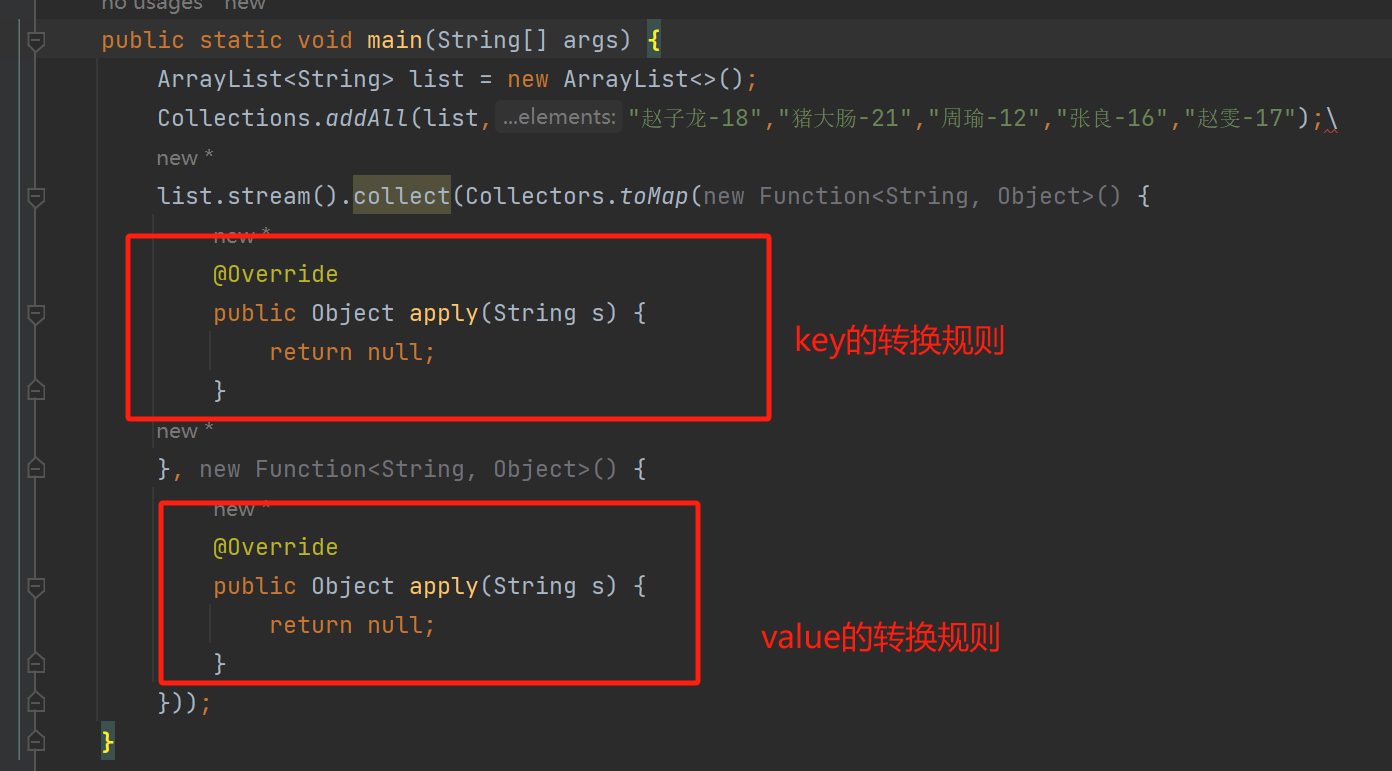
s就是我们流里面的数据,两个匿名内部类分别返回的是key和valuepublic static void main(String[] args) { ArrayList<String> list = new ArrayList<>(); Collections.addAll(list,"赵子龙-18","猪大肠-21","周瑜-12","张良-16","赵雯-17"); Map<String, Integer> map = list.stream().collect(Collectors.toMap(new Function<String, String>() { @Override public String apply(String s) { return s.split("-")[0]; } }, new Function<String, Integer>() { @Override public Integer apply(String s) { return Integer.parseInt(s.split("-")[1]); } })); System.out.println(map); }- 1
- 2
- 3
- 4
- 5
- 6
- 7
- 8
- 9
- 10
- 11
- 12
- 13
- 14
- 15
- 16

我们使用lambda表达式进行简化:public static void main(String[] args) { ArrayList<String> list = new ArrayList<>(); Collections.addAll(list,"赵子龙-18","猪大肠-21","周瑜-12","张良-16","赵雯-17"); Map<String, Integer> map = list.stream().collect(Collectors.toMap(s -> s.split("-")[0],s -> Integer.parseInt(s.split("-")[1]))); System.out.println(map); }- 1
- 2
- 3
- 4
- 5
- 6

总结
1.Stream流的作用:
结合了Lambda表达式,简化集合、数组的操作2.Stream流的使用步骤:
- 获取Stream流对象
- 使用中间方法处理数据
- 使用终结方法处理数据
3.如何获取Stream流对象
- 单列集合:Collection中默认的stream方法
- 双列集合:不能直接获取,需要先转为单列集合去获取
- 数据:Arrays工具类中的stream静态方法
- 零散数据:Stream接口中的of静态方法
4.常见方法
- 中间方法:filter、limit、skip、distinct、concat、map
- 终结方法:forEach、count、toArray、collect
-
相关阅读:
PlatformIO开发环境
如何从现有镜像创建 Dockerfile
关于并发编程与线程安全的思考与实践 | 京东云技术团队
XStream: Stream Processing Platform at Facebook
Unity WebGL RuntimeError: integer overflow(整数溢出问题)
点云从入门到精通技术详解100篇-基于路侧激光雷达的交通目标感知方法与实现
一文读懂HTTP, HTTPS, SSL和TLS
SpringBoot动态切换数据源
【PickerView案例08-国旗搭建界面加载数据 Objective-C预言】
查询效率提升10倍!3种优化方案,帮你解决MySQL深分页问题
- 原文地址:https://blog.csdn.net/buhuisuanfa/article/details/136340188
