-
Cloud整合Zookeeper代替Eureka
Zookeeper是一个分布式协调工具,可以实现注册中心功能
安装Zookeeper

随便 就用最新版本吧


进入Zookeeper 包目录
cd /usr/local/develop/
解压
tar -zxvf apache-zookeeper-3.9.1-bin.tar.gz -C /usr/local/develop
进入配置文件
cd /usr/local/develop/apache-zookeeper-3.9.1-bin/conf
复制文件
cp zoo_sample.cfg zoo.cfg

编辑文件
vim zoo.cfg

mkdir /usr/local/develop/apache-zookeeper-3.9.1-bin/data 这个没必要 会自动创建
cd /usr/local/develop/apache-zookeeper-3.9.1-bin/bin
启动Zookeeper
./zkServer.sh start

安装JDK

解压
tar -zxvf /usr/local/develop/jdk-8u191-linux-x64.tar.gz -C /usr/local/develop
配置JAVA_HOME
export JAVA_HOME=/usr/local/develop/jdk1.8.0_191
export PATH=$JAVA_HOME/bin:$PATH
export CLASSPATH=.:$JAVA_HOME/lib

让环境变量生效
source /etc/profile
java -version 查看jdk版本 至此JDK安装完成
which java 查看调用的是安装在哪里的java

进入Zookeeper启动目录
cd /usr/local/develop/apache-zookeeper-3.9.1-bin/bin
启动
./zkServer.sh start

停止
./zkServer.sh stop
配置Zookeeper为系统服务
vim /etc/systemd/system/zookeeper.service

[Unit]
Description=Apache ZooKeeper server
After=network.target[Service]
Type=forking
ExecStart=/usr/local/develop/apache-zookeeper-3.9.1-bin/bin/zkServer.sh start
ExecStop=/usr/local/develop/apache-zookeeper-3.9.1-bin/bin/zkServer.sh stop
User=root
Group=root
Restart=on-failure
Environment="JAVA_HOME=/usr/local/develop/jdk1.8.0_191"[Install]
WantedBy=multi-user.target是配置生效
systemctl daemon-reload
开机自启 看自己实际需要
systemctl enable zookeeper.service
systemctl start zookeeper.service 启动
systemctl stop zookeeper.service 停止
systemctl restart zookeeper.service 重启
systemctl status zookeeper.service 查看状态
admin.serverPort=8888指定了ZooKeeper的管理服务器端口。这个管理服务器提供了一个简单的HTTP接口,用于获取ZooKeeper服务的状态和性能指标等信息。通过访问这个端口,你可以获取到ZooKeeper实例的各种管理信息,比如运行状态、连接数、节点数量等。默认情况下,ZooKeeper的管理界面并不提供一个全面的Web界面来浏览这些信息,而是提供了一个简单的HTTP服务,通过发送HTTP请求到这个端口,可以获取到JSON格式的状态信息。
IP:8888/commands/stat

关闭Zookeeper服务
systemctl stop zookeeper.service
systemctl start zookeeper.service
Docker安装Zookeeper
docker run -d --name zookeeper --privileged=true -p 2181:2181 -v /mydata/zookeeper/data:/data -v /mydata/zookeeper/conf:/conf -v /mydata/zookeeper/logs:/datalog zookeeper:3.5.7
后面补
创建支付模块(生产者)

重新构建支付模块


pom.xml
- <?xml version="1.0" encoding="UTF-8"?>
- <project xmlns="http://maven.apache.org/POM/4.0.0"
- xmlns:xsi="http://www.w3.org/2001/XMLSchema-instance"
- xsi:schemaLocation="http://maven.apache.org/POM/4.0.0 http://maven.apache.org/xsd/maven-4.0.0.xsd">
- <parent>
- <artifactId>SpringCloud</artifactId>
- <groupId>org.example</groupId>
- <version>1.0-SNAPSHOT</version>
- </parent>
- <modelVersion>4.0.0</modelVersion>
- <artifactId>cloud-provider-payment8084</artifactId>
- <properties>
- <maven.compiler.source>8</maven.compiler.source>
- <maven.compiler.target>8</maven.compiler.target>
- </properties>
- <dependencies>
- <dependency>
- <groupId>org.example</groupId>
- <artifactId>cloud-api-commons</artifactId>
- <version>${project.version}</version>
- </dependency>
- <!-- https://mvnrepository.com/artifact/org.springframework.boot/spring-boot-starter-web -->
- <dependency>
- <groupId>org.springframework.boot</groupId>
- <artifactId>spring-boot-starter-web</artifactId>
- </dependency>
- <!-- https://mvnrepository.com/artifact/org.springframework.boot/spring-boot-starter-web -->
- <dependency>
- <groupId>org.springframework.boot</groupId>
- <artifactId>spring-boot-starter-actuator</artifactId>
- </dependency>
- <!-- https://mvnrepository.com/artifact/org.springframework.cloud/spring-cloud-starter-zookeeper-discovery -->
- <dependency>
- <groupId>org.springframework.cloud</groupId>
- <artifactId>spring-cloud-starter-zookeeper-discovery</artifactId>
- </dependency>
- <!-- https://mvnrepository.com/artifact/org.springframework.boot/spring-boot-devtools -->
- <dependency>
- <groupId>org.springframework.boot</groupId>
- <artifactId>spring-boot-devtools</artifactId>
- <scope>runtime</scope>
- <optional>true</optional>
- </dependency>
- <!-- https://mvnrepository.com/artifact/org.projectlombok/lombok -->
- <dependency>
- <groupId>org.projectlombok</groupId>
- <artifactId>lombok</artifactId>
- <optional>true</optional>
- </dependency>
- <!-- https://mvnrepository.com/artifact/org.springframework.boot/spring-boot-starter-test -->
- <dependency>
- <groupId>org.springframework.boot</groupId>
- <artifactId>spring-boot-starter-test</artifactId>
- <scope>test</scope>
- </dependency>
- </dependencies>
- </project>
application.yml
- server:
- port: 8084
- spring:
- application:
- name: cloud-provider-payment
- cloud:
- zookeeper:
- connect-string: xxx.xx.xxx.x:2181
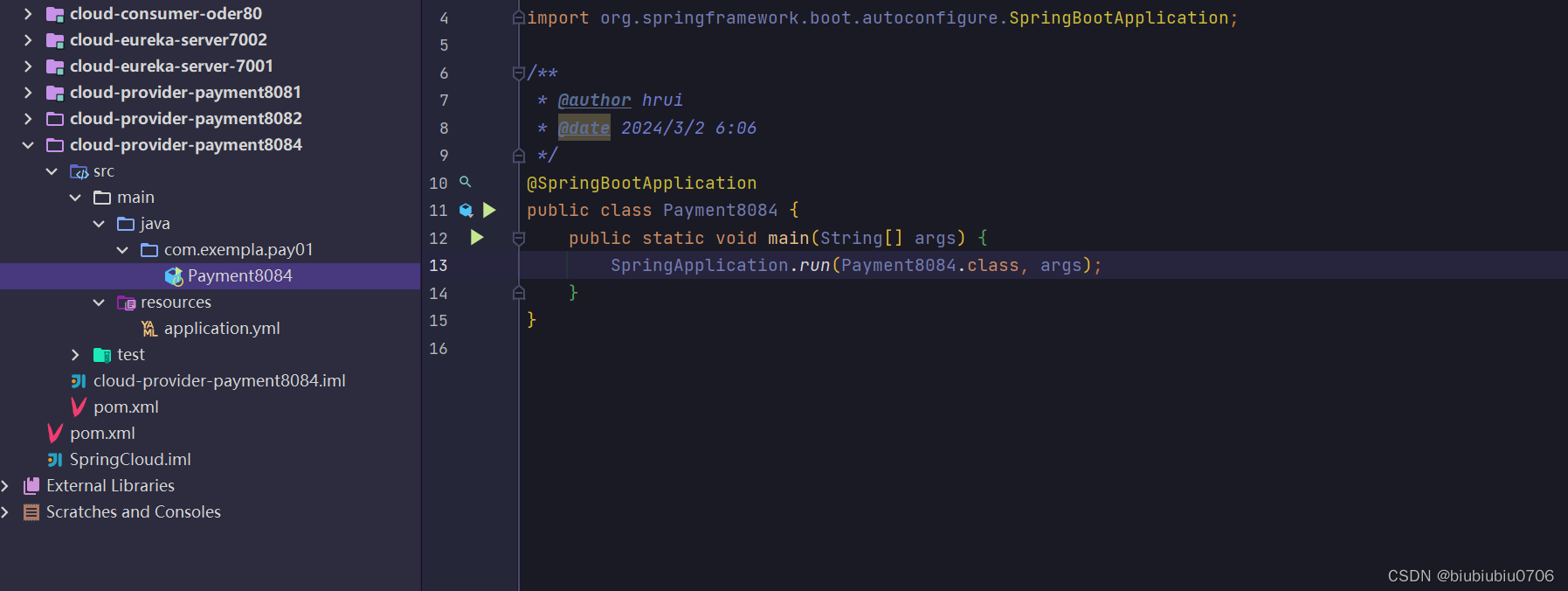
启动类
控制器
- package com.exempla.pay01.controller;
- import lombok.extern.slf4j.Slf4j;
- import org.springframework.beans.factory.annotation.Value;
- import org.springframework.web.bind.annotation.GetMapping;
- import org.springframework.web.bind.annotation.RequestMapping;
- import org.springframework.web.bind.annotation.RestController;
- import java.util.UUID;
- /**
- * @author hrui
- * @date 2024/3/2 6:07
- */
- @RestController
- @Slf4j
- @RequestMapping("/payment")
- public class PaymentController {
- @Value("${server.port}")
- private String serverPort;
- @GetMapping(value = "/zk")
- public String paymentzk(){
- return "springcloud with zookeeper:"+serverPort+"\t"+ UUID.randomUUID().toString();
- }
- }
启动8084 注册进Zookeeper lombok找不到 加个版本
记得Zookeeper服务器开通安全组
有可能版本冲突 解决办法

cd /usr/local/develop/apache-zookeeper-3.9.1-bin/bin
./zkCli.sh
ls /

ls /services

ls /services/cloud-provider-payment

ls /services/cloud-provider-payment/04bbfd46-50e0-462a-bd22-b8083cc445cf

get /services/cloud-provider-payment/04bbfd46-50e0-462a-bd22-b8083cc445cf

上面这个JSON串 就是微服务注册相关的信息

quit

也可以
访问接口 可以
localhost:8084/payment/zk
 http://localhost:8084/payment/zk
创建订单模块(消费者)


pom.xml
- <dependencies>
- <dependency>
- <groupId>com.atguigu.springcloud</groupId>
- <artifactId>cloud-api-commons</artifactId>
- <version>${project.version}</version>
- </dependency>
- <!-- https://mvnrepository.com/artifact/org.springframework.boot/spring-boot-starter-web -->
- <dependency>
- <groupId>org.springframework.boot</groupId>
- <artifactId>spring-boot-starter-web</artifactId>
- </dependency>
- <!-- https://mvnrepository.com/artifact/org.springframework.boot/spring-boot-starter-web -->
- <dependency>
- <groupId>org.springframework.boot</groupId>
- <artifactId>spring-boot-starter-actuator</artifactId>
- </dependency>
- <!-- https://mvnrepository.com/artifact/org.springframework.cloud/spring-cloud-starter-zookeeper-discovery -->
- <dependency>
- <groupId>org.springframework.cloud</groupId>
- <artifactId>spring-cloud-starter-zookeeper-discovery</artifactId>
- </dependency>
- <!-- https://mvnrepository.com/artifact/org.springframework.boot/spring-boot-devtools -->
- <dependency>
- <groupId>org.springframework.boot</groupId>
- <artifactId>spring-boot-devtools</artifactId>
- <scope>runtime</scope>
- <optional>true</optional>
- </dependency>
- <!-- https://mvnrepository.com/artifact/org.projectlombok/lombok -->
- <dependency>
- <groupId>org.projectlombok</groupId>
- <artifactId>lombok</artifactId>
- <optional>true</optional>
- </dependency>
- <!-- https://mvnrepository.com/artifact/org.springframework.boot/spring-boot-starter-test -->
- <dependency>
- <groupId>org.springframework.boot</groupId>
- <artifactId>spring-boot-starter-test</artifactId>
- <scope>test</scope>
- </dependency>
- </dependencies>
启动类

application.yml
- server:
- port: 80
- spring:
- application:
- name: cloud-consumer-order
- cloud:
- zookeeper:
- connect-string: xxx.xx.xx.x:2181
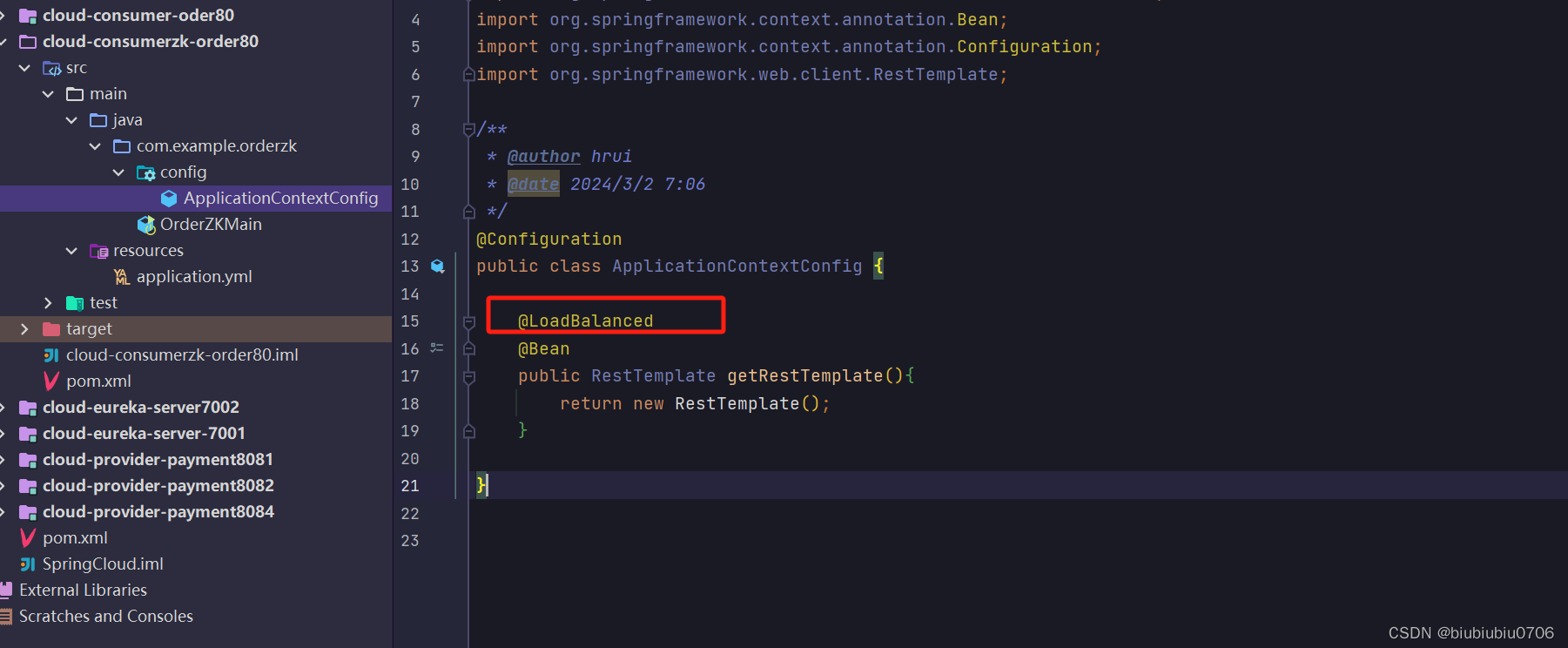
配置RestTemplate和负载均衡
控制器

启动服务


关于@EnableDiscoveryClient 注解 早期版本确实生产者和消费者启动类要加 后来就不需要了


-
相关阅读:
2022杭电多校联赛第九场 题解
mysql常见错误
JS点击按钮获取列表信息,纯JS代码创建表格,如何引入CSS框架,<svg>标签
用飞书写博客,并自动部署
了解 NFT 质押:Web3 中赚取被动收益的另一种方式
SOFAStack软件供应链安全产品解析——SCA软件成分分析
KUKA机器人通过3点法设置工作台基坐标系的具体方法
React 知识点:基础语法、组件、React-Router、Redux
Tech Lead(技术经理) 带人之道
VUE核心
- 原文地址:https://blog.csdn.net/tiantiantbtb/article/details/136408824