-
CentOS7 Hive2.3.8安装
CentOS7 Hive2.3.8 安装
建议从头用我的博客,如果用外教的文件到 一、9)步骤了,就用他的弄完,数据库不一样,在9步骤前还能继续看我的
一、 安装MySQL
0.0)查询mariadb,有就去0.1),没有就不管直接去1)
rpm -qa | grep mariadb- 1
0.1)卸载mariadb
rpm -e --nodeps [查询出来的内容]- 1
1) 下载mysql:
sudo yum localinstall https://repo.mysql.com//mysql80-community-release-el7-5.noarch.rpm- 1
2) 安装Mysql:
sudo yum install mysql-community-server- 1
3) 开启Mysql服务:
systemctl start mysqld.service- 1
A. 可能遇到的问题1:

输这个解决:rpm --import https://repo.mysql.com/RPM-GPG-KEY-mysql-2023- 1
B. 可能遇到的问题2:

输这个解决:sudo yum install mysql-server --nogpgcheck- 1
4) 检查Mysql服务运行状态
service mysqld status- 1

5) 查询Mysql临时密码以进入Mysql里面
grep "A temporary password" /var/log/mysqld.log- 1
 图片临时码为f0155f&dA4Ne
6) 输入以下命令,后面输密码的时候输入你屏幕里出来的临时密码
输密码用手敲不要复制粘贴
mysql –u root -p- 1
然后会弹出下面这个内容在:后面手敲密码就好,输密码的时候看不见
‘
Enter password:f0155f&dA4Ne7)更改Mysql密码,最好和我一样,涉及到后面Hive配置
ALTER user 'root'@'localhost' IDENTIFIED BY 'Root123!';- 1
现在进入Mysql密码是 Root123!
8)将表的所有操作权限赋予root用户,并让root用户授权其他用户。
GRANT all ON *.* TO 'root'@'localhost' WITH GRANT OPTION;- 1
9) Mysql数据库配置
a. 创建一个hivedb数据库:
create database hivedb;- 1
b. 使用数据库mysql:
use mysql;- 1
c. 输入命令看配置
select host, user, authentication_string, plugin from user;- 1

我们需要一个 hiveuser 对应 % 的用户,所以加一个CREATE USER 'hiveuser'@'%' IDENTIFIED BY 'Root123!';- 1
加好了,查看一下,就有% hiveuser 的用户了
select host, user, authentication_string, plugin from user;- 1

要是太长了串行了可以省略点查看select host, user from user;- 1

f. 给hiveuser授权一下
GRANT ALL ON *.* TO 'hiveuser'@'%';- 1
g. 手动更新配置:
flush privileges;- 1
二、安装 Hive:
1)把apache-hive-2.3.8-bin.tar.gz 下载后 用mobaxterm放到 /tools文件夹
链接:https://pan.baidu.com/s/1NBplQ4GYGfsa25aSK7I8OQ?pwd=vzji
提取码:vzji
–来自百度网盘超级会员V6的分享2)解压文件
tar -zvxf /tools/apache-hive-2.3.8-bin.tar.gz -C /training/- 1
3)进入 /training 文件夹
cd /training- 1
重命名移动文件夹为hive
mv apache-hive-2.3.8-bin hive- 1
4) 设置环境变量
vi ~/.bash_profile- 1
加进去
export HIVE_HOME=/training/hive export PATH=$PATH:$HIVE_HOME/bin- 1
- 2
:wq 保存退出后,更新环境变量文件
source ~/.bash_profile- 1
======================================================================
5) Hive配置文件更改
进入配置文件夹
cd training/hive/conf- 1
复制备份hive-env.sh.template并命名为hive-env.sh
cp hive-env.sh.template hive-env.sh- 1
复制备份hive-default.xml.template并命名为hive-site.xml
cp hive-default.xml.template hive-site.xml- 1
6) 配置 hive-site.xml,这个文件内容特别多,所以一次性删光了再往里面加东西
进入文件
vi hive-site.xml- 1
直接键盘敲6000dd,此命令意思是删除6000行,不要复制
6000 dd- 1
如果还没删空,就多来几次6000dd
删空后加入以下内容,注意复制进去的时候不要少了>符号之类的小错误,此文件涉及到之前设置的密码Root123!,如果你不一样,记得改#Enter the insert mode by pressingi and then copy this code to the file and save and exit using- :wq. <?xml version="1.0" encoding="UTF-8" standalone="no"?> <?xml-stylesheet type="text/xsl" href="configuration.xsl"?> <configuration> <!-- WARNING!!! This file is auto generated for documentation purposes ONLY! --> <!-- WARNING!!! Any changes you make to this file will be ignored by Hive. --> <!-- WARNING!!! You must make your changes in hive-site.xml instead. --> <!-- Hive Execution Parameters --> <property> <name>hive.default.fileformat</name> <value>TextFile</value> </property> <property> <!--The port is changed to your own port. Here is the onhive database in the connection database. If not, create it later --> <name>javax.jdo.option.ConnectionURL</name> <value>jdbc:mysql://localhost/metastore</value> <description>JDBC connect string for a JDBC metastore</description> </property> <property> <name>javax.jdo.option.ConnectionDriverName</name> <!--The latest version of the jar package to connect to MySQL All write com.mysql.cj.jdbc.Driver, if it is the old version with com.mysql.jdbc.Driver--> <value>com.mysql.cj.jdbc.Driver</value> <description>Driver class name for a JDBC metastore</description> </property> <property> <!--Connect to MySQL username--> <name>javax.jdo.option.ConnectionUserName</name> <value>root</value> <description>username to use against metastore database</description> </property> <property> <!--Connect MySQL password --> <name>javax.jdo.option.ConnectionPassword</name> <value>Root123!</value> <description>password to use against metastore database</description> </property> </configuration>- 1
- 2
- 3
- 4
- 5
- 6
- 7
- 8
- 9
- 10
- 11
- 12
- 13
- 14
- 15
- 16
- 17
- 18
- 19
- 20
- 21
- 22
- 23
- 24
- 25
- 26
- 27
- 28
- 29
- 30
- 31
- 32
- 33
- 34
- 35
- 36
- 37
7)配置 hive-env.sh
进入文件
vi hive-env.sh- 1
在文件最底下加,注意hadoop版本和java版本以及路径是否和我一样,不一样记得换
export HADOOP_HOME=/training/hadoop-3.3.0 export HIVE_CONF_DIR=/training/hive/conf export HIVE_AUX_JARS_PATH=/training/hive/lib export JAVA_HOME=/training/jdk1.8.0_144 export HIVE_HOME=/training/hive- 1
- 2
- 3
- 4
- 5
8)把 MySQL的 connected jar文件放到 hive/lib 文件夹下
链接:https://pan.baidu.com/s/1gD2M8Gr9IFOkOA4EghfWLg?pwd=32r8
提取码:32r8
–来自百度网盘超级会员V6的分享
9)进入 /training/hadoop-3.3.0/share/hadoop/hdfs/lib/
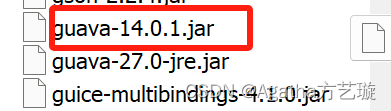
找到这个瓜娃27,把它下载到桌面上留着


10)进入 /training/hive/lib
把瓜娃27放进去,并且删除这个瓜娃14
11)启动Hadoop
start-all.sh- 1
12) 复制一个窗口进入这个路径
cd /training/hive/scripts/metastore/upgrade/mysql/- 1
输入命令后输密码Root123!进入mysql
mysql -u root –p- 1
输命令创建数据库metastore
create database metastore;- 1
使用之前创建好的hivedb
use hivedb;- 1
执行下面的代码
source hive-schema-2.3.0.mysql.sql- 1
12) 回到前面那个窗口初始化mysql
schematool -dbType mysql -initSchema- 1
成功的话会有这个提示
Starting metastore schema initialization to 2.3.8 Initialization
script hive-schema-2.3.8.mysql.sql Initialization script completed
schemaTool completed13)进入hive测试;
进hive命令行
hive- 1
创建库
Create database hive1;- 1
显示库,可以看到hive1
Show databases;- 1
退出
exit;- 1
14)用hdfs看看刚刚的hive1
hdfs dfs -ls /user/hive/warehouse- 1

关掉hadoop
stop-all.sh- 1
-
相关阅读:
C++【红黑树】
【“在路上”疫情信息检测】——项目基础框架搭建
电子科技大学《数据库原理及应用》(持续更新)
语音增强——DNN(深度神经网络)频谱映射
el-dialog 实现可以拖动的弹窗
飞机大战小游戏
SpringBoot二手车管理系统
【车辆计数】基于matlab GUI背景差分法道路行驶多车辆检测【含Matlab源码 1911期】
虚拟列表本质以及解决方式
Java版工程行业管理系统源码-专业的工程管理软件-提供一站式服务
- 原文地址:https://blog.csdn.net/agatha_aggie/article/details/136315137