-
uniapp的微信小程序授权头像昵称(最新版)
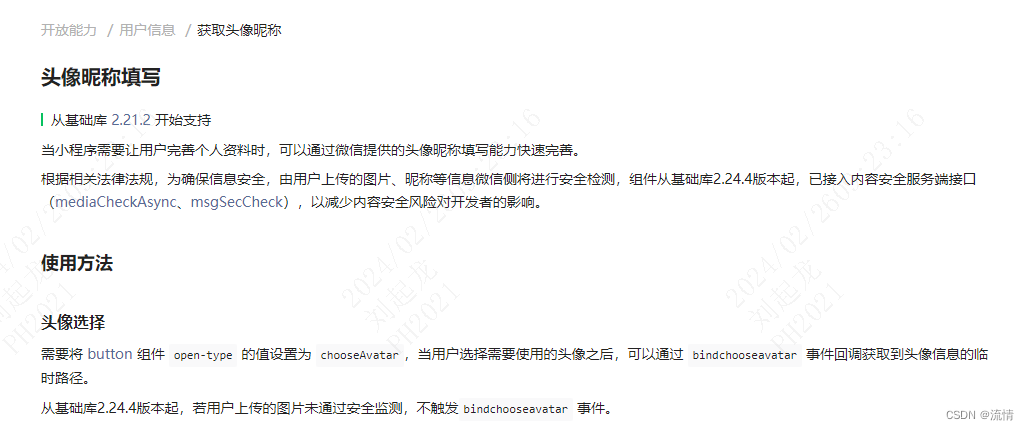
前面我出过两期博客关于小程序授权登录,利用php实现一个简单的小程序授权登录并存储授权用户信息到数据库的完整流程。无奈,小程序官方又整幺蛾子了。wx.getUserInfo接口收回,wx.getUserProfile接口也不让用。导致我的个人小程序:梦缘 的授权登录得改。所以,这篇博客专门针对授权登录中头像昵称的使用进行说明。内附源码
1.问题定位
lz的小程序:梦缘 技术栈是基于:php+uniapp+vant 写的,之前因为偷懒,没写后台管理,然后php用的也是tp5,没有走管理框架,导致后端代码不规范,后面就因为一些特殊原因,就重构了一下。然后也就理所当然的遇到了,授权登录头像昵称的问题。
之前走的wx.getUserProfile,也能用,但是获取的头像都变成了灰色头像,昵称统一为微信用户。作为强迫症患者的我肯定是不允许的,所以,必须解决。但是之前的代码我又不想删,毕竟都是自己一行一行敲出来的,我更加偏向于加代码。

这是之前授权登录得代码,直接调用wx.getUserProfile即可。
2.解决思路
前面提到过,之前的授权登录代码依旧是可以用的,只是头像和昵称统一是灰白色和微信用户。再结合前面官方说的,基础版本库的影响,基础版本库低于2.21.2,wx.getUserProfile返回的就是正常的头像昵称,高于2.21.2的话,就要使用昵称头像填写功能,把这两个值作为参数传递给后端。

既然如此,我之前的代码就可以保留了,在传参时额外增加nickname和avatar参数即可。后端针对是否有这两个参数做针对性处理。而这两个参数就需要前端利用小程序昵称头像的填写来获取了。
3.源码解析
下面直接公布授权登录得代码:login.vue
这里通过动态的获取当前小程序基础库来决定是否调用微信的头像昵称填写功能。然后再统一调用授权登录接口。后端根据动态动态保存。
- <template>
- <view>
- <view>
- <view class='header'>
- <view class="userinfo-avatar">
- <open-data type="userAvatarUrl" lang="zh_CN" />
- view>
- view>
- <view class='content'>
- <view>申请获取以下权限view>
- <text>获得你的公开信息(昵称,头像等)text>
- view>
- <button class='bottom' type='primary' @click="login" v-if="ischeck" >
- 授权登录
- button>
- <button class='bottom' type='primary' @click="login_zheshow" v-else>
- 授权登录
- button>
- <btnlogin :zheshow='zheshow' v-if="zheshow" />
- view>
- view>
- template>
- <script>
- import btnlogin from '@/components/butlogin/butlogin';
- const context = require("../../context/ggyzContext.js");
- export default {
- data() {
- return {
- code:'',
- ischeck:true,
- zheshow:false,
- nickname:"",
- avatar:"",
- }
- },
- components:{
- btnlogin
- },
- onShow() {
- var that=this;
- wx.login({
- success(res) {
- console.log("code:",res.code);
- if (res.code) {
- that.code=res.code;
- } else {
- console.log('登录失败!' + res.errMsg)
- }
- }
- })
- var {SDKVersion} = wx.getSystemInfoSync()
- // 判断是否支持getUserProfile()获取头像昵称
- var compareRes = this.compareVersion(SDKVersion, "2.21.2");
- // 不支持
- if (compareRes !== -1) {
- console.log("不支持getUserProfile()获取头像")
- this.ischeck = false;
- return
- }
- // 支持
- console.log("支持getUserProfile()获取头像")
- },
- methods: {
- login_zheshow(){
- this.zheshow = true;
- },
- loset(Logon_Credentials){
- console.log(Logon_Credentials,'登录信息');
- this.avatar=Logon_Credentials.active;
- this.nickname=Logon_Credentials.nickname;
- this.login();
- },
- close(){
- this.zheshow=false;
- },
- /**
- * 版本比较
- * v1 >= v2 返回 0或1 否则 -1
- * @param {String} v1
- * @param {String} v2
- */
- compareVersion (v1, v2) {
- v1 = v1.split('.')
- v2 = v2.split('.')
- const len = Math.max(v1.length, v2.length)
- while (v1.length < len) {
- v1.push('0')
- }
- while (v2.length < len) {
- v2.push('0')
- }
- for (let i = 0; i < len; i++) {
- const num1 = parseInt(v1[i])
- const num2 = parseInt(v2[i])
- if (num1 > num2) {
- return 1
- } else if (num1 < num2) {
- return -1
- }
- }
- return 0
- },
- login(){
- var that=this;
- wx.getUserProfile({
- desc: '用于完善会员资料',
- success: e => {
- console.log("授权信息:",e);
- //发起网络请求
- context.request({
- url: context.constant.url.login,
- method:'POST',
- data: {
- encryptedData: e.encryptedData,
- iv: e.iv,
- code: that.code,
- nickname:that.nickname,
- avatar:that.avatar
- },
- success(res) {
- console.log(res.data);
- if(res.data.code==1){
- uni.setStorageSync('userInfo',res.data.data);
- uni.setStorageSync('token',res.data.data.token);
- uni.setStorageSync('loginFlag',{expireTime:res.data.data.expiretime})
- uni.switchTab({
- url:'/pages/my/my'
- })
- }else{
- setTimeout( () => {
- uni.showToast({
- title: res.data.msg,
- icon: "none",
- });
- setTimeout( () =>{
- wx.hideToast();
- },2000)
- },0);
- }
- }
- })
- }
- })
- }
- }
- }
- script>
- <style>
- page{
- background: #FFFFFF;
- }
- .header {
- margin: 90rpx 90rpx 90rpx 50rpx;
- border-bottom: 1px solid #ccc;
- text-align: center;
- width: 650rpx;
- height: 300rpx;
- line-height: 450rpx;
- display: flex;
- justify-content: center;
- align-items: center;
- }
- .header .userinfo-avatar {
- width: 200rpx;
- height: 200rpx;
- margin-bottom: 80rpx;
- }
- .content {
- margin-left: 50rpx;
- margin-bottom: 90rpx;
- }
- .content text {
- display: block;
- color: #9d9d9d;
- margin-top: 40rpx;
- }
- .bottom {
- border-radius: 80rpx;
- margin: 70rpx 50rpx;
- font-size: 35rpx;
- }
- style>
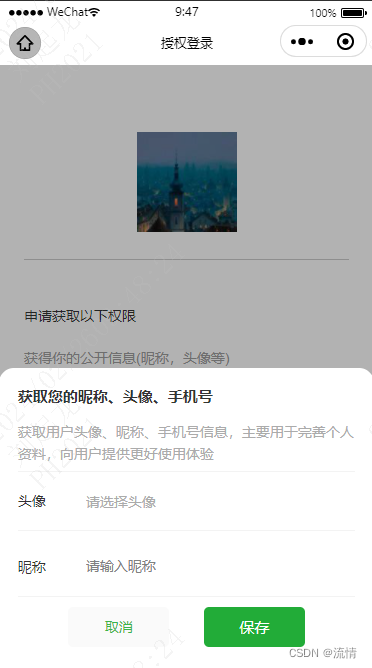
btnlogin.vue昵称填写组件:
tips:这里用到了vant的弹窗,记得uni-app项目是否引入了该组件库。别忘了在pages.json声明引用
- <template>
- <view>
- <van-popup position="bottom" :show="zheshow1" round>
- <view class="zheshow" >
- <view class="cen_ter">
- <view class="box_At">
- <view class="box_At_text">获取您的昵称、头像、手机号view>
- <view class="box_At_co">获取用户头像、昵称、手机号信息,主要用于完善个人资料,向用户提供更好使用体验view>
- <view class="box_B" style="border-top:1px solid #f3f3f3 ;">
- <view class="acvter">头像view>
- <button v-if="!active" class="acvter_all" open-type="chooseAvatar" @chooseavatar="onChooseAvatar">
- <view class="mast">请选择头像view>
- button>
- <view v-if="active" class="img"><image :src="active" >image>view>
- view>
- <view class="box_B">
- <view class="acvter">昵称view>
- <input class="acvter_all" type="nickname" :value="nickname" @blur="bindblur" placeholder="请输入昵称" />
- view>
- <view class="Brn_S">
- <view class="btn_btns" @click="colse">取消view>
- <button class="btn" @click="btns" style="background-color: #22ac38 !important;color: #ffffff !important;">
- <view class="btns">保存view>
- button>
- view>
- view>
- view>
- view>
- van-popup>
- view>
- template>
- <script>
- export default {
- props:['zheshow'],
- data() {
- return {
- on_zheshows:false,
- zheshow1:false,
- active:'',
- nickname:''
- }
- },
- mounted() {
- this.zheshow1=this.zheshow;
- },
- watch:{
- zheshow(zheshow,oldValue) {
- this.zheshow1=this.zheshow
- },
- },
- methods: {
- colse(){
- console.log("取消")
- this.$parent.close();
- },
- onChooseAvatar(e) {
- let that = this
- uni.getFileSystemManager().readFile({
- filePath: e.detail.avatarUrl, //选择图片返回的相对路径
- encoding: "base64",
- success: (res) => {
- let base64s = "data:image/jpeg;base64," + res.data
- that.active = base64s
- },
- fail: (res) => reject(res.errMsg),
- });
- },
- bindblur(e){this.nickname = e.detail.value},
- btns(e){
- if(this.active==''){
- uni.showToast({title:'请选择上传头像',icon:'none'})
- return
- }
- if(this.nickname==''){
- uni.showToast({title:'请填写昵称',icon:'none'})
- return
- }
- this.$parent.loset({nickname:this.nickname,active:this.active}) // 信息传递父组件中
- }
- }
- }
- script>
- <style lang="scss" scoped>
- .zheshow{
- width: 100%;height: 100%;background-color: rgba(0,0,0,0.3);position: fixed;top: 0;left: 0;
- display: flex;align-items: center;align-items: flex-end;
- .mast{margin-top: 6rpx;}
- .Brn_S{width: 70%;height: 100rpx;display: flex;align-items: center;justify-content: space-between;margin: 10rpx auto;}
- .btn_btns{width: 300rpx;height: 80rpx;background: antiquewhite; display: flex;align-items: center;
- justify-content: center; border-radius: 10rpx; margin-right: 70rpx;background-color: #fafafa;color: #39B54A;}
- .imgs{position: absolute;right: 6%;width: 32rpx;height: 32rpx;}
- .img{width: 90rpx;height: 90rpx;border-radius: 50%;margin-left: 80rpx;image{width: 100%;height: 100%;border-radius: 50%;}}
- .cen_ter{
- width: 100%;height: 600rpx;border-top-left-radius: 30rpx;border-top-right-radius: 30rpx;background-color: #FFFFFF;
- display: flex;align-items: center;justify-content: center;
- .box_At{width: 90%;height: 92%;margin-top: 20rpx;display: flex;flex-direction: column;.box_At_text{font-weight: bold;font-size: 30rpx}
- .box_At_co{font-size: 28rpx;color: #ababab;margin-top: 24rpx;}
- .box_B{width: 100%;height: 120rpx;border-bottom: 1px solid #f3f3f3;display: flex;align-items: center;
- margin-top: 12rpx;.acvter_all{font-size: 28rpx;color: #ababab;margin-left: 80rpx;}}
- .btn{width:300rpx;margin: 35rpx auto;height: 80rpx;display: flex;align-items: center;justify-content: center;
- background-color: #39B54A;color: #FFFFFF;border-radius: 10rpx;font-size: 30rpx;}
- }}
- }
- button {
- border-radius: 30rpx;height: 80rpx !important;padding-left: 0!important ;
- padding-right: 0!important ; background-color: rgba(0,0,0,0) !important;color: #ababab !important;font-family: PingFang SC !important;
- }
- button:after {
- top: 0;left: 0; border: 1px solid rgba(0,0,0,0) !important; -webkit-transform: scale(.5);
- transform: scale(.5); -webkit-transform-origin: 0 0; transform-origin: 0 0; box-sizing: border-box; border-radius: 10px;
- }
- style>
组件效果:
-
相关阅读:
概率论的学习和整理10:0-1分支 和 二项分布
前端——Layui的导航栏与tab页联动
上传文件到到大数据平台
负载均衡的算法(静态算法与动态算法)
【Android】深入Binder拦截
使用python校验密码强度
D. Grid-00100(构造一个行列均匀的方阵)
Redis内存耗尽后会发生什么?
Numpy学习笔记
第三篇------Virtual I/O Device (VIRTIO) Version 1.1
- 原文地址:https://blog.csdn.net/qq_34761385/article/details/136291382