-
3.Gin 框架中的路由简要说明
3.Gin 框架中的路由简要说明
Gin 框架中的路由
路由概述
路由(Routing)是由一个 URI(或者叫路径)和一个特定的 HTTP 方法(GET、POST 等)
组成的,涉及到应用如何响应客户端对某个网站节点的访问。
RESTful API 是目前比较成熟的一套互联网应用程序的 API 设计理论,所以我们设计我们的路
由的时候建议参考 RESTful API 指南。
在 RESTful 架构中,每个网址代表一种资源,不同的请求方式表示执行不同的操作:
GET(SELECT) 从服务器取出资源(一项或多项) POST(CREATE) 在服务器新建一个资源 PUT(UPDATE) 在服务器更新资源(客户端提供改变后的完整资源) DELETE(DELETE) 从服务器删除资源 简单的路由配置
简单的路由配置
GET 请求示例

1695656801157 - // GET 请求示例
- r.GET("/hello", func(c *gin.Context) {
- c.JSON(200, gin.H{
- "message": "hello....",
- })
- })
测试如下:
curl -X GET http://localhost:8000/hello
1695657576419 POST请求示例
- // POST 请求示例
- r.POST("/add", func(c *gin.Context) {
- c.JSON(http.StatusOK, gin.H{
- "message": "add",
- })
- })
测试如下:
curl -X POST -H "Content-Type: application/json" http://localhost:8000/add
1695657740216 PUT请求示例
- // PUT 请求示例
- r.PUT("/put", func(c *gin.Context) {
- c.JSON(http.StatusOK, gin.H{
- "message": "put",
- })
- })
测试如下:
curl -X PUT -H "Content-Type: application/json" http://localhost:8000/put
1695658030962 DELETE请求
- // DETELE 请求示例
- r.DELETE("/delete", func(c *gin.Context) {
- c.JSON(http.StatusOK, gin.H{
- "message": "delete",
- })
- })
测试如下:
curl -X DELETE -H "Content-Type: application/json" http://localhost:8000/delete
1695658161530 获取query参数、路径参数
路由里面获取 Query 参数
- // GET 获取query参数示例
- r.GET("/user", func(c *gin.Context) {
- // 获取query参数
- uid := c.Query("uid")
- // 返回响应信息
- c.JSON(http.StatusOK, gin.H{
- "message": fmt.Sprintf("uid=%s", uid),
- })
- })
测试如下:
curl -X GET http://localhost:8000/user?uid=test001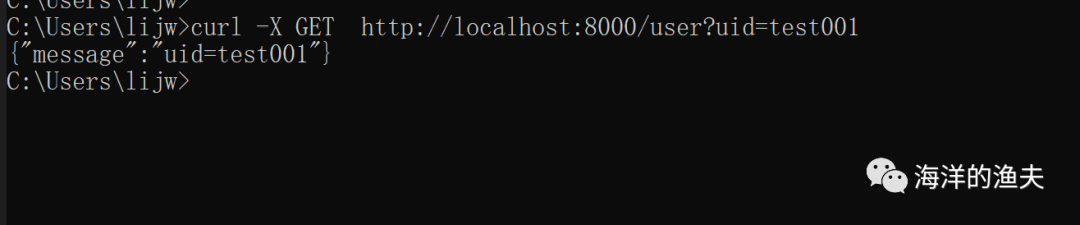
1695660194092 获取动态路由的路径参数
- // GET 获取path路径参数
- r.GET("/book/:bid", func(c *gin.Context) {
- // 获取path参数
- bid := c.Param("bid")
- // 返回响应信息
- c.JSON(http.StatusOK, gin.H{
- "message": fmt.Sprintf("bid=%s", bid),
- })
- })
测试 如下:
curl -X GET http://localhost:8000/book/bid001
1695660700658 路由响应数据:c.String() c.JSON() c.JSONP() c.XML() c.HTML()
c.String() 返回一个字符串
“
在上面的代码示例中,其实已经使用过了。
”- // c.String 响应内容为字符串
- r.GET("/news", func(c *gin.Context) {
- // 获取参数
- aid := c.Query("aid")
- // 返回字符串
- c.String(http.StatusOK, "aid=%s", aid)
- })
测试如下:
curl -X GET http://localhost:8000/news?aid=aid001
1695740680020 c.JSON() 返回 JSON 字符串
- r.GET("/json1", func(c *gin.Context) {
- // 使用 map[string]any 返回json内容
- c.JSON(200, map[string]any{
- "code": 0,
- "data": "json1",
- })
- })
- r.GET("/json2", func(c *gin.Context) {
- // gin.H 是 map[string]any的缩写
- c.JSON(200, gin.H{
- "code": 0,
- "data": "json2",
- })
- })
- r.GET("/json3", func(c *gin.Context) {
- // 使用结构体设置JSON结构
- var msg struct {
- Name string `json:"user"` // 使用`json:"user"` 定义json字符串返回的别名,例如Name在json字符串中为user
- Message string `json:"message"`
- Age int `json:"age"`
- }
- msg.Name = "lijw"
- msg.Message = "Hello world!"
- msg.Age = 18
- // 使用结构体对象,返回JSON数据
- c.JSON(http.StatusOK, msg)
- })
测试如下:
- curl -X GET http://localhost:8000/json1
- curl -X GET http://localhost:8000/json2
- curl -X GET http://localhost:8000/json3

1695741515412 c.JSONP() 返回回调JSON
- // c.JSONP() 返回回调JSON
- r.GET("/JSONP", func(c *gin.Context) {
- data := map[string]interface{}{ "foo": "bar", }
- // /JSONP?callback=x
- // 将输出:x({\"foo\":\"bar\"})
- c.JSONP(http.StatusOK, data)
- })
测试如下:
- curl -X GET http://localhost:8000/JSONP
- curl -X GET http://localhost:8000/JSONP?callback=x

1695741865466 c.XML() 返回 XML 数据
- // c.XML() 返回 XML 数据
- r.GET("/xml1", func(c *gin.Context) {
- // 方式一:手动拼接JSON
- c.XML(http.StatusOK, gin.H{
- "code": 0,
- "data": "xml1",
- })
- })
- r.GET("/xml2", func(c *gin.Context) {
- // 方法二:使用结构体
- type MessageRecord struct {
- Name string `xml:"name"`
- Message string `xml:"data"`
- Age int `xml:"age"`
- }
- var msg MessageRecord
- msg.Name = "lijw"
- msg.Message = "Hello world!"
- msg.Age = 18
- // 返回XML格式内容
- c.XML(http.StatusOK, msg)
- })
测试如下:
http://localhost:8000/xml1

1695742445725 http://localhost:8000/xml2

1695742466927 c.HTML 渲染模板
创建用于渲染的模板html

1695745504219 templates/index.html
Title index
渲染的内容: {{.title}}
