-
Java Stream 的常用API
Java Stream 的常用API
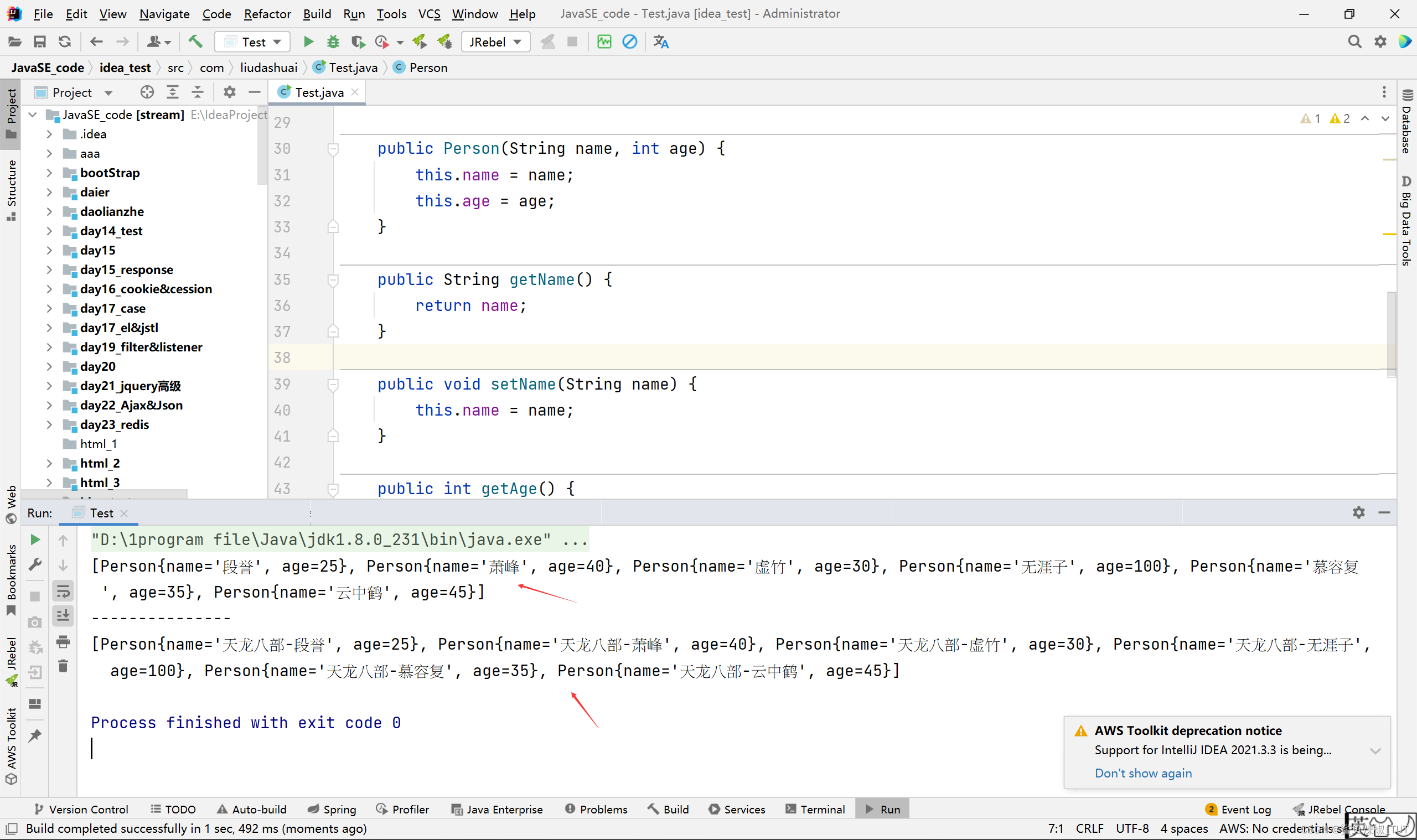
遍历(forEach)
package com.liudashuai; import java.util.ArrayList; import java.util.List; public class Test { public static void main(String[] args) { List<Person> userList = new ArrayList<>(); userList.add(new Person("段誉",25)); userList.add(new Person("萧峰",40)); userList.add(new Person("虚竹",30)); userList.add(new Person("无涯子",100)); userList.add(new Person("慕容复",35)); userList.add(new Person("云中鹤",45)); System.out.println(userList); System.out.println("---------------"); userList.stream().forEach(u -> { u.setName("天龙八部-" + u.getName()); }); System.out.println(userList); } } class Person{ private String name; private int age; public Person(String name, int age) { this.name = name; this.age = age; } public String getName() { return name; } public void setName(String name) { this.name = name; } public int getAge() { return age; } public void setAge(int age) { this.age = age; } @Override public String toString() { return "Person{" + "name='" + name + '\'' + ", age=" + age + '}'; } }- 1
- 2
- 3
- 4
- 5
- 6
- 7
- 8
- 9
- 10
- 11
- 12
- 13
- 14
- 15
- 16
- 17
- 18
- 19
- 20
- 21
- 22
- 23
- 24
- 25
- 26
- 27
- 28
- 29
- 30
- 31
- 32
- 33
- 34
- 35
- 36
- 37
- 38
- 39
- 40
- 41
- 42
- 43
- 44
- 45
- 46
- 47
- 48
- 49
- 50
- 51
- 52
- 53
- 54
- 55
- 56
- 57
- 58
筛选(filter)
package com.liudashuai; import java.util.ArrayList; import java.util.List; import java.util.stream.Collectors; public class Test { public static void main(String[] args) { List<Person> userList = new ArrayList<>(); userList.add(new Person("段誉",25)); userList.add(new Person("萧峰",40)); userList.add(new Person("虚竹",30)); userList.add(new Person("无涯子",100)); userList.add(new Person("慕容复",35)); userList.add(new Person("云中鹤",45)); List<Person> collect = userList.stream().filter(user -> (user.getAge() > 30 && user.getName().length() >2)).collect(Collectors.toList()); System.out.println(collect); } } class Person{ private String name; private int age; public Person(String name, int age) { this.name = name; this.age = age; } public String getName() { return name; } public void setName(String name) { this.name = name; } public int getAge() { return age; } public void setAge(int age) { this.age = age; } @Override public String toString() { return "Person{" + "name='" + name + '\'' + ", age=" + age + '}'; } }- 1
- 2
- 3
- 4
- 5
- 6
- 7
- 8
- 9
- 10
- 11
- 12
- 13
- 14
- 15
- 16
- 17
- 18
- 19
- 20
- 21
- 22
- 23
- 24
- 25
- 26
- 27
- 28
- 29
- 30
- 31
- 32
- 33
- 34
- 35
- 36
- 37
- 38
- 39
- 40
- 41
- 42
- 43
- 44
- 45
- 46
- 47
- 48
- 49
- 50
- 51
- 52
- 53
- 54
- 55

查找(findAny/findFirst)
package com.liudashuai; import java.util.ArrayList; import java.util.List; public class Test { public static void main(String[] args) { List<Person> userList = new ArrayList<>(); userList.add(new Person("段誉",25)); userList.add(new Person("萧峰",41)); userList.add(new Person("萧峰",42)); userList.add(new Person("萧峰",43)); userList.add(new Person("虚竹",30)); userList.add(new Person("无涯子",100)); userList.add(new Person("慕容复",35)); userList.add(new Person("云中鹤",45)); Person user = userList.stream().filter(u -> u.getName().equals("阿紫")).findAny().orElse(new Person("无",0)); System.out.println(user); Person user1 = userList.stream().filter(u -> u.getName().equals("阿紫")).findAny().orElse(null); System.out.println(user1); Person user2 = userList.stream().filter(u -> u.getName().equals("萧峰")).findAny().orElse(null); System.out.println(user2); Person user3 = userList.stream().filter(u -> u.getName().equals("萧峰")).findFirst().orElse(null); System.out.println(user3); } } class Person{ private String name; private int age; public Person(String name, int age) { this.name = name; this.age = age; } public String getName() { return name; } public void setName(String name) { this.name = name; } public int getAge() { return age; } public void setAge(int age) { this.age = age; } @Override public String toString() { return "Person{" + "name='" + name + '\'' + ", age=" + age + '}'; } }- 1
- 2
- 3
- 4
- 5
- 6
- 7
- 8
- 9
- 10
- 11
- 12
- 13
- 14
- 15
- 16
- 17
- 18
- 19
- 20
- 21
- 22
- 23
- 24
- 25
- 26
- 27
- 28
- 29
- 30
- 31
- 32
- 33
- 34
- 35
- 36
- 37
- 38
- 39
- 40
- 41
- 42
- 43
- 44
- 45
- 46
- 47
- 48
- 49
- 50
- 51
- 52
- 53
- 54
- 55
- 56
- 57
- 58
- 59
- 60
- 61
- 62
- 63

- findFirst() 方法根据命名,我们可以大致知道是获取Optional流中的第一个元素。
- findAny() 方法是获取Optional 流中任意一个,存在随机性,其实这里也是获取元素中的第一个,因为是并行流。
注意:在串行流中,findFirst和findAny返回同样的结果;但在并行流中,由于多个线程同时处理,findFirst可能会返回处理结果中的第一个元素,而findAny会返回最先处理完的元素。所以并行流里面使用findAny会更高效。这里并行下findFirst可能返回的不是第一个符合条件的元素吗?我不知道,但是,不重要,因为用得场景不多,因为多线程下,谁是处理结果中的第一个元素一般不重要,因为谁都可能是第一个,所以这里我不去了解findFirst是否可能返回的不是第一个符合条件的元素了。
总之就是串行流下,findFirst和findAny结果一样,并行流下,findAny效率更高,且并行流一般不在意谁是第一个,所以我建议平时使用findAny。
.orElse(null)表示如果一个都没找到返回null。
orElse()中可以塞默认值。如果找不到就会返回orElse中你自己设置的默认值。比如:上面的.orElse(new Person(“无”,0))
转换/去重(map/distinct)
package com.liudashuai; import java.util.ArrayList; import java.util.List; import java.util.stream.Collectors; public class Test { public static void main(String[] args) { List<Person> userList = new ArrayList<>(); userList.add(new Person("段誉",25)); userList.add(new Person("萧峰",41)); userList.add(new Person("萧峰",42)); userList.add(new Person("虚竹",30)); userList.add(new Person("无涯子",100)); userList.add(new Person("慕容复",35)); userList.add(new Person("云中鹤",45)); List<String> nameList = userList.stream().map(Person::getName).collect(Collectors.toList()); System.out.println(nameList); List<String> nameList2 = userList.stream().map(Person::getName).distinct().collect(Collectors.toList()); System.out.println(nameList2); } } class Person{ private String name; private int age; public Person(String name, int age) { this.name = name; this.age = age; } public String getName() { return name; } public void setName(String name) { this.name = name; } public int getAge() { return age; } public void setAge(int age) { this.age = age; } @Override public String toString() { return "Person{" + "name='" + name + '\'' + ", age=" + age + '}'; } }- 1
- 2
- 3
- 4
- 5
- 6
- 7
- 8
- 9
- 10
- 11
- 12
- 13
- 14
- 15
- 16
- 17
- 18
- 19
- 20
- 21
- 22
- 23
- 24
- 25
- 26
- 27
- 28
- 29
- 30
- 31
- 32
- 33
- 34
- 35
- 36
- 37
- 38
- 39
- 40
- 41
- 42
- 43
- 44
- 45
- 46
- 47
- 48
- 49
- 50
- 51
- 52
- 53
- 54
- 55
- 56

map的作用:是将输入一种类型,转化为另一种类型,通俗来说:就是将输入类型变成另一个类型。
跳过(limit/skip)
package com.liudashuai; import java.util.ArrayList; import java.util.List; import java.util.stream.Collectors; public class Test { public static void main(String[] args) { List<Person> userList = new ArrayList<>(); userList.add(new Person("段誉",25)); userList.add(new Person("萧峰",41)); userList.add(new Person("虚竹",30)); userList.add(new Person("无涯子",100)); userList.add(new Person("慕容复1",35)); userList.add(new Person("慕容复2",35)); userList.add(new Person("慕容复3",35)); //跳过第一个 List<Person> collect = userList.stream().skip(1).collect(Collectors.toList()); System.out.println(collect); //只输出前两个元素 List<Person> collect2 = userList.stream().limit(2).collect(Collectors.toList()); System.out.println(collect2); //跳过前3个元素,然后输出3个元素。可以代替sql中的limit。 List<Person> collect3 = userList.stream().skip(3).limit(3).collect(Collectors.toList()); System.out.println(collect3); } } class Person{ private String name; private int age; public Person(String name, int age) { this.name = name; this.age = age; } public String getName() { return name; } public void setName(String name) { this.name = name; } public int getAge() { return age; } public void setAge(int age) { this.age = age; } @Override public String toString() { return "Person{" + "name='" + name + '\'' + ", age=" + age + '}'; } }- 1
- 2
- 3
- 4
- 5
- 6
- 7
- 8
- 9
- 10
- 11
- 12
- 13
- 14
- 15
- 16
- 17
- 18
- 19
- 20
- 21
- 22
- 23
- 24
- 25
- 26
- 27
- 28
- 29
- 30
- 31
- 32
- 33
- 34
- 35
- 36
- 37
- 38
- 39
- 40
- 41
- 42
- 43
- 44
- 45
- 46
- 47
- 48
- 49
- 50
- 51
- 52
- 53
- 54
- 55
- 56
- 57
- 58
- 59
- 60
- 61

最大值/最小值/平均值(reduce)
package com.liudashuai; import java.util.ArrayList; import java.util.List; import java.util.Optional; import java.util.stream.Collectors; public class Test { public static void main(String[] args) { List<Person> userList = new ArrayList<>(); userList.add(new Person("段誉",25)); userList.add(new Person("萧峰",41)); userList.add(new Person("虚竹",30)); userList.add(new Person("无涯子",100)); userList.add(new Person("慕容复",35)); System.out.println("求和"); Integer sum1 = userList.stream().map(Person::getAge).reduce(0, Integer::sum); System.out.println(sum1); int sum2 = userList.stream().mapToInt(Person::getAge).sum(); System.out.println(sum2); Integer sum3 = userList.stream().collect(Collectors.summingInt(Person::getAge)); System.out.println(sum3); System.out.println("最大值"); Optional<Integer> max1 = userList.stream().map(Person::getAge).collect(Collectors.toList()) .stream().reduce((v1, v2) -> v1 > v2 ? v1 : v2); System.out.println(max1.get()); Optional<Integer> max2 = userList.stream().map(Person::getAge).collect(Collectors.toList()) .stream().reduce(Integer::max); System.out.println(max2.get()); int max3 = userList.stream().mapToInt(Person::getAge).max().getAsInt(); System.out.println(max3); System.out.println("最小值"); Optional<Integer> min = userList.stream().map(Person::getAge).collect(Collectors.toList()) .stream().reduce(Integer::min); System.out.println(min.get()); int min2 = userList.stream().mapToInt(Person::getAge).min().getAsInt(); System.out.println(min2); System.out.println("平均值"); Double averaging1 = userList.stream().collect(Collectors.averagingDouble(Person::getAge)); System.out.println(averaging1); double averaging2 = userList.stream().mapToInt(Person::getAge).average().getAsDouble(); System.out.println(averaging2); } } class Person{ private String name; private int age; public Person(String name, int age) { this.name = name; this.age = age; } public String getName() { return name; } public void setName(String name) { this.name = name; } public int getAge() { return age; } public void setAge(int age) { this.age = age; } @Override public String toString() { return "Person{" + "name='" + name + '\'' + ", age=" + age + '}'; } }- 1
- 2
- 3
- 4
- 5
- 6
- 7
- 8
- 9
- 10
- 11
- 12
- 13
- 14
- 15
- 16
- 17
- 18
- 19
- 20
- 21
- 22
- 23
- 24
- 25
- 26
- 27
- 28
- 29
- 30
- 31
- 32
- 33
- 34
- 35
- 36
- 37
- 38
- 39
- 40
- 41
- 42
- 43
- 44
- 45
- 46
- 47
- 48
- 49
- 50
- 51
- 52
- 53
- 54
- 55
- 56
- 57
- 58
- 59
- 60
- 61
- 62
- 63
- 64
- 65
- 66
- 67
- 68
- 69
- 70
- 71
- 72
- 73
- 74
- 75
- 76
- 77
- 78
- 79
- 80
- 81
- 82
- 83
- 84
- 85
- 86
- 87
- 88

mapToInt是 Stream API中一个非常有用的方法。它的主要作用是将一个 Stream 转换成一个IntStream,使得可以更加方便地对数字流进行处理。
IntStream中的一些常用方法如下:
- sum()
- max()
- min()
- average()
这些方法上面案例里面也有演示。
如果要操作的元素不是int,是double,我们也可以用mapToDouble也行。
package com.liudashuai; import java.util.ArrayList; import java.util.List; public class Test { public static void main(String[] args) { List<Person> userList = new ArrayList<>(); userList.add(new Person("段誉",161.5)); userList.add(new Person("萧峰",171.2)); userList.add(new Person("虚竹",167.2)); userList.add(new Person("无涯子",184.2)); userList.add(new Person("慕容复",178.0)); double sum = userList.stream().mapToDouble(Person::getHeight).sum();//和 double max = userList.stream().mapToDouble(Person::getHeight).max().getAsDouble();//最高 double min = userList.stream().mapToDouble(Person::getHeight).min().getAsDouble();//最矮 double average = userList.stream().mapToDouble(Person::getHeight).average().getAsDouble();//平均 System.out.println(sum); System.out.println(max); System.out.println(min); System.out.println(average); } } class Person{ private String name; private double height; public Person(String name, double height) { this.name = name; this.height = height; } public String getName() { return name; } public void setName(String name) { this.name = name; } public double getHeight() { return height; } public void setHeight(double height) { this.height = height; } @Override public String toString() { return "Person{" + "name='" + name + '\'' + ", height=" + height + '}'; } }- 1
- 2
- 3
- 4
- 5
- 6
- 7
- 8
- 9
- 10
- 11
- 12
- 13
- 14
- 15
- 16
- 17
- 18
- 19
- 20
- 21
- 22
- 23
- 24
- 25
- 26
- 27
- 28
- 29
- 30
- 31
- 32
- 33
- 34
- 35
- 36
- 37
- 38
- 39
- 40
- 41
- 42
- 43
- 44
- 45
- 46
- 47
- 48
- 49
- 50
- 51
- 52
- 53
- 54
- 55
- 56
- 57

统计(count/counting)
package com.liudashuai; import java.util.ArrayList; import java.util.List; import java.util.stream.Collectors; public class Test { public static void main(String[] args) { List<Person> userList = new ArrayList<>(); userList.add(new Person("段誉",25)); userList.add(new Person("萧峰",41)); userList.add(new Person("虚竹",30)); userList.add(new Person("无涯子",100)); userList.add(new Person("虚竹",30)); userList.add(new Person("慕容复",35)); Long collect = userList.stream().filter(p -> p.getName() == "虚竹").collect(Collectors.counting()); System.out.println(collect); long count = userList.stream().filter(p -> p.getAge() >= 50).count(); System.out.println(count); } } class Person{ private String name; private int age; public Person(String name, int age) { this.name = name; this.age = age; } public String getName() { return name; } public void setName(String name) { this.name = name; } public int getAge() { return age; } public void setAge(int age) { this.age = age; } @Override public String toString() { return "Person{" + "name='" + name + '\'' + ", age=" + age + '}'; } }- 1
- 2
- 3
- 4
- 5
- 6
- 7
- 8
- 9
- 10
- 11
- 12
- 13
- 14
- 15
- 16
- 17
- 18
- 19
- 20
- 21
- 22
- 23
- 24
- 25
- 26
- 27
- 28
- 29
- 30
- 31
- 32
- 33
- 34
- 35
- 36
- 37
- 38
- 39
- 40
- 41
- 42
- 43
- 44
- 45
- 46
- 47
- 48
- 49
- 50
- 51
- 52
- 53
- 54
- 55
- 56

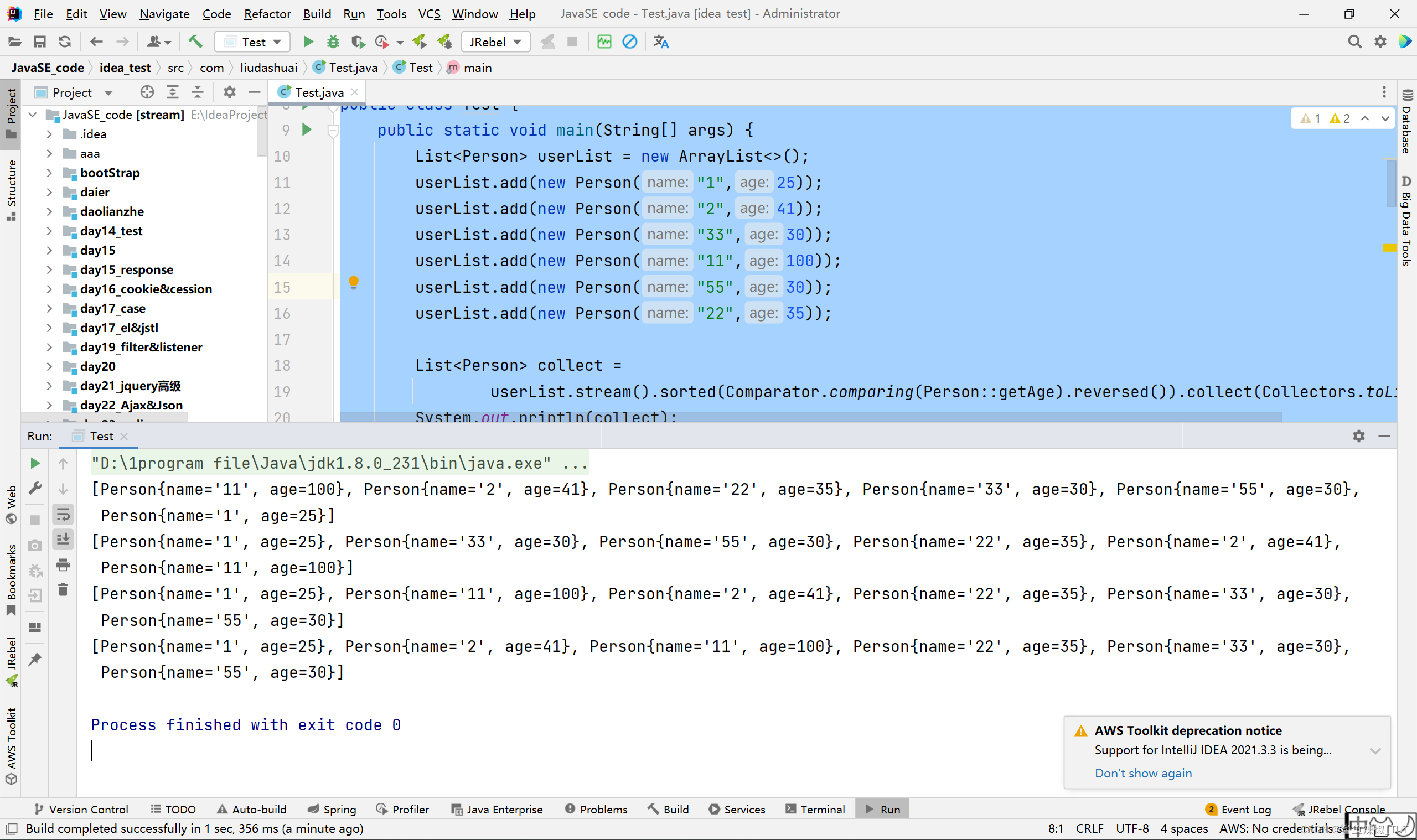
排序(sorted)
package com.liudashuai; import java.util.ArrayList; import java.util.Comparator; import java.util.List; import java.util.stream.Collectors; public class Test { public static void main(String[] args) { List<Person> userList = new ArrayList<>(); userList.add(new Person("1",25)); userList.add(new Person("2",41)); userList.add(new Person("33",30)); userList.add(new Person("11",100)); userList.add(new Person("55",30)); userList.add(new Person("22",35)); List<Person> collect = userList.stream().sorted(Comparator.comparing(Person::getAge).reversed()).collect(Collectors.toList()); System.out.println(collect); List<Person> collect2 = userList.stream().sorted(Comparator.comparing(Person::getAge)).collect(Collectors.toList()); System.out.println(collect2); List<Person> collect3 = userList.stream().sorted(Comparator.comparing(Person::getName)).collect(Collectors.toList()); System.out.println(collect3); List<Person> collect4 = userList.stream().sorted((e1, e2) -> { return Integer.compare(Integer.parseInt(e1.getName()), Integer.parseInt(e2.getName())); }).collect(Collectors.toList()); System.out.println(collect4); } } class Person{ private String name; private int age; public Person(String name, int age) { this.name = name; this.age = age; } public String getName() { return name; } public void setName(String name) { this.name = name; } public int getAge() { return age; } public void setAge(int age) { this.age = age; } @Override public String toString() { return "Person{" + "name='" + name + '\'' + ", age=" + age + '}'; } }- 1
- 2
- 3
- 4
- 5
- 6
- 7
- 8
- 9
- 10
- 11
- 12
- 13
- 14
- 15
- 16
- 17
- 18
- 19
- 20
- 21
- 22
- 23
- 24
- 25
- 26
- 27
- 28
- 29
- 30
- 31
- 32
- 33
- 34
- 35
- 36
- 37
- 38
- 39
- 40
- 41
- 42
- 43
- 44
- 45
- 46
- 47
- 48
- 49
- 50
- 51
- 52
- 53
- 54
- 55
- 56
- 57
- 58
- 59
- 60
- 61
- 62
- 63
- 64
- 65
- 66
- 67
- 68
-
相关阅读:
高级数据结构—线段树(一)
Android 9 固定以太网MAC地址(cmdline)
腾讯云服务器安装配置rabbitmq
C++ 算法学习 之 vector assign
轻取软考45分之软考信息系统项目管理师项目成本管理章节学习笔记
刷题记录(NC202589 魔法数字,NC235247 Sramoc问题)
Java UML 类图
将asp.net core程序部署到Linux服务器上(1)
接口自动化之测试数据动态生成并替换
使用nodejs的wxmnode模块,开发一个微信自动监控提醒功能,做个天气预报。
- 原文地址:https://blog.csdn.net/m0_59176231/article/details/134389120
