-
若依前后分离版框架下Springboot java引入Mqtt接受发送消息
**这只是其中一种而且是粗浅的接、发消息。
同步机制还要跟搞物联网的同事沟通确认去看看能不能实现 或者是设备比较多的情况下 不会去使用同步机制
首先pom文件 引入依赖
**org.eclipse.paho org.eclipse.paho.client.mqttv3 1.2.5 - 1
- 2
- 3
- 4
- 5
其次配置文件mqtt配置,我这是yml,其他配置文件写法需要改动下
mqtt: username: ****** # 用户名 password: ****** # 密码 hostUrl: tcp://******:1883 # tcp://ip:端口 clientId: clientId # 客户端id defaultTopic: electric/#,test # 订阅主题 electric/#表示以electric/开头的主题都可以接受到 timeout: 100 # 超时时间 (单位:秒) keepalive: 60 # 心跳 (单位:秒) enabled: true # 是否使用mqtt功能- 1
- 2
- 3
- 4
- 5
- 6
- 7
- 8
- 9
**接下来到了代码层面了
先创建一个yml文件的实体类 MqttConfig
prefix = 这里地址看你自己的配置
@ConfigurationProperties(prefix = “mqtt”)
**import com.ruoyi.common.utils.StringUtils; import org.springframework.beans.factory.annotation.Autowired; import org.springframework.boot.context.properties.ConfigurationProperties; import org.springframework.context.annotation.Bean; import org.springframework.stereotype.Component; @Component @ConfigurationProperties(prefix = "mqtt") public class MqttConfig { @Autowired private MqttPushClient mqttPushClient; /** * 用户名 */ private String username; /** * 密码 */ private String password; /** * 连接地址 */ private String hostUrl; /** * 客户Id */ private String clientId; /** * 默认连接话题 */ private String defaultTopic; /** * 超时时间 */ private int timeout; /** * 保持连接数 */ private int keepalive; /** * mqtt功能使能 */ private boolean enabled; private boolean retained; /** * qos */ private int qos; public String getUsername() { return username; } public void setUsername(String username) { this.username = username; } public String getPassword() { return password; } public void setPassword(String password) { this.password = password; } public String getHostUrl() { return hostUrl; } public void setHostUrl(String hostUrl) { this.hostUrl = hostUrl; } public String getClientId() { return clientId; } public void setClientId(String clientId) { this.clientId = clientId; } public String getDefaultTopic() { return defaultTopic; } public void setDefaultTopic(String defaultTopic) { this.defaultTopic = defaultTopic; } public int getTimeout() { return timeout; } public void setTimeout(int timeout) { this.timeout = timeout; } public int getKeepalive() { return keepalive; } public void setKeepalive(int keepalive) { this.keepalive = keepalive; } public boolean isEnabled() { return enabled; } public void setEnabled(boolean enabled) { this.enabled = enabled; } public int getQos() { return qos; } public void setQos(int qos) { this.qos = qos; } @Bean public MqttPushClient getMqttPushClient() { if(enabled == true){ String mqtt_topic[] = StringUtils.split(defaultTopic, ","); mqttPushClient.connect(hostUrl, clientId, username, password, timeout, keepalive);//连接 for(int i=0; i- 1
- 2
- 3
- 4
- 5
- 6
- 7
- 8
- 9
- 10
- 11
- 12
- 13
- 14
- 15
- 16
- 17
- 18
- 19
- 20
- 21
- 22
- 23
- 24
- 25
- 26
- 27
- 28
- 29
- 30
- 31
- 32
- 33
- 34
- 35
- 36
- 37
- 38
- 39
- 40
- 41
- 42
- 43
- 44
- 45
- 46
- 47
- 48
- 49
- 50
- 51
- 52
- 53
- 54
- 55
- 56
- 57
- 58
- 59
- 60
- 61
- 62
- 63
- 64
- 65
- 66
- 67
- 68
- 69
- 70
- 71
- 72
- 73
- 74
- 75
- 76
- 77
- 78
- 79
- 80
- 81
- 82
- 83
- 84
- 85
- 86
- 87
- 88
- 89
- 90
- 91
- 92
- 93
- 94
- 95
- 96
- 97
- 98
- 99
- 100
- 101
- 102
- 103
- 104
- 105
- 106
- 107
- 108
- 109
- 110
- 111
- 112
- 113
- 114
- 115
- 116
- 117
- 118
- 119
- 120
- 121
- 122
- 123
- 124
- 125
- 126
- 127
- 128
- 129
- 130
- 131
- 132
- 133
- 134
- 135
- 136
- 137
- 138
**这里在创建 MqttPushClient 文件
去链接客户端、发消息、订阅主题 功能都在这里
**import org.eclipse.paho.client.mqttv3.*; import org.eclipse.paho.client.mqttv3.persist.MemoryPersistence; import org.slf4j.Logger; import org.slf4j.LoggerFactory; import org.springframework.beans.factory.annotation.Autowired; import org.springframework.stereotype.Component; @Component public class MqttPushClient { private static final Logger logger = LoggerFactory.getLogger(MqttPushClient.class); @Autowired private PushCallback pushCallback; private static MqttClient client; private static MqttClient getClient() { return client; } private static void setClient(MqttClient client) { MqttPushClient.client = client; } /** * 客户端连接 * * @param host ip+端口 * @param clientID 客户端Id * @param username 用户名 * @param password 密码 * @param timeout 超时时间 * @param keepalive 保留数 */ public void connect(String host, String clientID, String username, String password, int timeout, int keepalive) { MqttClient client; try { client = new MqttClient(host, clientID, new MemoryPersistence()); MqttConnectOptions options = new MqttConnectOptions(); options.setCleanSession(true); options.setUserName(username); options.setPassword(password.toCharArray()); options.setConnectionTimeout(timeout); options.setKeepAliveInterval(keepalive); MqttPushClient.setClient(client); try { client.setCallback(pushCallback); client.connect(options); } catch (Exception e) { e.printStackTrace(); } } catch (Exception e) { e.printStackTrace(); } } /** * 发布消息 * * @param pubTopic 主题 * @param message 内容 * @param qos 连接方式 */ public static void publishMessage(String pubTopic, String message, int qos) { System.out.println("发布消息 "+client.isConnected()); System.out.println("id:"+client.getClientId()); MqttMessage mqttMessage = new MqttMessage(); mqttMessage.setQos(qos); mqttMessage.setPayload(message.getBytes()); MqttTopic topic = client.getTopic(pubTopic); if(null != topic) { try { MqttDeliveryToken publish = topic.publish(mqttMessage); if(!publish.isComplete()) { logger.info("发布消息成功"); } } catch (MqttException e) { e.printStackTrace(); } } } /** * 订阅某个主题 * * @param topic 主题 * @param qos 连接方式 */ public static void subscribe(String topic, int qos) { logger.info("开始订阅主题" + topic); try { MqttPushClient.getClient().subscribe(topic, qos); } catch (MqttException e) { e.printStackTrace(); } } }- 1
- 2
- 3
- 4
- 5
- 6
- 7
- 8
- 9
- 10
- 11
- 12
- 13
- 14
- 15
- 16
- 17
- 18
- 19
- 20
- 21
- 22
- 23
- 24
- 25
- 26
- 27
- 28
- 29
- 30
- 31
- 32
- 33
- 34
- 35
- 36
- 37
- 38
- 39
- 40
- 41
- 42
- 43
- 44
- 45
- 46
- 47
- 48
- 49
- 50
- 51
- 52
- 53
- 54
- 55
- 56
- 57
- 58
- 59
- 60
- 61
- 62
- 63
- 64
- 65
- 66
- 67
- 68
- 69
- 70
- 71
- 72
- 73
- 74
- 75
- 76
- 77
- 78
- 79
- 80
- 81
- 82
- 83
- 84
- 85
- 86
- 87
- 88
- 89
- 90
- 91
- 92
- 93
- 94
- 95
- 96
- 97
- 98
- 99
- 100
- 101
**再创建一个继承回调方法的接口 PushCallback
**package com.ruoyi.util.mqttUtil; import com.alibaba.fastjson2.JSONObject; import org.eclipse.paho.client.mqttv3.IMqttDeliveryToken; import org.eclipse.paho.client.mqttv3.MqttCallback; import org.eclipse.paho.client.mqttv3.MqttClient; import org.eclipse.paho.client.mqttv3.MqttMessage; import org.slf4j.Logger; import org.slf4j.LoggerFactory; import org.springframework.beans.factory.annotation.Autowired; import org.springframework.stereotype.Component; @Component public class PushCallback implements MqttCallback { private static final Logger logger = LoggerFactory.getLogger(MqttPushClient.class); @Autowired private MqttConfig mqttConfig; private static MqttClient client; private static String _topic; private static String _qos; private static String _msg; @Override public void connectionLost(Throwable throwable) { // 连接丢失后,一般在这里面进行重连 logger.info("连接断开,可以做重连"); if (client == null || !client.isConnected()) { mqttConfig.getMqttPushClient(); } } @Override public void messageArrived(String topic, MqttMessage mqttMessage) throws Exception { // subscribe后得到的消息会执行到这里面 logger.info("接收消息主题 : " + topic); logger.info("接收消息Qos : " + mqttMessage.getQos()); logger.info("接收消息内容 : " + new String(mqttMessage.getPayload())); _topic = topic; _qos = mqttMessage.getQos()+""; _msg = new String(mqttMessage.getPayload()); } @Override public void deliveryComplete(IMqttDeliveryToken iMqttDeliveryToken) { logger.info("发布消息成功"); //发布消息成功之后 才会调用这里 大家可以仔细看看token里面 后续同步机制也是利用这个token去完成 logger.info("deliveryComplete---------" + iMqttDeliveryToken.isComplete()); } //别的Controller层会调用这个方法来 获取 接收到的硬件数据 public String receive() { JSONObject jsonObject = new JSONObject(); jsonObject.put("topic", _topic); jsonObject.put("qos", _qos); jsonObject.put("msg", _msg); return jsonObject.toString(); } }- 1
- 2
- 3
- 4
- 5
- 6
- 7
- 8
- 9
- 10
- 11
- 12
- 13
- 14
- 15
- 16
- 17
- 18
- 19
- 20
- 21
- 22
- 23
- 24
- 25
- 26
- 27
- 28
- 29
- 30
- 31
- 32
- 33
- 34
- 35
- 36
- 37
- 38
- 39
- 40
- 41
- 42
- 43
- 44
- 45
- 46
- 47
- 48
- 49
- 50
- 51
- 52
- 53
- 54
- 55
- 56
- 57
- 58
- 59
- 60
- 61
- 62
- 63
- 64
到这就需要去下载个 MQTTX 跟服务器直接互相接发消息了
下图红框内的随意填写 服务器地址、端口、用户名、密码使用java代码配置文件里面的


往下就是连接上 添加一个订阅,记得 这个订阅要在你在配置文件里面哦 什么名字都ok /#相当于模糊查询

好了 这里可以启动项目了 控制台会打印咱们订阅的主题的,也就是说这些主题给咱们发消息 会直接被咱们接受的

启动项目 由于咱们的配置文件里订阅了test这个主题 我在mqttx里面直接给 test这个主题发送信息

控制台自动打印 订阅的test主题信息

**到这里的话 接受消息就完事了 就要搞下发消息了
随便找个controller弄个请求搞一下 **@RequestMapping("/send") @ResponseBody private ResponseEntitysend() throws MqttException { System.out.println("我是springboot发送的数据"); //三个参数 第一个是什么主题,第二个发送内容,第三个是 MqttPushClient.publishMessage("clientId1","-===============",1); return new ResponseEntity<>("OK", HttpStatus.OK); } - 1
- 2
- 3
- 4
- 5
- 6
- 7
- 8

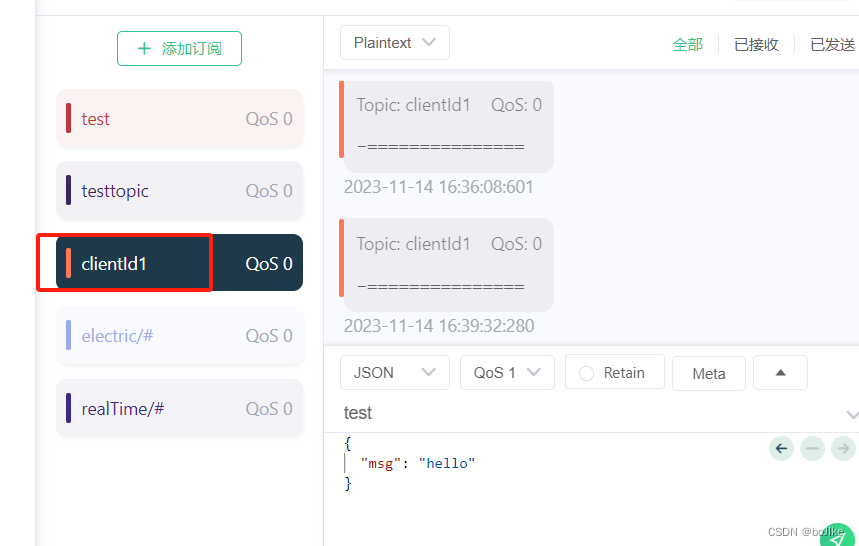
已分享完毕,只是很基础的应用 另过几天如果项目有需求会在这继续完善同步mqtt请求的后续 如果接受不到消息 一定要看看订阅的主题对应起来没

卡尔曼滤波器的推导
Python编程从入门到实践 第二章:变量和简单数据类型 练习答案记录
MyBatis-Plus排除不必要的字段
Java爬取哔哩哔哩视频(可视化)
【智能优化算法-灰狼算法】基于狩猎 (DLH) 搜索策略的灰狼算法求解单目标优化问题附matlab代码
SpringBoot项目使用EasyPoi实现导入导出,就是这么的丝滑
day39-网络编程01
asp.net blazor集成ReactiveUI.Blazor
飞码LowCode前端技术系列(二):如何便捷配置出页面 | 京东云技术团队