-
手摸手入门Springboot2.7集成Swagger2.9.2
环境介绍
技术栈
springboot+mybatis-plus+mysql+oracle+Swagger
软件
版本
mysql
8
IDEA
IntelliJ IDEA 2022.2.1
JDK
1.8
Spring Boot
2.7.13
mybatis-plus
3.5.3.2
REST软件架构风格
REST即表述性状态传递(英文:Representational State Transfer,简称REST,中文:表示层状态转移)是Roy Fielding博士在2000年他的博士论文中提出来的一种软件架构风格。它是一种针对网络应用的设计和开发方式,可以降低开发的复杂性,提高系统的可伸缩性。
在三种主流的Web服务实现方案中,因为REST模式的Web服务与复杂的SOAP和XML-RPC对比来讲明显的更加简洁,越来越多的web服务开始采用REST风格设计和实现。例如,Amazon.com提供接近REST风格的Web服务进行图书查找;雅虎提供的Web服务也是REST风格的。
REST中的要素:用REST表示资源和对资源的操作。在互联网中,表示一个资源或者一个操作。
资源用URL表示。
资源:查询资源、创建资源、更新资源、删除资源
表示层(视图层)状态转移:显示资源,通过视图页面,jsp等。
状态:资源变化。 转移:资源变化。
RESTful的注解
@PathVariable注解:获取url中的数据
@GetMapping注解
接收和处理get请求。等同于RequestMapping(method=RequestMethod.GET)
@PostMapping注解
接收和处理Post请求。等同于RequestMapping(method=RequestMethod.POST)
@PutMapping注解, Request method 'POST' and 'GET' not supported
支持put请求方式。等同于RequestMapping(method=RequestMethod.PUT)
@DeleteMapping注解 Request method 'POST' and 'GET' not supported
接收delete方式的请求,等同于RequestMapping(method=RequestMethod.DELETE)
用例
- @RestController
- public class RestControllerDemo {
- @Resource
- private StaffService service;
- /**
- * @PathVariable:获取url中的数据
- * value :路径变量名
- * 位置: 放在控制器方法的形参前面
- * {id}定义路径变量
- */
- @GetMapping("/Info/{id}")
- public String getInfo(@PathVariable("id") int id){
- //根据id查询信息
- Staff staff = service.selectById(id);
- return staff.getId()+staff.getName();
- }
- @PostMapping("/create/Staff/{id}/{name}")
- public String createStaff(@PathVariable("id") int id,@PathVariable String name){
- //执行sql----
- return "获得到数据:"+id+" : "+name;
- }
- @PutMapping("/modifyStaff/{id}/{name}")
- public String modifyStaff(@PathVariable("id") int id,@PathVariable String name){
- //执行sql语句 UPDATE staff SET name=#{name} WHERE id=#{id}
- return "更新了:"+id+" : "+name;
- }
- @DeleteMapping("/Delete/{id}")
- public String DelStaff(@PathVariable("id") int id){
- //执行sql语句 UPDATE staff SET name=#{name} WHERE id=#{id}
- return "id为"+id+"的用户被删除了";
- }
- }
建议使用Postman测试get,post,put,delete
配置html支持put和delect请求方式。
HiddenHttpMethodFilter支持将post请求转为put、delete请求Springboot框架启用HiddenHttpMethodFilter
application.properties配置
- #启用HiddenHttpMethodFilter过滤器
- spring.mvc.hiddenmethod.filter.enabled=true
Html页面
- Put
- <form action="/boot/modifyStaff/003/张三" method="post">
- <input type="hidden" name="_method" value="put">
- <input type="submit" value="提交">
- </form>
- Delete
- <form action="/boot/Delete/001" method="post">
- <input type="hidden" name="_method" value="delete">
- <input type="submit" value="提交">
- </form>
Controller
RUL:地址必须唯一
- @PutMapping("/modifyStaff/{id}/{name}")
- public String modifyStaff(@PathVariable("id") int id,@PathVariable String name){
- //执行sql语句 UPDATE staff SET name=#{name} WHERE id=#{id}
- return "更新了:"+id+" : "+name;
- }
- @DeleteMapping("/Delete/{id}")
- public String DelStaff(@PathVariable("id") int id){
- //执行sql语句 DELETE
- return "id为"+id+"的用户被删除了";
- }
@RestController注解
@Controller与@ResponseBody的组合
Swagger是一个规范和完整的框架,用于生成、描述、调用和可视化 RESTFUL风格的Web服务,是非常流行的API表达工具。
Swagger能够自动生成完善的 RESTFUL AP文档,,同时并根据后台代码的修改同步更新,同时提供完整的测试页面来调试API。
Springboot2.7集成Swagger2.9.2


pom.xml
- <dependencies>
- <dependency>
- <groupId>io.springfox</groupId>
- <artifactId>springfox-swagger2</artifactId>
- <version>2.9.2</version>
- </dependency>
- <dependency>
- <groupId>io.springfox</groupId>
- <artifactId>springfox-swagger-ui</artifactId>
- <version>2.9.2</version>
- </dependency>
- <dependency>
- <groupId>org.springframework.boot</groupId>
- <artifactId>spring-boot-starter-web</artifactId>
- </dependency>
- <dependency>
- <groupId>com.baomidou</groupId>
- <artifactId>mybatis-plus-boot-starter</artifactId>
- <version>3.5.4.1</version>
- </dependency>
- <dependency>
- <groupId>org.springframework.boot</groupId>
- <artifactId>spring-boot-devtools</artifactId>
- <scope>runtime</scope>
- <optional>true</optional>
- </dependency>
- <dependency>
- <groupId>com.mysql</groupId>
- <artifactId>mysql-connector-j</artifactId>
- <scope>runtime</scope>
- </dependency>
- <dependency>
- <groupId>com.oracle.database.jdbc</groupId>
- <artifactId>ojdbc8</artifactId>
- <scope>runtime</scope>
- </dependency>
- <dependency>
- <groupId>org.springframework.boot</groupId>
- <artifactId>spring-boot-configuration-processor</artifactId>
- <optional>true</optional>
- </dependency>
- <dependency>
- <groupId>org.projectlombok</groupId>
- <artifactId>lombok</artifactId>
- <optional>true</optional>
- </dependency>
- <dependency>
- <groupId>org.springframework.boot</groupId>
- <artifactId>spring-boot-starter-test</artifactId>
- <scope>test</scope>
- </dependency>
- <dependency>
- <groupId>com.alibaba</groupId>
- <artifactId>druid-spring-boot-starter</artifactId>
- <version>1.1.14</version>
- </dependency>
- <dependency>
- <groupId>com.baomidou</groupId>
- <artifactId>dynamic-datasource-spring-boot-starter</artifactId>
- <version>3.5.0</version>
- </dependency>
- <dependency>
- <groupId>p6spy</groupId>
- <artifactId>p6spy</artifactId>
- <version>3.9.1</version>
- </dependency>
- </dependencies>
application.yml

- hxiot:
- swagger2:
- # 是否开启swagger2 开启为true,关闭为false
- enable: true
- management:
- endpoints:
- web:
- exposure:
- include: "*"
- endpoint:
- prometheus:
- enabled: true
- health:
- show-details: always
- metrics:
- export:
- prometheus:
- enabled: true
- server:
- port: 8007
- spring:
- mvc:
- path match:
- matching-strategy: ant_path_matcher
- profiles:
- active: dev
- application:
- name: ProvideAPIServices
- datasource:
- dynamic:
- primary: sys2 #设置默认的数据源或者数据源组,默认值即为master
- strict: false #严格匹配数据源,默认false. true未匹配到指定数据源时抛异常,false使用默认数据源
- datasource:
- oracle:
- username: system
- password: pwd
- url: jdbc:oracle:thin:@0.0.0.0:1521:orcl
- driver-class-name: oracle.jdbc.driver.OracleDriver
- # driver-class-name: com.mysql.jdbc.Driver
- wms:
- url: jdbc:p6spy:mysql://0.0.0.0:3306/Wms?useUnicode=true&characterEncoding=UTF-8
- username: root
- password: pwd
- driver-class-name: com.p6spy.engine.spy.P6SpyDriver
- # driver-class-name: com.mysql.jdbc.Driver
- sys2:
- username: root
- password: pwd
- url: jdbc:p6spy:mysql://127.0.0.1:3306/sys?serverTimezone=Asia/Shanghai&useUnicode=true&characterEncoding=UTF-8
- driver-class-name: com.p6spy.engine.spy.P6SpyDriver
- mybatis-plus:
- configuration:
- #输出日志
- log-impl: org.apache.ibatis.logging.stdout.StdOutImpl
- #配置映射规则
- map-underscore-to-camel-case: true #表示支持下划线到驼蜂的映射
- #隐藏mybatis图标
- global-config:
- banner: false
- db-config:
- logic-delete-field: status
- logic-not-delete-value: 1
- logic-delete-value: 0
- #
- #mybatis:
- # mapper-locations=classpath: com/example/dao/*.xml
demoController

Controller需符合REST风格
- @Api(value = "ApiTest")
- @RestController("/demo")
- public class demoController {
- @Autowired
- private TAddressServiceImpl tAddressService;
- @ApiOperation(value = "测试")
- @GetMapping("/test")
- public List
setTAddressService() { - return tAddressService.list();
- }
- @ApiOperation(value = "上传文件")
- @PutMapping("/upload")
- //FileUploadDemo
- public void fileUp(@ApiParam("文件") MultipartFile file, HttpServletRequest request) throws IOException {
- //获取文件名称
- String originalFilename = file.getOriginalFilename();
- System.out.println(originalFilename);
- //获取web服务器运行目录
- String currentPath = request.getServletContext().getRealPath("/upload/");
- System.out.println(currentPath);
- saveFile(file,currentPath);
- System.out.println("ok");
- }
- public void saveFile(MultipartFile file,String path) throws IOException {
- File dir = new File(path);
- if (!dir.exists()) {
- dir.mkdirs();
- }
- File newFile = new File(path+file.getOriginalFilename());
- file.transferTo(newFile);
- }
- }
Configuration
- @Configuration
- @EnableSwagger2
- public class SwaggerConfig {
- /**
- * Docket
- */
- @Bean
- public Docket createRestAPi() {
- // 构造函数传入初始化规范,这是swagger2规范
- return new Docket(DocumentationType.SWAGGER_2)
- //.pathMapping("/")
- // apiInfo:添加api的详情信息,参数为ApiInfo类型的参数,这个参数包含了基本描述信息:比如标题、描述、版本之类的,开发中一般都是自定义这些信息
- .apiInfo(apiInfo())
- // select、apis、paths、build 这四个是一组的,组合使用才能返回一个Docket实例对象,其中apis和paths是可选的。
- .select()
- // apis:添加过滤条件。RequestHandlerSelectors中有很多过滤方式;RequestHandlerSelectors.withMethodAnnotation(ApiOperation.class):加了ApiOperation注解的类,生成接口文档
- //扫描com.qgs.controller包下的API交给Swagger2管理
- .apis(RequestHandlerSelectors.any())
- .paths(PathSelectors.any())
- // paths:控制那些路径的api会被显示出来。
- //.paths(PathSelecto1rs.any())
- .build()
- // 是否开启swagger 如果是false,浏览器将无法访问,默认是true
- .enable(true);
- }
- /**
- * ApiInfo
- */
- private ApiInfo apiInfo() {
- return new ApiInfoBuilder()
- // 标题内容
- .title("ProvideAPIServicesAPI文档")
- // 描述内容
- .description("接口文档详情信息")
- // 版本
- .version("1.0")
- 联系人信息
- //.contact(new Contact("", "", ""))
- // 许可
- //.license("")
- // 许可链接
- //.licenseUrl("")
- .build();
- }

http://192.168.1.8:8007/swagger-ui.html
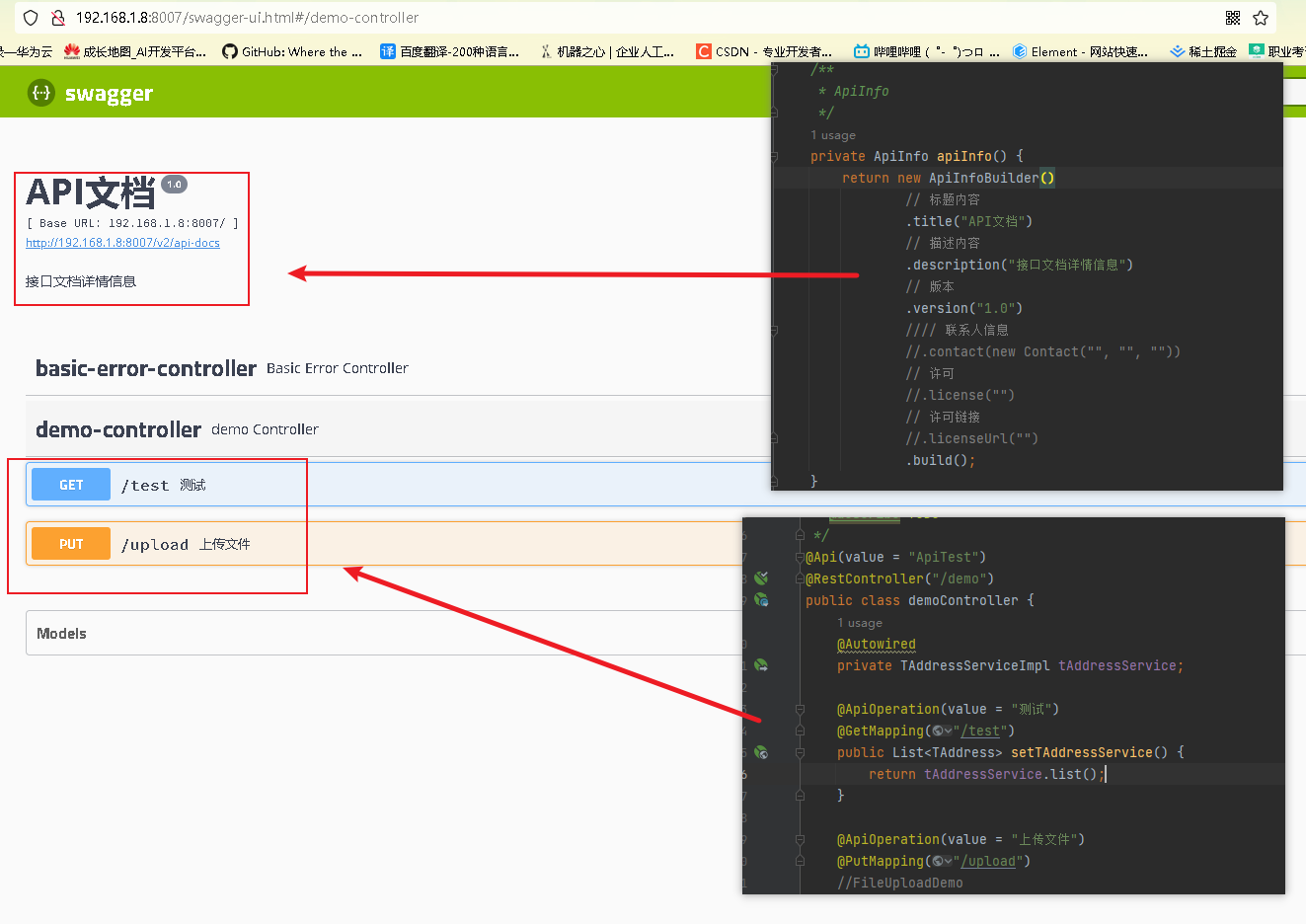
可能遇到的问题
org.springframework.context.ApplicationContextException: Failed to start bean 'documentationPluginsBootstrapper'; nested exception is java.lang.NullPointerException
Springboot2.7与Swagger3.0冲突,将Swagger降低降低
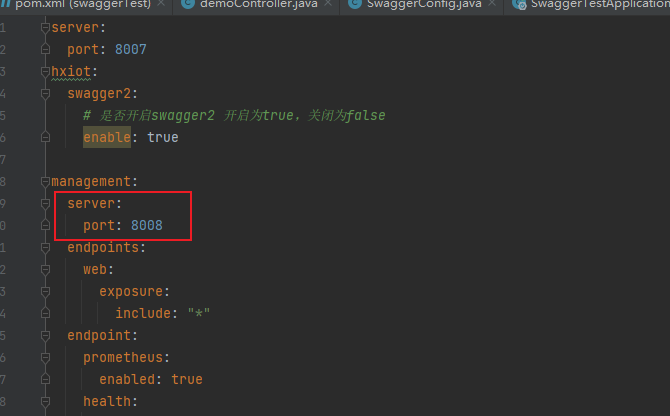
Springboot2.7与Swagger3.0冲突,将Swagger降低降低
-
相关阅读:
深入了解代理服务器:Socks5、IP代理与网络安全
通过模糊测试寻找车载蓝牙的安全漏洞
【PostgreSQL启动,停止命令(重启)】
程序员造轮子:一个基于posix线程库的互斥类(源码)
Python for循环
Graalvm-21 Windows初体验
PYTHON 自动化办公:更改图片后缀
Mysql 45讲学习笔记(十一)字符串字段怎么加索引
全面解析缓存应用经典问题
一款强大的子域名收集工具(OneForAll)
- 原文地址:https://blog.csdn.net/weixin_47268883/article/details/134430651
