-
适用于初学者的 .NET MAUI
适用于初学者的 .NET MAUI | Microsoft Learn
记录微软Learn中用到的代码。文章比较粗糙,大部分是项目代码粘贴。想详细学习的可到上面的链接学习,代码可以从这里复制后直接运行。
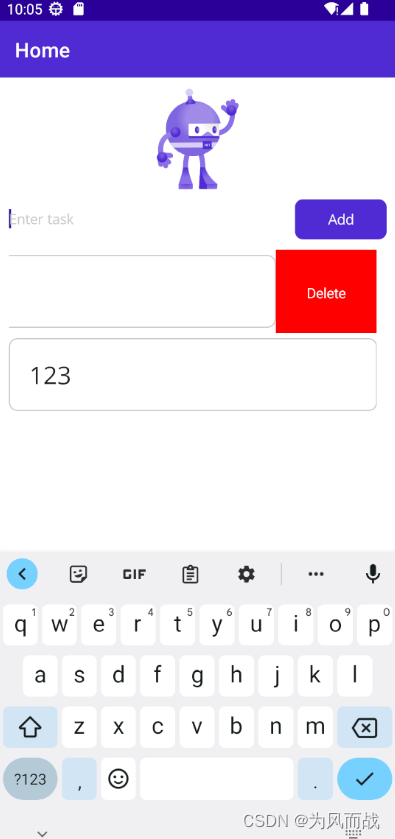
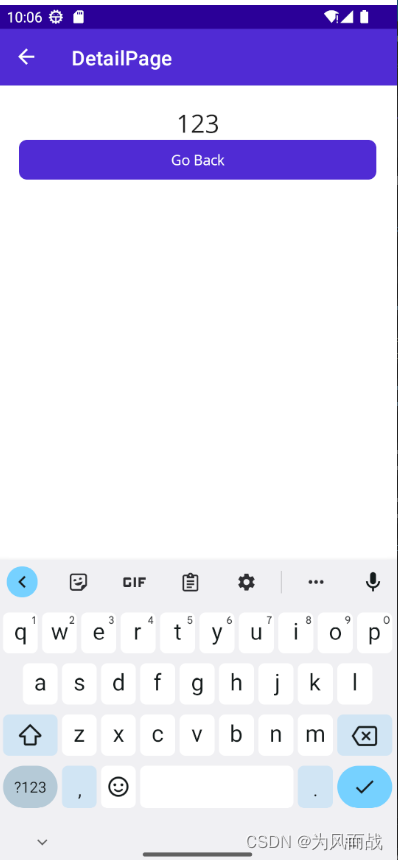
练习中一共有两个页面:
1、MainPage.xaml 用于添加列表中的内容。主要功能有向列表中添加一项;左滑删除该项;点击该选项进入详情页面。
2、DetailPage.xaml 显示详细信息,实际上显示的很少。返回主界面。
用到的MVVM包有:
1、CommunityToolkit.Mvvm
接下来是MainPage.xaml代码:
- "1.0" encoding="utf-8" ?>
"http://schemas.microsoft.com/dotnet/2021/maui" - xmlns:x="http://schemas.microsoft.com/winfx/2009/xaml"
- x:Class="MauiAppDemo1.MainPage"
- xmlns:viewmode="clr-namespace:MauiAppDemo1.ViewModel"
- x:DataType="viewmode:MainViewModel">
"100,Auto,*" - ColumnDefinitions=".75*,.25*"
- Padding="10"
- RowSpacing="10"
- ColumnSpacing="10">
"2" - Source="dotnet_bot.png"
- Background="white"/>
"Enter task" - Text="{Binding Text}"
- Grid.Row="1"/>
- Command="{Binding AddCommand}"
- Grid.Row="1"
- Grid.Column="1"/>
"2" Grid.ColumnSpan="2" - ItemsSource="{Binding Items}"
- SelectionMode="None">
"{x:Type x:String}"> "Delete" - BackgroundColor="Red"
- Command="{Binding Source={RelativeSource AncestorType={x:Type viewmode:MainViewModel}},Path=DeleteCommand}"
- CommandParameter="{Binding .}"/>
"0,5"> "{Binding Source={RelativeSource AncestorType={x:Type viewmode:MainViewModel}},Path=TapCommand}" - CommandParameter="{Binding .}"/>
- FontSize="24"/>
- using MauiAppDemo1.ViewModel;
- namespace MauiAppDemo1;
- public partial class MainPage : ContentPage
- {
- int count = 0;
- public MainPage(MainViewModel vm)
- {
- InitializeComponent();
- BindingContext = vm;
- }
- }
- using MauiAppDemo1.ViewModel;
- namespace MauiAppDemo1;
- public static class MauiProgram
- {
- public static MauiApp CreateMauiApp()
- {
- var builder = MauiApp.CreateBuilder();
- builder
- .UseMauiApp
() - .ConfigureFonts(fonts =>
- {
- fonts.AddFont("OpenSans-Regular.ttf", "OpenSansRegular");
- fonts.AddFont("OpenSans-Semibold.ttf", "OpenSansSemibold");
- });
- builder.Services.AddSingleton
(); - builder.Services.AddSingleton
(); - builder.Services.AddTransient
(); - builder.Services.AddSingleton
(); - return builder.Build();
- }
- }
- namespace MauiAppDemo1;
- public partial class AppShell : Shell
- {
- public AppShell()
- {
- InitializeComponent();
- Routing.RegisterRoute(nameof(DetailPage),typeof(DetailPage));
- }
- }
- using CommunityToolkit.Mvvm.ComponentModel;
- using CommunityToolkit.Mvvm.Input;
- using System;
- using System.Collections.Generic;
- using System.Collections.ObjectModel;
- using System.ComponentModel;
- using System.Linq;
- using System.Text;
- using System.Threading.Tasks;
- namespace MauiAppDemo1.ViewModel
- {
- ///
- /// CommunityToolkit.Mvvm
- ///
- public partial class MainViewModel : ObservableObject
- {
- public MainViewModel()
- {
- items = new ObservableCollection<string>();
- }
- [ObservableProperty]
- ObservableCollection<string> items;
- [ObservableProperty]
- string text;
- [RelayCommand]
- void Add()
- {
- if (string.IsNullOrWhiteSpace(Text)) return;
- items.Add(Text);
- Text = string.Empty;
- }
- [RelayCommand]
- void Delete(string s)
- {
- if (items.Contains(s))
- {
- items.Remove(s);
- }
- }
- [RelayCommand]
- async Task Tap(string s)
- {
- await Shell.Current.GoToAsync($"{nameof(DetailPage)}?Text={s}");
- }
- }
- ///
- /// 基本写法
- ///
- //public class MainViewModel : INotifyPropertyChanged
- //{
- // string text;
- // public string Text
- // {
- // get => text;
- // set
- // {
- // text=value;
- // OnPropertyChanged(nameof(Text));
- // }
- // }
- // public event PropertyChangedEventHandler PropertyChanged;
- // void OnPropertyChanged(string name)=>PropertyChanged?.Invoke(this, new PropertyChangedEventArgs(name));
- //}
- }
DetailPage.xaml
- "1.0" encoding="utf-8" ?>
"http://schemas.microsoft.com/dotnet/2021/maui" - xmlns:x="http://schemas.microsoft.com/winfx/2009/xaml"
- x:Class="MauiAppDemo1.DetailPage"
- xmlns:viewmodel="clr-namespace:MauiAppDemo1.ViewModel"
- x:DataType="viewmodel:DetailViewModel"
- Title="DetailPage">
"20"> - Text="{Binding Text}"FontSize="25"VerticalOptions="Center"HorizontalOptions="Center" />Command="{Binding GoBackCommand}"/>
- using MauiAppDemo1.ViewModel;
- namespace MauiAppDemo1;
- public partial class DetailPage : ContentPage
- {
- public DetailPage(DetailViewModel vm)
- {
- InitializeComponent();
- BindingContext = vm;
- }
- }
- using System;
- using System.Collections.Generic;
- using System.Linq;
- using System.Text;
- using System.Threading.Tasks;
- using CommunityToolkit.Mvvm.ComponentModel;
- using CommunityToolkit.Mvvm.Input;
- namespace MauiAppDemo1.ViewModel
- {
- [QueryProperty("Text","Text")]
- public partial class DetailViewModel:ObservableObject
- {
- [ObservableProperty]
- string text;
- [RelayCommand]
- async Task GoBack()
- {
- await Shell.Current.GoToAsync("..");
- }
- }
- }
- 相关阅读:
Cesium 空间量算——面积量算
【LeetCode:1402. 做菜顺序 | 动态规划 + 贪心】
1.1. Java简介与安装
Docker 容器文件(数据)共享
【已解决】使用Appium Inspector及uiautomatorviewer无法定位浮窗内元素
IP-adapter masking
大型客户关系管理系统源码CRM
IO Watch:用 Arduino UNO 制造的可编程手表
【Linux操作系统】——配置安装系统环境
美创科技信创数据安全「利基者」!
- 原文地址:https://blog.csdn.net/xingchengaiwei/article/details/134359742
