-
linux 创建git项目并提交到gitee(保姆式教程)
01、git安装与初始化设置
mhzzj@mhzzj-virtual-machine:~/work/skynetStudy$ apt install mhzzj@mhzzj-virtual-machine:~/work/skynetStudy$ git config --global user.name "用户名" mhzzj@mhzzj-virtual-machine:~/work/skynetStudy$ git config --global user.email 10086@qq.com- 1
- 2
- 3
02、生成密钥并拷贝
生成密钥
mhzzj@mhzzj-virtual-machine:~/work/skynetStudy$ ssh-keygen -t rsa -C "your email" Generating public/private rsa key pair. Enter file in which to save the key (/home/mhzzj/.ssh/id_rsa): Created directory '/home/mhzzj/.ssh'. Enter passphrase (empty for no passphrase): Enter same passphrase again: Your identification has been saved in /home/mhzzj/.ssh/id_rsa Your public key has been saved in /home/mhzzj/.ssh/id_rsa.pub The key fingerprint is: SHA256:BenbzPgfLVOb9VGmWsaANDH7nLXKvF8XLfNEibbhHKg your email The key's randomart image is: +---[RSA 3072]----+ | ..=. | | .o =. . .| | . +..=..+| | ...o+=+=o| | SE ++Xo+| | o +o B O+| | . O + =| | . = ..| | .o.. | +----[SHA256]-----+- 1
- 2
- 3
- 4
- 5
- 6
- 7
- 8
- 9
- 10
- 11
- 12
- 13
- 14
- 15
- 16
- 17
- 18
- 19
- 20
- 21
- 22
拷贝密钥到gitee
mhzzj@mhzzj-virtual-machine:~/work/skynetStudy$ cat /home/mhzzj/.ssh/id_rsa.pub #查看生成的密钥 ssh-rsa ******- 1
- 2
- 3
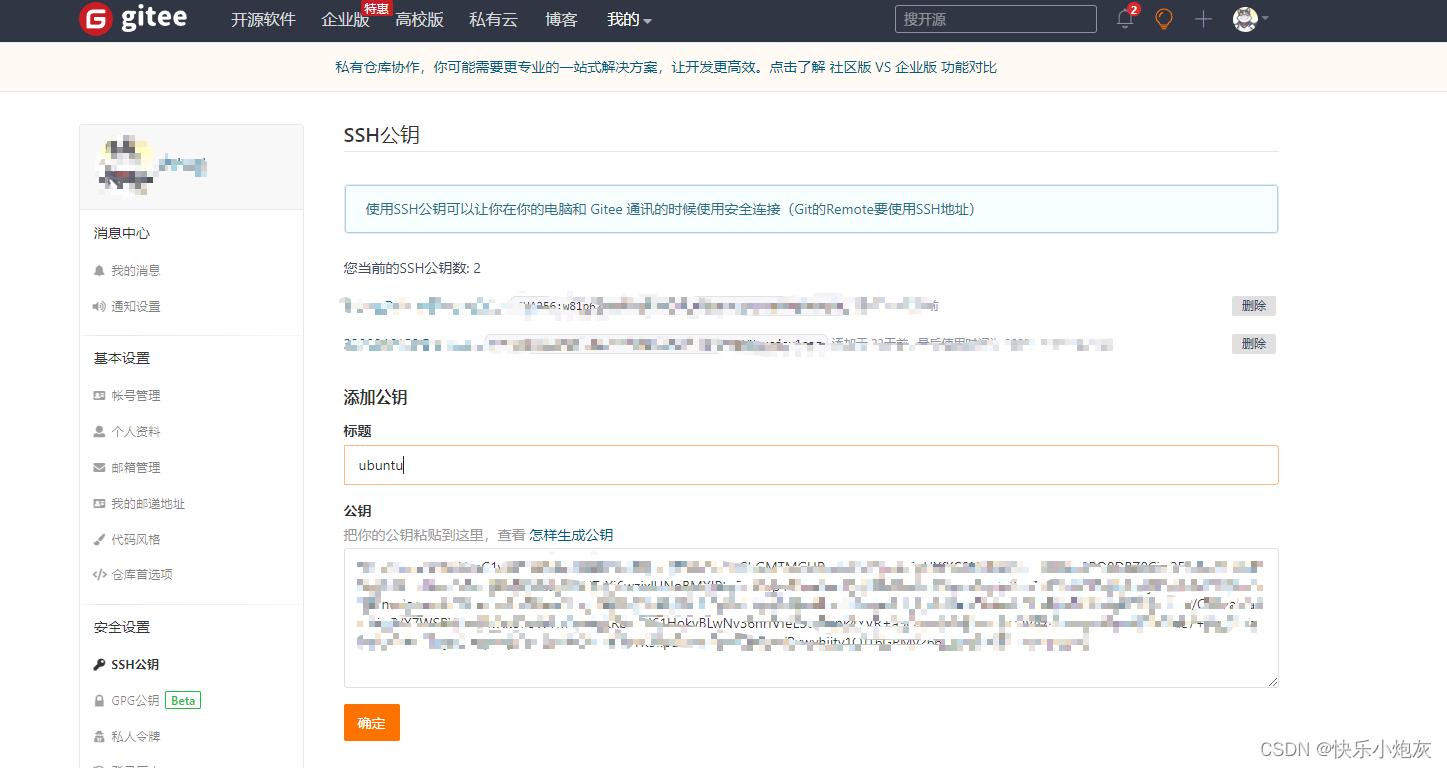
测试密钥是否生效hzzj@mhzzj-virtual-machine:~/work/skynetStudy$ ssh -T git@gitee.com The authenticity of host 'gitee.com (180.76.198.77)' can't be established. ECDSA key fingerprint is SHA256:FQGC9Kn/eye1W8icdBgrQp+KkGYoFgbVr17bmjey0Wc. Are you sure you want to continue connecting (yes/no/[fingerprint])? yes Warning: Permanently added 'gitee.com,180.76.198.77' (ECDSA) to the list of known hosts. Hi mhzzj(@mhz-zzj)! You've successfully authenticated, but GITEE.COM does not provide shell access.- 1
- 2
- 3
- 4
- 5
- 6
03、创建项目并提交代码
创建项目
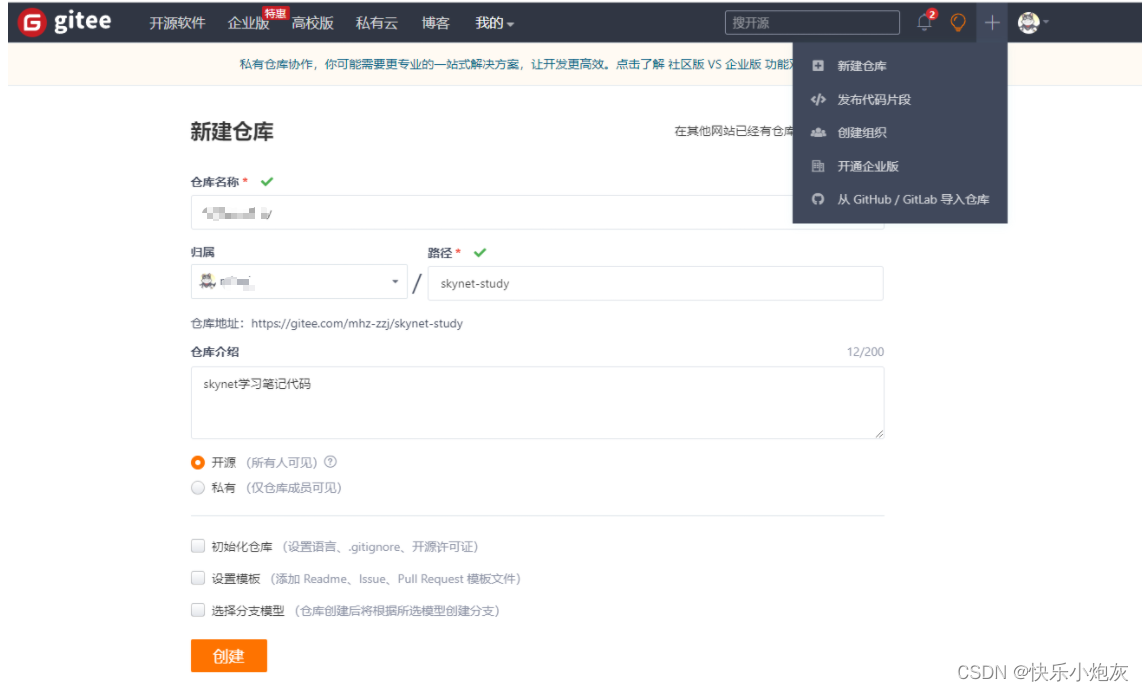
提交代码mhzzj@mhzzj-virtual-machine:~/work/skynetStudy$ git init mhzzj@mhzzj-virtual-machine:~/work/skynetStudy$ git add . mhzzj@mhzzj-virtual-machine:~/work/skynetStudy$ git commit -m "basic skynet" # 注意,使用ssh提交,否则需要输入账号和密码 如果意见add https,可以使用git remote rm origin删除已有的原创连接 mhzzj@mhzzj-virtual-machine:~/work/skynetStudy$ git remote add origin git@gitee.com:mhz-zzj/skynet-study.git mhzzj@mhzzj-virtual-machine:~/work/skynetStudy$ git push -u origin "master"- 1
- 2
- 3
- 4
- 5
- 6
-
相关阅读:
【汇编语言03】第2章 寄存器——实验1:查看CPU和内存,用机器指令和汇编指令编程
如何从Github中删除已有仓库
【Vue】vue项目用qrcodejs2生成带log的二维码图片,vue生成二维码图片中间带log,自定义log
NSSCTF之Misc篇刷题记录(17)
战略合作 | 零数科技携手中智关爱通共建基于区块链的新人力服务网络
未支付订单的过期删除策略
特征选择技术总结
qemu创建linux虚拟机(亲测有效)
【java】BigDecimal 正确声明方式
docker镜像仓库
- 原文地址:https://blog.csdn.net/qq_46237746/article/details/134233383
