-
iOS开发-4位或者6位验证码按顺序输入实现
iOS开发-4位或者6位验证码按顺序输入实现
之前实现了获取验证码后,验证码依次输入的实现功能, 输入手机号后,点击用短信验证码登录然后在界面点击用短信验证码登录,之后依次输入4位或者6位验证码。这里进行一下记录。
一、整体效果
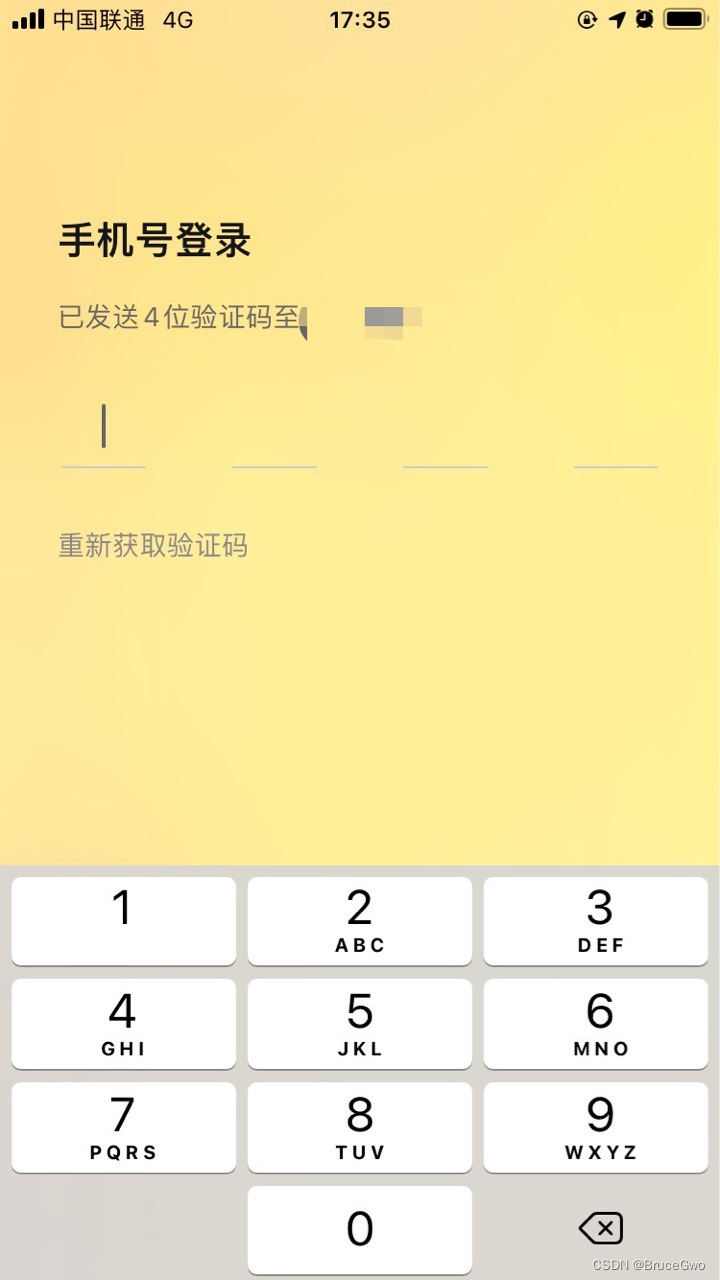
在实现这个的时候,整体结果为4个显示输入框数字的labelView,有一个current记录当前的输入的第几个数字,有一个输入框在labelView的位置,当输入了数字之后,输入框移动到current+1的labelView的位置,当点击键盘的删除按钮,输入框移动到current-1的labelView位置,重置current后的labelView显示的数字文本。
整体效果如下
二、实现功能
我们有一个labelView来显示数字文本,这个labelView主要就是UILabel,在当前view上添加点击手势。用于显示数字。
INVerifyCodeNumberView.h
#import@protocol INVerifyCodeNumberViewDelegate; @interface INVerifyCodeNumberView : UIView @property (nonatomic, weak) id delegate; @property (nonatomic, strong) NSString *number; @end @protocol INVerifyCodeNumberViewDelegate - (void)tapGestureDidAction; @end - 1
- 2
- 3
- 4
- 5
- 6
- 7
- 8
- 9
- 10
- 11
- 12
- 13
- 14
- 15
- 16
- 17
INVerifyCodeNumberView.m
#import "INVerifyCodeNumberView.h" #import "UIColor+Addition.h" @interface INVerifyCodeNumberView () @property (nonatomic, strong) UIImageView *lineImageView; @property (nonatomic, strong) UILabel *textLabel; @end @implementation INVerifyCodeNumberView - (instancetype)initWithFrame:(CGRect)frame { self = [super initWithFrame:frame]; if (self) { [self addSubview:self.lineImageView]; [self addSubview:self.textLabel]; UITapGestureRecognizer *tap = [[UITapGestureRecognizer alloc] initWithTarget:self action:@selector(tapAction)]; [self.lineImageView addGestureRecognizer:tap]; } return self; } - (void)layoutSubviews { [super layoutSubviews]; self.textLabel.frame = self.bounds; self.lineImageView.frame = CGRectMake(0.0, CGRectGetHeight(self.bounds) - 1.0, CGRectGetWidth(self.bounds), 1.0); } - (void)setNumber:(NSString *)number { _number = (number?number:@""); self.textLabel.text = _number; [self setNeedsLayout]; } - (void)tapAction { if (self.delegate && [self.delegate respondsToSelector:@selector(tapGestureDidAction)]) { [self.delegate tapGestureDidAction]; } } #pragma mark - SETTER/GETTER - (UIImageView *)lineImageView { if (!_lineImageView) { _lineImageView = [[UIImageView alloc] initWithFrame:CGRectZero]; _lineImageView.backgroundColor = [UIColor colorWithHexString:@"CCCCCC"]; _lineImageView.userInteractionEnabled = YES; } return _lineImageView; } - (UILabel *)textLabel { if (!_textLabel) { _textLabel = [[UILabel alloc] initWithFrame:CGRectZero]; _textLabel.font = [UIFont systemFontOfSize:18]; _textLabel.textColor = [UIColor colorWithHexString:@"999999"]; _textLabel.backgroundColor = [UIColor clearColor]; _textLabel.text = @""; _textLabel.textAlignment = NSTextAlignmentCenter; } return _textLabel; } @end- 1
- 2
- 3
- 4
- 5
- 6
- 7
- 8
- 9
- 10
- 11
- 12
- 13
- 14
- 15
- 16
- 17
- 18
- 19
- 20
- 21
- 22
- 23
- 24
- 25
- 26
- 27
- 28
- 29
- 30
- 31
- 32
- 33
- 34
- 35
- 36
- 37
- 38
- 39
- 40
- 41
- 42
- 43
- 44
- 45
- 46
- 47
- 48
- 49
- 50
- 51
- 52
- 53
- 54
- 55
- 56
- 57
- 58
- 59
- 60
- 61
- 62
- 63
- 64
- 65
- 66
- 67
之后根据验证码的数字的数量来创建多个labelView,有一个current记录当前的输入的第几个数字,有一个输入框在labelView的位置,当输入了数字之后,输入框移动到current+1的labelView的位置,当点击键盘的删除按钮,输入框移动到current-1的labelView位置,重置current后的labelView显示的数字文本。
INVerifyCodeView.h
#import#import "UIColor+Addition.h" @protocol INVerifyCodeViewDelegate; @interface INVerifyCodeView : UIView @property (nonatomic, weak) id actionDelegate; @property (nonatomic, weak) id delegate; @property (nonatomic, strong) NSString *phone; @end @protocol INVerifyCodeViewDelegate - (void)loginButtonDidAction; - (void)codeButtonDidAction; @end - 1
- 2
- 3
- 4
- 5
- 6
- 7
- 8
- 9
- 10
- 11
- 12
- 13
- 14
- 15
- 16
- 17
- 18
- 19
- 20
- 21
- 22
INVerifyCodeView.m
#import "INVerifyCodeView.h" #import "UIColor+Addition.h" #import "INVerifyCodeNumberView.h" #import "UITextField+Backward.h" #import "UIImage+Color.h" static CGFloat kNavHeight = 50.0; static CGFloat kNavSubHeight = 30.0; static const NSInteger kCodeNumber = 4; static const CGFloat kTitleHeight = 30.0; static const CGFloat kMidPadding = 30.0; static const CGFloat kVerMidPadding = 20.0; static const CGFloat kNumberSize = 44.0; static const CGFloat kLoginHeight = 44.0; static const CGFloat kCodeBtnHeight = 40.0; @interface INVerifyCodeView ()*codeNumberViews; @property (nonatomic, strong) UIImageView *bgImageView; @property (nonatomic, strong) UIVisualEffectView *effectView; @property (nonatomic, strong) UILabel *navTitleLabel; @property (nonatomic, strong) UILabel *navSubTitleLabel; @property (nonatomic, strong) UILabel *phoneTitleLabel; @property (nonatomic, strong) UITextField *phoneTextField; @property (nonatomic, strong) UIButton *loginButton; @property (nonatomic, strong) UIButton *codeButton; @property (nonatomic, assign) NSInteger currentIndex; // 当前输入框所在的index @end @implementation INVerifyCodeView - (id)initWithFrame:(CGRect)frame { self = [super initWithFrame:frame]; if (self) { self.backgroundColor = [UIColor colorWithHexString:@"f4f4f4"]; [self addSubview:self.bgImageView]; [self.bgImageView addSubview:self.effectView]; [self addSubview:self.navTitleLabel]; [self addSubview:self.navSubTitleLabel]; //[self addSubview:self.phoneTitleLabel]; [self initNumberViews]; [self addSubview:self.phoneTextField]; //[self addSubview:self.loginButton]; [self addSubview:self.codeButton]; self.currentIndex = 0; [self addObservers]; self.phone = @"17898989891"; } return self; } - (id)init { return [self initWithFrame:CGRectZero]; } - (void)layoutSubviews { [super layoutSubviews]; self.bgImageView.frame = self.bounds; self.effectView.frame = self.bgImageView.bounds; self.navTitleLabel.frame = CGRectMake(kMidPadding, 100, CGRectGetWidth(self.bounds) - 2*kMidPadding, kNavHeight); self.navSubTitleLabel.frame = CGRectMake(kMidPadding, CGRectGetMaxY(self.navTitleLabel.frame), CGRectGetWidth(self.bounds) - 2*kMidPadding, kNavSubHeight); //self.phoneTitleLabel.frame = CGRectMake(kMidPadding, CGRectGetMaxY(self.navSubTitleLabel.frame) + kVerMidPadding, CGRectGetWidth(self.bounds) - 2*kMidPadding, kTitleHeight); NSInteger number = self.codeNumberViews.count; CGFloat originX = kMidPadding + 2; CGFloat numPadding = (CGRectGetWidth(self.bounds) - 2*originX - number*kNumberSize)/(number - 1); INVerifyCodeNumberView *lastView = nil; for (INVerifyCodeNumberView *numberView in self.codeNumberViews) { numberView.frame = CGRectMake(lastView?(CGRectGetMaxX(lastView.frame) + numPadding):originX, CGRectGetMaxY(self.navSubTitleLabel.frame) + kVerMidPadding, kNumberSize, kNumberSize); lastView = numberView; } self.phoneTextField.frame = CGRectMake(0.0, 0.0, kNumberSize, kNumberSize); if (self.currentIndex < self.codeNumberViews.count) { INVerifyCodeNumberView *numberView = [self.codeNumberViews objectAtIndex:self.currentIndex]; if (numberView.number.length > 0) { self.phoneTextField.center = CGPointMake(numberView.center.x + 8.0, numberView.center.y); } else { self.phoneTextField.center = CGPointMake(numberView.center.x, numberView.center.y); } } //self.loginButton.frame = CGRectMake(originX, CGRectGetMaxY(lastView.frame) + kMidPadding, CGRectGetWidth(self.bounds) - 2*originX, kLoginHeight); self.codeButton.frame = CGRectMake(kMidPadding, CGRectGetMaxY(lastView.frame) + kVerMidPadding, CGRectGetWidth(self.bounds) - 2*kMidPadding, kCodeBtnHeight); } - (void)setDelegate:(id)delegate { _delegate = delegate; self.actionDelegate = delegate; } - (void)setPhone:(NSString *)phone { _phone = (phone?phone:@""); [self setSubAttributeString]; } - (void)setSubAttributeString { NSString *title = @"已发送4位验证码至"; NSString *subTitle = self.phone; NSString *content = [NSString stringWithFormat:@"%@ %@",title, subTitle]; NSRange subRange = [content rangeOfString:subTitle options:NSBackwardsSearch]; NSDictionary *attribute = @{NSForegroundColorAttributeName:[UIColor colorWithHexString:@"999999"],NSFontAttributeName:[UIFont systemFontOfSize:14]}; NSMutableAttributedString *attributedStr = [[NSMutableAttributedString alloc] initWithString:content]; [attributedStr setAttributes:attribute range:subRange]; self.navSubTitleLabel.attributedText = attributedStr; } #pragma mark - ACTIONS - (void)loginButtonAction { if (self.actionDelegate && [self.actionDelegate respondsToSelector:@selector(loginButtonDidAction)]) { [self.actionDelegate loginButtonDidAction]; } } - (void)codeButtonAction { if (self.actionDelegate && [self.actionDelegate respondsToSelector:@selector(codeButtonDidAction)]) { [self.actionDelegate codeButtonDidAction]; } } #pragma mark - TOUCH - (void)touchesBegan:(NSSet *)touches withEvent:(UIEvent *)event { [self singleTapGestureAction]; } - (void)singleTapGestureAction { // 发送resignFirstResponder. [[UIApplication sharedApplication] sendAction:@selector(resignFirstResponder) to:nil from:nil forEvent:nil]; } #pragma mark - INVerifyCodeNumberViewDelegate - (void)tapGestureDidAction { [self setNeedsLayout]; [self.phoneTextField becomeFirstResponder]; } #pragma mark - Observers - (void)addObservers { //监听键盘出现、消失 [[NSNotificationCenter defaultCenter] addObserver:self selector:@selector(keyboardWillShowOrChangeFrame:) name:UIKeyboardWillShowNotification object:nil]; [[NSNotificationCenter defaultCenter] addObserver:self selector:@selector(keyboardWillHide:) name:UIKeyboardWillHideNotification object:nil]; [[NSNotificationCenter defaultCenter] addObserver:self selector:@selector(textFieldTextDidChange:) name:UITextFieldTextDidChangeNotification object:nil]; [[NSNotificationCenter defaultCenter] addObserver:self selector:@selector(textFieldDeleteBackwardNotify:) name:kTextFieldDidDeleteBackwardNotification object:nil]; } - (void)removeObervers { //监听键盘出现、消失 [[NSNotificationCenter defaultCenter] removeObserver:self]; } #pragma mark - 键盘将要出现 - (void)keyboardWillShowOrChangeFrame:(NSNotification *)notification { NSDictionary *userInfo = notification.userInfo; CGRect endFrame = [userInfo[UIKeyboardFrameEndUserInfoKey] CGRectValue]; //获取键盘的高度 } #pragma mark - 键盘将要消失 - (void)keyboardWillHide:(NSNotification *)notification { //收起键盘 } #pragma mark - ACTIONS - (void)textFieldTextDidChange:(NSNotification *)notification { UITextField *textField = [notification object]; if (self.phoneTextField == textField) { if (textField.text > 0) { if (textField.text.length > 1) { textField.text = [textField.text substringToIndex:1]; } INVerifyCodeNumberView *numberView = [self.codeNumberViews objectAtIndex:self.currentIndex]; numberView.number = textField.text; if (self.currentIndex == self.codeNumberViews.count - 1) { [self.phoneTextField resignFirstResponder]; [self loginButtonAction]; } if (self.currentIndex < self.codeNumberViews.count - 1) { self.currentIndex ++; } textField.text = @""; [self setNeedsLayout]; } } } - (void)textFieldDeleteBackwardNotify:(NSNotification *)notification { NSLog(@"notification object:%@",notification); UITextField *textField = nil; if ([notification isKindOfClass:[UITextField class]]) { textField = (UITextField *)notification; } else if (notification.object && [notification.object isKindOfClass:[UITextField class]]) { textField = (UITextField *)[notification object]; } if (self.phoneTextField == textField) { if (self.currentIndex < 0) { [self setNeedsLayout]; return; } INVerifyCodeNumberView *numberView = [self.codeNumberViews objectAtIndex:self.currentIndex]; numberView.number = @""; self.currentIndex--; if (self.currentIndex < 0) { self.currentIndex = 0; } [self setNeedsLayout]; } } #pragma mark - SETTER/GETTER - (void)initNumberViews { self.codeNumberViews = [NSMutableArray arrayWithCapacity:0]; for (NSInteger index = 0; index < kCodeNumber; index++) { INVerifyCodeNumberView *numberView = [[INVerifyCodeNumberView alloc] initWithFrame:CGRectZero]; numberView.delegate = self; [self.codeNumberViews addObject:numberView]; [self addSubview:numberView]; } } - (UIImageView *)bgImageView { if (!_bgImageView) { _bgImageView = [[UIImageView alloc] initWithFrame:CGRectZero]; _bgImageView.backgroundColor = [UIColor clearColor]; _bgImageView.image = [UIImage imageNamed:@"login_bg.png"]; _bgImageView.contentMode = UIViewContentModeScaleAspectFill; } return _bgImageView; } - (UIVisualEffectView *)effectView { if (!_effectView) { UIBlurEffect *blurEffect = [UIBlurEffect effectWithStyle:UIBlurEffectStyleLight]; _effectView = [[UIVisualEffectView alloc] initWithEffect:blurEffect]; } return _effectView; } - (UILabel *)phoneTitleLabel { if (!_phoneTitleLabel) { _phoneTitleLabel = [[UILabel alloc] initWithFrame:CGRectZero]; _phoneTitleLabel.font = [UIFont systemFontOfSize:14]; _phoneTitleLabel.textColor = [UIColor colorWithHexString:@"999999"]; _phoneTitleLabel.backgroundColor = [UIColor clearColor]; _phoneTitleLabel.text = @"手机号码"; } return _phoneTitleLabel; } - (UITextField *)phoneTextField { if (!_phoneTextField) { _phoneTextField = [[UITextField alloc] initWithFrame:CGRectZero]; _phoneTextField.backgroundColor = [UIColor clearColor]; _phoneTextField.clipsToBounds = YES; _phoneTextField.textColor = [UIColor clearColor]; _phoneTextField.font = [UIFont boldSystemFontOfSize:18.0]; _phoneTextField.delegate = self; _phoneTextField.textAlignment = NSTextAlignmentCenter; _phoneTextField.keyboardType = UIKeyboardTypeNumberPad; _phoneTextField.clearButtonMode = UITextFieldViewModeNever; _phoneTextField.returnKeyType = UIReturnKeySearch; _phoneTextField.tintColor = [UIColor colorWithHexString:@"666666"]; } return _phoneTextField; } - (UIButton *)loginButton { if (!_loginButton) { _loginButton = [UIButton buttonWithType:UIButtonTypeCustom]; _loginButton.backgroundColor = [UIColor clearColor]; _loginButton.imageView.contentMode = UIViewContentModeScaleAspectFit; [_loginButton setBackgroundImage:[UIImage imageWithColor:[UIColor colorWithHexString:@"ff7e48"]] forState:UIControlStateNormal]; [_loginButton setBackgroundImage:[UIImage imageWithColor:[UIColor colorWithHexString:@"ff7e48"]] forState:UIControlStateHighlighted]; _loginButton.titleLabel.font = [UIFont boldSystemFontOfSize:14.0]; [_loginButton setTitle:@"登录" forState:UIControlStateNormal]; [_loginButton setTitleColor:[UIColor colorWithHexString:@"ffffff"] forState:UIControlStateNormal]; _loginButton.layer.cornerRadius = kLoginHeight/2; _loginButton.layer.masksToBounds = YES; [_loginButton addTarget:self action:@selector(loginButtonAction) forControlEvents:UIControlEventTouchUpInside]; } return _loginButton; } - (UIButton *)codeButton { if (!_codeButton) { _codeButton = [UIButton buttonWithType:UIButtonTypeCustom]; _codeButton.backgroundColor = [UIColor clearColor]; _codeButton.imageView.contentMode = UIViewContentModeScaleAspectFit; _codeButton.contentHorizontalAlignment = UIControlContentHorizontalAlignmentLeft; _codeButton.titleLabel.font = [UIFont systemFontOfSize:14.0]; [_codeButton setTitle:@"重新获取验证码" forState:UIControlStateNormal]; [_codeButton setTitleColor:[UIColor colorWithHexString:@"888888"] forState:UIControlStateNormal]; [_codeButton addTarget:self action:@selector(codeButtonAction) forControlEvents:UIControlEventTouchUpInside]; } return _codeButton; } - (UILabel *)navTitleLabel { if (!_navTitleLabel) { _navTitleLabel = [[UILabel alloc] initWithFrame:CGRectZero]; _navTitleLabel.font = [UIFont boldSystemFontOfSize:20]; _navTitleLabel.textColor = [UIColor colorWithHexString:@"131619"]; _navTitleLabel.backgroundColor = [UIColor clearColor]; _navTitleLabel.text = @"手机号登录"; } return _navTitleLabel; } - (UILabel *)navSubTitleLabel { if (!_navSubTitleLabel) { _navSubTitleLabel = [[UILabel alloc] initWithFrame:CGRectZero]; _navSubTitleLabel.font = [UIFont systemFontOfSize:14]; _navSubTitleLabel.textColor = [UIColor colorWithHexString:@"666666"]; _navSubTitleLabel.backgroundColor = [UIColor clearColor]; _navSubTitleLabel.text = @"已发送4位验证码至"; } return _navSubTitleLabel; } - (void)dealloc { [self removeObervers]; } @end - 1
- 2
- 3
- 4
- 5
- 6
- 7
- 8
- 9
- 10
- 11
- 12
- 13
- 14
- 15
- 16
- 17
- 18
- 19
- 20
- 21
- 22
- 23
- 24
- 25
- 26
- 27
- 28
- 29
- 30
- 31
- 32
- 33
- 34
- 35
- 36
- 37
- 38
- 39
- 40
- 41
- 42
- 43
- 44
- 45
- 46
- 47
- 48
- 49
- 50
- 51
- 52
- 53
- 54
- 55
- 56
- 57
- 58
- 59
- 60
- 61
- 62
- 63
- 64
- 65
- 66
- 67
- 68
- 69
- 70
- 71
- 72
- 73
- 74
- 75
- 76
- 77
- 78
- 79
- 80
- 81
- 82
- 83
- 84
- 85
- 86
- 87
- 88
- 89
- 90
- 91
- 92
- 93
- 94
- 95
- 96
- 97
- 98
- 99
- 100
- 101
- 102
- 103
- 104
- 105
- 106
- 107
- 108
- 109
- 110
- 111
- 112
- 113
- 114
- 115
- 116
- 117
- 118
- 119
- 120
- 121
- 122
- 123
- 124
- 125
- 126
- 127
- 128
- 129
- 130
- 131
- 132
- 133
- 134
- 135
- 136
- 137
- 138
- 139
- 140
- 141
- 142
- 143
- 144
- 145
- 146
- 147
- 148
- 149
- 150
- 151
- 152
- 153
- 154
- 155
- 156
- 157
- 158
- 159
- 160
- 161
- 162
- 163
- 164
- 165
- 166
- 167
- 168
- 169
- 170
- 171
- 172
- 173
- 174
- 175
- 176
- 177
- 178
- 179
- 180
- 181
- 182
- 183
- 184
- 185
- 186
- 187
- 188
- 189
- 190
- 191
- 192
- 193
- 194
- 195
- 196
- 197
- 198
- 199
- 200
- 201
- 202
- 203
- 204
- 205
- 206
- 207
- 208
- 209
- 210
- 211
- 212
- 213
- 214
- 215
- 216
- 217
- 218
- 219
- 220
- 221
- 222
- 223
- 224
- 225
- 226
- 227
- 228
- 229
- 230
- 231
- 232
- 233
- 234
- 235
- 236
- 237
- 238
- 239
- 240
- 241
- 242
- 243
- 244
- 245
- 246
- 247
- 248
- 249
- 250
- 251
- 252
- 253
- 254
- 255
- 256
- 257
- 258
- 259
- 260
- 261
- 262
- 263
- 264
- 265
- 266
- 267
- 268
- 269
- 270
- 271
- 272
- 273
- 274
- 275
- 276
- 277
- 278
- 279
- 280
- 281
- 282
- 283
- 284
- 285
- 286
- 287
- 288
- 289
- 290
- 291
- 292
- 293
- 294
- 295
- 296
- 297
- 298
- 299
- 300
- 301
- 302
- 303
- 304
- 305
- 306
- 307
- 308
- 309
- 310
- 311
- 312
- 313
- 314
- 315
- 316
- 317
- 318
- 319
- 320
- 321
- 322
- 323
- 324
- 325
- 326
- 327
- 328
- 329
- 330
- 331
- 332
- 333
- 334
- 335
- 336
- 337
- 338
- 339
- 340
- 341
- 342
- 343
- 344
- 345
- 346
- 347
- 348
- 349
- 350
- 351
- 352
- 353
- 354
- 355
- 356
- 357
- 358
当点击键盘的删除键,即deleteBackward键时候,我们需要使用method_exchangeImplementations来控制点击键盘执行我们的方法。比如这里定义了一个textFieldDidDeleteBackward
完整代码如下
UITextField+Backward.h
#import#import static NSString *const kTextFieldDidDeleteBackwardNotification = @"kTextFieldDidDeleteBackwardNotification"; @protocol INTextFieldDelegate @optional - (void)textFieldDidDeleteBackward:(UITextField *)textField; @end @interface UITextField (Backward) @property (weak, nonatomic) id delegate; @end - 1
- 2
- 3
- 4
- 5
- 6
- 7
- 8
- 9
- 10
- 11
- 12
- 13
- 14
- 15
- 16
- 17
- 18
UITextField+Backward.m
#import "UITextField+Backward.h" #import@implementation UITextField (Backward) + (void)load { Method method1 = class_getInstanceMethod([self class], NSSelectorFromString(@"deleteBackward")); Method method2 = class_getInstanceMethod([self class], @selector(in_deleteBackward)); method_exchangeImplementations(method1, method2); } - (void)in_deleteBackward { [self in_deleteBackward]; if ([self.delegate respondsToSelector:@selector(textFieldDidDeleteBackward:)]) { id delegate = (id )self.delegate; [delegate textFieldDidDeleteBackward:self]; } [[NSNotificationCenter defaultCenter] postNotificationName:kTextFieldDidDeleteBackwardNotification object:self]; } @end - 1
- 2
- 3
- 4
- 5
- 6
- 7
- 8
- 9
- 10
- 11
- 12
- 13
- 14
- 15
- 16
- 17
- 18
- 19
- 20
- 21
- 22
- 23
- 24
至此,实现数字验证码按顺序输入的代码完成。

三、小结
iOS开发-4位或者6位验证码按顺序输入实现
学习记录,每天不停进步。
-
相关阅读:
神经网络案例分析
Zookeeper学习笔记(2)—— Zookeeper API简单操作
VsCode备忘
创邻科技亮相ISWC 2023,国际舞台见证知识图谱领域研究突破
测试与开发环境网址hosts配置
对象的动态建立和释放(new和delete)
2022-8-21 01点 程序爱生活 纳指可能转向一次大跌中,奇怪的0.618数字出现了,恒指被美股带着可能要走破位,开始做空。
【Linux系统管理】05 常用命令 & 06 vim编辑器
基于线性表的图书信息管理系统
如何恢复电脑上删除的文件?快速恢复被删除文件的技巧【5个实用方法】
- 原文地址:https://blog.csdn.net/gloryFlow/article/details/134070162
