-
【safetensor】介绍和基础代码
Hugging Face, EleutherAI, StabilityAI 用的多
介绍
文件形式
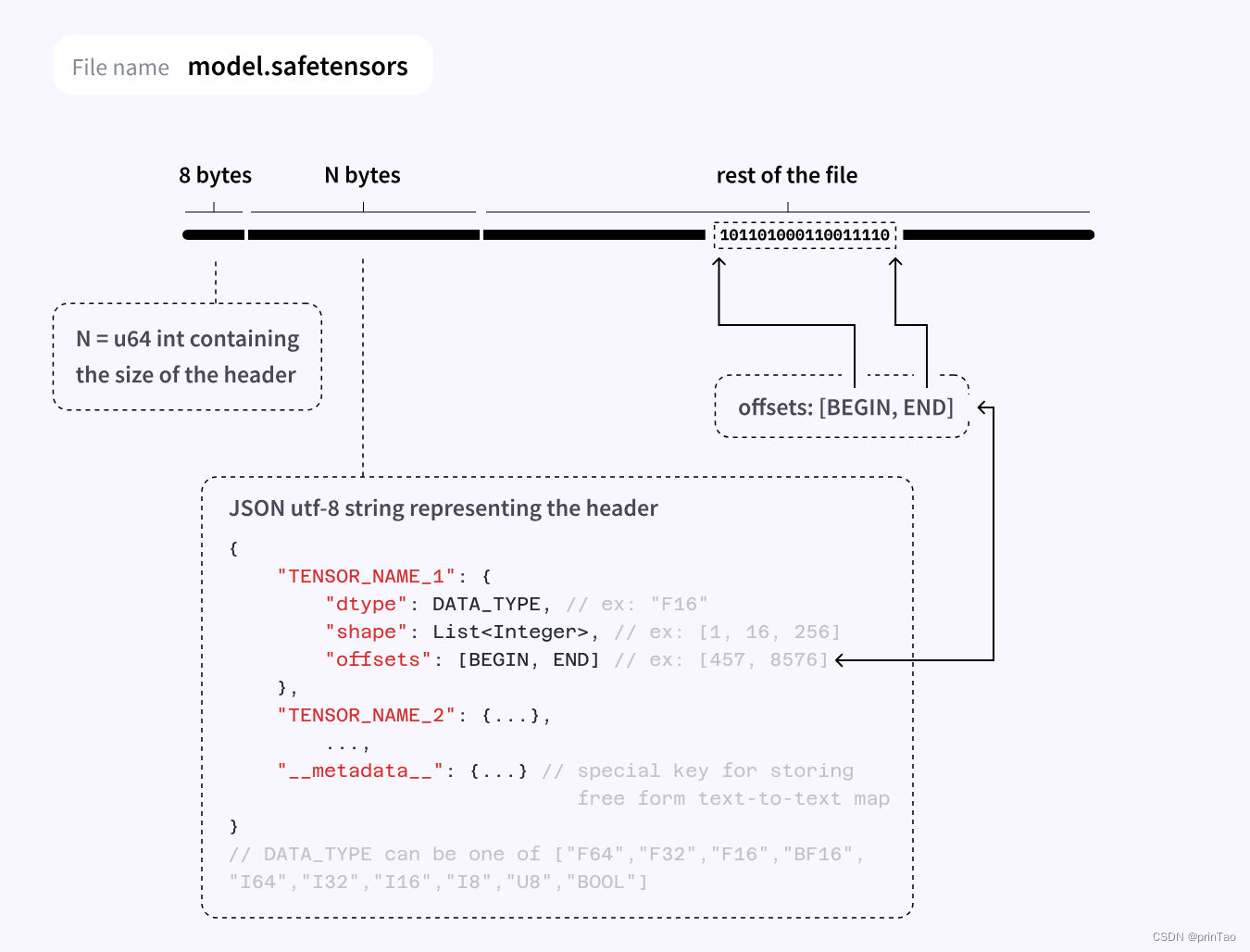
- header,体现其特性。如果强行将pickle或者空软连接 打开,会出现报错。解决详见:debug 连接到其他教程
- 结构和参数
安装
with pip: Copied pip install safetensors with conda: Copied conda install -c huggingface safetensors- 1
- 2
- 3
- 4
- 5
- 6
- 7
- 8
Usage
文档: https://huggingface.co/docs/safetensors/index
github: https://github.com/huggingface/safetensors测试安装
import torch from safetensors import safe_open from safetensors.torch import save_file tensors = { "weight1": torch.zeros((1024, 1024)), "weight2": torch.zeros((1024, 1024)) } save_file(tensors, "model.safetensors") tensors = {} with safe_open("model.safetensors", framework="pt", device="cpu") as f: for key in f.keys(): tensors[key] = f.get_tensor(key)- 1
- 2
- 3
- 4
- 5
- 6
- 7
- 8
- 9
- 10
- 11
- 12
- 13
- 14
加载
文档 https://huggingface.co/docs/diffusers/using-diffusers/using_safetensors
from diffusers import StableDiffusionPipeline pipeline = StableDiffusionPipeline.from_single_file( "https://huggingface.co/WarriorMama777/OrangeMixs/blob/main/Models/AbyssOrangeMix/AbyssOrangeMix.safetensors" )- 1
- 2
- 3
- 4
- 5
Load tensors
from safetensors import safe_open tensors = {} with safe_open("model.safetensors", framework="pt", device=0) as f: for k in f.keys(): tensors[k] = f.get_tensor(k)- 1
- 2
- 3
- 4
- 5
- 6
- 7
# Loading only part of the tensors (interesting when running on multiple GPU) from safetensors import safe_open tensors = {} with safe_open("model.safetensors", framework="pt", device=0) as f: tensor_slice = f.get_slice("embedding") vocab_size, hidden_dim = tensor_slice.get_shape() tensor = tensor_slice[:, :hidden_dim]- 1
- 2
- 3
- 4
- 5
- 6
- 7
- 8
- 9
保存
import torch from safetensors.torch import save_file tensors = { "embedding": torch.zeros((2, 2)), "attention": torch.zeros((2, 3)) } save_file(tensors, "model.safetensors")- 1
- 2
- 3
- 4
- 5
- 6
- 7
- 8
- 9
转换到safetensor
- 在线,利用hugging face
The easiest way to convert your model weights is to use the Convert Space, given your model weights are already stored on the Hub. The Convert Space downloads the pickled weights, converts them, and opens a Pull Request to upload the newly converted .safetensors file to your repository.
- 本地 运行
see 转换代码 convert.py
# 主函数 def convert_file( pt_filename: str, sf_filename: str, ): loaded = torch.load(pt_filename, map_location="cpu") if "state_dict" in loaded: loaded = loaded["state_dict"] shared = shared_pointers(loaded) for shared_weights in shared: for name in shared_weights[1:]: loaded.pop(name) # For tensors to be contiguous loaded = {k: v.contiguous() for k, v in loaded.items()} dirname = os.path.dirname(sf_filename) os.makedirs(dirname, exist_ok=True) save_file(loaded, sf_filename, metadata={"format": "pt"}) check_file_size(sf_filename, pt_filename) reloaded = load_file(sf_filename) for k in loaded: pt_tensor = loaded[k] sf_tensor = reloaded[k] if not torch.equal(pt_tensor, sf_tensor): raise RuntimeError(f"The output tensors do not match for key {k}")- 1
- 2
- 3
- 4
- 5
- 6
- 7
- 8
- 9
- 10
- 11
- 12
- 13
- 14
- 15
- 16
- 17
- 18
- 19
- 20
- 21
- 22
- 23
- 24
- 25
- 26
- 27
例子
解析
import requests # pip install requests import struct def parse_single_file(url): # Fetch the first 8 bytes of the file headers = {'Range': 'bytes=0-7'} response = requests.get(url, headers=headers) # Interpret the bytes as a little-endian unsigned 64-bit integer length_of_header = struct.unpack('- 1
- 2
- 3
- 4
- 5
- 6
- 7
- 8
- 9
- 10
- 11
- 12
- 13
- 14
- 15
- 16
- 17
- 18
- 19
- 20
-
相关阅读:
unity-协程详解
初级CRUD程序员 打工人流程规范
现在陪玩多吗,用Python来看看他们的行情
超市管理系统
微信小程序开发实战7 小程序订阅消息
华为OD机试(含B卷)真题2023 算法分类版,58道20个算法分类,如果距离机考时间不多了,就看这个吧,稳稳的
项目整体管理
刷题日记【第三天】
谷粒学院——Day04【项目前端相关基础知识二】
密码学-密码协议之零知识证明
- 原文地址:https://blog.csdn.net/prinTao/article/details/133972928