-
jQuery+AJAX请求的统一封装
记录一下使用jQuery+AJAX对http请求的统一封装
很久都没有使用jquery和ajax的组合了,这里记录一下jquery和ajax的组合简单封装 将来或许有机会重新启用这个组合
新建jquery.request.js;demo目录结构如下

const baseURL = 'http://127.0.0.1:8116'; // const baseURL = ""; const timeout = 3000; // requet ajax function request (url, method, data = {}, contentType, back){ $.ajax({ url: baseURL+url, type: method, data: data, cache: false, timeout: timeout, contentType: contentType, dataType: "json", success: function(res){ console.log(res) return typeof back == "function" && back(res); }, error: function(error) { console.log(error) return typeof back == "function" && back(null); } }); }; function getAjaxRequst (url, data, callBack) { request(url, "GET", data, "application/x-www-form-urlencoded;charset=UTF-8", function(res) { return typeof callBack == "function" && callBack(res) }) }; function postAjaxRequst (url, data, callBack) { request(url, "POST", data, "application/x-www-form-urlencoded;charset=UTF-8", function(res) { return typeof callBack == "function" && callBack(res) }) };- 1
- 2
- 3
- 4
- 5
- 6
- 7
- 8
- 9
- 10
- 11
- 12
- 13
- 14
- 15
- 16
- 17
- 18
- 19
- 20
- 21
- 22
- 23
- 24
- 25
- 26
- 27
- 28
- 29
- 30
- 31
- 32
- 33
- 34
- 35
- 36
- 37
- 38
index.html里jquery的引用必须放在request的前面
<script type="text/javascript" src="jquery.min.js"></script> <script type="text/javascript" src="jquery.request.js"></script>- 1
- 2
<!DOCTYPE html> <html> <head> <meta charset="utf-8"> <meta http-equiv="X-UA-Compatible" content="IE=edge,chrome=1"> <meta name="viewport" content="width=device-width, initial-scale=1, maximum-scale=1, user-scalable=no"> <meta name="renderer" content="webkit"> <meta http-equiv="Cache-Control" content="no-siteapp"> <meta name="keywords" content=""> <meta name="description" content=""> <meta http-equiv="pragma" content="no-cache"> <meta http-equiv="cache-control" content="no-cache"> <meta http-equiv="expires" content="0"> <script type="text/javascript" src="jquery.min.js"></script> <script type="text/javascript" src="jquery.request.js"></script> <title>jquery.request-demo</title> <style></style> </head> <body> <div class=""> </div> <script type="text/javascript"> $(function() { requestGetLoginDemo(); requestPostLoginDemo(); }); function requestGetLoginDemo() { var data = { username: "myyhtw", password: "123456"} getAjaxRequst('/auth/login', data, function(res) { console.log(res) if(res){ console.log("需要的数据") } else { console.log("返回数据不存在或者请求数据失败") } }) } function requestPostLoginDemo() { var data = { username: "myyhtw", password: "123456"} postAjaxRequst('/auth/login', data, function(res) { console.log(res) if(res){ console.log("需要的数据") } else { console.log("返回数据不存在或者请求数据失败") } }) } </script> </body> </html>- 1
- 2
- 3
- 4
- 5
- 6
- 7
- 8
- 9
- 10
- 11
- 12
- 13
- 14
- 15
- 16
- 17
- 18
- 19
- 20
- 21
- 22
- 23
- 24
- 25
- 26
- 27
- 28
- 29
- 30
- 31
- 32
- 33
- 34
- 35
- 36
- 37
- 38
- 39
- 40
- 41
- 42
- 43
- 44
- 45
- 46
- 47
- 48
- 49
- 50
- 51
- 52
- 53
- 54
- 55
- 56
- 57
- 58
- 59
- 60
- 61
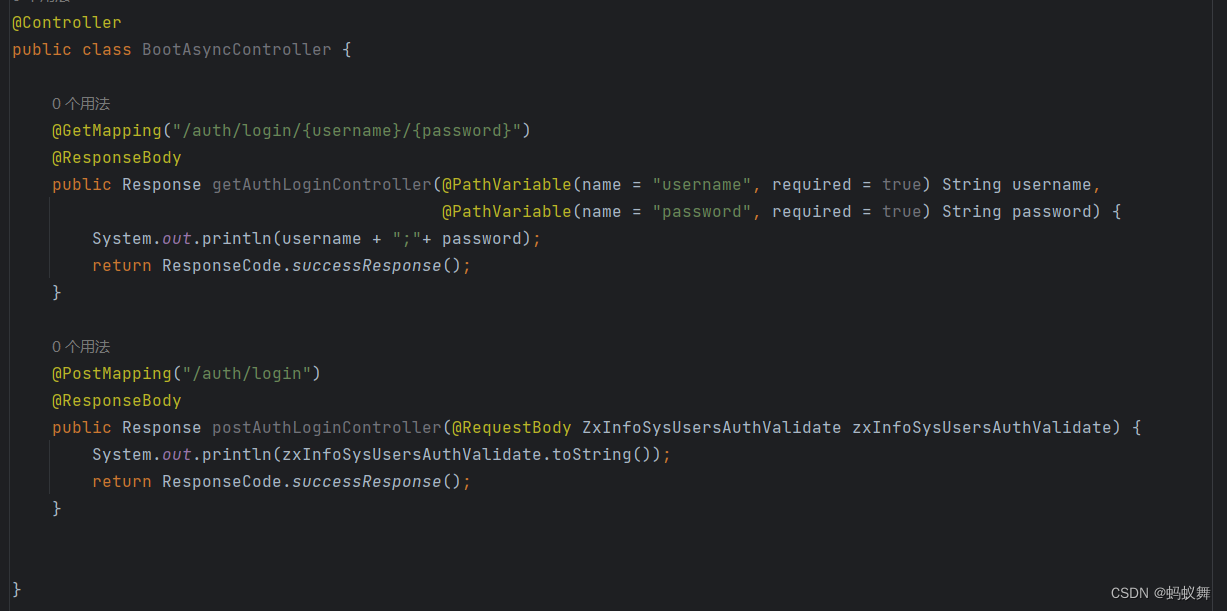
后端使用SpringBoot写了get和post请求登录的2个接口示例


这里使用的是application/x-www-form-urlencoded;charset=UTF-8,一般我们使用的都是json数据,于是呢可以改变下jquery.request.jsapplication/json;charset=UTF-8
// requet ajax json token function httpJsonRequest (url, method, data = {}, token, contentType, back){ $.ajax({ url: baseURL+url, type: method, data: JSON.stringify(data), cache: false, timeout: timeout, headers: {'token': token}, contentType: contentType, dataType: "json", success: function(res){ console.log(res) return typeof back == "function" && back(res); }, error: function(error) { console.log(error) return typeof back == "function" && back(null); } }); }; function getAjaxJsonHttpRequst (url, data, token, callBack) { httpJsonRequest(url, "GET", data, token, "application/json;charset=UTF-8", function(res) { return typeof callBack == "function" && callBack(res) }) }; function postAjaxJsonHttpRequst (url, data, token, callBack) { httpJsonRequest(url, "POST", data, token, "application/json;charset=UTF-8", function(res) { return typeof callBack == "function" && callBack(res) }) };- 1
- 2
- 3
- 4
- 5
- 6
- 7
- 8
- 9
- 10
- 11
- 12
- 13
- 14
- 15
- 16
- 17
- 18
- 19
- 20
- 21
- 22
- 23
- 24
- 25
- 26
- 27
- 28
- 29
- 30
- 31
index.html
$(function() { requestJsonGetLoginDemo(); requestJsonPostLoginDemo(); }); function requestJsonGetLoginDemo() { var username = "myyhtw"; var password = "123456"; getAjaxJsonHttpRequst('/auth/login/'+username+"/"+password, null, null, function(res) { console.log(res) if(res){ console.log("需要的数据") } else { console.log("返回数据不存在或者请求数据失败") } }) } function requestJsonPostLoginDemo() { var data = { username: "myyhtw", password: "123456"} postAjaxJsonHttpRequst('/auth/login', data, null, function(res) { console.log(res) if(res){ console.log("需要的数据") } else { console.log("返回数据不存在或者请求数据失败") } }) }- 1
- 2
- 3
- 4
- 5
- 6
- 7
- 8
- 9
- 10
- 11
- 12
- 13
- 14
- 15
- 16
- 17
- 18
- 19
- 20
- 21
- 22
- 23
- 24
- 25
- 26
- 27
- 28
- 29
- 30
后端使用SpringBoot写了get和post请求json格式登录的2个接口示例
完整jquery.request.js
const baseURL = 'http://127.0.0.1:8116'; // const baseURL = ""; const timeout = 3000; // requet ajax function request (url, method, data = {}, contentType, back){ $.ajax({ url: baseURL+url, type: method, data: data, cache: false, timeout: timeout, contentType: contentType, dataType: "json", success: function(res){ console.log(res) return typeof back == "function" && back(res); }, error: function(error) { console.log(error) return typeof back == "function" && back(null); } }); }; function getAjaxRequst (url, data, callBack) { request(url, "GET", data, "application/x-www-form-urlencoded;charset=UTF-8", function(res) { return typeof callBack == "function" && callBack(res) }) }; function postAjaxRequst (url, data, callBack) { request(url, "POST", data, "application/x-www-form-urlencoded;charset=UTF-8", function(res) { return typeof callBack == "function" && callBack(res) }) }; // requet ajax json token function httpJsonRequest (url, method, data = {}, token, contentType, back){ $.ajax({ url: baseURL+url, type: method, data: JSON.stringify(data), cache: false, timeout: timeout, headers: {'token': token}, contentType: contentType, dataType: "json", success: function(res){ console.log(res) return typeof back == "function" && back(res); }, error: function(error) { console.log(error) return typeof back == "function" && back(null); } }); }; function getAjaxJsonHttpRequst (url, data, token, callBack) { httpJsonRequest(url, "GET", data, token, "application/json;charset=UTF-8", function(res) { return typeof callBack == "function" && callBack(res) }) }; function postAjaxJsonHttpRequst (url, data, token, callBack) { httpJsonRequest(url, "POST", data, token, "application/json;charset=UTF-8", function(res) { return typeof callBack == "function" && callBack(res) }) };- 1
- 2
- 3
- 4
- 5
- 6
- 7
- 8
- 9
- 10
- 11
- 12
- 13
- 14
- 15
- 16
- 17
- 18
- 19
- 20
- 21
- 22
- 23
- 24
- 25
- 26
- 27
- 28
- 29
- 30
- 31
- 32
- 33
- 34
- 35
- 36
- 37
- 38
- 39
- 40
- 41
- 42
- 43
- 44
- 45
- 46
- 47
- 48
- 49
- 50
- 51
- 52
- 53
- 54
- 55
- 56
- 57
- 58
- 59
- 60
- 61
- 62
- 63
- 64
- 65
- 66
- 67
- 68
- 69
- 70
- 71
- 72
- 73
- 74
- 75
index.html
<!DOCTYPE html> <html> <head> <meta charset="utf-8"> <meta http-equiv="X-UA-Compatible" content="IE=edge,chrome=1"> <meta name="viewport" content="width=device-width, initial-scale=1, maximum-scale=1, user-scalable=no"> <meta name="renderer" content="webkit"> <meta http-equiv="Cache-Control" content="no-siteapp"> <meta name="keywords" content=""> <meta name="description" content=""> <meta http-equiv="pragma" content="no-cache"> <meta http-equiv="cache-control" content="no-cache"> <meta http-equiv="expires" content="0"> <script type="text/javascript" src="jquery.min.js"></script> <script type="text/javascript" src="jquery.request.js"></script> <title>jquery.request-demo</title> <style></style> </head> <body> <div class=""> </div> <script type="text/javascript"> $(function() { // requestGetLoginDemo(); // requestPostLoginDemo(); requestJsonGetLoginDemo(); requestJsonPostLoginDemo(); }); function requestJsonGetLoginDemo() { var username = "myyhtw"; var password = "123456"; getAjaxJsonHttpRequst('/auth/login/'+username+"/"+password, null, null, function(res) { console.log(res) if(res){ console.log("需要的数据") } else { console.log("返回数据不存在或者请求数据失败") } }) } function requestJsonPostLoginDemo() { var data = { username: "myyhtw", password: "123456"} postAjaxJsonHttpRequst('/auth/login', data, null, function(res) { console.log(res) if(res){ console.log("需要的数据") } else { console.log("返回数据不存在或者请求数据失败") } }) } function requestGetLoginDemo() { var data = { username: "myyhtw", password: "123456"} getAjaxRequst('/auth/login', data, function(res) { console.log(res) if(res){ console.log("需要的数据") } else { console.log("返回数据不存在或者请求数据失败") } }) } function requestPostLoginDemo() { var data = { username: "myyhtw", password: "123456"} postAjaxRequst('/auth/login', data, function(res) { console.log(res) if(res){ console.log("需要的数据") } else { console.log("返回数据不存在或者请求数据失败") } }) } </script> </body> </html>- 1
- 2
- 3
- 4
- 5
- 6
- 7
- 8
- 9
- 10
- 11
- 12
- 13
- 14
- 15
- 16
- 17
- 18
- 19
- 20
- 21
- 22
- 23
- 24
- 25
- 26
- 27
- 28
- 29
- 30
- 31
- 32
- 33
- 34
- 35
- 36
- 37
- 38
- 39
- 40
- 41
- 42
- 43
- 44
- 45
- 46
- 47
- 48
- 49
- 50
- 51
- 52
- 53
- 54
- 55
- 56
- 57
- 58
- 59
- 60
- 61
- 62
- 63
- 64
- 65
- 66
- 67
- 68
- 69
- 70
- 71
- 72
- 73
- 74
- 75
- 76
- 77
- 78
- 79
- 80
- 81
- 82
- 83
- 84
- 85
- 86
- 87
- 88
- 89
-
相关阅读:
基于51单片机病床呼叫系统proteus仿真设计(protues仿真+源码+报告)
jQuery之Callbacks函数功能测试
计算机毕业设计Java校园闲置物品交换平台系统(源码+系统+mysql数据库+Lw文档)
ViewModel 源码设计思路分析
OpenGL ES google angle
Python—线性回归
百钱百鸡问题(C++枚举法)
Apache Hudi初探(五)(与flink的结合)--Flink 中hudi clean操作
前篇 + 入门
MIT CS143 lecture 02 Overview of COOL
- 原文地址:https://blog.csdn.net/myyhtw/article/details/133576005
