-
会议OA项目-首页->flex弹性布局,轮播图后台数据获取及组件使用(后台数据交互mockjs),首页布局
- flex弹性布局
- 轮播图后台数据获取及组件使用(后台数据交互mockjs)
- 首页布局
1.flex弹性布局
什么是flex布局?
1) Flex是Flexible Box的缩写,意为”弹性布局”,用来为盒状模型提供最大的灵活性。
2) 任何一个容器都可以指定为Flex布局。
3) display: ‘flex’

容器默认存在两根轴:水平的主轴(main axis)和垂直的交叉轴(cross axis)。主轴的开始位置(与边框的交叉点)叫做main start,结束位置叫做main end;交叉轴的开始位置叫做cross start,结束位置叫做cross end。
项目默认沿主轴排列。单个项目占据的主轴空间叫做main size,占据的交叉轴空间叫做cross size。
- //oamin\app.json
- {
- "pages": [
- "pages/index/index",
- "pages/meeting/list/list",
- "pages/vote/list/list",
- "pages/ucenter/index/index",
- "pages/logs/logs"
- ],
- "window": {
- "backgroundTextStyle": "light",
- "navigationBarBackgroundColor": "#fff",
- "navigationBarTitleText": "Weixin",
- "navigationBarTextStyle": "black"
- },
- "tabBar": {
- "list": [{
- "pagePath": "pages/index/index",
- "text": "首页",
- "iconPath": "/static/tabBar/coding.png",
- "selectedIconPath": "/static/tabBar/coding-active.png"
- },
- {
- "pagePath": "pages/meeting/list/list",
- "iconPath": "/static/tabBar/sdk.png",
- "selectedIconPath": "/static/tabBar/sdk-active.png",
- "text":"会议"
- },
- {
- "pagePath": "pages/vote/list/list",
- "iconPath": "/static/tabBar/template.png",
- "selectedIconPath": "/static/tabBar/template-active.png",
- "text": "投票"
- },
- {
- "pagePath": "pages/ucenter/index/index",
- "iconPath": "/static/tabBar/component.png",
- "selectedIconPath": "/static/tabBar/component-active.png",
- "text": "设置"
- }],
- "style": "v2",
- "sitemapLocation": "sitemap.json"
- }
- }
"box"> 1 2 3 4 5 6 7 8 9 10 11 12
- /* pages/vote/list/list.wxss */
- .box{
- height: 750rpx;
- width: 750rpx;
- background-color: aquamarine;
- display: flex;
- /* flex-direction: column; */
- /* flex-direction: column-reverse; */
- flex-wrap: wrap;
- /* flex-flow: row; */
- /* flex-flow: row wrap; */
- /* justify-content: flex-end; */
- align-items: flex-end;
- }
- view{
- height: 100rpx;
- width: 100rpx;
- border: 1px solid red;
- }
flex属性
- **flex-direction** 主轴的方向 默认为row
- flex-wrap 如果一条轴线排不下,如何换行
- flex-flow 是flex-direction属性和flex-wrap属性的简写形式
- **justify-content** 定义了项目在主轴上的对齐方式
- **align-items** 定义项目在交叉轴上如何对齐
- align-content 属性定义了多根轴线的对齐方式注意,设为Flex布局以后,子元素的float、clear和vertical-align属性将失效。
### 学习地址(pages/vote/list/list.wxss页面的代码意思在以下链接):
http://www.runoob.com/w3cnote/flex-grammar.html
2.轮播图后台数据获取及组件使用(后台数据交互mockjs)
- //oamin\config\app.js
- // 以下是业务服务器API地址
- // 本机开发API地址
- var WxApiRoot = 'http://localhost:8080/demo/wx/';
- // 测试环境部署api地址
- // var WxApiRoot = 'http://192.168.0.101:8070/demo/wx/';
- // 线上平台api地址
- //var WxApiRoot = 'https://www.oa-mini.com/demo/wx/';
- module.exports = {
- IndexUrl: WxApiRoot + 'home/index', //首页数据接口
- SwiperImgs: WxApiRoot+'swiperImgs', //轮播图
- MettingInfos: WxApiRoot+'meeting/list', //会议信息
- };
- // index.js
- // 获取应用实例
- const app = getApp()
- const api=require("../../config/app.js")
- Page({
- data: {
- imgSrcs:[]
- },
- // 事件处理函数
- bindViewTap() {
- wx.navigateTo({
- url: '../logs/logs'
- })
- },
- loadSwiperImgs(){
- let that=this;
- wx.request({
- url: api.SwiperImgs,
- dataType: 'json',
- success(res) {
- console.log(res)
- that.setData({
- imgSrcs:res.data.images
- })
- }
- })
- },
- onLoad() {
- if (wx.getUserProfile) {
- this.setData({
- canIUseGetUserProfile: true
- })
- }
- this.loadSwiperImgs();
- },
- getUserProfile(e) {
- // 推荐使用wx.getUserProfile获取用户信息,开发者每次通过该接口获取用户个人信息均需用户确认,开发者妥善保管用户快速填写的头像昵称,避免重复弹窗
- wx.getUserProfile({
- desc: '展示用户信息', // 声明获取用户个人信息后的用途,后续会展示在弹窗中,请谨慎填写
- success: (res) => {
- console.log(res)
- this.setData({
- userInfo: res.userInfo,
- hasUserInfo: true
- })
- }
- })
- },
- getUserInfo(e) {
- // 不推荐使用getUserInfo获取用户信息,预计自2021年4月13日起,getUserInfo将不再弹出弹窗,并直接返回匿名的用户个人信息
- console.log(e)
- this.setData({
- userInfo: e.detail.userInfo,
- hasUserInfo: true
- })
- }
- })
"{{true}}" autoplay="{{true}}"> for="{{imgSrcs}}" wx:key="*text"> "{{item.img}}">

3.首页布局
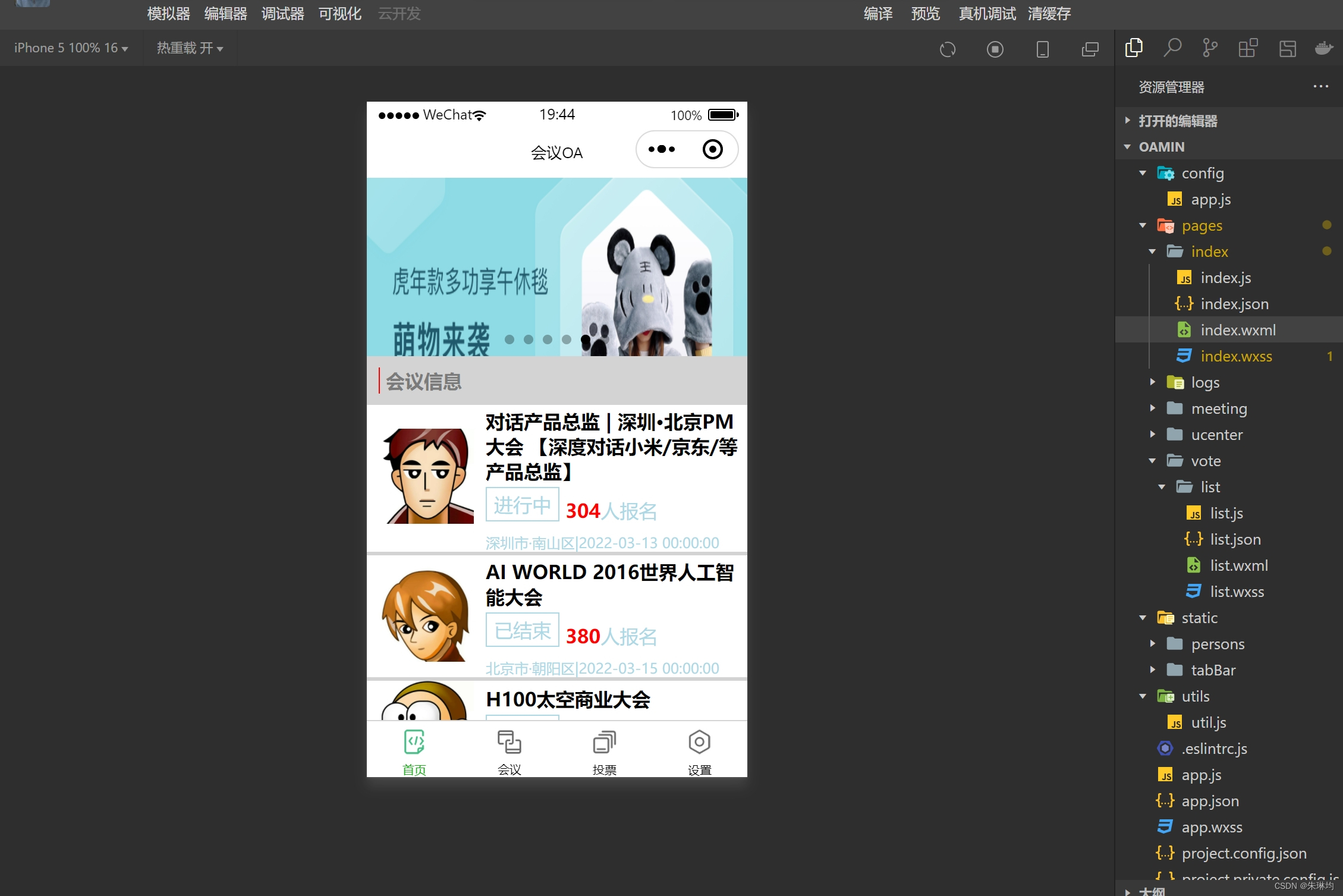
"{{true}}" autoplay="{{true}}"> for="{{imgSrcs}}" wx:key="*text"> "{{item.img}}"> "mobi-title"> "mobi-icon"> 会议信息 for-items="{{lists}}" wx:for-item="item" wx:key="item.id"> "list" data-id="{{item.id}}"> "list-img"> "video-img" mode="scaleToFill" src="{{item.image}}"> "list-detail"> "list-title"> {{item.title}} "list-tag"> "state">{{item.state}} "join"> "list-num">{{item.num}} 人报名"list-info"> {{item.location}} |{{item.starttime}} "section bottom-line"> 到底啦
- /**index.wxss**/
- .mobi-title{
- background-color: lightgray;
- padding: 10px;
- }
- .mobi-icon{
- border:1rpx solid red;
- margin-right: 5px;
- }
- .mobi-title text{
- font-weight: 700;
- color: #7B7B7B;
- }
- .list{
- display: flex;
- align-items: center;
- /* background-color: lightblue; */
- border-bottom: 3px solid lightgray;
- }
- .list-img{
- padding:0 10px;
- }
- .video-img{
- height: 80px;
- width: 80px;
- }
- .list-detail{
- }
- .list-title{
- font-weight: 700;
- margin: 3px 0;
- }
- .list-tag{
- display: flex;
- align-items: center;
- }
- .state{
- border:1px solid lightblue;
- padding: 3px 6px;
- color: lightblue;
- margin: 0 5px 10px 0;
- }
- .join{
- color: lightblue;
- }
- .list-num{
- color: red;
- font-weight: 700;
- }
- .list-info{
- color: lightblue;
- font-size: 12px;
- }
-
相关阅读:
MySQL常见面试题(三)
解决npm报错Error: error:0308010C:digital envelope routines::unsupported
Classloader整理
外语配音软件“布谷鸟配音“和ffmepg转换软件的使用以及SYD_Calculator提取文件到C语言
内网渗透系列之mimikatz的使用以及后门植入
ansible部署二进制k8s
《树莓派python编程指南》摘要
程序员的下一个风口
tauri为窗口添加阴影效果
【无标题】
- 原文地址:https://blog.csdn.net/weixin_73471776/article/details/133883257
