-
监控系列(六)prometheus监控DMHS操作步骤
一、监控的操作逻辑
- 给操作系统安装expect命令
- expect脚本执行dmhs_console脚本执行 cpt / exec 命令
- 用脚本进行过滤字符串过滤
- dm_export读取脚本与当前日期作比较,然后返回差值
二、安装步骤
1. linux中Expect工具的安装及使用方法
# wget https://sourceforge.net/projects/tcl/files/Tcl/8.4.19/tcl8.4.19-src.tar.gz # tar zxvf tcl8.4.19-src.tar.gz # cd tcl8.4.19/unix && ./configure # make # make install # 回退到基目录下在执行一下操作 # wget http://sourceforge.net/projects/expect/files/Expect/5.45/expect5.45.tar.gz # tar zxvf expect5.45.tar.gz # cd expect5.45 # ./configure --with-tcl=/usr/local/lib --with-tclinclude=../tcl8.4.19/generic # make # make install # ln -s /usr/local/bin/expect /usr/bin/expect # 安装完成之后运行expect命令,查看是否安装成功。 # expect expect1.1>- 1
- 2
- 3
- 4
- 5
- 6
- 7
- 8
- 9
- 10
- 11
- 12
- 13
- 14
- 15
- 16
- 17
- 18
- 19
2. dm_exporter工具配置文件
调整application.yml
新增dmhs的相关属性,注意enableType类型 需要区分源端以及目的端
[root@p4-oakdmdb02 dm_exporter]# vi application.yml spring: application: name: dm-prometheus server: port: 9200 ##ip识别错误时使用 ip: ##主机的hostname hostname: ##告警保留时间(分钟) alarmSaveTime: 5 ##大key的保留时间(表空间使用 分组) bigKeySaveTime: 720 ##会话等待的检测时间(分钟) 检测会话等待值 sql传参 waitingSessionTime: 5 ##是否屏蔽特殊项 0 不屏蔽 1屏蔽 (屏蔽定时任务、sql超时) specialCheck: 1 dmdbms: jdbcUrl: jdbc:dm://127.0.0.1:5236 username: SYSDBA password: SYSDBA dmhs: ## 0 不启动 1 cpt源端 2 目的端 enableType: 0 installBinPath: /home/dmdba/dmhs/bin management: endpoints: # 关闭所有的检查项 enabled-by-default: false web: exposure: # 暴露监控接口,*为全部接口 include: 'prometheus' # 不暴露接口 # exclude: 'info' base-path: "/" # 对外暴露prometheus接口并擦好看更多健康信息 endpoint: prometheus: enabled: true health: show-details: always ## 关闭内置的检查项 metrics: enable: jvm: false logback: false files: false tomcat: false executor: false disk: false uptime: false integration: false trace: http: enabled: false logging: config: classpath:log4j2.xml- 1
- 2
- 3
- 4
- 5
- 6
- 7
- 8
- 9
- 10
- 11
- 12
- 13
- 14
- 15
- 16
- 17
- 18
- 19
- 20
- 21
- 22
- 23
- 24
- 25
- 26
- 27
- 28
- 29
- 30
- 31
- 32
- 33
- 34
- 35
- 36
- 37
- 38
- 39
- 40
- 41
- 42
- 43
- 44
- 45
- 46
- 47
- 48
- 49
- 50
- 51
- 52
- 53
- 54
- 55
- 56
- 57
- 58
- 59
- 60
- 61
- 62
生成脚本(get_hs_console_info.sh)
工具自动生成,此脚本做参考
#!/usr/bin/env bash /usr/bin/expect << EOF set timeout 3 spawn /home/dmdba/dmhs_new_20230925/bin/dmhs_console send "cpt\r" send "exit\r" expect eof EOF- 1
- 2
- 3
- 4
- 5
- 6
- 7
- 8
- 9
生成脚本(get_hs_console_result_info.sh)
工具自动生成,此脚本做参考
#!/usr/bin/env bash HS_BIN_DIR=/home/dmdba/dmhs_new_20230925/bin SCRIPT_DIR=/prometheus/dm_exporter/export_script LOG_FILE=$SCRIPT_DIR/hs_console.txt RESULT_FILE=$SCRIPT_DIR/hs_console_result.txt cd $HS_BIN_DIR sh $SCRIPT_DIR/get_hs_console_info.sh >$LOG_FILE sed -i 's/\x1B\[[0-9;]*m//g; s/\x0D$//g; s/\^M\$//g' $LOG_FILE CheckPointTime=`cat $LOG_FILE |grep "checkpoint time"|awk -F " : " '{print $3}'|awk -F " " '{print $1,$2}'|awk 'NR==1{print}'` echo 'CheckPointTime='$CheckPointTime'' > $RESULT_FILE CurrentLogTime=`cat $LOG_FILE |grep "current log time"|awk -F " : " '{print $2}'|awk -F " " '{print $1,$2}'|awk 'NR==1{print}'` echo 'CurrentLogTime='$CurrentLogTime'' >> $RESULT_FILE- 1
- 2
- 3
- 4
- 5
- 6
- 7
- 8
- 9
- 10
- 11
- 12
- 13
[root@p4-oa15dmdb01 export_script]# cat hs_console_result.txt CheckPointTime=2023-10-13 11:41:21 CurrentLogTime=2023-10-13 13:28:10- 1
- 2
- 3
三、调整promehteus配置文件
1. 添加主机配置 prometheus.yml
[root@Zabbbix prometheus-2.35.0]# vim prometheus.yml # my global config global: scrape_interval: 1m # Set the scrape interval to every 15 seconds. Default is every 1 minute. evaluation_interval: 1m # Evaluate rules every 15 seconds. The default is every 1 minute. scrape_timeout: 1m # scrape_timeout is set to the global default (10s). # Alertmanager configuration alerting: alertmanagers: - static_configs: - targets: - 127.0.0.1:9093 # Load rules once and periodically evaluate them according to the global 'evaluation_interval'. rule_files: - "rules/*.yml" # - "rules/*_alerts.yml" # A scrape configuration containing exactly one endpoint to scrape: # Here it's Prometheus itself. scrape_configs: # The job name is added as a label `job=` to any timeseries scraped from this config. - job_name: "prometheus" static_configs: - targets: ["localhost:9090"] - job_name: "dmdbms_bgoak_dw" metrics_path: "/prometheus" static_configs: - targets: ["192.63.97.93:9200","192.63.97.94:9200"] labels: cluster_name: '办公OAK'- 1
- 2
- 3
- 4
- 5
- 6
- 7
- 8
- 9
- 10
- 11
- 12
- 13
- 14
- 15
- 16
- 17
- 18
- 19
- 20
- 21
- 22
- 23
- 24
- 25
- 26
- 27
- 28
- 29
- 30
- 31
- 32
- 33
2. 添加告警规则vim custom_test.yml
[root@Zabbbix rules]# vim custom_test.yml - alert: 备库重做日志内存堆积过高 expr: dmdbms_rapply_sys_task_mem_used >= 512000000 for: 15s labels: severity: 警告 annotations: description: "主机:{{ $labels.instance }} 备库重做日志内存堆积过高" summary: "主机:{{ $labels.instance }}:备库重做日志内存堆积过高,请确认是否正常" - alert: 备库重做日志线程数 expr: dmdbms_rapply_sys_task_num >= 2048 for: 15s labels: severity: 警告 annotations: description: "主机:{{ $labels.instance }} 备库重做日志线程数过高" summary: "主机:{{ $labels.instance }}:备库重做日志线程数过高,请确认是否正常" - alert: HS的进程连接异常 expr: dmdbms_dmhs_process_is_exit == 0 for: 15s labels: severity: 警告 annotations: description: "主机:{{ $labels.instance }} HS的进程连接异常" summary: "主机:{{ $labels.instance }}:HS的进程连接异常,请确认是否正常" - alert: HS的checkPointTime超过8h expr: dmdbms_dmhs_check_point_delay >=0 and dmdbms_dmhs_check_point_delay > 60*60*8 for: 15s labels: severity: 警告 annotations: description: "主机:{{ $labels.instance }} HS的checkPointTime超过8h" summary: "主机:{{ $labels.instance }}:HS的checkPointTime超过8h,请确认是否正常"- 1
- 2
- 3
- 4
- 5
- 6
- 7
- 8
- 9
- 10
- 11
- 12
- 13
- 14
- 15
- 16
- 17
- 18
- 19
- 20
- 21
- 22
- 23
- 24
- 25
- 26
- 27
- 28
- 29
- 30
- 31
- 32
- 33
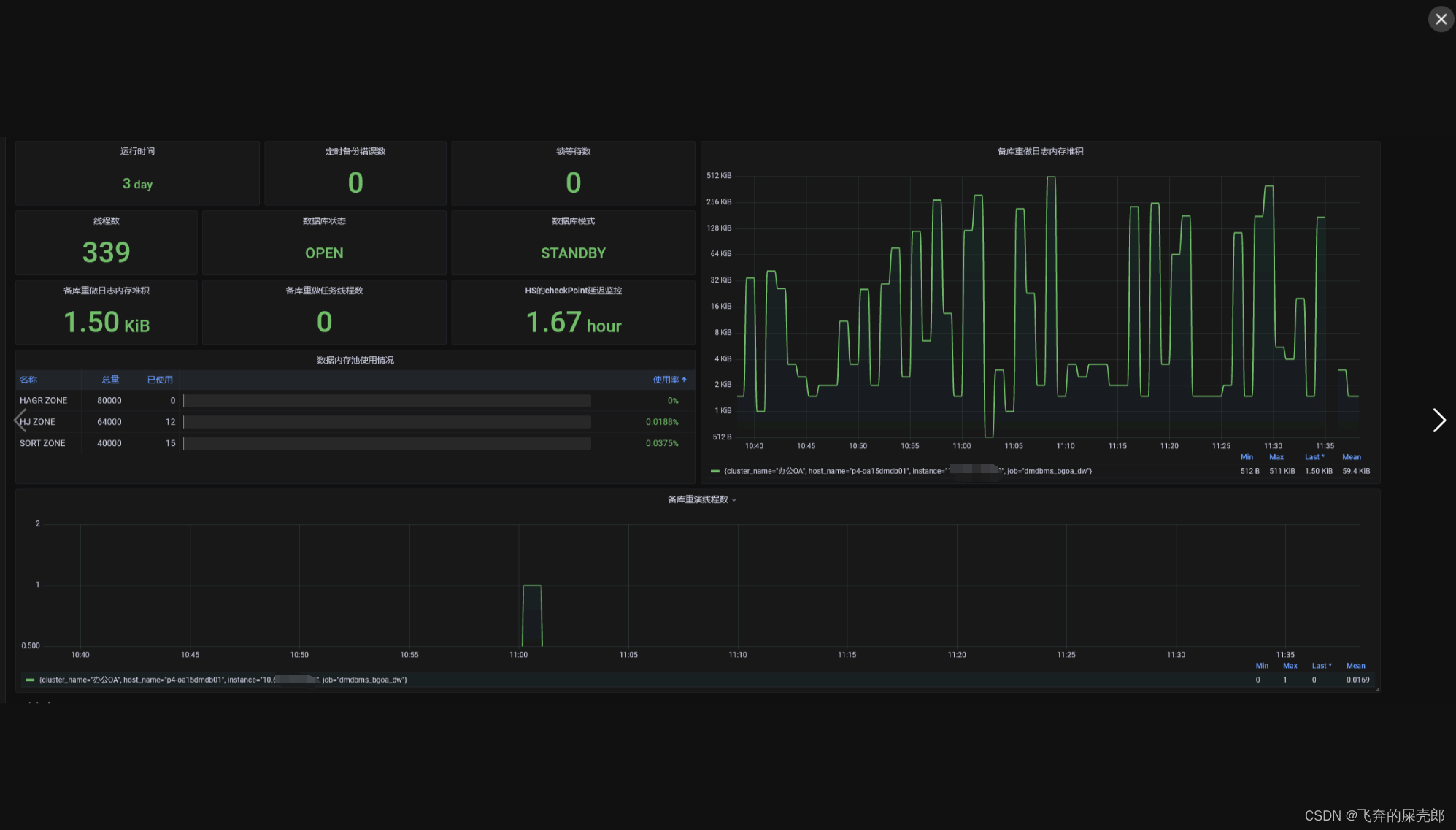
四、修改grafana图表
效果如下:


五、报错
安装expect报错 no acceptable cc found in $PATH

# 安装gcc的依赖环境 yum install gcc-c++- 1
- 2
-
相关阅读:
yolox
软件设计开发笔记6:基于QT的Modbus RTU从站
2022春季数据结构期末考试总结
快来给你的宠物视频加个表情特效吧
24v转12v转9v转5v转4.2v降压电源芯片AH8788
线性代数学习笔记6-4:行列式的应用(用伴随矩阵求逆矩阵、克莱姆法则解方程、行列式求面积/体积)
鲁棒的非负监督低秩鉴别嵌入算法
猿创征文|uniapp tabbar自定义风格
分布式微服务 - 3.服务调用 - 1.概念
java EE初阶 — 计算机工作原理
- 原文地址:https://blog.csdn.net/qq_35349982/article/details/133808778