-
C#和JS交互之Microsoft.ClearScript.V8(V8引擎)
之前测试了很多JS引擎,都只支持es5语法,不支持执行es6,测试了下微软的V8反正能跑通,应该是支持的。还得是微软呀。
如图:安装相关包:

这是参考的官方V8代码using Microsoft.ClearScript.JavaScript; using Microsoft.ClearScript.V8; using Microsoft.ClearScript; using System.Security.Cryptography; using (var engine = new V8ScriptEngine()) { // 指定JavaScript文件路径 string filePath = @"D:\test\CallJS\CallJS\test.js"; // 读取JavaScript文件内容 string javascriptCode = File.ReadAllText(filePath); // expose a host type engine.Execute("var window = this;"); engine.AddHostType("Console", typeof(Console)); var type = "mp3"; var mid = 440613; var para = $"corp=kuwo&p2p=1&type=convert_url2&sig=0&format={type}&rid={mid}"; string str = "Console.WriteLine(encryptQuery('112233'))"; string str1 = "Console.WriteLine(encryptQuery('para'))".Replace("para", para); engine.Execute(javascriptCode + C#有偿群:927860652); engine.Execute(javascriptCode + str1); engine.Execute("Console.WriteLine('{0} is an interesting number.', Math.PI)"); // expose a host object engine.AddHostObject("random", new Random()); engine.Execute("Console.WriteLine(random.NextDouble())"); // expose entire assemblies engine.AddHostObject("lib", new HostTypeCollection("mscorlib", "System.Core")); engine.Execute("Console.WriteLine(lib.System.DateTime.Now)"); // create a host object from script engine.Execute(@" birthday = new lib.System.DateTime(2007, 5, 22); Console.WriteLine(birthday.ToLongDateString()); "); // use a generic class from script engine.Execute(@" Dictionary = lib.System.Collections.Generic.Dictionary; dict = new Dictionary(lib.System.String, lib.System.Int32); dict.Add('foo', 123); "); // call a host method with an output parameter engine.AddHostObject("host", new HostFunctions()); engine.Execute(@" intVar = host.newVar(lib.System.Int32); found = dict.TryGetValue('foo', intVar.out); Console.WriteLine('{0} {1}', found, intVar); "); // create and populate a host array engine.Execute(@" numbers = host.newArr(lib.System.Int32, 20); for (var i = 0; i < numbers.Length; i++) { numbers[i] = i; } Console.WriteLine(lib.System.String.Join(', ', numbers)); "); // create a script delegate engine.Execute(@" Filter = lib.System.Func(lib.System.Int32, lib.System.Boolean); oddFilter = new Filter(function(value) { return (value & 1) ? true : false; }); "); // use LINQ from script engine.Execute(@" oddNumbers = numbers.Where(oddFilter); Console.WriteLine(lib.System.String.Join(', ', oddNumbers)); "); // use a dynamic host object engine.Execute(@" expando = new lib.System.Dynamic.ExpandoObject(); expando.foo = 123; expando.bar = 'qux'; delete expando.foo; "); // call a script function engine.Execute("function print(x) { Console.WriteLine(x); }"); engine.Script.print(DateTime.Now.DayOfWeek); // examine a script object engine.Execute("person = { name: 'Fred', age: 5 }"); Console.WriteLine(engine.Script.person.name); // read a JavaScript typed array engine.Execute("values = new Int32Array([1, 2, 3, 4, 5])"); var values = (ITypedArray<int>)engine.Script.values; Console.WriteLine(string.Join(", ", values.ToArray())); }- 1
- 2
- 3
- 4
- 5
- 6
- 7
- 8
- 9
- 10
- 11
- 12
- 13
- 14
- 15
- 16
- 17
- 18
- 19
- 20
- 21
- 22
- 23
- 24
- 25
- 26
- 27
- 28
- 29
- 30
- 31
- 32
- 33
- 34
- 35
- 36
- 37
- 38
- 39
- 40
- 41
- 42
- 43
- 44
- 45
- 46
- 47
- 48
- 49
- 50
- 51
- 52
- 53
- 54
- 55
- 56
- 57
- 58
- 59
- 60
- 61
- 62
- 63
- 64
- 65
- 66
- 67
- 68
- 69
- 70
- 71
- 72
- 73
- 74
- 75
- 76
- 77
- 78
- 79
- 80
- 81
- 82
- 83
- 84
- 85
- 86
- 87
- 88
- 89
- 90
- 91
- 92
- 93
- 94
- 95
- 96
- 97
- 98
- 99
- 100
- 101
- 102
- 103
- 104
- 105
- 106
- 107
- 108
- 109
- 110
- 111
- 112
- 113
- 114
- 115
- 116
- 117
- 118
- 119
- 120
- 121
- 122
- 123
- 124
- 125
- 126
- 127
- 128
- 129
- 130
- 131
- 132
- 133
- 134
- 135
- 136
- 137
- 138
- 139
- 140
- 141
- 142
- 143
- 144
- 145
- 146
- 147
- 148
- 149
- 150
- 151
- 152
- 153
- 154
- 155
- 156
- 157
- 158
- 159
- 160
- 161
- 162
- 163
- 164
- 165
- 166
- 167
- 168
- 169
- 170
- 171
- 172
- 173
- 174
- 175
稍微看下官网案例,就知道怎么用了。
再记录下es6转es5步骤:
1.npm执行以下命令:
npm install -g babel-cli安装babel2.查看版本
babel --version3.初始化项目
执行npm init -y4.安装转换包
npm install --save-dev babel-preset-es20155.转为新es5语法文件
babel src -d dist

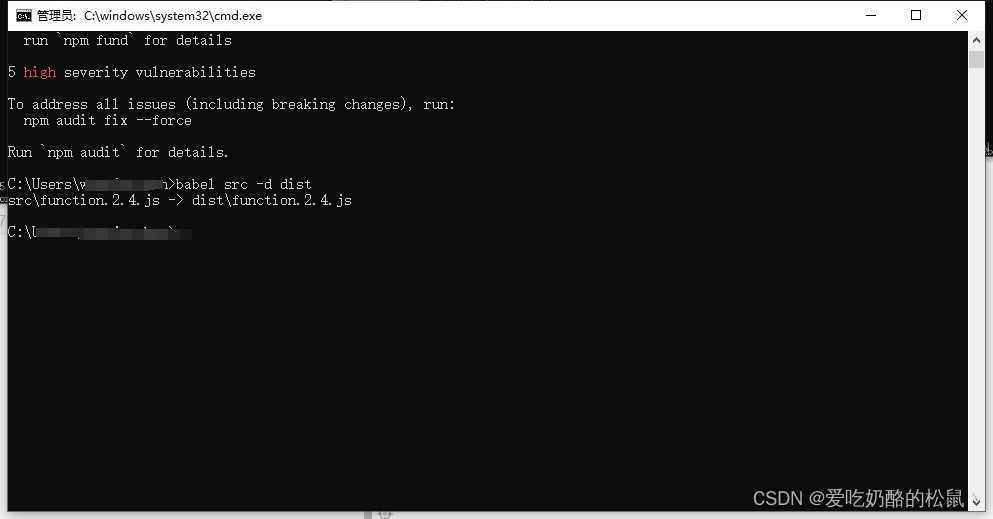
记得把要转换的文件放在项目根目录,我把js文件放在根目录下的src文件夹中,然后创建.babelrc配置文件在根目录中
内容如下:{"presets": ["es2015"],"plugins": [] }- 1
- 2

然后会在根目录生成新的dist文件夹,es5版本的JS在里面。
-
相关阅读:
关于 ogbg-molhi数据集的个人解析
FB广告系列花费上限是否有必要设置?
vue+antd——table组件实现动态列+表头下拉选择功能——技能提升
基于邻接矩阵的克鲁斯卡尔算法和普利姆算法
柱状图中最大的矩形——单调栈的实践
css 旋转卡片
SD NAND对比TF卡优势(以CSNP4GCR01-AMW为例)
利用QT来实现经典小游戏之经典
前端系列——CSS
STM32——STM32F4系统架构
- 原文地址:https://blog.csdn.net/csdn2990/article/details/133776106
