-
小黑子—MyBatis:第三章
MyBatis入门3.0
七 小黑子使用javassist生成类
javassist是一个开源的分析、编辑和创建java字节码类库。是由东京工业大学的数学和计算机科学系的Shigeru Chiba(千叶滋)所创建的。它已加入了开发源代码JBoss应用服务器项目,通过使用Javassist对字节码操作为JBoss实现动态"AOP"框架
7.1 Javassist的使用
- 我们要使用javassist,首先要引入它的依赖
<dependency> <groupId>org.javassistgroupId> <artifactId>javassistartifactId> <version>3.29.1-GAversion> dependency>- 1
- 2
- 3
- 4
- 5
- 样例代码:
package com.powernode.javassist; import javassist.CannotCompileException; import javassist.ClassPool; import javassist.CtClass; import javassist.CtMethod; import org.junit.Test; import java.lang.reflect.InvocationTargetException; import java.lang.reflect.Method; public class JavassistTest { @Test public void testGenerateFirstClass() throws CannotCompileException, ClassNotFoundException, InstantiationException, IllegalAccessException, NoSuchMethodException, InvocationTargetException { //获取类池,这个类池就是用来给我生成class的 ClassPool pool = ClassPool.getDefault(); //创造类(需要告诉javassist,类名是啥) CtClass ctClass = pool.makeClass("com.powernode.bank.dao.impl.AccountDapImpl"); // 创造方法 String methodCode = "public void insert(){System.out.println(123);}"; CtMethod ctMethod = CtMethod.make(methodCode, ctClass); //将方法添加到类中 ctClass.addMethod(ctMethod); //在内存中生成class ctClass.toClass(); //类加载到JVM当中,返回AccountDaoImpl Class<?> clazz = Class.forName("com.powernode.bank.dao.impl.AccountDapImpl"); //创建对象 Object obj = clazz.newInstance(); //获取AccountDaoImpl中的insert方法 Method insertMethod = clazz.getDeclaredMethod("insert"); //调用方法insert insertMethod.invoke(obj); } }- 1
- 2
- 3
- 4
- 5
- 6
- 7
- 8
- 9
- 10
- 11
- 12
- 13
- 14
- 15
- 16
- 17
- 18
- 19
- 20
- 21
- 22
- 23
- 24
- 25
- 26
- 27
- 28
- 29
- 30
- 31
- 32
- 33
- 34
- 35
- 36
- 37
- 38
- 39
- 40

运行要注意:在配置中加两个参数,要不然会有异常。
- –add-opens java.base/java.lang=ALL-UNNAMED
- –add-opens java.base/sun.net.util=ALL-UNNAMED


7.2 javassist生成动态类并实现接口

package com.powernode.javassist; import com.powernode.bank.dao.AccountDao; import javassist.ClassPool; import javassist.CtClass; import javassist.CtMethod; import org.junit.Test; public class JavassistTest { @Test public void testGenerateImpl() throws Exception { //获取类池 ClassPool pool = ClassPool.getDefault(); //制作类 CtClass ctClass = pool.makeClass("com.powernode.bank.dao.impl.AccountDapImpl"); //制造接口 CtClass ctInterface = pool.makeInterface("com.powernode.bank.dao.AccountDao"); //添加接口到类中 ctClass.addInterface(ctInterface); // 实现接口中的方法 //制造方法 CtMethod ctMethod = CtMethod.make("public void delete(){System.out.println(\"hello delete\");}", ctClass); //将方法添加到类中 ctClass.addMethod(ctMethod); //在内存中生成类,同时将生成的类加载到JVM当中 Class<?> clazz = ctClass.toClass(); AccountDao accountDao = (AccountDao) clazz.newInstance(); accountDao.delete(); } }- 1
- 2
- 3
- 4
- 5
- 6
- 7
- 8
- 9
- 10
- 11
- 12
- 13
- 14
- 15
- 16
- 17
- 18
- 19
- 20
- 21
- 22
- 23
- 24
- 25
- 26
- 27
- 28
- 29
- 30
- 31
- 32
- 33
- 34

- 实现接口中的所有方法
@Test public void testGenerateAccountDaoImpl() throws Exception{ // 获取类池 ClassPool pool = ClassPool.getDefault(); //制造类 CtClass ctClass = pool.makeInterface("com.powernode.bank.dao.impl.AccountDapImpl"); //制造接口 CtClass ctInterface = pool.makeInterface("com.powernode.bank.dao.AccountDao"); //实现接口 ctClass.addInterface(ctInterface); //实现接口中所有的方法 //获取接口中所有的方法 Method[] methods = AccountDao.class.getDeclaredMethods(); Arrays.stream(methods).forEach(method -> { //method 是接口中的抽象方法 try { // public void delete(){System.out.println(111);} StringBuilder methodCode = new StringBuilder(); methodCode.append("public ");//追加修饰符列表 methodCode.append(method.getReturnType().getName());//追加返回值类型 methodCode.append(" "); methodCode.append(method.getName()); methodCode.append("("); //添加参数 Class<?>[] parameterTypes = method.getParameterTypes(); for (int i = 0; i < parameterTypes.length; i++) { Class<?> parameter = parameterTypes[i]; methodCode.append(parameter.getName()); methodCode.append(" "); methodCode.append("arg"+i); if (i != parameterTypes.length-1){ methodCode.append(","); } } methodCode.append("){System.out.println(11111);"); //添加返回值 String returnName = method.getReturnType().getSimpleName();//获取返回值类名的简类名 if ("int".equals(returnName)){ methodCode.append("return 1;"); } else if ("String".equals(returnName)) { methodCode.append("return \"hello\";"); } methodCode.append("}"); CtMethod ctMethod = CtMethod.make(methodCode.toString(), ctClass); //将方法都加到类中 ctClass.addMethod(ctMethod); } catch (CannotCompileException e) { e.printStackTrace(); } }); //在内存中生成类,同时生成的类加载到JVM当中 Class<?> aClass = ctClass.toClass(); AccountDao accountDao = (AccountDao)aClass.newInstance(); //执行里面的方法 accountDao.insert("aaaaa"); accountDao.delete(); accountDao.update("aaaa",1000.00); accountDao.selectByActno("aaaa"); }- 1
- 2
- 3
- 4
- 5
- 6
- 7
- 8
- 9
- 10
- 11
- 12
- 13
- 14
- 15
- 16
- 17
- 18
- 19
- 20
- 21
- 22
- 23
- 24
- 25
- 26
- 27
- 28
- 29
- 30
- 31
- 32
- 33
- 34
- 35
- 36
- 37
- 38
- 39
- 40
- 41
- 42
- 43
- 44
- 45
- 46
- 47
- 48
- 49
- 50
- 51
- 52
- 53
- 54
- 55
- 56
- 57
- 58
- 59
- 60
7.3 工具类GenerateDaoProxy的编写
工具类GenerateDaoProxy能够动态地提供接口实现类
mybatis自己内置有javassist,mybatis号称轻量级的,只需要一个jar包就行
package com.powernode.bank.utils; import org.apache.ibatis.javassist.ClassPool; import org.apache.ibatis.javassist.CtClass; import org.apache.ibatis.javassist.CtMethod; import java.lang.reflect.Method; import java.util.Arrays; /** * 工具类:可以动态地生成DAO的实现类(或者说可以动态生成DAO的代理类) * @author 小黑子 * @version 1.0 */ public class GenerateDaoProxy { /** * 生成dao接口实现类,并且将实现类的对象创建出来并返回 * @param daoInterface dao接口 * @version 1.0 */ public static Object generate(Class daoInterface){ //类池 ClassPool pool = ClassPool.getDefault(); //制造类(com.powernode.bank.dao.AccountDao->com.powernode.bank.dao.impl.AccountDapImpl) final CtClass ctClass = pool.makeClass(daoInterface.getName()+"Proxy"); //制造接口 CtClass ctInterface = pool.makeInterface(daoInterface.getName()); //实现接口中的所有方法 Method[] methods = daoInterface.getDeclaredMethods(); Arrays.stream(methods).forEach(method->{ //method是抽象方法 //将method这个抽象方法进行实现 try { //public Account selectByActno(String arg0,int arg1,int arg2){代码;} StringBuilder methodCode = new StringBuilder(); methodCode.append("public "); methodCode.append(method.getReturnType().getName()); methodCode.append(" "); methodCode.append(method.getName()); methodCode.append("("); //需要方法的形式参数列表 Class<?>[] parameterTypes = method.getParameterTypes(); for (int i = 0; i < parameterTypes.length; i++) { Class<?> parameterType = parameterTypes[i]; methodCode.append(parameterType.getName()); methodCode.append(" "); methodCode.append("arg"+i); if(i!=parameterTypes.length-1){ methodCode.append(","); } } methodCode.append(")"); methodCode.append("{"); //需要方法体的代码 methodCode.append("}"); CtMethod ctMethod = CtMethod.make(methodCode.toString(), ctClass); ctClass.addMethod(ctMethod); } catch (Exception e) { e.printStackTrace(); } }); //创建对象 Object obj = null; try { Class<?> clazz = ctClass.toClass(); obj = clazz.newInstance(); } catch (Exception e) { e.printStackTrace(); } return null; } }- 1
- 2
- 3
- 4
- 5
- 6
- 7
- 8
- 9
- 10
- 11
- 12
- 13
- 14
- 15
- 16
- 17
- 18
- 19
- 20
- 21
- 22
- 23
- 24
- 25
- 26
- 27
- 28
- 29
- 30
- 31
- 32
- 33
- 34
- 35
- 36
- 37
- 38
- 39
- 40
- 41
- 42
- 43
- 44
- 45
- 46
- 47
- 48
- 49
- 50
- 51
- 52
- 53
- 54
- 55
- 56
- 57
- 58
- 59
- 60
- 61
- 62
- 63
- 64
- 65
- 66
- 67
- 68
- 69
- 70
- 71
- 72
- 73
- 74
- 75
- 76
- 77
- 78
- 79
- 80
- 81
7.3.1 每一个方法体的动态拼接
AccountDaoImpl的mybatis规范
package com.powernode.bank.dao.impl; import com.powernode.bank.dao.AccountDao; import com.powernode.bank.pojo.Account; import com.powernode.bank.utils.SqlSessionUtil; import org.apache.ibatis.session.SqlSession; public class AccountDaoImpl implements AccountDao { @Override public Account selectByActno(String arg0) { SqlSession sqlSession = SqlSessionUtil.openSession(); // Account account = (Account) sqlSession.selectOne("account.selectByActno",actno); // return account; return (Account) sqlSession.selectOne("account.selectByActno",arg0); } @Override public int updateByActno(Account arg0) { SqlSession sqlSession = SqlSessionUtil.openSession(); // int count = sqlSession.update("account.updateActno", act); // return count; return sqlSession.update("account.updateActno", arg0); }- 1
- 2
- 3
- 4
- 5
- 6
- 7
- 8
- 9
- 10
- 11
- 12
- 13
- 14
- 15
- 16
- 17
- 18
- 19
- 20
- 21
- 22
- 23
- 24
- 动态拼接
package com.powernode.bank.utils; import org.apache.ibatis.javassist.ClassPool; import org.apache.ibatis.javassist.CtClass; import org.apache.ibatis.javassist.CtMethod; import org.apache.ibatis.mapping.SqlCommandType; import org.apache.ibatis.session.SqlSession; import java.lang.reflect.Method; import java.util.Arrays; /** * 工具类:可以动态地生成DAO的实现类(或者说可以动态生成DAO的代理类) * @author 小黑子 * @version 1.0 */ public class GenerateDaoProxy { /** * 生成dao接口实现类,并且将实现类的对象创建出来并返回 * @param daoInterface dao接口 * @version 1.0 */ public static Object generate(SqlSession sqlSession, Class daoInterface){ //类池 ClassPool pool = ClassPool.getDefault(); //制造类(com.powernode.bank.dao.AccountDao->com.powernode.bank.dao.impl.AccountDapImpl) final CtClass ctClass = pool.makeClass(daoInterface.getName()+"Proxy"); //制造接口 CtClass ctInterface = pool.makeInterface(daoInterface.getName()); // 实现接口 ctClass.addInterface(ctInterface); //实现接口中的所有方法 Method[] methods = daoInterface.getDeclaredMethods(); Arrays.stream(methods).forEach(method->{ //method是抽象方法 //将method这个抽象方法进行实现 try { //public Account selectByActno(String arg0,int arg1,int arg2){代码;} StringBuilder methodCode = new StringBuilder(); methodCode.append("public "); methodCode.append(method.getReturnType().getName()); methodCode.append(" "); methodCode.append(method.getName()); methodCode.append("("); //需要方法的形式参数列表 Class<?>[] parameterTypes = method.getParameterTypes(); for (int i = 0; i < parameterTypes.length; i++) { Class<?> parameterType = parameterTypes[i]; methodCode.append(parameterType.getName()); methodCode.append(" "); methodCode.append("arg"+i); if(i!=parameterTypes.length-1){ methodCode.append(","); } } methodCode.append(")"); methodCode.append("{"); //需要方法体的代码 methodCode.append("org.apache.ibatis.session.SqlSession sqlSession = com.powernode.bank.utils.SqlSessionUtil.openSession();"); methodCode.append("sqlSession"); //需要知道是什么类型的sql语句 // sql语句的id是框架使用者提供的,具有多边性。对于我框架的开发人员来说。我不知道 //既然我框架开发者不知道sqlId。怎么办?mybatsi框架的开发者于是就出台了一个规定:凡是使用GenerateDaoProxy机制的 //sqlId都不能随便写。namespace必须是dao接口的全限定名称,id必须是dao接口中的方法名 String sqlId = daoInterface.getName() + "," + method.getName(); SqlCommandType sqlCommandType = sqlSession.getConfiguration().getMappedStatement(sqlId).getSqlCommandType(); if(sqlCommandType == sqlCommandType.INSERT){ } if(sqlCommandType == sqlCommandType.DELETE){ } if(sqlCommandType == sqlCommandType.UPDATE){ methodCode.append(" return sqlSession.update(\""+sqlId+"\", arg0)"); } if(sqlCommandType == sqlCommandType.SELECT){ String returnType = method.getReturnType().getName(); methodCode.append(" return (" +returnType+") sqlSession.selectOne(\""+sqlId+"\", arg0)"); } methodCode.append("}"); CtMethod ctMethod = CtMethod.make(methodCode.toString(), ctClass); ctClass.addMethod(ctMethod); } catch (Exception e) { e.printStackTrace(); } }); //创建对象 Object obj = null; try { Class<?> clazz = ctClass.toClass(); obj = clazz.newInstance(); } catch (Exception e) { e.printStackTrace(); } return obj; } }- 1
- 2
- 3
- 4
- 5
- 6
- 7
- 8
- 9
- 10
- 11
- 12
- 13
- 14
- 15
- 16
- 17
- 18
- 19
- 20
- 21
- 22
- 23
- 24
- 25
- 26
- 27
- 28
- 29
- 30
- 31
- 32
- 33
- 34
- 35
- 36
- 37
- 38
- 39
- 40
- 41
- 42
- 43
- 44
- 45
- 46
- 47
- 48
- 49
- 50
- 51
- 52
- 53
- 54
- 55
- 56
- 57
- 58
- 59
- 60
- 61
- 62
- 63
- 64
- 65
- 66
- 67
- 68
- 69
- 70
- 71
- 72
- 73
- 74
- 75
- 76
- 77
- 78
- 79
- 80
- 81
- 82
- 83
- 84
- 85
- 86
- 87
- 88
- 89
- 90
- 91
- 92
- 93
- 94
- 95
- 96
- 97
- 98
- 99
- 100
- 101
- 102
- 103
- 104
- 105
- 106
- 107
- 108
- 109
- 110
- 111
7.3.2 MyBatis的getMapper方法
DOCTYPE mapper PUBLIC "-//mybatis.org//DTD Mapper 3.0//EN" "http://mybatis.org/dtd/mybatis-3-mapper.dtd"> <mapper namespace="account"> <select id="selectByActno" resultType="com.powernode.bank.pojo.Account"> select * from t_act where actno = #{actno} select> <update id="updateByActno"> update t_act set balance = #{balance} where actno = #{actno} update> mapper>- 1
- 2
- 3
- 4
- 5
- 6
- 7
- 8
- 9
- 10
- 11
- 12
- 13
- 14
- 15
- 16
在mybatis当中。mybatis提供了相关的机制,也可以为动态为我们生成接口的实现类。(代理类:接口的代理)
mybatis当中实际上采用了代理模式,在内存中生成dao接口的代理类,然后创建代理类的实例
使用mybatis的这种代理机制的前提:
- SqlMapper.xml文件中
namespace必须是dao接口的全限定名称,id必须是dao接口中的方法名
怎么写?
AccountDao accountDao = SqlSessionUtil.openSession().getMapper(AccountDao.class);八 MyBatis中接口代理机制及使用
其实以上所讲内容mybatis内部已经实现了。直接调用以下代码即可获取dao接口的代理类:
AccountDao accountDao = (AccountDao)sqlSession.getMapper(AccountDao.class);- 1
使用以上代码的前提是:AccountMapper.xml文件中的namespace必须和dao接口的全限定名称一致,id必须和dao接口中方法名一致。
8.1 面向接口的方式进行CRUD
8.1.1 步骤1

CarMapper接口:package com.powernode.mybatis.mapper; import com.powernode.mybatis.pojo.Car; import java.util.List; public interface CarMapper { /** * @description: 新增car * @return */ int insert(Car car); /** * @description: 根据id删除car * @return */ int deleteById(Long id); /** * @description: 根据id修改汽车信息 * @return */ int update(Car car); /** * @description: 获取单个的汽车信息 * @return */ Car selectById(Long id); /** * @description: 获取所有的汽车信息 * @return */ List<Car> selectAll(); }- 1
- 2
- 3
- 4
- 5
- 6
- 7
- 8
- 9
- 10
- 11
- 12
- 13
- 14
- 15
- 16
- 17
- 18
- 19
- 20
- 21
- 22
- 23
- 24
- 25
- 26
- 27
- 28
- 29
- 30
- 31
- 32
- 33
- 34
- 35
- 36
- 37
- 38
资源下的CarMapper.xml
DOCTYPE mapper PUBLIC "-//mybatis.org//DTD Mapper 3.0//EN" "http://mybatis.org/dtd/mybatis-3-mapper.dtd"> <mapper namespace="com.powernode.mybatis.mapper.CarMapper"> <insert id="insert"> insert into t_car values(null,#{carNum},#{brand},#{guidePrice},#{produceTime},#{carType}) insert> <delete id="deleteById"> delete from t_car where id =#{id} delete> <update id="update"> update t_car set car_num = #{carNum},brand = #{brand}, guide_price = #{guidePrice},produce_time = #{produceTime},car_type = #{carType} where id = #{id} update> <select id="selectById" resultType="com.powernode.mybatis.pojo.Car"> select id, car_num as carNum, brand, guide_price as guidePrice, produce_time as produceTime, car_type as carType from t_car where id = #{id} select> <select id="selectAll" resultType="com.powernode.mybatis.pojo.Car"> select id, car_num as carNum, brand, guide_price as guidePrice, produce_time as produceTime, car_type as carType from t_car select> mapper>- 1
- 2
- 3
- 4
- 5
- 6
- 7
- 8
- 9
- 10
- 11
- 12
- 13
- 14
- 15
- 16
- 17
- 18
- 19
- 20
- 21
- 22
- 23
- 24
- 25
- 26
- 27
- 28
- 29
- 30
- 31
- 32
- 33
- 34
- 35
- 36
- 37
- 38
- 39
- 40
- 41
- 42
- 43
8.1.2 步骤2
测试代码:
package com.powernode.mybatis; import com.powernode.mybatis.mapper.CarMapper; import com.powernode.mybatis.pojo.Car; import com.powernode.mybatis.utils.SqlSessionUtil; import org.apache.ibatis.session.SqlSession; import org.junit.Test; import java.util.List; public class CarMapperTest { @Test public void testInsert(){ SqlSession sqlSession = SqlSessionUtil.openSession(); //面向接口获取接口的代理对象 CarMapper mapper = sqlSession.getMapper(CarMapper.class); Car car = new Car(null, "8654", "麻瓜", 3.0, "2022-1-20", "新能源"); int insert = mapper.insert(car); System.out.println(insert); sqlSession.commit(); sqlSession.close(); } @Test public void testDeleteById(){ SqlSession sqlSession = SqlSessionUtil.openSession(); CarMapper mapper = sqlSession.getMapper(CarMapper.class); int insert = mapper.deleteById(16L); System.out.println(insert); sqlSession.commit(); sqlSession.close(); } @Test public void testUpdateById(){ SqlSession sqlSession = SqlSessionUtil.openSession(); CarMapper mapper = sqlSession.getMapper(CarMapper.class); Car car = new Car(15L, "22222", "小老板", 3.0, "2022-10-1", "新能源"); mapper.update(car); System.out.println(car); sqlSession.commit(); sqlSession.close(); } @Test public void testSelectById(){ SqlSession sqlSession = SqlSessionUtil.openSession(); CarMapper mapper = sqlSession.getMapper(CarMapper.class); Car car = mapper.selectById(33L); System.out.println(car); } @Test public void testSelectAll(){ SqlSession sqlSession = SqlSessionUtil.openSession(); CarMapper mapper = sqlSession.getMapper(CarMapper.class); List<Car> cars = mapper.selectAll(); cars.forEach(car -> System.out.println(car)); } }- 1
- 2
- 3
- 4
- 5
- 6
- 7
- 8
- 9
- 10
- 11
- 12
- 13
- 14
- 15
- 16
- 17
- 18
- 19
- 20
- 21
- 22
- 23
- 24
- 25
- 26
- 27
- 28
- 29
- 30
- 31
- 32
- 33
- 34
- 35
- 36
- 37
- 38
- 39
- 40
- 41
- 42
- 43
- 44
- 45
- 46
- 47
- 48
- 49
- 50
- 51
- 52
- 53
- 54
- 55
- 56
- 57
- 58
- 59
- 60
- 61
- 62
- 63
九 小黑子的MyBatis小技巧
9.1 #{} 和 $()
#{}:底层是PreparedStatement实现,特点:先编译sql语句,再给占位符传值。可以防止sql注入,比较常用。- 使用该方法会自动给传入的值添加
''
${}:底层是Statement实现,特点:先进行sql语句拼接,然后再编译sql语句。不会给值添加'',所以存在sql注入现象。只有在需要进行sql语句关键字拼接的情况下才会用到。- 比如在书写升降序查询功能的SQL时,就需要使用${}来时asc或desc不带
''形式拼接到SQL语句中
select id,car_num as carNum,brand,guide_price as guidePrice,produce_time as produceTime,car_type as carType from t_car order by carNum 'asc'- 1
asc是一个升序关键字,不能带单引号的,所以在进行sql语句关键字拼接的时候,必须使用
${}案例:
- CarMapper接口
package com.powernode.mybatis.mapper; import com.powernode.mybatis.pojo.Car; import java.util.List; public interface CarMapper { /** * @description: 根据汽车类获取汽车信息并且根据desc降序、asc升序 * @param asc * @version 1.0 */ List<Car> selectAllAscOrDesc(String asc); /** * @description: 根据汽车类获取汽车信息 * @param carType * @version 1.0 */ List<Car> selectBycarType(String carType); }- 1
- 2
- 3
- 4
- 5
- 6
- 7
- 8
- 9
- 10
- 11
- 12
- 13
- 14
- 15
- 16
- 17
- 18
- 19
- 20
- 21
- 22
- CarMapper.xml
DOCTYPE mapper PUBLIC "-//mybatis.org//DTD Mapper 3.0//EN" "http://mybatis.org/dtd/mybatis-3-mapper.dtd"> <mapper namespace="com.powernode.mybatis.mapper.CarMapper"> <select id="selectAllAscOrDesc" resultType="com.powernode.mybatis.pojo.Car"> select id, car_num as carNum, brand, guide_price as guidePrice, produce_time as produceTime, car_type as carType from t_car order by produce_time ${ascOrDesc} select> <select id="selectBycarType" resultType="com.powernode.mybatis.pojo.Car"> select id, car_num as carNum, brand, guide_price as guidePrice, produce_time as produceTime, car_type as carType from t_car where car_type = #{carType} select> mapper>- 1
- 2
- 3
- 4
- 5
- 6
- 7
- 8
- 9
- 10
- 11
- 12
- 13
- 14
- 15
- 16
- 17
- 18
- 19
- 20
- 21
- 22
- 23
- 24
- 25
- 26
- 27
- 28
- 29
- 30
- 31
- 32
- 33
- 34
- 测试包:
@Test public void testSelectAllAscOrDesc(){ SqlSession sqlSession = SqlSessionUtil.openSession(); CarMapper mapper = sqlSession.getMapper(CarMapper.class); List<Car> cars = mapper.selectAllAscOrDesc("asc"); cars.forEach(car-> System.out.println(car)); sqlSession.commit(); sqlSession.close(); }- 1
- 2
- 3
- 4
- 5
- 6
- 7
- 8
- 9
使用
#{}来进行升降序查询:

使用${}来进行升降序查询:
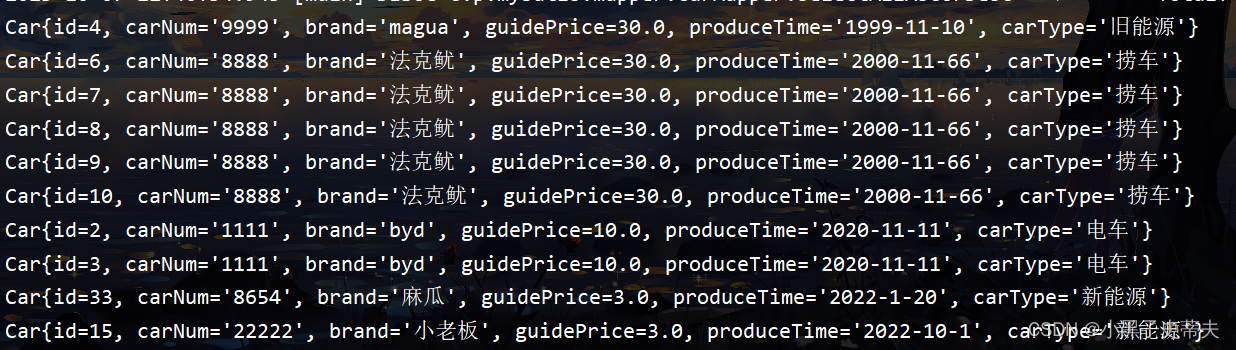
- 所以如果是SQL语句的关键字放到SQL语句中,只能使用
${},因为#{}是以值的形式放到SQL语句当中的
9.2 拼接表名
向SQL语句当中拼接表名,就需要使用
${}- 现实业务当中,可能会存在分表存储数据的情况。因为一张表的花,数据量太大,查询效率比较低
- 可以将这些数据有规律的分表存储,这样在查询的时候效率就比较高。因为扫描的数据量变少了。
- 日志表:专门储存日志信息的。如果t_log只有一张表 ,这张表中每一天都会产生很多log,慢慢的,这个表中数据会很多
怎么解决问题?
-
可以每天生成一个新表,每张以当天日期作为名称,例如:
- t_log_20220901
- t_log_20220902…
-
如果想知道某一天的日志信息怎么办?
- 假设 今天是20220901,那么直接查:t_log_2022901的表即可。
例子:
- LogMapper.xml
DOCTYPE mapper PUBLIC "-//mybatis.org//DTD Mapper 3.0//EN" "http://mybatis.org/dtd/mybatis-3-mapper.dtd"> <mapper namespace="com.powernode.mybatis.mapper.LogMapper"> <select id="selectAllByTable" resultType="com.powernode.mybatis.pojo.Log"> select * from t_log_${date} select> mapper>- 1
- 2
- 3
- 4
- 5
- 6
- 7
- 8
- 9
- 10
- LogMapper
package com.powernode.mybatis.mapper; import com.powernode.mybatis.pojo.Log; import java.util.List; public interface LogMapper { /* * @description: 根据日期查询获取表中不同的日志 * @version 1.0 */ List<Log> selectAllByTable(String date); }- 1
- 2
- 3
- 4
- 5
- 6
- 7
- 8
- 9
- 10
- 11
- 12
- 13
- 14
- 15
- LogMapperTest
package com.powernod.mybatis.test; import com.powernode.mybatis.mapper.LogMapper; import com.powernode.mybatis.pojo.Log; import com.powernode.mybatis.utils.SqlSessionUtil; import org.apache.ibatis.session.SqlSession; import org.junit.Test; import java.util.List; public class LogMapperTest { @Test public void testSelectAllByTable(){ SqlSession sqlSession = SqlSessionUtil.openSession(); LogMapper mapper = sqlSession.getMapper(LogMapper.class); List<Log> logs = mapper.selectAllByTable("20220901"); logs.forEach(log -> System.out.println(log)); sqlSession.commit(); sqlSession.close(); } }- 1
- 2
- 3
- 4
- 5
- 6
- 7
- 8
- 9
- 10
- 11
- 12
- 13
- 14
- 15
- 16
- 17
- 18
- 19
- 20
- 21
- 22
- 23
- 24


9.3 批量删除
批量删除:一次删除多条记录
- 批量删除的SQL语句有两种写法:
- 第一种or:delete from t_car where id=1 or id=2 or id=3;
- 第二种int:delete from t_car where id in(1,2,3);
案例:
- CarMapper接口
package com.powernode.mybatis.mapper; import com.powernode.mybatis.pojo.Car; import java.util.List; public interface CarMapper { /* * @description: 批量删除 * @param ids * @version 1.0 */ int deleteBatch(String ids); /** * @description: 根据汽车类获取汽车信息并且根据desc降序、asc升序 * @param asc * @version 1.0 */ List<Car> selectAllAscOrDesc(String asc); /** * @description: 根据汽车类获取汽车信息 * @param carType * @version 1.0 */ List<Car> selectBycarType(String carType); }- 1
- 2
- 3
- 4
- 5
- 6
- 7
- 8
- 9
- 10
- 11
- 12
- 13
- 14
- 15
- 16
- 17
- 18
- 19
- 20
- 21
- 22
- 23
- 24
- 25
- 26
- 27
- 28
- 29
- 30
- CarMapper.xml
<delete id="deleteBatch"> delete from t_car where id in (${ids}) delete>- 1
- 2
- 3
- 测试
@Test public void testDeleteBatch(){ SqlSession sqlSession = SqlSessionUtil.openSession(); CarMapper mapper = sqlSession.getMapper(CarMapper.class); int count = mapper.deleteBatch("33"); System.out.println(count); sqlSession.commit(); sqlSession.close(); }- 1
- 2
- 3
- 4
- 5
- 6
- 7
- 8
- 9
- 10

9.4 模糊查询
需求: 根据汽车品牌进行模糊查询
- CarMapper接口:
public interface CarMapper { /* * @description: 根据汽车品牌进行模糊查询 * @param brand * @version 1.0 */ List<Car> selectByBrandLike(String brand); /* * @description: 批量删除 * @param ids * @version 1.0 */ int deleteBatch(String ids); /** * @description: 根据汽车类获取汽车信息并且根据desc降序、asc升序 * @param asc * @version 1.0 */ List<Car> selectAllAscOrDesc(String asc); /** * @description: 根据汽车类获取汽车信息 * @param carType * @version 1.0 */ List<Car> selectBycarType(String carType); }- 1
- 2
- 3
- 4
- 5
- 6
- 7
- 8
- 9
- 10
- 11
- 12
- 13
- 14
- 15
- 16
- 17
- 18
- 19
- 20
- 21
- 22
- 23
- 24
- 25
- 26
- 27
- 28
- 29
- 30
- 31
- 测试包
@Test public void testSelectByBrandLike(){ SqlSession sqlSession = SqlSessionUtil.openSession(); CarMapper mapper = sqlSession.getMapper(CarMapper.class); List<Car> cars = mapper.selectByBrandLike("宝马"); cars.forEach(car-> System.out.println(car)); sqlSession.commit(); sqlSession.close(); }- 1
- 2
- 3
- 4
- 5
- 6
- 7
- 8
- 9
- 10
- CarMapper.xml
- 第一种方案:
'%{brand}%' - 第二种方案:concat函数,这个是mysql数据库当中的一个函数,专门进行字符串拼接
concat('%',#{brand},'%') - 第三种方案:
concat('%',${brand},'%')比较鸡肋,可以不用 - 第四种方案:
"%"#{brand}"%"
- 第一种方案:
<select id="selectByBrandLike" resultType="com.powernode.mybatis.pojo.Car"> select id, car_num as carNum, brand, guide_price as guidePrice, produce_time as produceTime, car_type as carType from t_car where brand like '%${brand}%' select>- 1
- 2
- 3
- 4
- 5
- 6
- 7
- 8
- 9
- 10
- 11
- 12


9.5 别名标签 typeAliases
第一种方式:typeAlias(可自定义,也可采用默认别名)
在mybatis.xml核心配置文件下写:<typeAliases> <typeAlias type="com.powernode.mybatis.pojo.Car" alias="aaa">typeAlias> typeAliases>- 1
- 2
- 3
首先要注意typeAliases标签的放置位置,如果不清楚的话,可以看看错误提示信息。
typeAliases标签中的typeAlias可以写多个。
- typeAlias:
- type属性:指定给哪个类起别名
- alias属性:别名。
- alias属性不是必须的,如果缺省的话,type属性指定的类型名的简类名作为别名。比如:com.powernode.mybatis.pojo.Car,简化成:car
- alias是大小写不敏感的。也就是说假设alias=“aaa”,再用的时候,可以aaa,也可以Aaa,也可以AAa,都行。但是就是不能写漏,或者写多
注意:namespace不能使用别名机制,必须写全限定接口名称、带有包名的

第二种方式:package(包下所有的类自动起别名,使用简名作为别名)
如果一个包下的类太多,每个类都要起别名,会导致typeAlias标签配置较多,所以mybatis用提供package的配置方式,只需要指定包名,该包下的所有类都自动起别名,别名就是简类名。并且别名不区分大小写。
<typeAliases> <package name="com.powernode.mybatis.pojo"/> typeAliases>- 1
- 2
- 3
9.6 mapper的配置
SQL映射文件的配置方式包括四种:
- resource:从类路径中加载
- url:从指定的全限定资源路径中加载
- class:使用映射器接口实现类的完全限定类名
- package:将包内的映射器接口实现全部注册为映射器
resource
这种方式是从类路径中加载配置文件,所以这种方式要求SQL映射文件必须放在resources目录下或其子目录下。
<mappers> <mapper resource="org/mybatis/builder/AuthorMapper.xml"/> <mapper resource="org/mybatis/builder/BlogMapper.xml"/> <mapper resource="org/mybatis/builder/PostMapper.xml"/> mappers>- 1
- 2
- 3
- 4
- 5
url
这种方式显然使用了绝对路径的方式,这种配置对SQL映射文件存放的位置没有要求,随意。这种方式使用极少,因为移植性太差。<mappers> <mapper url="file:///var/mappers/AuthorMapper.xml"/> <mapper url="file:///var/mappers/BlogMapper.xml"/> <mapper url="file:///var/mappers/PostMapper.xml"/> mappers>- 1
- 2
- 3
- 4
- 5
class
这个位置提供的是mapper接口的全限定接口名,必须带有包名的。思考:mapper标签的作用是指定SqlMapper.xml文件的路径,指定接口名有什么作用呢?
- 如果你class指定是:
com.powernode.mybatis.mappper.CarMapper - 那么mybatis框架会自动去com/powernode/mybatis/mapper目录下查找CarMapper.xml文件
注意:也就是说,如果采用这种方式,那么就必须保证CarMapper.xml文件和CarMapper接口必须在同一个目录下
如果使用这种方式必须满足以下条件:
- SQL映射文件和mapper接口放在同一个目录下。
- SQL映射文件的名字也必须和mapper接口名一致。
<mappers> <mapper class="org.mybatis.builder.AuthorMapper"/> <mapper class="org.mybatis.builder.BlogMapper"/> <mapper class="org.mybatis.builder.PostMapper"/> mappers>- 1
- 2
- 3
- 4
- 5
- 6
将CarMapper.xml文件移动到和mapper接口同一个目录下:
- 在resources目录下新建:
com/powernode/mybatis/mapper【这里千万要注意:不能这样新建com.powernode.mybatis.dao】 - 将CarMapper.xml文件移动到mapper目录下
- 修改mybatis-config.xml文件
<mappers> <mapper class="com.powernode.mybatis.mapper.CarMapper"/> mappers>- 1
- 2
- 3
package
如果class较多,可以使用这种package的方式,但前提条件和上一种方式一样。
这种包的方式在实际开发中是经常使用的,前提是:xml文件必须和接口放在一起,并且名字一致
<mappers> <package name="com.powernode.mybatis.mapper"/> mappers>- 1
- 2
- 3
- 4
9.7 IDEA配置模板文件

9.8 插入数据时获取自动生成的主键
前提是:主键是自动生成的。
业务背景:一个用户有多个角色。
插入一条新的记录之后,自动生成了主键,而这个主键需要在其他表中使用时。
插入一个用户数据的同时需要给该用户分配角色:需要将生成的用户的id插入到角色表的user_id字段上。第一种方式:可以先插入用户数据,再写一条查询语句获取id,然后再插入user_id字段。【比较麻烦】
第二种方式:mybatis提供了一种方式更加便捷。- CarMapper接口
/* * @description: 插入Car信息,并且使用生成的主键值 * @param car * @version 1.0 */ int insertCarUseGeneratedKeys(Car car);- 1
- 2
- 3
- 4
- 5
- 6
- CarMapper.xml
<insert id="insertCarUseGeneratedKeys" useGeneratedKeys="true" keyProperty="id"> insert into t_car values(null,#{carNum},#{brand},#{guidePrice},#{produceTime},#{carType}) insert>- 1
- 2
- 3
- 4
- 5
- 6
- 7
- 测试
@Test public void testInsertCarUseGenerateKeys(){ SqlSession sqlSession = SqlSessionUtil.openSession(); CarMapper mapper = sqlSession.getMapper(CarMapper.class); Car car = new Car(null,"9991","凯迪",40.0,"2022-11-11","能源车"); mapper.insertCarUseGeneratedKeys(car); System.out.println(car); sqlSession.commit(); sqlSession.close(); }- 1
- 2
- 3
- 4
- 5
- 6
- 7
- 8
- 9
- 10
- 11
- 12
- 13


-
相关阅读:
力扣每日一题2022-09-05中等题:寻找重复的子树
HCIP 第五天实验
python_data_analysis_and_mining_action-master-8
P1220 关路灯 ( 区间dp
低代码如何改变IT行业小作坊生产模式
STM32G030F6 (SOP-20)Cortex ® -M0+, 32KB Flash, 8KB RAM, 17 GPIOs
【LeetCode滑动窗口专题#2】无重复字符的最长子串
关于redis的一主三从三哨兵的实现
单目标优化:蜣螂优化算法(Dung beetle optimizer,DBO)
2022年字节跳动抖音日常实习面经
- 原文地址:https://blog.csdn.net/VanWot/article/details/133245835
