-
【iptables 实战】05 iptables设置网络转发实验
一、网络架构
实验效果,通过机器B的转发功能,将机器A的报文转发到机器C
本实验准备三台机器分别配置如下网络
机器A ip:192.168.56.104
机器C ip:10.1.0.10
机器B 两张网卡,分别的ip是192.168.56.106和10.1.0.11
如图所示
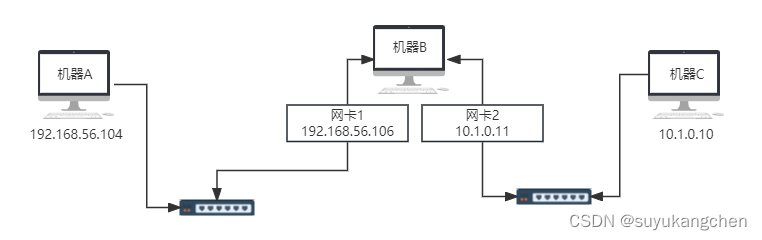
如下图所示
二、虚拟机网卡设置
设置两个host-Only的局域网


机器A的网络设置如下:

机器B的网络设置如下:
两个网卡,分别连接两个局域网

机器C的网卡配置如下:

三、虚拟机网络设置
A机器

B机器

连接局域网的,实际上有两个网卡
enp0s8网卡设置如下:
enp0s9网卡设置如下:

C机器

配置好三台机器的网络以后,
尝试A(192.168.56.104) ping B(192.168.56.106)[root@localhost network-scripts]# ping 192.168.56.106 PING 192.168.56.106 (192.168.56.106) 56(84) bytes of data. 64 bytes from 192.168.56.106: icmp_seq=1 ttl=64 time=1.12 ms 64 bytes from 192.168.56.106: icmp_seq=2 ttl=64 time=0.861 ms- 1
- 2
- 3
- 4
C(10.1.0.10) ping B(10.1.0.11)
[root@localhost ~]# ping 10.1.0.11 PING 10.1.0.11 (10.1.0.11) 56(84) bytes of data. 64 bytes from 10.1.0.11: icmp_seq=1 ttl=64 time=0.933 ms 64 bytes from 10.1.0.11: icmp_seq=2 ttl=64 time=0.899 ms- 1
- 2
- 3
- 4
可以发现 A和B ,C和B都是互通的
但是此时A和C不能互通
因此需要下面的步骤开启机器B的转发功能四、开启作为路由机B的转发功能
/etc/sysctl.conf设置如下配置:net.ipv4.ip_forward=1
[root@localhost ~]# cat /etc/sysctl.conf net.ipv4.ip_forward=1- 1
- 2
重启B机器
五、机器A和机器C的路由设置
通过手动添加路由规则,将A与机器C(10.1.0.10)的报文,都通过网关B进行处理
机器A(192.168.56.104)
注意route 设置,只在当前运行时有效,重启后就没有该路由规则了[root@localhost network-scripts]# route add -net 10.1.0.0/16 gw 192.168.56.106 [root@localhost network-scripts]# route -n Kernel IP routing table Destination Gateway Genmask Flags Metric Ref Use Iface 0.0.0.0 192.168.56.100 0.0.0.0 UG 100 0 0 enp0s8 10.1.0.0 192.168.56.106 255.255.0.0 UG 0 0 0 enp0s8 172.17.0.0 0.0.0.0 255.255.0.0 U 0 0 0 docker0 192.168.56.0 0.0.0.0 255.255.255.0 U 100 0 0 enp0s8 192.168.122.0 0.0.0.0 255.255.255.0 U 0 0 0 virbr0- 1
- 2
- 3
- 4
- 5
- 6
- 7
- 8
- 9
同样的,机器C(10.1.0.10)想连机器A(192.168.56.104)也得设置一下路由
[root@localhost network-scripts]# route add -net 192.168.56.0/24 gw 10.1.0.11 [root@localhost ~]# route -n Kernel IP routing table Destination Gateway Genmask Flags Metric Ref Use Iface 0.0.0.0 10.1.0.2 0.0.0.0 UG 100 0 0 enp0s8 10.1.0.0 0.0.0.0 255.255.0.0 U 100 0 0 enp0s8 172.17.0.0 0.0.0.0 255.255.0.0 U 0 0 0 docker0 192.168.56.0 10.1.0.11 255.255.255.0 UG 0 0 0 enp0s8 192.168.122.0 0.0.0.0 255.255.255.0 U 0 0 0 virbr0- 1
- 2
- 3
- 4
- 5
- 6
- 7
- 8
- 9
机器A(192.168.56.104)ping 机器C(10.1.0.10)
[root@localhost network-scripts]# ping 10.1.0.10 PING 10.1.0.10 (10.1.0.10) 56(84) bytes of data. 64 bytes from 10.1.0.10: icmp_seq=1 ttl=63 time=1.51 ms 64 bytes from 10.1.0.10: icmp_seq=2 ttl=63 time=1.61 ms- 1
- 2
- 3
- 4
机器C(10.1.0.10)ping机器A(192.168.56.104)
[root@localhost ~]# ping 192.168.56.104 PING 192.168.56.104 (192.168.56.104) 56(84) bytes of data. 64 bytes from 192.168.56.104: icmp_seq=1 ttl=63 time=1.62 ms 64 bytes from 192.168.56.104: icmp_seq=2 ttl=63 time=1.75 ms- 1
- 2
- 3
- 4
现在,A和C机器,就可以互通了
总结
要想一台主机作为转发功能,需要做下面的工作
- 1、B主机设置两张网卡,分别连接个局域网,和两个局域网的机器都互相能ping通。
- 2、开启B机器的转发功能:net.ipv4.ip_forward=1
- 3、两个不同局域网的主机A和C,想要通过B的转发,要配置路由规则,如:route add -net 192.168.56.0/24 gw 10.1.0.11
-
相关阅读:
Bootstrap-- 逻辑运算符
Jenkins实战中的一些技巧
Shell-06循环结构
【C语言】入门——结构体
SQL命令及MariaDB(一)
防爆等级与防爆原理概述
nginx负载均衡(动静分离)
如何理解低代码开发工具?
灯具类产品各站点上架TEMU平台需要提供什么认证?
基于PostGIS的mvt动态矢量切片的后台地图服务和前端调用
- 原文地址:https://blog.csdn.net/suyuaidan/article/details/133500654