-
Linux进程创建、进程终止、进程等待、进程程序替换
进程创建
fork函数
linux中fork函数,它从已存在进程中创建一个新进程。新进程为子进程,而原进程为父进程。
函数头文件、返回值


进程调用fork,当控制转移到内核中的fork代码后,内核做:
分配新的内存块和内核数据结构给子进程
将父进程部分数据结构内容拷贝至子进程
添加子进程到系统进程列表当中
fork返回,开始调度器调度fork创建子进程之后,分配新的内存给子进程,父进程将自己的代码和数据拷贝给子进程。

接下来,父子进程都从fork函数之后的代码开始独立运行,至于谁先运行,取决于调度器。

下面,是创建子进程的例子。#include#include #include #include int main() { pid_t id = fork(); if(id == -1) { std::cout << "创建失败 " <<strerror(errno) << " " << errno << std::endl; exit(-1); } std::cout << "创建成功 , pid : " << getpid() << std::endl; return 0; } - 1
- 2
- 3
- 4
- 5
- 6
- 7
- 8
- 9
- 10
- 11
- 12
- 13
- 14
- 15
- 16
- 17
- 18

打印了两次,并且pid不同,证明确实是两个不同的执行流在运行同一份代码。fork函数返回值
子进程返回0,
父进程返回的是子进程的pid。对于fork函数的返回值,初学者还是比较难以理解的。下面分情况来理解:
在理解之前,我们要确定一个条件,子进程是在fork函数里面创建的,比如是在某一行创建,那么fork函数里面剩下的语句是不是要被两个执行流运行呢?return语句是不是被执行两次呢?只不过一个是给父进程,一个是给子进程。

如果创建失败,那么就只有父进程,没有子进程,此时,返回-1给父进程pid_t id = fork(),id接收。如果创建成功,父进程接收子进程的pid,子进程接收0。
fork创建子进程的目的之一
1.希望让子进程执行父进程的一部分代码。
2.希望子进程执行一个全新的程序。fork调用失败的原因
系统中太多的进程。
实际用户的进程数超过了限制。写实拷贝
父子代码共享,父子再不写入时,数据也是共享的,当任意一方试图写入,便以写时拷贝的方式,各自一份副本。

进程终止
进程执行结果
a.正常执行完了(1.结果正确 2.结果不正确)
b.奔溃了(进程异常)[信号反馈]
奔溃的本质:进程因为某种原因,导致进程收到了来自操作系统的信号(kill -9)进程退出码
进程正常执行完了(结果正确,返回0)
结果不正确,返回1,2,3,4,5表示不同的原因——供用户对进程退出码
评定错误原因。运行可执行程序查询进程退出码
echo $?$?:只会保存最近一次执行程序的退出码。
下面举一个例子
#includeint Add_To_Top(int top) { int result = 0; for(int i = 1; i < top; ++i)//故意写成< { result += i; } return result; } int main() { int result = Add_To_Top(100); if(result == 5050)//结果正确 return 0; else//结果不正确 return 11; } - 1
- 2
- 3
- 4
- 5
- 6
- 7
- 8
- 9
- 10
- 11
- 12
- 13
- 14
- 15
- 16
- 17
- 18
- 19
- 20

#includeint Add_To_Top(int top) { int result = 0; for(int i = 1; i <= top; ++i)//改为正确的 { result += i; } return result; } int main() { int result = Add_To_Top(100); if(result == 5050)//结果正确 return 0; else//结果不正确 return 11; } - 1
- 2
- 3
- 4
- 5
- 6
- 7
- 8
- 9
- 10
- 11
- 12
- 13
- 14
- 15
- 16
- 17
- 18
- 19
- 20

查看c语言或者系统提供的退出码#include#include int main() { for(int i = 0; i < 134; ++i) { std::cout << strerror(i) << std::endl; } return 0; } - 1
- 2
- 3
- 4
- 5
- 6
- 7
- 8
- 9
- 10
- 11

自定义系统退出码#include#include const char* err_string[] = { "success", "error" }; int main() { return 0; } - 1
- 2
- 3
- 4
- 5
- 6
- 7
- 8
- 9
- 10
- 11
- 12
进程终止的理解
如何理解进程退出?OS少了一个进程,OS就要释放进程对应的内核数据结构+代码和数据(如果有独立的)。
进程的退出方式
进程的退出方式有哪些?
mian函数return,其他函数也是return?注意:其他函数return仅仅代表着该函数返回,进程的执行,本质是main执行流的执行。exit函数退出,exit(int code):code代表的就是进程的退出码,等价于main函数中return某一个值。exit函数是库函数,在代码的任何地方调用该函数都表示进程退出。
_exit函数也是库函数,_exit(int code)也可以用来退出进程。
exit和_exit有什么区别呢?
#include#include int main() { printf("hello world"); sleep(2); _exit(107); } - 1
- 2
- 3
- 4
- 5
- 6
- 7
- 8
- 9

#include#include int main() { printf("hello world"); sleep(2); exit(107); } - 1
- 2
- 3
- 4
- 5
- 6
- 7
- 8
- 9

可以观察到,调用_exit函数终止进程的程序,没有打印,调用exit函数终止进程的程序,无打印结果。结论:exit函数在终止前会刷新缓冲区,_exit函数在终止前不会刷新缓冲区。
exit最后也会调用_exit, 但在调用_exit之前,还做了其他工作:
- 执行用户通过 atexit或on_exit定义的清理函数。
- 关闭所有打开的流,所有的缓存数据均被写入
- 调用_exit

//伪代码 exit (int code) { //冲刷缓冲区等 _exit(code); }- 1
- 2
- 3
- 4
- 5
- 6
参数:_exit函数的参数定义了进程的终止状态,父进程通过wait(进程等待会提到)来获取该值。
说明:虽然status是int,但是仅有低8位可以被父进程所用。所以_exit(-1)时,在终端执行$?发现返回值是255。
进程也可以通过ctrl+c,即信号进行终止。
return退出
return是一种更常见的退出进程方法。执行return n等同于执行exit(n),因为调用main的运行时函数会将main的返回值当做 exit的参数。进程等待
进程等待的必要性
子进程退出,父进程如果不管不顾,就可能造成‘僵尸进程’的问题,进而造成内存泄漏。
另外,进程一旦变成僵尸状态,那就刀枪不入,kill -9 也无能为力,因为谁也没有办法杀死一个已经死去的进程。
最后,父进程派给子进程的任务完成的如何,我们需要知道。如,子进程运行完成,结果对还是不对,或者是否正常退出。
父进程通过进程等待的方式,回收子进程资源,获取子进程退出信息
进程等待的概念
进程等待:就是通过系统调用的方式,获取子进程退出码或者退出信号的方式,随便释放内存问题。
wait方法
#include
#include
pid_t wait(int*status);
返回值:
成功返回被等待进程pid,失败返回-1。
参数:
输出型参数,获取子进程退出状态,不关心则可以设置成为NULLwaitpid方法
pid_ t waitpid(pid_t pid, int *status, int options);
返回值:
当正常返回的时候waitpid返回收集到的子进程的进程ID;
如果设置了选项WNOHANG,而调用中waitpid发现没有已退出的子进程可收集,则返回0;
如果调用中出错,则返回-1,这时errno会被设置成相应的值以指示错误所在;
参数:
pid:
Pid=-1,等待任一个子进程。与wait等效。
Pid>0.等待其进程ID与pid相等的子进程。
status:
WIFEXITED(status): 若为正常终止子进程返回的状态,则为真。(查看进程是否是正常退出)
WEXITSTATUS(status): 若WIFEXITED非零,提取子进程退出码。(查看进程的退出码)
options:
WNOHANG: 若pid指定的子进程没有结束,则waitpid()函数返回0,不予以等待。若正常结束,则返回该子进程的ID。- 如果子进程已经退出,调用wait/waitpid时,wait/waitpid会立即返回,并且释放资源,获得子进程退出信息。
- 如果在任意时刻调用wait/waitpid,子进程存在且正常运行,则父进程可能阻塞。
- 如果不存在该子进程,则立即出错返回。

wait函数等待的例子
#include#include #include #include int main() { pid_t id = fork(); if(id == 0)//子进程 { int cnt = 5; while(cnt) { printf("我是子进程,我还有%d秒,pid:%d,ppid:%d\n",cnt--,getpid(),getppid()); sleep(1); } exit(0);//结束子进程,不会调用下面的代码 } pid_t ret_id = wait(NULL); printf("我是父进程,等待子进程成功,pid:%d,ppid:%d,ret_pid:%d\n",getpid(),getppid(),ret_id); return 0; } - 1
- 2
- 3
- 4
- 5
- 6
- 7
- 8
- 9
- 10
- 11
- 12
- 13
- 14
- 15
- 16
- 17
- 18
- 19
- 20
- 21
- 22

在子进程运行的时候,父进程一直阻塞在wait函数里,等待着子进程的结束,进而可以回收子进程的运行结果和释放子进程内存空间。wait的参数是输出型参数,用来获取进程的状态,可以设置为NULL去忽略。
waitpid函数

waitpid函数的例子等到后面获取子进程状态再来写。获取子进程status
wait和waitpid,都有一个status参数,该参数是一个输出型参数,由操作系统填充。
如果传递NULL,表示不关心子进程的退出状态信息。
否则,操作系统会根据该参数,将子进程的退出信息反馈给父进程。
status不能简单的当作整形来看待,可以当作位图来看待,具体细节如下图。(只研究status的低16位)
只有没有收到信号,正常运行时,才会查看退出码。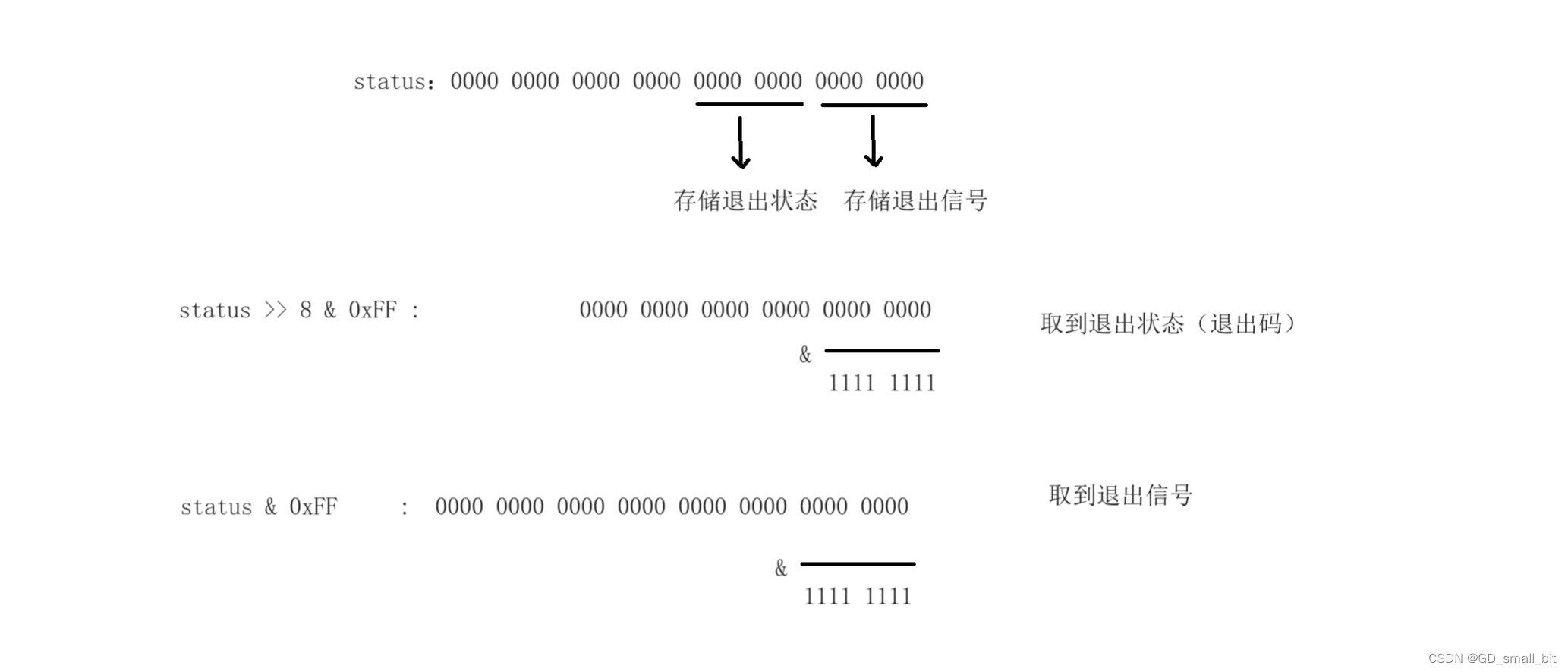
获取子进程status的例子#include#include #include #include int main() { pid_t id = fork(); if(id == 0)//子进程 { int cnt = 5; while(cnt) { printf("我是子进程,我还有%d秒,pid:%d,ppid:%d\n",cnt--,getpid(),getppid()); sleep(1); } exit(0);//结束子进程,不会调用下面的代码 } int status = 0; pid_t ret_id = waitpid(id,&status,0);//id指定进程,并且关心子进程退出状态 printf("我是父进程,等待子进程成功,pid:%d,ppid:%d,ret_pid:%d,child_exit_signal:%d\n",getpid(),getppid(),ret_id,(status>>8)&0xFF); return 0; } - 1
- 2
- 3
- 4
- 5
- 6
- 7
- 8
- 9
- 10
- 11
- 12
- 13
- 14
- 15
- 16
- 17
- 18
- 19
- 20
- 21
- 22
- 23

wait函数获取子进程退出状态也是如此。
在上面的waitpid函数是进程阻塞的等待方式,那如果我们要非进程阻塞的等待方式呢?下面是非进程阻塞的等待方式。
#include#include #include #include #include int main() { pid_t id = fork(); if(id == 0)//子进程 { int cnt = 5; while(cnt) { printf("我是子进程,我还有%d秒,pid:%d,ppid:%d\n",cnt--,getpid(),getppid()); sleep(1); } exit(0);//结束子进程,不会调用下面的代码 } int status = 0; while(1) { pid_t ret_id = waitpid(id,&status,WNOHANG);//id指定进程,并且关心子进程退出状态,非阻塞等待 if(ret_id == -1)//等待失败 { printf("进程等待出现错误:%s,%d",strerror(errno),errno); exit(1); } else if(ret_id == 0)//子进程还没有退出 { printf("子进程还没有退出,父进程在做自己的事情\n");//做其他事情 sleep(1); continue; } else//等待成功 { printf("我是父进程,等待子进程成功,pid:%d,ppid:%d,ret_pid:%d,child_exit_signal:%d\n",getpid(),getppid(),ret_id,(status>>8)&0xFF); break; } } return 0; } - 1
- 2
- 3
- 4
- 5
- 6
- 7
- 8
- 9
- 10
- 11
- 12
- 13
- 14
- 15
- 16
- 17
- 18
- 19
- 20
- 21
- 22
- 23
- 24
- 25
- 26
- 27
- 28
- 29
- 30
- 31
- 32
- 33
- 34
- 35
- 36
- 37
- 38
- 39
- 40
- 41
- 42

1.父进程是如何获取子进程的退出信息的?

wait/waitpid系统调用接口可读取task_struct的exit_code和exit_signal。
父进程读取子进程的内核数据结构来获取子进程的退出信息。
2.父进程在wait的时候,如果子进程没退出,父进程在干什么?
在子进程没有退出的时候,父进程只能一直在调用waitpid进行等待——阻塞等待。阻塞等待——不是运行状态——不再运行队列——在阻塞队列中。

熟悉WIFEXITED和WEXITSTATUS。#include#include #include #include #include #define TASK_NUM 10 //模拟父进程的任务 void sync_disk() { printf("这是一个刷新数据的任务\n"); } void sync_log() { printf("这是一个同步日志的任务\n"); } void sync_net_send() { printf("这是网络发送的任务\n"); } //保存相关任务 typedef void (*func_t)();//函数指针 func_t task_func[TASK_NUM] = {NULL}; int LoadTask(func_t task) { int i = 0; for(; i < TASK_NUM; ++i) { if(task_func[i] == NULL) break; } if(i == TASK_NUM) return -1; else task_func[i] = task; return 0; } void InitTack() { for(int i = 0; i < TASK_NUM; ++i) { task_func[i] = NULL; } LoadTask(sync_disk); LoadTask(sync_log); LoadTask(sync_net_send); } void RunTask() { for(int i = 0; i < TASK_NUM; ++i) { if(task_func[i] == NULL) continue; task_func[i](); } } int main() { pid_t id = fork(); if(id == 0)//子进程 { int cnt = 5; while(cnt) { printf("我是子进程,我还有%d秒,pid:%d,ppid:%d\n",cnt--,getpid(),getppid()); sleep(1); } exit(0);//结束子进程,不会调用下面的代码 } int status = 0; InitTack(); while(1) { pid_t ret_id = waitpid(id,&status,WNOHANG);//id指定进程,并且关心子进程退出状态,非阻塞等待 if(ret_id == -1)//等待失败 { printf("进程等待出现错误:%s,%d",strerror(errno),errno); exit(1); } else if(ret_id == 0)//子进程还没有退出 { RunTask(); sleep(1); continue; } else//等待成功 { if(WIFEXITED(status))//如果子进程正常终止时,改条件位真 { printf("我是父进程,等待子进程成功,pid:%d,ppid:%d,ret_pid:%d,child_exit_signal:%d\n",getpid(),getppid(),ret_id,WEXITSTATUS(status));//WIFEXITED结果非零,WEXITSTATUS提取子进程退出码 } else { printf("wait success,child exit signal : %d\n",status & 0x7F); } break; } } return 0; } - 1
- 2
- 3
- 4
- 5
- 6
- 7
- 8
- 9
- 10
- 11
- 12
- 13
- 14
- 15
- 16
- 17
- 18
- 19
- 20
- 21
- 22
- 23
- 24
- 25
- 26
- 27
- 28
- 29
- 30
- 31
- 32
- 33
- 34
- 35
- 36
- 37
- 38
- 39
- 40
- 41
- 42
- 43
- 44
- 45
- 46
- 47
- 48
- 49
- 50
- 51
- 52
- 53
- 54
- 55
- 56
- 57
- 58
- 59
- 60
- 61
- 62
- 63
- 64
- 65
- 66
- 67
- 68
- 69
- 70
- 71
- 72
- 73
- 74
- 75
- 76
- 77
- 78
- 79
- 80
- 81
- 82
- 83
- 84
- 85
- 86
- 87
- 88
- 89
- 90
- 91
- 92
- 93
- 94
- 95
- 96
- 97
- 98
- 99
- 100
- 101
- 102
- 103
- 104
- 105
- 106
- 107
- 108
- 109
正常结束,运行结果。

在另外一个窗口kill -9子进程,运行结果。

进程程序替换
替换原理
创建子进程的目的是什么?就是为了让子进程帮我执行特定的任务。
1.让子进程执行父进程的一部分代码。
2.如果子进程指向一个全新的程序代码呢?进程的程序替换。子进程往往要调用一种exec函数以执行另一个程序。当进程调用一种exec函数时,该进程的用户空间代码和数据完全被新程序替换,从新程序的启动例程开始执行。调用exec并不创建新进程,所以调用exec前后该进程的id并未改变。
替换函数
其实有六种以exec开头的函数,统称exec函数:
#include
`
int execl(const char *path, const char *arg, …);
int execlp(const char *file, const char *arg, …);
int execle(const char *path, const char *arg, …,char *const envp[]);
int execv(const char *path, char *const argv[]);
int execvp(const char *file, char *const argv[]);int execve(const char *path, char *const argv[], char *const envp[]);
函数解释
这些函数如果调用成功则加载新的程序从启动代码开始执行,不再返回。
如果调用出错则返回-1
所以exec函数只有出错的返回值而没有成功的返回值。命名理解
l(list) : 表示参数采用列表
v(vector) : 参数用数组
p(path) : 有p自动搜索环境变量PATH
e(env) : 表示自己维护环境变量
单进程的进程程序替换
#include#include int main() { std::cout << "begin..." << std::endl; std::cout << "begin..." << std::endl; std::cout << "begin..." << std::endl; std::cout << "begin..." << std::endl; std::cout << "begin..." << std::endl; printf("我是一个进程,pid:%d,ppid:%d\n",getpid(),getppid()); execl("/bin/ls","ls","-a","-l",NULL);//替换为执行ls -a -l的程序,注意指令本质也是程序 std::cout << "end..." << std::endl; std::cout << "end..." << std::endl; std::cout << "end..." << std::endl; std::cout << "end..." << std::endl; std::cout << "end..." << std::endl; return 0; } - 1
- 2
- 3
- 4
- 5
- 6
- 7
- 8
- 9
- 10
- 11
- 12
- 13
- 14
- 15
- 16
- 17
- 18
- 19
- 20
- 21
- 22

观察运行结果可知,没有打印end…,但却出现了ls -a -l后的一些结果。
程序替换:让一个进程去运行另一个在磁盘中的程序。程序替换的原理
1.站在进程的角度

将要执行的程序的数据和代码去替换原来的数据和代码。(程序替换)2.站在程序的角度
这个程序被加载了。(程序替换的函数可称为加载器)
进程的程序替换,有没有创建新的进程?没有。
程序编好了放在磁盘上,所以程序是要加载到内存,那么是如何进行加载的呢?是通过进程程序替换。
即然我们自己写的代码可以加载新的程序,那么操作系统呢?当创建进程的时候,先有进程数据结构,还是先加载代码和数据。
创建进程的时候,操作系统先把对应的数据结构、内核的PCB地址空间创建出来,然后再通过exce把外部的代码和数据拷贝到内存里。
程序替换是整体替换,不能局部替换,即所有的老代码都会被替换。
程序替换只会影响调用的进程,进程具有独立性。
子进程的程序替换
#include#include #include #include #include int main() { pid_t id = fork(); if (id == 0) // 我是子进程 { printf("我是子进程,pid:%d,ppid:%d\n", getpid(), getppid()); execl("/bin/ls", "ls", "-a", "-l", NULL);//让子进程进行程序替换,执行一个全新的程序代码 } sleep(5); printf("我是父进程,pid:%d\n", getpid()); waitpid(id,NULL,0); return 0; } - 1
- 2
- 3
- 4
- 5
- 6
- 7
- 8
- 9
- 10
- 11
- 12
- 13
- 14
- 15
- 16
- 17
- 18
- 19


父子进程共用一块物理地址,当子进程想加载一份新的代码和数据(程序替换),那么子进程会发生写实拷贝。子进程加载新程序的时候,是需要进行程序替换的,发生写实拷贝(子进程执行的是全新的程序、新的代码,写实拷贝在代码区也是可以发生的)。
execl函数执行会失败吗?
#include#include #include #include #include int main() { pid_t id = fork(); if (id == 0) // 我是子进程 { printf("我是子进程,pid:%d,ppid:%d\n", getpid(), getppid()); execl("/bin/lsssss", "lsssss", "-a", "-l", NULL);//执行一个不存在的程序 } sleep(5); printf("我是父进程,pid:%d\n", getpid()); waitpid(id,NULL,0); return 0; } - 1
- 2
- 3
- 4
- 5
- 6
- 7
- 8
- 9
- 10
- 11
- 12
- 13
- 14
- 15
- 16
- 17
- 18
- 19

注意运行结果,第二个打印子进程也打印了,证明了excel即程序替换失败。类似excel函数:如果替换成功,不会有返回值,如果替换失败,一定有返回值 —> 如果失败了,必定返回 —> 只要有返回值,就失败了。不用对该函数进行返回值判断,只要向后运行就一定是失败的。
熟悉接口
execl函数

例子:execl(“/bin/ls”,“ls”,“-a”,“-l”,NULL);NULL作为结束。
execv函数

例子:
char* const myargv[] = {“ls”,“-a”,“-l”,“-n”,NULL};
execv(“/bin/ls”,myargv);execlp函数

execlp(“ls”,“ls”,“-a”,“-l”,“-n”,NULL)execvp函数

char* const myargv[ ] = {“ls”,“-a”,“-l”,“-n”,NULL};
execvp(“ls”,myargv);execle函数

例子:otherproc.cc文件,生成otherproc文件
#include#include int main() { for (int i = 0; i < 5; ++i) { std::cout << "我是另外一个程序,pid:" << getpid() << " " << (getenv("myenv") == NULL ? "NULL" : getenv("myenv")) << std::endl;//查看是否存在myenv环境变量 } return 0; } - 1
- 2
- 3
- 4
- 5
- 6
- 7
- 8
- 9
- 10
- 11
myproc.cc文件生成myproc文件
#include#include #include #include #include char *const envp[] = {"myenv=YouCanSeeMe",NULL}; int main() { pid_t id = fork(); if (id == 0) // 我是子进程 { printf("我是子进程,pid:%d,ppid:%d\n", getpid(), getppid()); execle("./otherproc", "optherproc",NULL,envp);//让子进程进行程序替换,并传入myenv环境变量 } sleep(5); printf("我是父进程,pid:%d\n", getpid()); waitpid(id,NULL,0); return 0; } - 1
- 2
- 3
- 4
- 5
- 6
- 7
- 8
- 9
- 10
- 11
- 12
- 13
- 14
- 15
- 16
- 17
- 18
- 19
- 20
- 21
将子进程程序替换为otherproc,并传入环境变量。
运行结果如下

由运行结果可以得知,otherproc的确接收到了环境变量myenv。验证execle函数传环境变量是覆盖式传入:
otherproc.cc文件,生成otherproc文件
#include#include int main() { for (int i = 0; i < 5; ++i) { std::cout << "我是另外一个程序,pid:" << getpid() << " " << std::endl; std::cout << "myenv : " << (getenv("myenv") == NULL ? "NULL" : getenv("myenv")) << std::endl;//查看是否存在myenv环境变量 std::cout << "PATH : " << (getenv("PATH") == NULL ? "NULL" : getenv("PATH")) << std::endl;//查看是否存在myenv环境变量 } return 0; } - 1
- 2
- 3
- 4
- 5
- 6
- 7
- 8
- 9
- 10
- 11
- 12
- 13
myproc.cc文件生成myproc文件
#include#include #include #include #include char *const envp[] = {"myenv=YouCanSeeMe",NULL}; int main() { pid_t id = fork(); if (id == 0) // 我是子进程 { printf("我是子进程,pid:%d,ppid:%d\n", getpid(), getppid()); execle("./otherproc", "optherproc",NULL,envp);//让子进程进行程序替换,并存入myenv环境变量 } sleep(5); printf("我是父进程,pid:%d\n", getpid()); waitpid(id,NULL,0); return 0; } - 1
- 2
- 3
- 4
- 5
- 6
- 7
- 8
- 9
- 10
- 11
- 12
- 13
- 14
- 15
- 16
- 17
- 18
- 19
- 20
- 21
./otherproc时,可以发送系统的环境变量存在,myenv不存在。
./myporc时,可以发现系统的环境变量不存在,myenv的环境变量存在。原因是:execle函数传入的环境变量是覆盖式传入。如何保证传入新的环境变量的同时,系统的环境变量不会被覆盖?
otherproc.cc文件,生成otherproc文件
#include#include int main() { for (int i = 0; i < 5; ++i) { std::cout << "我是另外一个程序,pid:" << getpid() << " " << std::endl; std::cout << "myenv : " << (getenv("myenv") == NULL ? "NULL" : getenv("myenv")) << std::endl;//查看是否存在myenv环境变量 std::cout << "PATH : " << (getenv("PATH") == NULL ? "NULL" : getenv("PATH")) << std::endl;//查看是否存在myenv环境变量 } return 0; } - 1
- 2
- 3
- 4
- 5
- 6
- 7
- 8
- 9
- 10
- 11
- 12
- 13
myproc.cc文件生成myproc文件
#include#include #include #include #include int main() { extern char** environ; pid_t id = fork(); if (id == 0) // 我是子进程 { printf("我是子进程,pid:%d,ppid:%d\n", getpid(), getppid()); putenv("myenv=YouCanSeeMe"); execle("./otherproc", "optherproc",NULL,environ);//让子进程进行程序替换,并存入myenv环境变量 } sleep(5); printf("我是父进程,pid:%d\n", getpid()); waitpid(id,NULL,0); return 0; } - 1
- 2
- 3
- 4
- 5
- 6
- 7
- 8
- 9
- 10
- 11
- 12
- 13
- 14
- 15
- 16
- 17
- 18
- 19
- 20
- 21

./myproc以后,可发现自己的环境变量myenv和系统的环境变量PATH都存在。环境变量:环境变量具有全局属性,可以被子进程继承下去是如何做到的?
因为所有的指令都是bash的子进程,bash执行所有的指令都可以通过execle去执行,并且利用execle把环境变量作为最后一个参数传过去。
验证环境变量具有全局属性
./myproc,myproc通过execle调用otherproc,并传环境变量列表,而myproc的环境变量列表又从bash而来,bash的环境变量列表又被加上myenv=YouCanSeeMe,那么otherproc的myenv环境变量一定存在。
运行结果与猜想一致。myproc的execle函数和otherproc中的main函数的关系。
操作系统通过execle函数去调用otherproc的main函数。
execvpe函数

参数分别是文件名、如何运行的参数列表、环境变量。execve函数

参数分别是文件名、如何运行的参数列表、环境变量。这个函数才是真正的系统调用,其他六个是execve封装而来的。
总结

实现简易shell
-
相关阅读:
VUE基础知识五:组件的分类、组件间传值、事件调用等
中国芯片独角兽公司
【AutoSAR CAN】01 - CAN模块的功能及提供的API
Golang JWT 认证 (三)-添加token自动刷新机制
机器学习笔记:初始化0的问题
C++ 类和对象(4)构造函数
Spring中如何在一个Bean中注入一个内部Bean呢?
dubbo 教程
docker-compse整合redis集群
计算时间复杂度
- 原文地址:https://blog.csdn.net/GD_small_bit/article/details/133046053