-
Activiz快速显示大量球体
之前学习了下activiz,可以通过以下方式显示球体
- vtkSphereSource sphere = vtkSphereSource.New(); // 新建球
- vtkShrinkPolyData shrink = vtkShrinkPolyData.New(); // 新建数据收缩操作器
- shrink.SetInputConnection(sphere.GetOutputPort()); // 连接管道
- shrink.SetShrinkFactor(1.0);
- vtkPolyDataMapper sphereMapper = vtkPolyDataMapper.New(); // 新建制图器
- sphereMapper.SetInputConnection(shrink.GetOutputPort()); // 连接管道
- vtkActor sphereActor = vtkActor.New(); // 新建角色
- sphereActor.SetMapper(sphereMapper); // 传递制图器
- renderer.AddActor(sphereActor);
- sphere.SetCenter(top_xyz[0], top_xyz[1], top_xyz[2]);
- sphere.SetThetaResolution(8); // 设置球纬度参数
- sphere.SetPhiResolution(16); // 设置球经度参数
- sphere.SetRadius(0.1); // 设置球的半径
- sphereActor.GetProperty().SetColor(1, 0, 0); // 设置“角色”颜色[RGB]
但现在我需要显示大量球体,不想通过循环上面的代码或者搞很多个Actor来显示
我测试了100个球体的显示
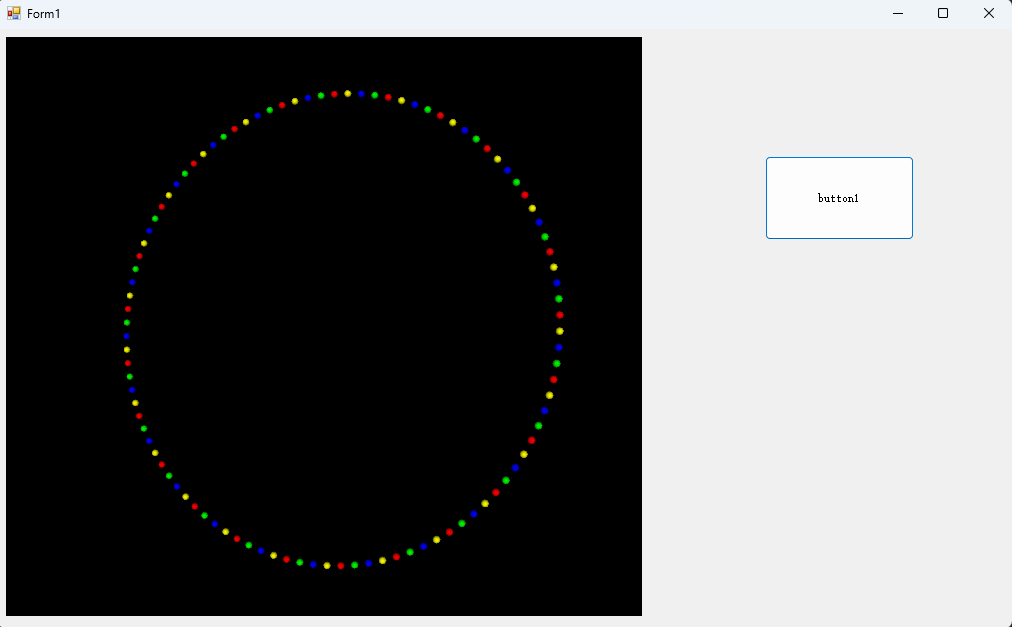
用以下方法更快显示出来,同时还能设置颜色和大小
- void ShowManySpheres()
- {
- vtkRenderWindow renderWindow = renderWindowControl1.RenderWindow;
- vtkRenderer render = renderWindow.GetRenderers().GetFirstRenderer();
- vtkPoints vtkpoints = vtkPoints.New();
- vtkFloatArray scales=vtkFloatArray.New();
- scales.SetName("scales");
- vtkFloatArray col=vtkFloatArray.New();
- col.SetName("col");
- // setup lookupTable and add some colors
- vtkLookupTable colors = vtkLookupTable.New();
- colors.SetNumberOfTableValues(4);
- colors.SetTableValue(0, 1.0, 0.0, 0.0, 1.0); //red
- colors.SetTableValue(1, 0.0, 1.0, 0.0, 1.0); //green
- colors.SetTableValue(2, 0.0, 0.0, 1.0, 1.0); //blue
- colors.SetTableValue(3, 1.0, 1.0, 0.0, 1.0); //yellow
- // the last double value is for opacity (1->max, 0->min)
- for (int i = 0; i < 100; i++)
- {
- vtkpoints.InsertPoint(i, 15 * Math.Cos(i * Math.PI / 50), 15 * Math.Sin(i * Math.PI / 50), 0); // sphere in circle
- scales.InsertNextValue(0.5f); // random radius between 0 and 0.99
- col.InsertNextValue((i*1.0f) % 4); // random color label
- }
- // grid structured to append center, radius and color label
- vtkUnstructuredGrid grid = vtkUnstructuredGrid.New();
- grid.SetPoints(vtkpoints);
- grid.GetPointData().AddArray(scales);
- grid.GetPointData().SetActiveScalars("scales"); // !!!to set radius first
- grid.GetPointData().AddArray(col);
- // create anything you want here, we will use a sphere for the demo
- vtkSphereSource sphereSource = vtkSphereSource.New();
- // object to group sphere and grid and keep smooth interaction
- vtkGlyph3D glyph3D = vtkGlyph3D.New();
- glyph3D.SetInput(grid);
- glyph3D.SetSourceConnection(sphereSource.GetOutputPort());
- // create a mapper and actor
- vtkPolyDataMapper mapper = vtkPolyDataMapper.New();
- mapper.SetInputConnection(glyph3D.GetOutputPort());
- mapper.SetScalarModeToUsePointFieldData(); // without, color are displayed regarding radius and not color label
- mapper.SetScalarRange(0,3); // to scale color label (without, col should be between 0 and 1)
- mapper.SelectColorArray("col"); // !!!to set color (nevertheless you will have nothing)
- mapper.SetLookupTable(colors);
- vtkActor actor = vtkActor.New();
- actor.SetMapper(mapper);
- render.AddActor(actor);
- render.ResetCamera();
- Refresh();
- }
-
相关阅读:
C++Atomic与内存序
【数据结构】——双链表(增删查改)
【音视频】MP4封装格式
LeetCode之二叉树
Spring Boot 整合Redis实现消息发布与订阅
sklearn机器学习——day07
linux学习-文件搜索
每日三题 6.28
时间序列的数据分析(六):指数平滑预测法
Redis(十一) 分布式锁
- 原文地址:https://blog.csdn.net/Isaac320/article/details/133163299
