-
el-calendar日历 简易排班
公司物流部要个简易的排班功能,由主管去设置线路,线路绑定上负责人。然后直接往日历里添加。


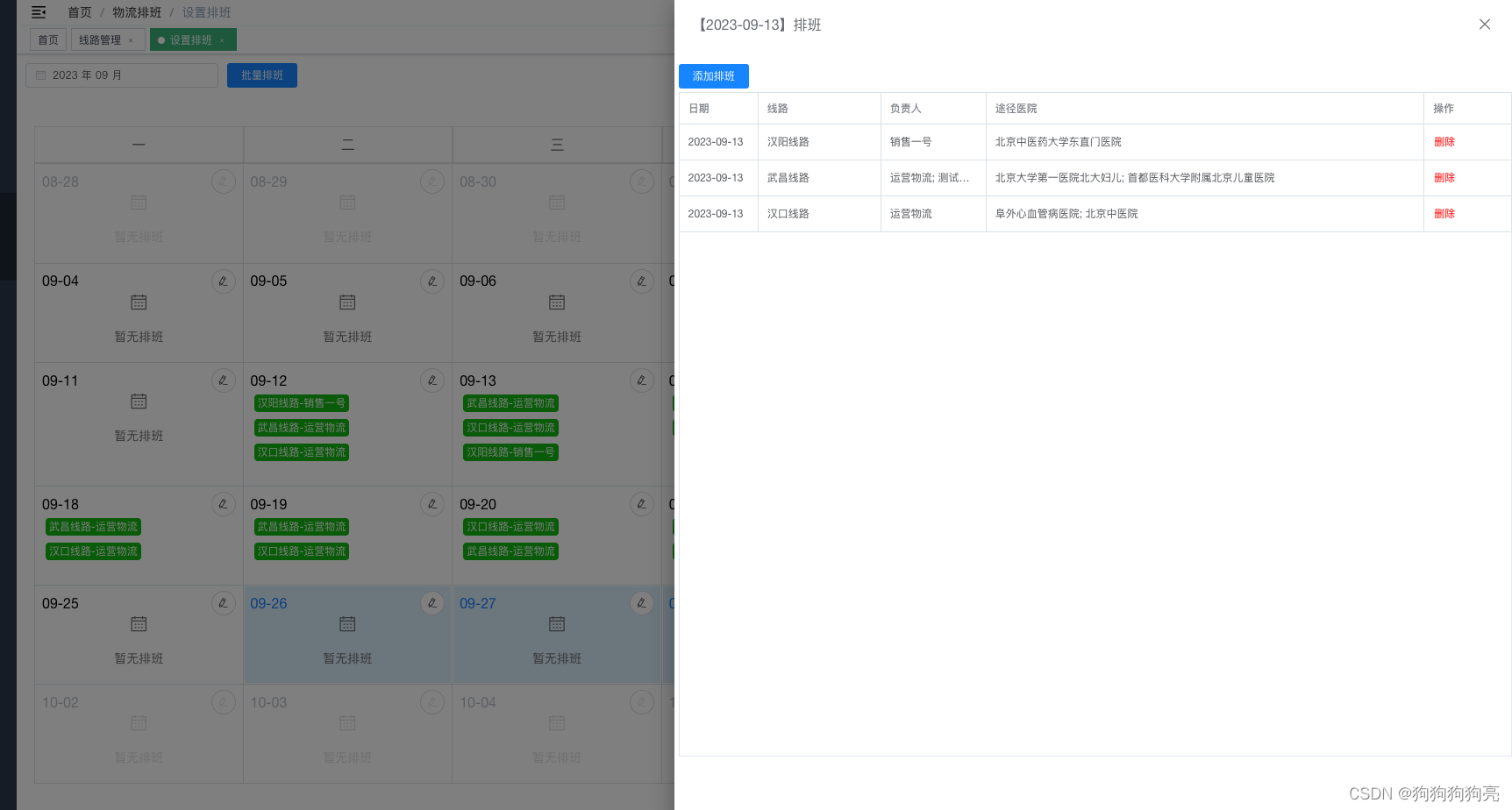

1、隐藏了自带的切换月份,改用了日期选择器。
2、禁用了非本月的点击事件,防止点击自动跳转到其他月份。
3、添加了点击多选,批量处理,也有单日排班处理。
4、拖拽删除排班,代码如下
export function getFirstDay(monthValue) { let date = new Date(monthValue) let month = parseInt(date.getMonth() + 1) let day = date.setDate(1); if (month < 10) month = '0' + month if (day < 10) day = '0' + day return date.getFullYear() + '-' + month } export function getLastDay(monthValue){ var year = new Date(monthValue).getFullYear(); //获取年份 var month = new Date(monthValue).getMonth() + 1; //获取月份 var lastDate = new Date(year, month , 0).getDate(); //获取当月最后一日 month = month < 10 ? '0' + month : month ; //月份补 0 return [ year,month ,lastDate ].join("-") } export function getNextDayByDay(dayValue) { let date = new Date(new Date(dayValue).getTime() + 3600 * 24 * 1000) let month = parseInt(date.getMonth() + 1) let day = date.getDate() if (month < 10) month = '0' + month if (day < 10) day = '0' + day return date.getFullYear() + '-' + month + '-' + day }- 1
- 2
- 3
- 4
- 5
- 6
- 7
- 8
- 9
- 10
- 11
- 12
- 13
- 14
- 15
- 16
- 17
- 18
- 19
- 20
- 21
- 22
- 23
- 24
时间过滤是因为我这边大部分后端接口让传2个日期,所以统一处理了。
<template> <div class="calender_body"> <div class="calender-class"> <div class="class-header"> <el-date-picker v-model="currentMonth" type="month" format="yyyy 年 MM 月" value-format="yyyy-MM" placeholder="选择月份" @change="changeCurrentMonth" /> <el-button type="primary" style="margin-left: 10px;" :disabled="!selectDateItems.length" @click="handleShowAddBatchDialog" >批量排班</el-button> </div> <div class="monthText">{{ currentMonth && currentMonth.replace(/-/,'年') }}月 排班表</div> <div v-if="isdraging" class="deleteDiv"> <div class="delIconBox" @dragover.prevent @dragenter.prevent @drop="handleDeleteClassByDrop" > <i class="el-icon-delete" style="font-size: 40px;" /> </div> </div> </div> <el-calendar v-model="currentMonth"> <!-- 这里使用的是 2.5 slot 语法,对于新项目请使用 2.6 slot 语法--> <template slot="dateCell" slot-scope="{date, data}"> <div class="day-content-class" :class="selectDateItems.some(el => el == data.day)? 'is-selected':''" @click.stop="handleSelectItem(data)" > <div class="header-class"> <div class="day-class">{{ data.day.split('-').slice(1).join('-') }}</div> <div class="handle-class"> <el-button icon="el-icon-edit" class="edit-color" circle @click.stop="handleWorkInfo(data)" /> </div> </div> <template v-if="viewDate[data.day]"> <div class="paiban-class"> <!-- @dragenter="handleDragEnter($event, dayValue)" @dragover.prevent="handleDragOver($event)"--> <div v-for="(dayValue, i,index) in viewDate[data.day]" :key="index" draggable="true" @dragstart="handleDragStart(dayValue)" @dragend="handleDragEnd()" > <div class="class-item-tag"> <span>{{ dayValue.logisticsRouteName }}</span> <span v-if="dayValue.users">-{{ dayValue.users[0].userName }}</span> </div> </div> </div> </template> <template v-else> <div class="no-work-class"> <div class="icon-class"> <i class="el-icon-date" /> </div> <div class="tips-class">暂无排班</div> </div> </template> </div> </template> </el-calendar> <!-- 批量排班 --> <el-dialog title="批量排班" :visible.sync="addBatchDialog" size="50%"> <el-form :model="addBatchForm"> <el-form-item label="值班路线" label-width="80px"> <el-select v-model="addBatchForm.logisticsRouteCode" style="width:100%" placeholder="请选择" filterable multiple default-first-option clearable > <el-option v-for="item in routerDataList" :key="item.id" :label="item.name" :value="item.code" :disabled="selectDateItemsHasRouteArr.some(el => el == item.code)" > <span style="float: left">{{ item.name }}</span> <span style="float: right;margin-right: 12px; color: #8492a6; font-size: 13px" >{{ item.userInfos[0].userName }}</span> </el-option> </el-select> </el-form-item> </el-form> <span slot="footer" class="dialog-footer"> <el-button @click="addBatchDialog = false">取 消</el-button> <el-button type="primary" @click="handleSubmitAddBatch">确 定</el-button> </span> </el-dialog> <!-- 排班详情--> <el-drawer :title="'【' + currentDay + '】排班'" :visible.sync="dayClassdrawer" size="50%"> <div style="width: 99%;margin:0 auto"> <el-button type="primary" style="margin-bottom: 4px;" @click="addDayClassDialog = true">添加排班</el-button> <el-table :data="workInfoList" border :height="`calc(100vh - 180px)`"> <el-table-column prop="day" label="日期" width="90" show-overflow-tooltip /> <el-table-column prop="logisticsRouteName" label="线路" width="140" show-overflow-tooltip /> <el-table-column label="负责人" width="120" show-overflow-tooltip> <template slot-scope="scope">{{ scope.row.users.join('; ') }}</template> </el-table-column> <el-table-column label="途径医院" width="*" show-overflow-tooltip> <template slot-scope="scope">{{ scope.row.hospitals.join('; ') }}</template> </el-table-column> <el-table-column fixed="right" label="操作" width="100"> <template slot-scope="scope"> <el-button type="text" style="color:red" @click.native.prevent="deleteRow(scope.row)" >删除</el-button> </template> </el-table-column> </el-table> </div> </el-drawer> <!-- 单日排班 --> <el-dialog :title="'添加【' + currentDay + '】排班'" :visible.sync="addDayClassDialog" size="50%"> <el-form :model="addForm"> <el-form-item label="值班路线" label-width="80px"> <el-select v-model="addForm.logisticsRouteCode" style="width:100%" placeholder="请选择" filterable multiple default-first-option clearable > <el-option v-for="item in routerDataList" :key="item.id" :label="item.name" :value="item.code" :disabled="workInfoList.some(el => el.logisticsRouteCode == item.code)" > <span style="float: left">{{ item.name }}</span> <span style="float: right;margin-right: 12px; color: #8492a6; font-size: 13px" >{{ item.userInfos[0].userName }}</span> </el-option> </el-select> </el-form-item> </el-form> <span slot="footer" class="dialog-footer"> <el-button @click="addDayClassDialog = false">取 消</el-button> <el-button type="primary" @click="handleSubmitAddDayClass">确 定</el-button> </span> </el-dialog> </div> </template> <script> import { getFirstDay, getNextDayByDay, getLastDay } from "@/utils/index"; export default { data() { return { isdraging: false, selectDateItems: [], // 当前选择日期 selectDateItemsHasRouteArr: [], // 当前日期包含的线路 routerDataList: [], // 线路 currentMonth: "", viewDate: {}, thisDay: null, thisDayWork: null, ending: null, dragging: null, addBatchDialog: false, // 批量添加 addBatchForm: { logisticsRouteCode: [] }, // 单日添加 addForm: { logisticsRouteCode: [] }, dayClassdrawer: false, currentDay: "", addDayClassDialog: false, workInfoList: [], dialogLoading: false }; }, mounted() { this.getRouteListData(); this.currentMonth = getFirstDay(new Date().getTime()); this.getCurrentMonthClass(); }, methods: { handleDragStart(item) { this.isdraging = true; this.dragging = item; }, handleDragEnd() { this.isdraging = false; }, // 拖动删除排班 handleDeleteClassByDrop(e) { let params = [this.dragging.id]; this.$api.LogisticsScheduleApi.DeleteLogisticsSchedule(params).then( res => { this.$message.success("删除成功"); this.getCurrentMonthClass(); } ); }, // handleDragOver(e) { // // 首先把div变成可以放置的元素,即重写dragenter/dragover // e.dataTransfer.dropEffect = "move"; // e.dataTransfer.dropEffect="move";//在dragenter中针对放置目标来设置! // }, // handleDragEnter(e, item) { // e.dataTransfer.effectAllowed = "move"; // 为需要移动的元素设置dragstart事件 // this.ending = item; // }, // 获取线路列表 getRouteListData() { let params = { pageIndex: 1, pageSize: 999 }; this.$api.LogisticsScheduleApi.PageLogisticsRoute(params).then(res => { this.routerDataList = res.data.items; }); }, // 切换月份 changeCurrentMonth(e) { this.currentMonth = e; this.getCurrentMonthClass(); }, // 获取当前月物流排班 getCurrentMonthClass() { let params = { StartDay: this.currentMonth + "-01", EndDay: getLastDay(this.currentMonth + "-01") }; this.$api.LogisticsScheduleApi.QueryLogisticsSchedule(params).then( res => { let obj = {}; if (res.data.length) { for (let i of res.data) { if (obj[i.day]) { obj[i.day].push({ ...i }); } else { obj[i.day] = [{ ...i }]; } } } this.viewDate = obj; } ); }, // 单日排班详情抽屉 handleWorkInfo(data) { this.currentDay = data.day; let params = { StartDay: this.currentDay, EndDay: getNextDayByDay(this.currentDay) }; this.$api.LogisticsScheduleApi.QueryLogisticsSchedule(params).then( res => { this.workInfoList = res.data.map(el => { el.hospitals = el.hospitals.map(item => item.hospitalName); el.users = el.users.map(item => item.userName); return el; }); } ); this.dayClassdrawer = true; }, // 添加单日排班 handleSubmitAddDayClass() { let params = { logisticsRouteCode: this.addForm.logisticsRouteCode, day: [this.currentDay] }; this.dialogLoading = true; this.$api.LogisticsScheduleApi.CreateLogisticsSchedule(params) .then(res => { this.$message.success("添加成功"); let parmas = { day: this.currentDay }; this.handleWorkInfo(parmas); this.getCurrentMonthClass(); this.addDayClassDialog = false; }) .finally(() => { this.dialogLoading = false; }); }, // 删除排班 deleteRow(row) { this.$confirm("此操作将会删除此条排班记录, 是否继续?", "提示", { confirmButtonText: "确定", cancelButtonText: "取消", type: "warning" }).then(() => { let params = [row.id]; this.$api.LogisticsScheduleApi.DeleteLogisticsSchedule(params).then( res => { this.$message.success("删除成功"); this.getCurrentMonthClass(); let date = { day: this.currentDay }; this.handleWorkInfo(date); } ); }); }, // 选中事件 handleSelectItem(data) { let dataStr = data.day; if (this.selectDateItems.findIndex(el => el == dataStr) > -1) { this.selectDateItems.splice( this.selectDateItems.findIndex(el => el == dataStr), 1 ); } else { this.selectDateItems.push(dataStr); } }, //批量弹窗 handleShowAddBatchDialog() { let arr = []; for (let i of this.selectDateItems) { if (this.viewDate[i]) { for (let j of this.viewDate[i]) { arr.push(j.logisticsRouteCode); } } } const newArr = [...new Set(arr)]; this.selectDateItemsHasRouteArr = newArr; this.addBatchDialog = true; }, //批量排班提交 handleSubmitAddBatch() { let params = { logisticsRouteCode: this.addBatchForm.logisticsRouteCode, day: this.selectDateItems }; this.dialogLoading = true; this.$api.LogisticsScheduleApi.CreateLogisticsSchedule(params) .then(res => { this.$message.success("添加成功"); this.getCurrentMonthClass(); this.selectDateItems = []; this.addBatchForm = this.$options.data().addBatchForm; this.addBatchDialog = false; }) .finally(() => { this.dialogLoading = false; }); } } }; </script> <style lang="scss" scoped> .calender_body { width: 100%; height: 100%; margin: 0; padding: 0; } .el-table__fixed-right { height: 100% !important; } .calender-class { position: relative; width: 100%; height: 70px; } .class-header { position: relative; padding: 10px; display: flex; } .deleteDiv { position: absolute; width: 100%; height: 70px; line-height: 70px; text-align: center; z-index: 11; top: 0; left: 0; background: rgba(155, 155, 155, 0.6); } .delIconBox { width: 160px; height: 60px; border-radius: 10px; background: rgba(155, 155, 155, 0.9); box-shadow: 0 0 10px #fff; margin: 5px auto; } .monthText { width: 100%; text-align: center; font-size: 16px; font-weight: 500; line-height: 20px; color: #666; height: 20px; } ::v-deep .el-calendar-table thead th { box-shadow: inset 0 0 2px rgba(0, 0, 0, 0.3); } .is-selected { color: #1989fa; background: #ddeffb; } ::v-deep .el-calendar__body { height: 85vh; } ::v-deep .el-calendar-table { width: 100%; height: 100%; //使不是本月的日期不可点击,不会跳转到其他月份 &:not(.is-range) { td.next { pointer-events: none; } td.prev { pointer-events: none; } } td.is-selected { background: none !important; } .prev, .next { .icon-class, .tips-class, .edit-color { color: #e1e1e1; } } td.is-today { .day-class { background: #44a2f3; width: 50px; text-align: center; height: 20px; border-radius: 4px; color: #fff; font-weight: 500; } } } ::v-deep .el-calendar-day { height: 100% !important; padding: 1px; } ::v-deep .el-calendar__header { display: none; } .day-content-class { height: 100%; display: flex; flex-direction: column; padding: 7px; } .header-class { display: flex; height: 24px; justify-content: space-between; align-items: center; } .paiban-class { display: flex; flex-flow: wrap; align-items: center; .class-item-tag { font-size: 12px; line-height: 20px; color: #fff; width: auto; border-radius: 4px; padding: 0 4px; margin: 4px; background: #11be11; } } .paiban-icon-class { font-size: 22px; margin: 8px 0 10px 0; } .paiban-name-class { padding-top: 10px; } .no-work-class { text-align: center; color: #cacaca; } .icon-class { font-size: 20px; color: #777; margin-bottom: 20px; } .tips-class { font-size: 14px; color: #777; } .edit-color { color: #333; } </style>- 1
- 2
- 3
- 4
- 5
- 6
- 7
- 8
- 9
- 10
- 11
- 12
- 13
- 14
- 15
- 16
- 17
- 18
- 19
- 20
- 21
- 22
- 23
- 24
- 25
- 26
- 27
- 28
- 29
- 30
- 31
- 32
- 33
- 34
- 35
- 36
- 37
- 38
- 39
- 40
- 41
- 42
- 43
- 44
- 45
- 46
- 47
- 48
- 49
- 50
- 51
- 52
- 53
- 54
- 55
- 56
- 57
- 58
- 59
- 60
- 61
- 62
- 63
- 64
- 65
- 66
- 67
- 68
- 69
- 70
- 71
- 72
- 73
- 74
- 75
- 76
- 77
- 78
- 79
- 80
- 81
- 82
- 83
- 84
- 85
- 86
- 87
- 88
- 89
- 90
- 91
- 92
- 93
- 94
- 95
- 96
- 97
- 98
- 99
- 100
- 101
- 102
- 103
- 104
- 105
- 106
- 107
- 108
- 109
- 110
- 111
- 112
- 113
- 114
- 115
- 116
- 117
- 118
- 119
- 120
- 121
- 122
- 123
- 124
- 125
- 126
- 127
- 128
- 129
- 130
- 131
- 132
- 133
- 134
- 135
- 136
- 137
- 138
- 139
- 140
- 141
- 142
- 143
- 144
- 145
- 146
- 147
- 148
- 149
- 150
- 151
- 152
- 153
- 154
- 155
- 156
- 157
- 158
- 159
- 160
- 161
- 162
- 163
- 164
- 165
- 166
- 167
- 168
- 169
- 170
- 171
- 172
- 173
- 174
- 175
- 176
- 177
- 178
- 179
- 180
- 181
- 182
- 183
- 184
- 185
- 186
- 187
- 188
- 189
- 190
- 191
- 192
- 193
- 194
- 195
- 196
- 197
- 198
- 199
- 200
- 201
- 202
- 203
- 204
- 205
- 206
- 207
- 208
- 209
- 210
- 211
- 212
- 213
- 214
- 215
- 216
- 217
- 218
- 219
- 220
- 221
- 222
- 223
- 224
- 225
- 226
- 227
- 228
- 229
- 230
- 231
- 232
- 233
- 234
- 235
- 236
- 237
- 238
- 239
- 240
- 241
- 242
- 243
- 244
- 245
- 246
- 247
- 248
- 249
- 250
- 251
- 252
- 253
- 254
- 255
- 256
- 257
- 258
- 259
- 260
- 261
- 262
- 263
- 264
- 265
- 266
- 267
- 268
- 269
- 270
- 271
- 272
- 273
- 274
- 275
- 276
- 277
- 278
- 279
- 280
- 281
- 282
- 283
- 284
- 285
- 286
- 287
- 288
- 289
- 290
- 291
- 292
- 293
- 294
- 295
- 296
- 297
- 298
- 299
- 300
- 301
- 302
- 303
- 304
- 305
- 306
- 307
- 308
- 309
- 310
- 311
- 312
- 313
- 314
- 315
- 316
- 317
- 318
- 319
- 320
- 321
- 322
- 323
- 324
- 325
- 326
- 327
- 328
- 329
- 330
- 331
- 332
- 333
- 334
- 335
- 336
- 337
- 338
- 339
- 340
- 341
- 342
- 343
- 344
- 345
- 346
- 347
- 348
- 349
- 350
- 351
- 352
- 353
- 354
- 355
- 356
- 357
- 358
- 359
- 360
- 361
- 362
- 363
- 364
- 365
- 366
- 367
- 368
- 369
- 370
- 371
- 372
- 373
- 374
- 375
- 376
- 377
- 378
- 379
- 380
- 381
- 382
- 383
- 384
- 385
- 386
- 387
- 388
- 389
- 390
- 391
- 392
- 393
- 394
- 395
- 396
- 397
- 398
- 399
- 400
- 401
- 402
- 403
- 404
- 405
- 406
- 407
- 408
- 409
- 410
- 411
- 412
- 413
- 414
- 415
- 416
- 417
- 418
- 419
- 420
- 421
- 422
- 423
- 424
- 425
- 426
- 427
- 428
- 429
- 430
- 431
- 432
- 433
- 434
- 435
- 436
- 437
- 438
- 439
- 440
- 441
- 442
- 443
- 444
- 445
- 446
- 447
- 448
- 449
- 450
- 451
- 452
- 453
- 454
- 455
- 456
- 457
- 458
- 459
- 460
- 461
- 462
- 463
- 464
- 465
- 466
- 467
- 468
- 469
- 470
- 471
- 472
- 473
- 474
- 475
- 476
- 477
- 478
- 479
- 480
- 481
- 482
- 483
- 484
- 485
- 486
- 487
- 488
- 489
- 490
- 491
- 492
- 493
- 494
- 495
- 496
- 497
- 498
- 499
- 500
- 501
- 502
- 503
- 504
- 505
- 506
- 507
- 508
- 509
- 510
- 511
- 512
- 513
- 514
- 515
- 516
- 517
- 518
- 519
- 520
- 521
- 522
- 523
- 524
- 525
- 526
- 527
- 528
- 529
- 530
- 531
- 532
- 533
- 534
- 535
- 536
- 537
- 538
- 539
- 540
- 541
- 542
- 543
- 544
文章参考: https://blog.csdn.net/qq_40601005/article/details/131376086
-
相关阅读:
【OFDM】多径信道下OFDM通信系统误码率仿真附matlab代码
1688-阿里巴巴批发网(获取商品的名称,价格,图片)
一文学习yolov5 实例分割:从训练到部署
archlinux安装rust环境
Servlet转发和重定向的区别,以及在配置文件中获取数据
Python入门
list容器 常用 API操作
1965. 丢失信息的雇员
Dobot机械臂的Python Demo
逆向-attack之数组越界赋值函数地址
- 原文地址:https://blog.csdn.net/weixin_44046951/article/details/132897161
