-
目标检测中生成锚框函数详解
计算每个像素点的锚框原理
缩放前的中心点坐标
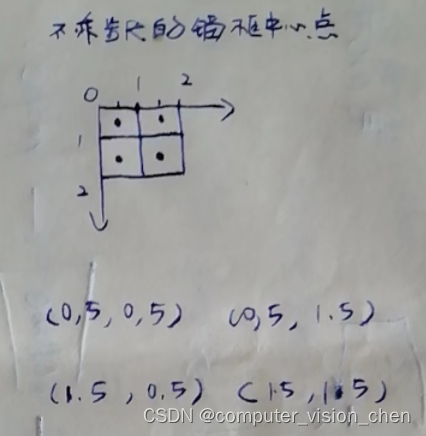
一个2x2的图片,有四个1x1像素的小框。 他们的左上角坐标为: (0,0),(1,0) (1,0),(1,1) 他们的中心点坐标为 左上角坐标 + (0.5,0.5): (0.5,0.5),(1.5,0.5) (1.5,0.5),(1.5,1.5)- 1
- 2
- 3
- 4
- 5
- 6
- 7
- 8
- 9
计算缩放后的中心点坐标。
缩放前图片为:(h,w),缩放成 (1,1),那么h和w每一步的步长为 1/h,1/w。 那么缩放后的中心点为缩放前的中心点的`x * 1/w`,`h * 1/h` 变成: (0.25,0.25)(0.75,0.25) (0.75,0.25)(0.75,0.75)- 1
- 2
- 3
- 4
- 5
- 6
计算缩放后的锚框的h,w
计算每个锚框的宽和高并归一化: 设置了三个缩放比例:sizes=[0.75,0.5,0.25] 设置了3个宽高比:ratios=[1,2,0.5] 每个像素生成 n+m-1 = 5个锚框,根据下面的公式计算每个锚框的w和h并归一化.- 1
- 2
- 3
- 4
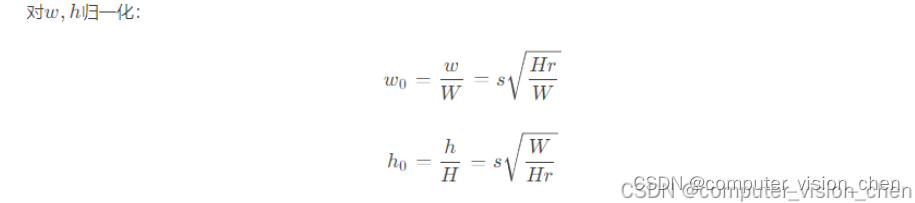
w=tensor([0.75, 0.50, 0.25, 1.06, 0.53]) h=tensor([0.75, 0.50, 0.25, 0.53, 1.06]) 上下组合: 5个锚框的5个(h,w) = (0.75,0.75) (0.50,0.50) (0.25,0.25) (1.06,0.53) (0.53,1.06)- 1
- 2
- 3
计算锚框的左上角右下角坐标
根据锚框缩放后的中心点 计算 锚框的左上角右下角坐标。 获得所有锚框的(-半宽,-半高,半宽,半高) 用锚框的中心点 + 锚框的(-半宽,-半高,半宽,半高)得到所有锚框的左上角,右下角坐标。 一共四个中心点,每个中心点生成5个锚框。所以2x2的图片共 4 x 5 =20个锚框。- 1
- 2
- 3
- 4
函数
# 为每个像素可以生成 n+m-1个锚框,整个图像生成 wh(n+m-1) def generate_anchors(data,sizes,ratios): # 书上的名字是 multibox_prior ''' data:输入图像,sizes:缩放比 rations:宽高比 :return: (批量数,锚框数量,4) ''' '''1.数据准备''' # 图片的shape为(样本数,h,w),取出图片的h,w in_height,in_width = data.shape[-2:] # 取出数据的设备,缩放比的数量,宽高比的数量 device,num_sizes,num_ratios = data.device,len(sizes),len(ratios) # 每个像素的锚框数 boxes_per_pixel = (num_sizes+num_ratios-1) # 把缩放列表和宽高比列表转换为tensor格式 size_tensor = torch.tensor(sizes,device=device) ratio_tensor = torch.tensor(ratios,device=device) '''设置锚框中心坐标 和 步长''' # 因为1像素的宽和高都是1,所以1像素的中心点是(0.5,0.5) offset_h,offset_w=0.5,0.5 # 缩放步长 steps_h = 1/in_height steps_w = 1/in_width center_h = (torch.arange(in_height,device=device) + offset_h) print(center_h) center_h = (torch.arange(in_height,device=device) + offset_h) * steps_h print(center_h) center_w = (torch.arange(in_width,device=device) + offset_w) print(center_w) center_w = (torch.arange(in_width,device=device) + offset_w) * steps_w print(center_w) # 生成锚框的所有中心的 shift_y,shift_x = torch.meshgrid(center_h,center_w) print(f'shift_y = {shift_y}') print(f'shift_x = {shift_x}') shift_y,shift_x = shift_y.reshape(-1),shift_x.reshape(-1) print(shift_y, shift_x) # 把计算锚框归一化后的w,h公式实现 # 1.norm =√H/W norm = torch.sqrt(torch.tensor(in_height)/torch.tensor(in_width)) # 生成“boxes_per_pixel”个高和宽, #只考虑包含s1或r1的组合,因此S*r1 与s1*R合并即为n+m-1个锚框 # 公式为: w = s * norm * √r # w = (s * √r0,s0 * √r1到rm)*norm # torch.cat是连接两个tensor,假设,s有n个,r有m个 如下cat得到结果形状为:n * 1 + 1 * (m-1) w = torch.cat((size_tensor * torch.sqrt(ratio_tensor[0]), size_tensor[0] * torch.sqrt(ratio_tensor[1:]))) * norm print(f'w={w}') print(f'w.shape={w.shape}') # 公式为: h = s / √r / norm # h = (s / √r0,s0 / √r1到rm) / norm h = torch.cat((size_tensor / torch.sqrt(ratio_tensor[0]), size_tensor[0] / torch.sqrt(ratio_tensor[1:]))) / norm print(f'h={h}') print(f'h.shape={h.shape}') anchor_manipulations = torch.stack((-w,-h,w,h)).T.repeat(in_height * in_width,1)/2 print(f'anchor_manipulations={anchor_manipulations}') print(f'anchor_manipulations.shape={anchor_manipulations.shape}') out_grid = torch.stack([shift_x,shift_y,shift_x,shift_y],dim=1) print(out_grid) print(out_grid.shape) out_grid = out_grid.repeat_interleave(boxes_per_pixel,dim=0) print(out_grid) print(out_grid.shape) # 让中心点坐标 + (-半宽,-半高,半宽,半高) = (左上角x,左上角y,右下角x,右下角y) # 形状为 (20,4) output = out_grid + anchor_manipulations # 增加维度 变成 (1,20,4) output = output.unsqueeze(0) return output- 1
- 2
- 3
- 4
- 5
- 6
- 7
- 8
- 9
- 10
- 11
- 12
- 13
- 14
- 15
- 16
- 17
- 18
- 19
- 20
- 21
- 22
- 23
- 24
- 25
- 26
- 27
- 28
- 29
- 30
- 31
- 32
- 33
- 34
- 35
- 36
- 37
- 38
- 39
- 40
- 41
- 42
- 43
- 44
- 45
- 46
- 47
- 48
- 49
- 50
- 51
- 52
- 53
- 54
- 55
- 56
- 57
- 58
- 59
- 60
- 61
- 62
- 63
- 64
- 65
- 66
- 67
- 68
- 69
- 70
- 71
- 72
- 73
- 74
- 75
- 76
- 77
- 78
- 79
- 80
X = torch.rand(size=(1,3,2,2)) Y = generate_anchors(X,sizes=[0.75,0.5,0.25],ratios=[1,2,0.5])- 1
- 2
草稿:
h,w =2,2的图片,中心点有4个。
设置了三个缩放比例:sizes=[0.75,0.5,0.25]
设置了3个宽高比:ratios=[1,2,0.5]
每个像素可以生成n+m-1 = 5个锚框。norm = torch.sqrt(torch.tensor(in_height)/torch.tensor(in_width)) w = torch.cat((size_tensor * torch.sqrt(ratio_tensor[0]), size_tensor[0] * torch.sqrt(ratio_tensor[1:]))) * norm h = torch.cat((size_tensor / torch.sqrt(ratio_tensor[0]), size_tensor[0] / torch.sqrt(ratio_tensor[1:]))) / norm- 1
- 2
- 3
- 4
- 5
- 6
w,h分别为:
w=tensor([0.75, 0.50, 0.25, 1.06, 0.53]) w.shape=torch.Size([5]) h=tensor([0.75, 0.50, 0.25, 0.53, 1.06]) h.shape=torch.Size([5])- 1
- 2
- 3
- 4
result = torch.stack((-w,-h,w,h)).T
相当于水平方向堆叠-w,-h,w,h,所以是5行4列。
torch.stack((-w,-h,w,h)).T=tensor([[-0.75, -0.75, 0.75, 0.75], [-0.50, -0.50, 0.50, 0.50], [-0.25, -0.25, 0.25, 0.25], [-1.06, -0.53, 1.06, 0.53], [-0.53, -1.06, 0.53, 1.06]]) result.shape=torch.Size([5, 4])- 1
- 2
- 3
- 4
- 5
- 6
result = result.repeat(in_height * in_width,1)
in_height * in_widht = 4
上面语法是将result在垂直方向复制四份。
得到 形状为(20,4)的矩阵。result=tensor([[-0.75, -0.75, 0.75, 0.75], [-0.50, -0.50, 0.50, 0.50], [-0.25, -0.25, 0.25, 0.25], [-1.06, -0.53, 1.06, 0.53], [-0.53, -1.06, 0.53, 1.06], [-0.75, -0.75, 0.75, 0.75], [-0.50, -0.50, 0.50, 0.50], [-0.25, -0.25, 0.25, 0.25], [-1.06, -0.53, 1.06, 0.53], [-0.53, -1.06, 0.53, 1.06], [-0.75, -0.75, 0.75, 0.75], [-0.50, -0.50, 0.50, 0.50], [-0.25, -0.25, 0.25, 0.25], [-1.06, -0.53, 1.06, 0.53], [-0.53, -1.06, 0.53, 1.06], [-0.75, -0.75, 0.75, 0.75], [-0.50, -0.50, 0.50, 0.50], [-0.25, -0.25, 0.25, 0.25], [-1.06, -0.53, 1.06, 0.53], [-0.53, -1.06, 0.53, 1.06]]) result.shape=torch.Size([20, 4])- 1
- 2
- 3
- 4
- 5
- 6
- 7
- 8
- 9
- 10
- 11
- 12
- 13
- 14
- 15
- 16
- 17
- 18
- 19
- 20
- 21
- 22
out_grid = torch.stack([shift_x,shift_y,shift_x,shift_y],dim=1) print(out_grid) print(out_grid.shape)- 1
- 2
- 3
tensor([[0.25, 0.25, 0.25, 0.25], [0.75, 0.25, 0.75, 0.25], [0.25, 0.75, 0.25, 0.75], [0.75, 0.75, 0.75, 0.75]]) torch.Size([4, 4])- 1
- 2
- 3
- 4
- 5
- 6
%matplotlib inline import torch from d2l import torch as d2l torch.set_printoptions(2) # 让pytorch打印张量时,只打印到小数点后两位- 1
- 2
- 3
- 4
将设一张图片,宽和高为2,2
X = torch.rand(size=(1,3,2,2)) Y = generate_anchors(X,sizes=[0.75,0.5,0.25],ratios=[1,2,0.5])- 1
- 2
锚框中心点的设置
# 为每个像素可以生成 n+m-1个锚框,整个图像生成 wh(n+m-1) def generate_anchors(data,sizes,ratios): # 书上的名字是 multibox_prior ''' data:输入图像,sizes:缩放比 rations:宽高比 :return: (批量数,锚框数量,4) ''' '''1.数据准备''' # 图片的shape为(样本数,h,w),取出图片的h,w in_height,in_width = data.shape[-2:] # 取出数据的设备,缩放比的数量,宽高比的数量 device,num_sizes,num_ratios = data.device,len(sizes),len(ratios) # 每个像素的锚框数 boxes_per_pixel = (num_sizes+num_ratios-1) # 把缩放列表和宽高比列表转换为tensor格式 size_tensor = torch.tensor(sizes,device=device) ratio_tensor = torch.tensor(ratios,device=device) '''设置锚框中心坐标 和 步长''' # 因为1像素的宽和高都是1,所以1像素的中心点是(0.5,0.5) offset_h,offset_w=0.5,0.5 # 缩放步长 steps_h = 1/in_height steps_w = 1/in_width- 1
- 2
- 3
- 4
- 5
- 6
- 7
- 8
- 9
- 10
- 11
- 12
- 13
- 14
- 15
- 16
- 17
- 18
- 19
- 20
- 21
- 22
- 23
# 不乘以步长,垂直方向上锚框的中心点 center_h = (torch.arange(in_height,device=device) + offset_h) print(center_h)- 1
- 2
- 3
tensor([0.50, 1.50])
# 乘以步长时,垂直方向上锚框的中心点。 center_h = (torch.arange(in_height,device=device) + offset_h) * steps_h print(center_h)- 1
- 2
- 3
tensor([0.25, 0.75])
# 不乘以步长,水平方向上锚框的中心点 center_w = (torch.arange(in_width,device=device) + offset_w) print(center_w)- 1
- 2
- 3
tensor([0.50, 1.50])
# 乘以步长,水平方向上锚框的中心点 center_w = (torch.arange(in_width,device=device) + offset_w) * steps_w print(center_w)- 1
- 2
- 3
tensor([0.25, 0.75])
乘以步长和不乘步长,锚框中心点的区别
之所以要乘以步长,是为了对应/w,/h归一化后的锚框形状。

# 生成锚框的所有中心点 shift_y,shift_x = torch.meshgrid(center_h,center_w) print(f'shift_y = {shift_y}') print(f'shift_x = {shift_x}')- 1
- 2
- 3
- 4
shift_y = tensor([[0.25, 0.25], [0.75, 0.75]])
shift_x = tensor([[0.25, 0.75], [0.25, 0.75]])#把tensor变成一维 shift_y,shift_x = shift_y.reshape(-1),shift_x.reshape(-1) print(shift_y, shift_x)- 1
- 2
- 3
tensor([0.25, 0.25, 0.75, 0.75]) tensor([0.25, 0.75, 0.25, 0.75])

思考
如果将图片缩放为1x1,h的步长是1/h,w的步长是1/w。
参考链接
https://zhuanlan.zhihu.com/p/455807888
-
相关阅读:
Servlet小结
C#静态类和静态类成员
408数据结构,怎么练习算法大题?
servlet实现登录功能【当用户当前未登陆,跳转登录页面才能访问,若已经登录了,才可以直接访问】
redis三(3-1)
跨境电商必读:什么是社交媒体营销?
Spring 全家桶 第六章:Spring MVC 实践
IT 安全方案,但是简易版
element中el-input 输入框 在自动填充(auto-complete=“on“)时,背景颜色会自动改变问题
(四)Windows网络模型之完成端口模型详解
- 原文地址:https://blog.csdn.net/qq_42864343/article/details/132824520
