-
opencv识别一张图片的多个红框,并截取红框的内容
需求
需要获取图片的红框的内容,实体的图片我就不放了
获取红框
先截取获得图片的多个轮廓
- import cv2
- import numpy as np
- # 加载图像并转换为灰度图像
- image = cv2.imread('image6.jpg')
- gray = cv2.cvtColor(image, cv2.COLOR_BGR2GRAY)
- # 应用高斯模糊以减少噪声
- blur = cv2.GaussianBlur(gray, (5, 5), 0)
- # 应用HSV颜色空间转换
- hsv = cv2.cvtColor(image, cv2.COLOR_BGR2HSV)
- lower_red = np.array([0, 50, 50])
- upper_red = np.array([10, 255, 255])
- mask = cv2.inRange(hsv, lower_red, upper_red)
- # 应用膨胀操作来放大边框内的内容和边框
- kernel = np.ones((5,5),np.uint8)
- dilated = cv2.dilate(mask,kernel,iterations = 1)
- # 获取边界框坐标
- contours, hierarchy = cv2.findContours(dilated, cv2.RETR_EXTERNAL, cv2.CHAIN_APPROX_SIMPLE)
- # 遍历每个轮廓并找到最大的红色边框
- max_contour = None
- max_area = 0
- for contour in contours:
- area = cv2.contourArea(contour)
- # if area > max_area:
- # max_contour = contour
- # max_area = area
- x, y, w, h = cv2.boundingRect(contour)
- # 裁剪图像以显示边界框内的内容及其周围10px内容
- crop_image = image[max(y-10, 0):min(y+h+10, image.shape[0]), max(x-10, 0):min(x+w+10, image.shape[1])]
- # 在裁剪后的图像上绘制红色矩形框以突出显示边界框内的内容及其周围10px内容
- cv2.rectangle(crop_image, (max(x-10, 0), max(y-10, 0)), (min(x+w+10, image.shape[1]), min(y+h+10, image.shape[0])), (0, 0, 255), 2) # 在裁剪后的图像上绘制红色矩形框以突出显示边界框内的内容及其周围10px内容
- #cv2.imshow('Content with Border and Surrounding Area', crop_image) # 显示带有红色边框和周围10px内容的裁剪后的图像
- cv2.imwrite(f'red_border_{x}_{y}_{w}_{h}.jpg', crop_image)
- cv2.waitKey(0)
- cv2.destroyAllWindows()
- # 获取最大轮廓的边界框坐标
- # x, y, w, h = cv2.boundingRect(max_contour)
- # # 裁剪图像以显示边界框内的内容及其周围10px内容
- # crop_image = image[max(y-10, 0):min(y+h+10, image.shape[0]), max(x-10, 0):min(x+w+10, image.shape[1])]
- # # 在裁剪后的图像上绘制红色矩形框以突出显示边界框内的内容及其周围10px内容
- # cv2.rectangle(crop_image, (max(x-10, 0), max(y-10, 0)), (min(x+w+10, image.shape[1]), min(y+h+10, image.shape[0])), (0, 0, 255), 2) # 在裁剪后的图像上绘制红色矩形框以突出显示边界框内的内容及其周围10px内容
- # cv2.imshow('Content with Border and Surrounding Area', crop_image) # 显示带有红色边框和周围10px内容的裁剪后的图像
- # cv2.waitKey(0)
- # cv2.destroyAllWindows()

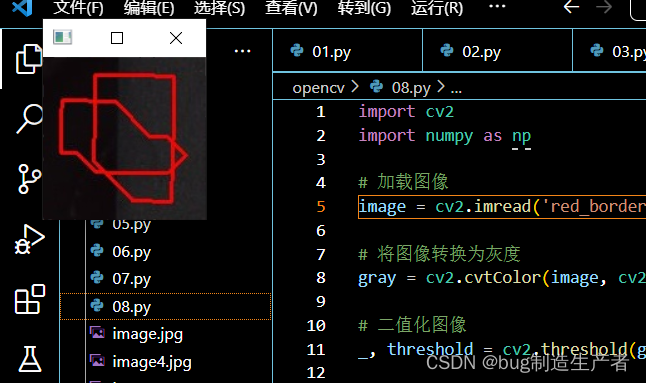
识别红框
- import cv2
- import numpy as np
- # 加载图像
- image = cv2.imread('red_border_1038_1886_6_6.jpg')
- # 将图像转换为灰度
- gray = cv2.cvtColor(image, cv2.COLOR_BGR2GRAY)
- # 二值化图像
- _, threshold = cv2.threshold(gray, 127, 255, cv2.THRESH_BINARY)
- # 找到图像中的轮廓
- contours, _ = cv2.findContours(threshold, cv2.RETR_EXTERNAL, cv2.CHAIN_APPROX_SIMPLE)
- # 遍历每个轮廓,判断是否是闭合的圆
- for contour in contours:
- # 进行轮廓近似,获取近似的多边形轮廓
- epsilon = 0.01 * cv2.arcLength(contour, True)
- approx = cv2.approxPolyDP(contour, epsilon, True)
- # 计算近似轮廓的周长
- approx_length = cv2.arcLength(approx, True)
- # 计算原始轮廓的周长
- contour_length = cv2.arcLength(contour, True)
- # 判断近似轮廓的周长是否接近于原始轮廓的周长
- if approx_length >= 0.9 * contour_length:
- # 绘制闭合的圆
- cv2.drawContours(image, [approx], -1, (0, 255, 0), 2)
- cv2.putText(image, 'Closed Circle', (10, 30), cv2.FONT_HERSHEY_SIMPLEX, 0.9, (0, 255, 0), 2)
- print("存在")
- # 显示结果图像
- cv2.imshow('Result', image)
- cv2.waitKey(0)
- cv2.destroyAllWindows()
-
相关阅读:
Springboot 配置Swagger (亲测)
阿里云服务器退款规则_退款政策全解析
爬虫基本原理介绍、实现以及问题解决
21天经典算法之直接插入排序
FORCESPRO的使用教程(暂未完结)
用JMeter对HTTP接口进行压测(一)压测脚本的书写、调试思路
ZZNUOJ_用C语言编写程序实现1541:除法(附完整源码)
LeetCode 852. 山脉数组的峰顶索引
基于Android课堂作业师生交流教学选课助手java mysql
k8s-实战——yapi平台部署
- 原文地址:https://blog.csdn.net/weixin_73368873/article/details/132702193
