-
Jenkins + GitBlit自动构建
多人协同过程中,避免不了多人提交,但没及时构建代码,导致代码被复盖。。。。
然后有了现在的自动构建【GitBlit配置groovy进行关联即可 ,或GitHub使用WebHook实现】
【笔者反复上面的操作,还是无法实现Git Push后触发钩子进行job构建】遇到此问题,直接拉到底部看解决方法!!!
一、 安装Jenkins【Git Plugin】 + GitBlit ,且可以正常运行【遇到问题找度娘,哈哈】


二、配置GitBlit - groovy文件
GitBlit目录下【gitblit-1.9.3\data\groovy】,复制一份jenkins.groovy,并重新命名为 myjenkins.groovy【等会儿GitBlit-接收-post-receive 脚本会使用到】

编辑myjenkins.groovy的jenkins主页面
找到【def jenkinsUrl】,修改为jenkins访问地址即可
修改完成后,重启GitBlit
修改完成后,重启GitBlit
修改完成后,重启GitBlit

三、添加接收的Jenkins
版本库为本地进行commit&push的仓库【实例使用的版本库就为Jenkins】
点击版本库-编辑,弹出一个List,点击【接收】,post-receive 脚本【把刚才复制并命令的myjenkins选择并保存】


到这里GitBlit已经没什么事了,可以建Jenkins项目,尝试本地commit&push文件,看看jenkins是否正确构建
四、建jenkins项目【这里之前的文章也提及到了,所以这里贴图处理】
本地commit&push到GitBlit,Jenkins就会自动构建


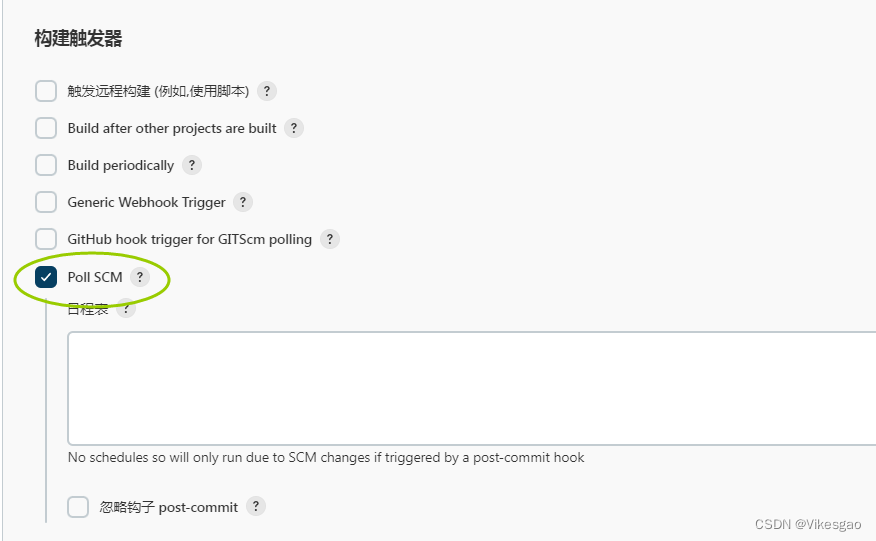
笔者反复上面的操作,还是无法实现Git Push后触发钩子进行job构建。。。。
问题WebHook触发不了并提示权限有误,如下截图:

按提示链接最终找到解决方法:
https://plugins.jenkins.io/git/#plugin-content-push-notification-from-repository

解决方法:
1.在Jenkins添加一个Git Access token并保存,把token复制出来备注:

2.再次编辑GitBlit的【myjenkins.groovy】文件,加上刚才生成token信息 并且保存,重启GitBlit

以下为完整修改后的代码内容:
- /*
- * Copyright 2011 gitblit.com.
- *
- * Licensed under the Apache License, Version 2.0 (the "License");
- * you may not use this file except in compliance with the License.
- * You may obtain a copy of the License at
- *
- * http://www.apache.org/licenses/LICENSE-2.0
- *
- * Unless required by applicable law or agreed to in writing, software
- * distributed under the License is distributed on an "AS IS" BASIS,
- * WITHOUT WARRANTIES OR CONDITIONS OF ANY KIND, either express or implied.
- * See the License for the specific language governing permissions and
- * limitations under the License.
- */
- import com.gitblit.GitBlit
- import com.gitblit.Keys
- import com.gitblit.models.RepositoryModel
- import com.gitblit.models.UserModel
- import com.gitblit.utils.JGitUtils
- import org.eclipse.jgit.lib.Repository
- import org.eclipse.jgit.revwalk.RevCommit
- import org.eclipse.jgit.transport.ReceiveCommand
- import org.eclipse.jgit.transport.ReceiveCommand.Result
- import org.slf4j.Logger
- /**
- * Sample Gitblit Post-Receive Hook: jenkins
- *
- * The Post-Receive hook is executed AFTER the pushed commits have been applied
- * to the Git repository. This is the appropriate point to trigger an
- * integration build or to send a notification.
- *
- * This script is only executed when pushing to *Gitblit*, not to other Git
- * tooling you may be using.
- *
- * If this script is specified in *groovy.postReceiveScripts* of gitblit.properties
- * or web.xml then it will be executed by any repository when it receives a
- * push. If you choose to share your script then you may have to consider
- * tailoring control-flow based on repository access restrictions.
- *
- * Scripts may also be specified per-repository in the repository settings page.
- * Shared scripts will be excluded from this list of available scripts.
- *
- * This script is dynamically reloaded and it is executed within it's own
- * exception handler so it will not crash another script nor crash Gitblit.
- *
- * Bound Variables:
- * gitblit Gitblit Server com.gitblit.GitBlit
- * repository Gitblit Repository com.gitblit.models.RepositoryModel
- * receivePack JGit Receive Pack org.eclipse.jgit.transport.ReceivePack
- * user Gitblit User com.gitblit.models.UserModel
- * commands JGit commands Collection
- * url Base url for Gitblit String
- * logger Logs messages to Gitblit org.slf4j.Logger
- * clientLogger Logs messages to Git client com.gitblit.utils.ClientLogger
- *
- * Accessing Gitblit Custom Fields:
- * def myCustomField = repository.customFields.myCustomField
- *
- */
- // Indicate we have started the script
- logger.info("jenkins hook triggered by ${user.username} for ${repository.name}")
- // This script requires Jenkins Git plugin 1.1.14 or later
- // http://kohsuke.org/2011/12/01/polling-must-die-triggering-jenkins-builds-from-a-git-hook/
- // define your jenkins url here or set groovy.jenkinsServer in
- // gitblit.properties or web.xml
- // def jenkinsUrl = gitblit.getString('groovy.jenkinsServer', 'http://yourserver/jenkins')
- def jenkinsUrl = gitblit.getString('groovy.jenkinsServer', 'http://192.168.24.74:9999')
- // define the repository base url
- def jenkinsGitbaseurl = gitblit.getString('groovy.jenkinsGitbaseurl', "${url}/r")
- // define the trigger url
- def triggerUrl = jenkinsUrl + "/git/notifyCommit?url=" + jenkinsGitbaseurl + "/${repository.name}" + "&token=f57bc27f16d3e8e0a8783a1caef7d888"
- // trigger the build
- new URL(triggerUrl).getContent()
重启后,可以进行测试一下;本地Git Push一下,滴滴滴。。。构建成功


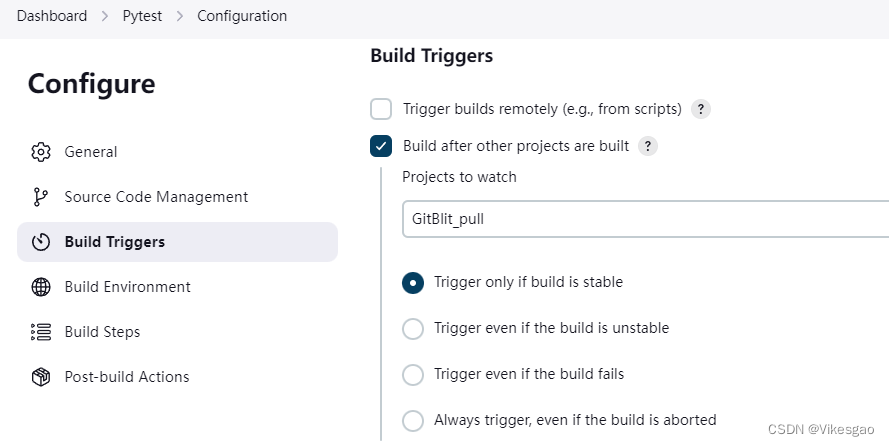
其他工程构建后触发
Build after other projects are build某些环境的构建,相互之间彼此依赖,所以,有些环境必须先安装。对于大型项目而言,会有多个工程需要构建,此时,就可以编排工程的构建顺序,我们可以安排环境工程先构建。
【GitBlit_pull】为前置工程

-
相关阅读:
freeswitch配置SBC的方案
MySQL(8) 优化、MySQL8、常用命令
git创建新分支将项目挂载到新分支操作
2023-9-12 完全背包问题
Elasticsearch近实时架构
基于JAVA的学生课程后台管理系统【数据库设计、源码、开题报告】
边缘计算智能分析网关V4地面垃圾AI检测算法介绍及场景应用
【MySQL】Mysql事务以及权限管理
盛水最多的容器(双指针) leetcode
2246: 【区赛】【宁波32届小学生】最佳交换
- 原文地址:https://blog.csdn.net/vikesgao/article/details/128189218
