-
Linux系统( Centos 7) 配置与管理Apache服务器实例详细步骤
Linux系统( Centos 7) 配置与管理Apache服务器实例详细步骤
服务器centos7-1
1.配置网络。
- [root@centos7 ~]# vim /etc/sysconfig/network-scripts/ifcfg-ens33
- TYPE=Ethernet
- PROXY_METHOD=none
- BROWSER_ONLY=no
- BOOTPROTO=static
- DEFROUTE=yes
- IPV4_FAILURE_FATAL=no
- IPV6INIT=yes
- IPV6_AUTOCONF=yes
- IPV6_DEFROUTE=yes
- IPV6_FAILURE_FATAL=no
- IPV6_ADDR_GEN_MODE=stable-privacy
- NAME=ens33
- UUID=9f92031e-cb20-4cde-b796-6935a082ba86
- DEVICE=ens33
- ONBOOT=yes
- IPADDR=192.168.10.1
- NETMASK=255.255.255.0
- GATEWAY=192.168.10.1
2.安装Apache相关软件。
- [root@centos7~]# rpm -q httpd
- [root@centos7~]# mkdir /opt/centos
- [root@centos7~]# mount /dev/cdrom /opt/centos
mount: /dev/sr0 写保护,将以只读方式挂载
- [root@centos7~]# mv /etc/yum.repos.d/* /home/
- [root@centos7~]# vim /etc/yum.repos.d/local.repo
[centos]
name=centos
baseurl=file:///opt/centos
gpgcheck=0
enabled=1
[root@centos7~]# yum clean all已加载插件:fastestmirror, langpacks
正在清理软件源: centos
Cleaning up list of fastest mirrors
Other repos take up 568 M of disk space (use --verbose for details)
[root@centos7~]# yum install httpd -y
已加载插件:fastestmirror, langpacks
Determining fastest mirrors
centos | 3.6 kB 00:00
(1/2): centos/group_gz | 166 kB 00:00
(2/2): centos/primary_db | 3.1 MB 00:00
正在解决依赖关系
--> 正在检查事务
---> 软件包 httpd.x86_64.0.2.4.6-88.el7.centos 将被 安装
--> 正在处理依赖关系 httpd-tools = 2.4.6-88.el7.centos,它被软件包 httpd-2.4.6-88.el7.centos.x86_64 需要
--> 正在处理依赖关系 /etc/mime.types,它被软件包 httpd-2.4.6-88.el7.centos.x86_64 需要
--> 正在检查事务
---> 软件包 httpd-tools.x86_64.0.2.4.6-88.el7.centos 将被 安装
---> 软件包 mailcap.noarch.0.2.1.41-2.el7 将被 安装
--> 解决依赖关系完成
依赖关系解决
================================================================================
Package 架构 版本 源 大小
================================================================================
正在安装:
httpd x86_64 2.4.6-88.el7.centos centos 2.7 M
为依赖而安装:
httpd-tools x86_64 2.4.6-88.el7.centos centos 90 k
mailcap noarch 2.1.41-2.el7 centos 31 k
事务概要
================================================================================
安装 1 软件包 (+2 依赖软件包)
总下载量:2.8 M
安装大小:9.6 M
Downloading packages:
--------------------------------------------------------------------------------
总计 19 MB/s | 2.8 MB 00:00
Running transaction check
Running transaction test
Transaction test succeeded
Running transaction
正在安装 : mailcap-2.1.41-2.el7.noarch 1/3
正在安装 : httpd-tools-2.4.6-88.el7.centos.x86_64 2/3
正在安装 : httpd-2.4.6-88.el7.centos.x86_64 3/3
验证中 : httpd-tools-2.4.6-88.el7.centos.x86_64 1/3
验证中 : mailcap-2.1.41-2.el7.noarch 2/3
验证中 : httpd-2.4.6-88.el7.centos.x86_64 3/3
已安装:
httpd.x86_64 0:2.4.6-88.el7.centos
作为依赖被安装:
httpd-tools.x86_64 0:2.4.6-88.el7.centos mailcap.noarch 0:2.1.41-2.el7
完毕!
[root@centos7~]# rpm -qa | grep httpd
httpd-tools-2.4.6-88.el7.centos.x86_64
httpd-2.4.6-88.el7.centos.x86_64
- [root@centos7~]# systemctl start httpd
- [root@centos7~]# firewall-cmd --list-all
public (active)
target: default
icmp-block-inversion: no
interfaces: ens36
sources:
services: dhcpv6-client ssh
ports:
protocols:
masquerade: no
forward-ports:
source-ports:
icmp-blocks:
rich rules:
3. 让防火墙放行,并设置SELinux为允许。
[root@centos7~]# firewall-cmd --permanent --add-service=httpsuccess
[root@centos7~]# firewall-cmd --reloadsuccess
[root@centos7~]# firewall-cmd --list-allpublic (active)
target: default
icmp-block-inversion: no
interfaces: ens36
sources:
services: dhcpv6-client http ssh
ports:
protocols:
masquerade: no
forward-ports:
source-ports:
icmp-blocks:
rich rules:
- [root@centos7~]# setenforce 0
- [root@centos7~]# getenforce
Permissive
4. 测试httpd服务是否安装成功。
- [root@centos7~]# systemctl start httpd
- [root@centos7~]# systemctl enable httpd
Created symlink from /etc/systemd/system/multi-user.target.wants/httpd.service to /usr/lib/systemd/system/httpd.service.
[root@centos7~]# firefox http://127.0.0.1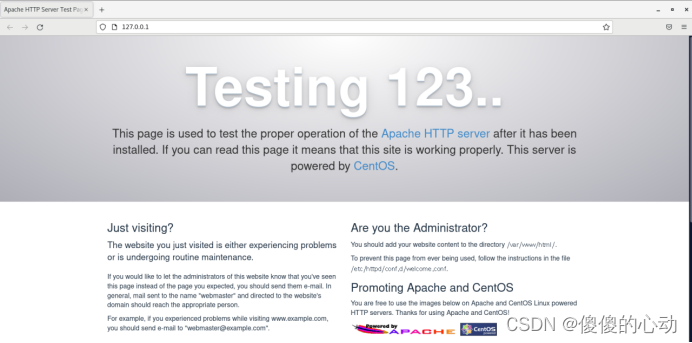
5.设置文档根目录和首页文件。[
- root@centos7~]# mkdir /home/www
- [root@centos7~]# echo "The Web's DocumentRoot Test" > /home/www/myweb.html
- [root@centos7~]# vim /etc/httpd/conf/httpd.conf
......
119 DocumentRoot "/home/www"
120
121 #
122 # Relax access to content within /var/www.
123 #
124
125 AllowOverride None
126 # Allow open access:
127 Require all granted
128
......
163
164 DirectoryIndex index.html myweb.html
165
[root@centos7~]# firewall-cmd --reloadsuccess
[root@centos7~]# systemctl restart httpd//此时可去
6.设置首页文件。
- [root@centos7~]# useradd devil
- [root@centos7~]# passwd devil
更改用户 devil 的密码 。
新的 密码:
无效的密码: 密码是一个回文
重新输入新的 密码:
passwd:所有的身份验证令牌已经成功更新。
- [root@centos7~]# chmod 705 /home/devil
- [root@centos7~]# mkdir /home/devil/public_html
- [root@centos7~]# cd /home/devil/public_html
[root@centos7public_html]# echo "this is devil's web." >>index.html[root@centos7public_html]# cd
[root@centos7~]# vim /etc/httpd/conf.d/userdir.conf...... //注意:使用“ : set nu”可显示行号。
17 # UserDir disabled
18
19 #
20 # To enable requests to /~user/ to serve the user's public_html
21 # directory, remove the "UserDir disabled" line above, and uncomment
22 # the following line instead:
23 #
24 UserDir public_html
......
- [root@centos7~]# setenforce 0
- [root@centos7~]# firewall-cmd --reload
success
[root@centos7~]# firewall-cmd --list-allpublic (active)
target: default
icmp-block-inversion: no
interfaces: ens33
sources:
services: dhcpv6-client http ssh
ports:
protocols:
masquerade: no
forward-ports:
source-ports:
icmp-blocks:
rich rules:
[root@centos7~]# systemctl restart httpd客户端client1
- 配置网络。
[root@client1 ~]# vim /etc/sysconfig/network-scripts/ifcfg-ens33TYPE=Ethernet
PROXY_METHOD=none
BROWSER_ONLY=no
BOOTPROTO=static
DEFROUTE=yes
IPV4_FAILURE_FATAL=no
IPV6INIT=yes
IPV6_AUTOCONF=yes
IPV6_DEFROUTE=yes
IPV6_FAILURE_FATAL=no
IPV6_ADDR_GEN_MODE=stable-privacy
NAME=ens33
UUID=9f92031e-cb20-4cde-b796-6935a082ba86
DEVICE=ens33
ONBOOT=yes
IPADDR=192.168.10.10
NETMASK=255.255.255.0
GATEWAY=192.168.10.1
2.进行测试。
[root@client1 ~]# firefox http://192.168.10.1

[root@client1 ~]# firefox http://192.168.10.1/~devil

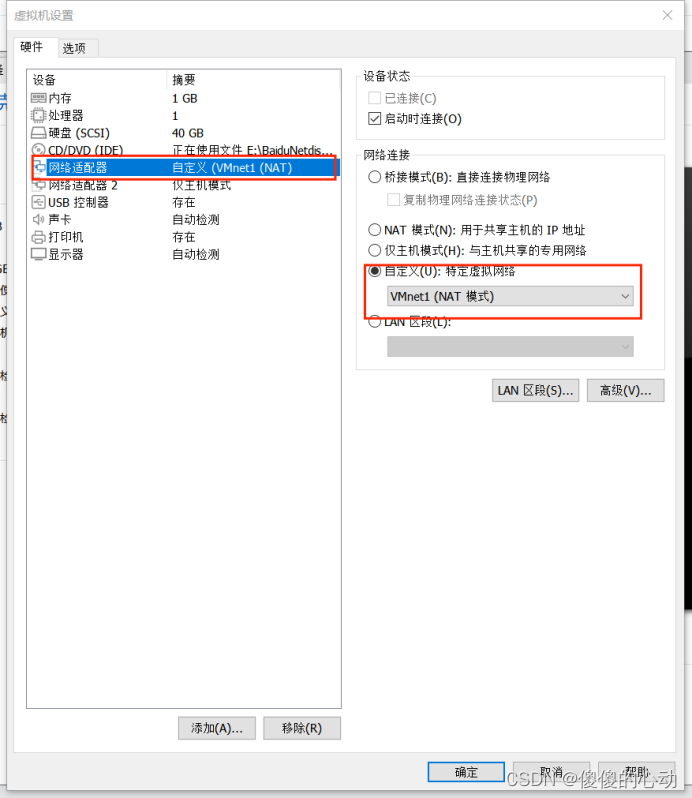
注意:centos7与client1都是使用VMnet1(NAT模式)连接,如图所示
-
相关阅读:
如何使用MATLAB写测试(3)combinatorial explosion? 参数化!
基础复习——共享参数SharedPreferences——记住密码项目——存储卡的文件操作(读写文件&读写图片)...
kubeadm 部署的 k8s 增加 ip 并重新生成证书
Linux 禁止用户或 IP通过 SSH 登录
Easy3D 曲面网格数据的读取与写入
项目实战——匹配系统(下)
.Net Core&RabbitMQ死信队列
扫雷小游戏(1.0版本)
干货|数据资产评估的基本方法和选择方法
【Python】Python中一些有趣的用法
- 原文地址:https://blog.csdn.net/m0_63624418/article/details/128167749
