-
Spirng 痛苦源码学习(二)——手写spring大致总框架(一)
前言
本文主要基于spring的注解的方式完成spring总体流程
- 1、配置文件配合容器实现
- 2、通过注解扫描所有的bean定义信息
- 3、完成CreatBean方法
- 4、实现getBean方法
- 5、实现postProcessor完成AOP(使用JDK动态代理)
- 6、实现aware回调
总体来说:
spring 模拟依赖
project 模拟我们的项目
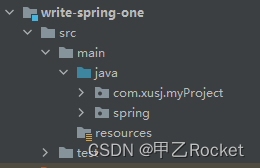
一、总体步骤如下
总的来说
1、使用了spring文件夹模拟了我们平常的依赖。
2、project文件夹模拟我们平常的项目。1、spring 文件夹
简介=》用于模拟我们导的spring依赖
-
1、编写一个容器
-
2、简单的完成一个构造方法,支持传入配置文件,通过注解方式进行下面的操作
——以上第一步完成存取—— -
3、定义一个@ComponentScan注解,目的是为了扫描
-
4、在context容器构造器中,扫描配置文件的注解,得到其中的路径值
-
5、扫描对应路径下的所有的类(我们扫描的是.class文件,而不是.java);所以我们要拿到的是应用类加载器,然后获取对应的路径下的文件
——以上是类扫描——
- 6、获取所有文件的绝对路径,然后截取成可以读取到对应类的值
- 7、读取对应的类上的注解(如@Component,@Service…)判断是不是一个bean
——以上是判断是不是一个bean的逻辑——
- 8、定义@Scope注解(定义这是一个单例还是一个原型)
- 9、判断是不是有@Scope注解,取到其中的值
- 10、将类信息,单例or原型等信息封装成一个bean的定义信息,放到map中
——以上扫描包结束,封装bean定义信息放map中——
- 11、根据bean定义信息,创建bean,然后放到singletonObjects中
——以上创建bean到单例池中——
-
12、定义@Autowired依赖注入注解
-
13、判断bean类中是不是有对应的属性值有依赖注入注解
-
14、有点话就先getBean去单例缓存池中拿,拿不到就CreatBean(判断单例和原型)
——以上是依赖注入的过程—— -
15、定义后置处理器接口:里面主要分为前置和后置处理postProcessBeforeInitialization、postProcessAfterInitialization
-
16、在扫描的时候,就把所有的后置处理器干到缓存池中
-
17、判断这个bean是不是PostProcess(instanceof 父类就行)
-
18、在创建bean的时候我们要取出所有缓存中的处理器,然后看看他们要干嘛(循环每一个后置处理器)
——以上定义后置处理器接口—— -
19、定义@XXAware回调接口
-
20、和后置处理器差不多,我们也才creatBean判断bean是不是Aware
-
21、有的话就让spring回调干点事情
2、myProject 文件夹
简介=》用于我们项目中利用spring
- 1、编写配置文件
- 2、编写启动类
- 2.1 获取一个容器,然后在容器中getBean
——以上第一步完成存取——
- 3、和spring配置一样,我们要在配置文件中配置@ComponentScan注解
——以上是类扫描——
- 4、在对应的类中添加@Scope注解
——以上扫描包结束,封装bean定义信息放map中(区分原型还是单例)——
-
5、在对应类中添加@Autowired注解即可,其他交给容器去整
——以上是依赖注入的过程—— -
6、自定义一个BeanPostProcess,我们的Aop其实就是这里搞起来的,读取aop的注解缓存池,然后一通前置通知get
——以上定义后置处理器接口——
二、主要coding
1、配置文件
package com.xusj.myProject.config; import spring.annotation.ComponentScan; /** * @author xusj *
CreateDate 2022/11/29 0:30 */ @ComponentScan("com.xusj.myProject") public class AppConfig { }- 1
- 2
- 3
- 4
- 5
- 6
- 7
- 8
- 9
- 10
- 11
- 12
- 13
2、容器
package spring.context; import spring.annotation.Autowired; import spring.annotation.Component; import spring.annotation.ComponentScan; import spring.annotation.Scope; import java.beans.Introspector; import java.io.File; import java.lang.reflect.Field; import java.net.URL; import java.util.HashMap; import java.util.Map; import java.util.Objects; /** * @author xusj *
CreateDate 2022/11/29 0:29 */ public class MyApplicationContext { private Class<?> configClass; /** * bean定义信息的缓存池 * k */ private final Map<String, BeanDefinition> beanDefinitionMap = new HashMap<>(); private final Map<String, Object> singletonObjects = new HashMap<>(); /** * 构造方法,通过配置类完成 * * @param clazz */ public MyApplicationContext(Class<?> clazz) { this.configClass = clazz; // 扫描对应下的所有子包 // 1、判断有没有注解 if (clazz.isAnnotationPresent(ComponentScan.class)) { // 2、先拿到注解和对应的值(路径) ComponentScan componentScanAnnotation = clazz.getAnnotation(ComponentScan.class); String path = componentScanAnnotation.value(); // 转化成我们需要的path path = path.replace(".", "/"); // 3、获取对应的类加载器,我们需要读取的应用类加载器中的文件而不是我们写的.java文件[返回类的类装载器。] ClassLoader classLoader = MyApplicationContext.class.getClassLoader(); // 4、获取对应路径的资源 URL resource = classLoader.getResource(path); // 5、获取对应位置的文件 File file = new File(resource.getFile()); // 判断文件 if (file.isDirectory()) { getFile(file); } } } /*** * 获取所有的文件 * * @param file 文件 * @author xusj *
CreateDate 2022/11/29 1:05 */ private void getFile(File file) { // 遍历文件(一直遍历到最后) for (File f : Objects.requireNonNull(file.listFiles())) { if (f.isDirectory()) { // 递归 getFile(f); } else { // 扫描所有类判断是不是个bean,是的话就创建一个bean定义信息,然后放到map中 scanComponent(f); } } // 扫描bean定义信息map缓存,创建bean for (Map.Entry<String, BeanDefinition> entry : beanDefinitionMap.entrySet()) { String beanName = entry.getKey(); BeanDefinition beanDefinition = entry.getValue(); // 判断是单例还是原型 if ("singleton".equals(beanDefinition.getScope())) { // 创建bean Object bean = createBean(beanName, beanDefinition); // TODO XUSJ 放到单例池中 singletonObjects.put(beanName, bean); } } } /** * 创建bean * * @param beanName * @param beanDefinition */ public Object createBean(String beanName, BeanDefinition beanDefinition) { // 获取类信息 Class<?> clazz = beanDefinition.getType(); // 通过构造方法创建bean Object instance = null; try { instance = clazz.getConstructor().newInstance(); // 判断依赖注入的问题 for (Field field : clazz.getDeclaredFields()) { // 判断该类中有没有@Autowired if (field.isAnnotationPresent(Autowired.class)) { field.setAccessible(true); field.set(instance, getBean(field.getName())); } } } catch (Exception e) { e.printStackTrace(); } return instance; } private void scanComponent(File f) { // 1 获取所有的文件 // 获取文件的绝对路径 String absolutePath = f.getAbsolutePath(); // 更换成可应用类加载器可以处理的结果 absolutePath = absolutePath.substring(absolutePath.indexOf("com"), absolutePath.indexOf(".class")); absolutePath = absolutePath.replace("\\", "."); // 2 通过应用类加载器获取绝对路径中的类 System.out.println("对应文件的绝对路径=》" + f.getName() + ":" + absolutePath); ClassLoader classLoader = MyApplicationContext.class.getClassLoader(); try { Class<?> clazz = classLoader.loadClass(absolutePath); // 3 判断这个类上面是不是有对应的bean相关的注解 if (clazz.isAnnotationPresent(Component.class)) { // 4 获取我们定义的beanName Component componentScanAnnotation = clazz.getAnnotation(Component.class); String beanName = componentScanAnnotation.value(); // 如果没有定义的话,直接就使用类目作为beanName if (beanName.isEmpty()) { // 获取简单类目 beanName = Introspector.decapitalize(clazz.getSimpleName()); } // 5 构建bean的定义信息 BeanDefinition beanDefinition = new BeanDefinition(); beanDefinition.setType(clazz); beanDefinition.setBeanName(beanName); // 6、通过注解判断是单例还是原型 if (clazz.isAnnotationPresent(Scope.class)) { Scope scopeAnnotation = clazz.getAnnotation(Scope.class); String value = scopeAnnotation.value(); // 放到bean的定义信息中 beanDefinition.setScope(value); } else { // 默认为singleton beanDefinition.setBeanName("singleton"); } // 将bean定义信息,放到beanDefinitionMap中 beanDefinitionMap.put(beanName, beanDefinition); } } catch (ClassNotFoundException e) { e.printStackTrace(); } } /*** * 通过beanName去获取bean * * @param name beanName * @return {@link Object} * @author xusj *
CreateDate 2022/11/29 0:34 */ public Object getBean(String name) { // 先判断bean定义信息是不是有值 if (!beanDefinitionMap.containsKey(name)) { throw new RuntimeException(); } // 获取bean定义信息 BeanDefinition beanDefinition = beanDefinitionMap.get(name); // 判断是不是单例 if ("singleton".equals(beanDefinition.getScope())) { // 先去单例池中去拿 Object singletonObj = singletonObjects.get(name); if (singletonObj == null) { // 没有说明还没创建,那我就创建一个 singletonObj = createBean(name, beanDefinition); // 放到单例池中 singletonObjects.put(name, singletonObj); } return singletonObj; } else { // 原型模式[就是直接搞一个新的出来] Object prototypeBean = createBean(name, beanDefinition); return prototypeBean; } } }- 1
- 2
- 3
- 4
- 5
- 6
- 7
- 8
- 9
- 10
- 11
- 12
- 13
- 14
- 15
- 16
- 17
- 18
- 19
- 20
- 21
- 22
- 23
- 24
- 25
- 26
- 27
- 28
- 29
- 30
- 31
- 32
- 33
- 34
- 35
- 36
- 37
- 38
- 39
- 40
- 41
- 42
- 43
- 44
- 45
- 46
- 47
- 48
- 49
- 50
- 51
- 52
- 53
- 54
- 55
- 56
- 57
- 58
- 59
- 60
- 61
- 62
- 63
- 64
- 65
- 66
- 67
- 68
- 69
- 70
- 71
- 72
- 73
- 74
- 75
- 76
- 77
- 78
- 79
- 80
- 81
- 82
- 83
- 84
- 85
- 86
- 87
- 88
- 89
- 90
- 91
- 92
- 93
- 94
- 95
- 96
- 97
- 98
- 99
- 100
- 101
- 102
- 103
- 104
- 105
- 106
- 107
- 108
- 109
- 110
- 111
- 112
- 113
- 114
- 115
- 116
- 117
- 118
- 119
- 120
- 121
- 122
- 123
- 124
- 125
- 126
- 127
- 128
- 129
- 130
- 131
- 132
- 133
- 134
- 135
- 136
- 137
- 138
- 139
- 140
- 141
- 142
- 143
- 144
- 145
- 146
- 147
- 148
- 149
- 150
- 151
- 152
- 153
- 154
- 155
- 156
- 157
- 158
- 159
- 160
- 161
- 162
- 163
- 164
- 165
- 166
- 167
- 168
- 169
- 170
- 171
- 172
- 173
- 174
- 175
- 176
- 177
- 178
- 179
- 180
- 181
- 182
- 183
- 184
- 185
- 186
- 187
- 188
- 189
- 190
- 191
- 192
- 193
- 194
- 195
- 196
- 197
- 198
- 199
- 200
- 201
- 202
- 203
- 204
- 205
- 206
- 207
- 208
3、一些spring中的重要的注解

4、项目中的使用
package com.xusj.myProject.service; import spring.annotation.Autowired; import spring.annotation.Component; import spring.annotation.Scope; import spring.aware.MyBeanAware; /** * @author xusj *
CreateDate 2022/11/29 0:35 */ @Component(value = "oneService") @Scope(value = "singleton") public class OneService implements MyBeanAware { @Autowired private TwoService twoService; public void test() { System.out.println("twoService" + "+++" + twoService); } @Override public void setSth() { } }- 1
- 2
- 3
- 4
- 5
- 6
- 7
- 8
- 9
- 10
- 11
- 12
- 13
- 14
- 15
- 16
- 17
- 18
- 19
- 20
- 21
- 22
- 23
- 24
- 25
- 26
- 27
- 28
5.重要的bean定义信息
package spring.context; /** * @author xusj *
CreateDate 2022/11/29 10:02 */ public class BeanDefinition { /** * beanName */ private String beanName; /** * 类信息 */ private Class<?> type; /** * bean类型 */ private String scope; public BeanDefinition() { } @Override public String toString() { return "BeanDefinition{" + "beanName='" + beanName + '\'' + ", type=" + type + ", scope='" + scope + '\'' + '}'; } public String getScope() { return scope; } public void setScope(String scope) { this.scope = scope; } public String getBeanName() { return beanName; } public void setBeanName(String beanName) { this.beanName = beanName; } public Class<?> getType() { return type; } public void setType(Class<?> type) { this.type = type; } }- 1
- 2
- 3
- 4
- 5
- 6
- 7
- 8
- 9
- 10
- 11
- 12
- 13
- 14
- 15
- 16
- 17
- 18
- 19
- 20
- 21
- 22
- 23
- 24
- 25
- 26
- 27
- 28
- 29
- 30
- 31
- 32
- 33
- 34
- 35
- 36
- 37
- 38
- 39
- 40
- 41
- 42
- 43
- 44
- 45
- 46
- 47
- 48
- 49
- 50
- 51
- 52
- 53
- 54
- 55
- 56
- 57
- 58
- 59
- 60
- 61
6、postProcessor重要,前置通知和后置
依赖倒置原则,先定义接口package com.xusj.myProject.postProcessor; import spring.annotation.Component; import spring.processor.BeanPostProcessor; import java.lang.reflect.InvocationHandler; import java.lang.reflect.Method; import java.lang.reflect.Proxy; /** * 我的后置处理器 * * @author xusj *
CreateDate 2022/11/29 16:31 */ @Component public class MyBeanPostProcessor implements BeanPostProcessor { // 前置搞点事情(Aop,这里用的是JDK的动态代理,spring使用的CGLIB) @Override public Object postProcessBeforeInitialization(Object bean, String beanName) { // 其实AOP也是在这里整的,就是读一些注解然后整 if ("userService".equals(beanName)) { return Proxy.newProxyInstance(MyBeanPostProcessor.class.getClassLoader(), bean.getClass().getInterfaces(), new InvocationHandler() { @Override public Object invoke(Object proxy, Method method, Object[] args) throws Throwable { // 切面 System.out.println("切面逻辑"); // 原来的对象去执行方法 return method.invoke(bean, args); } }); } // bean return bean; } // 后置搞点事情 @Override public Object postProcessAfterInitialization(Object bean, String beanName) { return BeanPostProcessor.super.postProcessAfterInitialization(bean, beanName); } }- 1
- 2
- 3
- 4
- 5
- 6
- 7
- 8
- 9
- 10
- 11
- 12
- 13
- 14
- 15
- 16
- 17
- 18
- 19
- 20
- 21
- 22
- 23
- 24
- 25
- 26
- 27
- 28
- 29
- 30
- 31
- 32
- 33
- 34
- 35
- 36
- 37
- 38
- 39
- 40
- 41
- 42
- 43
- 44
- 45
7、aware回调接口
总的来说和postProecssor一样,也是依赖倒置原则主要项目的截图

-
相关阅读:
Spring
(附源码)springboot高校党建信息管理系统 毕业设计 051541
module ‘numpy‘ has no attribute ‘object‘
微服务之SpringCloud
可转债列表页与日频交易数据呈现:fastapi+antV G2
Java练习day3
【 OpenGauss源码学习 —— 列存储(update)】
Hadoop(HDFS)
IOS面试题object-c 61-70
Kafka Stream 学习笔记-5 process api
- 原文地址:https://blog.csdn.net/weixin_46643875/article/details/128101564