-
SpringBoot入门
目录
重点:SpringBoot项目静态图片加载浏览器不显示解决方案
部分图片来自百战程序员
Spring缺点分析
Spring是一个非常优秀的轻量级框架,以IOC(控制反转)和AOP(面向切面)为思想内核,极大简化了JAVA企业级项目的开发。
虽然Spring的组件代码是轻量级的,但它的配置却是重量级的。使用Spring进行项目开发需要在配置文件中写很多代码,所有这些配置都代表了开发时的损耗。

除此之外,Spring项目的依赖管理也是一件耗时耗力的事情。在环境搭建时,需要分析要导入哪些库的坐标,而且还需要分析导入与之有依赖关系的其他库的坐标,一旦选错了依赖的版本,随之而来的不兼容问题就会严重阻碍项目的开发进度。比如Spring5.0以上只能使用Junit4.12以上的版本。

总结
Spring的缺点:
- 配置过于繁琐。
- 引入的依赖过多,版本控制复杂。
什么是SpringBoot
SpringBoot对Spring的缺点进行改善和优化,基于约定大于配置的思想,简化了Spring的开发,所谓简化是指简化了Spring中大量的配置文件和繁琐的依赖引入。所以SpringBoot是一个服务于框架的框架,它不是对Spring功能的增强,而是提供了一种快速使用Spring框架的方式。
SpringBoot的优点:
- 配置简单
- 依赖引入简单
- 提供了一些大型项目的非功能特性,如嵌入式服务器,安全指标,健康监测等。
SpringBoot核心功能
自动配置
SpringBoot项目自动提供最优配置,同时可以修改默认值满足特定的要求。
起步依赖
SpringBoot的依赖是基于功能的,而不是普通项目的依赖是基于JAR包的。SpringBoot将完成一个功能所需要的所有坐标打包到一起,并完成了版本适配,我们在使用某功能时只需要引入一个依赖即可。
SpringBoot项目结构
POM文件

接下来我们分析SpringBoot的项目结构:
POM文件
- SpringBoot项目必须继承spring-boot-starter-parent,即所有的SpringBoot项目都是spring-boot-starter-parent的子项目。spring-boot-starter-parent中定义了常用配置、依赖、插件等信息,供SpringBoot项目继承使用。
- <parent>
- <groupId>org.springframework.bootgroupId>
- <artifactId>spring-boot-starter-parentartifactId>
- <version>2.7.0-M1version>
- <relativePath/>
- parent>
- SpringBoot项目中可以定义起步依赖,起步依赖不是以jar包为单位,而是以功能为单位
- <dependencies>
- <dependency>
- <groupId>org.springframework.bootgroupId>
- <artifactId>spring-boot-starter-webartifactId>
- dependency>
- <dependency>
- <groupId>org.springframework.bootgroupId>
- <artifactId>spring-boot-starter-testartifactId>
- <scope>testscope>
- dependency>
- dependencies>
- spring-boot-maven-plugin插件是将项目打包成jar包的插件。该插件打包后的SpringBoot项目无需依赖web容器,可以直接使用JDK运行
- <build>
- <plugins>
- <plugin>
- <groupId>org.springframework.bootgroupId>
- <artifactId>spring-boot-maven-pluginartifactId>
- plugin>
- plugins>
- build>
启动类、配置文件
启动类
启动类的作用是启动SpringBoot项目,运行启动类的main方法即可启动SpringBoot项目。
@SpringBootApplication
public class Springbootdemo2Application{
public static void main(String[] args) {
SpringApplication.run(Springbootdemo2Application.class, args);
}
}
配置文件
由于SpringBoot极大简化了Spring配置,所以只有一个application.properties配置文件,且Spring的自动配置功能使得大部分的配置都有默认配置,该文件的功能是覆盖默认配置信息,该文件不写任何信息都可以启动项目。
启动后默认端口号为8080,我们可以覆盖该配置:
server.port=8888
SpringBoot入门案例
1、通过IDEA搭建SpringBoot项目,点击新建项目,选中Spring Initializr,点击下一步

2、编写包结构,项目名称,项目类型等等

3、勾选起步依赖,然后创建项目

4、在启动类同级包下或同级子包下创建控制器
- @Controller
- public class MyController {
- @RequestMapping("/hello")
- @ResponseBody
- public String hello(){
- System.out.println("hello");
- return "myController";
- }
- }
5、运行启动类,访问对应路径

原理分析
起步依赖
查看spring-boot-starter-parent起步依赖
- 按住Ctrl点击pom.xml中的spring-boot-starter-parent,跳转到了spring-boot-starter-parent的pom.xml,发现spring-boot-starter-parent的父工程是spring-boot-dependencies。

- 进入spring-boot-dependencies的pom.xml可以看到,一部分坐标的版本、依赖管理、插件管理已经定义好,所以SpringBoot工程继承spring-boot-starter-parent后已经具备版本锁定等配置了。所以起步依赖的作用就是进行依赖的传递。

查看spring-boot-starter-web起步依赖
按住Ctrl点击pom.xml中的spring-boot-starter-web,跳转到了spring-boot-starter-web的pom.xml,从spring-boot-starter-web的pom.xml中我们可以发现,spring-boot-starter-web就是将web开发要使用的spring-web、spring-webmvc等坐标进行了打包,这样我们的工程只要引入spring-boot-starter-web起步依赖的坐标就可以进行web开发了,同样体现了依赖传递的作用。

自动配置
- 查看注解@SpringBootApplication的源码

@SpringBootConfiguration:等同与@Configuration,既标注该类是Spring的一个配置类
@EnableAutoConfiguration:SpringBoot自动配置功能开启- 查看注解@EnableAutoConfifiguration的源码
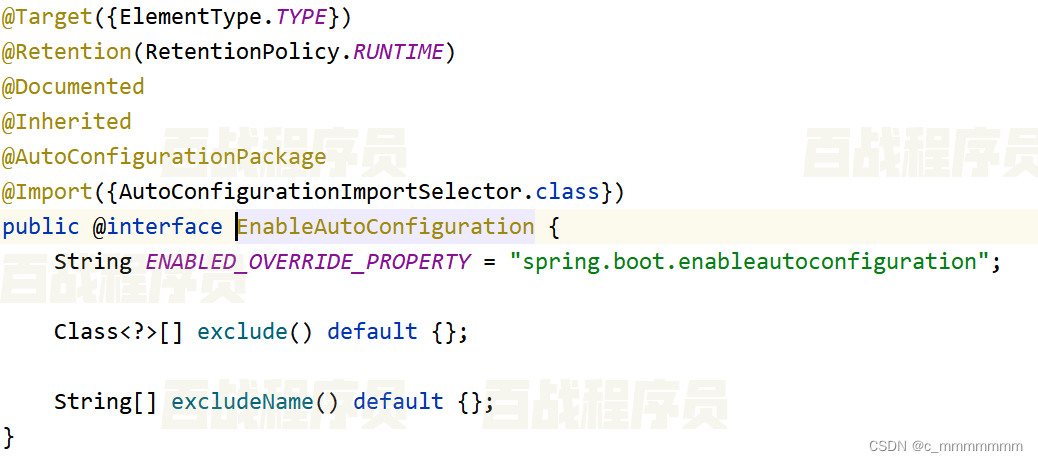
@Import(AutoConfigurationImportSelector.class) 导入了AutoConfigurationImportSelector类
- 查看AutoConfigurationImportSelector源码

SpringFactoriesLoader.loadFactoryNames方法的作用就是从META-INF/spring.factories文件中读取指定类对应的类名称列表
- 点开spring-boot-autoconfigure的spring.factories文件

有关配置类的信息如下:

上面配置文件存在大量的以Configuration为结尾的类名称,这些类就是存有自动配置信息的类,而SpringApplication在获取这些类名后再加载。
- 我们ServletWebServerFactoryAutoConfifiguration为例来分析源码:

@EnableConfifigurationProperties(ServerProperties.class)代表加载ServerProperties服务器配置属性类。
- 进入ServerProperties类源码如下:

prefifix = "server"表示SpringBoot配置文件中的前缀,SpringBoot会将配置文件中以server开始的属性映射到该类的字段中。所以配置网络端口的方式为server.port
- 如果我们没有在配置文件中配置默认端口,SpringBoot就会读取默认配置,而默认配置存放在META-INF/spring-configuration-metadata.json中,打开spring-boot-autoconfigure的spring.factories文件

该文件中保存的就是所有默认配置信息。

核心注解
@SpringBootApplication
标注是SpringBoot的启动类。
此注解等同于@SpringBootConfiguration+@EnableAutoConfiguration+@ComponentScan。
@SpringBootConfiguration
@SpringBootConfiguration是@Configuration的派生注解,跟@Configuration功能一致,标注这个类是一个配置类,只不过@SpringBootConfiguration是Springboot的注解,而@Configuration是Spring的注解
@EnableAutoConfiguration
SpringBoot自动配置注解。
等同于@AutoConfigurationPackage+@Import(AutoConfigurationImportSelector.class)
@AutoConfigurationPackage
自动扫描包的注解,它会自动扫描主类所在包下所有加了注解的类(@Controller,@Service等),以及配置类(@Configuration)。
@Import({AutoConfigurationImportSelector.class})
该注解会导入AutoConfifigurationImportSelector类对象,该对象会从META-INF/spring.factories文件中读取配置类的名称列表。
@ComponentScan
该注解会扫描项目,自动装配一些项目启动需要的Bean。
YAML文件
配置文件介绍
SpringBoot项目中,大部分配置都有默认值,但如果想替换默认配置的话,就可以使用application.properties或者application.yml进行配置。
SpringBoot默认会从resources目录下加载application.properties或application.yml文件。其中,application.properties文件是键值对类型的文件,之前一直在使用,所以我们不再对properties文件进行阐述。
除了properties文件外,SpringBoot还支持YAML文件进行配置。YAML文件的扩展名为.yml或.yaml,它的基本要求如下:
- 大小写敏感
- 使用缩进代表层级关系
- 相同的部分只出现一次
比如使用properties文件配置tomcat端口:
server.port=8888
而使用YAML文件配置tomcat端口:
server:
port: 8888
自定义配置简单数据
除了覆盖默认配置,我们还可以在YAML文件中配置其他信息以便我们在项目中使用。配置简单数据的方式如下:
- 语法:
数据名: 值
- 示例代码:

注意:冒号后面必须有一个空格
自定义配置对象数据
- 语法:
对象:
属性名1: 属性值
属性名2: 属性值
# 或者
对象: {属性名1: 属性值,属性名2: 属性值} - 示例代码:

属性名前面的空格个数不限,在yml语法中,相同缩进代表同一个级别,只要每个属性前的空格数一样即可。
自定义配置集合数据
- 语法
集合:
- 值1
- 值2
# 或者
集合: [值1,值2]
- 示例代码
# 城市
- # 集合中的元素是对象
- 语法:
集合名:
- 对象属性名: 值

注意:值与之前的 - 之间存在一个空格
@Value读取配置文件数据
我们可以通过@Value注解将配置文件中的值映射到一个Spring管理的Bean的字段上,用法如下:
读取上次编写的文件数据
application.yml:
- name: zhangsan
- student1:
- name: zhangsan
- age: 14
- student2: {name: zhangsan,age: 15}
- city1:
- - beijign
- - shanghai
- - tianjing
- city2: [beijing,shanghai,tianjing]
- students:
- - name: zhangsan
- age: 16
- sex: male
- - name: lisi
- age: 20
- sex: female
- - name: wangwu
- age: 25
- sex: male
编写控制器:
- @Controller
- public class YmlController {
- @Value("${name}")
- private String name;
- @Value("${student1.age}")
- private int age;
- @Value("${city1[0]}")
- private String city1;
- @Value("${students[0].sex}")
- private String sex;
- @RequestMapping("/yml")
- @ResponseBody
- public String ymlController(){
- return name+":"+age+":"+city1+":"+sex;
- }
- }
运行启动类,访问对应路径

@ConfigurationProperties
@ConfigurationProperties(prefix="key")
读取的类需要编写getter和setter方法,否则无法赋值
application.yml:
- user:
- id: 10001
- username: shangxuetang
- address:
- - beijing
- - tianjin
- - shanghai
- - chongqing
- grades:
- - subject: math
- score: 100
- - subject: english
- score: 90
编写控制器
- package com.itbaizhan.springboot_blog.contoller;
- import com.itbaizhan.springboot_blog.domain.Grade;
- import org.springframework.boot.context.properties.ConfigurationProperties;
- import org.springframework.stereotype.Controller;
- import org.springframework.web.bind.annotation.RequestMapping;
- import org.springframework.web.bind.annotation.ResponseBody;
- import java.util.List;
- @Controller
- @ConfigurationProperties(prefix = "user")
- public class YmlController1 {
- private int id;
- private String username;
- private List
address; - private List
grades; - @RequestMapping("/yml2")
- @ResponseBody
- public String yml2(){
- System.out.println(id);
- System.out.println(username);
- System.out.println(address);
- System.out.println(grades);
- return "hello springboot!";
- }
- public int getId() {
- return id;
- }
- public void setId(int id) {
- this.id = id;
- }
- public String getUsername() {
- return username;
- }
- public void setUsername(String username) {
- this.username = username;
- }
- public List
getAddress() { - return address;
- }
- public void setAddress(List
address) { - this.address = address;
- }
- public List
getGrades() { - return grades;
- }
- public void setGrades(List
grades) { - this.grades = grades;
- }
- }

占位符的作用
YAML文件中可以使用${}占位符,它有两个作用:
1、使用配置文件中的值
- 编写配置文件
server:
port: 8888
myconfig:
myport: ${server.port} - 读取配置文件
- @Controller
- public class YmlController3{
- @Value("${myconfig.myport}")
- private int port;
- @RequestMapping("/yml3")
- @ResponseBody
- public String yml3(){
- System.out.println(port);
- return "hello springboot!";
- }
- }
2、SpringBoot框架提供了一些生成随机数的方法可以在yml文件中使用:
- ${random.value} :生成类似uuid的随机数,没有"-"连接
- ${random.uuid} :生成一个uuid,有短杠连接
- ${random.int} :随机取整型范围内的一个值
- ${random.int(10)}:随机生成一个10以内的数
- ${random.int(100,200)}:随机生成一个100-200 范围以内的数
- ${random.long}:随机取长整型范围内的一个值
- ${random.long(100,200)}:随机生成长整型100-200范围内的一个值
用法如下:
# 随机生成tomcat端口
server:
port: ${random.int(1024,9999)}
SpringBoot访问静态资源
静态资源相关目录
SpringBoot项目中没有WebApp目录,只有src目录。在src/main/resources下面有static和templates两个文件夹。SpringBoot默认在static目录中存放静态资源,而templates中放动态页面。
static目录
SpringBoot通过/resources/static目录访问静态资源,在resources/static中编写html页面:
- html>
- <html lang="en">
- <head>
- <title>测试htmltitle>
- head>
- <body>
- <h1>我的HTMLh1>
- <img src="/img/img.png">
- body>
- html>
目录结构

templates目录
在SpringBoot中不推荐使用JSP作为动态页面,而是默认使用Thymeleaf编写动态页面。templates目录是存放Thymeleaf页面的目录,稍后我们讲解Thymeleaf技术。
静态资源其他存放位置
除了/resources/static目录,SpringBoot还会扫描以下位置的静态资源:
- /resources/META‐INF/resources/
- /resources/resources/
- /resources/public/

我们还可以在配置文件自定义静态资源位置

在SpringBoot配置文件进行自定义静态资源位置配置
spring:
web:
resources:
static-locations: classpath:/suibian/,classpath:/static/
注意:
- 该配置会覆盖默认静态资源位置,如果还想使用之前的静态资源位置,还需要配置在后面。
- SpringBoot2.5之前的配置方式为:spring.resources.static-locations
重点:SpringBoot项目静态图片加载浏览器不显示解决方案
SpringBoot项目静态图片加载浏览器不显示问题解决方案
项目结构如下:
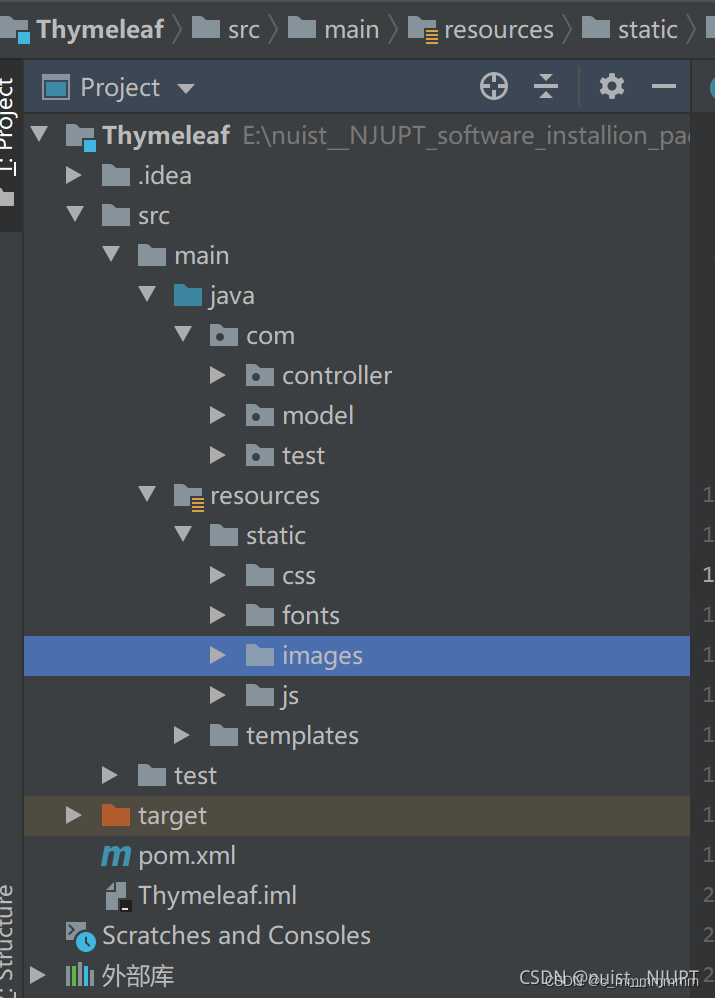
我是通过Maven创建的以Thymeleaf为模板引擎创建的SpringBoot Web项目,发现加载的图片在浏览器不显示,本来我以为是配路径加载错误,后来发现路径并没有问题,我的图片放在src/main/resources/static/images目录中,在前端加载代码如下:${aBook.picture}是获取模型的图片名称。
这样看起来其实没有任何问题,但是就是浏览器不显示图片,后面我以为需要像springMVC一样,需要配置静态资源路径,进行映射,防止拦截器拦截,我就在全局配置文件application.properties下配置了路径,后面发现根本没有必要配置,配置了也没有意义,因为SpringBoot默认访问static目录,所以最终的解决方法就是更新缓存并重启项目,就可以正常显示了。
如下所示:

Thymeleaf
入门
Thymeleaf是一款用于渲染XML/HTML5内容的模板引擎,类似JSP。它可以轻易的与SpringMVC等Web框架进行集成作为Web应用的模板引擎。在SpringBoot中推荐使用Thymeleaf编写动态页面。
Thymeleaf最大的特点是能够直接在浏览器中打开并正确显示模板页面,而不需要启动整个Web应用。
Thymeleaf在有网络和无网络的环境下皆可运行,它即可以让美工在浏览器查看页面的静态效果,也可以让程序员在服务器查看带数据的动态页面效果。没有数据时,Thymeleaf的模板可以静态地运行;当有数据返回到页面时,Thymeleaf标签会动态地替换掉静态内容,使页面动态显示。
- 创建Springboot项目
- 引入SpringMVC和Thymeleaf起步依赖
- <dependency>
- <groupId>org.springframework.bootgroupId>
- <artifactId>spring-boot-starter-thymeleafartifactId>
- dependency>
- <dependency>
- <groupId>org.springframework.bootgroupId>
- <artifactId>spring-boot-starter-webartifactId>
- dependency>
创建视图index.html
- html>
- <html lang="en" xmlns:th="http://www.thymeleaf.org">
- <head>
- <meta charset="UTF-8">
- <title>thymeleaf入门title>
- head>
- <body>
- <h2 th:text="${msg}">helloh2>
- body>
- html>
template中的html文件不能直接访问,需要编写Controller跳转到页面中
- @Controller
- public class PageController {
- // 页面跳转
- @GetMapping("/show")
- public String showPage(Model model){
- model.addAttribute("msg","Hello Thymeleaf");
- return "index";
- }
- }
启动项目,访问 http://localhost:8080/show
再访问静态页面

变量输出
语法
作用
th:text
将model中的值作为内容放入标签中
th:value
将model中的值放入input标签的value属性中
- 准备模型数据
- @GetMapping("/show")
- public String showPage(Model model){
- model.addAttribute("msg","Hello Thymeleaf");
- return"index";
- }
- 在视图展示model中的值
- html>
- <html lang="en" xmlns:th="http://www.thymeleaf.org">
- <head>
- <meta charset="UTF-8">
- <title>thymeleaf入门title>
- head>
- <body>
- <h2 th:text="${msg}">helloh2>
- <input th:value="${msg}">
- body>
- html>

操作字符串
Thymeleaf提供了一些内置对象可以操作数据,内置对象可直接在模板中使用,这些对象是以#引用的,
操作字符串的内置对象为strings。
方法
说明
${#strings.isEmpty(key)}
判断字符串是否为空,如果为空返回true,否则返回false
${#strings.contains(msg,'T')}
判断字符串是否包含指定的子串,如果包含返回true,否则返回false
${#strings.startsWith(msg,'a')}
判断当前字符串是否以子串开头,如果是返回true,否则返回false
${#strings.endsWith(msg,'a')}
判断当前字符串是否以子串结尾,如果是返回true,否则返回false
${#strings.length(msg)}
返回字符串的长度
${#strings.indexOf(msg,'h')}
查找子串的位置,并返回该子串的下标,如果没找到则返回-1
${#strings.substring(msg,2,5)}
截取子串,用法与JDK的subString方法相同
${#strings.toUpperCase(msg)}
字符串转大写
${#strings.toLowerCase(msg)}
字符串转小写
使用方式:
- html>
- <html lang="en" xmlns:th="http://www.thymeleaf.org">
- <head>
- <meta charset="UTF-8">
- <title>thymeleaf入门title>
- head>
- <body>
- <h2 th:text="${msg}">helloh2>
- <input th:value="${msg}">
- <hr>
- <span th:text="${#strings.isEmpty(msg)}">span><br/>
- <span th:text="${#strings.substring(msg,2,5)}">span><br/>
- <span th:text="${#strings.contains(msg,'T')}">span><br/>
- body>
- html>

操作时间
操作时间的内置对象为dates
方法
说明
${#dates.format(key)}
格式化日期,默认的以浏览器默认语言为格式化标准
${#dates.format(key,'yyyy/MM/dd')}
按照自定义的格式做日期转换
${#dates.year(key)}
取年
${#dates.month(key)}
取月
${#dates.day(key)}
取日
- 准备数据
model.addAttribute("date",newDate(130,01,01)); - 使用内置对象操作时间
- <span th:text="${#dates.format(date)}">span>
- <span th:text="${#dates.format(date,'yyyy/MM/dd')}">span>
- <span th:text="${#dates.year(date)}">span>
- <span th:text="${#dates.month(date)}">span>
- <span th:text="${#dates.day(date)}">span>

条件判断
语法
作用
th:if
条件判断
- 准备数据
model.addAttribute("sex","女"); - 进行条件判断
- <div>
- <span th:if="${sex} == '男'">
- 性别:男
- span>
- <span th:if="${sex} == '女'">
- 性别:女
- span>
- div>
语法
作用
th:switch/th:case
th:switch/th:case与Java中的switch语句等效。th:case="*"表示Java中switch的default,即没有case的值为true时显示th:case="*"的内容。
- 准备数据,进行条件判断
model.addAttribute("id","12");- <div th:switch="${id}">
- <span th:case="1">1span>
- <span th:case="2">2span>
- <span th:case="3">3span>
- <span th:case="*">*span>
- div>

遍历集合
语法
作用
th:each
迭代器,用于循环迭代集合
遍历集合
编写实体类
- public class Users{
- private String id;
- private String name;
- private int age;
- // 省略getter/setter/构造方法
- }
准备数据
- List
users=new ArrayList<>(); - users.add(new Users("1","sxt",23));
- users.add(new Users("2","baizhan",22));
- users.add(new Users("3","admin",25));
- model.addAttribute("users",users);
在页面中展示数据
- <table border="1" width="50%">
- <tr>
- <th>IDth>
- <th>Nameth>
- <th>Ageth>
- tr>
- <tr th:each="user : ${users}">
- <td th:text="${user.id}">td>
- <td th:text="${user.name}">td>
- <td th:text="${user.age}">td>
- tr>
- table>
遍历时使用状态变量
thymeleaf将遍历的状态变量封装到一个对象中,通过该对象的属性可以获取状态变量:
状态变量
含义
index
当前迭代器的索引,从0开始
count
当前迭代对象的计数,从1开始
size
被迭代对象的长度
odd/even
布尔值,当前循环是否是偶数/奇数,从0开始
first
布尔值,当前循环的是否是第一条,如果是返回true,否则返回false
last
布尔值,当前循环的是否是最后一条,如果是则返回true,否则返回false
使用状态变量
- <tr th:each="user,status : ${users}">
- <td th:text="${user.id}">td>
- <td th:text="${user.name}">td>
- <td th:text="${user.age}">td>
- <td th:text="${status.index}">td>
- <td th:text="${status.count}">td>
- <td th:text="${status.size}">td>
- <td th:text="${status.odd}">td>
- <td th:text="${status.even}">td>
- <td th:text="${status.first}">td>
- <td th:text="${status.last}">td>
- tr>
遍历map
遍历出的是一个键值对对象,key获取键,value获取值
- 准备数据
- Map
- map.put("user1",new Users("1","shangxuetang",23));
- map.put("user2",new Users("2","baizhan",22));
- map.put("user3",new Users("3","admin",25));
- model.addAttribute("map",map);
- 遍历map
- <table border="1" width="50%">
- <tr>
- <th>IDth>
- <th>Nameth>
- <th>Ageth>
- <th>Keyth>
- tr>
- <tr th:each="m : ${map}">
- <td th:text="${m.value.id}">td>
- <td th:text="${m.value.name}">td>
- <td th:text="${m.value.age}">td>
- <td th:text="${m.key}">td>
- tr>
- table>
获取域中的数据
thymeleaf也可以获取request,session,application域中的数据,方法如下:
准备数据
- request.setAttribute("req","HttpServletRequest");
- session.setAttribute("ses","HttpSession");
- session.getServletContext().setAttribute("app","application");
获取域数据
- request1: <span th:text="${#request.getAttribute('req')}"/>
- request2:<span th:text="${#httpServletRequest.getAttribute('req')}"/>
- <hr/>
- session1: <span th:text="${session.ses}"/>
- session2: <span th:text="${#httpSession.getAttribute('ses')}"/>
- <hr/>
- application1: <span th:text="${application.app}"/>
- application2:<span th:text="${#servletContext.getAttribute('app')}"/>
URL写法
在Thymeleaf中路径的写法为@{路径}
在路径中添加参数
- 准备数据
- model.addAttribute("id","100");
- model.addAttribute("name","bzcxy");
- 准备跳转后访问的Controller
- @GetMapping("/show2")
- @ResponseBody
- public String show2(String id,String name){
- return id+":"+name;
- }
- 在URL中添加参数
- <a th:href="@{show2?id=1&name=sxt}">静态参数一a>
- <a th:href="@{show2(id=2,name=bz)}">静态参数二a>
- <a th:href="@{'show2?id='+${id}+'&name='+${name}}">动态参数一a>
- <a th:href="@{show2(id=${id},name=${name})}">动态参数二a>
RESTful风格URL写法
- 准备跳转后访问的Controller
- @GetMapping("/show3/{id}/{name}")
- @ResponseBody
- public String show3(@PathVariable String id,@PathVariable String name){
- return id+":"+name;
- }
- 在URL中添加参数
<a th:href="@{/show3/{id}/{name}(id=${id},name=${name})}">restful格式传递参数方式a>
相关配置
在Springboot配置文件中可以进行Thymeleaf相关配置
配置项
含义
spring.thymeleaf.prefix
视图前缀
spring.thymeleaf.suffix
视图后缀
spring.thymeleaf.encoding
编码格式
spring.thymeleaf.servlet.content-type
响应类型
spring.thymeleaf.cache=false
页面缓存,配置为false则不启用页面缓存,方便测试
- spring:
- thymeleaf:
- prefix: classpath:/templates/
- suffix: .html
- encoding: UTF-8
- cache: false
- servlet:
- content-type: text/html
SpringBoot参数校验
简单数据类型
SpringBoot自带了validation工具可以从后端对前端传来的参数进行校验,
用法如下:
在类上方添加@Validated注解
在参数前添加@NotBlank注解
引入validation起步依赖
- <dependency>
- <groupId>org.springframework.bootgroupId>
- <artifactId>spring-boot-starter-validationartifactId>
- dependency>
编写Controller
- // 该控制器开启参数校验
- @Validated
- @Controller
- public class TestController{
- @RequestMapping("/t1")
- @ResponseBody
- // 在参数前加校验注解,该注解的意思是字符串参数不能为null
- public String t1(@NotBlank String username){
- System.out.println(username);
- return "请求成功!";
- }
- }
如果没有传递参数则会报异常


在校验参数的注解中添加message属性,可以替换异常信息。
- // 该控制器开启参数校验
- @Validated
- @Controller
- public class TestController{
- @RequestMapping("/t1")
- @ResponseBody
- // 在参数前加校验注解,该注解的意思是字符串参数不能为null
- public String t1(@NotBlank(message="用户名不能为空") String username){
- System.out.println(username);
- return "请求成功!";
- }
- }

异常处理
当抛出ConstraintViolationException异常后,我们可以使用SpringMVC的异常处理器,也可以使用SpringBoot自带的异常处理机制。
当程序出现了异常,SpringBoot会使用自带的BasicErrorController对象处理异常。该处理器会默认跳转到/resources/templates/error.html页面。
编写异常页面:
- html>
- <html lang="en">
- <head>
- <meta charset="UTF-8">
- <title>错误页面title>
- head>
- <body>
- <h1>服务器开小差了!h1>
- body>
- html>
我们再次访问t2并且不传递参数

校验相关注解
SpringBoot参数校验_校验相关注解
注解
作用
@NotNull
判断包装类是否为null
@NotBlank
判断字符串是否为null或者是空串(去掉首尾空格)
@NotEmpty
判断集合是否为空
@Length
判断字符的长度(最大或者最小)
@Min
判断数值最小值
@Max
判断数值最大值
@Email
判断邮箱是否合法
- @RequestMapping("/t2")
- @ResponseBody
- public String t2(
- @NotBlank @Length(min=1, max=5) String username,
- @NotNull @Min(0) @Max(150) Integer age,
- @NotEmpty @RequestParamList
address, - @NotBlank @Email String email) {
- System.out.println(username);
- System.out.println(age);
- System.out.println(address);
- System.out.println(email);
- return "请求成功!";
- }
对象类型
校验的对象参数前添加@Validated,并将异常信息封装到BindingResult对象中
SpringBoot也可以校验对象参数中的每个属性,用法如下:
- 添加实体类
- public class Student{
- @NotNull(message="id不能为空")
- private Integer id;
- @NotBlank(message="姓名不能为空")
- private String name;
- // 省略getter/setter/tostring
- }
- 编写控制器
- @Controller
- public class TestController2{
- @RequestMapping("/t3")
- @ResponseBody
// 校验的对象参数前添加@Validated,并将异常信息封装到BindingResult对象中
- public String t3(@Validated Student student,BindingResult result) {
- // 判断是否有参数异常
- if(result.hasErrors()) {
- // 所有参数异常
- List
list = result.getAllErrors(); - // 遍历参数异常,输出异常信息
- for(ObjectError err : list) {
- FieldError fieldError = (FieldError) err;
- System.out.println(fieldError.getDefaultMessage());
- }
- return "参数异常";
- }
- System.out.println(student);
- return "请求成功!";
- }
- }
SpringTask
定时任务
定时任务即系统在特定时间执行一段代码,它的场景应用非常广泛:
- 购买游戏的月卡会员后,系统每天给会员发放游戏资源。
- 管理系统定时生成报表。
- 定时清理系统垃圾。
- ......
定时任务的实现主要有以下几种方式:
- Java自带的java.util.Timer类,这个类允许调度一个java.util.TimerTask任务。使用这种方式可以让程序按照某一个频度执行,但不能在指定时间运行。一般用的较少。
- Quartz。这是一个功能比较强大的的调度器,可以让程序在指定时间执行,也可以按照某一个频度执行,配置起来稍显复杂。
- Spring3.0以后自带Spring Task,可以将它看成一个轻量级的Quartz,使用起来比 Quartz简单许多,在课程中我们使用Spring Task实现定时任务
入门案例
1、创建SpringBoot项目,
在启动类上方添加@EnableScheduling注解开启定时任务。

2、编写定时任务类
方法上方添加 @Scheduled ,将该方法设置为定时方法,并且需要将定时类放到Spring容器中
- @Component
- public class Task1 {
- @Scheduled(cron = "* * * * * *")
- public void t1(){
- SimpleDateFormat sdf = new SimpleDateFormat("HH-mm-ss");
- System.out.println(sdf.format(new Date()));
- }
- }
3、启动项目,定时任务方法按照配置定时执行。

Cron表达式
Spring Task依靠Cron表达式配置定时规则。Cron表达式是一个字符串,分为6或7个域,每一个域代表一个含义,以空格隔开。有如下两种语法格式:
- Seconds Minutes Hours DayofMonth Month DayofWeek Year
- Seconds Minutes Hours DayofMonth Month DayofWeek
Seconds(秒):域中可出现, - * /四个字符,以及0-59的整数
- *:表示匹配该域的任意值,在Seconds域使用*,表示每秒钟都会触发
- ,:表示列出枚举值。在Seconds域使用5,20,表示在5秒和20秒各触发一次。
- -:表示范围。在Seconds域使用5-20,表示从5秒到20秒每秒触发一次
- /:表示起始时间开始触发,然后每隔固定时间触发一次。在Seconds域使用5/20, 表示5秒触发一次,25秒,45秒分别触发一次。
Minutes(分),Hours(时)同上
DayofMonth(日期):域中可出现, - * / ? L W C八个字符,以及1-31的整数
- C:表示和当前日期相关联。在DayofMonth域使用5C,表示在5日后的那一天触发,且每月的那天都会触发。比如当前是10号,那么每月15号都会触发。
- L:表示最后,在DayofMonth域使用L,表示每个月的最后一天触发。
- W:表示工作日,在DayofMonth域用15W,表示最接近这个月第15天的工作日触发,如果15号是周六,则在14号即周五触发;如果15号是周日,则在16号即周一触发;如果15号是周二则在当天触发。
注:
- 该用法只会在当前月计算,不会到下月触发。比如在DayofMonth域用31W,31号是周日,那么会在29号触发而不是下月1号。
- 在DayofMonth域用LW,表示这个月的最后一个工作日触发。
Month(月份):域中可出现, - * /四个字符,以及1-12的整数或JAN-DEC的单词缩写
DayofWeek(星期):可出现, - * / ? L # C八个字符,以及1-7的整数或SUN-SAT 单词缩写,1代表星期天,7代表星期六
- C:在DayofWeek域使用2C,表示在2日后的那一天触发,且每周的那天都会触发。比如当前是周一,那么每周三都会触发。
- L :在DayofWeek域使用L,表示在一周的最后一天即星期六触发。在DayofWeek域使用5L,表示在一个月的最后一个星期四触发。
- #:用来指定具体的周数,#前面代表星期几,#后面代表一个月的第几周,比如5#3表示一个月第三周的星期四。
- ?:在无法确定是具体哪一天时使用,用于DayofMonth和DayofWeek域。例如在每月的20日零点触发1次,此时无法确定20日是星期几,写法如下:0 0 0 20 * ?;或者在每月的最后一个周日触发,此时无法确定该日期是几号,写法如下:0 0 0 ? * 1L
Year(年份):域中可出现, - * /四个字符,以及1970~2099的整数。该域可以省略,表示每年都触发。
@Schedule
@Scheduled写在方法上方,指定该方法定时执行。常用参数如下:
- cron:cron表达式,定义方法执行的时间规则。
- fixedDelay:任务立即执行,之后每隔多久执行一次,单位是毫秒,上一次任务结束后计算下次执行的时间。
- fixedRate:任务立即执行,之后每隔多久执行一次,单位是毫秒,上一次任务开始后计算下次执行的时间。
- initialDelay:项目启动后不马上执行定时器,根据initialDelay的值延时执行。
多线程任务
Spring Task定时器默认是单线程的,如果项目中使用多个定时器,使用一个线程会造成效率低下。代码如下:
- @Component
- public class Task1 {
- SimpleDateFormat sdf = new SimpleDateFormat("HH:mm:ss");
- @Scheduled(cron = "* * * * * *")
- public void t1(){
- try {
- Thread.sleep(5000);
- } catch (InterruptedException e) {
- e.printStackTrace();
- }
- System.out.println(Thread.currentThread().getId()+":线程1,时间:"+sdf.format(new Date()));
- }
- @Scheduled(cron = "* * * * * *")
- public void t2(){
- System.out.println(Thread.currentThread().getId()+":线程2,时间:"+sdf.format(new Date()));
- }
- }

任务1较浪费时间,会阻塞任务2的运行。此时我们可以给Spring Task配置线程池。
通过配置类实现SchedulingConfigurer接口,重写方法
- @Configuration
- public class SchedulingConfig implements SchedulingConfigurer {
- @Override
- public void configureTasks(ScheduledTaskRegistrar taskRegistrar) {
- //创建线程池
- taskRegistrar.setScheduler(Executors.newScheduledThreadPool(5));
- }
- }
此时任务1不会阻塞任务2的运行

-
相关阅读:
2022-6-29 最大二叉树,根据前序和后序遍历构造二叉树,将子数组重新排序得到同一个二叉查找树的方案数
双十一电视机顶盒哪个牌子好?测评员盘点年度电视机顶盒排行榜
Delegate介绍
《微信小程序开发从入门到实战》学习二十五
Qt还是尽量使用UTF8编码
html5新特性
计算机网络知识点总结——第三章数据链路层
python typer使用指南
2022年最新贵州建筑安全员模拟题库及答案
图的拓扑排序(入门篇)
- 原文地址:https://blog.csdn.net/cccccccmmm/article/details/128068720
