-
【零基础入门MyBatis系列】第十一篇——动态SQL
一、概述
📖 1、什么是动态SQL?
- 根据不同条件生成不同的SQL语句,是mybatis的一大优势。
- 用于动态拼接SQL语句
📖 2、如何实现动态SQL?
- mybatis 为我们提供了一些标签,在写SQL语句的时候,合理的使用这些标签可以提高SQL语句的效率
- 该部分都用于Mapper映射文件的SQL语句中
- 本章节内容概述:

📖 3、准备工作:
- 创建一个新模块:mybatis-009-dynamic-sql【Maven模块】
- 修改 pom.xml 文件 – 打包方式jar、–引入依赖 mysql驱动、mybatis、junit、logback
- 目录结构:

- 文件说明:
文件名 作用 CarMapper 数据库操作接口 CarMapper.xml 映射文件 Car POJO类 SqlSessionUtil 工具类 jdbc.properties 保存mysql账户信息 logback.xml 日志配置文件 mybatis-config.xml 核心配置文件 CarMapperTest 单元测试文件 - CarMapper、CarMapper.xml、CarMapperTest三个文件在本篇学习过程中不断更新,其他文件不动
- 普通Java类 – Car
package com.powernode.mybatis.pojo; /** * @author Bonbons * @version 1.0 */ public class Car { private Long id; private String carNum; private String brand; private Double guidePrice; private String produceTime; private String carType; //提供构造方法 public Car(){} public Car(Long id, String carNum, String brand, Double guidePrice, String produceTime, String carType) { this.id = id; this.carNum = carNum; this.brand = brand; this.guidePrice = guidePrice; this.produceTime = produceTime; this.carType = carType; } //提供get和set方法 public Long getId() { return id; } public void setId(Long id) { this.id = id; } public String getCarNum() { return carNum; } public void setCarNum(String carNum) { this.carNum = carNum; } public String getBrand() { return brand; } public void setBrand(String brand) { this.brand = brand; } public Double getGuidePrice() { return guidePrice; } public void setGuidePrice(Double guidePrice) { this.guidePrice = guidePrice; } public String getProduceTime() { return produceTime; } public void setProduceTime(String produceTime) { this.produceTime = produceTime; } public String getCarType() { return carType; } public void setCarType(String carType) { this.carType = carType; } //重写toString方法 @Override public String toString() { return "Car{" + "id=" + id + ", carNum='" + carNum + '\'' + ", brand='" + brand + '\'' + ", guidePrice=" + guidePrice + ", produceTime='" + produceTime + '\'' + ", carType='" + carType + '\'' + '}'; } }- 1
- 2
- 3
- 4
- 5
- 6
- 7
- 8
- 9
- 10
- 11
- 12
- 13
- 14
- 15
- 16
- 17
- 18
- 19
- 20
- 21
- 22
- 23
- 24
- 25
- 26
- 27
- 28
- 29
- 30
- 31
- 32
- 33
- 34
- 35
- 36
- 37
- 38
- 39
- 40
- 41
- 42
- 43
- 44
- 45
- 46
- 47
- 48
- 49
- 50
- 51
- 52
- 53
- 54
- 55
- 56
- 57
- 58
- 59
- 60
- 61
- 62
- 63
- 64
- 65
- 66
- 67
- 68
- 69
- 70
- 71
- 72
- 73
- 74
- 75
- 76
- 77
- 78
- 79
- 80
- 81
- 82
- 83
- 84
- 85
- 86
- 87
- 工具类:SqlSessionUtil
package com.powernode.mybatis.utils; import org.apache.ibatis.io.Resources; import org.apache.ibatis.session.SqlSession; import org.apache.ibatis.session.SqlSessionFactory; import org.apache.ibatis.session.SqlSessionFactoryBuilder; import java.io.IOException; /** * @author Bonbons * @version 1.0 */ public class SqlSessionUtil { private SqlSessionUtil(){} //定义一个SqlSession private static final SqlSessionFactory sqlSessionFactory; //在类加载的时候初始化SqlSessionFactory static { try { sqlSessionFactory = new SqlSessionFactoryBuilder().build(Resources.getResourceAsStream("mybatis-config.xml")); } catch (IOException e) { throw new RuntimeException(e); } } //定义一个全局的ThreadLocal,可以保证一个SqlSession对应一个线程 private static ThreadLocal<SqlSession> local = new ThreadLocal<>(); //通过一个公有的方法为外部提供会话的对象 >> 确保同一个线程操作的是同一个连接对象 public static SqlSession openSession(){ //我们用local去获取会话 SqlSession sqlSession = local.get(); //如果当前没有开启的会话就去创建一个,如果get到了就用这个[确保我们操作的是同一个连接对象] if(sqlSession == null){ sqlSession = sqlSessionFactory.openSession(); //将SqlSession对象绑定到当前线程上 local.set(sqlSession); } return sqlSession; } /** * 关闭SqlSession对象并从当前线程中解绑 * @param sqlSession 会话对象 */ public static void close(SqlSession sqlSession){ if(sqlSession != null){ sqlSession.close(); local.remove(); } } }- 1
- 2
- 3
- 4
- 5
- 6
- 7
- 8
- 9
- 10
- 11
- 12
- 13
- 14
- 15
- 16
- 17
- 18
- 19
- 20
- 21
- 22
- 23
- 24
- 25
- 26
- 27
- 28
- 29
- 30
- 31
- 32
- 33
- 34
- 35
- 36
- 37
- 38
- 39
- 40
- 41
- 42
- 43
- 44
- 45
- 46
- 47
- 48
- 49
- 50
- 51
- 52
- 53
- properties文件 :jdbc.properties
jdbc.driver = com.mysql.cj.jdbc.Driver jdbc.url = jdbc:mysql://localhost:3306/powernode jdbc.username = root jdbc.password = 111111- 1
- 2
- 3
- 4
- 日志配置文件:logback.xml
<?xml version="1.0" encoding="UTF-8"?> <configuration debug="false"> <!-- 控制台输出 --> <appender name="STDOUT" class="ch.qos.logback.core.ConsoleAppender"> <encoder class="ch.qos.logback.classic.encoder.PatternLayoutEncoder"> <!--格式化输出:%d表示日期,%thread表示线程名,%-5level:级别从左显示5个字符宽度%msg:日志消息,%n是换行符--> <pattern>%d{yyyy-MM-dd HH:mm:ss.SSS} [%thread] %-5level %logger{50} - %msg%n</pattern> </encoder> </appender> <!-- 按照每天生成日志文件 --> <appender name="FILE" class="ch.qos.logback.core.rolling.RollingFileAppender"> <rollingPolicy class="ch.qos.logback.core.rolling.TimeBasedRollingPolicy"> <!--日志文件输出的文件名--> <FileNamePattern>${LOG_HOME}/TestWeb.log.%d{yyyy-MM-dd}.log</FileNamePattern> <!--日志文件保留天数--> <MaxHistory>30</MaxHistory> </rollingPolicy> <encoder class="ch.qos.logback.classic.encoder.PatternLayoutEncoder"> <!--格式化输出:%d表示日期,%thread表示线程名,%-5level:级别从左显示5个字符宽度%msg:日志消息,%n是换行符--> <pattern>%d{yyyy-MM-dd HH:mm:ss.SSS} [%thread] %-5level %logger{50} - %msg%n</pattern> </encoder> <!--日志文件最大的大小--> <triggeringPolicy class="ch.qos.logback.core.rolling.SizeBasedTriggeringPolicy"> <MaxFileSize>100MB</MaxFileSize> </triggeringPolicy> </appender> <!--mybatis log configure--> <logger name="com.apache.ibatis" level="TRACE"/> <logger name="java.sql.Connection" level="DEBUG"/> <logger name="java.sql.Statement" level="DEBUG"/> <logger name="java.sql.PreparedStatement" level="DEBUG"/> <!-- 日志输出级别,logback日志级别包括五个:TRACE < DEBUG < INFO < WARN < ERROR --> <root level="DEBUG"> <appender-ref ref="STDOUT"/> <appender-ref ref="FILE"/> </root> </configuration>- 1
- 2
- 3
- 4
- 5
- 6
- 7
- 8
- 9
- 10
- 11
- 12
- 13
- 14
- 15
- 16
- 17
- 18
- 19
- 20
- 21
- 22
- 23
- 24
- 25
- 26
- 27
- 28
- 29
- 30
- 31
- 32
- 33
- 34
- 35
- 36
- 37
- 38
- 39
- 40
- 41
- mybatis 核心配置文件:mybatis-config.xml
<?xml version="1.0" encoding="UTF-8" ?> <!DOCTYPE configuration PUBLIC "-//mybatis.org//DTD Config 3.0//EN" "http://mybatis.org/dtd/mybatis-3-config.dtd"> <configuration> <!--外部资源地址--> <properties resource="jdbc.properties"></properties> <settings> <!--开启自动映射--> <setting name="mapUnderscoreToCamelCase" value="true"/> </settings> <typeAliases> <!--pojo类包名,自动起简名--> <package name="com.powernode.mybatis.pojo"/> </typeAliases> <environments default="dev"> <environment id="dev"> <transactionManager type="JDBC"/> <dataSource type="POOLED"> <property name="driver" value="${jdbc.driver}"/> <property name="url" value="${jdbc.url}"/> <property name="username" value="${jdbc.username}"/> <property name="password" value="${jdbc.password}"/> </dataSource> </environment> </environments> <mappers> <!--指定xml的目录,加载目录下的所有映射文件,前提要与对应接口在一个目录下--> <package name="com.powernode.mybatis.mapper"/> </mappers> </configuration>- 1
- 2
- 3
- 4
- 5
- 6
- 7
- 8
- 9
- 10
- 11
- 12
- 13
- 14
- 15
- 16
- 17
- 18
- 19
- 20
- 21
- 22
- 23
- 24
- 25
- 26
- 27
- 28
- 29
- 30
- 31
二、if 标签
📖 1、if 标签如何使用?
用于多条件查询,在我们指定的几个条件中,我们可以为该条件传递参数,也可以不使用该查询条件

例如该图:如果我们想使用某个条件来筛选,我们就可以为其传入对应的有效参数📖 2、if 标签的具体是如何使用的呢?
- if 标签有一个test属性,只有当 test 属性为 true 时,才会拼接if里面的内容到SQL语句中
- test 的属性值我们一般都传入判断当前参数是否有效的布尔表达式【
property != null and property != ''】 - if 语句当中就是我们要拼接的条件表达式
📖 3、那我们如何实现根据品牌、指导价、汽车类型来查询汽车数据呢?
- 要求:根据品牌模糊查询、指导价大于指定的值、汽车类型为我们指定的类型【三个条件同时满足】
- 因为返回的结果可能是多条,所以我们用一个集合来接收,为了使用见名知意的参数名,我们可以添加 @Param 注解【数据库表操作接口】
/** * 多条件查询,可能使用这个条件,也可能不使用 * @param brand 品牌 * @param guidePrice 指导价 * @param carType 汽车类型 * @return 查询结果的集合 */ List<Car> selectByMultiCondition(@Param("brand") String brand, @Param("guidePrice") Double guidePrice, @Param("carType") String carType);- 1
- 2
- 3
- 4
- 5
- 6
- 7
- 8
- 有了接口我们就可以去写对应的映射文件:
<select id="selectByMultiCondition" resultType="Car"> select * from t_car where 1=1 <if test="brand != null and brand != ''"> and brand like "%"#{brand}"%" </if> <if test="guidePrice != null and guidePrice != ''"> and guide_price > #{guidePrice} </if> <if test="carType != null and carType != ''"> and car_type = #{carType} </if> </select>- 1
- 2
- 3
- 4
- 5
- 6
- 7
- 8
- 9
- 10
- 11
- 12
为什么这里要添加 1 = 1 呢?
(1)因为如果 没有 if 标签有效的话,该SQL底层末尾的情况是这样的
select * from t_car where,很明显是个错误的语法
(2)添加1=1之后,条件都为空就会输出全部的汽车数据- 接下来在测试类中写个单元测试方法调试一下【考虑空值,可以有8种输入,经测试全部通过】
@Test public void testSelectByMultiCondition(){ SqlSession sqlSession = SqlSessionUtil.openSession(); CarMapper mapper = sqlSession.getMapper(CarMapper.class); List<Car> cars = mapper.selectByMultiCondition("奔驰", 55.0, "燃油车"); cars.forEach(car -> System.out.println(car)); sqlSession.close(); }- 1
- 2
- 3
- 4
- 5
- 6
- 7
- 8

三、where 标签
- where 标签可以让SQL子句更加智能
- 可以自动去除前面多余的 and/or
- 如果没有条件成立就不拼接 where
- 使用起来非常简单,就是在if 标签集合外部套一个where标签
- 仍然使用上一个案例:品牌、价格、汽车类型查询汽车数据
(1)接口中的方法
/** * 使用where标签,让我们的子句更加智能化 * @param brand * @param guidePrice * @param carType * @return */ List<Car> selectByMultiConditionWithWhere(@Param("brand") String brand, @Param("guidePrice") Double guidePrice, @Param("carType") String carType);- 1
- 2
- 3
- 4
- 5
- 6
- 7
- 8
(2)映射文件中的SQL
<select id="selectByMultiConditionWithWhere" resultType="Car"> select * from t_car <!--如果if标签没有成立的,就不会生成where关键字--> <where> <if test="brand != null and brand != ''"> brand like "%"#{brand}"%" </if> <if test="guidePrice != null and guidePrice != ''"> guide_price > #{guidePrice} </if> <if test="carType != null and carType != ''"> car_type = #{carType} </if> </where> </select>- 1
- 2
- 3
- 4
- 5
- 6
- 7
- 8
- 9
- 10
- 11
- 12
- 13
- 14
- 15
(3)测试类中的单元测试方法
@Test public void testSelectByMultiConditionWithWhere(){ SqlSession sqlSession = SqlSessionUtil.openSession(); CarMapper mapper = sqlSession.getMapper(CarMapper.class); List<Car> cars = mapper.selectByMultiConditionWithWhere("", null, ""); cars.forEach(car -> System.out.println(car)); sqlSession.close(); }- 1
- 2
- 3
- 4
- 5
- 6
- 7
- 8
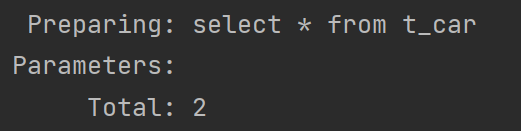
实际生成的SQL语句如下,并且成功查询出所有的数据
四、trim 标签
-
trim 标签的优势是:动态的添加、删除前缀和后缀
-
为什么需要这么做呢?
- 上面if标签我们直接演示的是成功的案例,可能存在前面或后面有不应该出现的 and 或 or
- 我们可以动态的添加前缀和后缀,这个标签也是结合 if 标签使用的
-
trim 标签的组成:
- prefix 属性:添加指定前缀
- suffix 属性:添加指定后缀
- prefixOverrides 属性:去除指定前缀
- suffixOverrides 属性:去除指定后缀
-
依旧采用根据品牌、价格、汽车类型筛选汽车数据
(1)接口方法:
/** * 使用trim标签 * @param brand * @param guidePrice * @param carType * @return */ List<Car> selectByMultiConditionWithTrim(@Param("brand") String brand, @Param("guidePrice") Double guidePrice, @Param("carType") String carType);- 1
- 2
- 3
- 4
- 5
- 6
- 7
- 8
(2)SQL 语句:
<select id="selectByMultiConditionWithTrim" resultType="Car"> select * from t_car <trim prefix="where" suffixOverrides="and | or"> <if test="brand != null and brand != ''"> brand like "%"#{brand}"%" and </if> <if test="guidePrice != null and guidePrice != ''"> guide_price > #{guidePrice} or </if> <if test="carType != null and carType != ''"> car_type = #{carType} and </if> </trim> </select>- 1
- 2
- 3
- 4
- 5
- 6
- 7
- 8
- 9
- 10
- 11
- 12
- 13
- 14
(3)测试方法:【根据SQL和此处参数得知:要筛选大于55万的奔驰车或所有燃油车】
@Test public void testSelectByMultiConditionWithTrim(){ SqlSession sqlSession = SqlSessionUtil.openSession(); CarMapper mapper = sqlSession.getMapper(CarMapper.class); List<Car> cars = mapper.selectByMultiConditionWithTrim("奔驰", 55.0, "燃油车"); cars.forEach(car -> System.out.println(car)); sqlSession.close(); }- 1
- 2
- 3
- 4
- 5
- 6
- 7
- 8
测试结果:查询成功

五、Set 标签
-
可以生成 set 关键字和去除末尾的 ,
-
通过条件筛选,可以避免将字段更新为空值
-
通常用于 update 语句,结合 if 标签使用
-
接下来我们用 set 标签更新一条汽车信息
(1)接口方法:
/** * 更新汽车信息 -- set标签的使用 * @param car * @return */ int updateBySet(Car car);- 1
- 2
- 3
- 4
- 5
- 6
(2)SQL语句:
<update id="updateBySet"> update t_car <!--通过指定更新的字段来避免更新空--> <set> <!--只有if语句成立的时候才会去更新对应的字段--> <if test="carNum != null and carNum != ''">car_num = #{carNum},</if> <if test="brand != null and brand != ''">brand = #{brand},</if> <if test="guidePrice != null and guidePrice != ''">guide_price = #{guidePrice},</if> <if test="produceTime != null and produceTime != ''">produce_time = #{produceTime},</if> <if test="carType != null and carType != ''">car_type = #{carType}</if> </set> </update>- 1
- 2
- 3
- 4
- 5
- 6
- 7
- 8
- 9
- 10
- 11
- 12
(3)测试方法:
@Test public void setUpdateBySet(){ SqlSession sqlSession = SqlSessionUtil.openSession(); CarMapper mapper = sqlSession.getMapper(CarMapper.class); mapper.updateById(new Car(2L, null, 75.0, null, null, "")); sqlSession.commit(); sqlSession.close(); }- 1
- 2
- 3
- 4
- 5
- 6
- 7
- 8
(4)测试结果:我们指向更新id为2的汽车的价格,更新前

更新后:


六、choose when otherwise 标签
- 这是类似于 if – else if – else 的语法 >> 最终只会选择一条子句拼接到SQL中
- 先根据品牌查询,如果没有提供品牌,再根据指导价格查询,如果没有提供指导价格,就根据汽车类型查询。【三者中选一个条件进行查询】
(1)接口方法:
/** * 使用 choose when otherwise 标签 * @param brand * @param guidePrice * @param carType * @return */ List<Car> selectByChoose(@Param("brand") String brand, @Param("guidePrice") Double guidePrice, @Param("carType") String carType);- 1
- 2
- 3
- 4
- 5
- 6
- 7
- 8
(2)SQL语句:
其实这里可以将where标签直接替换成where关键字,因为一定会拼接一个查询条件的【使用了otherwise标签】
<select id="selectByChoose" resultType="Car"> select * from t_car <where> <choose> <when test="brand != null and brand != ''"> brand like "%"#{brand}"%" </when> <when test="guidePrice != null and guidePrice != ''"> guide_price > #{guidePrice} </when> <otherwise> car_type = #{carType} </otherwise> </choose> </where> </select>- 1
- 2
- 3
- 4
- 5
- 6
- 7
- 8
- 9
- 10
- 11
- 12
- 13
- 14
- 15
- 16
(3)测试方法:
@Test public void testSelectByChoose(){ SqlSession sqlSession = SqlSessionUtil.openSession(); CarMapper mapper = sqlSession.getMapper(CarMapper.class); List<Car> cars = mapper.selectByChoose("", 22.0, "电动车"); cars.forEach(car -> System.out.println(car)); sqlSession.commit(); sqlSession.close(); }- 1
- 2
- 3
- 4
- 5
- 6
- 7
- 8
- 9
(4)测试结果:查询成功

七、foreach 标签
- 用于通过循环来完成某种操作,批量删除、批量添加
- foreach 标签的组成:
- collection 属性:传入的数组或集合
- item 属性:数组或集合中的一个元素
- separator 属性:分隔符
- open 属性:foreach标签中所有内容的开始 “(”
- close 属性:foreach标签中所有内容的结束 “)”
1、根据id组成的数组来完成批量删除:
(1)接口方法
/** * 批量删除 * @param ids 我们要删除的id数组 * @return 删除记录的条数 */ int deleteByIds(@Param("ids") Long [] ids);- 1
- 2
- 3
- 4
- 5
- 6
(2)SQL语句:
<delete id="deleteByIds"> delete from t_car where id in( <foreach collection="ids" item="id" separator=","> <!--与item对应,代表我们从数组中取出的元素--> #{id} </foreach> ) </delete>- 1
- 2
- 3
- 4
- 5
- 6
- 7
- 8
(3)测试方法:
@Test public void testDeleteByIds(){ SqlSession sqlSession = SqlSessionUtil.openSession(); CarMapper mapper = sqlSession.getMapper(CarMapper.class); Long [] ids = {27L, 28L}; int count = mapper.deleteByIds(ids); System.out.println(count); sqlSession.commit(); sqlSession.close(); }- 1
- 2
- 3
- 4
- 5
- 6
- 7
- 8
- 9
- 10
(4)测试结果:成功删除指定id的数据
2、根据传入的汽车数据集合批量插入
(1)接口方法/** * 批量插入,一次插入多条汽车信息 * @param cars 待插入的数据集合 * @return 插入成功的数据条数 */ int insertBatch(@Param("ids") List<Car> cars);- 1
- 2
- 3
- 4
- 5
- 6
(2)SQL语句:
<insert id="insertBatch"> insert into t_car values <foreach collection="cars" item="car" separator=","> (null, #{car.carNum}, #{car.brand}, #{car.guidePrice}, #{car.produceTime}, #{car.carType}) </foreach> </insert>- 1
- 2
- 3
- 4
- 5
- 6
(3)测试方法:
@Test public void testInsertBatch(){ SqlSession sqlSession = SqlSessionUtil.openSession(); CarMapper mapper = sqlSession.getMapper(CarMapper.class); // 创建我们的数据集合 List<Car> cars = new ArrayList<>(); cars.add(new Car(null, "100", "梅赛德斯", 66.0, "2022-11-07", "燃油车")); cars.add(new Car(null, "101", "奥迪A8", 67.0, "2022-11-07", "燃油车")); cars.add(new Car(null, "102", "宾利", 68.0, "2022-11-07", "燃油车")); // 调用我们的方法插入数据 mapper.insertBatch(cars); // 提交事务、管理连接 sqlSession.commit(); sqlSession.close(); }- 1
- 2
- 3
- 4
- 5
- 6
- 7
- 8
- 9
- 10
- 11
- 12
- 13
- 14
- 15
(4)测试结果:插入数据成功


八、sql 标签与 include 标签
- 这两个标签一般配合使用,可以提高代码的复用率、易维护
- 利用 sql 标签来声明sql片段, 它有个id属性标识唯一的sql
- include标签可以导入sql片段在SQL语句中直接使用,使用refid属性指明用那个sql即可
<sql id="carCols">id,car_num carNum,brand,guide_price guidePrice,produce_time produceTime,car_type carType</sql> <select id="selectAllRetMap" resultType="map"> select <include refid="carCols"/> from t_car </select>- 1
- 2
- 3
- 4
- 5
-
相关阅读:
[附源码]Python计算机毕业设计毕业生就业信息管理系统
React+TS前台项目实战(二十九)-- 首页构建之性能优化实现首页Echarts模块数据渲染
Dijsktra算法解析
跳过开屏广告
如何在PPT中去除编辑密码?
LeetCode算法心得——连续数组(前缀和+HashMap)
【实践篇】推荐算法PaaS化探索与实践
专利申请需要准备什么资料
给折腿的罗技G512键盘换键帽
机器学习实战-系列教程3:线性回归2(项目实战、原理解读、源码解读)
- 原文地址:https://blog.csdn.net/qq_61323055/article/details/127745359