-
MySQL在centos上的安装
去mysql官网下载mysql
通过mysql官网的download界面,找到community server,然后选择对应linux版本下载对应的安装包
这里直接上链接
https://downloads.mysql.com/archives/community/
可以通过cat /etc/centos-release命令找到当前centos对应的版本下载&安装myslq-community-server安装包

yum install mysql-community-server-8.0.31-1.el7.x86_64.rpm- 1
安装后遇到以下问题:
--> Finished Dependency Resolution Error: Package: mysql-community-server-8.0.31-1.el7.x86_64 (/mysql-community-server-8.0.31-1.el7.x86_64) Requires: mysql-community-client(x86-64) >= 8.0.11 Error: Package: mysql-community-server-8.0.31-1.el7.x86_64 (/mysql-community-server-8.0.31-1.el7.x86_64) Requires: mysql-community-icu-data-files = 8.0.31-1.el7 Error: Package: mysql-community-server-8.0.31-1.el7.x86_64 (/mysql-community-server-8.0.31-1.el7.x86_64) Requires: mysql-community-common(x86-64) = 8.0.31-1.el7- 1
- 2
- 3
- 4
- 5
- 6
- 7
原因是因为缺少对应的依赖,对应的依赖在下载页面可以找到

然后下载对应的rpm文件进行安装rpm -Uvh mysql-community-icu-data-files-8.0.30-1.el7.x86_64.rpm rpm -Uvh mysql-community-common-8.0.30-1.el7.x86_64.rpm- 1
- 2
安装这俩文件包十分顺利,但是安装第三个包时出现问题
rpm -Uvh mysql-community-client-8.0.30-1.el7.x86_64.rpm- 1
报错
error: Failed dependencies: mysql-community-client-plugins = 8.0.30-1.el7 is needed by mysql-community-client-8.0.30-1.el7.x86_64 mysql-community-libs(x86-64) >= 8.0.11 is needed by mysql-community-client-8.0.30-1.el7.x86_64- 1
- 2
- 3
不就是缺少依赖吗?继续找

找到其中一个依赖,安装,没毛病rpm -Uvh mysql-community-client-plugins-8.0.30-1.el7.x86_64.rpm- 1
再继续找,也找到了
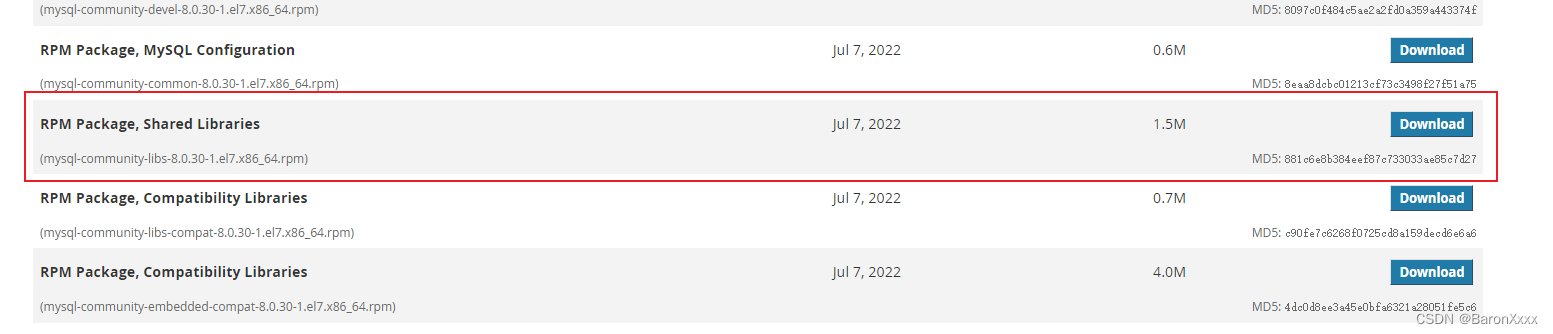
安装rpm -Uvh mysql-community-libs-8.0.30-1.el7.x86_64.rpm- 1
有毛病,遇到问题了
error: Failed dependencies: libmysqlclient.so.18()(64bit) is needed by (installed) postfix-2:2.10.1-9.el7.x86_64 libmysqlclient.so.18(libmysqlclient_18)(64bit) is needed by (installed) postfix-2:2.10.1-9.el7.x86_64- 1
- 2
- 3
遇到这个问题,是因为centos的默认数据库是 mariadb ,这两个包已经被mariadb数据库所依赖了
[root@VM-0-13-centos mysql]# rpm -qa | grep mariadb mariadb-libs-5.5.68-1.el7.i686 mariadb-libs-5.5.68-1.el7.x86_64- 1
- 2
- 3
强制删除mariadb数据库,释放这个包
rpm -e --nodeps mariadb-libs-5.5.68-1.el7.x86_64 rpm -e --nodeps mariadb-libs-5.5.68-1.el7.i686- 1
- 2
再次安装剩余的包
[root@VM-0-13-centos mysql]# rpm -ivh mysql-community-libs-8.0.30-1.el7.x86_64.rpm warning: mysql-community-libs-8.0.30-1.el7.x86_64.rpm: Header V4 RSA/SHA256 Signature, key ID 3a79bd29: NOKEY Preparing... ################################# [100%] Updating / installing... 1:mysql-community-libs-8.0.30-1.el7################################# [100%] [root@VM-0-13-centos mysql]# rpm -Uvh mysql-community-client-8.0.30-1.el7.x86_64.rpm warning: mysql-community-client-8.0.30-1.el7.x86_64.rpm: Header V4 RSA/SHA256 Signature, key ID 3a79bd29: NOKEY Preparing... ################################# [100%] Updating / installing... 1:mysql-community-client-8.0.30-1.e################################# [100%]- 1
- 2
- 3
- 4
- 5
- 6
- 7
- 8
- 9
- 10
完美通过
检查mysql是否安装成功
查看当前mysql服务状态
[root@VM-0-13-centos mysql]# systemctl status mysqld.service ● mysqld.service - MySQL Server Loaded: loaded (/usr/lib/systemd/system/mysqld.service; enabled; vendor preset: disabled) Active: inactive (dead) Docs: man:mysqld(8) http://dev.mysql.com/doc/refman/en/using-systemd.html- 1
- 2
- 3
- 4
- 5
- 6
当前mysql为未启动状态
启动mysql服务
[root@VM-0-13-centos mysql]# systemctl start mysqld.service- 1
再次查看mysql状态
[root@VM-0-13-centos mysql]# systemctl status mysqld.service ● mysqld.service - MySQL Server Loaded: loaded (/usr/lib/systemd/system/mysqld.service; enabled; vendor preset: disabled) Active: active (running) since Tue 2022-11-22 02:10:28 CST; 4s ago Docs: man:mysqld(8) http://dev.mysql.com/doc/refman/en/using-systemd.html Process: 12896 ExecStartPre=/usr/bin/mysqld_pre_systemd (code=exited, status=0/SUCCESS) Main PID: 13014 (mysqld) Status: "Server is operational" CGroup: /system.slice/mysqld.service └─13014 /usr/sbin/mysqld Nov 22 02:10:20 VM-0-13-centos systemd[1]: Starting MySQL Server... Nov 22 02:10:28 VM-0-13-centos systemd[1]: Started MySQL Server.- 1
- 2
- 3
- 4
- 5
- 6
- 7
- 8
- 9
- 10
- 11
- 12
- 13
- 14
mysql已经是启动状态了
获取mysql初始密码
[root@VM-0-13-centos mysql]# grep "password" /var/log/mysqld.log 2022-11-21T18:10:23.266077Z 6 [Note] [MY-010454] [Server] A temporary password is generated for root@localhost: UGWyvk3l?tWE- 1
- 2
进入数据库&修改密码
[root@VM-0-13-centos mysql]# mysql -uroot -pUGWyvk3l?tWE mysql> ALTER USER 'root'@'localhost' IDENTIFIED BY 'xxxxxxx'; Query OK, 0 rows affected (0.02 sec)- 1
- 2
- 3
到此,数据库就安装成功啦
-
相关阅读:
外贸常用的出口认证 | 全球外贸数据服务平台 | 箱讯科技
docker 常用命令
Himall商城安装帮助类AES加密解密(2)
ARM +FPGA GPIB IP核实现
树上启发式合并简单题
容器编排工具鉴赏- docker-compose 、Kubernetes、OpenShift、Docker Swarm
便携式脑卒中检测仪是不是离现实不远了?
.NET使用QuestPDF高效地生成PDF文档
钉钉推送线上环境异常
二十三种设计模式全面解析-装饰器模式-超越继承的灵活装扮
- 原文地址:https://blog.csdn.net/jake_xiao/article/details/127975371