-
SpringBoot整合freemarker模板导出word文件
1、前言
在项目中我们有时间需要根据一个word模板文档,批量生成其他的word文档,里面的有些值改变一下而已,那怎么做呢?
2、需求说明
假如说,现在我有个模板文档,内容如下:

现在上面文档里面有如下变量:
- username:员工姓名
- idno:身份证号码
- hireDate:入职日期
- work:职位
- endDate:离职日期
现在我需要针对不同的员工一键生成一份离职证明出来,公司章是一张图片,也需要生成进去,下面我们开始测试
3、编码
基础框架代码地址:https://gitee.com/colinWu_java/spring-boot-base.git
我会在此主干基础上开发
3.1、导入依赖
<dependency> <groupId>org.freemarkergroupId> <artifactId>freemarkerartifactId> <version>2.3.30version> dependency>- 1
- 2
- 3
- 4
- 5
- 6
3.2、接口编写
TestController新增下面接口:
/** * 根据ftl模板模板下载word文档 */ @GetMapping("/downloadWord") public void downloadWord(HttpServletResponse response){ Map<String, Object> map = new HashMap<>(); map.put("username", "王天霸");//姓名 map.put("idno", "429004199601521245");//身份证号 map.put("hireDate", "2021年12月12日");//入职日期 map.put("work", "Java软件工程师");//职务 map.put("endDate", "2022年11月25日");//离职日期 map.put("imageData", Tools.getBase64ByPath("D:\\demo\\test.png"));//盖章Base64数据(不包含头信息) try { FreemarkerExportWordUtil.exportWord(response, map, "离职证明.doc", "EmploymentSeparationCertificate.ftl"); } catch (IOException e) { e.printStackTrace(); } }- 1
- 2
- 3
- 4
- 5
- 6
- 7
- 8
- 9
- 10
- 11
- 12
- 13
- 14
- 15
- 16
- 17
- 18
D:\demo\test.png这张图片就是下面这张图片:

3.3、工具类
Tools工具类:
package org.wujiangbo.utils; import org.wujiangbo.domain.user.User; import sun.misc.BASE64Encoder; import java.io.*; import java.util.ArrayList; import java.util.List; /** *工具类
* * @author 波波老师(微信 : javabobo0513) * @date 2022/11/16-23:02 */ public class Tools { /** * 获得指定图片文件的base64编码数据 * @param filePath 文件路径 * @return base64编码数据 */ public static String getBase64ByPath(String filePath) { if(!hasLength(filePath)){ return ""; } File file = new File(filePath); if(!file.exists()) { return ""; } InputStream in = null; byte[] data = null; try { in = new FileInputStream(file); } catch (FileNotFoundException e1) { e1.printStackTrace(); } try { assert in != null; data = new byte[in.available()]; in.read(data); in.close(); } catch (IOException e) { e.printStackTrace(); } BASE64Encoder encoder = new BASE64Encoder(); return encoder.encode(data); } /** * @desc 判断字符串是否有长度 */ public static boolean hasLength(String str) { return org.springframework.util.StringUtils.hasLength(str); } }- 1
- 2
- 3
- 4
- 5
- 6
- 7
- 8
- 9
- 10
- 11
- 12
- 13
- 14
- 15
- 16
- 17
- 18
- 19
- 20
- 21
- 22
- 23
- 24
- 25
- 26
- 27
- 28
- 29
- 30
- 31
- 32
- 33
- 34
- 35
- 36
- 37
- 38
- 39
- 40
- 41
- 42
- 43
- 44
- 45
- 46
- 47
- 48
- 49
- 50
- 51
- 52
- 53
- 54
- 55
FreemarkerExportWordUtil工具类:
package org.wujiangbo.utils; import freemarker.template.Configuration; import freemarker.template.Template; import freemarker.template.Version; import javax.servlet.http.HttpServletResponse; import java.io.*; import java.net.URLEncoder; import java.nio.charset.StandardCharsets; import java.util.Map; /** * 模板word导出,工具类 */ public class FreemarkerExportWordUtil { private static Configuration configuration = null; static { configuration = new Configuration(new Version("2.3.0")); configuration.setDefaultEncoding("utf-8"); //获取模板路径 setClassForTemplateLoading 这个方法默认路径是webRoot 路径下 configuration.setClassForTemplateLoading(FreemarkerExportWordUtil.class, "/templates"); } private FreemarkerExportWordUtil() { throw new AssertionError(); } /** * 根据 /resources/templates 目录下的ftl模板文件生成文件并写到客户端进行下载 * @param response HttpServletResponse * @param map 数据集合 * @param fileName 用户下载到的文件名称 * @param ftlFileName ftl模板文件名称 * @throws IOException */ public static void exportWord(HttpServletResponse response, Map map, String fileName, String ftlFileName) throws IOException { Template freemarkerTemplate = configuration.getTemplate(ftlFileName); // 调用工具类的createDoc方法生成Word文档 File file = createDoc(map, freemarkerTemplate); //将word文档写到前端 download(file.getAbsolutePath(), response, fileName); } private static File createDoc(Map<?, ?> dataMap, Template template) { //临时文件 String name = "template.doc"; File f = new File(name); Template t = template; try { // 这个地方不能使用FileWriter因为需要指定编码类型否则生成的Word文档会因为有无法识别的编码而无法打开 Writer w = new OutputStreamWriter(new FileOutputStream(f), "utf-8"); t.process(dataMap, w); w.close(); } catch (Exception ex) { ex.printStackTrace(); throw new RuntimeException(ex); } return f; } //下载文件的公共方法 public static void download(String filePath, HttpServletResponse response, String fileName) { try { setAttachmentResponseHeader(response, fileName); } catch (UnsupportedEncodingException e) { e.printStackTrace(); } try( BufferedInputStream bis = new BufferedInputStream(new FileInputStream(filePath)); // 输出流 BufferedOutputStream bos = new BufferedOutputStream(response.getOutputStream()); ){ byte[] buff = new byte[1024]; int len = 0; while ((len = bis.read(buff)) > 0) { bos.write(buff, 0, len); } } catch (FileNotFoundException e) { e.printStackTrace(); } catch (IOException e) { e.printStackTrace(); } } /** * 下载文件名重新编码 * @param response 响应对象 * @param realFileName 真实文件名 * @return */ public static void setAttachmentResponseHeader(HttpServletResponse response, String realFileName) throws UnsupportedEncodingException { String percentEncodedFileName = percentEncode(realFileName); StringBuilder contentDispositionValue = new StringBuilder(); contentDispositionValue.append("attachment; filename=") .append(percentEncodedFileName) .append(";") .append("filename*=") .append("utf-8''") .append(percentEncodedFileName); response.addHeader("Access-Control-Allow-Origin", "*"); response.addHeader("Access-Control-Expose-Headers", "Content-Disposition,download-filename"); response.setHeader("Content-disposition", contentDispositionValue.toString()); response.setHeader("download-filename", percentEncodedFileName); } /** * 百分号编码工具方法 * * @param s 需要百分号编码的字符串 * @return 百分号编码后的字符串 */ public static String percentEncode(String s) throws UnsupportedEncodingException { String encode = URLEncoder.encode(s, StandardCharsets.UTF_8.toString()); return encode.replaceAll("\\+", "%20"); } }- 1
- 2
- 3
- 4
- 5
- 6
- 7
- 8
- 9
- 10
- 11
- 12
- 13
- 14
- 15
- 16
- 17
- 18
- 19
- 20
- 21
- 22
- 23
- 24
- 25
- 26
- 27
- 28
- 29
- 30
- 31
- 32
- 33
- 34
- 35
- 36
- 37
- 38
- 39
- 40
- 41
- 42
- 43
- 44
- 45
- 46
- 47
- 48
- 49
- 50
- 51
- 52
- 53
- 54
- 55
- 56
- 57
- 58
- 59
- 60
- 61
- 62
- 63
- 64
- 65
- 66
- 67
- 68
- 69
- 70
- 71
- 72
- 73
- 74
- 75
- 76
- 77
- 78
- 79
- 80
- 81
- 82
- 83
- 84
- 85
- 86
- 87
- 88
- 89
- 90
- 91
- 92
- 93
- 94
- 95
- 96
- 97
- 98
- 99
- 100
- 101
- 102
- 103
- 104
- 105
- 106
- 107
- 108
- 109
- 110
- 111
- 112
- 113
- 114
- 115
- 116
- 117
- 118
- 119
- 120
- 121
- 122
3.4、ftl文件
那么如何制作出ftl模板文件呢?很简单,跟着下面步骤做即可
1、首先新建一个demo.doc文档,然后内容像下面这样写好:

2、将该word文档导出成demo.xml文档,如下:

然后:
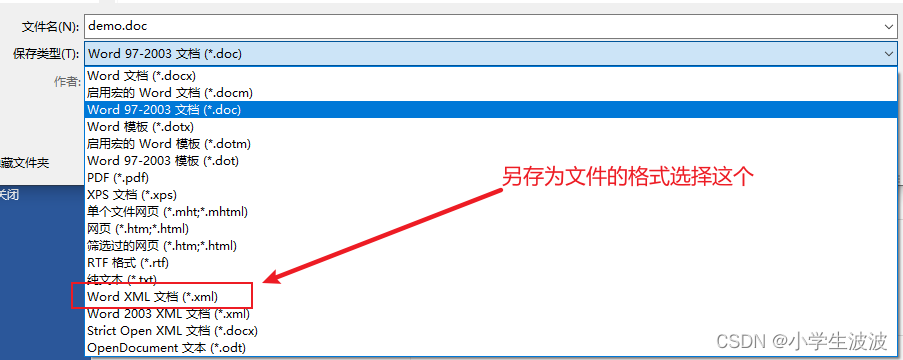
这样桌面就会多一个demo.xml文件,此时关闭demo.doc文件,打开demo.xml文件进行编辑
3、修改Demo.xml文件
在demo.xml文件中找到刚才所有的变量,然后都用 包 裹 一 下 , 如 : u s e r n a m e 改 成 {}包裹一下,如:username改成 包裹一下,如:username改成{username},idno改成${idno},等等,全部改完
最后搜索pkg:binaryData字符串,用这个包裹着很大一段字符串,那就是文档中公章图片的Base64格式数据,我们将其全部删除,用${imageData}变量代替即可,待会从代码中给这个变量赋值即可,就可以将真正的公章图片替换到文档中了,而且图片大小格式什么的,都会和模板文档中保持一致,所以模板文档的格式先调整后之后再另存为xml文件
修改完成之后,将文件的后缀名由xml改成ftl,然后拷贝到项目resources下的templates目录下,我这里改成:EmploymentSeparationCertificate.ftl了
3.5、测试
打开浏览器,访问接口:http://localhost:8001/downloadWord,就可以下载一个word文档了,打开后内容如下:

OK,到此测试成功了
4、word转pdf
有些场景需要导出pdf,那么就需要将生成的临时word文件转成pdf后再导出了,下面就介绍一下word转成pdf的方法吧
首先需要导入依赖:
<dependency> <groupId>com.documents4jgroupId> <artifactId>documents4j-localartifactId> <version>1.0.3version> dependency> <dependency> <groupId>com.documents4jgroupId> <artifactId>documents4j-transformer-msoffice-wordartifactId> <version>1.0.3version> dependency>- 1
- 2
- 3
- 4
- 5
- 6
- 7
- 8
- 9
- 10
工具类:
/** * word文档转成PDF文档 * @param wordPath word文档路径 * @param pdfPath pdf文档路径 */ public static void word2pdf(String wordPath, String pdfPath){ File inputWord = new File(wordPath); File outputFile = new File(pdfPath); InputStream docxInputStream = null; OutputStream outputStream = null; IConverter converter = null; try { docxInputStream = new FileInputStream(inputWord); outputStream = new FileOutputStream(outputFile); converter = LocalConverter.builder().build(); converter.convert(docxInputStream).as(DocumentType.DOCX).to(outputStream).as(DocumentType.PDF).execute(); outputStream.close(); } catch (Exception e) { e.printStackTrace(); log.error("word文档转成PDF文档时,发生异常:{}", e.getLocalizedMessage()); } finally { //关闭资源 try { if(docxInputStream != null){ docxInputStream.close(); } if(outputStream != null){ outputStream.close(); } if(converter != null){ converter.shutDown(); } } catch (IOException e) { e.printStackTrace(); } } }- 1
- 2
- 3
- 4
- 5
- 6
- 7
- 8
- 9
- 10
- 11
- 12
- 13
- 14
- 15
- 16
- 17
- 18
- 19
- 20
- 21
- 22
- 23
- 24
- 25
- 26
- 27
- 28
- 29
- 30
- 31
- 32
- 33
- 34
- 35
- 36
- 37
需要注意的是:要使用这个工具类的话,运行这个代码的机器上需要安装WPS或者office软件,否则转换过程中会报错(这可能是一个小瑕疵,我正在寻找其他更加优雅的转换方案,有更好办法的小伙伴,欢迎留言)
我们就调用这个工具类将刚才生成的word文档转成pdf,成功之后内容如下:

内容和word文档一致,测试成功
5、总结
- 本文主要介绍了根据word模板如何导出word文件,已经将word文档如何转成pdf文件
- 大家赶紧联系起来吧
如果本文对你有帮助的话,记得帮忙点个赞哦
-
相关阅读:
(三)行为模式:10、策略模式(Strategy Pattern)(C++示例)
时间序列的数据分析(五):简单预测法
系统架构设计:19 论数据挖掘技术的应用
SQL Server如何建表
【短信验证】手机登录短信验证
数据分析OSM模型
多进程编程(二):管道
自定义弹窗dom元素的添加与使用的js文件
java php nodejs python旅游网站设计与开发需求分析Springboot SpringcloudVue汇总一览
Mysql取数据怎么取?
- 原文地址:https://blog.csdn.net/wujiangbo520/article/details/127930038
