-
关于Ubuntu ssh远程连接报错和无法root登录的解决方法
一、使用远程工具连接Ubuntu提示报错
MobaXterm v22.0 版本直接可以远程连接上(前提是sshd服务是开启的状态)
注意:须使用最新版本或较高版本的ssh远程连接工具,进行ssh连接;若使用较低版本的ssh远程连接工具,会报错,导致连接不上情况一:
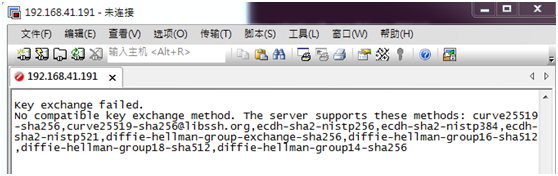
若使用secureCRT 7.0版本远程连接提示Key exchange failed. No compatible key exchange method报错:
Key exchange failed.
No compatible key exchange method. The server supports these methods: curve25519-sha256,curve25519-sha256@libssh.org,ecdh-sha2-nistp256,ecdh-sha2-nistp384,ecdh-sha2-nistp521,diffie-hellman-group-exchange-sha256,diffie-hellman-group16-sha512,diffie-hellman-group18-sha512,diffie-hellman-group14-sha256
解决方法:
root@ubuntu-virtual-machine:~# apt install -y openssh-server root@ubuntu-virtual-machine:~# service sshd start- 1
- 2
root@ubuntu-virtual-machine:~# ps -ef |grep ssh ubuntu 1514 1444 0 10:55 ? 00:00:00 /usr/bin/ssh-agent /usr/bin/im-launch env GNOME_SHELL_SESSION_MODE=ubuntu /usr/bin/gnome-session --systemd --session=ubuntu root 1980 1 0 10:57 ? 00:00:01 sshd: root@pts/0 root 1982 1 0 10:57 ? 00:00:00 sshd: root@notty root 2118 1982 0 10:57 ? 00:00:00 /usr/lib/openssh/sftp-server root 2473 1 0 11:10 ? 00:00:00 sshd: /usr/sbin/sshd -D [listener] 0 of 10-100 startups root 2475 2473 0 11:10 ? 00:00:00 sshd: root@pts/1 root 2608 2117 0 11:18 pts/0 00:00:00 grep --color=auto ssh- 1
- 2
- 3
- 4
- 5
- 6
- 7
- 8
root@ubuntu-virtual-machine:~# vim /etc/ssh/sshd_config 文件内容最后添加如下: KexAlgorithms curve25519-sha256@libssh.org,ecdh-sha2-nistp256,ecdh-sha2-nistp384,ecdh-sha2-nistp521,diffie-hellman-group-exchange-sha256,diffie-hellman-group14-sha1,diffie-hellman-group-exchange-sha1,diffie-hellman-group1-sha1- 1
- 2
- 3
重启sshd服务
root@ubuntu-virtual-machine:~# service sshd restart- 1
重新连接后,还是报错;但跟之前报错不一样,请看下面情况二解决:

情况二:
使用secureCRT 7.0版本ssh远程连接出现如下报错:

使用PuTTY 0.67.00版本ssh远程连接出现如下报错:

解决方法:
root@glory-virtual-machine:~# apt install -y openssh-server- 1
root@glory-virtual-machine:~# vim /etc/ssh/sshd_config- 1
在sshd_config配置文件底部添加如下两行内容:
HostKeyAlgorithms=+ssh-rsa,ssh-dss KexAlgorithms=+diffie-hellman-group-exchange-sha1,diffie-hellman-group14-sha1,diffie-hellman-group1-sha1- 1
- 2

重启sshd服务root@glory-virtual-machine:~# service sshd restart- 1
再重新连接,即可连接上

二、ubuntu开启root用户登录
- 编辑修改sshd_config配置文件
root@ubuntu-virtual-machine:~# vim /etc/ssh/sshd_config- 1
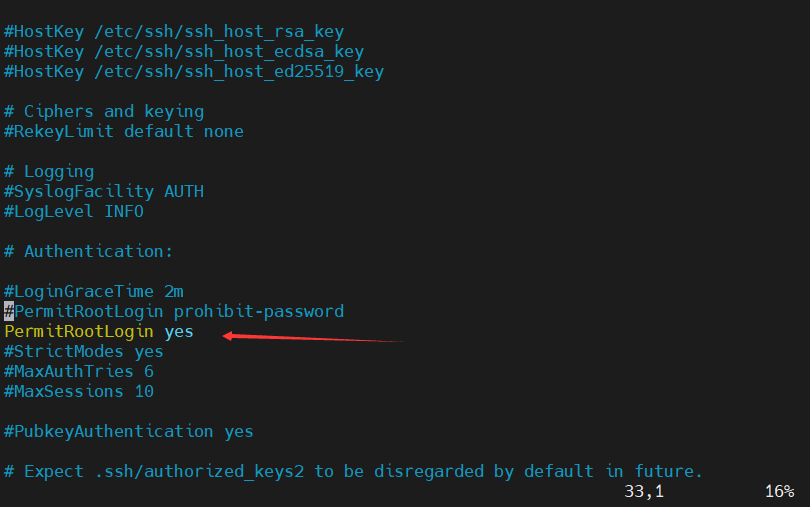
文件内容添加如下: PermitRootLogin yes- 1
- 2
- 重新启动sshd服务
root@ubuntu-virtual-machine:~# service sshd restart- 1
- 使用putty远程连接,用root用户登录,登录成功

Tips:
新安装的Ubuntu设置root密码
在Ubuntu里,如果用户没有设置root密码,那么它默认有一个随机密码,这个密码是可以更改的。
如果用户已经设置了密码,那么这个密码会一直保留,直到用户再次修改它。
修改root密码的方法如下:
# sudo passwd root
接着,输入自己想要设置的密码即可 -
相关阅读:
threejs(4)-纹理材质高级操作
Hexagon_V65_Programmers_Reference_Manual(30)
arm day2(9.15)数据操作指令,跳转指令,特殊功能寄存器指令,+XMind
基于springboot+vue的社区医院管理服务系统
python 背包问题 动态规划
文件系统(九):一文看懂yaffs2文件系统原理
电动吸吮式过滤器 自清洗过滤器
计算机出现msvcr110.dll丢失是什么意思?七种方法解决msvcr110.dll丢失
LeetCode-分割回文串(C++)
CMake篇1: Windows上用CMake编译生成可执行程序
- 原文地址:https://blog.csdn.net/DT_FlagshipStore/article/details/126051811