-
5分钟实现「视频检索」:基于内容理解,无需任何标签
Notebook 教程:text-video retrieval
「视频检索」任务就是输入一段文本,检索出最符合文本描述的视频。随着各类视频平台的兴起和火爆,网络上视频的数量呈现井喷式增长,「视频检索」成为人们高效查找视频的一项新需求。传统的视频检索通常要求视频带有额外的文字标签,通过匹配查询语句的关键词与视频标签实现检索。这一方案存在一个很大的缺陷,由于缺乏对语义的理解,该系统高度依赖关键词和视频标签,与真正的内容匹配存在差距。随着深度学习在计算机视觉和自然语言领域上的高速发展,「视频文本跨模态检索」能够理解文字和视频的内容,从而实现视频与文本之间的匹配。相比传统方法,基于内容理解的视频检索也更加接近人类的思考逻辑。目前主流的实践方法是将视频和文本编码成特征向量,由于含义相近的向量在空间中的位置也是相近的,我们可以通过计算向量之间的相似度实现文本-视频跨模态检索任务。
视频作为一种非结构化数据,其类型丰富、信息量复杂、处理门槛较高。而视频与文本又各属不同类型的数据,处理这种跨模态的任务具有一定的难度。在本文中,借助专门处理非结构化数据的工具,如向量数据库 Milvus 和提供向量数据 ETL 框架的 Towhee ,我们可以轻松地利用针对「视频-文本」跨模态任务的深度学习网络(例如 CLIP4Clip )搭建一个“理解”内容的视频检索系统!
 「视频检索」服务 demo
在这篇文章中,我们将会使用 Milvus 和 Towhee 搭建一个基于内容理解的「视频检索」服务!
安装相关工具包
在开始之前,我们需要安装相关的工具包,我们用到了以下工具:
-
Towhee:用于构建模型推理流水线的框架,对于新手非常友好。
-
Milvus:用于存储向量并创建索引的数据库,简单好上手。
-
Gradio:轻量级的机器学习 Demo 构建工具。
-
Pillow:图像处理常用的 Python 库。
python -m pip install -q pymilvus towhee towhee.models pillow ipython gradio数据集准备
我们在这里选用了 MSR-VTT (Microsoft Research Video to Text) 数据集的部分数据(1000个)。MSR-VTT 是一个公开的视频描述数据集,由 10000 个视频片段与对应的文本描述组成。 你可以选择从 google drive 或者通过以下代码下载和解压数据,解压后的数据包括了以下几个部分:
-
test_1k_compress: MSR-VTT-1kA 数据集中 1000 个压缩的测试视频。
-
MSRVTT_JSFUSION_test.csv: 一个 csv 文件,其中重要信息包括每个视频的id(video_id)、视频路径(video_path)、文字描述(sentence)。
- curl -L https://github.com/towhee-io/examples/releases/download/data/text_video_search.zip -O
- unzip -q -o text_video_search.zip
你可以通过改变以下代码中的
sample_num选择使用更少的测试数据。我们简单提取和查看一下 csv 文件中包含的信息:- import pandas as pd
- import os
- raw_video_path = './test_1k_compress' # 1k test video path.
- test_csv_path = './MSRVTT_JSFUSION_test.csv' # 1k video caption csv.
- test_sample_csv_path = './MSRVTT_JSFUSION_test_sample.csv'
- sample_num = 1000 # you can change this sample_num to be smaller, so that this notebook will be faster.
- test_df = pd.read_csv(test_csv_path)
- print('length of all test set is {}'.format(len(test_df)))
- sample_df = test_df.sample(sample_num, random_state=42)
- sample_df['video_path'] = sample_df.apply(lambda x:os.path.join(raw_video_path, x['video_id']) + '.mp4', axis=1)
- sample_df.to_csv(test_sample_csv_path)
- print('random sample {} examples'.format(sample_num))
- df = pd.read_csv(test_sample_csv_path)
- df[['video_id', 'video_path', 'sentence']].head()

与「图像描述」、「以文搜图」等跨模态任务的原理类似,基于内容理解的「视频检索」通过选取视频剪辑中的关键帧,将其转换成能表达该视频的特征向量。为了节省资源和方便观察,我们先可以选择将视频转换为 GIF 动图:
- from IPython import display
- from pathlib import Path
- import towhee
- from PIL import Image
- def display_gif(video_path_list, text_list):
- html = ''
- for video_path, text in zip(video_path_list, text_list):
- html_line = '
' - html += html_line
- return display.HTML(html)
- def convert_video2gif(video_path, output_gif_path, num_samples=16):
- frames = (
- towhee.glob(video_path)
- .video_decode.ffmpeg(sample_type='uniform_temporal_subsample', args={'num_samples': num_samples})
- .to_list()[0]
- )
- imgs = [Image.fromarray(frame) for frame in frames]
- imgs[0].save(fp=output_gif_path, format='GIF', append_images=imgs[1:], save_all=True, loop=0)
- def display_gifs_from_video(video_path_list, text_list, tmpdirname = './tmp_gifs'):
- Path(tmpdirname).mkdir(exist_ok=True)
- gif_path_list = []
- for video_path in video_path_list:
- video_name = str(Path(video_path).name).split('.')[0]
- gif_path = Path(tmpdirname) / (video_name + '.gif')
- convert_video2gif(video_path, gif_path)
- gif_path_list.append(gif_path)
- return display_gif(gif_path_list, text_list)
让我们看几个数据集中的视频-文本对:
- # sample_show_df = sample_df.sample(5, random_state=42)
- sample_show_df = sample_df[:5]
- video_path_list = sample_show_df['video_path'].to_list()
- text_list = sample_show_df['sentence'].to_list()
- tmpdirname = './tmp_gifs'
- display_gifs_from_video(video_path_list, text_list, tmpdirname=tmpdirname)

a girl wearing red top and black trouser is putting a sweater on a dog

young people sit around the edges of a room clapping and raising their arms while others dance in the center during a party

a person is using a phone
创建 Milvus 集合
在创建 Milvus 之前,请确保你已经安装并启动了 Milvus 。Milvus 是处理非结构化数据的好手,它能在后续的相似度检索和近邻搜索中发挥至关重要的作用。我们需要利用 Milvus 服务中创建一个集合(Collection)用于存储和检索向量,该集合包含两列:
id和embedding,其中id是集合的主键。另外,为了加速检索,我们可以基于embedding创建 IVF_FLAT 索引(索引的参数 ``"nlist":2048`)。同时,我们选择L2 欧式距离衡量向量之间的相似度(距离越小表示越相近):- from pymilvus import connections, FieldSchema, CollectionSchema, DataType, Collection, utility
- connections.connect(host='127.0.0.1', port='19530')
- def create_milvus_collection(collection_name, dim):
- if utility.has_collection(collection_name):
- utility.drop_collection(collection_name)
- fields = [
- FieldSchema(name='id', dtype=DataType.INT64, descrition='ids', is_primary=True, auto_id=False),
- FieldSchema(name='embedding', dtype=DataType.FLOAT_VECTOR, descrition='embedding vectors', dim=dim)
- ]
- schema = CollectionSchema(fields=fields, description='video retrieval')
- collection = Collection(name=collection_name, schema=schema)
- # create IVF_FLAT index for collection.
- index_params = {
- 'metric_type':'L2', #IP
- 'index_type':"IVF_FLAT",
- 'params':{"nlist":2048}
- }
- collection.create_index(field_name="embedding", index_params=index_params)
- return collection
collection = create_milvus_collection('text_video_retrieval', 512)提取特征,导入向量
本文教学的「视频检索」系统主要包含数据插入和检索两个部分。首先,我们将视频库里的所有视频转换成一个向量并存入数据库(Milvus 集合)中。当数据库准备完成后,该系统就可以实现检索服务。检索过程会将查询语句转换成一个向量,然后在数据库中找到与其最相近的视频向量,最终通过视频向量的id返回其对应的实际视频。
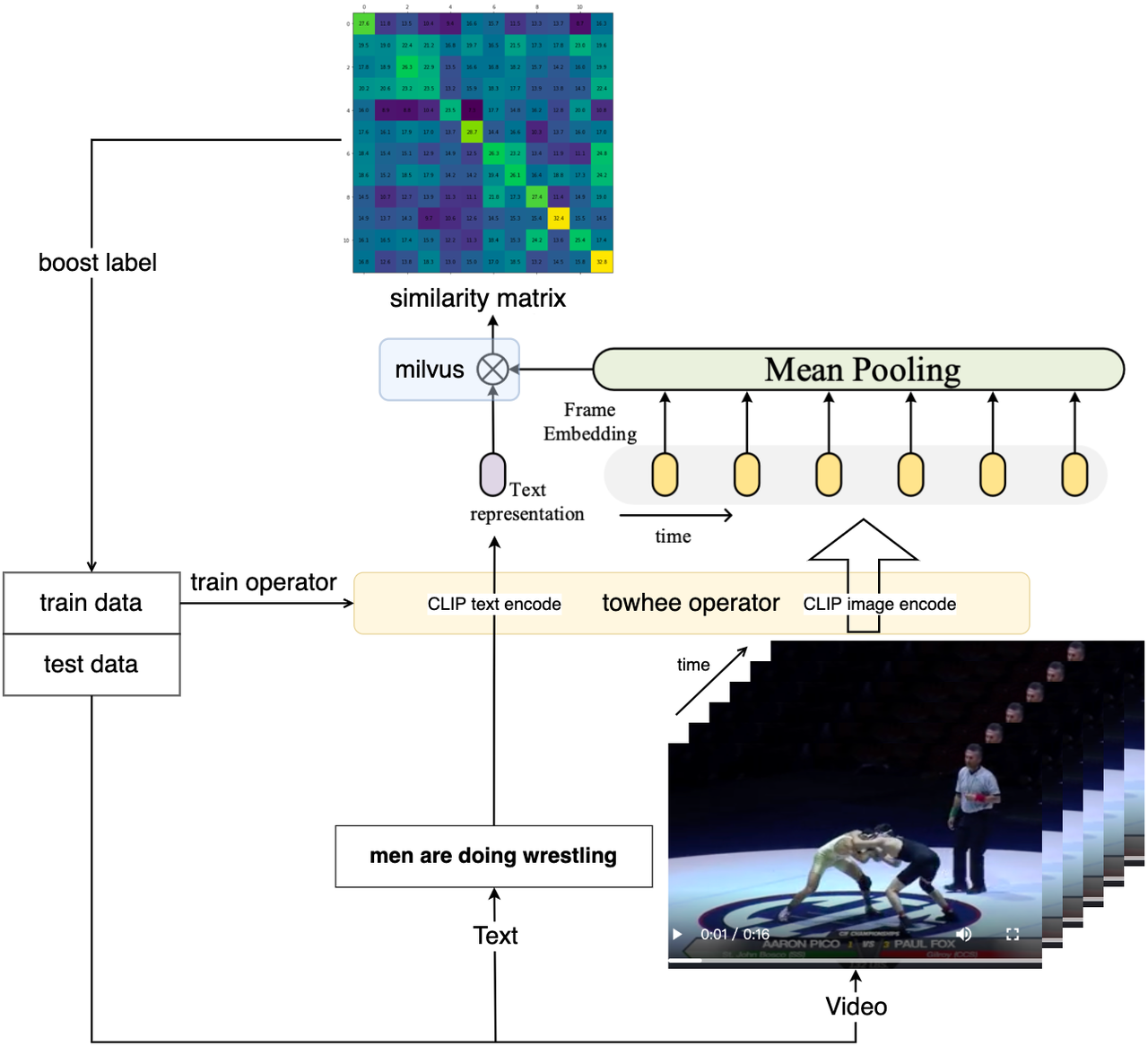
为了将视频与文本转换成向量,我们需要一个视频-文本跨模态的神经网络模型用于提取特征。Towhee 提供了一系列简单又好用的 API ,以供我们可以更便捷地操作数据处理的算子和流水线。这里我们选用了towhee clip4clip算子将视频库里的所有视频转换成向量,并插入事先准备好的 Milvus 集合中。 该算子不仅提供了预训练的 CLIP4Clip 提取特征,还包含了后处理工作(比如池化、维度处理、转数据格式),能够通过几行代码轻松提取向量。
为了加速算子与预训练模型的下载,在运行 clip4clip 算子之前,请确保你已经安装了 git 和 git-lfs(如果已安装请跳过):
- sudo apt-get install git & git-lfs
- git lfs install
- import os
- import towhee
- device = 'cuda:0'
- # device = 'cpu'
- # For the first time you run this line,
- # it will take some time
- # because towhee will download operator with weights on backend.
- dc = (
- towhee.read_csv(test_sample_csv_path).unstream()
- .runas_op['video_id', 'id'](func=lambda x: int(x[-4:]))
- .video_decode.ffmpeg['video_path', 'frames'](sample_type='uniform_temporal_subsample', args={'num_samples': 12}) \
- .runas_op['frames', 'frames'](func=lambda x: [y for y in x]) \
- .video_text_embedding.clip4clip['frames', 'vec'](model_name='clip_vit_b32', modality='video', device=device) \
- .to_milvus['id', 'vec'](collection=collection, batch=30)
- )
Wall time: 1min 19s检查数据库集合可以看到共有 1000 条向量,通过 Towhee 提供的接口还可以查看各个数据之间的对应关系:- print('Total number of inserted data is {}.'.format(collection.num_entities))
- dc.select['video_id', 'id', 'vec']().show()
Total number of inserted data is 1000.
我们在这里对上面的代码做一些接口说明:
-
towhee.read_csv(test_sample_csv_path):读取 csv 文件中的数据。 -
.runas_op['video_id', 'id'](func=lambda x: int(x[-4:])):取每一行数据的video_id 列最后 4 个数据作为 id 列的数据,并转换其数据类型为 int。 -
.video_decode.ffmpeg and runas_op:统一对视频进行二次采样,然后得到一串视频图像列表,作为 clip4clip 模型的输入。 -
.video_text_embedding.clip4clip['frames', 'vec'](model_name='clip_vit_b32', modality='video'):从视频中采样的图像帧中提取 Embedding 特征向量,然后在时间维度上平均池化它们。 -
.to_milvus['id', 'vec'](collection=collection, batch=30):将向量 30 个一批插入 Milvus 集合中。
系统评估
我们已经成功实现了「视频检索」服务的核心功能,接下来可以根据不同指标评估检索引擎。在本节中,我们将使用 recall@topk 评估我们的「视频文本检索」服务的性能:
Recall@topk 是在 top k 个结果的“查全率”。比如,共有5个目标结果,Recall@top10为40%则表示前十个结果中找到了2(5*40%)个目标结果。本案例中每次只有一个目标结果,因此 Recall@topk同时也意味着准确率(Accuracy)。
- dc = (
- towhee.read_csv(test_sample_csv_path).unstream()
- .video_text_embedding.clip4clip['sentence','text_vec'](model_name='clip_vit_b32', modality='text', device=device)
- .milvus_search['text_vec', 'top10_raw_res'](collection=collection, limit=10)
- .runas_op['video_id', 'ground_truth'](func=lambda x : [int(x[-4:])])
- .runas_op['top10_raw_res', 'top1'](func=lambda res: [x.id for i, x in enumerate(res) if i < 1])
- .runas_op['top10_raw_res', 'top5'](func=lambda res: [x.id for i, x in enumerate(res) if i < 5])
- .runas_op['top10_raw_res', 'top10'](func=lambda res: [x.id for i, x in enumerate(res) if i < 10])
- )
我们分别返回 top 1 个、top 5 个和 top 10 个预测结果,并查看分别对应的评估结果:
- dc.select['video_id', 'sentence', 'ground_truth', 'top10_raw_res', 'top1', 'top5', 'top10']().show()
- # dc.show()

- benchmark = (
- dc.with_metrics(['mean_hit_ratio',]) \
- .evaluate['ground_truth', 'top1'](name='recall_at_1') \
- .evaluate['ground_truth', 'top5'](name='recall_at_5') \
- .evaluate['ground_truth', 'top10'](name='recall_at_10') \
- .report()
- )

这些评估结果与 CLIP4Clip 论文原文中的评估分数十分接近,我们可以相信这次搭建的「视频检索」服务性能达标了!

CLIP4Clip 原文中的评估分数
在线 Demo
为了更方便地使用这个「视频检索」服务,我们可以借助 Gradio 来部署一个可交互的在线可玩 Demo。
首先,我们使用 Towhee 将查询过程包装成一个函数:
- milvus_search_function = (
- api.video_text_embedding.clip4clip(model_name='clip_vit_b32', modality='text', device=device)
- .milvus_search(collection=collection, limit=show_num)
- .runas_op(func=lambda res: [os.path.join(raw_video_path, 'video' + str(x.id) + '.mp4') for x in res])
- .as_function()
- )
然后,我们基于 Gradio 创建一个 demo 程序:
- import gradio
- interface = gradio.Interface(milvus_search_function,
- inputs=[gradio.Textbox()],
- outputs=[gradio.Video(format='mp4') for _ in range(show_num)]
- )
- interface.launch(inline=True, share=True)
Gradio 启动服务后,会提供了 URL 供在线访问:

点击这个 URL 链接,就会跳转到「视频检索」服务的交互界面。输入你想要搜索的文本描述,即找到视频库中最符合该描述的视频。例如,我们输入 "a man is cooking" (一个男人正在做饭) 即可得到:

总结
在今天的这篇文章中,我们构建了一个简单的基于内容理解的「视频检索」系统。这个系统与之前的「以文搜图」类似,输入一段文字便可找到最符合描述的视频。
面对「视频-文本」检索这样的跨模态任务,我们使用提供向量数据 ETL 框架的 Towhee 获取视频和文本的 Embedding 向量,然后在向量数据库 Milvus 中创建了向量索引,实现视频到文本之间的对应,最后通过相似度检索实现了从文本到视频的跨模态检索任务。
通过对模型进行评估,我们的模型得分与 CLIP4Clip 原论文中的分数十分接近,可以说, Milvus 和 Towhee 可以让我们轻松地搭建了一个性能达标的「视频文本检索」服务!
最后,我们利用 Gradio 将我们的模型包装成一个可以交互的 demo ,方便我们在应用层面上操作跨模态检索工作。
之后的「5分钟」系列还会介绍更多丰富精彩的用 Milvus 和 Towhee 处理非结构化数据的 AI 业务系统搭建流程哦!请持续关注我们,感兴趣的朋友可以跟着一起动手试试!
-
-
相关阅读:
HuggingFace 官网教程笔记
Docker从认识到实践再到底层原理(四-2)|Docker镜像仓库实战案例
git merge和git rebase的区别
Probability Calibration概率校准大比拼:性能、应用场景和可视化对比总结
linux下system.img解包和打包(android rom修改)
GlusterFS企业分布式存储
暴力破解-破解 Apache BASIC 认证
思科C9300交换机Bundle模式转换为Install模式
linux内核的文件组织形式
快速排序算法
- 原文地址:https://blog.csdn.net/weixin_44839084/article/details/127924897
