-
next项目部署到GitHub模板
使用
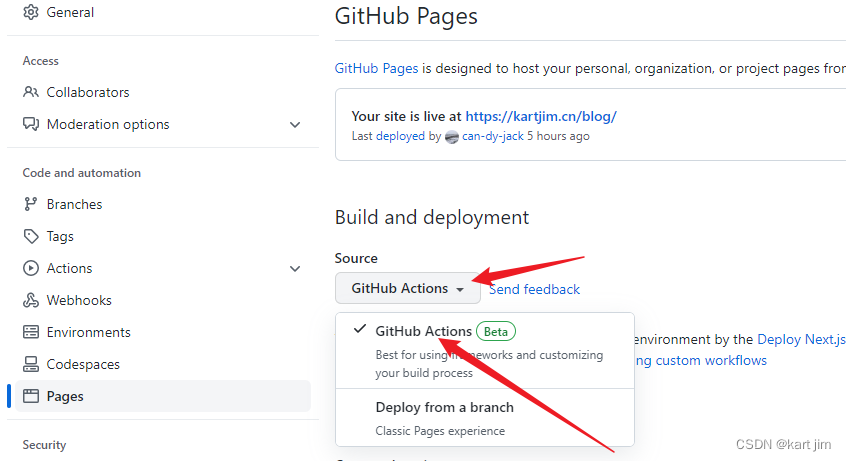
github action将next项目部署到GitHub pages的模板:在项目根目录下新建
.github/workflows目录,并在其下新建一个 yaml文件,文件名字任意。在文件中写入以下模板,并推送到github仓库即可(可按需更改,模板可通过github pages页面 - 通过github actions部署选项中获取):
name: deploy Next.js site to Pages on: push: branches: ["main"] # 允许手动运行此工作流 workflow_dispatch: # 设置 GITHUB_TOKEN 的权限以允许部署到GITHUB页面 permissions: contents: read pages: write id-token: write # 允许一个并发部署 concurrency: group: "pages" cancel-in-progress: true # 部署设置与步骤 jobs: build: runs-on: ubuntu-latest steps: - name: Checkout uses: actions/checkout@v3 - name: Detect package manager id: detect-package-manager run: | if [ -f "${{ github.workspace }}/yarn.lock" ]; then echo "::set-output name=manager::yarn" echo "::set-output name=command::install" echo "::set-output name=runner::yarn" exit 0 elif [ -f "${{ github.workspace }}/package.json" ]; then echo "::set-output name=manager::npm" echo "::set-output name=command::ci" echo "::set-output name=runner::npx --no-install" exit 0 else echo "Unable to determine packager manager" exit 1 fi - name: Setup Node uses: actions/setup-node@v3 with: node-version: "16" cache: ${{ steps.detect-package-manager.outputs.manager }} - name: Setup Pages uses: actions/configure-pages@v2 with: # Automatically inject basePath in your Next.js configuration file and disable # server side image optimization (https://nextjs.org/docs/api-reference/next/image#unoptimized). # # You may remove this line if you want to manage the configuration yourself. static_site_generator: next - name: Restore cache uses: actions/cache@v3 with: path: | .next/cache # Generate a new cache whenever packages or source files change. key: ${{ runner.os }}-nextjs-${{ hashFiles('**/package-lock.json', '**/yarn.lock') }}-${{ hashFiles('**.[jt]s', '**.[jt]sx') }} # If source files changed but packages didn't, rebuild from a prior cache. restore-keys: | ${{ runner.os }}-nextjs-${{ hashFiles('**/package-lock.json', '**/yarn.lock') }}- - name: Install dependencies run: ${{ steps.detect-package-manager.outputs.manager }} ${{ steps.detect-package-manager.outputs.command }} - name: Build with Next.js run: ${{ steps.detect-package-manager.outputs.runner }} next build - name: Static HTML export with Next.js run: ${{ steps.detect-package-manager.outputs.runner }} next export - name: Upload artifact uses: actions/upload-pages-artifact@v1 with: path: ./out # Deployment job deploy: environment: name: github-pages url: ${{ steps.deployment.outputs.page_url }} runs-on: ubuntu-latest needs: build steps: - name: Deploy to GitHub Pages id: deployment uses: actions/deploy-pages@v1- 1
- 2
- 3
- 4
- 5
- 6
- 7
- 8
- 9
- 10
- 11
- 12
- 13
- 14
- 15
- 16
- 17
- 18
- 19
- 20
- 21
- 22
- 23
- 24
- 25
- 26
- 27
- 28
- 29
- 30
- 31
- 32
- 33
- 34
- 35
- 36
- 37
- 38
- 39
- 40
- 41
- 42
- 43
- 44
- 45
- 46
- 47
- 48
- 49
- 50
- 51
- 52
- 53
- 54
- 55
- 56
- 57
- 58
- 59
- 60
- 61
- 62
- 63
- 64
- 65
- 66
- 67
- 68
- 69
- 70
- 71
- 72
- 73
- 74
- 75
- 76
- 77
- 78
- 79
- 80
- 81
- 82
- 83
- 84
- 85
-
相关阅读:
【夯实算法基础】差分约束
java-net-php-python-net本科生毕业设计选导师系统演示录像2019计算机毕业设计程序
ENVI Classic:如何加载栅格数据(Img/DEM)和矢量数据(evf of ROI)?
【数据结构】红黑树(C++实现)
React-4(state、props、表单、通信、生命周期)
MySql的初识感悟,以及sql语句中的DDL和DML和DQL的基本语法
腾讯mini项目-【指标监控服务重构】2023-08-11
贝叶斯核机回归-因果中介分析 (BKMR-CMA)causalbkmr R包
论文复现|Panoptic Deeplab(全景分割PyTorch)
面试问题记录一 --- C++(Qt方向)
- 原文地址:https://blog.csdn.net/qq_46590483/article/details/127924431
