-
微信小程序API(详细 教程)
微信内置api
小程序中的 API 是由宿主环境提供的,通过这些丰富的小程序 API,开发者可以方便的调用微信提供的能力,例如:获取用户信息、本地存储、支付功能等。
API 使用说明
-
小程序提供了很多实用的方法供开发者使用
-
小程序全局对象是:
wx -
所有的 API 都保存在
wx对象中

一,界面交互
显示消息提示框:
wx.showToast()wx.showToast({ title: '成功', icon: 'success', duration: 2000 })- 1
- 2
- 3
- 4
- 5
- 6
- 7

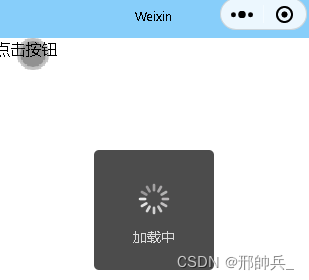
显示消息加载框:
wx.showLoading()显示 loading 提示框。需主动调用 wx.hideLoading 才能关闭提示框
wx.showLoading({ title: '加载中', }) setTimeout(function () { wx.hideLoading() }, 2000)- 1
- 2
- 3
- 4
- 5
- 6
- 7
- 8
显示模态对话框
wx.showModalwx.showModal({ title: '提示', content: '这是一个模态弹窗', success (res) { if (res.confirm) { console.log('用户点击确定') } else if (res.cancel) { console.log('用户点击取消') } } })- 1
- 2
- 3
- 4
- 5
- 6
- 7
- 8
- 9
- 10
- 11
- 12

二,网络请求
1,接口请求
wx.request1.1,配置合法域名
小程序请求的接口需要https和域名,并且需要在微信小程序管理后台中加入指定域名


1.2,请求示例
wx.request({ url: '', data: { x: '', y: '' }, header: { 'content-type': 'application/json' // 默认值 }, success (res) { console.log(res.data) } })- 1
- 2
- 3
- 4
- 5
- 6
- 7
- 8
- 9
- 10
- 11
- 12
- 13
- 14
1.3,文件下载
wx.downloadFile下载文件资源到本地。客户端直接发起一个 HTTPS GET 请求,返回文件的本地临时路径 (本地路径),单次下载允许的最大文件为 200MB
同样也要配置下载合法域名
wx.downloadFile({ url: '', success (res) { // 只要服务器有响应数据,就会把响应内容写入文件并进入 success 回调,业务需要自行判断是否下载到了想要的内容 if (res.statusCode === 200) { wx.playVoice({ filePath: res.tempFilePath }) } } })- 1
- 2
- 3
- 4
- 5
- 6
- 7
- 8
- 9
- 10
- 11
- 12
1.3,文件上传
wx.uploadFile将本地资源上传到服务器。客户端发起一个 HTTPS POST 请求,其中 content-type 为 multipart/form-data
同样也要配置下载合法域名wx.uploadFile({ url: '', filePath: tempFilePaths[0], name: 'file', formData: { 'user': 'test' }, success (res){ const data = res.data //do something } })- 1
- 2
- 3
- 4
- 5
- 6
- 7
- 8
- 9
- 10
- 11
- 12
- 13
1.4,分享朋友圈
onShareTimeline监听右上角菜单“分享到朋友圈”按钮的行为,并自定义分享内容
注意:只有定义了此事件处理函数,右上角菜单才会显示“分享到朋友圈”按钮Page({ /** * 生命周期函数--监听页面加载 */ onLoad() { // 用户点击右上角分享给好友,要先在分享好友这里设置menus的两个参数,才可以分享朋友圈 wx.showShareMenu({ menus: ['shareAppMessage', 'shareTimeline'] //shareAppMessage必须得有 }) }, //用户点击右上角分享朋友圈 onShareTimeline() { return { title: '自定义分享标题', query: "id=110101&name=heyzqt", imageUrl: "" } } })- 1
- 2
- 3
- 4
- 5
- 6
- 7
- 8
- 9
- 10
- 11
- 12
- 13
- 14
- 15
- 16
- 17
- 18
- 19
- 20
- 21

三 ,获取系统信息 wx.getSystemInfo
功能描述
异步获取系统信息。需要一定的微信客户端版本支持,在不支持的客户端上,会使用同步实现来返回。
参数
Object object

object.success 回调函数参数
Object res

wx.getSystemInfo({ success (res) { console.log(res.model) console.log(res.pixelRatio) console.log(res.windowWidth) console.log(res.windowHeight) console.log(res.language) console.log(res.version) console.log(res.platform) } })- 1
- 2
- 3
- 4
- 5
- 6
- 7
- 8
- 9
- 10
- 11
- 12
输出结果:

四,获取用户信息 wx.getUserProfile
获取用户信息的接口变化历史:
1,直接用wx.getUserInfo获取用户信息,后来被限制。
2,使用button按钮的open-type=“getUserInfo”,通过bindgetuserinfo事件获取用户信息,现在叒限制。
3,使用API:getUserProFile获取用户信息小程序发了篇公告小程序登录、用户信息相关接口调整说明

将授权登陆获取用户信息的接口调整了,新增了一个
wx.getUserProfile。特说明一下授权登陆的注意事项:1,原授权登陆流程不变,依旧是

2,只是获取用户信息的地方发生改变了,获取用户信息必须通过wx.getUserProfile获取3,
wx.getUserProfile这个API必须写在事件的最上面在这里插入代码片示例代码:
wxml:
<button bindtap="login">登陆</button>- 1
- 2
JS:
login() { wx.getUserProfile({ desc: '展示用户信息', // 声明获取用户个人信息后的用途,后续会展示在弹窗中,请谨慎填写 success: (file) => { console.log(file) wx.login({ success: (res) => { console.log(res); wx.request({ url: 'code获取openid的接口', data: { code: res.code }, success: (open) => { console.log(open.data); wx.request({ url: '授权登陆接口', data: { openid: open.data.openid, NickName: file.userInfo.nickName, HeadUrl: file.userInfo.avatarUrl }, success(data) { console.log(data.data); } }) } }) } }) } }) },- 1
- 2
- 3
- 4
- 5
- 6
- 7
- 8
- 9
- 10
- 11
- 12
- 13
- 14
- 15
- 16
- 17
- 18
- 19
- 20
- 21
- 22
- 23
- 24
- 25
- 26
- 27
- 28
- 29
- 30
- 31
- 32
- 33
- 34
-
-
相关阅读:
JBDC的使用
php聊天室通讯系统常用的接口对接函数 curl、file_get_contents()、WebSocket、消息队列
2023年智能家居占消费电子出货量28%,蓝牙Mesh照明占据重要位置
UDS协议发展历史
c++学习--第三部分
防火墙规则审查及影响
每日一题:LeetCode-589.N叉树的前序遍历
spring-security-源码解析+自定义拓展
MySQL进阶4,常见函数
汇编语言(第三版)第二章 寄存器 笔记
- 原文地址:https://blog.csdn.net/m0_64875238/article/details/127852019
