-
JavaWeb实现简单的带有验证码的用户判断登录案例
JavaWeb学习案例笔记
一、简介
涉及的知识点
Cookie,session
案例需求:- 访问带有验证码的登录页面login.jsp
- 用户输入用户名,密码以及验证码。
* 如果用户名和密码输入有误,跳转登录页面,提示:用户名或密码错误
* 如果验证码输入有误,跳转登录页面,提示:验证码错误
* 如果全部输入正确,则跳转到主页success.jsp,显示:用户名,欢迎您
实现流程
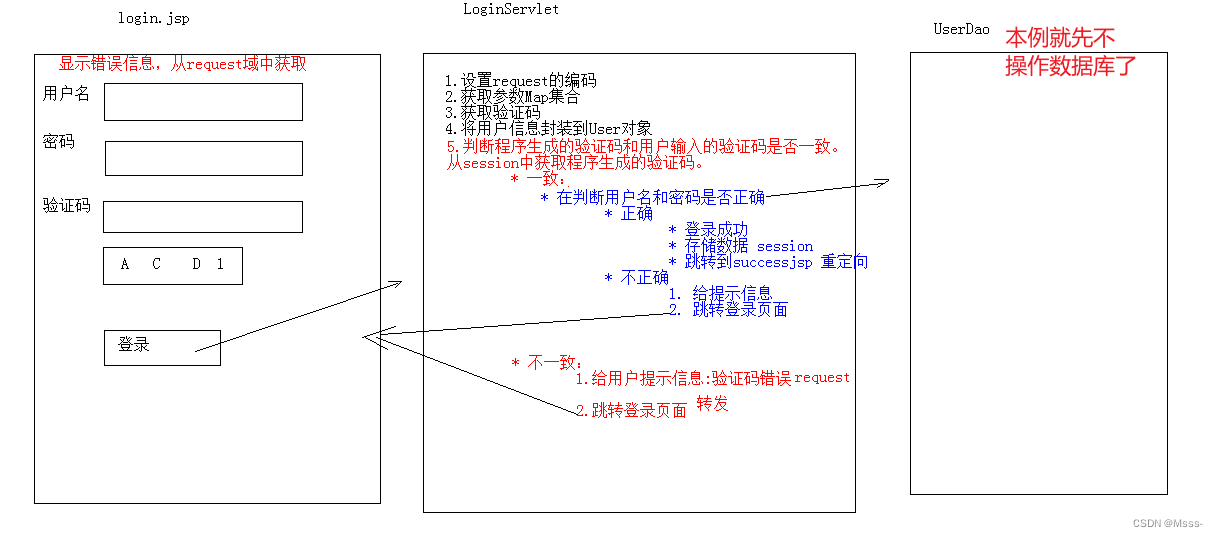
二、代码实现
登录页面login.jsp
<%@ page contentType="text/html;charset=UTF-8" language="java" %> <html> <head> <title>login</title> <script> window.onload = function (){ document.getElementById("img").onclick = function (){ this.src = "/day16_cookie_session_war_exploded/checkCodeServlet?time="+new Date().getTime(); } } </script> <style> div{ color: red; } </style> </head> <body> <form action="/day16_cookie_session_war_exploded/loginServlet" method="post"> <table> <tr> <td>用户名</td> <td><input type="text" name="username"></td> </tr> <tr> <td>密码</td> <td><input type="password" name="password"></td> </tr> <tr> <td>验证码</td> <td><input type="text" name="checkCode"></td> </tr> <tr> <td colspan="2"><img id="img" src="/day16_cookie_session_war_exploded/checkCodeServlet"> </td> </tr> <tr> <td colspan="2"><input type="submit" value="登录"></td> </tr> </table> </form> <div><%= request.getAttribute("cc_error") == null ? "" : request.getAttribute("cc_error")%></div> <div><%= request.getAttribute("login_error") == null ? "" : request.getAttribute("login_error") %></div> </body> </html>- 1
- 2
- 3
- 4
- 5
- 6
- 7
- 8
- 9
- 10
- 11
- 12
- 13
- 14
- 15
- 16
- 17
- 18
- 19
- 20
- 21
- 22
- 23
- 24
- 25
- 26
- 27
- 28
- 29
- 30
- 31
- 32
- 33
- 34
- 35
- 36
- 37
- 38
- 39
- 40
- 41
- 42
- 43
- 44
- 45
- 46
- 47
- 48
- 49
- 50
- 51
- 52
验证码生成CheckCodeServlet.java
import javax.imageio.ImageIO; import javax.servlet.ServletException; import javax.servlet.ServletOutputStream; import javax.servlet.annotation.WebServlet; import javax.servlet.http.HttpServlet; import javax.servlet.http.HttpServletRequest; import javax.servlet.http.HttpServletResponse; import java.awt.*; import java.awt.image.BufferedImage; import java.io.IOException; import java.util.Random; @WebServlet("/checkCodeServlet") public class CheckCodeServlet extends HttpServlet { protected void doPost(HttpServletRequest request, HttpServletResponse response) throws ServletException, IOException { int width = 100; int height = 50; //1.创建一对象,在内存中图片(验证码图片对象) BufferedImage image = new BufferedImage(width,height,BufferedImage.TYPE_INT_RGB); //2.美化图片 //2.1 填充背景色 Graphics g = image.getGraphics();//画笔对象 g.setColor(Color.PINK);//设置画笔颜色 g.fillRect(0,0,width,height); //2.2画边框 g.setColor(Color.BLUE); g.drawRect(0,0,width - 1,height - 1); //设置字体大小。好像没成 Font font = new Font("copperplate",Font.BOLD,30); g.setFont(font); String str = "ABCDEFGHIJKLMNOPQRSTUVWXYZabcdefghigklmnopqrstuvwxyz0123456789"; //生成随机角标 Random ran = new Random(); StringBuilder sb = new StringBuilder(); for (int i = 1; i <= 4; i++) { int index = ran.nextInt(str.length()); //获取字符 char ch = str.charAt(index);//随机字符 sb.append(ch); //2.3写验证码 g.drawString(ch+"",width/5*i,height/2); } String checkCode_session = sb.toString(); //将验证码存入Session request.getSession().setAttribute("checkCode_session", checkCode_session); //2.4画干扰线 g.setColor(Color.GREEN); //随机生成坐标点 for (int i = 0; i < 10; i++) { int x1 = ran.nextInt(width); int x2 = ran.nextInt(width); int y1 = ran.nextInt(height); int y2 = ran.nextInt(height); g.drawLine(x1,y1,x2,y2); } //3.将图片输出到页面展示 ImageIO.write(image,"jpg",response.getOutputStream()); } protected void doGet(HttpServletRequest request, HttpServletResponse response) throws ServletException, IOException { this.doPost(request,response); } }- 1
- 2
- 3
- 4
- 5
- 6
- 7
- 8
- 9
- 10
- 11
- 12
- 13
- 14
- 15
- 16
- 17
- 18
- 19
- 20
- 21
- 22
- 23
- 24
- 25
- 26
- 27
- 28
- 29
- 30
- 31
- 32
- 33
- 34
- 35
- 36
- 37
- 38
- 39
- 40
- 41
- 42
- 43
- 44
- 45
- 46
- 47
- 48
- 49
- 50
- 51
- 52
- 53
- 54
- 55
- 56
- 57
- 58
- 59
- 60
- 61
- 62
- 63
- 64
- 65
- 66
- 67
- 68
- 69
- 70
- 71
- 72
- 73
- 74
- 75
- 76
- 77
- 78
- 79
- 80
- 81
判断验证码是否正确LoginServlet.java
import javax.servlet.*; import javax.servlet.http.*; import javax.servlet.annotation.*; import java.io.IOException; @WebServlet("/loginServlet") public class LoginServlet extends HttpServlet { protected void doPost(HttpServletRequest request, HttpServletResponse response) throws ServletException, IOException { //1.设置request编码 request.setCharacterEncoding("utf-8"); //2.获取参数。也可使用BeanUtils获取Map集合 String username = request.getParameter("username"); String password = request.getParameter("password"); String checkCode = request.getParameter("checkCode"); //3.先获取生成的验证码 HttpSession session = request.getSession(); String checkCode_session = (String) session.getAttribute("checkCode_session"); //删除session中存储的验证码 session.removeAttribute("checkCode_session"); //3.先判断验证码是否正确 if(checkCode_session!= null && checkCode_session.equalsIgnoreCase(checkCode)){ //equalsIgnoreCase方法,忽略大小写的比较 //忽略大小写比较 //验证码正确,判断用户名和密码是否一致 if("zhangsan".equals(username) && "123".equals(password)){//需要调用UserDao查询数据库 //登录成功 //存储信息,用户信息 session.setAttribute("user",username); //重定向到success.jsp response.sendRedirect(request.getContextPath()+"/success.jsp"); }else{ //登录失败 //存储提示信息到request request.setAttribute("login_error","用户名或密码错误"); //转发到登录页面 request.getRequestDispatcher("/login.jsp").forward(request,response); } }else{ //验证码不一致 //存储提示信息到request request.setAttribute("cc_error","验证码错误"); //转发到登录页面 request.getRequestDispatcher("/login.jsp").forward(request,response); } } protected void doGet(HttpServletRequest request, HttpServletResponse response) throws ServletException, IOException { this.doPost(request, response); } }- 1
- 2
- 3
- 4
- 5
- 6
- 7
- 8
- 9
- 10
- 11
- 12
- 13
- 14
- 15
- 16
- 17
- 18
- 19
- 20
- 21
- 22
- 23
- 24
- 25
- 26
- 27
- 28
- 29
- 30
- 31
- 32
- 33
- 34
- 35
- 36
- 37
- 38
- 39
- 40
- 41
- 42
- 43
- 44
- 45
- 46
- 47
- 48
- 49
- 50
- 51
- 52
- 53
- 54
- 55
- 56
登录成功后跳转success.jsp
<%@ page contentType="text/html;charset=UTF-8" language="java" %> <html> <head> <title>Title</title> </head> <body> <h1><%=request.getSession().getAttribute("user")%>,欢迎您</h1> </body> </html>- 1
- 2
- 3
- 4
- 5
- 6
- 7
- 8
- 9
- 10
- 11
- 12
三、值得注意的地方
1、LoginServlet中注意编码

2、LoginServle中这个地方还可以用BeanUtils进行优化

3、CheckCodeServlet记得吧验证码加入到session

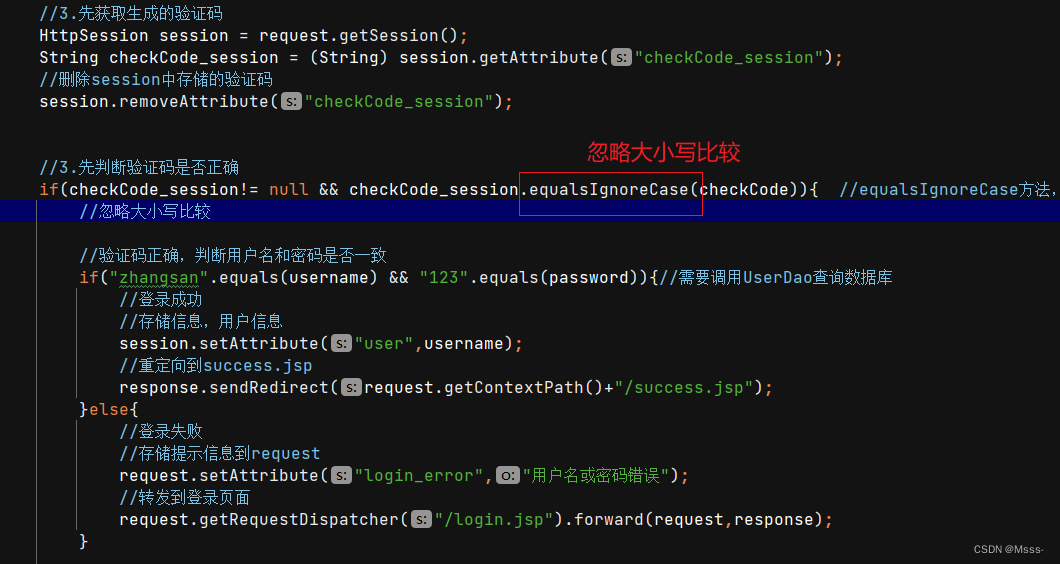
4、判断验证码不区分大小写
LoginServlet中
5、记得每次生成验证码后删除,不然下一次现在的验证码字符和判断的验证码字符不一致
LoginServlet中

来源:B站黑马程序员JavaWeb网课
-
相关阅读:
Java 之SpringBoot+Vue实现后台管理系统的开发【二、后端】
7-22 龟兔赛跑(分数 20)
数据库(mysql)之用户管理
Qt5.15:MinGW64位编译Oracle 19c数据库驱动及代码测试 - 安装时没有选Sources处理办法
计算机网络 | 03.[HTTP篇] HTTP缓存技术
行业洞察 | 新零售业态下,品牌电商应如何重塑增长?
RIP实验
【嵌入式面试题】常见面试题梳理二
Vue3+typescript项目使用script-setup写法时,模版中的变量和方法编辑器检测都为Unresolved variable或者Element is not exported,如何解决
Ubuntu20.04 下编译和运行 FreeSWITCH的问题汇总
- 原文地址:https://blog.csdn.net/mfysss/article/details/127831197
