-
(续)SSM整合之springmvc笔记(@RequestMapping注解)(P124-130)还没完
目录
1 新建spring_mvc_demo com.atguigu
5 .在resources下面创建配置文件springmvc.xml
五 . @RequestMapping注解的method属性
六 .@RequestMapping注解的params属性(了解)
七 @RequestMapping注解的headers属性(了解)
@RequestMapping注解
一.准备工作
1 新建spring_mvc_demo com.atguigu

2. 导入依赖
war


        org.springframework
        spring-webmvc
        5.3.1


        ch.qos.logback
        logback-classic
        1.2.3


        javax.servlet
        javax.servlet-api
        3.1.0
        provided


        org.thymeleaf
        thymeleaf-spring5
        3.0.12.RELEASE
3 .添加web模板
第一种方式

在spring_mvc_demo后面添加\src\main\webapp\
整体D:\review_ssm\workspace\SSM\spring_mvc_demo\src\main\webapp\WEB-INF\web.xml

 第二种方式:
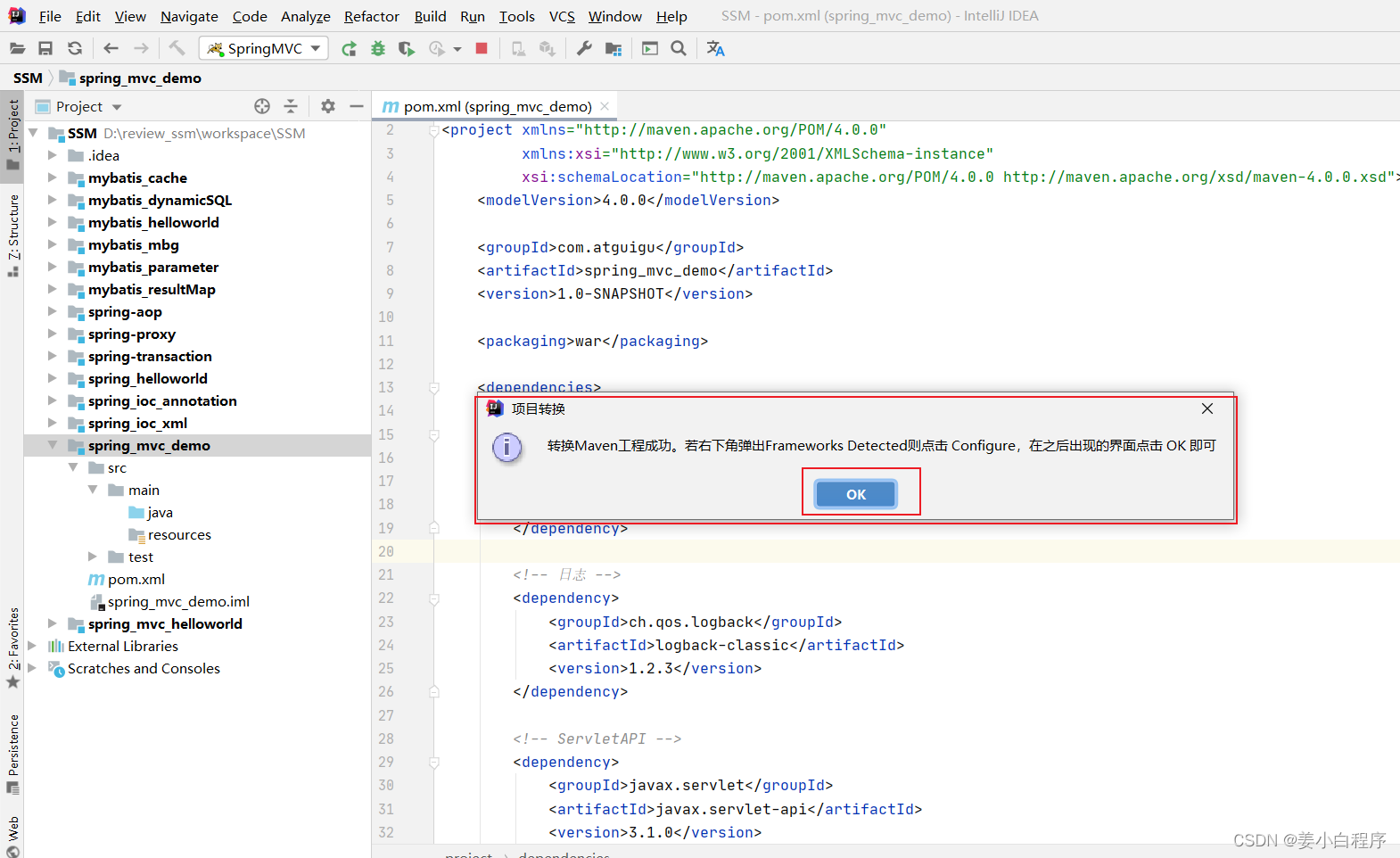

4 . 在web.xml里面进行进行配置

- "1.0" encoding="UTF-8"?>
- <web-app xmlns="http://xmlns.jcp.org/xml/ns/javaee"
- xmlns:xsi="http://www.w3.org/2001/XMLSchema-instance"
- xsi:schemaLocation="http://xmlns.jcp.org/xml/ns/javaee http://xmlns.jcp.org/xml/ns/javaee/web-app_4_0.xsd"
- version="4.0">
- <servlet>
- <servlet-name>SpringMVCservlet-name>
- <servlet-class>org.springframework.web.servlet.DispatcherServletservlet-class>
- <init-param>
- <param-name>contextConfigLocationparam-name>
- <param-value>classpath:springmvc.xmlparam-value>
- init-param>
- <load-on-startup>1load-on-startup>
- servlet>
- <servlet-mapping>
- <servlet-name>SpringMVCservlet-name>
- <url-pattern>/url-pattern>
- servlet-mapping>
- web-app>
5 .在resources下面创建配置文件springmvc.xml
- "1.0" encoding="UTF-8"?>
- <beans xmlns="http://www.springframework.org/schema/beans"
- xmlns:xsi="http://www.w3.org/2001/XMLSchema-instance"
- xmlns:context="http://www.springframework.org/schema/context"
- xsi:schemaLocation="http://www.springframework.org/schema/beans http://www.springframework.org/schema/beans/spring-beans.xsd http://www.springframework.org/schema/context https://www.springframework.org/schema/context/spring-context.xsd">
- <context:component-scan base-package="com.atguigu.controller">context:component-scan>
- <bean id="viewResolver" class="org.thymeleaf.spring5.view.ThymeleafViewResolver">
- <property name="order" value="1"/>
- <property name="characterEncoding" value="UTF-8"/>
- <property name="templateEngine">
- <bean class="org.thymeleaf.spring5.SpringTemplateEngine">
- <property name="templateResolver">
- <bean class="org.thymeleaf.spring5.templateresolver.SpringResourceTemplateResolver">
- <property name="prefix" value="/WEB-INF/templates/"/>
- <property name="suffix" value=".html"/>
- <property name="templateMode" value="HTML5"/>
- <property name="characterEncoding" value="UTF-8" />
- bean>
- property>
- bean>
- property>
- bean>
- beans>
6 创建控制层
- package com.atguigu.controller;
- import org.springframework.stereotype.Controller;
- import org.springframework.web.bind.annotation.PathVariable;
- import org.springframework.web.bind.annotation.RequestMapping;
- import org.springframework.web.bind.annotation.RequestMethod;
- @Controller
- public class TestRequestMappingController {
- }

7 . 创建入口控制层 用来访问首页
- @Controller
- public class ProtalController {
- @RequestMapping("/") //访问首页
- public String protal(){
- return "index";
- }
- }
8 . 创建首页
- html>
- <html lang="en" xmlns:th="http://www.thymeleaf.org">
- <head>
- <meta charset="UTF-8">
- <title>首页title>
- head>
- <body>
- <h1>index.htmlh1>
- body>
- html>

9 . 部暑工程


10 .启动tomcat

 11 .测试结果
二 .@RequestMapping注解的功能
从注解名称上我们可以看到, @RequestMapping 注解的作用就是将请求和处理请求的控制器方法关联起来,建立映射关系。SpringMVC 接收到指定的请求,就会来找到在映射关系中对应的控制器方法来处理这个请求。三 .@RequestMapping注解的位置
@RequestMapping 标识一个类:设置映射请求的请求路径的初始信息@RequestMapping 标识一个方法:设置映射请求请求路径的具体信息我们打开ProtalController类 然后按住Ctrl+左健 打开@RequestMapping注解解释:@Target({ElementType.TYPE, ElementType.METHOD})@Target:当前注解所能标识的位置 我们可以把他标记在一个类上TYPE 也可以把它标记在一个方法上METHOD
现在我们演示把它标记在一个类
第一步: 在TestRequestMappingController类写hello()方法
- /*
- * 1、@RequestMapping注解标识的位置
- @RequestMapping标识一个类:设置映射请求的请求路径的初始信息
- @RequestMapping标识一个方法:设置映射请求请求路径的具体信息
- * */
- @Controller
- @RequestMapping("/test") //设置当前映射的初始信息
- public class TestRequestMappingController {
- //此时控制器方法所匹配的请求的请求路径为/test/hello
- @RequestMapping("/hello") //设置映射的具体信息
- public String hello() {
- return "success";
- }
- }
第二步:写success.html首页
- html>
- <html lang="en" xmlns:th="http://www.thymeleaf.org">
- <head>
- <meta charset="UTF-8">
- <title>首页title>
- head>
- <body>
- <h1>success.htmlh1>
- body>
- html>
第三步:写index.html
- html>
- <html lang="en" xmlns:th="http://www.thymeleaf.org">
- <head>
- <meta charset="UTF-8">
- <title>首页title>
- head>
- <body>
- <h1>index.htmlh1>
- <a th:href="@{/hello}">测试@RequestMapping注解所标识的位置a><br>
- body>
- html>
第四步:测试

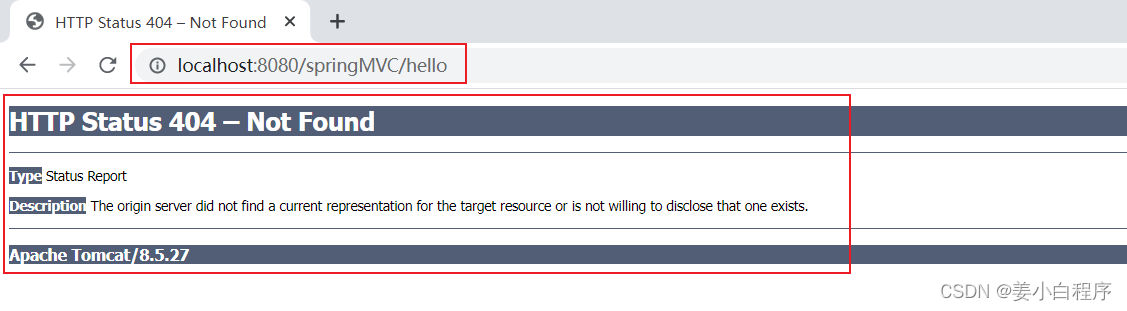
报404的原因是
因为在类上加上了@RequestMapping("/test")之后 我们当前访问的请求路径应该是test下面的hello 才能匹配到控制器方法hello()
解决办法如下
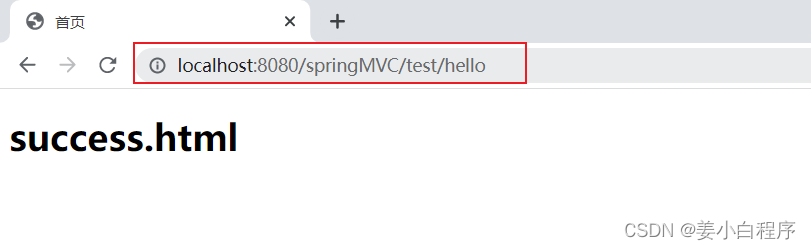
怎么用
2个控制层都可以对hello路径进行处理 这个时候就会报错 所以我们要在类上加上@RequestMapping("/test") 这时我们的控制器方法所匹配的请求的请求路径为/test/hello
TestRequestMappingController

ProtalController

启动tomcat
报错:
Caused by: java.lang.IllegalStateException: Ambiguous mapping. Cannot map 'testRequestMappingController' method
com.atguigu.controller.TestRequestMappingController#hello()
to { [/hello]}: There is already 'protalController' bean method模糊不清的一个映射 不能去映射'testRequestMappingController'里面的hello()方法
因为 'protalController里面已经有了一个方法进行映射了

总结
* 1、@RequestMapping注解标识的位置
* @RequestMapping标识一个类:设置映射请求的请求路径的初始信息
* @RequestMapping标识一个方法:设置映射请求请求路径的具体信息
四 . @RequestMapping注解的value属性
@RequestMapping 注解的 value 属性通过请求的请求地址匹配请求映射@RequestMapping 注解的 value 属性是一个字符串类型的数组,表示该请求映射能够匹配多个请求地址 所对应的请求@RequestMapping 注解的 value 属性必须设置,至少通过请求地址匹配请求映射
TestRequestMappingController
- /*
- * 1、@RequestMapping注解标识的位置
- * @RequestMapping标识一个类:设置映射请求的请求路径的初始信息
- * @RequestMapping标识一个方法:设置映射请求请求路径的具体信息
- * 2、@RequestMapping注解value属性
- * 作用:通过请求的请求路径匹配请求
- * value属性是数组类型,即当前浏览器所发送请求的请求路径匹配value属性中的任何一个值
- * 则当前请求就会被注解所标识的方法进行处理
- * */
- @Controller
- //@RequestMapping("/test") //设置当前映射的初始信息
- public class TestRequestMappingController {
- //此时控制器方法所匹配的请求的请求路径为/test/hello
- @RequestMapping({"/hello","/abc"}) //设置映射的具体信息
- public String hello() {
- return "success";
- }
- }
index.html
- html>
- <html lang="en" xmlns:th="http://www.thymeleaf.org">
- <head>
- <meta charset="UTF-8">
- <title>首页title>
- head>
- <body>
- <h1>index.htmlh1>
- <a th:href="@{/hello}">测试@RequestMapping注解所标识的位置a><br>
- <a th:href="@{/abc}">测试@RequestMapping注解的value属性a><br>
- body>
- html>
测试


总结:
 @RequestMapping注解value属性
* 作用:通过请求的请求路径匹配请求
* value属性是数组类型,即当前浏览器所发送请求的请求路径匹配value属性中的任何一个值
* 则当前请求就会被注解所标识的方法进行处理
@RequestMapping 注解的 method 属性通过请求的请求方式( get 或 post )匹配请求映射@RequestMapping 注解的 method 属性是一个 RequestMethod 类型的数组,表示该请求映射能够匹配多种请求方式的请求若当前请求的请求地址满足请求映射的 value 属性,但是请求方式不满足 method 属性,则浏览器报错405 : Request method 'POST' not supported
/**
 * The HTTP request methods to map to, narrowing the primary mapping:
 * GET, POST, HEAD, OPTIONS, PUT, PATCH, DELETE, TRACE.
 * Supported at the type level as well as at the method level!
 * When used at the type level, all method-level mappings inherit this
 * HTTP method restriction.
 */
RequestMethod[] method() default {};
Crtl+左健 打开RequestMethod[] 枚举类型
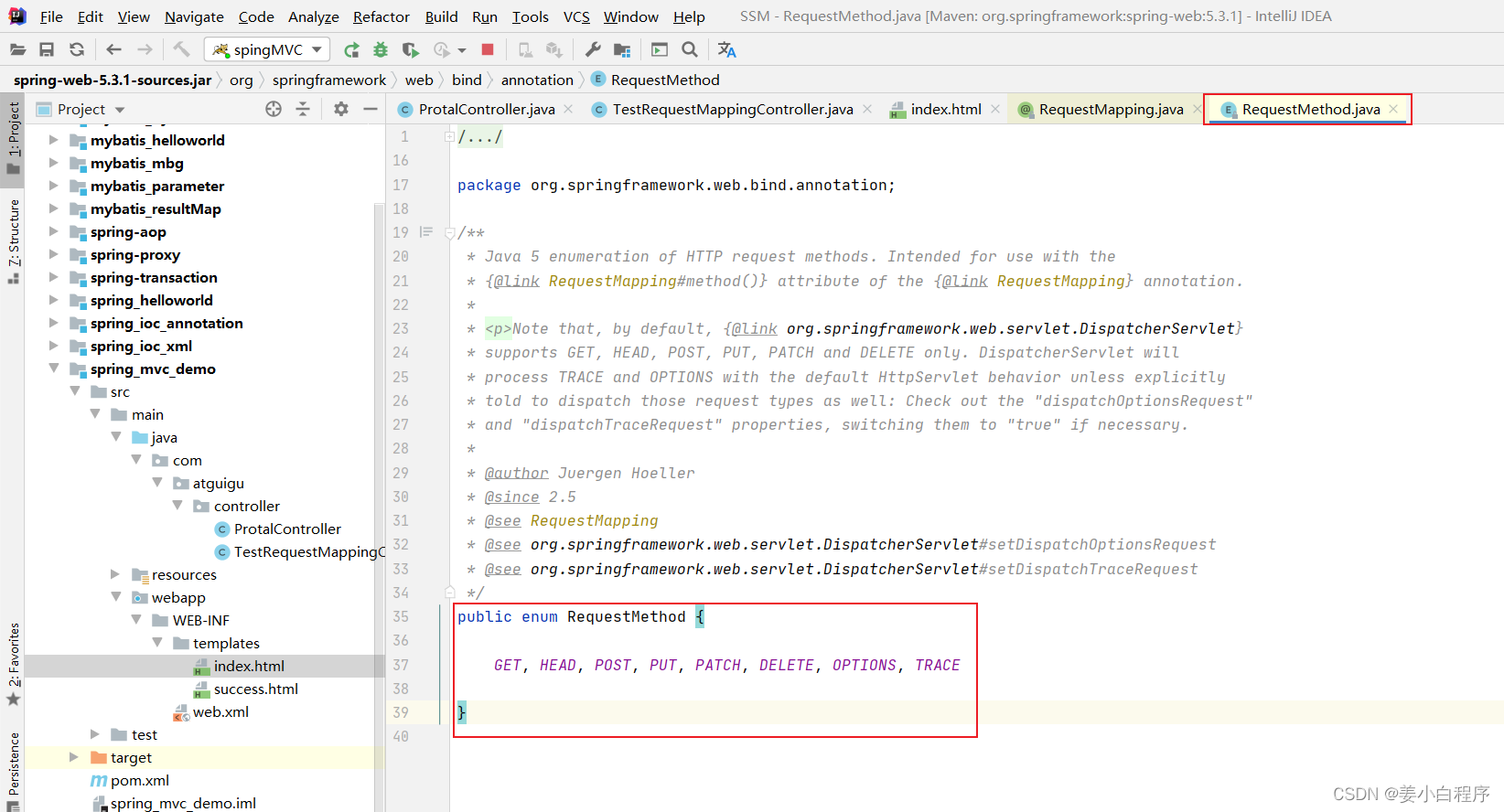
表单提交发出的是post或是axios里面把请求方式设置成post 其他的都是get,比如超链接来发送请求 地址栏直接输入地址来发送请求 都是get
- /*
- * 1、@RequestMapping注解标识的位置
- * @RequestMapping标识一个类:设置映射请求的请求路径的初始信息
- * @RequestMapping标识一个方法:设置映射请求请求路径的具体信息
- * 2、@RequestMapping注解value属性
- * 作用:通过请求的请求路径匹配请求
- * value属性是数组类型,即当前浏览器所发送请求的请求路径匹配value属性中的任何一个值
- * 则当前请求就会被注解所标识的方法进行处理
- * 3、@RequestMapping注解的method属性
- * 作用:通过请求的请求方式匹配请求
- * method属性是RequestMethod类型的数组,即当前浏览器所发送请求的请求方式匹配method属性中的任何一中请求方式
- * 则当前请求就会被注解所标识的方法进行处理
- * 若浏览器所发送的请求的请求路径和@RequestMapping注解value属性匹配,但是请求方式不匹配
- * 此时页面报错:405 - Request method 'xxx' not supported
- * 在@RequestMapping的基础上,结合请求方式的一些派生注解:
- * @GetMapping,@PostMapping,@DeleteMapping,@PutMapping
- * */
- @Controller
- //@RequestMapping("/test") //设置当前映射的初始信息
- public class TestRequestMappingController {
- //此时控制器方法所匹配的请求的请求路径为/test/hello
- @RequestMapping(
- value = {"/hello","/abc"},
- method = RequestMethod.GET
- )
- public String hello() {
- return "success";
- }
- }
测试


现在我们把请求方式设置成post
- package com.atguigu.controller;
- import org.springframework.stereotype.Controller;
- import org.springframework.web.bind.annotation.RequestMapping;
- import org.springframework.web.bind.annotation.RequestMethod;
- /*
- * 1、@RequestMapping注解标识的位置
- * @RequestMapping标识一个类:设置映射请求的请求路径的初始信息
- * @RequestMapping标识一个方法:设置映射请求请求路径的具体信息
- * 2、@RequestMapping注解value属性
- * 作用:通过请求的请求路径匹配请求
- * value属性是数组类型,即当前浏览器所发送请求的请求路径匹配value属性中的任何一个值
- * 则当前请求就会被注解所标识的方法进行处理
- * 3、@RequestMapping注解的method属性
- * 作用:通过请求的请求方式匹配请求
- * method属性是RequestMethod类型的数组,即当前浏览器所发送请求的请求方式匹配method属性中的任何一中请求方式
- * 则当前请求就会被注解所标识的方法进行处理
- * 若浏览器所发送的请求的请求路径和@RequestMapping注解value属性匹配,但是请求方式不匹配
- * 此时页面报错:405 - Request method 'xxx' not supported
- * 在@RequestMapping的基础上,结合请求方式的一些派生注解:
- * @GetMapping,@PostMapping,@DeleteMapping,@PutMapping
- * */
- @Controller
- //@RequestMapping("/test") //设置当前映射的初始信息
- public class TestRequestMappingController {
- //此时控制器方法所匹配的请求的请求路径为/test/hello
- @RequestMapping(
- value = {"/hello","/abc"},
- //method = RequestMethod.GET
- method = RequestMethod.POST
- )
- public String hello() {
- return "success";
- }
- }
- html>
- <html lang="en" xmlns:th="http://www.thymeleaf.org">
- <head>
- <meta charset="UTF-8">
- <title>首页title>
- head>
- <body>
- <h1>index.htmlh1>
- <a th:href="@{/hello}">测试@RequestMapping注解所标识的位置a><br>
- <a th:href="@{/abc}">测试@RequestMapping注解的value属性a><br>
- <form th:action="@{/hello}" method="post">
- <input type="submit" value="测试@RequestMapping注解的method属性">
- form>
- body>
- html>
- [点击并拖拽以移动]
-
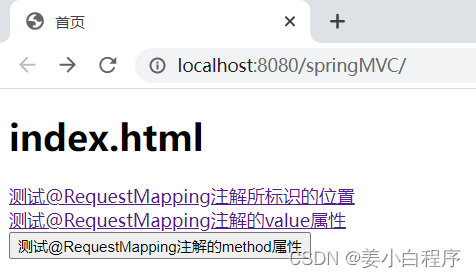
注意:表单在没有设置post请求时 默认的还是get请求 也就是说上面三种都是get请求
而现在我们在控制层里面的@RequestMapping注解里面把请求方式设置层了post请求,
若浏览器所发送的请求的请求路径和@RequestMapping注解value属性匹配,但是请求方式不匹配,此时页面报错:405 - Request method 'xxx' not supported
测试


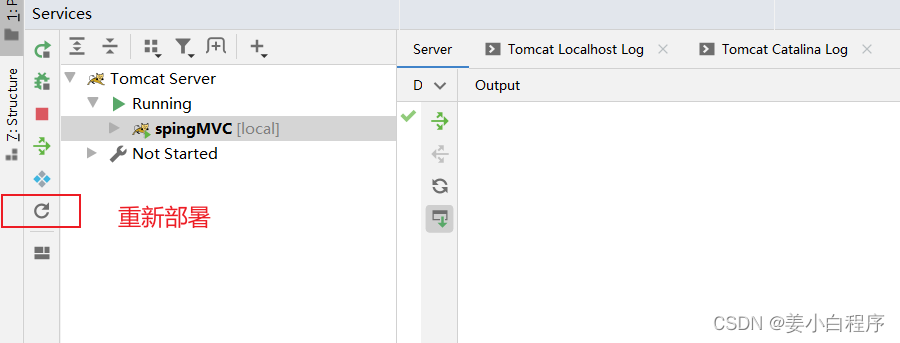
 现在我们把表单的请求方式改成post 重新部暑
- html>
- <html lang="en" xmlns:th="http://www.thymeleaf.org">
- <head>
- <meta charset="UTF-8">
- <title>首页title>
- head>
- <body>
- <h1>index.htmlh1>
- <a th:href="@{/hello}">测试@RequestMapping注解所标识的位置a><br>
- <a th:href="@{/abc}">测试@RequestMapping注解的value属性a><br>
- <form th:action="@{/hello}" method="post">
- <input type="submit" value="测试@RequestMapping注解的method属性">
- form>
- body>
- html>


现在我们让他匹配get和post
- /*
- * 1、@RequestMapping注解标识的位置
- * @RequestMapping标识一个类:设置映射请求的请求路径的初始信息
- * @RequestMapping标识一个方法:设置映射请求请求路径的具体信息
- * 2、@RequestMapping注解value属性
- * 作用:通过请求的请求路径匹配请求
- * value属性是数组类型,即当前浏览器所发送请求的请求路径匹配value属性中的任何一个值
- * 则当前请求就会被注解所标识的方法进行处理
- * 3、@RequestMapping注解的method属性
- * 作用:通过请求的请求方式匹配请求
- * method属性是RequestMethod类型的数组,即当前浏览器所发送请求的请求方式匹配method属性中的任何一中请求方式
- * 则当前请求就会被注解所标识的方法进行处理
- * 若浏览器所发送的请求的请求路径和@RequestMapping注解value属性匹配,但是请求方式不匹配
- * 此时页面报错:405 - Request method 'xxx' not supported
- * 在@RequestMapping的基础上,结合请求方式的一些派生注解:
- * @GetMapping,@PostMapping,@DeleteMapping,@PutMapping
- * */
- @Controller
- //@RequestMapping("/test") //设置当前映射的初始信息
- public class TestRequestMappingController {
- //此时控制器方法所匹配的请求的请求路径为/test/hello
- @RequestMapping(
- value = {"/hello","/abc"},
- //method = RequestMethod.GET
- // method = RequestMethod.POST
- method = {RequestMethod.POST, RequestMethod.GET}
- )
- public String hello() {
- return "success";
- }
- }
重新部暑


派生注解:
在@RequestMapping的基础上,结合请求方式的一些派生注解: * @GetMapping,@PostMapping,@DeleteMapping,@PutMapping
注:1 、对于处理指定请求方式的控制器方法, SpringMVC 中提供了 @RequestMapping 的派生注解处理 get 请求的映射 -->@GetMapping处理 post 请求的映射 -->@PostMapping处理 put 请求的映射 -->@PutMapping处理 delete 请求的映射 -->@DeleteMapping2 、常用的请求方式有 get , post , put , delete但是目前浏览器只支持 get 和 post ,若在 form 表单提交时,为 method 设置了其他请求方式的字符串( put 或 delete ),则按照默认的请求方式 get 处理若要发送 put 和 delete 请求,则需要通过 spring 提供的过滤器 HiddenHttpMethodFilter ,在RESTful 部分会讲到总结:
@RequestMapping注解的method属性
* 作用:通过请求的请求方式匹配请求
* method属性是RequestMethod类型的数组,即当前浏览器所发送请求的请求方式匹配method属性中的任何一中请求方式
* 则当前请求就会被注解所标识的方法进行处理
* 若浏览器所发送的请求的请求路径和@RequestMapping注解value属性匹配,但是请求方式不匹配
* 此时页面报错:405 - Request method 'xxx' not supported
* 在@RequestMapping的基础上,结合请求方式的一些派生注解:
* @GetMapping,@PostMapping,@DeleteMapping,@PutMapping
六 .@RequestMapping注解的params属性(了解)
@RequestMapping 注解的 params 属性通过请求的请求参数匹配请求映射@RequestMapping 注解的 params 属性是一个字符串类型的数组,可以通过四种表达式设置请求参数和请求映射的匹配关系"param" :要求请求映射所匹配的请求必须携带 param 请求参数"!param" :要求请求映射所匹配的请求必须不能携带 param 请求参数"param=value" :要求请求映射所匹配的请求必须携带 param 请求参数且 param=value"param!=value" :要求请求映射所匹配的请求必须携带 param 请求参数但是 param!=value/** * The parameters of the mapped request, narrowing the primary mapping. *
Same format for any environment: a sequence of "myParam=myValue" style * expressions, with a request only mapped if each such parameter is found * to have the given value. Expressions can be negated by using the "!=" operator, * as in "myParam!=myValue". "myParam" style expressions are also supported, * with such parameters having to be present in the request (allowed to have * any value). Finally, "!myParam" style expressions indicate that the * specified parameter is not supposed to be present in the request. *
Supported at the type level as well as at the method level! * When used at the type level, all method-level mappings inherit this * parameter restriction. */ String[] params() default {};

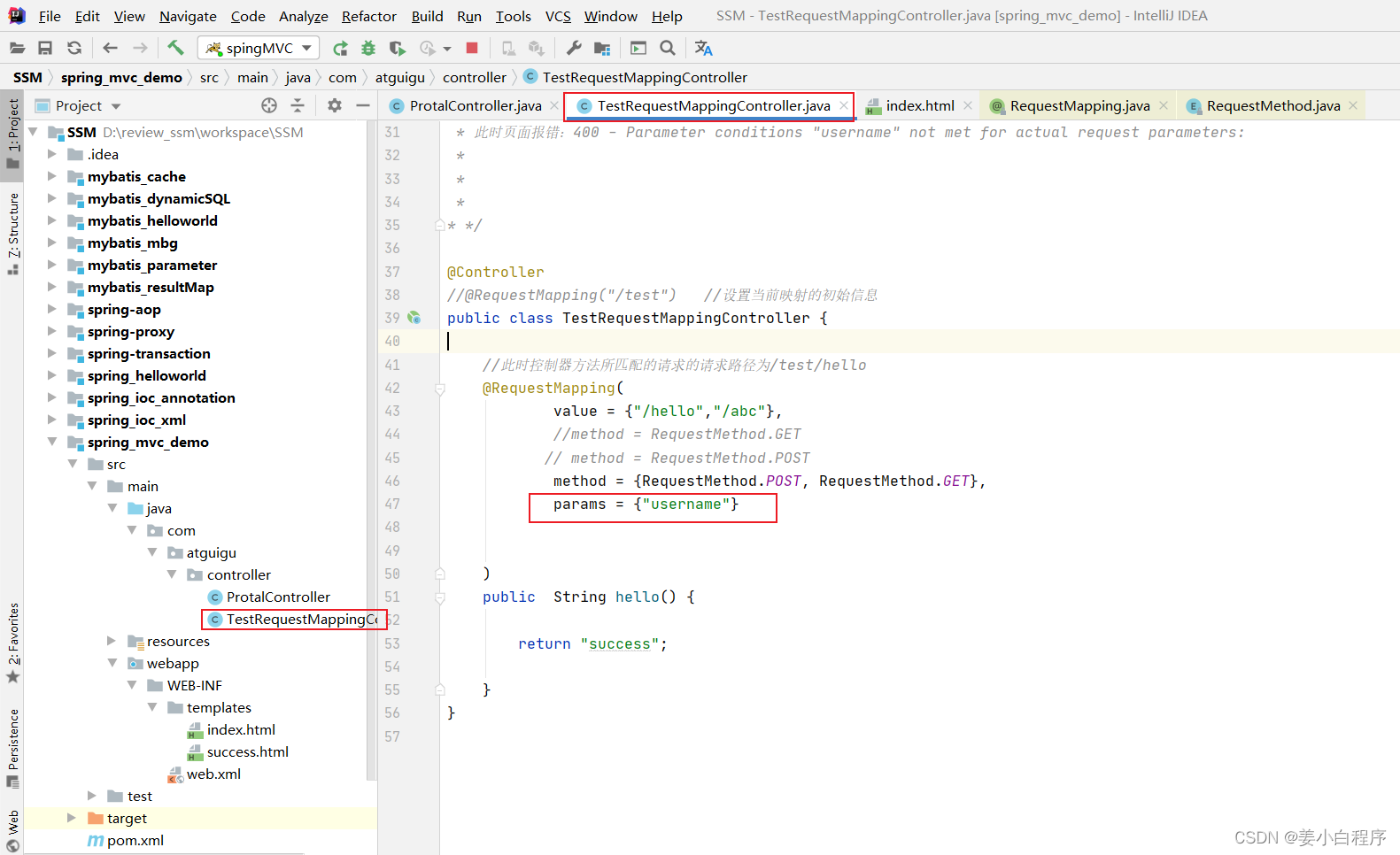
第一种写法
- package com.atguigu.controller;
- import org.springframework.stereotype.Controller;
- import org.springframework.web.bind.annotation.RequestMapping;
- import org.springframework.web.bind.annotation.RequestMethod;
- /*
- * 1、@RequestMapping注解标识的位置
- * @RequestMapping标识一个类:设置映射请求的请求路径的初始信息
- * @RequestMapping标识一个方法:设置映射请求请求路径的具体信息
- * 2、@RequestMapping注解value属性
- * 作用:通过请求的请求路径匹配请求
- * value属性是数组类型,即当前浏览器所发送请求的请求路径匹配value属性中的任何一个值
- * 则当前请求就会被注解所标识的方法进行处理
- * 3、@RequestMapping注解的method属性
- * 作用:通过请求的请求方式匹配请求
- * method属性是RequestMethod类型的数组,即当前浏览器所发送请求的请求方式匹配method属性中的任何一中请求方式
- * 则当前请求就会被注解所标识的方法进行处理
- * 若浏览器所发送的请求的请求路径和@RequestMapping注解value属性匹配,但是请求方式不匹配
- * 此时页面报错:405 - Request method 'xxx' not supported
- * 在@RequestMapping的基础上,结合请求方式的一些派生注解:
- * @GetMapping,@PostMapping,@DeleteMapping,@PutMapping
- * 4、@RequestMapping注解的params属性
- * 作用:通过请求的请求参数匹配请求,即浏览器发送的请求的请求参数必须满足params属性的设置
- * params可以使用四种表达式:
- * "param":表示当前所匹配请求的请求参数中必须携带param参数
- * "!param":表示当前所匹配请求的请求参数中一定不能携带param参数
- * "param=value":表示当前所匹配请求的请求参数中必须携带param参数且值必须为value
- * "param!=value":表示当前所匹配请求的请求参数中可以不携带param,若携带值一定不能是value
- * 若浏览器所发送的请求的请求路径和@RequestMapping注解value属性匹配,但是请求参数不匹配
- * 此时页面报错:400 - Parameter conditions "username" not met for actual request parameters:
- *
- *
- *
- * */
- @Controller
- //@RequestMapping("/test") //设置当前映射的初始信息
- public class TestRequestMappingController {
- //此时控制器方法所匹配的请求的请求路径为/test/hello
- @RequestMapping(
- value = {"/hello","/abc"},
- //method = RequestMethod.GET
- // method = RequestMethod.POST
- method = {RequestMethod.POST, RequestMethod.GET},
- params = {"username"}
- )
- public String hello() {
- return "success";
- }
- }

 报400 当前参数的条件与真实的请求参数不匹配
第一种方式
修改 index.html

- html>
- <html lang="en" xmlns:th="http://www.thymeleaf.org">
- <head>
- <meta charset="UTF-8">
- <title>首页title>
- head>
- <body>
- <h1>index.htmlh1>
- <a th:href="@{/hello}">测试@RequestMapping注解所标识的位置a><br>
- <a th:href="@{/abc}">测试@RequestMapping注解的value属性a><br>
- <form th:action="@{/hello}" method="post">
- <input type="submit" value="测试@RequestMapping注解的method属性">
- form>
- <a th:href="@{/hello?username=admin}">测试@RequestMapping注解的params属性a><br>
- body>
- html>

 第二种方式
第二种方式测试@RequestMapping注解的params属性

- html>
- <html lang="en" xmlns:th="http://www.thymeleaf.org">
- <head>
- <meta charset="UTF-8">
- <title>首页title>
- head>
- <body>
- <h1>index.htmlh1>
- <a th:href="@{/hello}">测试@RequestMapping注解所标识的位置a><br>
- <a th:href="@{/abc}">测试@RequestMapping注解的value属性a><br>
- <form th:action="@{/hello}" method="post">
- <input type="submit" value="测试@RequestMapping注解的method属性">
- form>
- <a th:href="@{/hello?username=admin}">测试@RequestMapping注解的params属性a><br>
- <a th:href="@{/hello(username='admin')}">测试@RequestMapping注解的params属性a><br>
- body>
- html>


第二种写法

- package com.atguigu.controller;
- import org.springframework.stereotype.Controller;
- import org.springframework.web.bind.annotation.RequestMapping;
- import org.springframework.web.bind.annotation.RequestMethod;
- /*
- * 1、@RequestMapping注解标识的位置
- * @RequestMapping标识一个类:设置映射请求的请求路径的初始信息
- * @RequestMapping标识一个方法:设置映射请求请求路径的具体信息
- * 2、@RequestMapping注解value属性
- * 作用:通过请求的请求路径匹配请求
- * value属性是数组类型,即当前浏览器所发送请求的请求路径匹配value属性中的任何一个值
- * 则当前请求就会被注解所标识的方法进行处理
- * 3、@RequestMapping注解的method属性
- * 作用:通过请求的请求方式匹配请求
- * method属性是RequestMethod类型的数组,即当前浏览器所发送请求的请求方式匹配method属性中的任何一中请求方式
- * 则当前请求就会被注解所标识的方法进行处理
- * 若浏览器所发送的请求的请求路径和@RequestMapping注解value属性匹配,但是请求方式不匹配
- * 此时页面报错:405 - Request method 'xxx' not supported
- * 在@RequestMapping的基础上,结合请求方式的一些派生注解:
- * @GetMapping,@PostMapping,@DeleteMapping,@PutMapping
- * 4、@RequestMapping注解的params属性
- * 作用:通过请求的请求参数匹配请求,即浏览器发送的请求的请求参数必须满足params属性的设置
- * params可以使用四种表达式:
- * "param":表示当前所匹配请求的请求参数中必须携带param参数
- * "!param":表示当前所匹配请求的请求参数中一定不能携带param参数
- * "param=value":表示当前所匹配请求的请求参数中必须携带param参数且值必须为value
- * "param!=value":表示当前所匹配请求的请求参数中可以不携带param,若携带值一定不能是value
- * 若浏览器所发送的请求的请求路径和@RequestMapping注解value属性匹配,但是请求参数不匹配
- * 此时页面报错:400 - Parameter conditions "username" not met for actual request parameters:
- *
- *
- *
- * */
- @Controller
- //@RequestMapping("/test") //设置当前映射的初始信息
- public class TestRequestMappingController {
- //此时控制器方法所匹配的请求的请求路径为/test/hello
- @RequestMapping(
- value = {"/hello","/abc"},
- //method = RequestMethod.GET
- // method = RequestMethod.POST
- method = {RequestMethod.POST, RequestMethod.GET},
- // params = {"username"}
- params = {"username","!password"}
- )
- public String hello() {
- return "success";
- }
- }


现在我们把它加个&password

第三种方式

- package com.atguigu.controller;
- import org.springframework.stereotype.Controller;
- import org.springframework.web.bind.annotation.RequestMapping;
- import org.springframework.web.bind.annotation.RequestMethod;
- /*
- * 1、@RequestMapping注解标识的位置
- * @RequestMapping标识一个类:设置映射请求的请求路径的初始信息
- * @RequestMapping标识一个方法:设置映射请求请求路径的具体信息
- * 2、@RequestMapping注解value属性
- * 作用:通过请求的请求路径匹配请求
- * value属性是数组类型,即当前浏览器所发送请求的请求路径匹配value属性中的任何一个值
- * 则当前请求就会被注解所标识的方法进行处理
- * 3、@RequestMapping注解的method属性
- * 作用:通过请求的请求方式匹配请求
- * method属性是RequestMethod类型的数组,即当前浏览器所发送请求的请求方式匹配method属性中的任何一中请求方式
- * 则当前请求就会被注解所标识的方法进行处理
- * 若浏览器所发送的请求的请求路径和@RequestMapping注解value属性匹配,但是请求方式不匹配
- * 此时页面报错:405 - Request method 'xxx' not supported
- * 在@RequestMapping的基础上,结合请求方式的一些派生注解:
- * @GetMapping,@PostMapping,@DeleteMapping,@PutMapping
- * 4、@RequestMapping注解的params属性
- * 作用:通过请求的请求参数匹配请求,即浏览器发送的请求的请求参数必须满足params属性的设置
- * params可以使用四种表达式:
- * "param":表示当前所匹配请求的请求参数中必须携带param参数
- * "!param":表示当前所匹配请求的请求参数中一定不能携带param参数
- * "param=value":表示当前所匹配请求的请求参数中必须携带param参数且值必须为value
- * "param!=value":表示当前所匹配请求的请求参数中可以不携带param,若携带值一定不能是value
- * 若浏览器所发送的请求的请求路径和@RequestMapping注解value属性匹配,但是请求参数不匹配
- * 此时页面报错:400 - Parameter conditions "username" not met for actual request parameters:
- *
- *
- *
- * */
- @Controller
- //@RequestMapping("/test") //设置当前映射的初始信息
- public class TestRequestMappingController {
- //此时控制器方法所匹配的请求的请求路径为/test/hello
- @RequestMapping(
- value = {"/hello","/abc"},
- //method = RequestMethod.GET
- // method = RequestMethod.POST
- method = {RequestMethod.POST, RequestMethod.GET},
- // params = {"username"}
- //params = {"username","!password"}
- params = {"username","!password","age=20"}
- )
- public String hello() {
- return "success";
- }
- }


现在我们加上&age=20

第四种方式

- package com.atguigu.controller;
- import org.springframework.stereotype.Controller;
- import org.springframework.web.bind.annotation.RequestMapping;
- import org.springframework.web.bind.annotation.RequestMethod;
- /*
- * 1、@RequestMapping注解标识的位置
- * @RequestMapping标识一个类:设置映射请求的请求路径的初始信息
- * @RequestMapping标识一个方法:设置映射请求请求路径的具体信息
- * 2、@RequestMapping注解value属性
- * 作用:通过请求的请求路径匹配请求
- * value属性是数组类型,即当前浏览器所发送请求的请求路径匹配value属性中的任何一个值
- * 则当前请求就会被注解所标识的方法进行处理
- * 3、@RequestMapping注解的method属性
- * 作用:通过请求的请求方式匹配请求
- * method属性是RequestMethod类型的数组,即当前浏览器所发送请求的请求方式匹配method属性中的任何一中请求方式
- * 则当前请求就会被注解所标识的方法进行处理
- * 若浏览器所发送的请求的请求路径和@RequestMapping注解value属性匹配,但是请求方式不匹配
- * 此时页面报错:405 - Request method 'xxx' not supported
- * 在@RequestMapping的基础上,结合请求方式的一些派生注解:
- * @GetMapping,@PostMapping,@DeleteMapping,@PutMapping
- * 4、@RequestMapping注解的params属性
- * 作用:通过请求的请求参数匹配请求,即浏览器发送的请求的请求参数必须满足params属性的设置
- * params可以使用四种表达式:
- * "param":表示当前所匹配请求的请求参数中必须携带param参数
- * "!param":表示当前所匹配请求的请求参数中一定不能携带param参数
- * "param=value":表示当前所匹配请求的请求参数中必须携带param参数且值必须为value
- * "param!=value":表示当前所匹配请求的请求参数中可以不携带param,若携带值一定不能是value
- * 若浏览器所发送的请求的请求路径和@RequestMapping注解value属性匹配,但是请求参数不匹配
- * 此时页面报错:400 - Parameter conditions "username" not met for actual request parameters:
- *
- *
- *
- * */
- @Controller
- //@RequestMapping("/test") //设置当前映射的初始信息
- public class TestRequestMappingController {
- //此时控制器方法所匹配的请求的请求路径为/test/hello
- @RequestMapping(
- value = {"/hello","/abc"},
- //method = RequestMethod.GET
- // method = RequestMethod.POST
- method = {RequestMethod.POST, RequestMethod.GET},
- // params = {"username"}
- //params = {"username","!password"}
- //params = {"username","!password","age=20"}
- params = {"username","!password","age=20","gender!=女"}
- )
- public String hello() {
- return "success";
- }
- }
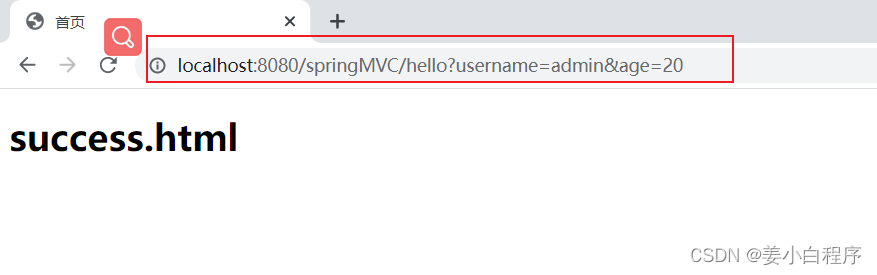 现在加上&gender=女
总结:
@RequestMapping注解的params属性
* 作用:通过请求的请求参数匹配请求,即浏览器发送的请求的请求参数必须满足params属性的设置
* params可以使用四种表达式:
* "param":表示当前所匹配请求的请求参数中必须携带param参数
* "!param":表示当前所匹配请求的请求参数中一定不能携带param参数
* "param=value":表示当前所匹配请求的请求参数中必须携带param参数且值必须为value
* "param!=value":表示当前所匹配请求的请求参数中可以不携带param,若携带值一定不能是value
* 若浏览器所发送的请求的请求路径和@RequestMapping注解value属性匹配,但是请求参数不匹配
* 此时页面报错:400 - Parameter conditions "username" not met for actual request parameters:
七 @RequestMapping注解的headers属性(了解)
@RequestMapping 注解的 headers 属性通过请求的请求头信息匹配请求映射@RequestMapping 注解的 headers 属性是一个字符串类型的数组,可以通过四种表达式设置请求头信息和请求映射的匹配关系"header" :要求请求映射所匹配的请求必须携带 header 请求头信息"!header" :要求请求映射所匹配的请求必须不能携带 header 请求头信息"header=value" :要求请求映射所匹配的请求必须携带 header 请求头信息且 header=value"header!=value" :要求请求映射所匹配的请求必须携带 header 请求头信息且 header!=value若当前请求满足 @RequestMapping 注解的 value 和 method 属性,但是不满足 headers 属性,此时页面显示 404 错误,即资源未找到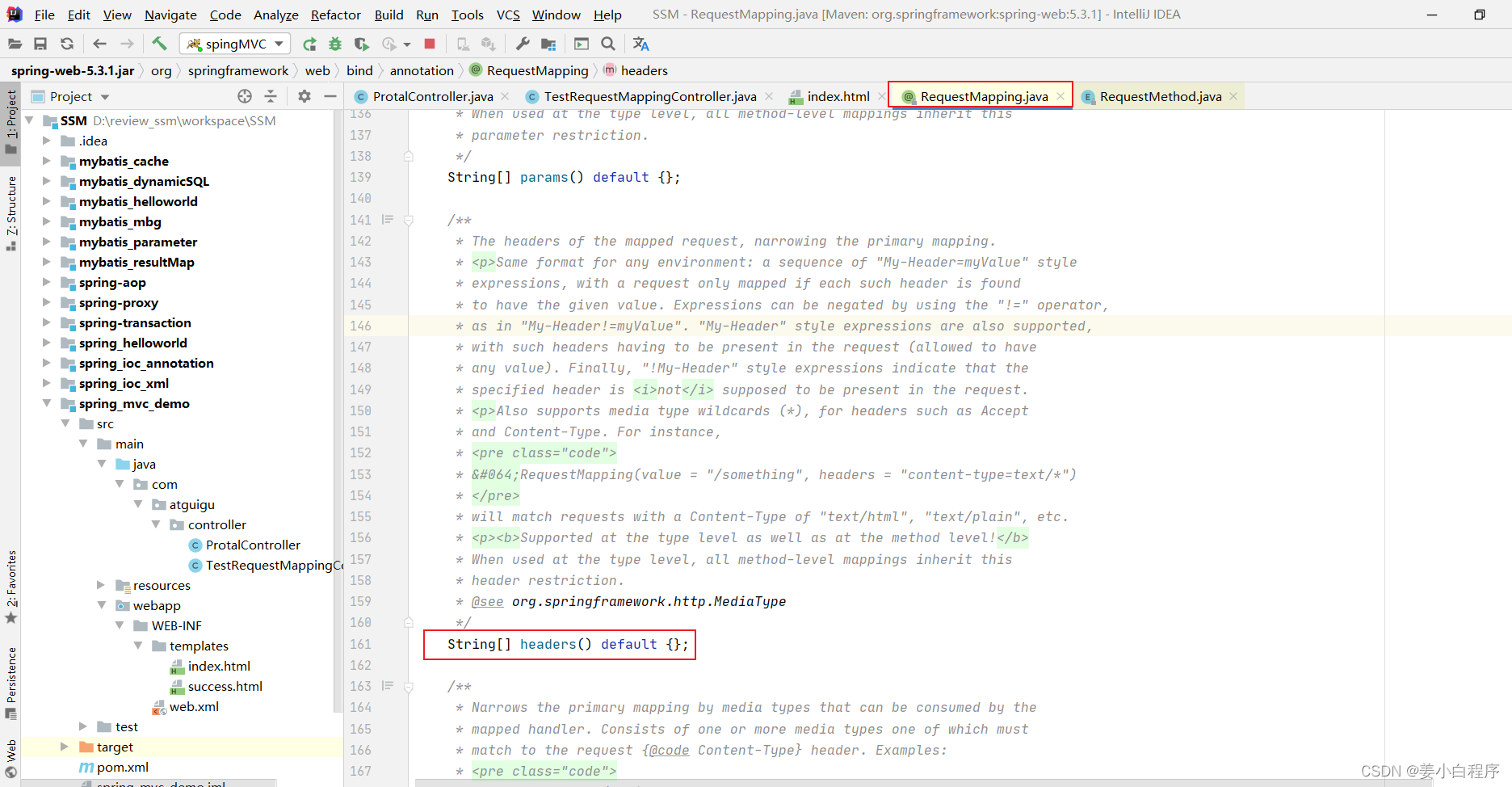

- package com.atguigu.controller;
- import org.springframework.stereotype.Controller;
- import org.springframework.web.bind.annotation.RequestMapping;
- import org.springframework.web.bind.annotation.RequestMethod;
- /*
- * 1、@RequestMapping注解标识的位置
- * @RequestMapping标识一个类:设置映射请求的请求路径的初始信息
- * @RequestMapping标识一个方法:设置映射请求请求路径的具体信息
- * 2、@RequestMapping注解value属性
- * 作用:通过请求的请求路径匹配请求
- * value属性是数组类型,即当前浏览器所发送请求的请求路径匹配value属性中的任何一个值
- * 则当前请求就会被注解所标识的方法进行处理
- * 3、@RequestMapping注解的method属性
- * 作用:通过请求的请求方式匹配请求
- * method属性是RequestMethod类型的数组,即当前浏览器所发送请求的请求方式匹配method属性中的任何一中请求方式
- * 则当前请求就会被注解所标识的方法进行处理
- * 若浏览器所发送的请求的请求路径和@RequestMapping注解value属性匹配,但是请求方式不匹配
- * 此时页面报错:405 - Request method 'xxx' not supported
- * 在@RequestMapping的基础上,结合请求方式的一些派生注解:
- * @GetMapping,@PostMapping,@DeleteMapping,@PutMapping
- * 4、@RequestMapping注解的params属性
- * 作用:通过请求的请求参数匹配请求,即浏览器发送的请求的请求参数必须满足params属性的设置
- * params可以使用四种表达式:
- * "param":表示当前所匹配请求的请求参数中必须携带param参数
- * "!param":表示当前所匹配请求的请求参数中一定不能携带param参数
- * "param=value":表示当前所匹配请求的请求参数中必须携带param参数且值必须为value
- * "param!=value":表示当前所匹配请求的请求参数中可以不携带param,若携带值一定不能是value
- * 若浏览器所发送的请求的请求路径和@RequestMapping注解value属性匹配,但是请求参数不匹配
- * 此时页面报错:400 - Parameter conditions "username" not met for actual request parameters:
- *5、@RequestMapping注解的headers属性
- * 作用:通过请求的请求头信息匹配请求,即浏览器发送的请求的请求头信息必须满足headers属性的设置
- * 若浏览器所发送的请求的请求路径和@RequestMapping注解value属性匹配,但是请求头信息不匹配
- * 此时页面报错:404
- *
- *
- * */
- @Controller
- //@RequestMapping("/test") //设置当前映射的初始信息
- public class TestRequestMappingController {
- //此时控制器方法所匹配的请求的请求路径为/test/hello
- @RequestMapping(
- value = {"/hello","/abc"},
- //method = RequestMethod.GET
- // method = RequestMethod.POST
- method = {RequestMethod.POST, RequestMethod.GET},
- // params = {"username"}
- //params = {"username","!password"}
- //params = {"username","!password","age=20"}
- // params = {"username","!password","age=20","gender!=女"}
- headers = {"referer"}
- )
- public String hello() {
- return "success";
- }
- }

打开F12


如果这个时候 我们复制地址值 新建一个标签复制进去后 会报错

有首页的情况

总结:
@RequestMapping注解的headers属性
* 作用:通过请求的请求头信息匹配请求,即浏览器发送的请求的请求头信息必须满足headers属性的设置
* 若浏览器所发送的请求的请求路径和@RequestMapping注解value属性匹配,但是请求头信息不匹配
* 此时页面报错:404
八 SpringMVC支持ant风格的路径
?:表示任意的单个字符* :表示任意的 0 个或多个字符** :表示任意层数的任意目录注意:在使用 ** 时,只能使用 /**/xxx 的方式
1 . ?:表示任意的单个字符
- package com.atguigu.controller;
- import org.springframework.stereotype.Controller;
- import org.springframework.web.bind.annotation.RequestMapping;
- import org.springframework.web.bind.annotation.RequestMethod;
- /*
- * 1、@RequestMapping注解标识的位置
- * @RequestMapping标识一个类:设置映射请求的请求路径的初始信息
- * @RequestMapping标识一个方法:设置映射请求请求路径的具体信息
- * 2、@RequestMapping注解value属性
- * 作用:通过请求的请求路径匹配请求
- * value属性是数组类型,即当前浏览器所发送请求的请求路径匹配value属性中的任何一个值
- * 则当前请求就会被注解所标识的方法进行处理
- * 3、@RequestMapping注解的method属性
- * 作用:通过请求的请求方式匹配请求
- * method属性是RequestMethod类型的数组,即当前浏览器所发送请求的请求方式匹配method属性中的任何一中请求方式
- * 则当前请求就会被注解所标识的方法进行处理
- * 若浏览器所发送的请求的请求路径和@RequestMapping注解value属性匹配,但是请求方式不匹配
- * 此时页面报错:405 - Request method 'xxx' not supported
- * 在@RequestMapping的基础上,结合请求方式的一些派生注解:
- * @GetMapping,@PostMapping,@DeleteMapping,@PutMapping
- * 4、@RequestMapping注解的params属性
- * 作用:通过请求的请求参数匹配请求,即浏览器发送的请求的请求参数必须满足params属性的设置
- * params可以使用四种表达式:
- * "param":表示当前所匹配请求的请求参数中必须携带param参数
- * "!param":表示当前所匹配请求的请求参数中一定不能携带param参数
- * "param=value":表示当前所匹配请求的请求参数中必须携带param参数且值必须为value
- * "param!=value":表示当前所匹配请求的请求参数中可以不携带param,若携带值一定不能是value
- * 若浏览器所发送的请求的请求路径和@RequestMapping注解value属性匹配,但是请求参数不匹配
- * 此时页面报错:400 - Parameter conditions "username" not met for actual request parameters:
- *5、@RequestMapping注解的headers属性
- * 作用:通过请求的请求头信息匹配请求,即浏览器发送的请求的请求头信息必须满足headers属性的设置
- * 若浏览器所发送的请求的请求路径和@RequestMapping注解value属性匹配,但是请求头信息不匹配
- * 此时页面报错:404
- 6、SpringMVC支持ant风格的路径
- * 在@RequestMapping注解的value属性值中设置一些特殊字符
- * ?:任意的单个字符(不包括?)
- * *:任意个数的任意字符(不包括?和/)
- * **:任意层数的任意目录,注意使用方式只能**写在双斜线中,前后不能有任何的其他字符
- *
- *
- * */
- @Controller
- //@RequestMapping("/test") //设置当前映射的初始信息
- public class TestRequestMappingController {
- //此时控制器方法所匹配的请求的请求路径为/test/hello
- @RequestMapping(
- value = {"/hello","/abc"},
- //method = RequestMethod.GET
- // method = RequestMethod.POST
- method = {RequestMethod.POST, RequestMethod.GET},
- // params = {"username"}
- //params = {"username","!password"}
- //params = {"username","!password","age=20"}
- // params = {"username","!password","age=20","gender!=女"}
- headers = {"referer"}
- )
- public String hello() {
- return "success";
- }
- @RequestMapping("/a?a/test/ant")
- public String testAnt(){
- return "success";
- }
- }

- html>
- <html lang="en" xmlns:th="http://www.thymeleaf.org">
- <head>
- <meta charset="UTF-8">
- <title>首页title>
- head>
- <body>
- <h1>index.htmlh1>
- <a th:href="@{/hello}">测试@RequestMapping注解所标识的位置a><br>
- <a th:href="@{/abc}">测试@RequestMapping注解的value属性a><br>
- <form th:action="@{/hello}" method="post">
- <input type="submit" value="测试@RequestMapping注解的method属性">
- form>
- <a th:href="@{/hello?username=admin}">测试@RequestMapping注解的params属性a><br>
- <a th:href="@{/hello(username='admin')}">测试@RequestMapping注解的params属性a><br>
- <a th:href="@{/aaa/test/ant}">测试@RequestMapping注解支持ant风格的路径a><br>
- body>
- html>


但是不能写问号? 或是多个字符 如下所示 则会报错


2 . *:表示任意的0个或多个字符

- package com.atguigu.controller;
- import org.springframework.stereotype.Controller;
- import org.springframework.web.bind.annotation.RequestMapping;
- import org.springframework.web.bind.annotation.RequestMethod;
- /*
- * 1、@RequestMapping注解标识的位置
- * @RequestMapping标识一个类:设置映射请求的请求路径的初始信息
- * @RequestMapping标识一个方法:设置映射请求请求路径的具体信息
- * 2、@RequestMapping注解value属性
- * 作用:通过请求的请求路径匹配请求
- * value属性是数组类型,即当前浏览器所发送请求的请求路径匹配value属性中的任何一个值
- * 则当前请求就会被注解所标识的方法进行处理
- * 3、@RequestMapping注解的method属性
- * 作用:通过请求的请求方式匹配请求
- * method属性是RequestMethod类型的数组,即当前浏览器所发送请求的请求方式匹配method属性中的任何一中请求方式
- * 则当前请求就会被注解所标识的方法进行处理
- * 若浏览器所发送的请求的请求路径和@RequestMapping注解value属性匹配,但是请求方式不匹配
- * 此时页面报错:405 - Request method 'xxx' not supported
- * 在@RequestMapping的基础上,结合请求方式的一些派生注解:
- * @GetMapping,@PostMapping,@DeleteMapping,@PutMapping
- * 4、@RequestMapping注解的params属性
- * 作用:通过请求的请求参数匹配请求,即浏览器发送的请求的请求参数必须满足params属性的设置
- * params可以使用四种表达式:
- * "param":表示当前所匹配请求的请求参数中必须携带param参数
- * "!param":表示当前所匹配请求的请求参数中一定不能携带param参数
- * "param=value":表示当前所匹配请求的请求参数中必须携带param参数且值必须为value
- * "param!=value":表示当前所匹配请求的请求参数中可以不携带param,若携带值一定不能是value
- * 若浏览器所发送的请求的请求路径和@RequestMapping注解value属性匹配,但是请求参数不匹配
- * 此时页面报错:400 - Parameter conditions "username" not met for actual request parameters:
- *5、@RequestMapping注解的headers属性
- * 作用:通过请求的请求头信息匹配请求,即浏览器发送的请求的请求头信息必须满足headers属性的设置
- * 若浏览器所发送的请求的请求路径和@RequestMapping注解value属性匹配,但是请求头信息不匹配
- * 此时页面报错:404
- 6、SpringMVC支持ant风格的路径
- * 在@RequestMapping注解的value属性值中设置一些特殊字符
- * ?:任意的单个字符(不包括?)
- * *:任意个数的任意字符(不包括?和/)
- * **:任意层数的任意目录,注意使用方式只能**写在双斜线中,前后不能有任何的其他字符
- *
- *
- * */
- @Controller
- //@RequestMapping("/test") //设置当前映射的初始信息
- public class TestRequestMappingController {
- //此时控制器方法所匹配的请求的请求路径为/test/hello
- @RequestMapping(
- value = {"/hello","/abc"},
- //method = RequestMethod.GET
- // method = RequestMethod.POST
- method = {RequestMethod.POST, RequestMethod.GET},
- // params = {"username"}
- //params = {"username","!password"}
- //params = {"username","!password","age=20"}
- // params = {"username","!password","age=20","gender!=女"}
- headers = {"referer"}
- )
- public String hello() {
- return "success";
- }
- @RequestMapping("/a*a/test/ant")
- public String testAnt(){
- return "success";
- }
- }


但是不能写?和/

 3 . **:表示任意层数的任意目录
- package com.atguigu.controller;
- import org.springframework.stereotype.Controller;
- import org.springframework.web.bind.annotation.RequestMapping;
- import org.springframework.web.bind.annotation.RequestMethod;
- /*
- * 1、@RequestMapping注解标识的位置
- * @RequestMapping标识一个类:设置映射请求的请求路径的初始信息
- * @RequestMapping标识一个方法:设置映射请求请求路径的具体信息
- * 2、@RequestMapping注解value属性
- * 作用:通过请求的请求路径匹配请求
- * value属性是数组类型,即当前浏览器所发送请求的请求路径匹配value属性中的任何一个值
- * 则当前请求就会被注解所标识的方法进行处理
- * 3、@RequestMapping注解的method属性
- * 作用:通过请求的请求方式匹配请求
- * method属性是RequestMethod类型的数组,即当前浏览器所发送请求的请求方式匹配method属性中的任何一中请求方式
- * 则当前请求就会被注解所标识的方法进行处理
- * 若浏览器所发送的请求的请求路径和@RequestMapping注解value属性匹配,但是请求方式不匹配
- * 此时页面报错:405 - Request method 'xxx' not supported
- * 在@RequestMapping的基础上,结合请求方式的一些派生注解:
- * @GetMapping,@PostMapping,@DeleteMapping,@PutMapping
- * 4、@RequestMapping注解的params属性
- * 作用:通过请求的请求参数匹配请求,即浏览器发送的请求的请求参数必须满足params属性的设置
- * params可以使用四种表达式:
- * "param":表示当前所匹配请求的请求参数中必须携带param参数
- * "!param":表示当前所匹配请求的请求参数中一定不能携带param参数
- * "param=value":表示当前所匹配请求的请求参数中必须携带param参数且值必须为value
- * "param!=value":表示当前所匹配请求的请求参数中可以不携带param,若携带值一定不能是value
- * 若浏览器所发送的请求的请求路径和@RequestMapping注解value属性匹配,但是请求参数不匹配
- * 此时页面报错:400 - Parameter conditions "username" not met for actual request parameters:
- *5、@RequestMapping注解的headers属性
- * 作用:通过请求的请求头信息匹配请求,即浏览器发送的请求的请求头信息必须满足headers属性的设置
- * 若浏览器所发送的请求的请求路径和@RequestMapping注解value属性匹配,但是请求头信息不匹配
- * 此时页面报错:404
- 6、SpringMVC支持ant风格的路径
- * 在@RequestMapping注解的value属性值中设置一些特殊字符
- * ?:任意的单个字符(不包括?)
- * *:任意个数的任意字符(不包括?和/)
- * **:任意层数的任意目录,注意使用方式只能**写在双斜线中,前后不能有任何的其他字符
- *
- *
- * */
- @Controller
- //@RequestMapping("/test") //设置当前映射的初始信息
- public class TestRequestMappingController {
- //此时控制器方法所匹配的请求的请求路径为/test/hello
- @RequestMapping(
- value = {"/hello","/abc"},
- //method = RequestMethod.GET
- // method = RequestMethod.POST
- method = {RequestMethod.POST, RequestMethod.GET},
- // params = {"username"}
- //params = {"username","!password"}
- //params = {"username","!password","age=20"}
- // params = {"username","!password","age=20","gender!=女"}
- headers = {"referer"}
- )
- public String hello() {
- return "success";
- }
- /* @RequestMapping("/a?a/test/ant")
- public String testAnt(){
- return "success";
- }*/
- /* @RequestMapping("/a*a/test/ant")
- public String testAnt(){
- return "success";
- }*/
- @RequestMapping("/**/test/ant")
- public String testAnt(){
- return "success";
- }
- }

 总结:
总结:SpringMVC支持ant风格的路径 * 在@RequestMapping注解的value属性值中设置一些特殊字符 * ?:任意的单个字符(不包括?) * *:任意个数的任意字符(不包括?和/) * **:任意层数的任意目录,注意使用方式只能**写在双斜线中,前后不能有任何的其他字符
九 SpringMVC支持路径中的占位符(重点)
原始方式: /deleteUser?id=1rest 方式: /user/delete/1SpringMVC 路径中的占位符常用于 RESTful 风格中,当请求路径中将某些数据通过路径的方式传输到服务器中,就可以在相应的 @RequestMapping 注解的 value 属性中通过占位符 {xxx} 表示传输的数据,在 通过 @PathVariable 注解,将占位符所表示的数据赋值给控制器方法的形参
- package com.atguigu.controller;
- import org.springframework.stereotype.Controller;
- import org.springframework.web.bind.annotation.PathVariable;
- import org.springframework.web.bind.annotation.RequestMapping;
- import org.springframework.web.bind.annotation.RequestMethod;
- /*
- * 1、@RequestMapping注解标识的位置
- * @RequestMapping标识一个类:设置映射请求的请求路径的初始信息
- * @RequestMapping标识一个方法:设置映射请求请求路径的具体信息
- * 2、@RequestMapping注解value属性
- * 作用:通过请求的请求路径匹配请求
- * value属性是数组类型,即当前浏览器所发送请求的请求路径匹配value属性中的任何一个值
- * 则当前请求就会被注解所标识的方法进行处理
- * 3、@RequestMapping注解的method属性
- * 作用:通过请求的请求方式匹配请求
- * method属性是RequestMethod类型的数组,即当前浏览器所发送请求的请求方式匹配method属性中的任何一中请求方式
- * 则当前请求就会被注解所标识的方法进行处理
- * 若浏览器所发送的请求的请求路径和@RequestMapping注解value属性匹配,但是请求方式不匹配
- * 此时页面报错:405 - Request method 'xxx' not supported
- * 在@RequestMapping的基础上,结合请求方式的一些派生注解:
- * @GetMapping,@PostMapping,@DeleteMapping,@PutMapping
- * 4、@RequestMapping注解的params属性
- * 作用:通过请求的请求参数匹配请求,即浏览器发送的请求的请求参数必须满足params属性的设置
- * params可以使用四种表达式:
- * "param":表示当前所匹配请求的请求参数中必须携带param参数
- * "!param":表示当前所匹配请求的请求参数中一定不能携带param参数
- * "param=value":表示当前所匹配请求的请求参数中必须携带param参数且值必须为value
- * "param!=value":表示当前所匹配请求的请求参数中可以不携带param,若携带值一定不能是value
- * 若浏览器所发送的请求的请求路径和@RequestMapping注解value属性匹配,但是请求参数不匹配
- * 此时页面报错:400 - Parameter conditions "username" not met for actual request parameters:
- *5、@RequestMapping注解的headers属性
- * 作用:通过请求的请求头信息匹配请求,即浏览器发送的请求的请求头信息必须满足headers属性的设置
- * 若浏览器所发送的请求的请求路径和@RequestMapping注解value属性匹配,但是请求头信息不匹配
- * 此时页面报错:404
- 6、SpringMVC支持ant风格的路径
- * 在@RequestMapping注解的value属性值中设置一些特殊字符
- * ?:任意的单个字符(不包括?)
- * *:任意个数的任意字符(不包括?和/)
- * **:任意层数的任意目录,注意使用方式只能**写在双斜线中,前后不能有任何的其他字符
- *7、@RequestMapping注解使用路径中的占位符
- * 传统:/deleteUser?id=1
- * rest:/user/delete/1
- * 需要在@RequestMapping注解的value属性中所设置的路径中,使用{xxx}的方式表示路径中的数据
- * 在通过@PathVariable注解,将占位符所标识的值和控制器方法的形参进行绑定
- * */
- @Controller
- //@RequestMapping("/test") //设置当前映射的初始信息
- public class TestRequestMappingController {
- //此时控制器方法所匹配的请求的请求路径为/test/hello
- @RequestMapping(
- value = {"/hello","/abc"},
- //method = RequestMethod.GET
- // method = RequestMethod.POST
- method = {RequestMethod.POST, RequestMethod.GET},
- // params = {"username"}
- //params = {"username","!password"}
- //params = {"username","!password","age=20"}
- // params = {"username","!password","age=20","gender!=女"}
- headers = {"referer"}
- )
- public String hello() {
- return "success";
- }
- /* @RequestMapping("/a?a/test/ant")
- public String testAnt(){
- return "success";
- }*/
- /* @RequestMapping("/a*a/test/ant")
- public String testAnt(){
- return "success";
- }*/
- @RequestMapping("/**/test/ant")
- public String testAnt(){
- return "success";
- }
- /* @RequestMapping("/test/rest/{username}/{id}")
- public String testRest(@PathVariable("id") Integer id, @PathVariable("username") String username){
- System.out.println("id:"+id+",username:"+username);
- return "success";
- }*/
- @RequestMapping("/test/rest/{id}")
- public String testRest(@PathVariable("id") Integer id){
- System.out.println("id:"+id);
- return "success";
- }
- }

- html>
- <html lang="en" xmlns:th="http://www.thymeleaf.org">
- <head>
- <meta charset="UTF-8">
- <title>首页title>
- head>
- <body>
- <h1>index.htmlh1>
- <a th:href="@{/hello}">测试@RequestMapping注解所标识的位置a><br>
- <a th:href="@{/abc}">测试@RequestMapping注解的value属性a><br>
- <form th:action="@{/hello}" method="post">
- <input type="submit" value="测试@RequestMapping注解的method属性">
- form>
- <a th:href="@{/hello?username=admin}">测试@RequestMapping注解的params属性a><br>
- <a th:href="@{/hello(username='admin')}">测试@RequestMapping注解的params属性a><br>
- <a th:href="@{/aaa/test/ant}">测试@RequestMapping注解支持ant风格的路径a><br>
- <a th:href="@{/test/rest/1}">测试@RequestMapping注解的value属性中的占位符a><br>
- body>
- html>


现在我们加上username

- package com.atguigu.controller;
- import org.springframework.stereotype.Controller;
- import org.springframework.web.bind.annotation.PathVariable;
- import org.springframework.web.bind.annotation.RequestMapping;
- import org.springframework.web.bind.annotation.RequestMethod;
- /*
- * 1、@RequestMapping注解标识的位置
- * @RequestMapping标识一个类:设置映射请求的请求路径的初始信息
- * @RequestMapping标识一个方法:设置映射请求请求路径的具体信息
- * 2、@RequestMapping注解value属性
- * 作用:通过请求的请求路径匹配请求
- * value属性是数组类型,即当前浏览器所发送请求的请求路径匹配value属性中的任何一个值
- * 则当前请求就会被注解所标识的方法进行处理
- * 3、@RequestMapping注解的method属性
- * 作用:通过请求的请求方式匹配请求
- * method属性是RequestMethod类型的数组,即当前浏览器所发送请求的请求方式匹配method属性中的任何一中请求方式
- * 则当前请求就会被注解所标识的方法进行处理
- * 若浏览器所发送的请求的请求路径和@RequestMapping注解value属性匹配,但是请求方式不匹配
- * 此时页面报错:405 - Request method 'xxx' not supported
- * 在@RequestMapping的基础上,结合请求方式的一些派生注解:
- * @GetMapping,@PostMapping,@DeleteMapping,@PutMapping
- * 4、@RequestMapping注解的params属性
- * 作用:通过请求的请求参数匹配请求,即浏览器发送的请求的请求参数必须满足params属性的设置
- * params可以使用四种表达式:
- * "param":表示当前所匹配请求的请求参数中必须携带param参数
- * "!param":表示当前所匹配请求的请求参数中一定不能携带param参数
- * "param=value":表示当前所匹配请求的请求参数中必须携带param参数且值必须为value
- * "param!=value":表示当前所匹配请求的请求参数中可以不携带param,若携带值一定不能是value
- * 若浏览器所发送的请求的请求路径和@RequestMapping注解value属性匹配,但是请求参数不匹配
- * 此时页面报错:400 - Parameter conditions "username" not met for actual request parameters:
- *5、@RequestMapping注解的headers属性
- * 作用:通过请求的请求头信息匹配请求,即浏览器发送的请求的请求头信息必须满足headers属性的设置
- * 若浏览器所发送的请求的请求路径和@RequestMapping注解value属性匹配,但是请求头信息不匹配
- * 此时页面报错:404
- 6、SpringMVC支持ant风格的路径
- * 在@RequestMapping注解的value属性值中设置一些特殊字符
- * ?:任意的单个字符(不包括?)
- * *:任意个数的任意字符(不包括?和/)
- * **:任意层数的任意目录,注意使用方式只能**写在双斜线中,前后不能有任何的其他字符
- *7、@RequestMapping注解使用路径中的占位符
- * 传统:/deleteUser?id=1
- * rest:/user/delete/1
- * 需要在@RequestMapping注解的value属性中所设置的路径中,使用{xxx}的方式表示路径中的数据
- * 在通过@PathVariable注解,将占位符所标识的值和控制器方法的形参进行绑定
- * */
- @Controller
- //@RequestMapping("/test") //设置当前映射的初始信息
- public class TestRequestMappingController {
- //此时控制器方法所匹配的请求的请求路径为/test/hello
- @RequestMapping(
- value = {"/hello","/abc"},
- //method = RequestMethod.GET
- // method = RequestMethod.POST
- method = {RequestMethod.POST, RequestMethod.GET},
- // params = {"username"}
- //params = {"username","!password"}
- //params = {"username","!password","age=20"}
- // params = {"username","!password","age=20","gender!=女"}
- headers = {"referer"}
- )
- public String hello() {
- return "success";
- }
- /* @RequestMapping("/a?a/test/ant")
- public String testAnt(){
- return "success";
- }*/
- /* @RequestMapping("/a*a/test/ant")
- public String testAnt(){
- return "success";
- }*/
- @RequestMapping("/**/test/ant")
- public String testAnt(){
- return "success";
- }
- /* @RequestMapping("/test/rest/{id}")
- public String testRest(@PathVariable("id") Integer id){
- System.out.println("id:"+id);
- return "success";
- }*/
- @RequestMapping("/test/rest/{username}/{id}")
- public String testRest(@PathVariable("id") Integer id, @PathVariable("username") String username){
- System.out.println("id:"+id+",username:"+username);
- return "success";
- }
- }
- html>
- <html lang="en" xmlns:th="http://www.thymeleaf.org">
- <head>
- <meta charset="UTF-8">
- <title>首页title>
- head>
- <body>
- <h1>index.htmlh1>
- <a th:href="@{/hello}">测试@RequestMapping注解所标识的位置a><br>
- <a th:href="@{/abc}">测试@RequestMapping注解的value属性a><br>
- <form th:action="@{/hello}" method="post">
- <input type="submit" value="测试@RequestMapping注解的method属性">
- form>
- <a th:href="@{/hello?username=admin}">测试@RequestMapping注解的params属性a><br>
- <a th:href="@{/hello(username='admin')}">测试@RequestMapping注解的params属性a><br>
- <a th:href="@{/aaa/test/ant}">测试@RequestMapping注解支持ant风格的路径a><br>
- <a th:href="@{/test/rest/admin/1}">测试@RequestMapping注解的value属性中的占位符a><br>
- body>
- html>


总结:
@RequestMapping注解使用路径中的占位符
* 传统:/deleteUser?id=1
* rest:/user/delete/1
* 需要在@RequestMapping注解的value属性中所设置的路径中,使用{xxx}的方式表示路径中的数据
* 在通过@PathVariable注解,将占位符所标识的值和控制器方法的形参进行绑定
全部总结:
/* * 1、@RequestMapping注解标识的位置 * @RequestMapping标识一个类:设置映射请求的请求路径的初始信息 * @RequestMapping标识一个方法:设置映射请求请求路径的具体信息 * 2、@RequestMapping注解value属性 * 作用:通过请求的请求路径匹配请求 * value属性是数组类型,即当前浏览器所发送请求的请求路径匹配value属性中的任何一个值 * 则当前请求就会被注解所标识的方法进行处理 * 3、@RequestMapping注解的method属性 * 作用:通过请求的请求方式匹配请求 * method属性是RequestMethod类型的数组,即当前浏览器所发送请求的请求方式匹配method属性中的任何一中请求方式 * 则当前请求就会被注解所标识的方法进行处理 * 若浏览器所发送的请求的请求路径和@RequestMapping注解value属性匹配,但是请求方式不匹配 * 此时页面报错:405 - Request method 'xxx' not supported * 在@RequestMapping的基础上,结合请求方式的一些派生注解: * @GetMapping,@PostMapping,@DeleteMapping,@PutMapping * 4、@RequestMapping注解的params属性 * 作用:通过请求的请求参数匹配请求,即浏览器发送的请求的请求参数必须满足params属性的设置 * params可以使用四种表达式: * "param":表示当前所匹配请求的请求参数中必须携带param参数 * "!param":表示当前所匹配请求的请求参数中一定不能携带param参数 * "param=value":表示当前所匹配请求的请求参数中必须携带param参数且值必须为value * "param!=value":表示当前所匹配请求的请求参数中可以不携带param,若携带值一定不能是value * 若浏览器所发送的请求的请求路径和@RequestMapping注解value属性匹配,但是请求参数不匹配 * 此时页面报错:400 - Parameter conditions "username" not met for actual request parameters: *5、@RequestMapping注解的headers属性 * 作用:通过请求的请求头信息匹配请求,即浏览器发送的请求的请求头信息必须满足headers属性的设置 * 若浏览器所发送的请求的请求路径和@RequestMapping注解value属性匹配,但是请求头信息不匹配 * 此时页面报错:404 6、SpringMVC支持ant风格的路径 * 在@RequestMapping注解的value属性值中设置一些特殊字符 * ?:任意的单个字符(不包括?) * *:任意个数的任意字符(不包括?和/) * **:任意层数的任意目录,注意使用方式只能**写在双斜线中,前后不能有任何的其他字符 *7、@RequestMapping注解使用路径中的占位符 * 传统:/deleteUser?id=1 * rest:/user/delete/1 * 需要在@RequestMapping注解的value属性中所设置的路径中,使用{xxx}的方式表示路径中的数据 * 在通过@PathVariable注解,将占位符所标识的值和控制器方法的形参进行绑定 * */ -
相关阅读:
【NoSQL数据库技术与应用】【课本代码】【课后题答案】【持续更新】
递归与回溯法
Go 语言之 Json 解析,正则表达式,从数据库导出 CSV 文件代码示例
Spring Boot跨域问题简介
Nodejs系列之模块成员导出与导入
go语言,yaml实现简单的workflow工作流
Causality
Netty 学习(六):创建 NioEventLoopGroup 的核心源码说明
Day19_8 Java学习之打印流、属性集、类加载器与反射
【Pod】
- 原文地址:https://blog.csdn.net/m0_59281987/article/details/127826334
