-
SpringBoot SpringBoot 基础篇 4 基于 SpringBoot 的SSMP 整合案例 4.8 业务层标准开发【基础CRUD】
SpringBoot
【黑马程序员SpringBoot2全套视频教程,springboot零基础到项目实战(spring boot2完整版)】
SpringBoot 基础篇
4 基于 SpringBoot 的SSMP 整合案例
4.8 业务层标准开发【基础CRUD】
4.8.1 业务层开发
【注意】
Service层接口定义与数据层接口定义具有较大区别,不要混用
- selectByUserNameAndPassword(String username,String password);【数据层】
- login(String username,String password);【业务层】
【接口定义】
package com.dingjiaxiong.service; import com.baomidou.mybatisplus.core.metadata.IPage; import com.dingjiaxiong.domain.Book; import java.util.List; /** * ClassName: BookService * date: 2022/10/17 19:14 * * @author DingJiaxiong */ public interface BookService { //新增 Boolean save(Book book); //修改 Boolean update(Book book); //删除 Boolean delete(Integer id); //查询单个 Book getById(Integer id); //查询全部 List<Book> getAll(); //分页查询 IPage<Book> getPage(int currentPage , int pageSize); }- 1
- 2
- 3
- 4
- 5
- 6
- 7
- 8
- 9
- 10
- 11
- 12
- 13
- 14
- 15
- 16
- 17
- 18
- 19
- 20
- 21
- 22
- 23
- 24
- 25
- 26
- 27
- 28
- 29
- 30
- 31
【实现类定义】
package com.dingjiaxiong.service.impl; import com.baomidou.mybatisplus.core.metadata.IPage; import com.baomidou.mybatisplus.extension.plugins.pagination.Page; import com.dingjiaxiong.Dao.BookDao; import com.dingjiaxiong.domain.Book; import com.dingjiaxiong.service.BookService; import org.springframework.beans.factory.annotation.Autowired; import org.springframework.stereotype.Service; import java.util.List; /** * ClassName: BookServiceImpl * date: 2022/10/17 19:17 * * @author DingJiaxiong */ @Service public class BookServiceImpl implements BookService { @Autowired private BookDao bookDao; @Override public Boolean save(Book book) { return bookDao.insert(book) > 0; } @Override public Boolean update(Book book) { return bookDao.updateById(book) > 0; } @Override public Boolean delete(Integer id) { return bookDao.deleteById(id) > 0; } @Override public Book getById(Integer id) { return bookDao.selectById(id); } @Override public List<Book> getAll() { return bookDao.selectList(null); } @Override public IPage<Book> getPage(int currentPage, int pageSize) { IPage page = new Page(currentPage,pageSize); return bookDao.selectPage(page,null); } }- 1
- 2
- 3
- 4
- 5
- 6
- 7
- 8
- 9
- 10
- 11
- 12
- 13
- 14
- 15
- 16
- 17
- 18
- 19
- 20
- 21
- 22
- 23
- 24
- 25
- 26
- 27
- 28
- 29
- 30
- 31
- 32
- 33
- 34
- 35
- 36
- 37
- 38
- 39
- 40
- 41
- 42
- 43
- 44
- 45
- 46
- 47
- 48
- 49
- 50
- 51
- 52
- 53
- 54
- 55
- 56
这样就算完成了,测试一下
package com.dingjiaxiong.service; import com.dingjiaxiong.service.impl.BookServiceImpl; import org.junit.jupiter.api.Test; import org.springframework.beans.factory.annotation.Autowired; import org.springframework.boot.test.context.SpringBootTest; /** * ClassName: BookServiceTestCase * date: 2022/10/17 19:20 * * @author DingJiaxiong */ @SpringBootTest public class BookServiceTestCase { @Autowired private BookServiceImpl bookService; @Test void testGetById(){ System.out.println(bookService.getById(1)); } }- 1
- 2
- 3
- 4
- 5
- 6
- 7
- 8
- 9
- 10
- 11
- 12
- 13
- 14
- 15
- 16
- 17
- 18
- 19
- 20
- 21
- 22
- 23
- 24
- 25
- 26
测试结果

其他方法同理
新增:
@Test void testSave(){ Book book = new Book(); book.setType("测试数据123"); book.setName("测试数据123"); book.setDescription("测试数据123"); bookService.save(book); }- 1
- 2
- 3
- 4
- 5
- 6
- 7
- 8
- 9

修改:
@Test void testUpdate(){ Book book = new Book(); book.setId(15); book.setType("测试数据123"); book.setName("测试数据123xxxxxxxxxxxxxxxxxxx"); book.setDescription("测试数据123"); bookService.update(book); }- 1
- 2
- 3
- 4
- 5
- 6
- 7
- 8
- 9
- 10

删除:
@Test void testDelete(){ bookService.delete(15); }- 1
- 2
- 3
- 4

查询全部
@Test void testGetAll(){ System.out.println(bookService.getAll()); }- 1
- 2
- 3
- 4

分页查询
@Test void testPage(){ IPage iPage = bookService.getPage(2, 5); System.out.println(iPage.getCurrent()); System.out.println(iPage.getSize()); System.out.println(iPage.getTotal()); System.out.println(iPage.getPages()); System.out.println(iPage.getRecords()); }- 1
- 2
- 3
- 4
- 5
- 6
- 7
- 8
- 9
- 10
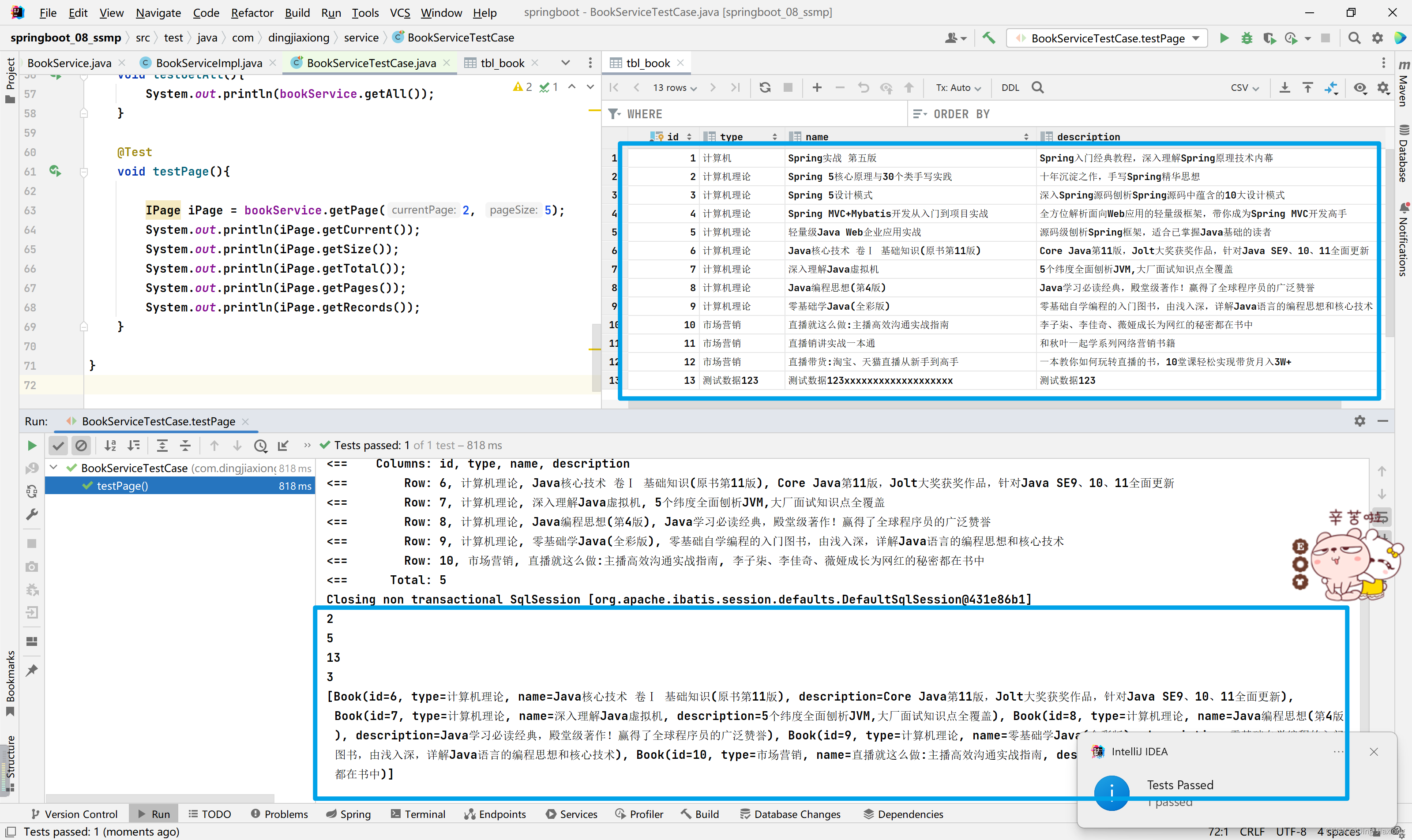
ok, 没毛病
小结一下【这是标准开发】
- 接口定义
- 实现类定义
- 测试类定义
4.8.2 小结
- Service接口名称定义成业务名称,并与Dao接口名称进行区分
- 制作测试类测试Service功能是否有效
-
相关阅读:
Docker下部署安装Mysql
力扣669 补9.16
IBM MQ 故障诊断(一)
【内网攻击】DHCP协议概念——地址池耗尽攻击
好好回答下 TCP 和 UDP 的区别!
Google Cloud X Kyligence|如何从业务视角管理数据湖?
5.2 空表实验
『第十一章』数据持久化:CoreData 与 CloudKit
1856. 子数组最小乘积的最大值-前准和+单调栈
webgl 系列 —— 绘制猫
- 原文地址:https://blog.csdn.net/weixin_44226181/article/details/127817008
