-
LayUI项目学习
🌼 官网教程
1、新建一个LayUI项目:
① 初始化项目:
1)新建一个文件夹,命名为layui,进入文件夹,执行
npm init -y,生成一个package.json文件。
2)新建一个html文件,命名为index.html
3)引入layui,我这里采用模块化开发,cdn引入。模块化(layui.js):<!-- 引入layui css --> <link rel="stylesheet" type="text/css" href="https://www.layuicdn.com/layui-v2.5.6/css/layui.css" /> <!-- 引入layui js --> <script src="https://www.layuicdn.com/layui-v2.5.6/layui.js"></script>- 1
- 2
- 3
- 4
非模块化(layui.all.js):<!-- 引入layui css --> <link rel="stylesheet" type="text/css" href="https://www.layuicdn.com/layui-v2.5.6/css/layui.css" /> <!-- 引入layui js --> <script src="https://www.layuicdn.com/layui-v2.5.6/layui.all.js"></script>- 1
- 2
- 3
- 4
本地下载引入:https://gitee.com/layui/layui/tree/v2.5.6/dist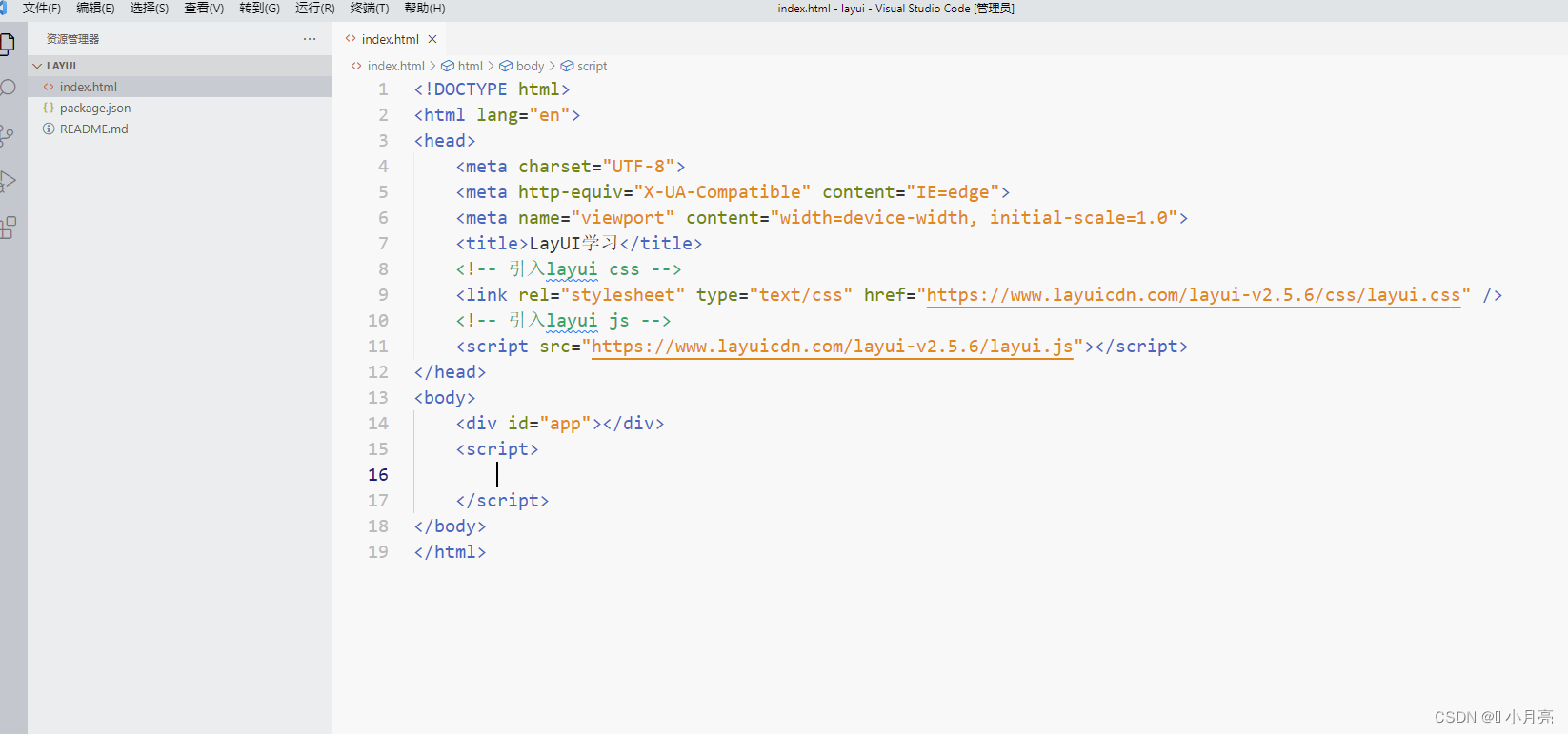
2、启动layUI项目:
① 安装live-server:
npm install -g live-server② 安装完毕后在当前目录下执行命令:
live-server③
live-server命令报错:先执行set-ExecutionPolicy RemoteSigned,然后再次执行live-server3、使用nginx进行反向代理:
① 下载并解压nginx:官网
② 启动nginx:
方法一:在目录中双击
nginx.exe
方法二:在nginx解压目录下,cmd执行
start nginx,然后回车
③ 检查是否启动成功:输入
tasklist /fi "imagename eq nginx.exe"命令,出现如下的提示就说明成功了。
④ 关闭nginx:输入
taskkill /f /t /im nginx.exe命令,出现如下的提示就说明成功了。
⑤ 修改nginx中的代码:


#user nobody; worker_processes 1; events { worker_connections 1024; } http { include mime.types; default_type application/octet-stream; sendfile on; keepalive_timeout 65; server { listen 9090; server_name localhost; location / { root html; index index.html index.htm; } error_page 500 502 503 504 /50x.html; location = /50x.html { root html; } # 根据访问的路径跳转到不同端口的服务中 # 访问 http://localhost:9090/api 直接跳转到 http://192.168.1.11:8080/passurl location /api { proxy_pass http://192.168.1.11:8080/passurl; } # 访问 http://localhost:9090/upload 直接跳转到 http://192.168.1.11:8080/upload location /upload { proxy_pass http://192.168.1.11:8080/upload; # 根据项目自定义的 proxy_set_header X-Real-IP $remote_addr; # 根据项目自定义的 proxy_set_header X-Forwarded-For $proxy_add_x_forwarded_for; # 根据项目自定义的 proxy_set_header Authorization $http_authorization; } } }- 1
- 2
- 3
- 4
- 5
- 6
- 7
- 8
- 9
- 10
- 11
- 12
- 13
- 14
- 15
- 16
- 17
- 18
- 19
- 20
- 21
- 22
- 23
- 24
- 25
- 26
- 27
- 28
- 29
- 30
- 31
- 32
- 33
- 34
- 35
- 36
- 37
- 38
- 39
- 40
4、部署:
① 直接将文件放在服务器
② webpack打包layui:
1)执行命令进行安装webpack
npm i webpack webpack-cli -g2)webpack热更新:执行命令
npm install webpack-dev-server --save-dev3)安装生成html文件和清理dist文件插件:
npm install html-webpack-plugin clean-webpack-plugin4)将资源拷贝到打包的目录下:
npm i copy-webpack-plugin@5.1.2 --save5)新建
webpack.config.js文件进行配置:const webpack = require('webpack') const path = require('path') const HtmlWebpackPlugin = require("html-webpack-plugin")// 在dist目录下生成新的index.html文件 const { CleanWebpackPlugin } = require("clean-webpack-plugin") // 生成文件前清理dist目录下的所有文件 const CopyWebpackPlugin = require('copy-webpack-plugin') module.exports = { mode: 'development', devServer: { open: true, host: "localhost", port: 9527 }, entry: './src/index.js', // 入口文件 output: { path: path.resolve(__dirname, 'dist'), // 出口目录 // filename: 'bundle.js', }, resolve: { extensions: ['.js','json'], // 文件的后缀名可以省略 alias: { // 表示别名 '@': path.join(__dirname, './src') } }, plugins: [ // 插件管理 new CleanWebpackPlugin(), // 生成文件前清理dist目录下的所有文件 new HtmlWebpackPlugin({ // 在dist目录下生成新的index.html文件 template: "./index.html", minify: { // 压缩html collapseWhitespace: true, // 压缩空白 removeComments: true // 去除注释 } }), new webpack.ProvidePlugin({}), // 自动加载模块 new CopyWebpackPlugin([ { from: path.resolve(__dirname, 'src'), to: 'src', } ]) ], module: { rules: [ { test:/\.css$/i, use: ["style-loader", "css-loader"], }, ] }, target: ["web", "es5"] // combining targets }- 1
- 2
- 3
- 4
- 5
- 6
- 7
- 8
- 9
- 10
- 11
- 12
- 13
- 14
- 15
- 16
- 17
- 18
- 19
- 20
- 21
- 22
- 23
- 24
- 25
- 26
- 27
- 28
- 29
- 30
- 31
- 32
- 33
- 34
- 35
- 36
- 37
- 38
- 39
- 40
- 41
- 42
- 43
- 44
- 45
- 46
- 47
- 48
- 49
- 50
- 51
- 52
6)更改
package.json文件配置:{ "name": "layui", "version": "1.0.0", "description": "", "main": "index.js", "scripts": { "test": "echo \"Error: no test specified\" && exit 1", "dev": "webpack-dev-server", "build": "webpack --watch" }, "keywords": [], "author": "", "license": "ISC", "dependencies": { "clean-webpack-plugin": "^4.0.0", "copy-webpack-plugin": "^5.1.2", "css-loader": "^6.7.1", "html-webpack-plugin": "^5.5.0", "style-loader": "^3.3.1" }, "devDependencies": { "webpack": "^5.75.0", "webpack-cli": "^4.10.0", "webpack-dev-server": "^4.11.1" } }- 1
- 2
- 3
- 4
- 5
- 6
- 7
- 8
- 9
- 10
- 11
- 12
- 13
- 14
- 15
- 16
- 17
- 18
- 19
- 20
- 21
- 22
- 23
- 24
- 25
- 26
- 27
5、缺陷:
-
本来要用
layui-src打包,但是找了一圈资源,不太懂,就没用。 -
css解析(最后没用上,后续更新),安装css-loader、style-loader:
npm i css-loader style-loader -
练习项目网址,有兴趣可以看看 https://github.com/nana-yin/LayUI
-
附上一张查找npm安装的路径的命令和webpack安装成功的截图

6、Layui中表格内容换行显示:
// 直接改css样式 .layui-table-cell { height: auto ; white-space: normal; word-wrap:break-word; }- 1
- 2
- 3
- 4
- 5
- 6
7、layer.open中使用layer.msg,默认将会关闭父窗口:
layer.open({ type: 1, // 解决办法:将type设置为1 area: ["400px"], ... });- 1
- 2
- 3
- 4
- 5
-
相关阅读:
KubeSphere介绍和基于K8S的安装
JavaWeb Session会话
Maven的常用命令管理项目的生命周期
io+day8
Vue watch属性
PTA 1065 单身狗(Python3)
Nature Electronics|微器件在柔性基底上的高密度集成(可穿戴电子/界面调控/电子皮肤/柔性电子)
CF1324F题解
回溯-数组总和II
java - 散列算法 SHA-256 hash值计算
- 原文地址:https://blog.csdn.net/Y1914960928/article/details/127123641
