-
JavaSE_day16【泛型与集合】
JavaSE_day16【泛型、集合】
主要内容
- 泛型
- Collection集合
学习目标
- 能够使用泛型定义类、接口、方法
- 能够理解泛型上限
- 能够阐述泛型通配符的作用
- 能够识别通配符的上下限
- 能够熟练使用Collection集合的API
- 能够使用Iterator迭代器遍历Collection系列的集合
- 能够使用foreach遍历Collection系列的集合
第十一章 泛型
11.1 泛型的概念
11.1.1 泛型的引入
例如:生产瓶子的厂家,一开始并不知道我们将来会用瓶子装什么,我们什么都可以装,但是有的时候,我们在使用时,想要限定某个瓶子只能用来装什么,这样我们不会装错,而用的时候也可以放心的使用,无需再三思量。我们生活中是在使用这个瓶子时在瓶子上“贴标签”,这样就轻松解决了问题。

还有,在Java中我们在声明方法时,当在完成方法功能时如果有未知的数据需要参与,这些未知的数据需要在调用方法时才能确定,那么我们把这样的数据通过形参表示。那么在方法体中,用这个形参名来代表那个未知的数据,而调用者在调用时,对应的传入值就可以了。

受以上两点启发,JDK1.5设计了泛型的概念。泛型即为“类型参数”,这个类型参数在声明它的类、接口或方法中,代表未知的通用的类型。例如:
java.lang.Comparable接口和java.util.Comparator接口,是用于对象比较大小的规范接口,这两个接口只是限定了当一个对象大于另一个对象时返回正整数,小于返回负整数,等于返回0。但是并不确定是什么类型的对象比较大小,之前的时候只能用Object类型表示,使用时既麻烦又不安全,因此JDK1.5就给它们增加了泛型。
public interface Comparable<T>{ int compareTo(T o) ; }- 1
- 2
- 3
public interface Comparator<T>{ int compare(T o1, T o2) ; }- 1
- 2
- 3
其中就是类型参数,即泛型。
11.1.2 泛型的好处
那么我们在使用如上面这样的接口时,如果没有泛型或不指定泛型,很麻烦,而且有安全隐患。如果有了泛型并使用泛型,那么既能保证安全,又能简化代码。
JavaBean:圆类型
class Circle{ private double radius; public Circle(double radius) { super(); this.radius = radius; } public double getRadius() { return radius; } public void setRadius(double radius) { this.radius = radius; } @Override public String toString() { return "Circle [radius=" + radius + "]"; } }- 1
- 2
- 3
- 4
- 5
- 6
- 7
- 8
- 9
- 10
- 11
- 12
- 13
- 14
- 15
- 16
- 17
- 18
- 19
- 20
- 21
- 22
比较器
import java.util.Comparator; public class CircleComparator implements Comparator{ @Override public int compare(Object o1, Object o2) { //强制类型转换 Circle c1 = (Circle) o1; Circle c2 = (Circle) o2; return Double.compare(c1.getRadius(), c2.getRadius()); } }- 1
- 2
- 3
- 4
- 5
- 6
- 7
- 8
- 9
- 10
- 11
- 12
- 13
测试类
public class TestGeneric { public static void main(String[] args) { CircleComparator com = new CircleComparator(); System.out.println(com.compare(new Circle(1), new Circle(2))); System.out.println(com.compare("圆1", "圆2"));//运行时异常:ClassCastException } }- 1
- 2
- 3
- 4
- 5
- 6
- 7
- 8
使用泛型:
比较器:
class CircleComparator implements Comparator<Circle>{ @Override public int compare(Circle o1, Circle o2) { //不再需要强制类型转换,代码更简洁 return Double.compare(o1.getRadius(), o2.getRadius()); } }- 1
- 2
- 3
- 4
- 5
- 6
- 7
- 8
- 9
测试类
import java.util.Comparator; public class TestGeneric { public static void main(String[] args) { CircleComparator com = new CircleComparator(); System.out.println(com.compare(new Circle(1), new Circle(2))); // System.out.println(com.compare("圆1", "圆2"));//编译错误,因为"圆1", "圆2"不是Circle类型,编译器提前报错,而不是冒着风险在运行时再报错 } }- 1
- 2
- 3
- 4
- 5
- 6
- 7
- 8
- 9
- 10
其中:是类型变量(Type Variables),Comparator这种就称为参数化类型(Parameterized Types),Comparator
中的 是参数化类型的类型参数。 类比方法的参数,我们可以把,称为类型形参,将
称为类型实参,有助于我们理解泛型。 11.2 参数类型:泛型类与泛型接口
当我们在声明类或接口时,类或接口中定义某个成员时,该成员有些类型是不确定的,而这个类型需要在使用这个类或接口时才可以确定,那么我们可以使用泛型。
11.2.1 声明泛型类与泛型接口
语法格式:
【修饰符】 class 类名<类型变量列表>{ } 【修饰符】 interface 接口名<类型变量列表>{ }- 1
- 2
- 3
- 4
- 5
- 6
注意:
- <类型变量列表>:可以是一个或多个类型变量,一般都是使用单个的大写字母表示。例如:、
- <类型变量列表>中的类型变量不能用于静态成员上。
示例代码:
例如:我们要声明一个学生类,该学生包含姓名、成绩,而此时学生的成绩类型不确定,为什么呢,因为,语文老师希望成绩是“优秀”、“良好”、“及格”、“不及格”,数学老师希望成绩是89.5, 65.0,英语老师希望成绩是’A’,‘B’,‘C’,‘D’,‘E’。那么我们在设计这个学生类时,就可以使用泛型。
public class Student<T>{ private String name; private T score; public Student() { super(); } public Student(String name, T score) { super(); this.name = name; this.score = score; } public String getName() { return name; } public void setName(String name) { this.name = name; } public T getScore() { return score; } public void setScore(T score) { this.score = score; } @Override public String toString() { return "姓名:" + name + ", 成绩:" + score; } }- 1
- 2
- 3
- 4
- 5
- 6
- 7
- 8
- 9
- 10
- 11
- 12
- 13
- 14
- 15
- 16
- 17
- 18
- 19
- 20
- 21
- 22
- 23
- 24
- 25
- 26
- 27
- 28
- 29
11.2.2 使用泛型类与泛型接口
在使用这种参数化的类与接口时,我们需要指定泛型变量的实际类型参数:
(1)实际类型参数必须是引用数据类型,不能是基本数据类型
(2)在创建类的对象时指定类型变量对应的实际类型参数
public class TestGeneric{ public static void main(String[] args) { //语文老师使用时: Student<String> stu1 = new Student<String>("张三", "良好"); //数学老师使用时: //Studentstu2 = new Student Student<Double> stu2 = new Student<Double>("张三", 90.5); //英语老师使用时: Student<Character> stu3 = new Student<Character>("张三", 'C'); //错误的指定 //Student } }("张三", 90.5);//错误,必须是引用数据类型 - 1
- 2
- 3
- 4
- 5
- 6
- 7
- 8
- 9
- 10
- 11
- 12
- 13
- 14
- 15
- 16
JDK1.7支持简写形式:Student stu1 = new Student<>(“张三”, “良好”);
指定泛型实参时,必须左右两边一致,不存在多态现象
(3)在继承泛型类或实现泛型接口时,指定类型变量对应的实际类型参数
class ChineseStudent extends Student<String>{ public ChineseStudent() { super(); } public ChineseStudent(String name, String score) { super(name, score); } }- 1
- 2
- 3
- 4
- 5
- 6
- 7
- 8
- 9
- 10
- 11
public class TestGeneric{ public static void main(String[] args) { //语文老师使用时: ChineseStudent stu = new ChineseStudent("张三", "良好"); } }- 1
- 2
- 3
- 4
- 5
- 6
- 7
class Circle implements Comparable<Circle>{ private double radius; public Circle(double radius) { super(); this.radius = radius; } public double getRadius() { return radius; } public void setRadius(double radius) { this.radius = radius; } @Override public String toString() { return "Circle [radius=" + radius + "]"; } @Override public int compareTo(Circle c){ return Double.compare(radius,c.radius); } }- 1
- 2
- 3
- 4
- 5
- 6
- 7
- 8
- 9
- 10
- 11
- 12
- 13
- 14
- 15
- 16
- 17
- 18
- 19
- 20
- 21
- 22
- 23
- 24
- 25
- 26
- 27
11.2.3 类型变量的上限
当在声明类型变量时,如果不希望这个类型变量代表任意引用数据类型,而是某个系列的引用数据类型,那么可以设定类型变量的上限。
语法格式:
<类型变量 extends 上限>- 1
如果有多个上限
<类型变量 extends 上限1 & 上限2>- 1
如果多个上限中有类有接口,那么只能有一个类,而且必须写在最左边。接口的话,可以多个。
如果在声明<类型变量>时没有指定任何上限,默认上限是java.lang.Object。
例如:我们要声明一个两个数求和的工具类,要求两个加数必须是Number数字类型,并且实现Comparable接口。
class SumTools<T extends Number & Comparable<T>>{ private T a; private T b; public SumTools(T a, T b) { super(); this.a = a; this.b = b; } @SuppressWarnings("unchecked") public T getSum(){ if(a instanceof BigInteger){ return (T) ((BigInteger) a).add((BigInteger)b); }else if(a instanceof BigDecimal){ return (T) ((BigDecimal) a).add((BigDecimal)b); }else if(a instanceof Short){ return (T)(Integer.valueOf((Short)a+(Short)b)); }else if(a instanceof Integer){ return (T)(Integer.valueOf((Integer)a+(Integer)b)); }else if(a instanceof Long){ return (T)(Long.valueOf((Long)a+(Long)b)); }else if(a instanceof Float){ return (T)(Float.valueOf((Float)a+(Float)b)); }else if(a instanceof Double){ return (T)(Double.valueOf((Double)a+(Double)b)); } throw new UnsupportedOperationException("不支持该操作"); } }- 1
- 2
- 3
- 4
- 5
- 6
- 7
- 8
- 9
- 10
- 11
- 12
- 13
- 14
- 15
- 16
- 17
- 18
- 19
- 20
- 21
- 22
- 23
- 24
- 25
- 26
- 27
- 28
测试类
public static void main(String[] args) { SumTools<Integer> s = new SumTools<Integer>(1,2); Integer sum = s.getSum(); System.out.println(sum); // SumToolss = new SumTools }("1","2");//错误,因为String类型不是extends Number - 1
- 2
- 3
- 4
- 5
- 6
- 7
11.2.4 泛型擦除
当使用参数化类型的类或接口时,如果没有指定泛型,那么会怎么样呢?
会发生泛型擦除,自动按照最左边的第一个上限处理。如果没有指定上限,上限即为Object。
public static void main(String[] args) { SumTools s = new SumTools(1,2); Number sum = s.getSum(); System.out.println(sum); }- 1
- 2
- 3
- 4
- 5
import java.util.Comparator; public class CircleComparator implements Comparator{ @Override public int compare(Object o1, Object o2) { //强制类型转换 Circle c1 = (Circle) o1; Circle c2 = (Circle) o2; return Double.compare(c1.getRadius(), c2.getRadius()); } }- 1
- 2
- 3
- 4
- 5
- 6
- 7
- 8
- 9
- 10
- 11
- 12
- 13
11.2.5 练习
练习1
1、声明一个坐标类Coordinate,它有两个属性:x,y,都为T类型
2、在测试类中,创建两个不同的坐标类对象,
分别指定T类型为String和Double,并为x,y赋值,打印对象public class TestExer1 { public static void main(String[] args) { Coordinate<String> c1 = new Coordinate<>("北纬38.6", "东经36.8"); System.out.println(c1); // Coordinatec2 = new Coordinate<>(38.6, 38);//自动装箱与拆箱只能与对应的类型 38是int,自动装为Integer Coordinate<Double> c2 = new Coordinate<>(38.6, 36.8); System.out.println(c2); } } class Coordinate<T>{ private T x; private T y; public Coordinate(T x, T y) { super(); this.x = x; this.y = y; } public Coordinate() { super(); } public T getX() { return x; } public void setX(T x) { this.x = x; } public T getY() { return y; } public void setY(T y) { this.y = y; } @Override public String toString() { return "Coordinate [x=" + x + ", y=" + y + "]"; } }- 1
- 2
- 3
- 4
- 5
- 6
- 7
- 8
- 9
- 10
- 11
- 12
- 13
- 14
- 15
- 16
- 17
- 18
- 19
- 20
- 21
- 22
- 23
- 24
- 25
- 26
- 27
- 28
- 29
- 30
- 31
- 32
- 33
- 34
- 35
- 36
- 37
- 38
- 39
练习2
1、声明一个Person类,包含姓名和伴侣属性,其中姓名是String类型,而伴侣的类型不确定,
因为伴侣可以是Person,可以是Animal(例如:金刚),可以是Ghost鬼(例如:倩女幽魂),
可以是Demon妖(例如:白娘子),可以是Robot机器人(例如:剪刀手爱德华)。。。2、在测试类中,创建Person对象,并为它指定伴侣,打印显示信息
public class TestExer3 { @SuppressWarnings({ "rawtypes", "unchecked" }) public static void main(String[] args) { Person<Demon> xu = new Person<Demon>("许仙",new Demon("白娘子")); System.out.println(xu); Person<Person> xie = new Person<Person>("谢学建",new Person("徐余龙")); Person fere = xie.getFere(); fere.setFere(xie); System.out.println(xie); System.out.println(fere); } } class Demon{ private String name; public Demon(String name) { super(); this.name = name; } @Override public String toString() { return "Demon [name=" + name + "]"; } } class Person<T>{ private String name; private T fere; public Person(String name, T fere) { super(); this.name = name; this.fere = fere; } public Person(String name) { super(); this.name = name; } public Person() { super(); } public String getName() { return name; } public void setName(String name) { this.name = name; } public T getFere() { return fere; } public void setFere(T fere) { this.fere = fere; } @SuppressWarnings("rawtypes") @Override public String toString() { if(fere instanceof Person){ Person p = (Person) fere; return "Person [name=" + name + ", fere=" + p.getName() + "]"; } return "Person [name=" + name + ", fere=" + fere + "]"; } }- 1
- 2
- 3
- 4
- 5
- 6
- 7
- 8
- 9
- 10
- 11
- 12
- 13
- 14
- 15
- 16
- 17
- 18
- 19
- 20
- 21
- 22
- 23
- 24
- 25
- 26
- 27
- 28
- 29
- 30
- 31
- 32
- 33
- 34
- 35
- 36
- 37
- 38
- 39
- 40
- 41
- 42
- 43
- 44
- 45
- 46
- 47
- 48
- 49
- 50
- 51
- 52
- 53
- 54
- 55
- 56
- 57
- 58
- 59
- 60
- 61
- 62
- 63
- 64
练习3
1、声明员工类型Employee,包含姓名(String),薪资(double),年龄(int)
2、员工类Employee实现java.lang.Comparable接口,指定T为Employee类型,重写抽象方法,按照薪资比较大小,薪资相同的按照姓名的自然顺序比较大小。
3、在测试类中创建Employee数组,然后调用Arrays.sort(Object[] arr)方法进行排序,遍历显示员工信息
4、再次调用Arrays.sort(Object[] arr,Comparator c)方法进行按照年龄排序,年龄相同的安装姓名自然顺序比较大小,遍历显示员工信息
public class TestExer3 { @Test public void test01() { Employee[] arr = new Employee[3]; arr[0] = new Employee("Irene", 18000, 18); arr[1] = new Employee("Jack", 14000, 28); arr[2] = new Employee("Alice", 14000, 24); Arrays.sort(arr); for (int i = 0; i < arr.length; i++) { System.out.println(arr[i]); } } @Test public void test02() { Employee[] arr = new Employee[3]; arr[0] = new Employee("Irene", 18000, 18); arr[1] = new Employee("Jack", 14000, 28); arr[2] = new Employee("Alice", 14000, 24); //Arrays.sort(T[] arr,Comparatorc) Arrays.sort(arr, new Comparator<Employee>() { //按照年龄排序,年龄相同的安装姓名自然顺序比较大小 @Override public int compare(Employee o1, Employee o2) { if(o1.getAge() != o2.getAge()) { return o1.getAge() - o2.getAge(); } return o1.getName().compareTo(o2.getName()); } }); for (int i = 0; i < arr.length; i++) { System.out.println(arr[i]); } } } class Employee implements Comparable<Employee>{ private String name; private double salary; private int age; public Employee(String name, double salary, int age) { super(); this.name = name; this.salary = salary; this.age = age; } public Employee() { super(); } public String getName() { return name; } public void setName(String name) { this.name = name; } public double getSalary() { return salary; } public void setSalary(double salary) { this.salary = salary; } public int getAge() { return age; } public void setAge(int age) { this.age = age; } @Override public String toString() { return "Employee [name=" + name + ", salary=" + salary + ", age=" + age + "]"; } //重写抽象方法,按照薪资比较大小,薪资相同的按照姓名的自然顺序比较大小。 @Override public int compareTo(Employee o) { if(this.salary != o.salary) { return Double.compare(this.salary, o.salary); } return this.name.compareTo(o.name);//name是String类型,有compareTo方法 } }- 1
- 2
- 3
- 4
- 5
- 6
- 7
- 8
- 9
- 10
- 11
- 12
- 13
- 14
- 15
- 16
- 17
- 18
- 19
- 20
- 21
- 22
- 23
- 24
- 25
- 26
- 27
- 28
- 29
- 30
- 31
- 32
- 33
- 34
- 35
- 36
- 37
- 38
- 39
- 40
- 41
- 42
- 43
- 44
- 45
- 46
- 47
- 48
- 49
- 50
- 51
- 52
- 53
- 54
- 55
- 56
- 57
- 58
- 59
- 60
- 61
- 62
- 63
- 64
- 65
- 66
- 67
- 68
- 69
- 70
- 71
- 72
- 73
- 74
- 75
- 76
- 77
- 78
- 79
- 80
- 81
- 82
- 83
- 84
- 85
- 86
- 87
11.3 泛型方法
前面介绍了在定义类、接口时可以声明<类型变量>,在该类的方法和属性定义、接口的方法定义中,这些<类型变量>可被当成普通类型来用。但是,在另外一些情况下,
(1)如果我们定义类、接口时没有使用<类型变量>,但是某个方法定义时,想要自己定义<类型变量>;
(2)另外我们之前说类和接口上的类型形参是不能用于静态方法中,那么当某个静态方法想要定义<类型变量>。
那么,JDK1.5之后,还提供了泛型方法的支持。
语法格式:
【修饰符】 <类型变量列表> 返回值类型 方法名(【形参列表】)【throws 异常列表】{ //... }- 1
- 2
- 3
- <类型变量列表>:可以是一个或多个类型变量,一般都是使用单个的大写字母表示。例如:、
- <类型变量>同样也可以指定上限
示例代码:
我们编写一个数组工具类,包含可以给任意对象数组进行从小到大排序,要求数组元素类型必须实现Comparable接口
public class MyArrays{ public static <T extends Comparable<T>> void sort(T[] arr){ for (int i = 1; i < arr.length; i++) { for (int j = 0; j < arr.length-i; j++) { if(arr[j].compareTo(arr[j+1])>0){ T temp = arr[j]; arr[j] = arr[j+1]; arr[j+1] = temp; } } } } }- 1
- 2
- 3
- 4
- 5
- 6
- 7
- 8
- 9
- 10
- 11
- 12
- 13
测试类
public class TestGeneric{ public static void main(String[] args) { int[] arr = {3,2,5,1,4}; // MyArrays.sort(arr);//错误的,因为int[]不是对象数组 String[] strings = {"hello","java","chai"}; MyArrays.sort(strings); System.out.println(Arrays.toString(strings)); Circle[] circles = {new Circle(2.0),new Circle(1.2),new Circle(3.0)}; MyArrays.sort(circles); System.out.println(Arrays.toString(circles)); } }- 1
- 2
- 3
- 4
- 5
- 6
- 7
- 8
- 9
- 10
- 11
- 12
- 13
- 14
11.4 类型通配符
当我们声明一个方法时,某个形参的类型是一个参数化的泛型类或泛型接口类型,但是在声明方法时,又不确定该泛型实际类型,我们可以考虑使用类型通配符。
例如:
这个学生类是一个参数化的泛型类,代码如下(详细请看$10.2.1中的示例说明):
public class Student<T>{ private String name; private T score; public Student() { super(); } public Student(String name, T score) { super(); this.name = name; this.score = score; } public String getName() { return name; } public void setName(String name) { this.name = name; } public T getScore() { return score; } public void setScore(T score) { this.score = score; } @Override public String toString() { return "姓名:" + name + ", 成绩:" + score; } }- 1
- 2
- 3
- 4
- 5
- 6
- 7
- 8
- 9
- 10
- 11
- 12
- 13
- 14
- 15
- 16
- 17
- 18
- 19
- 20
- 21
- 22
- 23
- 24
- 25
- 26
- 27
- 28
- 29
11.4.1 任意类型
例如:我们要声明一个学生管理类,这个管理类要包含一个方法,可以遍历学生数组。
学生管理类:
class StudentService { public static void print(Student<?>[] arr) { for (int i = 0; i < arr.length; i++) { System.out.println(arr[i]); } } }- 1
- 2
- 3
- 4
- 5
- 6
- 7
测试类
public class TestGeneric { public static void main(String[] args) { // 语文老师使用时: Student<String> stu1 = new Student<String>("张三", "良好"); // 数学老师使用时: // Studentstu2 = new Student Student<Double> stu2 = new Student<Double>("张三", 90.5); // 英语老师使用时: Student<Character> stu3 = new Student<Character>("张三", 'C'); Student<?>[] arr = new Student[3]; arr[0] = stu1; arr[1] = stu2; arr[2] = stu3; StudentService.print(arr); } }("张三", 90.5);//错误,必须是引用数据类型 - 1
- 2
- 3
- 4
- 5
- 6
- 7
- 8
- 9
- 10
- 11
- 12
- 13
- 14
- 15
- 16
- 17
- 18
- 19
- 20
11.4.2
例如:我们要声明一个学生管理类,这个管理类要包含一个方法,找出学生数组中成绩最高的学生对象。
要求学生的成绩的类型必须可比较大小,实现Comparable接口。
学生管理类:
class StudentService { @SuppressWarnings({ "rawtypes", "unchecked" }) public static Student<? extends Comparable> max(Student<? extends Comparable>[] arr){ Student<? extends Comparable> max = arr[0]; for (int i = 0; i < arr.length; i++) { if(arr[i].getScore().compareTo(max.getScore())>0){ max = arr[i]; } } return max; } }- 1
- 2
- 3
- 4
- 5
- 6
- 7
- 8
- 9
- 10
- 11
- 12
测试类
public class TestGeneric { @SuppressWarnings({ "rawtypes", "unchecked" }) public static void main(String[] args) { Student<? extends Double>[] arr = new Student[3]; arr[0] = new Student<Double>("张三", 90.5); arr[1] = new Student<Double>("李四", 80.5); arr[2] = new Student<Double>("王五", 94.5); Student<? extends Comparable> max = StudentService.max(arr); System.out.println(max); } }- 1
- 2
- 3
- 4
- 5
- 6
- 7
- 8
- 9
- 10
- 11
- 12
11.4.3
现在要声明一个数组工具类,包含可以给任意对象数组进行从小到大排序,只要你指定定制比较器对象,而且这个定制比较器对象可以是当前数组元素类型自己或其父类的定制比较器对象
数组工具类:
class MyArrays{ public static <T> void sort(T[] arr, Comparator<? super T> c){ for (int i = 1; i < arr.length; i++) { for (int j = 0; j < arr.length-i; j++) { if(c.compare(arr[j], arr[j+1])>0){ T temp = arr[j]; arr[j] = arr[j+1]; arr[j+1] = temp; } } } } }- 1
- 2
- 3
- 4
- 5
- 6
- 7
- 8
- 9
- 10
- 11
- 12
- 13
例如:有如下JavaBean
class Person{ private String name; private int age; public Person(String name, int age) { super(); this.name = name; this.age = age; } public Person() { super(); } public String getName() { return name; } public void setName(String name) { this.name = name; } public int getAge() { return age; } public void setAge(int age) { this.age = age; } @Override public String toString() { return "name=" + name + ", age=" + age; } } class Student extends Person{ private int score; public Student(String name, int age, int score) { super(name, age); this.score = score; } public Student() { super(); } public int getScore() { return score; } public void setScore(int score) { this.score = score; } @Override public String toString() { return super.toString() + ",score=" + score; } }- 1
- 2
- 3
- 4
- 5
- 6
- 7
- 8
- 9
- 10
- 11
- 12
- 13
- 14
- 15
- 16
- 17
- 18
- 19
- 20
- 21
- 22
- 23
- 24
- 25
- 26
- 27
- 28
- 29
- 30
- 31
- 32
- 33
- 34
- 35
- 36
- 37
- 38
- 39
- 40
- 41
- 42
- 43
- 44
- 45
- 46
- 47
- 48
- 49
- 50
- 51
- 52
- 53
- 54
测试类
public class TestGeneric { public static void main(String[] args) { Student[] all = new Student[3]; all[0] = new Student("张三", 23, 89); all[1] = new Student("李四", 22, 99); all[2] = new Student("王五", 25, 67); MyArrays.sort(all, new Comparator<Person>() { @Override public int compare(Person o1, Person o2) { return o1.getAge() - o2.getAge(); } }); System.out.println(Arrays.toString(all)); MyArrays.sort(all, new Comparator<Student>() { @Override public int compare(Student o1, Student o2) { return o1.getScore() - o2.getScore(); } }); System.out.println(Arrays.toString(all)); } }- 1
- 2
- 3
- 4
- 5
- 6
- 7
- 8
- 9
- 10
- 11
- 12
- 13
- 14
- 15
- 16
- 17
- 18
- 19
- 20
- 21
- 22
- 23
- 24
- 25
- 26
- 27
11.4.4 使用类型通配符来指定类型参数的问题
:不可变,因为类型不确定,编译时,任意类型都是错 :不可变,因为的?可能是上限或上限的子类,即类型不确定,编译按任意类型处理都是错。 :可以将值修改为下限或下限子类的对象,因为?代表是下限或下限的父类,那么设置为下限或下限子类的对象是安全的。 ```java public class TestGeneric { public static void main(String[] args) { Student stu1 = new Student<>();stu1.setScore(null);//除了null,无法设置为其他值 Student stu2 = new Student<>(); stu2.setScore(null);//除了null,无法设置为其他值 Student stu3 = new Student<>(); stu3.setScore(56);//可以设置Number或其子类的对象 }- 1
- 2
- 3
- 4
- 5
- 6
- 7
- 8
- 9
}
class Student{
private String name;
private T score;public Student() { super(); } public Student(String name, T score) { super(); this.name = name; this.score = score; } public String getName() { return name; } public void setName(String name) { this.name = name; } public T getScore() { return score; } public void setScore(T score) { this.score = score; } @Override public String toString() { return "姓名:" + name + ", 成绩:" + score; }- 1
- 2
- 3
- 4
- 5
- 6
- 7
- 8
- 9
- 10
- 11
- 12
- 13
- 14
- 15
- 16
- 17
- 18
- 19
- 20
- 21
- 22
- 23
- 24
}
## 11.5 练习 在数组工具类中声明如下泛型方法: (1)可以在任意类型的对象数组中,查找某个元素的下标,按照顺序查找,如果有重复的,就返回第一个找到的,如果没有返回-1 (2)可以在任意类型的对象数组中,查找最大值,要求元素必须实现Comparable接口 (3)可以在任意类型的对象数组中,查找最大值,按照指定定制比较器来比较元素大小 (4)可以给任意对象数组进行从小到大排序,要求数组元素类型必须实现Comparable接口 (5)可以给任意对象数组进行从小到大排序,只要你指定定制比较器对象,不要求数组元素实现Comparable接口 (6)可以将任意对象数组的元素拼接为一个字符串返回 ```java public class MyArrays { //可以在任意类型的对象数组中,查找某个元素的下标,按照顺序查找,如果有重复的,就返回第一个找到的,如果没有返回-1 public staticint find(T[] arr, T value) { for (int i = 0; i < arr.length; i++) { if(arr[i].equals(value)) {//使用==比较太严格,使用equals方法,因为任意对象都有equals方法 return i; } } return -1; } //可以在任意类型的对象数组中,查找最大值,要求元素必须实现Comparable接口 public static > T max(T[] arr) { T max = arr[0]; for (int i = 0; i < arr.length; i++) { if(max.compareTo(arr[i])<0) {//if(max < arr[i]) { max = arr[i]; } } return max; } //可以在任意类型的对象数组中,查找最大值,按照指定定制比较器来比较元素大小 public static T max(T[] arr, Comparator c) { T max = arr[0]; for (int i = 0; i < arr.length; i++) { if(c.compare(max, arr[i])<0) {//if(max < arr[i]) { max = arr[i]; } } return max; } //可以给任意对象数组进行从小到大排序,要求数组元素类型必须实现Comparable接口 public static > void sort(T[] arr) { for (int i = 0; i < arr.length-1; i++) { int minIndex = i; for (int j = i+1; j < arr.length; j++) { if(arr[minIndex].compareTo(arr[j])>0) { minIndex = j; } } if(minIndex!=i) { T temp = arr[minIndex]; arr[minIndex] = arr[i]; arr[i] = temp; } } } //可以给任意对象数组进行从小到大排序,只要你指定定制比较器对象,不要求数组元素实现Comparable接口 public static void sort(T[] arr, Comparator c) { for (int i = 0; i < arr.length-1; i++) { int minIndex = i; for (int j = i+1; j < arr.length; j++) { if(c.compare(arr[minIndex],arr[j])>0) { minIndex = j; } } if(minIndex!=i) { T temp = arr[minIndex]; arr[minIndex] = arr[i]; arr[i] = temp; } } } //可以将任意对象数组的元素拼接为一个字符串返回 public static String toString(T[] arr) { String str = "["; for (int i = 0; i < arr.length; i++) { if(i==0) { str += arr[i]; }else { str += "," + arr[i]; } } str += "]"; return str; } } - 1
- 2
- 3
- 4
- 5
- 6
- 7
- 8
- 9
- 10
- 11
- 12
- 13
- 14
- 15
- 16
- 17
- 18
- 19
- 20
- 21
- 22
- 23
- 24
- 25
- 26
- 27
- 28
- 29
- 30
- 31
- 32
- 33
- 34
- 35
- 36
- 37
- 38
- 39
- 40
- 41
- 42
- 43
- 44
- 45
- 46
- 47
- 48
- 49
- 50
- 51
- 52
- 53
- 54
- 55
- 56
- 57
- 58
- 59
- 60
- 61
- 62
- 63
- 64
- 65
- 66
- 67
- 68
- 69
- 70
- 71
- 72
- 73
- 74
- 75
- 76
- 77
- 78
- 79
- 80
- 81
- 82
- 83
- 84
- 85
- 86
- 87
- 88
- 89
- 90
- 91
- 92
- 93
- 94
- 95
- 96
- 97
- 98
- 99
第十二章 集合
集合是java中提供的一种容器,可以用来存储多个数据。
集合和数组既然都是容器,它们有啥区别呢?
- 数组的长度是固定的。集合的长度是可变的。
- 数组中可以存储基本数据类型值,也可以存储对象,而集合中只能存储对象
集合主要分为两大系列:Collection和Map,Collection 表示一组对象,Map表示一组映射关系或键值对。
12.1 Collection
Collection 层次结构中的根接口。Collection 表示一组对象,这些对象也称为 collection 的元素。一些 collection 允许有重复的元素,而另一些则不允许。一些 collection 是有序的,而另一些则是无序的。JDK 不提供此接口的任何直接实现:它提供更具体的子接口(如 Set 和 List、Queue)实现。此接口通常用来传递 collection,并在需要最大普遍性的地方操作这些 collection。
Collection是所有单列集合的父接口,因此在Collection中定义了单列集合(List和Set)通用的一些方法,这些方法可用于操作所有的单列集合。方法如下:
1、添加元素
(1)add(E obj):添加元素对象到当前集合中
(2)addAll(Collection other):添加other集合中的所有元素对象到当前集合中,即this = this ∪ other
2、删除元素
(1) boolean remove(Object obj) :从当前集合中删除第一个找到的与obj对象equals返回true的元素。
(2)boolean removeAll(Collection coll):从当前集合中删除所有与coll集合中相同的元素。即this = this - this ∩ coll
3、判断
(1)boolean isEmpty():判断当前集合是否为空集合。
(2)boolean contains(Object obj):判断当前集合中是否存在一个与obj对象equals返回true的元素。
(3)boolean containsAll(Collection c):判断c集合中的元素是否在当前集合中都存在。即c集合是否是当前集合的“子集”。
4、获取元素个数
(1)int size():获取当前集合中实际存储的元素个数
5、交集
(1)boolean retainAll(Collection coll):当前集合仅保留与c集合中的元素相同的元素,即当前集合中仅保留两个集合的交集,即this = this ∩ coll;
6、转为数组
(1)Object[] toArray():返回包含当前集合中所有元素的数组
方法演示:
import java.util.ArrayList; import java.util.Collection; public class Demo1Collection { public static void main(String[] args) { // 创建集合对象 // 使用多态形式 Collection<String> coll = new ArrayList<String>(); // 使用方法 // 添加功能 boolean add(String s) coll.add("小李广"); coll.add("扫地僧"); coll.add("石破天"); System.out.println(coll); // boolean contains(E e) 判断o是否在集合中存在 System.out.println("判断 扫地僧 是否在集合中"+coll.contains("扫地僧")); //boolean remove(E e) 删除在集合中的o元素 System.out.println("删除石破天:"+coll.remove("石破天")); System.out.println("操作之后集合中元素:"+coll); // size() 集合中有几个元素 System.out.println("集合中有"+coll.size()+"个元素"); // Object[] toArray()转换成一个Object数组 Object[] objects = coll.toArray(); // 遍历数组 for (int i = 0; i < objects.length; i++) { System.out.println(objects[i]); } // void clear() 清空集合 coll.clear(); System.out.println("集合中内容为:"+coll); // boolean isEmpty() 判断是否为空 System.out.println(coll.isEmpty()); } }- 1
- 2
- 3
- 4
- 5
- 6
- 7
- 8
- 9
- 10
- 11
- 12
- 13
- 14
- 15
- 16
- 17
- 18
- 19
- 20
- 21
- 22
- 23
- 24
- 25
- 26
- 27
- 28
- 29
- 30
- 31
- 32
- 33
- 34
- 35
- 36
- 37
- 38
- 39
@Test public void test2(){ Collection coll = new ArrayList(); coll.add(1); coll.add(2); System.out.println("coll集合元素的个数:" + coll.size()); Collection other = new ArrayList(); other.add(1); other.add(2); other.add(3); coll.addAll(other); // coll.add(other); System.out.println("coll集合元素的个数:" + coll.size()); }- 1
- 2
- 3
- 4
- 5
- 6
- 7
- 8
- 9
- 10
- 11
- 12
- 13
- 14
- 15
- 16
- 17
注意:coll.addAll(other);与coll.add(other);

@Test public void test5(){ Collection coll = new ArrayList(); coll.add(1); coll.add(2); coll.add(3); coll.add(4); coll.add(5); System.out.println("coll集合元素的个数:" + coll.size());//5 Collection other = new ArrayList(); other.add(1); other.add(2); other.add(8); coll.retainAll(other);//保留交集 System.out.println("coll集合元素的个数:" + coll.size());//2 }- 1
- 2
- 3
- 4
- 5
- 6
- 7
- 8
- 9
- 10
- 11
- 12
- 13
- 14
- 15
- 16
- 17
- 18
12.2 Iterator迭代器
12.2.1 Iterator接口
在程序开发中,经常需要遍历集合中的所有元素。针对这种需求,JDK专门提供了一个接口
java.util.Iterator。Iterator接口也是Java集合中的一员,但它与Collection、Map接口有所不同,Collection接口与Map接口主要用于存储元素,而Iterator主要用于迭代访问(即遍历)Collection中的元素,因此Iterator对象也被称为迭代器。想要遍历Collection集合,那么就要获取该集合迭代器完成迭代操作,下面介绍一下获取迭代器的方法:
public Iterator iterator(): 获取集合对应的迭代器,用来遍历集合中的元素的。
下面介绍一下迭代的概念:
- 迭代:即Collection集合元素的通用获取方式。在取元素之前先要判断集合中有没有元素,如果有,就把这个元素取出来,继续在判断,如果还有就再取出出来。一直把集合中的所有元素全部取出。这种取出方式专业术语称为迭代。
Iterator接口的常用方法如下:
public E next():返回迭代的下一个元素。public boolean hasNext():如果仍有元素可以迭代,则返回 true。
接下来我们通过案例学习如何使用Iterator迭代集合中元素:
public class IteratorDemo { public static void main(String[] args) { // 使用多态方式 创建对象 Collection<String> coll = new ArrayList<String>(); // 添加元素到集合 coll.add("串串星人"); coll.add("吐槽星人"); coll.add("汪星人"); //遍历 //使用迭代器 遍历 每个集合对象都有自己的迭代器 Iterator<String> it = coll.iterator(); // 泛型指的是 迭代出 元素的数据类型 while(it.hasNext()){ //判断是否有迭代元素 String s = it.next();//获取迭代出的元素 System.out.println(s); } } }- 1
- 2
- 3
- 4
- 5
- 6
- 7
- 8
- 9
- 10
- 11
- 12
- 13
- 14
- 15
- 16
- 17
- 18
- 19
tips::在进行集合元素取出时,如果集合中已经没有元素了,还继续使用迭代器的next方法,将会发生java.util.NoSuchElementException没有集合元素的错误。
12.2.2 迭代器的实现原理
我们在之前案例已经完成了Iterator遍历集合的整个过程。当遍历集合时,首先通过调用集合的iterator()方法获得迭代器对象,然后使用hashNext()方法判断集合中是否存在下一个元素,如果存在,则调用next()方法将元素取出,否则说明已到达了集合末尾,停止遍历元素。
Iterator迭代器对象在遍历集合时,内部采用指针的方式来跟踪集合中的元素,为了让初学者能更好地理解迭代器的工作原理,接下来通过一个图例来演示Iterator对象迭代元素的过程:
在调用Iterator的next方法之前,迭代器的索引位于第一个元素之前,指向第一个元素,当第一次调用迭代器的next方法时,返回第一个元素,然后迭代器的索引会向后移动一位,指向第二个元素,当再次调用next方法时,返回第二个元素,然后迭代器的索引会再向后移动一位,指向第三个元素,依此类推,直到hasNext方法返回false,表示到达了集合的末尾,终止对元素的遍历。
12.2.3 使用Iterator迭代器删除元素
java.util.Iterator迭代器中有一个方法:
void remove() ;
那么,既然Collection已经有remove(xx)方法了,为什么Iterator迭代器还要提供删除方法呢?
因为Collection的remove方法,无法根据条件删除。
例如:要删除以下集合元素中的偶数
@Test public void test02(){ Collection<Integer> coll = new ArrayList<>(); coll.add(1); coll.add(2); coll.add(3); coll.add(4); // coll.remove(?)//无法编写 Iterator<Integer> iterator = coll.iterator(); while(iterator.hasNext()){ Integer element = iterator.next(); if(element%2 == 0){ // coll.remove(element);//错误的 iterator.remove(); } } System.out.println(coll); }- 1
- 2
- 3
- 4
- 5
- 6
- 7
- 8
- 9
- 10
- 11
- 12
- 13
- 14
- 15
- 16
- 17
- 18
- 19
- 20
注意:不要在使用Iterator迭代器进行迭代时,调用Collection的remove(xx)方法,否则会报异常java.util.ConcurrentModificationException,或出现不确定行为。
12.2.4 增强for
增强for循环(也称for each循环)是JDK1.5以后出来的一个高级for循环,专门用来遍历数组和集合的。
格式:
for(元素的数据类型 变量 : Collection集合or数组){ //写操作代码 }- 1
- 2
- 3
练习1:遍历数组
通常只进行遍历元素,不要在遍历的过程中对数组元素进行修改。
public class NBForDemo1 { public static void main(String[] args) { int[] arr = {3,5,6,87}; //使用增强for遍历数组 for(int a : arr){//a代表数组中的每个元素 System.out.println(a); } } }- 1
- 2
- 3
- 4
- 5
- 6
- 7
- 8
- 9
练习2:遍历集合
通常只进行遍历元素,不要在遍历的过程中对集合元素进行增加、删除、替换操作。
public class NBFor { public static void main(String[] args) { Collection<String> coll = new ArrayList<String>(); coll.add("小河神"); coll.add("老河神"); coll.add("神婆"); //使用增强for遍历 for(String s :coll){//接收变量s代表 代表被遍历到的集合元素 System.out.println(s); } } }- 1
- 2
- 3
- 4
- 5
- 6
- 7
- 8
- 9
- 10
- 11
- 12
12.2.5 java.lang.Iterable接口
java.lang.Iterable接口,实现这个接口允许对象成为 “foreach” 语句的目标。
Java 5时Collection接口继承了java.lang.Iterable接口,因此Collection系列的集合就可以直接使用foreach循环遍历。
java.lang.Iterable接口的抽象方法:
- public Iterator iterator(): 获取对应的迭代器,用来遍历数组或集合中的元素的。
自定义某容器类型,实现java.lang.Iterable接口,发现就可以使用foreach进行迭代。
import java.util.Iterator; public class TestMyArrayList { public static void main(String[] args) { MyArrayList<String> my = new MyArrayList<>(); for(String obj : my) { System.out.println(obj); } } } class MyArrayList<T> implements Iterable<T>{ @Override public Iterator<T> iterator() { return null; } }- 1
- 2
- 3
- 4
- 5
- 6
- 7
- 8
- 9
- 10
- 11
- 12
- 13
- 14
- 15
- 16
- 17
- 18
foreach本质上就是使用Iterator迭代器进行遍历的。
我们在如下代码的for(Student student : coll)这行打断点,然后使用单步调试进入源码,发现foreach本质上是调用集合的iterator()方法,返回一个迭代器进行迭代的
import java.util.ArrayList; import java.util.Collection; public class TestForeach { public static void main(String[] args) { Collection<String> coll = new ArrayList<>(); coll.add("陈琦"); coll.add("李晨"); coll.add("邓超"); coll.add("黄晓明"); //调用ArrayList里面的Iterator iterator() for (String str : coll) { System.out.println(str); } } }- 1
- 2
- 3
- 4
- 5
- 6
- 7
- 8
- 9
- 10
- 11
- 12
- 13
- 14
- 15
- 16
- 17


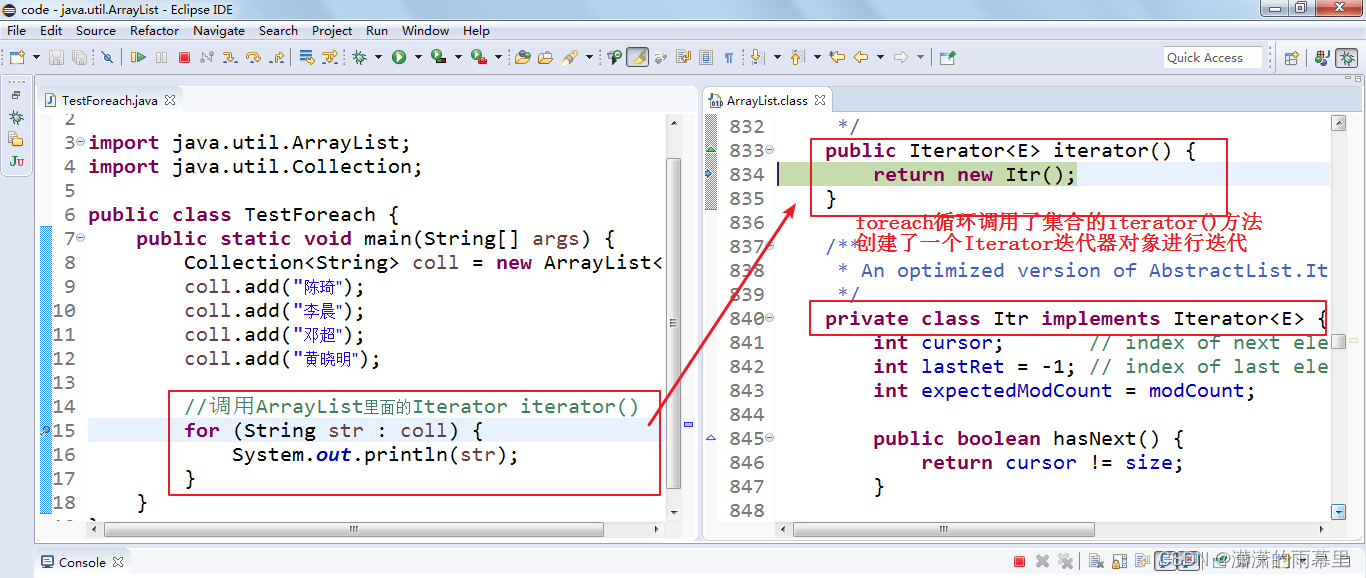
所以也不要在foreach遍历的过程使用Collection的remove()方法。否则,要么报异常java.util.ConcurrentModificationException,要么行为不确定。
12.2.6 Java中modCount的用法,快速失败(fail-fast)机制
当使用foreach或Iterator迭代器遍历集合时,同时调用迭代器自身以外的方法修改了集合的结构,例如调用集合的add和remove方法时,就会报ConcurrentModificationException。
import java.util.ArrayList; import java.util.Collection; import java.util.Iterator; public class TestForeach { public static void main(String[] args) { Collection<String> list = new ArrayList<>(); list.add("hello"); list.add("java"); list.add("atguigu"); list.add("world"); Iterator<String> iterator = list.iterator(); while(iterator.hasNext()){ list.remove(iterator.next()); } } }- 1
- 2
- 3
- 4
- 5
- 6
- 7
- 8
- 9
- 10
- 11
- 12
- 13
- 14
- 15
- 16
- 17
- 18
如果在Iterator、ListIterator迭代器创建后的任意时间从结构上修改了集合(通过迭代器自身的 remove 或 add 方法之外的任何其他方式),则迭代器将抛出 ConcurrentModificationException。因此,面对并发的修改,迭代器很快就完全失败,而不是冒着在将来不确定的时间任意发生不确定行为的风险。
这样设计是因为,迭代器代表集合中某个元素的位置,内部会存储某些能够代表该位置的信息。当集合发生改变时,该信息的含义可能会发生变化,这时操作迭代器就可能会造成不可预料的事情。因此,果断抛异常阻止,是最好的方法。这就是Iterator迭代器的快速失败(fail-fast)机制。
注意,迭代器的快速失败行为不能得到保证,一般来说,存在不同步的并发修改时,不可能作出任何坚决的保证。快速失败迭代器尽最大努力抛出
ConcurrentModificationException。因此,编写依赖于此异常的程序的方式是错误的,正确做法是:*迭代器的快速失败行为应该仅用于检测 bug。*例如:@Test public void test02() { ArrayList<String> list = new ArrayList<>(); list.add("hello"); list.add("java"); list.add("atguigu"); list.add("world"); //以下代码没有发生ConcurrentModificationException异常 Iterator<String> iterator = list.iterator(); while(iterator.hasNext()){ String str = iterator.next(); if("atguigu".equals(str)){ list.remove(str); } } }- 1
- 2
- 3
- 4
- 5
- 6
- 7
- 8
- 9
- 10
- 11
- 12
- 13
- 14
- 15
- 16
- 17
- 18
那么如何实现快速失败(fail-fast)机制的呢?
- 在ArrayList等集合类中都有一个modCount变量。它用来记录集合的结构被修改的次数。
- 当我们给集合添加和删除操作时,会导致modCount++。
- 然后当我们用Iterator迭代器遍历集合时,创建集合迭代器的对象时,用一个变量记录当前集合的modCount。例如:
int expectedModCount = modCount;,并且在迭代器每次next()迭代元素时,都要检查expectedModCount != modCount,如果不相等了,那么说明你调用了Iterator迭代器以外的Collection的add,remove等方法,修改了集合的结构,使得modCount++,值变了,就会抛出ConcurrentModificationException。
下面以AbstractList和ArrayList.Itr迭代器为例进行源码分析:
AbstractList类中声明了modCount变量:
/** * The number of times this list has been structurally modified. * Structural modifications are those that change the size of the * list, or otherwise perturb it in such a fashion that iterations in * progress may yield incorrect results. * *This field is used by the iterator and list iterator implementation * returned by the {@code iterator} and {@code listIterator} methods. * If the value of this field changes unexpectedly, the iterator (or list * iterator) will throw a {@code ConcurrentModificationException} in * response to the {@code next}, {@code remove}, {@code previous}, * {@code set} or {@code add} operations. This provides * fail-fast behavior, rather than non-deterministic behavior in * the face of concurrent modification during iteration. * *
Use of this field by subclasses is optional. If a subclass * wishes to provide fail-fast iterators (and list iterators), then it * merely has to increment this field in its {@code add(int, E)} and * {@code remove(int)} methods (and any other methods that it overrides * that result in structural modifications to the list). A single call to * {@code add(int, E)} or {@code remove(int)} must add no more than * one to this field, or the iterators (and list iterators) will throw * bogus {@code ConcurrentModificationExceptions}. If an implementation * does not wish to provide fail-fast iterators, this field may be * ignored. */
protected transient int modCount = 0;- 1
- 2
- 3
- 4
- 5
- 6
- 7
- 8
- 9
- 10
- 11
- 12
- 13
- 14
- 15
- 16
- 17
- 18
- 19
- 20
- 21
- 22
- 23
- 24
- 25
- 26
- 27
modCount是这个list被结构性修改的次数。结构性修改是指:改变list的size大小,或者,以其他方式改变他导致正在进行迭代时出现错误的结果。
这个字段用于迭代器和列表迭代器的实现类中,由迭代器和列表迭代器方法返回。如果这个值被意外改变,这个迭代器将会抛出 ConcurrentModificationException的异常来响应:next,remove,previous,set,add 这些操作。在迭代过程中,他提供了fail-fast行为而不是不确定行为来处理并发修改。
子类使用这个字段是可选的,如果子类希望提供fail-fast迭代器,它仅仅需要在add(int, E),remove(int)方法(或者它重写的其他任何会结构性修改这个列表的方法)中添加这个字段。调用一次add(int,E)或者remove(int)方法时必须且仅仅给这个字段加1,否则迭代器会抛出伪装的ConcurrentModificationExceptions错误。如果一个实现类不希望提供fail-fast迭代器,则可以忽略这个字段。
Arraylist的Itr迭代器:
private class Itr implements Iterator<E> { int cursor; int lastRet = -1; int expectedModCount = modCount;//在创建迭代器时,expectedModCount初始化为当前集合的modCount的值 public boolean hasNext() { return cursor != size; } @SuppressWarnings("unchecked") public E next() { checkForComodification();//校验expectedModCount与modCount是否相等 int i = cursor; if (i >= size) throw new NoSuchElementException(); Object[] elementData = ArrayList.this.elementData; if (i >= elementData.length) throw new ConcurrentModificationException(); cursor = i + 1; return (E) elementData[lastRet = i]; } final void checkForComodification() { if (modCount != expectedModCount)//校验expectedModCount与modCount是否相等 throw new ConcurrentModificationException();//不相等,抛异常 } }- 1
- 2
- 3
- 4
- 5
- 6
- 7
- 8
- 9
- 10
- 11
- 12
- 13
- 14
- 15
- 16
- 17
- 18
- 19
- 20
- 21
- 22
- 23
- 24
- 25
- 26
t modCount = 0;
modCount是这个list被结构性修改的次数。结构性修改是指:改变list的size大小,或者,以其他方式改变他导致正在进行迭代时出现错误的结果。 这个字段用于迭代器和列表迭代器的实现类中,由迭代器和列表迭代器方法返回。如果这个值被意外改变,这个迭代器将会抛出 ConcurrentModificationException的异常来响应:next,remove,previous,set,add 这些操作。在迭代过程中,他提供了fail-fast行为而不是不确定行为来处理并发修改。 子类使用这个字段是可选的,如果子类希望提供fail-fast迭代器,它仅仅需要在add(int, E),remove(int)方法(或者它重写的其他任何会结构性修改这个列表的方法)中添加这个字段。调用一次add(int,E)或者remove(int)方法时必须且仅仅给这个字段加1,否则迭代器会抛出伪装的ConcurrentModificationExceptions错误。如果一个实现类不希望提供fail-fast迭代器,则可以忽略这个字段。 Arraylist的Itr迭代器: ```java private class Itr implements Iterator{ int cursor; int lastRet = -1; int expectedModCount = modCount;//在创建迭代器时,expectedModCount初始化为当前集合的modCount的值 public boolean hasNext() { return cursor != size; } @SuppressWarnings("unchecked") public E next() { checkForComodification();//校验expectedModCount与modCount是否相等 int i = cursor; if (i >= size) throw new NoSuchElementException(); Object[] elementData = ArrayList.this.elementData; if (i >= elementData.length) throw new ConcurrentModificationException(); cursor = i + 1; return (E) elementData[lastRet = i]; } final void checkForComodification() { if (modCount != expectedModCount)//校验expectedModCount与modCount是否相等 throw new ConcurrentModificationException();//不相等,抛异常 } } - 1
- 2
- 3
- 4
- 5
- 6
- 7
- 8
- 9
- 10
- 11
- 12
- 13
- 14
- 15
- 16
- 17
- 18
- 19
- 20
- 21
- 22
- 23
- 24
- 25
- 26
- 27
- 28
- 29
- 30
- 31
- 32
- 33
- 34
- 35
- 36
-
相关阅读:
一切为了喵喵 | 攻防世界 x Nepnep x CATCTF邀你一战!
调用栈:为什么Javascript代码会出现栈溢出
Java 基础
Skywalking系列学习之Trace Profiling源码分析
Postman接口测试工具详解
剑指offer 44. 从1到n整数中1出现的次数
《德阳市餐饮服务业油烟污染防治管理办法(征求意见稿)》之创新油烟监管
使用自定义的评价函数优化高NA分束器
SpringBoot面试题6:Spring Boot 2.X 有什么新特性?与 1.X 有什么区别?
Java接口
- 原文地址:https://blog.csdn.net/pp_46918/article/details/127760290
