-
十九、MyBatis Plus详解
一、简介
1. MyBatisPlus 介绍

MyBatis-Plus(简称 MP),是一个 MyBatis 的增强工具包,只做增强不做改变. 为简化开发工作、提高生产率而生
我们的愿景是成为 Mybatis 最好的搭档,就像 魂斗罗 中的 1P、2P,基友搭配,效率翻倍。2. 代码及文档发布地址
官方地址:http://mp.baomidou.com
代码发布地址:
Github: https://github.com/baomidou/mybatis-plus
Gitee: https://gitee.com/baomidou/mybatis-plus
文档发布地址:
http://mp.baomidou.com/#/?id=%E7%AE%80%E4%BB%8B3. 前置知识
Mybatis
Spring
Maven
springboot二、集成 MP
1. 创建测试表
-- 创建库 CREATE DATABASE mp; -- 使用库 USE mp; -- 创建表 CREATE TABLE tbl_employee( id INT(11) PRIMARY KEY AUTO_INCREMENT, last_name VARCHAR(50), email VARCHAR(50), gender CHAR(1), age int ); INSERT INTO tbl_employee(last_name,email,gender,age) VALUES('Tom','tom@kejizhentan.com',1,22); INSERT INTO tbl_employee(last_name,email,gender,age) VALUES('Jerry','jerry@kejizhentan.com',0,25); INSERT INTO tbl_employee(last_name,email,gender,age) VALUES('Black','black@kejizhentan.com',1,30); INSERT INTO tbl_employee(last_name,email,gender,age) VALUES('White','white@kejizhentan.com',0,35);- 1
- 2
- 3
- 4
- 5
- 6
- 7
- 8
- 9
- 10
- 11
- 12
- 13
- 14
- 15
- 16
2. 搭建springboot项目
项目结构如下:

pom.xml配置文件如下:<?xml version="1.0" encoding="UTF-8"?> <project xmlns="http://maven.apache.org/POM/4.0.0" xmlns:xsi="http://www.w3.org/2001/XMLSchema-instance" xsi:schemaLocation="http://maven.apache.org/POM/4.0.0 https://maven.apache.org/xsd/maven-4.0.0.xsd"> <modelVersion>4.0.0</modelVersion> <groupId>com.kejizhentan</groupId> <artifactId>mybatis-plus-project</artifactId> <version>0.0.1-SNAPSHOT</version> <name>mybatis-plus-project</name> <description>mybatis-plus-project</description> <properties> <java.version>1.8</java.version> <project.build.sourceEncoding>UTF-8</project.build.sourceEncoding> <project.reporting.outputEncoding>UTF-8</project.reporting.outputEncoding> <spring-boot.version>2.3.7.RELEASE</spring-boot.version> </properties> <dependencies> <dependency> <groupId>org.springframework.boot</groupId> <artifactId>spring-boot-starter-web</artifactId> <!-- 去掉logback配置 --> <exclusions> <exclusion> <groupId>org.springframework.boot</groupId> <artifactId>spring-boot-starter-logging</artifactId> </exclusion> </exclusions> </dependency> <!--引入mybatis自动配置starter--> <!-- <dependency>--> <!-- <groupId>org.mybatis.spring.boot</groupId>--> <!-- <artifactId>mybatis-spring-boot-starter</artifactId>--> <!-- <version>2.1.4</version>--> <!-- </dependency>--> <!--使用druid连接池--> <dependency> <groupId>com.alibaba</groupId> <artifactId>druid</artifactId> <version>1.2.8</version> </dependency> <!--引入mysql驱动--> <dependency> <groupId>mysql</groupId> <artifactId>mysql-connector-java</artifactId> <scope>runtime</scope> </dependency> <!--引入mybatisplus依赖--> <dependency> <groupId>com.baomidou</groupId> <artifactId>mybatis-plus-boot-starter</artifactId> <version>3.5.1</version> </dependency> <!-- 引入log4j2依赖 --> <dependency> <groupId>org.springframework.boot</groupId> <artifactId>spring-boot-starter-log4j2</artifactId> </dependency> <dependency> <groupId>org.projectlombok</groupId> <artifactId>lombok</artifactId> <optional>true</optional> </dependency> <dependency> <groupId>org.springframework.boot</groupId> <artifactId>spring-boot-starter-test</artifactId> <scope>test</scope> <exclusions> <exclusion> <groupId>org.junit.vintage</groupId> <artifactId>junit-vintage-engine</artifactId> </exclusion> </exclusions> </dependency> </dependencies> <dependencyManagement> <dependencies> <dependency> <groupId>org.springframework.boot</groupId> <artifactId>spring-boot-dependencies</artifactId> <version>${spring-boot.version}</version> <type>pom</type> <scope>import</scope> </dependency> </dependencies> </dependencyManagement> <build> <plugins> <plugin> <groupId>org.apache.maven.plugins</groupId> <artifactId>maven-compiler-plugin</artifactId> <version>3.8.1</version> <configuration> <source>1.8</source> <target>1.8</target> <encoding>UTF-8</encoding> </configuration> </plugin> <plugin> <groupId>org.springframework.boot</groupId> <artifactId>spring-boot-maven-plugin</artifactId> <version>2.3.7.RELEASE</version> <configuration> <mainClass>com.kejizhentan.mybatisspringboot.MybatisSpringbootApplication</mainClass> </configuration> <executions> <execution> <id>repackage</id> <goals> <goal>repackage</goal> </goals> </execution> </executions> </plugin> </plugins> </build> </project>- 1
- 2
- 3
- 4
- 5
- 6
- 7
- 8
- 9
- 10
- 11
- 12
- 13
- 14
- 15
- 16
- 17
- 18
- 19
- 20
- 21
- 22
- 23
- 24
- 25
- 26
- 27
- 28
- 29
- 30
- 31
- 32
- 33
- 34
- 35
- 36
- 37
- 38
- 39
- 40
- 41
- 42
- 43
- 44
- 45
- 46
- 47
- 48
- 49
- 50
- 51
- 52
- 53
- 54
- 55
- 56
- 57
- 58
- 59
- 60
- 61
- 62
- 63
- 64
- 65
- 66
- 67
- 68
- 69
- 70
- 71
- 72
- 73
- 74
- 75
- 76
- 77
- 78
- 79
- 80
- 81
- 82
- 83
- 84
- 85
- 86
- 87
- 88
- 89
- 90
- 91
- 92
- 93
- 94
- 95
- 96
- 97
- 98
- 99
- 100
- 101
- 102
- 103
- 104
- 105
- 106
- 107
- 108
- 109
- 110
- 111
- 112
- 113
- 114
- 115
- 116
- 117
- 118
- 119
application.properties配置文件
# 应用名称 spring.application.name=mybatis-plus-project server.servlet.context-path=/kejizhentan # 应用服务 WEB 访问端口 server.port=8080 # 就是这行代码让mybatis可以输出sql语句 mybatis-plus.configuration.log-impl=org.apache.ibatis.logging.stdout.StdOutImpl #项目大体日志等级,也就是不额外设置就是info了 logging.level.root=info logging.pattern.console= "%d{HH:mm:ss} %-5level %msg%n" # 配置数据库信息root spring.datasource.username=root spring.datasource.password= 123456 spring.datasource.url=jdbc:mysql://localhost:3306/mp?serverTimezone=UTC spring.datasource.driver-class-name= com.mysql.cj.jdbc.Driver spring.datasource.type=com.alibaba.druid.pool.DruidDataSource # mybatis配置文件路径设置 #可以不写全局 #mybatis.config-location=classpath:mybatis/mybatis-config.xml mybatis.mapper-locations=classpath:mybatis/mapper/*.xml #开启驼峰命名(配置文件,所有全局配置文件的配置都放在configuration配置项中即可) mybatis.configuration.map-underscore-to-camel-case=true- 1
- 2
- 3
- 4
- 5
- 6
- 7
- 8
- 9
- 10
- 11
- 12
- 13
- 14
- 15
- 16
- 17
- 18
- 19
- 20
- 21
- 22
- 23
- 24
- 25
- 26
MybatisPlusProjectApplication启动类配置mapper扫描包
@SpringBootApplication @MapperScan("com.kejizhentan.demo.mapper") public class MybatisPlusProjectApplication { public static void main(String[] args) { SpringApplication.run(MybatisPlusProjectApplication.class, args); } }- 1
- 2
- 3
- 4
- 5
- 6
- 7
- 8
- 9
TblEmployeeController
@Controller @RequestMapping("/tblEmployee") public class TblEmployeeController { @Autowired private TblEmployeeService tblEmployeeService; @GetMapping("/getAll") @ResponseBody public List<TblEmployee> getAll(){ List<TblEmployee> list = tblEmployeeService.list(); return list; } }- 1
- 2
- 3
- 4
- 5
- 6
- 7
- 8
- 9
- 10
- 11
- 12
TblEmployee
/** * * @TableName tbl_employee */ @TableName(value ="tbl_employee") @Data public class TblEmployee implements Serializable { /** * */ @TableId(value = "id", type = IdType.AUTO) private Integer id; /** * */ @TableField(value = "last_name") private String lastName; /** * */ @TableField(value = "email") private String email; /** * */ @TableField(value = "gender") private String gender; /** * */ @TableField(value = "age") private Integer age; @TableField(exist = false) private static final long serialVersionUID = 1L; }- 1
- 2
- 3
- 4
- 5
- 6
- 7
- 8
- 9
- 10
- 11
- 12
- 13
- 14
- 15
- 16
- 17
- 18
- 19
- 20
- 21
- 22
- 23
- 24
- 25
- 26
- 27
- 28
- 29
- 30
- 31
- 32
- 33
- 34
- 35
- 36
- 37
- 38
- 39
- 40
TblEmployeeMapper
/** * @Entity com.kejizhentan.demo.domain.TblEmployee */ public interface TblEmployeeMapper extends BaseMapper<TblEmployee> { }- 1
- 2
- 3
- 4
- 5
- 6
TblEmployeeService
public interface TblEmployeeService extends IService<TblEmployee> { }- 1
- 2
- 3
TblEmployeeServiceImpl
@Service public class TblEmployeeServiceImpl extends ServiceImpl<TblEmployeeMapper, TblEmployee> implements TblEmployeeService{ }- 1
- 2
- 3
- 4
- 5
3. 入门 HelloWorld
⑴ 通用 CRUD
1)提出问题:
假设我们已存在一张 tbl_employee 表,且已有对应的实体类 Employee,实现tbl_employee 表的 CRUD 操作我们需要做什么呢?
2)实现方式:
- 基于 Mybatis:
需要编写 EmployeeMapper 接口,并手动编写 CRUD 方法
提供 EmployeeMapper.xml 映射文件,并手动编写每个方法对应的 SQL 语句 - 基于 MP
只需要创建 EmployeeMapper 接口, 并继承 BaseMapper 接口.这就是使用 MP
需要完成的所有操作,甚至不需要创建 SQL 映射文件。
3) service层和mapper层crud操作

@TableName的作用:
就是在类名和数据库中的表名不一致时确定某个实体类对应数据库中哪个表。
@TableId
它对应的是将数据库的主键进行映射。如果没有这个注解,调用mybatis-plus中的一些根据主键id进行操作的方法,就会导致方法无法找到主键,使得方法所要进行的操作无效。
@TableField
映射数据库中的其他普通字段,其注解中有一个属性exist,如果将其设置为false,则默认这个属性不经过数据库字段的映射⑵ 条件构造器 EntityWrapper
1) EntityWrapper 简介
Mybatis-Plus 通过 EntityWrapper(简称 EW,MP 封装的一个查询条件构造器)或者Condition(与 EW 类似) 来让用户自由的构建查询条件,简单便捷,没有额外的负担,能够有效提高开发效率
- 实体包装器,主要用于处理 sql 拼接,排序,实体参数查询等
- 注意: 使用的是数据库字段,不是 Java 属性!
- 条件参数说明:

2) EntityWrapper使用案例

三、代码生成器
MP 提供了大量的自定义设置,生成的代码完全能够满足各类型的需求
1. MP 的代码生成器 和 Mybatis MBG 代码生成器:
- MP 的代码生成器都是基于 java 代码来生成。MBG 基于 xml 文件进行代码生成
- MyBatis 的代码生成器可生成: 实体类、Mapper 接口、Mapper 映射文件
- MP 的代码生成器可生成: 实体类(可以选择是否支持 AR)、Mapper 接口、Mapper 映射
文件、 Service 层、Controller 层
2. 表及字段命名策略选择
在 MP 中,我们建议数据库表名 和 表字段名采用驼峰命名方式, 如果采用下划线命名方式 请开启全局下划线开关,如果表名字段名命名方式不一致请注解指定,我们建议最好保持一致。
这么做的原因是为了避免在对应实体类时产生的性能损耗,这样字段不用做映射就能直接和实体类对应。当然如果项目里不用考虑这点性能损耗,那么你采用下滑线也是没问题的,只需要在生成代码时配置 dbColumnUnderline 属性就可以
3. 代码生成器项目构建
⑴ 通过mybatis-plus Generator构建
1)模板引擎
MP 的代码生成器默认使用的是 Apache 的 Velocity 模板,当然也可以更换为别的模板技术,例如 freemarker。此处不做过多的介绍。
需要加入 Apache Velocity 的依赖<dependency> <groupId>org.apache.velocity</groupId> <artifactId>velocity-engine-core</artifactId> <version>2.0</version> </dependency>- 1
- 2
- 3
- 4
- 5
加入 slf4j ,查看日志输出信息
<dependency> <groupId>org.slf4j</groupId> <artifactId>slf4j-api</artifactId> <version>1.7.7</version> </dependency> <dependency> <groupId>org.slf4j</groupId> <artifactId>slf4j-log4j12</artifactId> <version>1.7.7</version> </dependency>- 1
- 2
- 3
- 4
- 5
- 6
- 7
- 8
- 9
- 10
2)完整项目代码如下
数据源:
-- 创建库 CREATE DATABASE mp; -- 使用库 USE mp; -- 创建表 CREATE TABLE tbl_employee( id INT(11) PRIMARY KEY AUTO_INCREMENT, last_name VARCHAR(50), email VARCHAR(50), gender CHAR(1), age int ); INSERT INTO tbl_employee(last_name,email,gender,age) VALUES('Tom','tom@kejizhentan.com',1,22); INSERT INTO tbl_employee(last_name,email,gender,age) VALUES('Jerry','jerry@kejizhentan.com',0,25); INSERT INTO tbl_employee(last_name,email,gender,age) VALUES('Black','black@kejizhentan.com',1,30); INSERT INTO tbl_employee(last_name,email,gender,age) VALUES('White','white@kejizhentan.com',0,35);- 1
- 2
- 3
- 4
- 5
- 6
- 7
- 8
- 9
- 10
- 11
- 12
- 13
- 14
- 15
- 16
项目结构如下:

pom.xml<?xml version="1.0" encoding="UTF-8"?> <project xmlns="http://maven.apache.org/POM/4.0.0" xmlns:xsi="http://www.w3.org/2001/XMLSchema-instance" xsi:schemaLocation="http://maven.apache.org/POM/4.0.0 https://maven.apache.org/xsd/maven-4.0.0.xsd"> <modelVersion>4.0.0</modelVersion> <groupId>com.kejizhentan</groupId> <artifactId>demo</artifactId> <version>0.0.1-SNAPSHOT</version> <name>demo</name> <description>Demo project for Spring Boot</description> <parent> <groupId>org.springframework.boot</groupId> <artifactId>spring-boot-starter-parent</artifactId> <version>2.3.2.RELEASE</version> </parent> <dependencies> <!-- SpringMVC --> <dependency> <groupId>org.springframework.boot</groupId> <artifactId>spring-boot-starter-web</artifactId> <version>2.3.2.RELEASE</version> </dependency> <!-- mysql 驱动 --> <dependency> <groupId>mysql</groupId> <artifactId>mysql-connector-java</artifactId> <version>8.0.28</version> <scope>runtime</scope> </dependency> <!-- mybatisPlus 依赖 --> <dependency> <groupId>com.baomidou</groupId> <artifactId>mybatis-plus-boot-starter</artifactId> <version>3.5.1</version> </dependency> <!-- mybatisplus 生成器 --> <dependency> <groupId>com.baomidou</groupId> <artifactId>mybatis-plus-generator</artifactId> <version>3.5.2</version> </dependency> <!-- Freemarker 引擎模板 --> <dependency> <groupId>org.freemarker</groupId> <artifactId>freemarker</artifactId> <version>2.3.31</version> </dependency> <!-- Velocity 引擎模板(MP生成器默认使用) --> <dependency> <groupId>org.apache.velocity</groupId> <artifactId>velocity</artifactId> <version>1.7</version> </dependency> <!-- lombok --> <dependency> <groupId>org.projectlombok</groupId> <artifactId>lombok</artifactId> <version>1.18.18</version> </dependency> <!-- swagger2 --> <dependency> <groupId>io.springfox</groupId> <artifactId>springfox-swagger2</artifactId> <version>3.0.0</version> </dependency> </dependencies> </project>- 1
- 2
- 3
- 4
- 5
- 6
- 7
- 8
- 9
- 10
- 11
- 12
- 13
- 14
- 15
- 16
- 17
- 18
- 19
- 20
- 21
- 22
- 23
- 24
- 25
- 26
- 27
- 28
- 29
- 30
- 31
- 32
- 33
- 34
- 35
- 36
- 37
- 38
- 39
- 40
- 41
- 42
- 43
- 44
- 45
- 46
- 47
- 48
- 49
- 50
- 51
- 52
- 53
- 54
- 55
- 56
- 57
- 58
- 59
- 60
- 61
- 62
- 63
- 64
- 65
- 66
- 67
- 68
- 69
- 70
- 71
- 72
- 73
- 74
- 75
- 76
GeneratorDemo
public class GeneratorDemo { public static void main(String[] args) { // TODO 配置数据源 FastAutoGenerator.create("jdbc:mysql://127.0.0.1:3306/mp?useUnicode=true&serverTimezone=GMT&characterEncoding=utf-8", "root", "123456")// jdbc 基础配置 .globalConfig(builder -> { builder.author("kejizhentan") // 设置作者 // .enableSwagger() // 开启 swagger 模式 .disableOpenDir()// 禁止打开输出目录,默认值:true(即默认会自动打开输出目录) .commentDate("yyyy-MM-dd HH:mm")// 注释日期,默认值: yyyy-MM-dd // TODO System.getProperty("user.dir") 拿到工程的绝对路径 .outputDir(System.getProperty("user.dir") + "/src/main/java"); // 指定输出目录 }) .packageConfig(builder -> { // TODO 包信息配置 builder.parent("com.kejizhentan") // 设置父包名,默认值:com.baomidou .moduleName("demo") // 设置父包模块名,默认值:无 .entity("entity")// Entity 包名,默认值:entity .service("service")// Service 包名,默认值:service .serviceImpl("service.impl")// Service Impl 包名,默认值:service.impl .mapper("mapper")// Mapper 包名,默认值:mapper .xml("mapper.xml")// Mapper XML 包名,默认值:mapper.xml .pathInfo(Collections.singletonMap(OutputFile.xml, System.getProperty("user.dir") + "/src/main/resources/mapper")) // 路径配置信息 TODO 用不到则注释掉 .controller("controller");// Controller 包名,默认值:controller }) .strategyConfig(builder -> { // TODO 设置需要生成的表,不设置则生成所有表 builder.addInclude("tbl_employee") // 设置需要生成的表名,支持设置多个,不设置则生成所有表 .addTablePrefix("t_", "tb_","tbl_")// 设置过滤表前缀,支持设置多个,设置后在生成实体类时会过滤掉该前缀 .entityBuilder().disableSerialVersionUID()// 禁用生成 serialVersionUID,默认值:true .enableChainModel()// 开启链式模型,默认值:false .enableLombok()// 开启 lombok 模型,默认值:false // .enableRemoveIsPrefix()// 开启 Boolean 类型字段移除 is 前缀,默认值:false .enableTableFieldAnnotation()// 开启生成实体时生成字段注解,默认值:false .enableActiveRecord()// 开启 ActiveRecord 模型,默认值:false,开启后实体类会继承Model类 //.versionColumnName("version")// 乐观锁字段名(数据库) TODO 用不到则注释掉 // .versionPropertyName("version")// 乐观锁属性名(实体) //.logicDeleteColumnName("deleted")// 逻辑删除字段名(数据库) TODO 用不到则注释掉 // .logicDeletePropertyName("deleted")// 逻辑删除属性名(实体) // .naming(NamingStrategy.underline_to_camel)// 数据库表映射到实体的命名策略,默认下划线转驼峰命名:NamingStrategy.underline_to_camel // .columnNaming(NamingStrategy.underline_to_camel)// 数据库表字段映射到实体的命名策略,默认为 null,未指定按照 naming 执行 // .addIgnoreColumns("age", "name")// 添加忽略字段,支持设置多个,设置后字段将不会生成实体字段映射 // .addTableFills(new Column("create_time", FieldFill.INSERT))// 添加表字段填充 TODO 用不到则注释掉 // .addTableFills(new Property("updateTime", FieldFill.INSERT_UPDATE))// 添加表字段填充 TODO 用不到则注释掉 // .idType(IdType.AUTO)// 全局主键类型 // .formatFileName("%sEntity")// 格式化文件名称 .mapperBuilder().superClass(BaseMapper.class)// 设置父类 .enableMapperAnnotation()// 开启 @Mapper 注解,默认值:false .enableBaseResultMap()// 启用 BaseResultMap 生成,默认值:false .enableBaseColumnList()// 启用 BaseColumnList,默认值:false // .cache(MyMapperCache.class)// 设置缓存实现类 // .formatMapperFileName("%sDao")// 格式化 mapper 文件名称 // .formatXmlFileName("%sXml")// 格式化 xml 实现类文件名称 // .serviceBuilder().formatServiceFileName("%sService")// 格式化 service 接口文件名称,不设置的话默认会带有 I 前缀 // .formatServiceImplFileName("%sServiceImp")// 格式化 service 实现类文件名称 .controllerBuilder().enableHyphenStyle()// 开启驼峰转连字符,默认值:false // .formatFileName("%sAction")// 格式化文件名称 .enableRestStyle();// 开启生成@RestController 控制器,默认值:false }) .templateEngine(new FreemarkerTemplateEngine()) // 使用 Freemarker 引擎模板,默认的是 Velocity 引擎模板 .execute(); } }- 1
- 2
- 3
- 4
- 5
- 6
- 7
- 8
- 9
- 10
- 11
- 12
- 13
- 14
- 15
- 16
- 17
- 18
- 19
- 20
- 21
- 22
- 23
- 24
- 25
- 26
- 27
- 28
- 29
- 30
- 31
- 32
- 33
- 34
- 35
- 36
- 37
- 38
- 39
- 40
- 41
- 42
- 43
- 44
- 45
- 46
- 47
- 48
- 49
- 50
- 51
- 52
- 53
- 54
- 55
- 56
- 57
- 58
- 59
- 60
- 61
- 62

执行结果如下:


完整代码下载:https://kejizhentan.lanzoue.com/i7A2W0efwt3e
⑵ 通过XMybatis构建项目
1)连接数据源【数据库】
找到database,然后选择左上角的+号,点击后选择Data Source后选择Mysql数据库,如下图所示:


Name:自己定义的数据源的名称,如果建立多个数据源,可以按名字区分;
Comment:数据源名称注释;
Host:数据源IP地址:本次是连接线上库,如果连接本机的测试库,则为localhost;
Port:端口号,本次的线上数据库的端口为3358,本机测试库端口号默认为3306;
User/Password:数据库用户名/密码;按照输入即可,可以选择密码保存为永久;
URL:数据库请求的URL,按照自动生成即可;点击测试连接可能出现的问题:

服务器返回无效时区。转到“高级”选项卡并手动设置“serverTimezone”属性。解决方法: 在Advanced中将
serverTimezone设置成Hongkong即可

点击测试连接不报错后点击apply和ok

2)逆向生成mapper等文件
① 勾选要逆向生成项目文件的库名

② 找到要生成的文件的表,鼠标右键选择 MybatisX-Generator

③ 填写必要信息
module path:逆向生成的文件的所在模块路径;
base path:module path下的基本路径,一般为src/main/java不会变;
base package:base path下的完整包路径,一般为com.***;
relative package:要生成的文件(类等)所在的包名称;
④ 填写生成的文件信息
annotation:表示生成的代码中是否添加注解,选择mybatis-plus 3即可
options:
comment:生成的文件是否添加注释,默认添加注释即可
toString/hashCode/equals:表示生成的实体类是否需要重写几种方法,根据自身情况选择是否勾选即可
Lombok:是否选择添加@Data注解,以便取代生成get/set等方法,推荐选择勾选
Actual column:建议不勾选此方法,勾选后实体类的变量会跟数据库的字段保持一致,如数据库字段为user_name,则生成的实体类的字段名也为user_name;
Actual Column Annotation:是否生成数据库注解,根据自身情况选择勾选,一般需要勾选;
JSR310:Date API:是否选用新标准的时间api,一般选择勾选即可;
template:推荐选择mybatis-plus3,默认会生成常用的工程文件;
最终生成的项目结构如下:

注:生成的文件的base path 和package name 可以改成自己想生成的文件的路径及包路径。
四、分页插件介绍
1. Mybatis 插件机制简介
⑴ 插件机制:
Mybatis 通过插件(Interceptor) 可以做到拦截四大对象相关方法的执行,根据需求,完
成相关数据的动态改变。
Executor
StatementHandler
ParameterHandler
ResultSetHandler⑵ 插件原理
四大对象的每个对象在创建时,都会执行 interceptorChain.pluginAll(),会经过每个插件对象的 plugin()方法,目的是为当前的四大对象创建代理。代理对象就可以拦截到四大对象相关方法的执行,因为要执行四大对象的方法需要经过代理
⑶ 分页插件拦截器
com.baomidou.mybatisplus.plugins.PaginationInterceptor2. 详细代码如下:
⑴ 分页接口BaseMapper
BaseMapper接口提供了如下几个分页查询接口:selectPage:根据 entity 条件,查询全部记录selectMapsPage:根据 Wrapper 条件,查询全部记录
⑵ 完整配置类代码:
下边就是完整的配置类,至于为什么比官网上的少一点,因为那个可以说会报错,而且也不需要使用到它,以下就是完整配置类:
@Configuration public class MybatisConfig { /** * 分页插件。如果你不配置,分页插件将不生效 */ @Bean public MybatisPlusInterceptor paginationInterceptor() { MybatisPlusInterceptor interceptor = new MybatisPlusInterceptor(); // 指定数据库方言为 MYSQL interceptor.addInnerInterceptor(new PaginationInnerInterceptor(DbType.MYSQL)); return interceptor; } }- 1
- 2
- 3
- 4
- 5
- 6
- 7
- 8
- 9
- 10
- 11
- 12
- 13
注意:如果你没有配置分页插件,则不会进行分页。所以这个一定要配置。
⑶ 使用 QueryWrapper 和 Page 作为参数进行分页
例如:
@RunWith(SpringRunner.class) @SpringBootTest class MybatisPlusProjectApplicationTests { @Autowired private EmployeeMapper employeeMapper; @Test void contextLoads() { QueryWrapper<Employee> wrapper = new QueryWrapper<>(); wrapper.isNotNull("id"); // 创建分页对象(1表示第一页;4表示每页大小为4) Page<Employee> page = new Page<>(1, 2); Page<Employee> result = employeeMapper.selectPage(page, wrapper); System.out.println("page == result: " + (page == result)); System.out.println("size: " + result.getSize()); System.out.println("total: " + result.getTotal()); for(Employee e : result.getRecords()) { System.out.println(e); } } }- 1
- 2
- 3
- 4
- 5
- 6
- 7
- 8
- 9
- 10
- 11
- 12
- 13
- 14
- 15
- 16
- 17
- 18
- 19
- 20
- 21
- 22
结果如下:

⑷ 另外一个分页方法,selectMapsPage 和上面的使用方法一样,仅仅是返回类型不一样。
代码如下:
@RunWith(SpringRunner.class) @SpringBootTest class MybatisPlusProjectApplicationTests { @Autowired private EmployeeMapper employeeMapper; @Test void contextLoads() { // 返回的结果类型为 Map<String,Object> Page<Map<String,Object>> page = new Page<>(1, 4); employeeMapper.selectMapsPage(page, null); System.out.println("size: " + page.getSize()); System.out.println("total: " + page.getTotal()); System.out.println("pages: " + page.getPages()); for(Map<String,Object> map : page.getRecords()) { System.out.println(map); } } }- 1
- 2
- 3
- 4
- 5
- 6
- 7
- 8
- 9
- 10
- 11
- 12
- 13
- 14
- 15
- 16
- 17
- 18
- 19
- 20
结果如下:

注意:
- 在我们项目的配置文件夹下,一定要添加MybatisPlusConfig
- 我们需要在这个配置类中添加paginationInterceptor()方法,进行分页功能的配置,其实就是配置分页功能的拦截器
- 使用方法,进来数据的分页
- 使用方法,返回分页的数据
⑸ mybatis-plus分页插件完整代码如下:
项目结构如下:

pom.xml<?xml version="1.0" encoding="UTF-8"?> <project xmlns="http://maven.apache.org/POM/4.0.0" xmlns:xsi="http://www.w3.org/2001/XMLSchema-instance" xsi:schemaLocation="http://maven.apache.org/POM/4.0.0 https://maven.apache.org/xsd/maven-4.0.0.xsd"> <modelVersion>4.0.0</modelVersion> <groupId>com.kejizhentan</groupId> <artifactId>mybatis-plus-project</artifactId> <version>0.0.1-SNAPSHOT</version> <name>mybatis-plus-project</name> <description>mybatis-plus-project</description> <properties> <java.version>1.8</java.version> <project.build.sourceEncoding>UTF-8</project.build.sourceEncoding> <project.reporting.outputEncoding>UTF-8</project.reporting.outputEncoding> <spring-boot.version>2.3.7.RELEASE</spring-boot.version> </properties> <dependencies> <dependency> <groupId>org.springframework.boot</groupId> <artifactId>spring-boot-starter-web</artifactId> <!-- 去掉logback配置 --> <exclusions> <exclusion> <groupId>org.springframework.boot</groupId> <artifactId>spring-boot-starter-logging</artifactId> </exclusion> </exclusions> </dependency> <!--引入mybatis自动配置starter--> <!-- <dependency>--> <!-- <groupId>org.mybatis.spring.boot</groupId>--> <!-- <artifactId>mybatis-spring-boot-starter</artifactId>--> <!-- <version>2.1.4</version>--> <!-- </dependency>--> <!--使用druid连接池--> <dependency> <groupId>com.alibaba</groupId> <artifactId>druid</artifactId> <version>1.2.8</version> </dependency> <!--引入mysql驱动--> <dependency> <groupId>mysql</groupId> <artifactId>mysql-connector-java</artifactId> <scope>runtime</scope> </dependency> <!--引入mybatisplus依赖--> <dependency> <groupId>com.baomidou</groupId> <artifactId>mybatis-plus-boot-starter</artifactId> <version>3.5.1</version> </dependency> <!-- 引入log4j2依赖 --> <dependency> <groupId>org.springframework.boot</groupId> <artifactId>spring-boot-starter-log4j2</artifactId> </dependency> <dependency> <groupId>org.projectlombok</groupId> <artifactId>lombok</artifactId> <optional>true</optional> </dependency> <dependency> <groupId>org.springframework.boot</groupId> <artifactId>spring-boot-starter-test</artifactId> <scope>test</scope> <exclusions> <exclusion> <groupId>org.junit.vintage</groupId> <artifactId>junit-vintage-engine</artifactId> </exclusion> </exclusions> </dependency> <dependency> <groupId>junit</groupId> <artifactId>junit</artifactId> <scope>test</scope> </dependency> </dependencies> <dependencyManagement> <dependencies> <dependency> <groupId>org.springframework.boot</groupId> <artifactId>spring-boot-dependencies</artifactId> <version>${spring-boot.version}</version> <type>pom</type> <scope>import</scope> </dependency> </dependencies> </dependencyManagement> <build> <plugins> <plugin> <groupId>org.apache.maven.plugins</groupId> <artifactId>maven-compiler-plugin</artifactId> <version>3.8.1</version> <configuration> <source>1.8</source> <target>1.8</target> <encoding>UTF-8</encoding> </configuration> </plugin> <plugin> <groupId>org.springframework.boot</groupId> <artifactId>spring-boot-maven-plugin</artifactId> <version>2.3.7.RELEASE</version> <configuration> <mainClass>com.kejizhentan.mybatisspringboot.MybatisSpringbootApplication</mainClass> </configuration> <executions> <execution> <id>repackage</id> <goals> <goal>repackage</goal> </goals> </execution> </executions> </plugin> </plugins> </build> </project>- 1
- 2
- 3
- 4
- 5
- 6
- 7
- 8
- 9
- 10
- 11
- 12
- 13
- 14
- 15
- 16
- 17
- 18
- 19
- 20
- 21
- 22
- 23
- 24
- 25
- 26
- 27
- 28
- 29
- 30
- 31
- 32
- 33
- 34
- 35
- 36
- 37
- 38
- 39
- 40
- 41
- 42
- 43
- 44
- 45
- 46
- 47
- 48
- 49
- 50
- 51
- 52
- 53
- 54
- 55
- 56
- 57
- 58
- 59
- 60
- 61
- 62
- 63
- 64
- 65
- 66
- 67
- 68
- 69
- 70
- 71
- 72
- 73
- 74
- 75
- 76
- 77
- 78
- 79
- 80
- 81
- 82
- 83
- 84
- 85
- 86
- 87
- 88
- 89
- 90
- 91
- 92
- 93
- 94
- 95
- 96
- 97
- 98
- 99
- 100
- 101
- 102
- 103
- 104
- 105
- 106
- 107
- 108
- 109
- 110
- 111
- 112
- 113
- 114
- 115
- 116
- 117
- 118
- 119
- 120
- 121
- 122
- 123
- 124
application.properties
# 应用名称 spring.application.name=mybatis-plus-project server.servlet.context-path=/kejizhentan # 应用服务 WEB 访问端口 server.port=8080 # 就是这行代码让mybatis可以输出sql语句 mybatis-plus.configuration.log-impl=org.apache.ibatis.logging.stdout.StdOutImpl #项目大体日志等级,也就是不额外设置就是info了 logging.level.root=info logging.pattern.console= "%d{HH:mm:ss} %-5level %msg%n" # 配置数据库信息root spring.datasource.username=root spring.datasource.password= 123456 spring.datasource.url=jdbc:mysql://localhost:3306/mp?serverTimezone=UTC spring.datasource.driver-class-name= com.mysql.cj.jdbc.Driver spring.datasource.type=com.alibaba.druid.pool.DruidDataSource # mybatis配置文件路径设置 #可以不写全局 #mybatis.config-location=classpath:mybatis/mybatis-config.xml mybatis.mapper-locations=classpath:mybatis/mapper/*.xml #开启驼峰命名(配置文件,所有全局配置文件的配置都放在configuration配置项中即可) mybatis.configuration.map-underscore-to-camel-case=true- 1
- 2
- 3
- 4
- 5
- 6
- 7
- 8
- 9
- 10
- 11
- 12
- 13
- 14
- 15
- 16
- 17
- 18
- 19
- 20
- 21
- 22
- 23
- 24
- 25
- 26
MybatisPlusProjectApplication.java
@SpringBootApplication @MapperScan("com.kejizhentan.demo.mapper") public class MybatisPlusProjectApplication { public static void main(String[] args) { SpringApplication.run(MybatisPlusProjectApplication.class, args); } }- 1
- 2
- 3
- 4
- 5
- 6
- 7
- 8
- 9
MybatisConfig.java
@Configuration public class MybatisConfig { /** * 分页插件。如果你不配置,分页插件将不生效 */ @Bean public MybatisPlusInterceptor paginationInterceptor() { MybatisPlusInterceptor interceptor = new MybatisPlusInterceptor(); // 指定数据库方言为 MYSQL interceptor.addInnerInterceptor(new PaginationInnerInterceptor(DbType.MYSQL)); return interceptor; } }- 1
- 2
- 3
- 4
- 5
- 6
- 7
- 8
- 9
- 10
- 11
- 12
- 13
EmployeeController.java
@RestController @RequestMapping("/demo/employee") public class EmployeeController { }- 1
- 2
- 3
- 4
- 5
- 6
Employee.java
@Getter @Setter @Accessors(chain = true) @TableName("tbl_employee") public class Employee extends Model<Employee> { @TableId(value = "id", type = IdType.AUTO) private Integer id; @TableField("last_name") private String lastName; @TableField("email") private String email; @TableField("gender") private String gender; @TableField("age") private Integer age; @Override public Serializable pkVal() { return this.id; } }- 1
- 2
- 3
- 4
- 5
- 6
- 7
- 8
- 9
- 10
- 11
- 12
- 13
- 14
- 15
- 16
- 17
- 18
- 19
- 20
- 21
- 22
- 23
- 24
- 25
- 26
- 27
- 28
EmployeeMapper.java
@Mapper public interface EmployeeMapper extends BaseMapper<Employee> { }- 1
- 2
- 3
- 4
EmployeeServiceImpl.java
@Service public class EmployeeServiceImpl extends ServiceImpl<EmployeeMapper, Employee> implements IEmployeeService { }- 1
- 2
- 3
- 4
IEmployeeService.java
public interface IEmployeeService extends IService<Employee> { }- 1
- 2
- 3
- 4
EmployeeMapper.xml
<?xml version="1.0" encoding="UTF-8"?> <!DOCTYPE mapper PUBLIC "-//mybatis.org//DTD Mapper 3.0//EN" "http://mybatis.org/dtd/mybatis-3-mapper.dtd"> <mapper namespace="com.kejizhentan.demo.mapper.EmployeeMapper"> <!-- 通用查询映射结果 --> <resultMap id="BaseResultMap" type="com.kejizhentan.demo.domain.Employee"> <id column="id" property="id" /> <result column="last_name" property="lastName" /> <result column="email" property="email" /> <result column="gender" property="gender" /> <result column="age" property="age" /> </resultMap> <!-- 通用查询结果列 --> <sql id="Base_Column_List"> id, last_name, email, gender, age </sql> </mapper>- 1
- 2
- 3
- 4
- 5
- 6
- 7
- 8
- 9
- 10
- 11
- 12
- 13
- 14
- 15
- 16
- 17
- 18
- 19
MybatisPlusProjectApplicationTests.java
@RunWith(SpringRunner.class) @SpringBootTest class MybatisPlusProjectApplicationTests { @Autowired private EmployeeMapper employeeMapper; @Test void contextLoads() { // 返回的结果类型为 Map<String,Object> Page<Map<String,Object>> page = new Page<>(1, 4); employeeMapper.selectMapsPage(page, null); System.out.println("size: " + page.getSize()); System.out.println("total: " + page.getTotal()); System.out.println("pages: " + page.getPages()); for(Map<String,Object> map : page.getRecords()) { System.out.println(map); } } }- 1
- 2
- 3
- 4
- 5
- 6
- 7
- 8
- 9
- 10
- 11
- 12
- 13
- 14
- 15
- 16
- 17
- 18
- 19
五、 常用技术介绍
在mp库下创建 User 表
CREATE TABLE USER ( id BIGINT(20)NOT NULL COMMENT '主键ID', NAME VARCHAR(30)NULL DEFAULT NULL COMMENT '姓名', age INT(11)NULL DEFAULT NULL COMMENT '年龄', email VARCHAR(50)NULL DEFAULT NULL COMMENT '邮箱', PRIMARY KEY (id) );- 1
- 2
- 3
- 4
- 5
- 6
- 7
- 8
其对应的数据库 mp脚本如下:
INSERT INTO user (id, name, age, email)VALUES (1, 'Jone', 18, 'test1@baomidou.com'), (2, 'Jack', 20, 'test2@baomidou.com'), (3, 'Tom', 28, 'test3@baomidou.com'), (4, 'Sandy', 21, 'test4@baomidou.com'), (5, 'Billie', 24, 'test5@baomidou.com');- 1
- 2
- 3
- 4
- 5
- 6
1. 主键策略
⑴ ASSIGN_ID

雪花算法:分布式ID生成器
雪花算法是由Twitter公布的分布式主键生成算法,它能够保证不同表的主键的不重复性,以及相同表的主键的有序性。核心思想:
长度共64bit(一个long型)。
首先是一个符号位,1bit标识,由于long基本类型在Java中是带符号的,最高位是符号位,正数是0,负数是1,所以id一般是正数,最高位是0。
41bit时间截(毫秒级),存储的是时间截的差值(当前时间截 - 开始时间截),结果约等于69.73年。
10bit作为机器的ID(5个bit是数据中心,5个bit的机器ID,可以部署在1024个节点)。
12bit作为毫秒内的流水号(意味着每个节点在每毫秒可以产生 4096 个 ID)。

优点:整体上按照时间自增排序,并且整个分布式系统内不会产生ID碰撞,并且效率较高。⑵ AUTO 自增策略
需要在创建数据表的时候设置主键自增
实体字段中配置
@TableId(type = IdType.AUTO)

要想影响所有实体的配置,可以设置全局主键配置#全局设置主键生成策略 mybatis-plus.global-config.db-config.id-type=auto- 1
- 2
2. 自动填充和乐观锁
⑴ 自动填充
需求描述:
项目中经常会遇到一些数据,每次都使用相同的方式填充,例如记录的创建时间,更新时间等。
我们可以使用MyBatis Plus的自动填充功能,完成这些字段的赋值工作在User表中添加datetime类型的新的字段 create_time、update_time

1) 实体上增加字段并添加自动填充注解
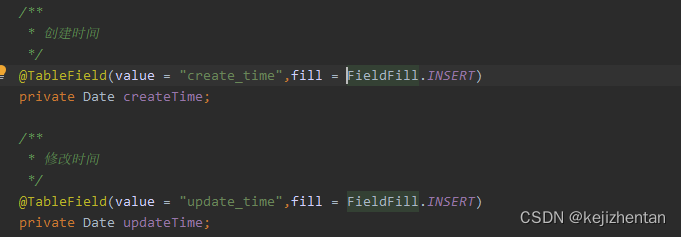
2) 实现元对象处理器接口
@Component public class MyMetaObjectHandler implements MetaObjectHandler { //mp执行添加操作,这个方法执行 @Override public void insertFill(MetaObject metaObject) { this.setFieldValByName("createTime",new Date(),metaObject); this.setFieldValByName("updateTime",new Date(),metaObject); } //mp执行修改操作,这个方法执行 @Override public void updateFill(MetaObject metaObject) { this.setFieldValByName("updateTime",new Date(),metaObject); } }- 1
- 2
- 3
- 4
- 5
- 6
- 7
- 8
- 9
- 10
- 11
- 12
- 13
- 14
- 15
- 16
注意:不要忘记添加 @Component 注解
⑵ 乐观锁
1) 场景
主要适用场景: 当要更新一条记录的时候,希望这条记录没有被别人更新,也就是说实现线程安全的数据更新
乐观锁实现方式:
取出记录时,获取当前version
更新时,带上这个version
执行更新时, set version = newVersion where version = oldVersion
如果version不对,就更新失败
接下来介绍如何在Mybatis-Plus项目中,使用乐观锁:2)乐观锁实现流程
① 在user表中增加一个vesion字段并修改实体类

② 添加 @Version 注解

③ 创建配置文件
创建包config,创建文件MybatisPlusConfig.java
此时可以删除主类中的 @MapperScan 扫描注解
@Configuration @MapperScan("com.kejizhentan.demo.mapper") public class MybatisConfig { // 注册乐观锁插件(旧版:3.0.5) /* @Bean public OptimisticLockerInterceptor optimisticLockerInterceptor(){ return new OptimisticLockerInterceptor(); } */ // 注册乐观锁和分页插件(新版:3.4.0) @Bean public MybatisPlusInterceptor mybatisPlusInterceptor(){ MybatisPlusInterceptor interceptor = new MybatisPlusInterceptor(); interceptor.addInnerInterceptor(new OptimisticLockerInnerInterceptor()); // 乐观锁插件 // DbType:数据库类型(根据类型获取应使用的分页方言) interceptor.addInnerInterceptor(new PaginationInnerInterceptor(DbType.MYSQL)); // 分页插件 return interceptor; } //注册分页插件(旧版:3.0.5) /* @Bean public PaginationInterceptor paginationInterceptor(){ return new PaginationInterceptor(); } */ }- 1
- 2
- 3
- 4
- 5
- 6
- 7
- 8
- 9
- 10
- 11
- 12
- 13
- 14
- 15
- 16
- 17
- 18
- 19
- 20
- 21
- 22
- 23
- 24
- 25
- 26
- 27
- 28
- 29
④ 乐观锁测试
@RunWith(SpringRunner.class) @SpringBootTest class MybatisPlusProjectApplicationTests { @Autowired private UserMapper userMapper; //乐观锁执行测试 @Test void contextLoads() { //先查询 User user = userMapper.selectById(1593929754778599426L); //后修改 user.setName("王老五"); userMapper.updateById(user); } }- 1
- 2
- 3
- 4
- 5
- 6
- 7
- 8
- 9
- 10
- 11
- 12
- 13
- 14
- 15
- 16
执行结果如下:

-
相关阅读:
Java 代理模式
【牛客 - SQL篇 - SQL大厂面试真题】SQL162 2021年11月每天的人均浏览文章时长
ctf bugku
Positive Technologies 利用 PT Cloud Application Firewall 保护中小型企业的网络资源
地球主题网页设计题材——大学生网页制作期末作业HTML+CSS+JS
数据结构—List集合
ZigBee 3.0理论教程-通用-1-06:协议架构-应用层(APP)
第 18章 安全架构设计理论与实践
第十七章:IO流
Shiro介绍及其功能
- 原文地址:https://blog.csdn.net/kejizhentan/article/details/127468133
