-
【0137】【libpq】向postmaster发送 startup packet 数据包(7)
1. 概述
在【0136】【libpq】startup packet应用机制及构建过程(6) 一文,介绍了libpq是如何与postmaster进行通信的。它将首先构造一个startup packet数据包,然后发送给postmaster中的postgres后端进程;postgres在接收到libpq发送过来的startup packet之后,会进行相应的系列的初始化操作。然后并发送相关的数据给libpq(这个具体实现与细节将在【0138】中讲解)。
本文我们就来详细讲解libpq是如何将构建好的startup packet发送给postgres的这样一个过程。
2. 发送startup packet
向postgres后端进程发送startup packet的过程是由函数PQconnectPoll()内部的pqPacketSend()实现。如下图所示:

该函数中第一个参数是PGconn连接句柄;第二个参数是“单字节消息类型代码(single-byte message type code.)”,对于startup packet(启动数据包)而言,它没有消息类型代码,所以传0;第三个参数是待发送的startup packet数据包;第四个参数的startup packet的有效字符串长度。
// 理论上讲,这可能会阻塞,但实际上不应该阻塞,因为我们只有在套接字准备好写的情况下才能到达这里。【Send the startup packet.】 if (pqPacketSend(conn, 0, startpacket, packetlen) != STATUS_OK) { appendPQExpBuffer(&conn->errorMessage, libpq_gettext("could not send startup packet: %s\n"), SOCK_STRERROR(SOCK_ERRNO, sebuf, sizeof(sebuf))); free(startpacket); goto error_return; } free(startpacket); // startup packet发送后,更新PGconn中status成员的状态. conn->status = CONNECTION_AWAITING_RESPONSE; return PGRES_POLLING_READING; }- 1
- 2
- 3
- 4
- 5
- 6
- 7
- 8
- 9
- 10
- 11
- 12
- 13
- 14
- 15
该函数pqPacketSend()如果写入失败,返回STATUS_ERROR;否则,返回STATUS_OK;如果阻塞,返回SIDE_EFFECTS。
注意:使用pqPacketSend()例程发送的所有消息都有一个长度字,无论是protocol 2.0 or 3.0。
int pqPacketSend(PGconn *conn, char pack_type, const void *buf, size_t buf_len)
buf:消息的内容。
buf_len:消息内容长度,给定长度仅包括buf中的内容;这里添加了消息类型和消息长度字段。pqPacketSend()函数的完整实现如下:
int pqPacketSend(PGconn *conn, char pack_type, //pack_type = 0; const void *buf, size_t buf_len) { /* Start the message. */ if (pqPutMsgStart(pack_type, true, conn)) return STATUS_ERROR; /* Send the message body. */ if (pqPutnchar(buf, buf_len, conn)) return STATUS_ERROR; /* Finish the message. */ if (pqPutMsgEnd(conn)) return STATUS_ERROR; /* Flush to ensure backend gets it. */ if (pqFlush(conn)) return STATUS_ERROR; return STATUS_OK; }- 1
- 2
- 3
- 4
- 5
- 6
- 7
- 8
- 9
- 10
- 11
- 12
- 13
- 14
- 15
- 16
- 17
- 18
- 19
- 20
- 21
- 22
2.1 构造message type和协议字空间
这里的想法是,我们在
conn->outBuffer中构造消息,从已经在outBuffer中的任何数据开始(即,在outBuffer+outCount)。我们根据需要扩大缓冲区以保存消息。消息完成后,我们填写长度字(如果需要),然后将outCount提前到消息前面,使其符合发送条件。//msg_type: 是消息类型字节,或者0表示消息没有类型字节(只有启动消息(startup messages)没有类型字节) //fore_len: 强制消息具有长度字()length word);否则,如果是协议3,我们将在其中添加一个长度字 //conn: PGconn连接句柄 int pqPutMsgStart(char msg_type, bool force_len, PGconn *conn) // 0 true conn { int lenPos; int endPos; //【为消息类型字节留出空间】 if (msg_type) endPos = conn->outCount + 1; else endPos = conn->outCount; //【判断是否需要长度字(word)吗?】 if (force_len || PG_PROTOCOL_MAJOR(conn->pversion) >= 3) { lenPos = endPos; /* allow room for message length */ endPos += 4; } else lenPos = -1; // 【确保消息(message header)头有空间】 if (pqCheckOutBufferSpace(endPos, conn)) return EOF; //【okay,保存消息类型字节(如果有)】 if (msg_type) conn->outBuffer[conn->outCount] = msg_type; //【设置消息指针】 conn->outMsgStart = lenPos; //0 conn->outMsgEnd = endPos; //4 /* length word, if needed, will be filled in by pqPutMsgEnd */ if (conn->Pfdebug) fprintf(conn->Pfdebug, "To backend> Msg %c\n", msg_type ? msg_type : ' '); return 0; }- 1
- 2
- 3
- 4
- 5
- 6
- 7
- 8
- 9
- 10
- 11
- 12
- 13
- 14
- 15
- 16
- 17
- 18
- 19
- 20
- 21
- 22
- 23
- 24
- 25
- 26
- 27
- 28
- 29
- 30
- 31
- 32
- 33
- 34
- 35
- 36
- 37
- 38
- 39
- 40
- 41
- 42
- 43
- 44
状态变量
conn->outMsgStart指向不完整消息的长度字:它要么是outCount,要么是outCount+1,这取决于是否存在类型字节。如果我们发送的消息没有长度字(仅限协议3.0之前的版本),则outMsgStart为-1。状态变量conn->outMsgEnd是到目前为止为止收集的数据的结尾。
2.2 将startup packet添加到PGconn中的outBuffer
在2.1节中保证了向postmaster发送的数据中,包含了消息类型字节(如果是非startup packet的话,有1字节)和协议字(4字节);由于本次是startup packet,所以没有消息类型字节。本节的主要功能是将startup packet字符串添加到PGconn连接句柄中的outBuffer(发送缓冲区)中。
该过程由函数pqPutnchar()完成。
pqPacketSend() pqPutMsgStart(); pqPutnchar(); //【将待发送到postmaster的消息添加到outBuffer缓冲区】 pqPutMsgEnd(); pqFlush()- 1
- 2
- 3
- 4
- 5
该函数实现如下:
// 将len字节精确写入outBuffer int pqPutnchar(const char *s, size_t len, PGconn *conn) { // 【函数完成2件事:I. 判断空间是否足够容纳len长度的数据; II. memcpy()拷贝数据到outBuffer】 if (pqPutMsgBytes(s, len, conn)) return EOF; if (conn->Pfdebug) { fprintf(conn->Pfdebug, "To backend> "); fputnbytes(conn->Pfdebug, s, len); fprintf(conn->Pfdebug, "\n"); } return 0; }- 1
- 2
- 3
- 4
- 5
- 6
- 7
- 8
- 9
- 10
- 11
- 12
- 13
- 14
- 15
- 16
- 17
- 18
如上面代码中所描述,pqPutnchar()函数的主要功能由pqPutMsgBytes()完成,该函数内部主要完成两件事:
- 确保PGconn中的outBuffer能够容纳下len长度的消息s。
- 确保成功将待发送的消息memcpy()到PGconn中的outBuffer。
/* * pqPutMsgBytes: add bytes to a partially-constructed message * * Returns 0 on success, EOF on error */ static int pqPutMsgBytes(const void *buf, size_t len, PGconn *conn) { // 【确保有足够的空间】 - 由于这里空间足够,就不展开该函数的内部实现,后期在拓展 if (pqCheckOutBufferSpace(conn->outMsgEnd + len, conn)) return EOF; // 【okay, 保存数据】 - 2.1节中outMsgEnd的值为4,所以这里outBuffer中前4个字节没有数据(给protocol保留) memcpy(conn->outBuffer + conn->outMsgEnd, buf, len); // 【记得同步累增outMsgEnd的长度】 conn->outMsgEnd += len; /* no Pfdebug call here, caller should do it */ return 0; }- 1
- 2
- 3
- 4
- 5
- 6
- 7
- 8
- 9
- 10
- 11
- 12
- 13
- 14
- 15
- 16
- 17
- 18
现在outBuffer发送缓冲区中,已经有startup packet包数据中。startup packet真实发送数据是33字节,但是前面有4字节的protocol长度。所以现在的outMsgEnd为37字节。

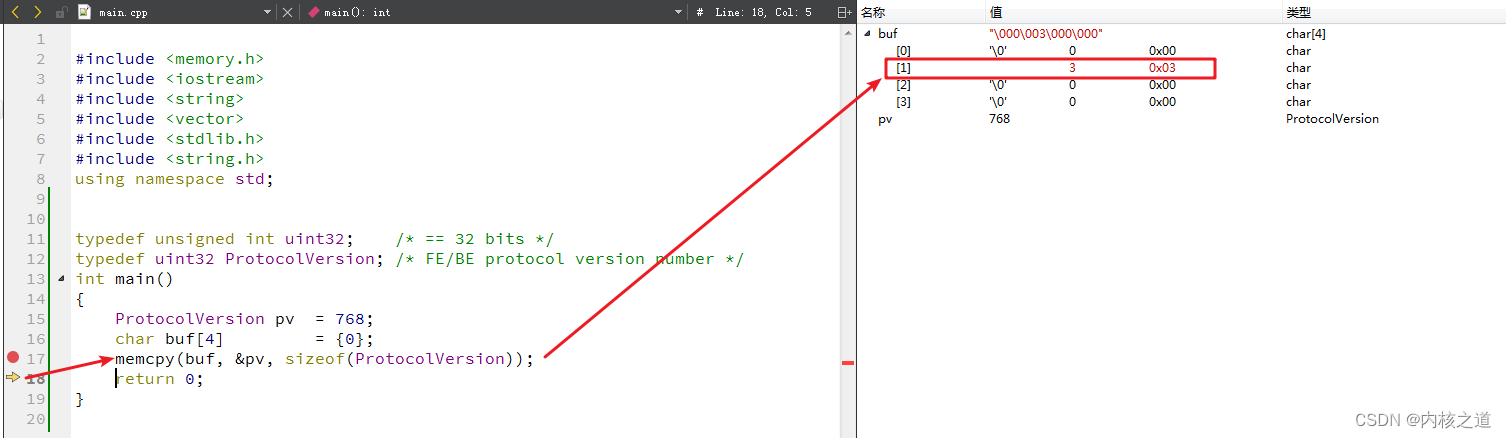
和抓包工具得到的数据一致。右边红色

pv的值是768,memcpy()到内存中前后的效果如下面两幅图所示:- 图(1) 四字节的char类型数组buf,初始化0之后的内存布局图:

- 图(2)将unsigned int类型的变量pv拷贝到buf数组后,其内存初始化情况如下图所示:
2.2.1 疑问:为啥outBuffer中pversion(4字节)前面还有4字节?
如下图所示:第一个红色线框中的
4字节内容是ProtocolVersion(unsigned int)类型变量pv的值(768)存储在char []内存中的布局。而前面(黄色线框)还有4字节的内存空间。这四字节哪里来的?
值得注意的是pqPutMsgBytes()函数中在将startup packet拷贝到PGconn中的outBuffer时,其形式是:
memcpy(conn->outBuffer + conn->outMsgEnd, buf, len); //【重点在outBuffer + outMsgEnd】- 1
而原本在【0136】【libpq】startup packet应用机制及构建过程(6)后,conn->outMsgEnd被初始化了4。所以前面4个字节是0,从outBuff[4]索引下标开始,才开始真正存储startup packet的数据。示意图如下所示:

所以才得到outBuffer中startup packet数据的前四个字节为0。
2.3 在构建的消息中添加 message length 字
从2.2节可以,本次待发送给postmaster守护进程的数据包大小是37字节。前面4个字节是空闲(保留)的。思考一下,libpq会浪费这四字节空间吗?
结论: 显然不会浪费掉这四字节的空间;这四字节用于存储本次构建的待发送给postmaster的消息的长度。而本次是构建的startup packet,其长度是37,所以这个长度值(37)会存储在outBuffer的前面4个字节中。
先来看一下unsigned int类型的变量值(
37)在大小为4的char类型数组中的存储布局形式:- 图1 初始化为0的数组buf,各元素的值以及内存布局情况

- 图2 将unsigned int类型的变量值(37)拷贝到buf数组中(4个字节)后的内存布局:

- 再来看一下tcpdump抓到的libpq发送给postmaster的startup packet数据。是不是刚刚好能够对应上来,包括message数据和message长度。这个分组就是libpq发送给postmaster的startup packet(启动数据包)。

在构建的消息中添加消息长度是由函数pqPutMsgEnd()完成,该函数的完整实现如下:// 【 完成消息的构造并可能发送】 int pqPutMsgEnd(PGconn *conn) { if (conn->Pfdebug) fprintf(conn->Pfdebug, "To backend> Msg complete, length %u\n", conn->outMsgEnd - conn->outCount); // 如果需要,则在message头部填充长度字(notice:一个字等于4字节.) // 【什么时候outMsgStart < 0 ? 就是非protocol 3或是调用pqPutMsgStart()函数force_len显示指定false】 if (conn->outMsgStart >= 0) { uint32 msgLen = conn->outMsgEnd - conn->outMsgStart; msgLen = pg_hton32(msgLen); memcpy(conn->outBuffer + conn->outMsgStart, &msgLen, 4); } // 【使消息符合发送条件】 conn->outCount = conn->outMsgEnd; if (conn->outCount >= 8192) { int toSend = conn->outCount - (conn->outCount % 8192); if (pqSendSome(conn, toSend) < 0) return EOF; /* in nonblock mode, don't complain if unable to send it all */ } return 0; }- 1
- 2
- 3
- 4
- 5
- 6
- 7
- 8
- 9
- 10
- 11
- 12
- 13
- 14
- 15
- 16
- 17
- 18
- 19
- 20
- 21
- 22
- 23
- 24
- 25
- 26
- 27
- 28
- 29
- 30
- 31
- 32
注意:除非我们已经积累了至少8K的数据(Unix系统上管道缓冲区的典型大小),否则我们实际上不会在这里发送任何内容。这避免了发送小的部分数据包。当需要将所有数据刷新到服务器时,调用者必须使用pqFlush。
该函数调用对应的gdb调试信息如下图所示:

2.4 发送outBuffer中等待的数据
由于本文内文较多,将该小节的内容放在下一文中,请阅读:
【0138】【libpq】发送任何在outBuffer中等待的数据(8) -
相关阅读:
【Python零基础入门篇 · 9】:字典的相关操作
2022 CCF CSP-J2 解密
【毕业季|进击的技术er】工作七年的职场人,不希望你们再走弯路
拓世科技集团打造数字人营销解决方案,为车企提供新的“增长担当”
java毕业生设计疫苗接种平台计算机源码+系统+mysql+调试部署+lw
Matlab:从矩阵中删除行或列
快速代码补全技巧,快速打印日志创建对象
使用网络摄像头进行眼睛注视估计
2022亚太数学杯数学建模竞赛B题(思路、程序......)
客流人数管理新趋势:景区客流采集分析系统的功能特点
- 原文地址:https://blog.csdn.net/lixiaogang_theanswer/article/details/127611419
