-
(八) ES6 新特性 —— promise
CSDN话题挑战赛第2期
参赛话题:学习笔记目录
Promise 是 ES6 引入的异步编程的新解决方案。语法上 Promise 是一个构造函数, 用来封装异步操作并可以获取其成功或失败的结果。
1) Promise 构造函数: Promise (excutor) {}
2) Promise.prototype.then 方法
3) Promise.prototype.catch 方法
promise的实例化
promise实例化接受一个参数,而且这个参数是一个函数,有两个形参:resolve, reject
里面还有一个异步操作:
- const p = new Promise(function (resolve, reject) {
- setTimeout(function () {
- }, 1000);
- });
运行promise对象有三个状态:初始化、成功、失败
当我们在异步函数里面调用一个resolve之后,对象的状态就会变成成功
- const p = new Promise(function (resolve, reject) {
- setTimeout(function () {
- let data = '数据库中的用户数据';
- resolve(data);
- }, 1000);
- });
运行而当我们调用reject之后,对象的状态就会变成失败。
- const p = new Promise(function (resolve, reject) {
- setTimeout(function () {
- let err = '数据读取失败';
- reject(err);
- }, 1000);
- });
此时:我们可以调用promise 对象的 then 方法
then方法接收两个函数类型的参数。
成功的函数是value,失败的是reason
如果promise调用的是resolve——成功,那么then就会就会执行第一个回调函数
如果promise调用的是reject——失败,那么then就会就会执行第二个回调函数
- p.then(
- function (value) {
- console.log(value);
- },
- function (reason) {
- console.error(reason);
- }
- );
调用resolve返回结果:

调用reason返回结果:

Promise封装读取文件
我们想要读取为学.md文件里面的内容并对他做一个输出。
如果不用promise的话,我们可以这样做:
- fs.readFile('./resources/为学.md', (err, data) => {
- //如果失败, 则抛出错误
- if (err) throw err;
- //如果没有出错, 则输出内容
- console.log(data.toString());
- });

正常输出,没有问题。
当我们使用promise封装时:
- const p = new Promise(function (resolve, reject) {
- // 读取文件也是一个异步操作
- fs.readFile("./resources/为学.md", (err, data)=>{
- //判断如果失败
- if(err) reject(err);
- //如果成功
- resolve(data);
- });
- });
- p.then(function(value){
- console.log(value.toString());
- }, function(reason){
- console.log("读取失败!!");
- });
运行也可以正常读出文件内容。
promise封装读取AJAX
- // 接口地址: https://api.apiopen.top/getJoke
- const p = new Promise((resolve, reject) => {
- //1. 创建对象
- const xhr = new XMLHttpRequest();
- //2. 初始化
- xhr.open('GET', 'https://api.apiopen.top/getJoke');
- // 跨域的话可以去设置一下响应头
- //response.setHeader('Access-Control-Allow-Origin', '*');
- //3. 发送
- xhr.send();
- //4. 绑定事件, 处理响应结果
- xhr.onreadystatechange = function () {
- //判断
- if (xhr.readyState === 4) {
- //判断响应状态码 200-299
- if (xhr.status >= 200 && xhr.status < 300) {
- //表示成功
- resolve(xhr.response);
- } else {
- //如果失败
- reject(xhr.status);
- }
- }
- };
- });
- //指定回调
- p.then(
- function (value) {
- console.log(value);
- },
- function (reason) {
- console.error(reason);
- }
- );
运行Promise-then方法
- const p = new Promise((resolve, reject) => {
- setTimeout(() => {
- reject('出错啦');
- }, 1000);
- });
- const result = p.then(
- (value) => {
- console.log(value);
- },
- (reason) => {
- console.warn(reason);
- }
- );
- console.log(result);
运行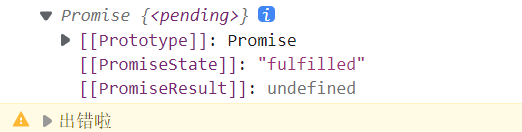
当我们接收then方法的返回结果时我们发现他是一个Promise对象,对象状态由回调函数的返回结果决定,如果回调函数中返回的结果是一个非Promise类型的属性,状态为成功,返回值为对象的成功的值。
- const p = new Promise((resolve, reject) => {
- setTimeout(() => {
- resolve('成功啦');
- }, 1000);
- });
- const result = p.then(
- (value) => {
- console.log(value);
- return 123;
- },
- (reason) => {
- console.warn(reason);
- }
- );
- console.log(result);
运行
如果返回的值是一个成功的promise对象:
- const result = p.then(
- (value) => {
- console.log(value);
- return new Promise((resolve, reject) => {
- resolve('ok');
- });
- },
- (reason) => {
- console.warn(reason);
- }
- );
- console.log(result);

回调函数返回的是一个Promise,那么这个Promise的状态就会影响Then方法返回的一个Promise的状态,而且这个Promise成功返回的值就是then方法返回的值。
再看返回的失败的Promise对象:
- const result = p.then(
- (value) => {
- console.log(value);
- return new Promise((resolve, reject) => {
- // resolve('ok');
- reject('error');
- });
- //3. 抛出错误
- // throw new Error('出错啦!');
- throw '出错啦!';
- },
- (reason) => {
- console.warn(reason);
- }
- );
- console.log(result);

如果回调函数返回的是一个失败,那么then方法返回的也是一个失败,失败值就是then方法的失败值。
说白了就是里面的异步操作决定外面的异步操作
再来看看抛出错误的选项:
- const result = p.then(
- (value) => {
- console.log(value);
- //3. 抛出错误
- throw new Error('出错啦!');
- // throw '出错啦!';
- },
- (reason) => {
- console.warn(reason);
- }
- );
- console.log(result);

状态也是一个失败的Promise的状态,错误值就是Error抛出来的那个值。
根据then方法的以上特性:我们来看一下then方法的链式调用
p.then((value) => {}).then((value) => {});需求:按顺序读取三个文件的内容
方法一:层级嵌套
- const fs = require("fs");
- fs.readFile('./resources/为学.md', (err, data1)=>{
- fs.readFile('./resources/插秧诗.md', (err, data2)=>{
- fs.readFile('./resources/观书有感.md', (err, data3)=>{
- let result = data1 + '\r\n' +data2 +'\r\n'+ data3;
- console.log(result);
- });
- });
- });
运行方法二:Promise
- const p = new Promise((resolve, reject) => {
- fs.readFile("./resources/为学.md", (err, data) => {
- resolve(data);
- });
- });
- p.then(value => {
- // value是第一个文件内容,data是第二个文件内容
- return new Promise((resolve, reject) => {
- fs.readFile("./resources/插秧诗.md", (err, data) => {
- resolve([value, data]); // 1. 这里返回成功,那么then方法也会返回成功,
- // 而且then方法返回成功的值就是这块返回成功的值 即两个文件的数组
- });
- });
- }).then(value => {
- // 2. 所以这里的value就是第一个文件结合了第二个文件后的值
- return new Promise((resolve, reject) => {
- fs.readFile("./resources/观书有感.md", (err, data) => {
- //压入
- value.push(data); //value就是三个文件的值
- resolve(value);// 3. 再把value传给下一个then
- });
- })
- }).then(value => {
- console.log(value.join('\r\n'));
- });
catch方法
catch不同于then方法,他只需指定一个方法就可以了。
- const p = new Promise((resolve, reject) => {
- setTimeout(() => {
- //设置 p 对象的状态为失败, 并设置失败的值
- reject('出错啦!');
- }, 1000);
- });
- p.catch(function (reason) {
- console.warn(reason);
- });
运行 -
相关阅读:
二叉(搜索)树的最近公共祖先 ●●
Docker学习笔记
文本生成中的采样策略
代码随想录算法训练营第二十三天|669 修剪二叉搜索树 108 将有序数组转换为二叉搜索树 538 把二叉搜索树转换为累加树
antd+react Hook弹窗改进版
聚苯乙烯PS彩色胶乳微球:红色/蓝色/黑色/绿色胶乳微球介绍和制备方法
java多线程-多线程技能
Shell脚本完成pxe装机配置
电子电器架构 —— 网关通道设计原则
Day 36 贪心算法 part05 : 435. 无重叠区间 763.划分字母区间 56. 合并区间
- 原文地址:https://blog.csdn.net/a45667/article/details/127116634