-
Hadoop(MapReduce)
文章目录
1、MapReduce概述
1.1 定义

1.2 优缺点
优点:

缺点:

1.3 MapReduce 核心思想

1.4 MapReduce进程

1.5 官方 WordCount 源码
采用反编译工具反编译源码,发现 WordCount 案例有 Map 类、Reduce 类和驱动类。且数据的类型是 Hadoop 自身封装的序列化类型。
1.6 常用数据序列化类型

1.7 MapReduce编程规范


1.8 WordCount案例实操
1.8.1 本地测试


(3)环境准备
a.创建maven工程,MapReduceDemo
b.在pom.xml文件中添加如下依赖org.apache.hadoop</groupId> hadoop-client</artifactId> 3.1.3</version> </dependency> junit</groupId> junit</artifactId> 4.12</version> </dependency> org.slf4j</groupId> slf4j-log4j12</artifactId> 1.7.30</version> </dependency> </dependencies> c.在项目的src/main/resources目录下,新建一个文件,命名为“log4j.properties”,在文件中填入。
log4j.rootLogger=INFO, stdout
log4j.appender.stdout=org.apache.log4j.ConsoleAppender
log4j.appender.stdout.layout=org.apache.log4j.PatternLayout
log4j.appender.stdout.layout.ConversionPattern=%d %p [%c] - %m%n
log4j.appender.logfile=org.apache.log4j.FileAppender
log4j.appender.logfile.File=target/spring.log
log4j.appender.logfile.layout=org.apache.log4j.PatternLayout
log4j.appender.logfile.layout.ConversionPattern=%d %p [%c] - %m%n
d.创建包名com.xxxx.mapreduce.wordcount
e.编写Mapper类package com.xxxx.mapreduce.wordcount; import org.apache.hadoop.io.IntWritable; import org.apache.hadoop.io.LongWritable; import org.apache.hadoop.io.Text; import org.apache.hadoop.mapreduce.Mapper; import java.io.IOException; /** * KEYIN map阶段输入的key: LongWritable * VALUEIN map阶段输入的value: Text * KEYOUT map阶段输出的key: Text * VALUEOUT map阶段输出的value类型: IntWritable */ public class WordCountMapper extends Mapper<LongWritable, Text,Text, IntWritable> { private Text outK = new Text(); private IntWritable outV = new IntWritable(1); @Override protected void map(LongWritable key, Text value, Mapper<LongWritable, Text, Text, IntWritable>.Context context) throws IOException, InterruptedException { //1.获取一行 //atguigu atguigu String line = value.toString(); //2.切割 //atguigu //atguigu String[] words = line.split(" "); //3.循环写出 for (String word : words){ //封装outK outK.set(word); //写出 context.write(outK,outV); } } }f.编写 Reducer 类
package com.xxxx.mapreduce.wordcount;

import org.apache.hadoop.io.IntWritable;
import org.apache.hadoop.io.Text;
import org.apache.hadoop.mapreduce.Reducer;

import java.io.IOException;

/**
 * KEYIN        reduce阶段输入的key: Text
 * VALUEIN      reduce阶段输入的value: IntWritable
 * KEYOUT       reduce阶段输出的key: Text
 * VALUEOUT     reduce阶段输出的value类型: IntWritable
 */
public class WordCountReducer extends Reducer<Text, IntWritable,Text,IntWritable> {


    private IntWritable outV = new IntWritable();

    @Override
    protected void reduce(Text key, Iterable<IntWritable> values, Reducer<Text, IntWritable, Text, IntWritable>.Context context) throws IOException, InterruptedException {

        int sum=0;

        //atguigu (1,1)
        //1.累计求和
        for (IntWritable value : values){
            sum += value.get();
        }

        outV.set(sum);

        //写出
        context.write(key,outV);

    }
}
g.编写 Driver 驱动类
package com.xxxx.mapreduce.wordcount;

import org.apache.hadoop.conf.Configuration;
import org.apache.hadoop.fs.Path;
import org.apache.hadoop.io.IntWritable;
import org.apache.hadoop.io.Text;
import org.apache.hadoop.mapreduce.Job;
import org.apache.hadoop.mapreduce.lib.input.FileInputFormat;
import org.apache.hadoop.mapreduce.lib.output.FileOutputFormat;

import java.io.IOException;

/**
 * 注释内容
 *
 * @author : li.linnan
 * @create : 2022/9/28
 */
public class WordCountDriver {

    public static void main(String[] args) throws IOException, InterruptedException, ClassNotFoundException {

        // 1 获取配置信息以及获取 job 对象
        Configuration conf = new Configuration();
        Job job = Job.getInstance(conf);

        // 2 关联本 Driver 程序的 jar
        job.setJarByClass(WordCountDriver.class);

        // 3 关联 Mapper 和 Reducer 的 jar
        job.setMapperClass(WordCountMapper.class);
        job.setReducerClass(WordCountReducer.class);

        // 4 设置 Mapper 输出的 kv 类型
        job.setMapOutputKeyClass(Text.class);
        job.setMapOutputValueClass(IntWritable.class);

        // 5 设置最终输出 kv 类型
        job.setOutputKeyClass(Text.class);
        job.setOutputValueClass(IntWritable.class);

        // 6 设置输入和输出路径
        FileInputFormat.setInputPaths(job, new Path("D:\\input\\hello.txt"));
        FileOutputFormat.setOutputPath(job, new Path("D:\\input\\result"));

        // 7 提交 job
        boolean result = job.waitForCompletion(true);
        System.exit(result ? 0 : 1);

    }

}
h.本地测试


文件内容:
atguigu	2
banzhang	1
cls	3
hadoop	1
jiao	1
ss	2
xue	1
1.8.2 提交到集群测试
集群上测试
(1)用 maven 打 jar 包,需要添加的打包插件依赖<build> <plugins> <plugin> <artifactId>maven-compiler-pluginartifactId> <version>3.6.1version> <configuration> <source>1.8source> <target>1.8target> configuration> plugin> <plugin> <artifactId>maven-assembly-pluginartifactId> <configuration> <descriptorRefs> <descriptorRef>jar-with-dependenciesdescriptorRef> descriptorRefs> configuration> <executions> <execution> <id>make-assemblyid> <phase>packagephase> <goals> <goal>singlegoal> goals> execution> executions> plugin> plugins> build>(2)修改输入输出路径
        // 6 设置输入和输出路径
        FileInputFormat.setInputPaths(job, new Path(args[0]));
        FileOutputFormat.setOutputPath(job, new Path(args[1]));
(3)将程序打成 jar 包

(4)修改不带依赖的 jar 包名称为 wc.jar,并拷贝该 jar 包到 Hadoop 集群的/opt/module/hadoop-3.1.3 路径。 (直接将jar包拖拽过来)

(5)执行命令
[lln@hadoop102 hadoop-3.1.3]$ hadoop jar wc.jar com.xxxx.mapreduce.wordcount.WordCountDriver /input /output
2、Hadoop序列化
2.1 概述


2.2 自定义bean对象实现序列化接口(Writable)

2.3 序列化案例实操
(1)需求

(2)需求分析

(3)编写MapReduce程序
a.编写流量统计的Bean对象package com.xxxx.mapreduce.writable; import org.apache.hadoop.io.Writable; import java.io.DataInput; import java.io.DataOutput; import java.io.IOException; /** * 1、定义类,实现Writable接口 * 2、重写序列化和反序列化方法 * 3、重写空参构造 * 4、toString方法 * * @author : li.linnan * @create : 2022/9/29 */ public class FlowBean implements Writable { private long upFlow;//上行流量 private long downFlow;//下行流量 private long sumFlow;//总流量 //空参构造 public FlowBean(){ } public long getUpFlow() { return upFlow; } public void setUpFlow(long upFlow) { this.upFlow = upFlow; } public long getDownFlow() { return downFlow; } public void setDownFlow(long downFlow) { this.downFlow = downFlow; } public long getSumFlow() { return sumFlow; } public void setSumFlow(long sumFlow) { this.sumFlow = sumFlow; } public void setSumFlow() { this.sumFlow = this.upFlow + this.downFlow; } @Override public void write(DataOutput dataOutput) throws IOException { dataOutput.writeLong(upFlow); dataOutput.writeLong(downFlow); dataOutput.writeLong(sumFlow); } @Override public void readFields(DataInput dataInput) throws IOException { this.upFlow = dataInput.readLong(); this.downFlow = dataInput.readLong(); this.sumFlow = dataInput.readLong(); } @Override public String toString() { return upFlow + "\t" + downFlow + "\t" + sumFlow; } }b.编写Mapper类
package com.xxxx.mapreduce.writable;

import org.apache.hadoop.io.LongWritable;
import org.apache.hadoop.io.Text;
import org.apache.hadoop.mapreduce.Mapper;

import java.io.IOException;

/**
 * 注释内容
 *
 * @author : li.linnan
 * @create : 2022/9/29
 */
public class FlowMapper extends Mapper<LongWritable, Text,Text,FlowBean> {

    private Text outK = new Text();
    private FlowBean outV = new FlowBean();

    @Override
    protected void map(LongWritable key,Text value,Context context) throws IOException,InterruptedException{

        //1、获取一行
        //1	13736230513	192.196.100.1	www.atguigu.com	2481	24681	200
        //2	13846544121	192.196.100.2			264	0	200
        String line = value.toString();

        //2 切割
        //1,13736230513,192.196.100.1,www.atguigu.com,2481,24681,200
        //2,13846544121,192.196.100.2,264,0,200
        String[] split = line.split("\t");

        //3、抓取想要的数据
        //手机号 13736230513
        //上行流量和下行流量 2481 24681
        String phone = split[1];
        String up = split[split.length-3];
        String down = split[split.length-2];

        //4、封装outK、outV
        outK.set(phone);
        outV.setUpFlow(Long.parseLong(up));
        outV.setDownFlow(Long.parseLong(down));
        outV.setSumFlow();

        //5、写出outK、outV
        context.write(outK,outV);


    }

}
c.编写Reducer类
package com.xxxx.mapreduce.writable;

import org.apache.hadoop.io.Text;
import org.apache.hadoop.mapreduce.Reducer;

import java.io.IOException;

/**
 * 注释内容
 *
 * @author : li.linnan
 * @create : 2022/9/29
 */
public class FlowReducer extends Reducer<Text,FlowBean,Text,FlowBean> {

    private FlowBean outV = new FlowBean();

    @Override
    protected void reduce(Text key, Iterable<FlowBean> values, Context context) throws IOException, InterruptedException {

        long totalUp = 0;
        long totalDown = 0;

        //1、遍历values,将其中的上行流量,下行流量分别累加
        for(FlowBean flowBean : values){
            totalUp += flowBean.getUpFlow();
            totalDown += flowBean.getDownFlow();
        }

        //2、封装outV
        outV.setUpFlow(totalUp);
        outV.setDownFlow(totalDown);
        outV.setSumFlow();

        //3、写出outK、outV
        context.write(key,outV);
    }
}
d.编写Driver驱动类
package com.xxxx.mapreduce.writable;

import org.apache.hadoop.conf.Configuration;
import org.apache.hadoop.fs.Path;
import org.apache.hadoop.io.Text;
import org.apache.hadoop.mapreduce.Job;
import org.apache.hadoop.mapreduce.lib.input.FileInputFormat;
import org.apache.hadoop.mapreduce.lib.output.FileOutputFormat;

import java.io.IOException;

/**
 * 注释内容
 *
 * @author : li.linnan
 * @create : 2022/9/29
 */
public class FlowDriver {

    public static void main(String[] args) throws IOException, InterruptedException, ClassNotFoundException {

        //1 获取job
        Configuration conf = new Configuration();
        Job job = Job.getInstance(conf);

        //2 设置jar
        job.setJarByClass(FlowDriver.class);

        //3 关联mapper 和 Reducer
        job.setMapperClass(FlowMapper.class);
        job.setReducerClass(FlowReducer.class);

        //4 设置mapper 输出的 key 和 value 类型
        job.setMapOutputKeyClass(Text.class);
        job.setMapOutputValueClass(FlowBean.class);

        //5 设置最终数据输出的 key 和 value 类型
        job.setOutputKeyClass(Text.class);
        job.setOutputValueClass(FlowBean.class);

        //6 设置数据的输入路径和输出路径
        FileInputFormat.setInputPaths(job, new Path("D:\\input\\phone.txt"));
        FileOutputFormat.setOutputPath(job, new Path("D:\\input\\result"));

        //7 提交job
        boolean b = job.waitForCompletion(true);
        System.exit(b?0:1);

    }

}
phone.txt 文件内容
1	13736230513	192.196.100.1	www.atguigu.com	2481	24681	200
2	13846544121	192.196.100.2			264	0	200
3 	13956435636	192.196.100.3			132	1512	200
4 	13966251146	192.168.100.1			240	0	404
5 	18271575951	192.168.100.2	www.atguigu.com	1527	2106	200
6 	84188413	192.168.100.3	www.atguigu.com	4116	1432	200
7 	13590439668	192.168.100.4			1116	954	200
8 	15910133277	192.168.100.5	www.hao123.com	3156	2936	200
9 	13729199489	192.168.100.6			240	0	200
10 	13630577991	192.168.100.7	www.shouhu.com	6960	690	200
11 	15043685818	192.168.100.8	www.baidu.com	3659	3538	200
12 	15959002129	192.168.100.9	www.atguigu.com	1938	180	500
13 	13560439638	192.168.100.10			918	4938	200
14 	13470253144	192.168.100.11			180	180	200
15 	13682846555	192.168.100.12	www.qq.com	1938	2910	200
16 	13992314666	192.168.100.13	www.gaga.com	3008	3720	200
17 	13509468723	192.168.100.14	www.qinghua.com	7335	110349	404
18 	18390173782	192.168.100.15	www.sogou.com	9531	2412	200
19 	13975057813	192.168.100.16	www.baidu.com	11058	48243	200
20 	13768778790	192.168.100.17			120	120	200
21 	13568436656	192.168.100.18	www.alibaba.com	2481	24681	200
22 	13568436656	192.168.100.19			1116	954	200
运行结果
13470253144	180	180	360
13509468723	7335	110349	117684
13560439638	918	4938	5856
13568436656	3597	25635	29232
13590439668	1116	954	2070
13630577991	6960	690	7650
13682846555	1938	2910	4848
13729199489	240	0	240
13736230513	2481	24681	27162
13768778790	120	120	240
13846544121	264	0	264
13956435636	132	1512	1644
13966251146	240	0	240
13975057813	11058	48243	59301
13992314666	3008	3720	6728
15043685818	3659	3538	7197
15910133277	3156	2936	6092
15959002129	1938	180	2118
18271575951	1527	2106	3633
18390173782	9531	2412	11943
84188413	4116	1432	5548
3、MapReduce框架原理

3.1 InputFormat数据输入
3.1.1 切片与MapTask并行度决定机制


3.1.2 Job提交流程源码和切片源码详情
(1)Job提交流程源码详解


(2)切片源码解析
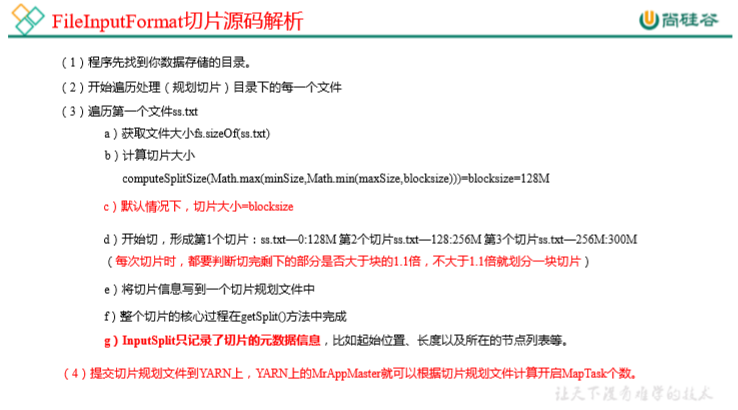
3.1.3 FileInputFormat切片机制


3.1.4 TextInputFormat

3.1.5 CombineTextInputFormat 切片机制


3.1.6 CombineTextInputFormat 案例实操
1)案例

3.2 MapReduce工作流程


3.3 Shuffle机制
3.3.1 Shuffle机制
Map方法之后,Reduce方法之前的数据处理过程称之为Shuffle。

3.3.2 Partition分区


3.3.3 Partition分区案例


3.3.4 WritableComparable排序


3.3.5 WritableComparable全排序案例


FlowBean对象在需求1的基础上增加了比较功能
package com.xxxx.mapreduce.writableComparable;

import org.apache.hadoop.io.Writable;
import org.apache.hadoop.io.WritableComparable;

import java.io.DataInput;
import java.io.DataOutput;
import java.io.IOException;

/**
 * 1、定义类,实现Writable接口
 * 2、重写序列化和反序列化方法
 * 3、重写空参构造
 * 4、toString方法
 *
 * @author : li.linnan
 * @create : 2022/9/29
 */
public class FlowBean implements WritableComparable<FlowBean> {

    private long upFlow;//上行流量
    private long downFlow;//下行流量
    private long sumFlow;//总流量

    //空参构造
    public FlowBean(){
    }

    public long getUpFlow() {
        return upFlow;
    }

    public void setUpFlow(long upFlow) {
        this.upFlow = upFlow;
    }

    public long getDownFlow() {
        return downFlow;
    }

    public void setDownFlow(long downFlow) {
        this.downFlow = downFlow;
    }

    public long getSumFlow() {
        return sumFlow;
    }

    public void setSumFlow(long sumFlow) {
        this.sumFlow = sumFlow;
    }

    public void setSumFlow() {
        this.sumFlow = this.upFlow + this.downFlow;
    }

    @Override
    public void write(DataOutput dataOutput) throws IOException {

        dataOutput.writeLong(upFlow);
        dataOutput.writeLong(downFlow);
        dataOutput.writeLong(sumFlow);

    }

    @Override
    public void readFields(DataInput dataInput) throws IOException {

        this.upFlow = dataInput.readLong();
        this.downFlow = dataInput.readLong();
        this.sumFlow = dataInput.readLong();

    }

    @Override
    public String toString() {
        return upFlow + "\t" + downFlow + "\t" + sumFlow;
    }


    //按照总流量的倒序排序
    @Override
    public int compareTo(FlowBean o) {
        if(this.sumFlow > o.sumFlow){
            return -1;
        }else if(this.sumFlow<o.sumFlow){
            return 1;
        }else {
            return 0;
        }
    }
}
编写Mapper类
package com.xxxx.mapreduce.writableComparable;

import org.apache.hadoop.io.LongWritable;
import org.apache.hadoop.io.Text;
import org.apache.hadoop.mapreduce.Mapper;

import java.io.IOException;

/**
 * 注释内容
 *
 * @author : li.linnan
 * @create : 2022/9/29
 */
public class FlowMapper extends Mapper<LongWritable, Text, FlowBean,Text> {

    private FlowBean outK = new FlowBean();
    private Text outV = new Text();

    @Override
    protected void map(LongWritable key,Text value,Context context) throws IOException,InterruptedException{

        //1、获取一行
        //13470253144	180	180	360
        //13509468723	7335	110349	117684
        String line = value.toString();

        //2 切割
        String[] split = line.split("\t");

        //3、抓取想要的数据
        //手机号 13736230513
        //上行流量和下行流量 2481 24681
        String phone = split[0];
        String up = split[1];
        String down = split[2];

        //4、封装outK、outV
        outK.setUpFlow(Long.parseLong(up));
        outK.setDownFlow(Long.parseLong(down));
        outK.setSumFlow();
        outV.set(phone);

        //5、写出outK、outV
        context.write(outK,outV);


    }

}
编写Reduce类
package com.xxxx.mapreduce.writableComparable;

import org.apache.hadoop.io.Text;
import org.apache.hadoop.mapreduce.Reducer;

import java.io.IOException;

/**
 * 注释内容
 *
 * @author : li.linnan
 * @create : 2022/9/29
 */
public class FlowReducer extends Reducer<FlowBean, Text,Text, FlowBean> {


    @Override
    protected void reduce(FlowBean key, Iterable<Text> values, Reducer<FlowBean, Text, Text, FlowBean>.Context context) throws IOException, InterruptedException {
        //遍历values集合,循环写出,避免总流量相同的情况
        for (Text value:values){
            //调换KV的位置,反向写出
            context.write(value,key);
        }
    }
}
编写Driver类
package com.xxxx.mapreduce.writableComparable;

import org.apache.hadoop.conf.Configuration;
import org.apache.hadoop.fs.Path;
import org.apache.hadoop.io.Text;
import org.apache.hadoop.mapreduce.Job;
import org.apache.hadoop.mapreduce.lib.input.FileInputFormat;
import org.apache.hadoop.mapreduce.lib.output.FileOutputFormat;

import java.io.IOException;

/**
 * 注释内容
 *
 * @author : li.linnan
 * @create : 2022/9/29
 */
public class FlowDriver {

    public static void main(String[] args) throws IOException, InterruptedException, ClassNotFoundException {

        //1 获取job
        Configuration conf = new Configuration();
        Job job = Job.getInstance(conf);

        //2 设置jar
        job.setJarByClass(FlowDriver.class);

        //3 关联mapper 和 Reducer
        job.setMapperClass(FlowMapper.class);
        job.setReducerClass(FlowReducer.class);

        //4 设置mapper 输出的 key 和 value 类型
        job.setMapOutputKeyClass(FlowBean.class);
        job.setMapOutputValueClass(Text.class);

        //5 设置最终数据输出的 key 和 value 类型
        job.setOutputKeyClass(Text.class);
        job.setOutputValueClass(FlowBean.class);

        //6 设置数据的输入路径和输出路径
        //上一次的运行结果作为输入
        FileInputFormat.setInputPaths(job, new Path("D:\\input\\result"));
        FileOutputFormat.setOutputPath(job, new Path("D:\\input\\result4"));

        //7 提交job
        boolean b = job.waitForCompletion(true);
        System.exit(b?0:1);

    }

}
输入:
13470253144	180	180	360
13509468723	7335	110349	117684
13560439638	918	4938	5856
13568436656	3597	25635	29232
13590439668	1116	954	2070
13630577991	6960	690	7650
13682846555	1938	2910	4848
13729199489	240	0	240
13736230513	2481	24681	27162
13768778790	120	120	240
13846544121	264	0	264
13956435636	132	1512	1644
13966251146	240	0	240
13975057813	11058	48243	59301
13992314666	3008	3720	6728
15043685818	3659	3538	7197
15910133277	3156	2936	6092
15959002129	1938	180	2118
18271575951	1527	2106	3633
18390173782	9531	2412	11943
84188413	4116	1432	5548
输出:
13509468723	7335	110349	117684
13975057813	11058	48243	59301
13568436656	3597	25635	29232
13736230513	2481	24681	27162
18390173782	9531	2412	11943
13630577991	6960	690	7650
15043685818	3659	3538	7197
13992314666	3008	3720	6728
15910133277	3156	2936	6092
13560439638	918	4938	5856
84188413	4116	1432	5548
13682846555	1938	2910	4848
18271575951	1527	2106	3633
15959002129	1938	180	2118
13590439668	1116	954	2070
13956435636	132	1512	1644
13470253144	180	180	360
13846544121	264	0	264
13729199489	240	0	240
13768778790	120	120	240
13966251146	240	0	240
附:二次排序
重写compareTo方法
    //按照总流量的倒序排序
    @Override
    public int compareTo(FlowBean o) {
        if(this.sumFlow > o.sumFlow){
            return -1;
        }else if(this.sumFlow<o.sumFlow){
            return 1;
        }else {
            //二次排序:按照上行流量的正序排
            if(this.upFlow>o.upFlow){
                return 1;
            }else if(this.upFlow<o.upFlow){
                return -1;
            }else{
                return 0;
            }

        }
    }
3.3.6 WritableComparable区内排序案例


添加自定义分区
package com.xxxx.mapreduce.partitionerandwritableComparable;

import org.apache.hadoop.io.Text;
import org.apache.hadoop.mapreduce.Partitioner;

/**
 * 注释内容
 *
 * @author : li.linnan
 * @create : 2022/10/13
 */
public class ProvincePartitioner extends Partitioner<FlowBean, Text> {


    @Override
    public int getPartition(FlowBean flowBean, Text text, int numPartitions) {

        //获取手机号前三位
        String phone = text.toString();
        String prePhone = phone.substring(0,3);

        //定义一个分区变量partition,根据prePhone设置分区号
        int partition;
        if("136".equals(prePhone)){
            partition = 0;
        }else if("137".equals(prePhone)){
            partition = 1;
        }else if("138".equals(prePhone)){
            partition = 2;
        }else if("139".equals(prePhone)){
            partition = 3;
        }else {
            partition = 4;
        }

        //最后返回分区号 partition
        return partition;

    }
}
在驱动器中添加分区类
package com.xxxx.mapreduce.partitionerandwritableComparable;

import org.apache.hadoop.conf.Configuration;
import org.apache.hadoop.fs.Path;
import org.apache.hadoop.io.Text;
import org.apache.hadoop.mapreduce.Job;
import org.apache.hadoop.mapreduce.lib.input.FileInputFormat;
import org.apache.hadoop.mapreduce.lib.output.FileOutputFormat;

import java.io.IOException;

/**
 * 注释内容
 *
 * @author : li.linnan
 * @create : 2022/9/29
 */
public class FlowDriver {

    public static void main(String[] args) throws IOException, InterruptedException, ClassNotFoundException {

        //1 获取job
        Configuration conf = new Configuration();
        Job job = Job.getInstance(conf);

        //2 设置jar
        job.setJarByClass(FlowDriver.class);

        //3 关联mapper 和 Reducer
        job.setMapperClass(FlowMapper.class);
        job.setReducerClass(FlowReducer.class);

        //4 设置mapper 输出的 key 和 value 类型
        job.setMapOutputKeyClass(FlowBean.class);
        job.setMapOutputValueClass(Text.class);

        //5 设置最终数据输出的 key 和 value 类型
        job.setOutputKeyClass(Text.class);
        job.setOutputValueClass(FlowBean.class);


        //设置自定义分区器
        job.setPartitionerClass(ProvincePartitioner.class);
        //设置对应的ReduceTask的个数
        job.setNumReduceTasks(5);


        //6 设置数据的输入路径和输出路径
        //上一次的运行结果作为输入
        FileInputFormat.setInputPaths(job, new Path("D:\\input\\result"));
        FileOutputFormat.setOutputPath(job, new Path("D:\\input\\result5"));

        //7 提交job
        boolean b = job.waitForCompletion(true);
        System.exit(b?0:1);

    }

}
分区、区内排序结果如下:

3.3.7 Combiner合并


3.3.8 Combiner合并案例


增加一个 WordCountCombiner 类继承 Reducerpackage com.xxxx.mapreduce.combiner; import org.apache.hadoop.io.IntWritable; import org.apache.hadoop.io.Text; import org.apache.hadoop.mapreduce.Reducer; import java.io.IOException; /** * 注释内容 * * @author : li.linnan * @create : 2022/10/13 */ public class WordCountCombiner extends Reducer<Text, IntWritable, Text, IntWritable> { private IntWritable outV = new IntWritable(); @Override protected void reduce(Text key, Iterable<IntWritable> values, Reducer<Text, IntWritable, Text, IntWritable>.Context context) throws IOException, InterruptedException { int sum = 0; for (IntWritable value : values){ sum += value.get(); } //封装outV outV.set(sum); //写出outKV context.write(key,outV); } }(2)在 WordcountDriver 驱动类中指定 Combiner
        //指定自定义的Combiner
        job.setCombinerClass(WordCountCombiner.class);
前后比较

方案二
将WordCountReducer作为Combiner在WordCountDriver驱动类中指定


3.4 OutputFormat 数据输出
3.4.1 OutputFormat 接口实现类

3.4.2 自定义 OutputFormat 案例实操


package com.xxxx.mapreduce.outputformat;

import org.apache.hadoop.io.LongWritable;
import org.apache.hadoop.io.NullWritable;
import org.apache.hadoop.io.Text;
import org.apache.hadoop.mapreduce.Mapper;

import java.io.IOException;

public class LogMapper extends Mapper<LongWritable, Text,Text, NullWritable> {

    @Override
    protected void map(LongWritable key, Text value, Context context) throws IOException, InterruptedException {
        //不做任何处理
        context.write(value,NullWritable.get());
    }
}
package com.xxxx.mapreduce.outputformat;

import org.apache.hadoop.io.NullWritable;
import org.apache.hadoop.io.Text;
import org.apache.hadoop.mapreduce.Reducer;

import java.io.IOException;

public class LogReducer extends Reducer<Text, NullWritable,Text,NullWritable> {

    @Override
    protected void reduce(Text key, Iterable<NullWritable> values, Context context) throws IOException, InterruptedException {
        //防止有相同数据产生丢数据
        for (NullWritable value : values){
            context.write(key,NullWritable.get());
        }

    }
}
package com.xxxx.mapreduce.outputformat;

import org.apache.hadoop.io.NullWritable;
import org.apache.hadoop.io.Text;
import org.apache.hadoop.mapreduce.RecordWriter;
import org.apache.hadoop.mapreduce.TaskAttemptContext;
import org.apache.hadoop.mapreduce.lib.output.FileOutputFormat;

import java.io.IOException;

public class LogOutputFormat extends FileOutputFormat<Text, NullWritable> {
    public RecordWriter getRecordWriter(TaskAttemptContext job) throws IOException, InterruptedException {
        LogRecordWriter lrw = new LogRecordWriter(job);
        return lrw;
    }
}
package com.xxxx.mapreduce.outputformat;

import org.apache.hadoop.fs.FSDataOutputStream;
import org.apache.hadoop.fs.FileSystem;
import org.apache.hadoop.fs.Path;
import org.apache.hadoop.io.IOUtils;
import org.apache.hadoop.io.NullWritable;
import org.apache.hadoop.io.Text;
import org.apache.hadoop.mapreduce.RecordWriter;
import org.apache.hadoop.mapreduce.TaskAttemptContext;

import java.io.IOException;

public class LogRecordWriter extends RecordWriter<Text, NullWritable> {


    private FSDataOutputStream atguiguOut;
    private FSDataOutputStream otherOut;


    public LogRecordWriter(TaskAttemptContext job) {
        try {
            FileSystem fs = FileSystem.get(job.getConfiguration());
            atguiguOut = fs.create(new Path("D:\\input\\atguigu.log"));
            otherOut = fs.create(new Path("D:\\input\\other.log"));
        } catch (IOException e) {
            e.printStackTrace();
        }
    }

    @Override
    public void write(Text key, NullWritable value) throws IOException, InterruptedException {
        String log = key.toString();
        // 具体写
        // 根据一行的log数据是否包含atguigu,判断两条输出流
        if(log.contains("atguigu")){
            atguiguOut.writeBytes(log + "\n");
        } else {
            otherOut.writeBytes(log + "\n");
        }

    }

    @Override
    public void close(TaskAttemptContext context) throws IOException, InterruptedException {
        // 关流
        IOUtils.closeStream(atguiguOut);
        IOUtils.closeStream(otherOut);
    }
}
package com.xxxx.mapreduce.outputformat;

import com.xxxx.mapreduce.wordcount.WordCountDriver;
import com.xxxx.mapreduce.wordcount.WordCountMapper;
import com.xxxx.mapreduce.wordcount.WordCountReducer;
import org.apache.hadoop.conf.Configuration;
import org.apache.hadoop.fs.Path;
import org.apache.hadoop.io.IntWritable;
import org.apache.hadoop.io.NullWritable;
import org.apache.hadoop.io.Text;
import org.apache.hadoop.mapreduce.Job;
import org.apache.hadoop.mapreduce.lib.input.FileInputFormat;
import org.apache.hadoop.mapreduce.lib.output.FileOutputFormat;

import java.io.IOException;

public class LogDriver {

    public static void main(String[] args) throws IOException, InterruptedException, ClassNotFoundException {

        // 1 获取配置信息以及获取 job 对象
        Configuration conf = new Configuration();
        Job job = Job.getInstance(conf);

        // 2 关联本 Driver 程序的 jar
        job.setJarByClass(LogDriver.class);

        // 3 关联 Mapper 和 Reducer 的 jar
        job.setMapperClass(LogMapper.class);
        job.setReducerClass(LogReducer.class);

        // 4 设置 Mapper 输出的 kv 类型
        job.setMapOutputKeyClass(Text.class);
        job.setMapOutputValueClass(NullWritable.class);

        // 5 设置最终输出 kv 类型
        job.setOutputKeyClass(Text.class);
        job.setOutputValueClass(NullWritable.class);

        // 设置自定义的outputformat
        job.setOutputFormatClass(LogOutputFormat.class);

        // 6 设置输入和输出路径
        FileInputFormat.setInputPaths(job, new Path("D:\\input\\log.txt"));
        // 虽然我们自定义了outputformat,但是因为我们的outputformat继承自FileOutputFormat
        // 但是FileOutputFormat药书出一个_SUCCESS文件,所以还得指定一个输出目录
        FileOutputFormat.setOutputPath(job, new Path("D:\\input\\logout"));

        // 7 提交 job
        boolean result = job.waitForCompletion(true);
        System.exit(result ? 0 : 1);


    }

}
3.5 MapReduce内核源码解析
3.5.1 MapTask 工作机制


3.5.2 ReduceTask 工作机制


3.5.3 ReduceTask 并行度决定机制


3.5.4 MapTask & ReduceTask 源码解析


3.6 Join应用
3.6.1 Reduce Join

3.6.2 Reduce Join 案例


package com.xxxx.mapreduce.reduceJoin;

import org.apache.hadoop.io.Writable;

import java.io.DataInput;
import java.io.DataOutput;
import java.io.IOException;

public class TableBean implements Writable {

    // id pid amount
    // pid pname
    private String id; //订单id
    private String pid; //商品id
    private int amount; //商品数量
    private String pname; //商品名称
    private String flag; //标记是什么表 order pd

    // 空参构造
    public TableBean() {
    }

    public String getId() {
        return id;
    }

    public void setId(String id) {
        this.id = id;
    }

    public String getPid() {
        return pid;
    }

    public void setPid(String pid) {
        this.pid = pid;
    }

    public int getAmount() {
        return amount;
    }

    public void setAmount(int amount) {
        this.amount = amount;
    }

    public String getPname() {
        return pname;
    }

    public void setPname(String pname) {
        this.pname = pname;
    }

    public String getFlag() {
        return flag;
    }

    public void setFlag(String flag) {
        this.flag = flag;
    }

    public void write(DataOutput dataOutput) throws IOException {
        dataOutput.writeUTF(id);
        dataOutput.writeUTF(pid);
        dataOutput.writeInt(amount);
        dataOutput.writeUTF(pname);
        dataOutput.writeUTF(flag);
    }

    public void readFields(DataInput dataInput) throws IOException {
        this.id = dataInput.readUTF();
        this.pid = dataInput.readUTF();
        this.amount = dataInput.readInt();
        this.pname = dataInput.readUTF();
        this.flag = dataInput.readUTF();
    }

    @Override
    public String toString() {
        // id pname amount
        return  id + "\t" + pname + "\t" + amount;
    }
}
package com.xxxx.mapreduce.reduceJoin;

import org.apache.hadoop.io.LongWritable;
import org.apache.hadoop.io.Text;
import org.apache.hadoop.mapreduce.Mapper;
import org.apache.hadoop.mapreduce.lib.input.FileSplit;

import java.io.IOException;

public class TableMapper extends Mapper<LongWritable, Text,Text,TableBean> {

    private String fileName;
    private Text outK = new Text();
    private TableBean outV = new TableBean();
    @Override
    protected void setup(Context context) throws IOException, InterruptedException {
        // 初始化 order pd
        FileSplit split = (FileSplit) context.getInputSplit();

        fileName = split.getPath().getName();
    }

    @Override
    protected void map(LongWritable key, Text value, Context context) throws IOException, InterruptedException {
        // 获取一行
        String line = value.toString();

        // 判断是哪个文件的
        if(fileName.contains("order")){ //处理的是订单表
            String[] split = line.split("\t");

            //封装
            outK.set(split[1]);
            outV.setId(split[0]);
            outV.setPid(split[1]);
            outV.setAmount(Integer.parseInt(split[2]));
            outV.setPname("");
            outV.setFlag("order");
        } else { //处理的是商品表
            String[] split = line.split("\t");

            //封装
            outK.set(split[0]);
            outV.setId("");
            outV.setPid(split[0]);
            outV.setAmount(0);
            outV.setPname(split[1]);
            outV.setFlag("pd");
        }

        // 写出
        context.write(outK,outV);


    }
}
package com.xxxx.mapreduce.reduceJoin;

import org.apache.commons.beanutils.BeanUtils;
import org.apache.hadoop.io.NullWritable;
import org.apache.hadoop.io.Text;
import org.apache.hadoop.mapreduce.Reducer;

import java.io.IOException;
import java.lang.reflect.InvocationTargetException;
import java.util.ArrayList;

public class TableReducer extends Reducer<Text,TableBean,TableBean, NullWritable> {
    @Override
    protected void reduce(Text key, Iterable<TableBean> values, Context context) throws IOException, InterruptedException {

        // 01 1001 1 order
        // 01 1004 4 order
        // 01 小米   pd
        ArrayList<TableBean> orderBeans = new ArrayList<TableBean>();
        TableBean pdBean = new TableBean();

        for(TableBean value : values){
            if("order".equals(value.getFlag())){//订单表
                // 创建一个临时 TableBean 对象接受value
                TableBean tmpOrderBean = new TableBean();

                try {
                    BeanUtils.copyProperties(tmpOrderBean,value);
                } catch (IllegalAccessException e) {
                    e.printStackTrace();
                } catch (InvocationTargetException e) {
                    e.printStackTrace();
                }

                // 将临时的 TableBean对象添加到集合 orderBeans
                orderBeans.add(tmpOrderBean);

            } else {//商品表
                try {
                    BeanUtils.copyProperties(pdBean,value);
                } catch (IllegalAccessException e) {
                    e.printStackTrace();
                } catch (InvocationTargetException e) {
                    e.printStackTrace();
                }
            }
        }

        // 遍历集合 orderBeans,替换掉每个 orderBean 的 pid 为 pname
        for(TableBean orderBean : orderBeans){
            orderBean.setPname(pdBean.getPname());

            //写出修改后的 orderBean 对象
            context.write(orderBean,NullWritable.get());
        }


    }
}
package com.xxxx.mapreduce.reduceJoin;


import org.apache.hadoop.conf.Configuration;
import org.apache.hadoop.fs.Path;
import org.apache.hadoop.io.NullWritable;
import org.apache.hadoop.io.Text;
import org.apache.hadoop.mapreduce.Job;
import org.apache.hadoop.mapreduce.lib.input.FileInputFormat;
import org.apache.hadoop.mapreduce.lib.output.FileOutputFormat;

import java.io.IOException;

public class TableDriver {

    public static void main(String[] args) throws IOException, InterruptedException, ClassNotFoundException {

        // 1 获取配置信息以及获取 job 对象
        Configuration conf = new Configuration();
        Job job = Job.getInstance(conf);

        // 2 关联本 Driver 程序的 jar
        job.setJarByClass(TableDriver.class);

        // 3 关联 Mapper 和 Reducer 的 jar
        job.setMapperClass(TableMapper.class);
        job.setReducerClass(TableReducer.class);

        // 4 设置 Mapper 输出的 kv 类型
        job.setMapOutputKeyClass(Text.class);
        job.setMapOutputValueClass(TableBean.class);

        // 5 设置最终输出 kv 类型
        job.setOutputKeyClass(Text.class);
        job.setOutputValueClass(NullWritable.class);

        // 6 设置输入和输出路径
        FileInputFormat.setInputPaths(job, new Path("E:\\hadoop\\11_input\\inputtable"));
        FileOutputFormat.setOutputPath(job, new Path("D:\\input\\logout4"));

        // 7 提交 job
        boolean result = job.waitForCompletion(true);
        System.exit(result ? 0 : 1);


    }

}
3.6.3 Map Join

3.6.2 Reduce Join 案例


package com.xxxx.mapreduce.mapjoin;


import org.apache.hadoop.conf.Configuration;
import org.apache.hadoop.fs.Path;
import org.apache.hadoop.io.NullWritable;
import org.apache.hadoop.io.Text;
import org.apache.hadoop.mapreduce.Job;
import org.apache.hadoop.mapreduce.lib.input.FileInputFormat;
import org.apache.hadoop.mapreduce.lib.output.FileOutputFormat;

import java.io.IOException;
import java.net.URI;
import java.net.URISyntaxException;

public class MapjoinDriver {

    public static void main(String[] args) throws IOException, InterruptedException, ClassNotFoundException, URISyntaxException {

        // 1 获取配置信息以及获取 job 对象
        Configuration conf = new Configuration();
        Job job = Job.getInstance(conf);

        // 2 关联本 Driver 程序的 jar
        job.setJarByClass(MapjoinDriver.class);

        // 3 关联 Mapper 的 jar
        job.setMapperClass(MapjoinMapper.class);

        // 4 设置 Mapper 输出的 kv 类型
        job.setMapOutputKeyClass(Text.class);
        job.setMapOutputValueClass(NullWritable.class);

        // 5 设置最终输出 kv 类型
        job.setOutputKeyClass(Text.class);
        job.setOutputValueClass(NullWritable.class);

        // 加载缓存数据
        job.addCacheFile(new URI("file:///E:/hadoop/11_input/inputtable/pd.txt"));
        // Map端join的逻辑不需要Reduce阶段,设置reduceTask数量为0
        job.setNumReduceTasks(0);

        // 6 设置输入和输出路径
        FileInputFormat.setInputPaths(job, new Path("E:\\hadoop\\11_input\\inputtable\\order.txt"));
        FileOutputFormat.setOutputPath(job, new Path("D:\\input\\logout5"));

        // 7 提交 job
        boolean result = job.waitForCompletion(true);
        System.exit(result ? 0 : 1);


    }

}
package com.xxxx.mapreduce.mapjoin;

import org.apache.commons.lang.StringUtils;
import org.apache.hadoop.fs.FSDataInputStream;
import org.apache.hadoop.fs.FileSystem;
import org.apache.hadoop.fs.Path;
import org.apache.hadoop.io.LongWritable;
import org.apache.hadoop.io.NullWritable;
import org.apache.hadoop.io.Text;
import org.apache.hadoop.mapreduce.Mapper;

import java.io.BufferedReader;
import java.io.IOException;
import java.io.InputStreamReader;
import java.net.URI;
import java.util.HashMap;

public class MapjoinMapper extends Mapper<LongWritable, Text,Text, NullWritable> {

    private HashMap<String,String> pdMap = new HashMap<String, String>();
    private Text outK = new Text();
    @Override
    protected void setup(Context context) throws IOException, InterruptedException {
        // 获取缓存的文件,并把文件封装到集合 pd.txt
        URI[] cacheFiles = context.getCacheFiles();

        FileSystem fs = FileSystem.get(context.getConfiguration());
        FSDataInputStream fis = fs.open(new Path(cacheFiles[0]));

        // 从流中读数据
        BufferedReader reader = new BufferedReader(new InputStreamReader(fis,"UTF-8"));

        String line;
        while(StringUtils.isNotEmpty(line = reader.readLine())){
            // 切割
            String[] fields = line.split("\t");

            // 赋值
            pdMap.put(fields[0],fields[1]);

        }


    }

    @Override
    protected void map(LongWritable key, Text value, Context context) throws IOException, InterruptedException {
        // 处理order.txt
        String line = value.toString();
        String[] fields = line.split("\t");

        // 获取pid
        String pname = pdMap.get(fields[1]);

        // 获取订单id和订单数量
        // 封装
        outK.set(fields[0] + "\t" + pname + "\t" + fields[2]);

        context.write(outK,NullWritable.get());
    }
}
3.7 ETL 数据清洗


package com.xxxx.mapreduce.etl;

import org.apache.hadoop.io.LongWritable;
import org.apache.hadoop.io.NullWritable;
import org.apache.hadoop.io.Text;
import org.apache.hadoop.mapreduce.Mapper;

import java.io.IOException;

public class WebLogMapper extends Mapper<LongWritable, Text,Text, NullWritable> {

    @Override
    protected void map(LongWritable key, Text value, Context context) throws IOException, InterruptedException {

        // 获取一行
        String line = value.toString();

        // ETL
        boolean result = parseLog(line,context);

        if(!result){
            return;
        }

        // 写出
        context.write(value,NullWritable.get());

    }

    private boolean parseLog(String line, Context context) {
        // 切割
        String[] fields = line.split(" ");
        // 判断日志的长度是否大于11

        if(fields.length > 11){
            return true;
        }else{
            return false;
        }
    }
}
package com.xxxx.mapreduce.etl;

import org.apache.hadoop.conf.Configuration;
import org.apache.hadoop.fs.Path;
import org.apache.hadoop.io.NullWritable;
import org.apache.hadoop.io.Text;
import org.apache.hadoop.mapreduce.Job;
import org.apache.hadoop.mapreduce.lib.input.FileInputFormat;
import org.apache.hadoop.mapreduce.lib.output.FileOutputFormat;


public class WebLogDriver {

    public static void main(String[] args) throws Exception {

        // 输入输出路径需要根据自己电脑上的实际位置设置
        args = new String[] {"E:/hadoop/11_input/inputlog","D:/input/logout6"};

        // 1 获取配置信息以及获取 job 对象
        Configuration conf = new Configuration();
        Job job = Job.getInstance(conf);

        // 2 关联本 Driver 程序的 jar
        job.setJarByClass(WebLogDriver.class);

        // 3 关联 Mapper 的 jar
        job.setMapperClass(WebLogMapper.class);

        // 5 设置最终输出 kv 类型
        job.setOutputKeyClass(Text.class);
        job.setOutputValueClass(NullWritable.class);

        // 设置reduceTask数量为0
        job.setNumReduceTasks(0);

        // 6 设置输入和输出路径
        FileInputFormat.setInputPaths(job, new Path(args[0]));
        FileOutputFormat.setOutputPath(job, new Path(args[1]));

        // 7 提交 job
        boolean result = job.waitForCompletion(true);
        System.exit(result ? 0 : 1);


    }


}
3.8 MapReduce 开发总结


4、Hadoop数据压缩


mapper和reducer保持不变


5、常见错误和解决方案


-
相关阅读:
语法基础(数组)
Linux应急响应
发布自己的一个脚手架用于快速搭建vue项目
银河麒麟V10(飞腾2000+ ARM)环境下构建达梦V8数据库容器镜像
Spring IOC源码:obtainFreshBeanFactory 详解(中)
推荐算法的三大研究热点
SQL刷题之单表查询
字符串常量池与StringBuilder
Halcon Solution Guide I basics(1): Guide to Halcon Methods(Halcon解决方案)
docker离线版安装nginx+php环境踩坑记录
- 原文地址:https://blog.csdn.net/lln1540295459/article/details/127086657